
Video · guide
Text to video: what seven pages say about clips, cost and rights
By Alberto Gulotta · Updated · 15 min read
Text to video means two things on the pages we read on 4 November 2026. Canva, Google Cloud, Runway and Wikipedia describe a model that makes a short clip from a prompt, up to eight seconds on Canva. Fliki, HeyGen and VEED build a video from a script, Fliki up to 15 minutes. Their lengths, costs and rights differ.
| Question | Answer | Where it comes from |
|---|---|---|
| How long is a clip? | Canva says up to eight seconds; Google Cloud says 4 to 8 for Veo and 3 to 10 for Gemini Omni Flash; Wikipedia says 30 for Seedance 2.5 | Canva, Google Cloud, Wikipedia |
| How long does it take? | HeyGen says a one-minute script is usually ready in 5 to 10 minutes; Fliki says 2 to 5 minutes for a video under 60 seconds | HeyGen, Fliki |
| Is there a free plan? | Fliki gives 3 minutes a month at 720p, HeyGen 3 videos a month, Runway 125 one-time credits (its Free-plan answer lists images, voiceovers and Characters, not a clip from text); Canva offers it on paid plans | Fliki, HeyGen, Runway, Canva |
| Is the video marked? | Fliki and HeyGen say free videos carry a watermark; Runway says its Free images do; the Canva and VEED text does not say | Fliki, HeyGen, Runway |
| Can I use it commercially? | Runway says the work is yours on every plan; Canva says yes, but you may not have exclusive rights; Fliki and HeyGen say paid plans | Runway, Canva, Fliki, HeyGen |
Two kinds of text to video
Wikipedia defines a text-to-video model as a form of generative AI that takes a description in natural language and produces a video, and says that progress in the 2020s has largely been driven by video diffusion models. Runway describes the same idea on its page: the description is the only input you need, you write out the action, the setting and the mood, and Runway turns it into a clip from scratch. Canva, with its Create a Video Clip tool, and Google Cloud, with Gemini Omni Flash and Veo in its documentation, describe a prompt going in and a short clip coming out.
Fliki, HeyGen and VEED describe something put together rather than generated in one go. Fliki takes a script, an idea, a blog URL or a PPT or PDF and pairs each scene with stock footage, images or AI-generated clips. HeyGen turns a script or a description into a video with an avatar, a voice, scenes and captions, and lists B-roll made with its own HeyGen Video 1 model, with Veo or Seedance, or taken from stock. VEED takes a prompt or a script and builds footage, narration and automatic subtitles; you choose between an avatar and voice-only narration, and you can swap the footage for your own media, stock clips or AI-generated visuals.
Only Fliki’s FAQ draws a line between the two. It says that Pictory, InVideo AI and Lumen5 build videos mainly from stock clips, and that Fliki adds AI video models such as Veo 3.1 and Kling 3.0, plus voices and avatars. The pages we read do not otherwise separate a clip generated from nothing from a video assembled from stock and a voice, so the figures below belong to one kind or the other, and the tables say which.
Wikipedia, which is an open encyclopedia, gives the dates. It says Runway released Gen-1 and Gen-2 in February 2023, and that Gen-2, made public in June 2023, added text-to-video. It says Google’s Veo 3, launched in May 2025, was noted for its audio, which had been a limit of these models. It reports ByteDance’s Seedance 2.0 in February 2026, noted for 15-second generation, and Seedance 2.5 in July 2026.
How long a clip can be
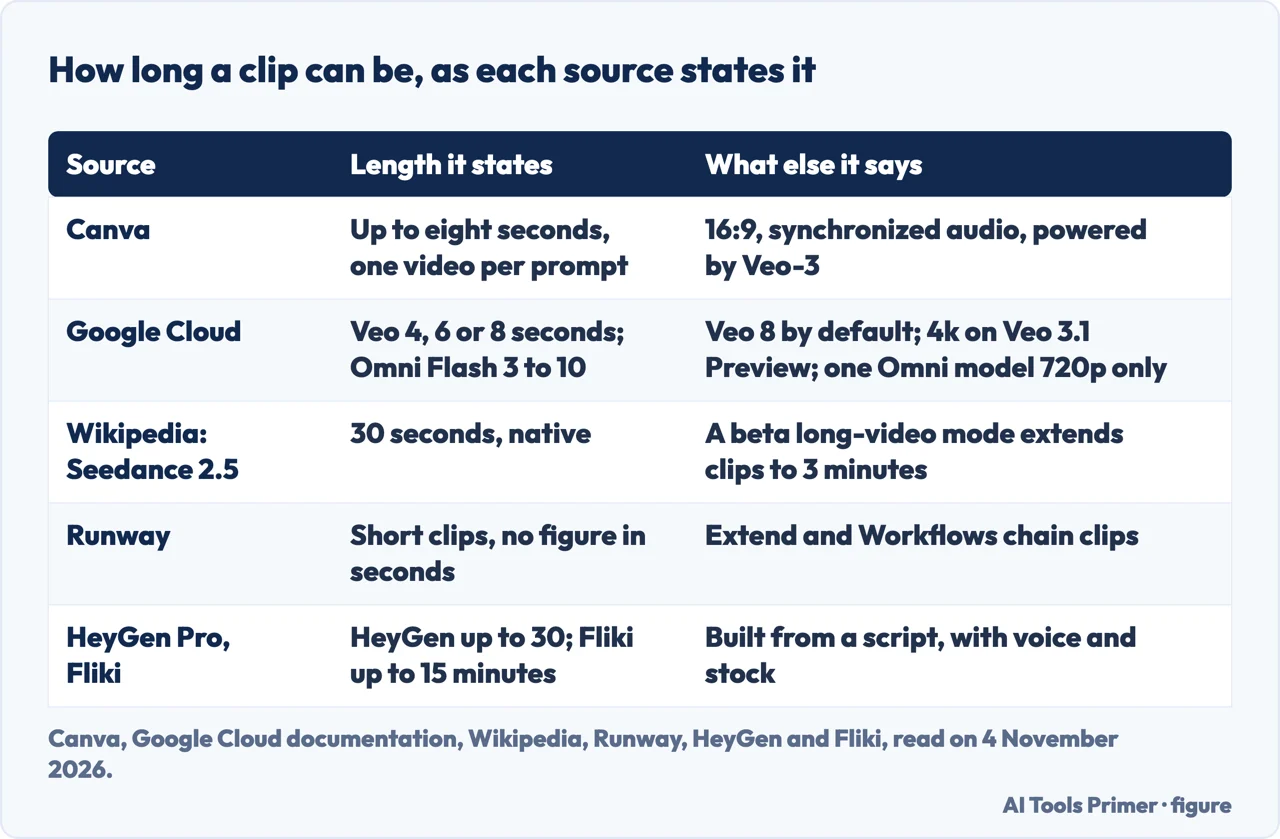
Canva says its Create a Video Clip makes a 16:9 video of up to eight seconds with synchronized audio, one video per prompt, and says the tool is powered by Google’s Veo-3. Google Cloud’s documentation says the Veo models accept a duration of 4, 6 or 8 seconds, with 8 as the default, and from 1 to 4 videos per request. The resolution defaults to 720p, with 1080p as a choice and “4k” for the Veo 3.1 Preview models only. For Gemini Omni Flash it gives the duration as a string such as “10s”, from 3 to 10 seconds, and lists two models: gemini-omni-flash-preview supports only 720p, while gemini-omni-1.1-flash-preview lists 360p, 720p, 1080p and 4k.
Wikipedia’s table for Veo gives eight seconds for individual clips, which it says can be continued or extended as separate clips. For newer models it reports more: Lightricks’ LTX Video update of July 2025 is described as capable of generating clips reaching 60 seconds, and Seedance 2.5 generates 30-second native clips, with 4k video and local editing, so a changed detail does not mean regenerating the whole clip, and it has a beta long-video mode that extends clips to 3 minutes. Runway says single generations are short clips and gives no number of seconds; for a longer sequence it points to Extend, to chaining generations with Workflows, and to references that keep a character consistent across shots.
Longer figures appear too, and they describe another product. HeyGen’s price table lists videos of up to 1 minute each on the Free plan and up to 30 minutes on Pro. Fliki says you pick a target duration of up to 15 minutes, and sorts inputs into short (1 minute), medium (2 to 5 minutes) and long (5 to 15 minutes). HeyGen and Fliki describe these as videos built from a script with voices, avatars, stock or AI clips; the pages do not say how much of a long video is generated from nothing, so the figures are not like for like. The generator box at the top of HeyGen’s page tags HeyGen Video 1 as a free preview, Seedance 2.5 as Pro and Veo 3.1 as paid plan, and lists 5 s and 768p among its settings; the text does not say which model those two settings belong to.
How long it takes
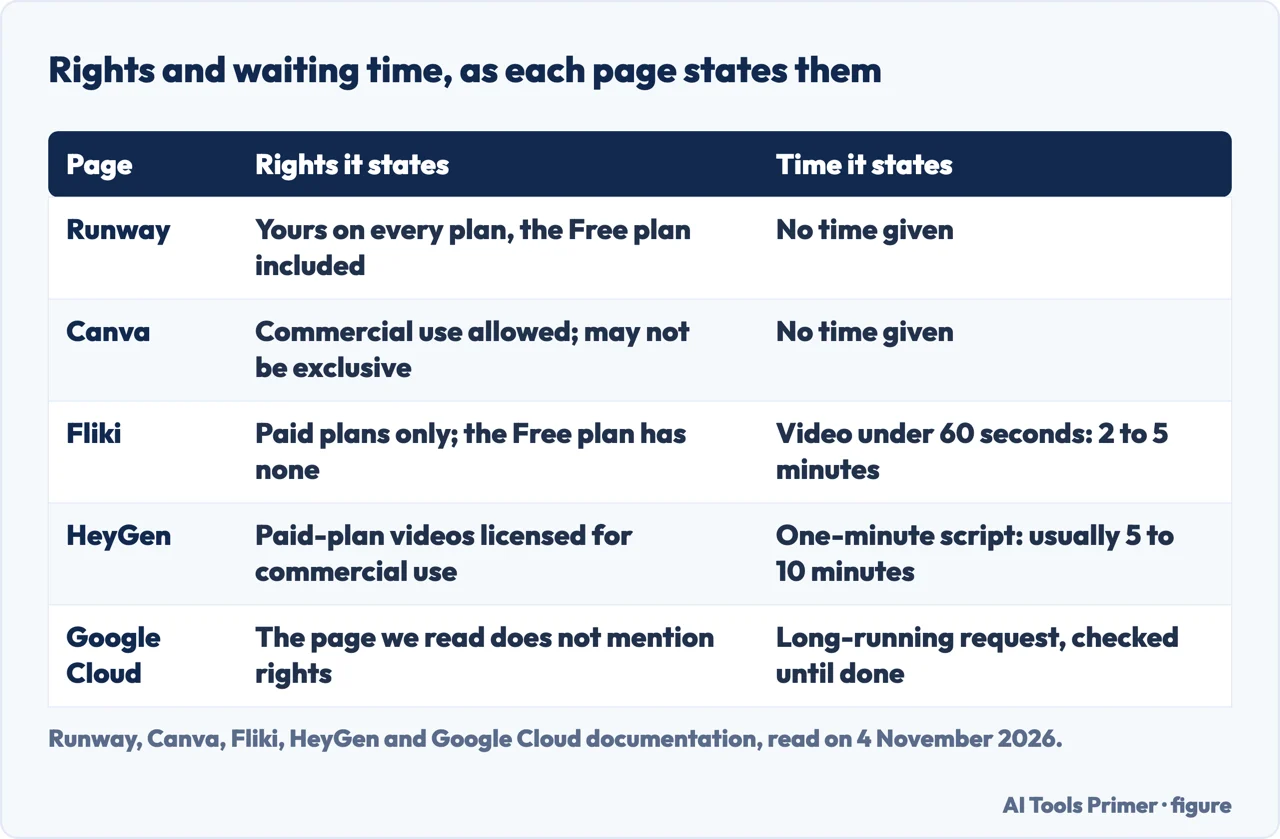
Two pages give a waiting time, and both are the seller’s own figures for a video built from a script. HeyGen says a one-minute script is “usually ready in 5 to 10 minutes”, and that its Video Agent renders at about 5 to 10 times the video’s length, voiceover, captions and B-roll included, so longer scripts take proportionally longer. Fliki says a video under 60 seconds takes 2 to 5 minutes, counting script, voiceover, visuals, captions and export, and that a video of 5 to 15 minutes takes 10 to 15 minutes including review. Its headline promise is a publish-ready video in under 5 minutes.
Google Cloud’s documentation describes the waiting without timing it. A Veo request begins a long-running operation, and the page shows a second call that checks the operation until the video is done; the output can be stored in a Cloud Storage bucket you name; if you give none, the video bytes come back in the response. For Gemini Omni Flash you can work synchronously or set background to true and fetch the result later with an interaction ID; stored and asynchronous interactions are kept for up to 7 days. Wikipedia lists heavy computing as a primary limit of text-to-video models, one that restricts how long and how good the output can be.
The Canva, VEED and Runway pages we read give no timed figure for generation: Canva says its tool generates a video “instantly” and VEED says text becomes video “in minutes”, neither with a number of seconds or minutes to hold them to. Runway does say that it shows the total cost before you generate, which is the nearest thing to a preview of the job. We timed nothing, so the figures above are what each page claims.
What it costs, and what the free plan gives
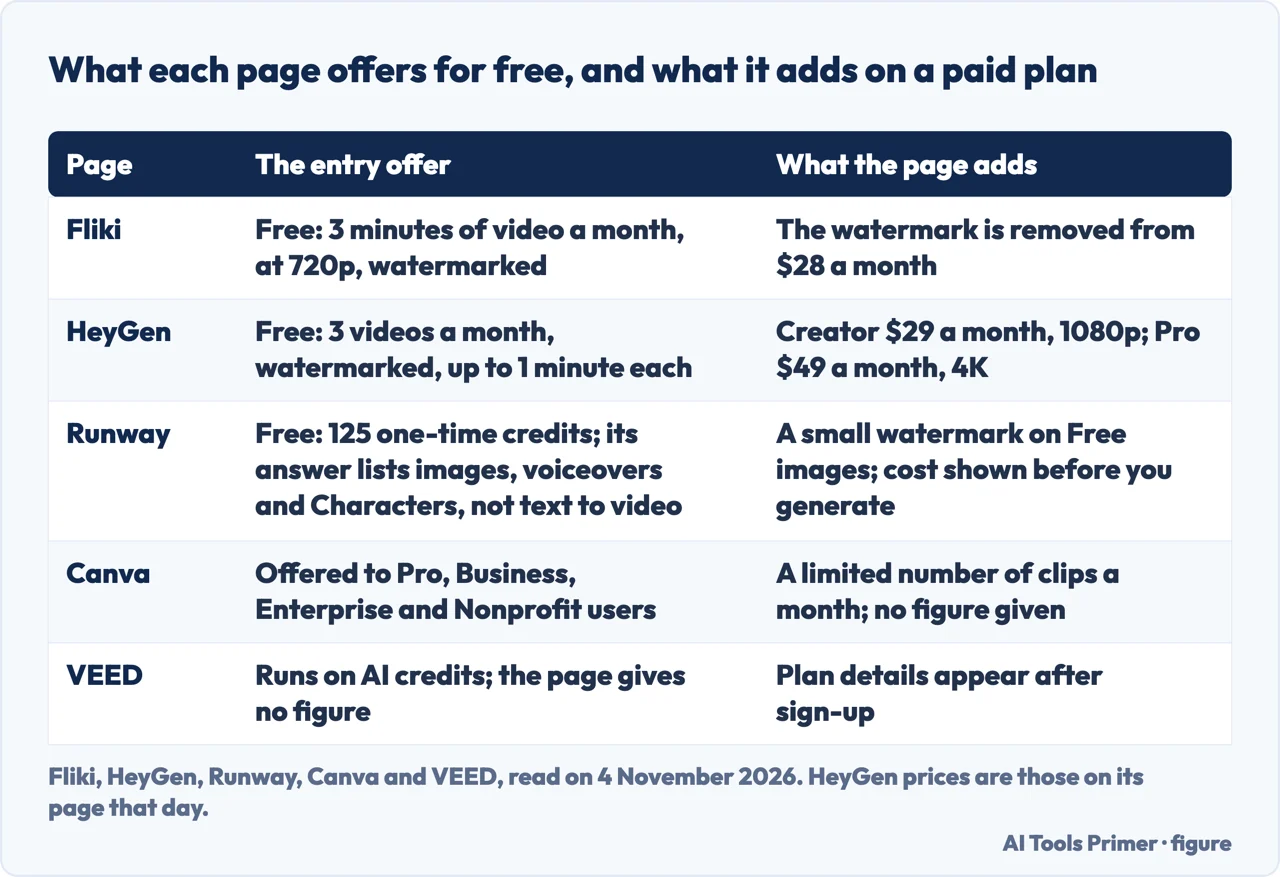
Fliki says its free plan is 3 credits a month, which it says makes 3 minutes of video, exported at 720p with a small Fliki watermark. The watermark is removed on paid plans, from $28 a month, and paid plans add Full HD or 4k export and commercial rights. One detail differs inside the page: a paragraph says free accounts get the full 2,000+ voice library, while the limits table beside it lists 300+ voices in 80+ languages.
HeyGen’s price table shows the Free plan at $0 with “3 videos a month, watermarked” and videos of up to 1 minute each. Creator is $29 a month, with 600 credits, 1080p export, HeyGen branding removed and HeyGen Video 1 for text, image and reference to video. Pro is $49 a month, with 1,000 credits, 4K export, Seedance 2.5, Veo 3.1 and videos of up to 30 minutes. The generator box on the same page mentions 2 free clips a day for HeyGen Video 1. We read these prices on 4 November 2026; they change, and the page also has a monthly and a yearly view.
Runway says its Free plan includes 125 one-time credits, and that each model charges per image, per second or per 6 seconds of conversation with a Character. Its answer on what the Free plan can make lists images, voiceovers, conversations with Characters, and work on existing video through upscaling and scene building; it does not list generating a clip from text. The full rates sit on a Credits by model page, which we did not read. Canva says Pro, Business, Enterprise and Nonprofit users can make a limited number of video clips per month, and gives no figure. VEED says its text-to-video tool runs on AI credits and that what is available on your plan appears after sign-up, again with no figure.
The Google Cloud page we read gives no price for generating a video. It does mention that new Google Cloud customers get $300 in free credits, which is a statement about the account and not about video. Wikipedia’s Veo table also gives a cost line, but it describes the cost as varying, so we do not repeat it.
Rights and watermarks
Runway says what you create in Runway is yours on every plan, the Free plan included. It also says that outputs from Runway’s own models carry C2PA content credentials on every plan, and that images made on the Free plan carry a small Runway watermark; the page speaks of images there, not of video. Fliki says its paid plans include commercial rights to the AI voiceover, stock footage and AI visuals, with no watermark, and that the free plan has no commercial rights. HeyGen says videos generated on paid plans are licensed for commercial use across marketing, sales, training and product channels, and its Free plan is the one listed as watermarked.
Canva is the most guarded. It says you can use what Canva AI generates for any purpose, personal or commercial, as long as you follow its AI Product Terms and Terms of Use, and then adds that you may not have exclusive rights to AI-generated designs. It says it is your responsibility to check that the design is suitable for commercial use, including whether permission is needed to depict works of art, photographs, trademarks or logos, and that Canva does not guarantee the output is cleared for use, particularly if it looks like someone else’s work. The Canva and VEED pages we read do not mention a watermark on the video.
The VEED text and the Google Cloud documentation we read do not mention who owns the result. Wikipedia adds one fact on the legal side of the field: it says Seedance 2.0 drew criticism from the Motion Picture Association for copyright infringement. Every statement here is what that page says about its own product, and we read no terms of service.
What goes wrong, and what we did not use
Wikipedia lists the limits of the models. Despite their rapid progress they are very heavy on computing, which restricts how long and how good the output can be; they need a large amount of specific training data, which it ties to accessibility; and text or fine details in AI-generated videos often appear garbled, with distorted hands and unreadable text as its examples. The pages we read from the sellers do not list failures of that kind. What they offer instead is advice on the prompt. Canva says to make it detailed and to include the style, the framing and the lighting. HeyGen says to lead with the script or message, then add a tone line, a style and a camera move, and say which media to use. VEED says scripts with a clear structure, such as numbered steps and short paragraphs, convert most effectively, and that a long article is broken into scenes. Runway says the best model depends on the clip and the style, and that it recommends one from your input.
We made no video with any of these tools. We did not open the Zebracat page or the Google Play app listing, and we did not use the Gemini page, which came in Italian, or the DeepMind page on Veo, which we could not read. We read no page from OpenAI, so we say nothing about what Sora can do, and the pages we read do not describe a text-to-video tool inside ChatGPT, apart from the plugin and the menu entries mentioned in the answers below. For a still picture set in motion, see our page on image to video.
Where to start
Five ways in.
- “What is the difference?”
- Two kinds of text to video — kinds
- “How long can the video be?”
- How long a clip can be — length
- “How long does it take?”
- How long it takes — time
- “Is it free?”
- What it costs, and what the free plan gives — cost
- “Can I use it for work?”
- Rights and watermarks — rights
From text, image or clip
Making a video and finishing it.
Free plans and prices
What the free versions cover and what the paid ones cost.
Questions people also ask
Can ChatGPT do text-to-video?
The pages we read do not say what ChatGPT itself can do. HeyGen’s page announces a HeyGen plugin for ChatGPT, VEED’s menu lists Sora 2 and Sora 2 Pro, and Wikipedia names OpenAI’s Sora among text-to-video models.
Is VideoGPT free?
The pages we read do not describe VideoGPT. VEED’s menu lists a tool of that name. VEED says its text-to-video tool runs on AI credits, shows “No credit card required” and gives no price.
Which is the best text-to-video AI?
The pages we read run no test of one tool against another. Wikipedia calls Seedance 2.5 a new state of the art for text-to-video models, and Runway says the best model depends on the clip and the style. Canva, HeyGen and VEED each describe their own tool as the best or one of the best.
How do I turn text to a video?
Canva says to choose Video clip under Canva AI, or open the Elements tab in the editor, write a detailed prompt, choose Generate video, then trim, add filters and download an MP4. Fliki, HeyGen and VEED start from a pasted script, idea or prompt.
Not covered here. We made no video with any of these tools. The statements come from pages by Canva, Fliki, HeyGen, VEED and Runway, from Wikipedia and from Google Cloud documentation, all read on 4 November 2026, and each seller describes its own product.
The search volume and difficulty behind this page come from a Semrush reading of 29 August 2026, older than the 60 days the site normally allows.
Sources
- Canva — AI Video Generator: Text to Video AI Tool — www.canva.com, read 4 November 2026.
- Fliki — Free Text to Video AI — fliki.ai, read 4 November 2026.
- HeyGen — Text to Video AI — www.heygen.com, read 4 November 2026.
- VEED — Text to Video AI — www.veed.io, read 4 November 2026.
- Runway — AI Video Generator — runway.com, read 4 November 2026.
- Wikipedia — Text-to-video model — en.wikipedia.org, read 4 November 2026.
- Google Cloud — Generate videos from text prompts — docs.cloud.google.com, read 4 November 2026.
Written by Alberto Gulotta
Founder and editor of AI Tools Primer, writing from Palermo, Italy. Thirty-five years of taking computers apart, starting with a Commodore 64 — the long version is on the about page.
Something wrong on this page? Write to aitoolsprimer@gmail.com and it gets fixed.
Written on 4 November 2026.
Independence and limits
No affiliate links and no paid placements anywhere on this site. Nobody pays to appear here, and no company has seen this page before you did.
This is general information, not professional advice. Where a page touches money, health, safety or the law, it names its source and the date it was read — and your situation may still differ. See the privacy page and the cookie policy.