
Video · guide
Is DaVinci Resolve free? Limits, watermark and the Studio price
By Alberto Gulotta · Updated · 15 min read
Is DaVinci Resolve free? Yes: Blackmagic Design's page offers a free version for Mac, Windows and Linux that works at up to 60 fps in resolutions as high as Ultra HD. Studio, the paid version, adds 10-bit, noise reduction and AI tools. Blackmagic shows Studio at $236; the articles we read say $295.
| Question | Answer | Where it comes from |
|---|---|---|
| Is there a free version? | Yes: a free download for Mac, Windows and Linux, next to the paid Studio version | Blackmagic Design |
| How far does the free version export? | Ultra HD 3840 x 2160 at up to 60 fps; Studio goes to 32K at up to 120 fps | Blackmagic Design, Storyblocks |
| Which video formats? | Blackmagic says virtually all 8-bit formats; Studio adds 10-bit and most professional formats | Blackmagic Design |
| What does Studio cost? | $236 on Blackmagic’s page, down from $295; the articles say $295 (CineD: around $300, Storyblocks once $299) | Blackmagic Design, five articles |
| Is there a watermark? | Blackmagic does not say; three articles say not on exports, and CineD says yes for Studio-only tools | Artlist, Storyblocks, The Post Flow, CineD |
Yes, and Blackmagic says so
Blackmagic Design’s page for DaVinci Resolve 21 lists a free version beside Studio, with a Free Download Now button, and describes the program for Mac, Windows and Linux. The same page gives its reason for a free version: the best creative tools should not be limited to Hollywood, so you can learn the same tools professional Hollywood artists use. Once you have learned it and use it for more work, it says, you can buy Studio.
CineD reads the free version differently. Its author calls it “pretty clever marketing” and a gateway into Blackmagic’s hardware, naming the speed editor, the color grading panels and the ATEM mini series. That is CineD’s reading; Blackmagic gives the reason above. Storyblocks adds some history: it says Blackmagic bought Resolve in 2009 and then made a Mac version and a Linux version, selling the software for much less than the hardware systems it replaced.
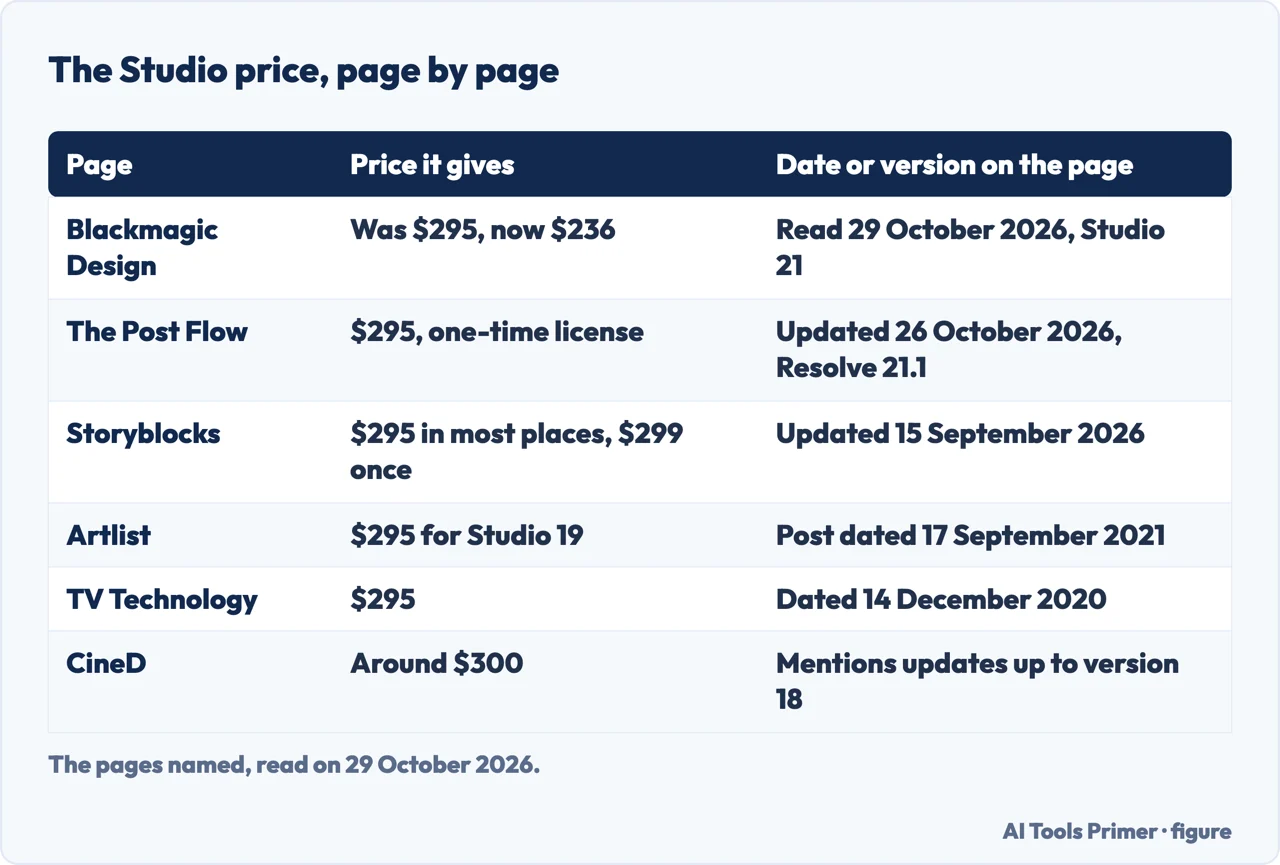
Blackmagic describes Resolve as an all in one solution for editing, color, visual effects, motion graphics and audio. Before the details, one thing about the articles: they are written against different versions. Blackmagic’s page describes Resolve 21, The Post Flow says its table matches Resolve 21.1 and was updated on 26 October 2026, and Storyblocks says it covers versions up to 21. Artlist’s post carries a 2021 date but names Studio 19, CineD mentions updates up to version 18, and TV Technology’s article names Studio 16 and is dated December 2020. Where they disagree, part of the reason can be the version.
What the free version exports, and where it stops
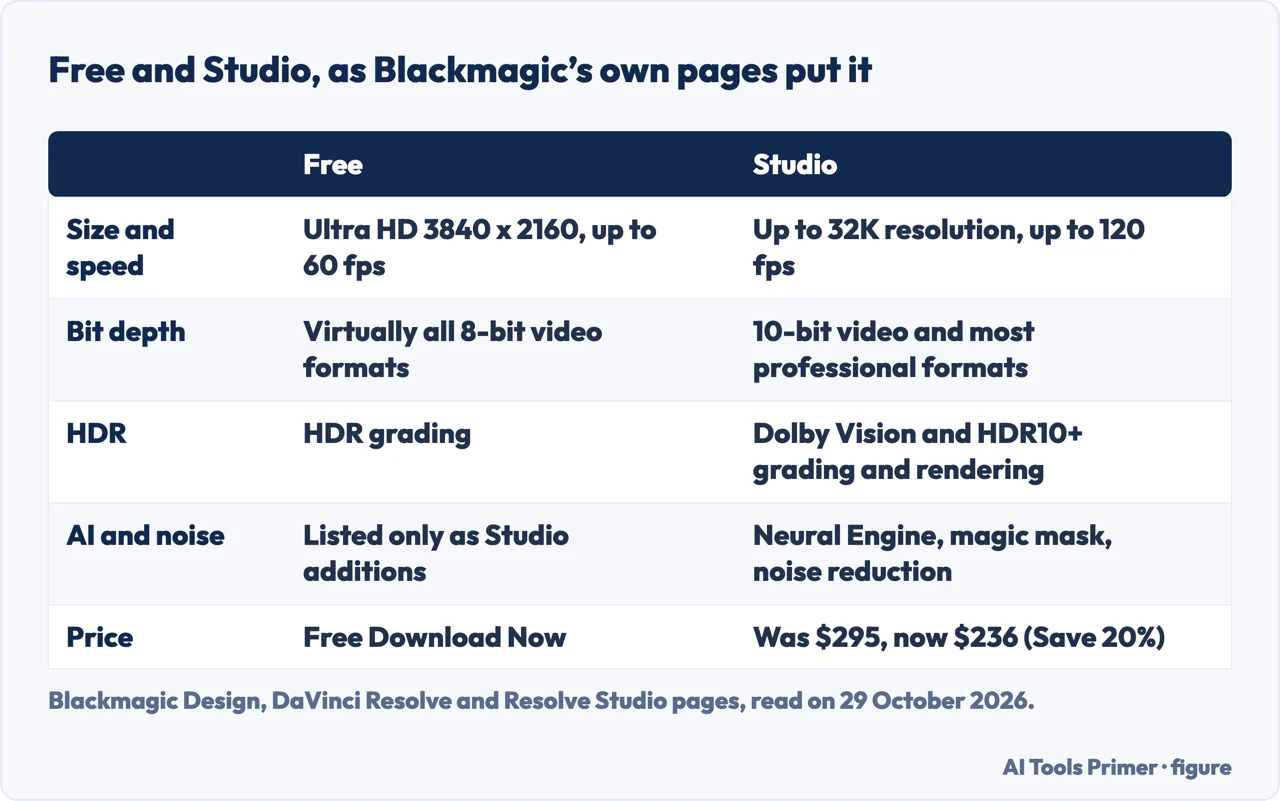
Blackmagic says the free version works with virtually all 8-bit video formats at up to 60 fps in resolutions as high as Ultra HD 3840 x 2160, and that it includes multi-user collaboration and HDR grading. Its Studio page adds that in the free version you can edit and finish at that size and speed, with color tools such as luma, HSL and 3D keyers, a color warper and HDR tools. For Studio, Blackmagic gives 10-bit video up to 120 fps and resolutions beyond 4K, and on its Studio page up to 32K at 120 fps. Storyblocks adds that both versions have multi-user collaboration on projects, with a chat function, and that only the paid version gives access to remote grading, monitoring, and sync markers and comments via Dropbox.
Ultra HD is not DCI 4K, and 8-bit is not every file
Two details in the sources need care. The first is the size. Ultra HD is 3840 x 2160, the ceiling for export in the free version. Storyblocks adds that this is the maximum for export only: you can still import, edit and grade larger resolutions in the free version, you just cannot export them. CineD says that for DCI 4K at 4,096 x 2,160, or anything higher, you have to go for the paid version. The two sizes are different numbers.
The second is the bit depth. Blackmagic puts the free version at 8-bit formats and says Studio supports most professional formats, adding advanced AVCHD, AVC-Intra and popular H.264 camera formats that use all-I intraframe encoding, plus 10-bit encoding. CineD, in an article written around Resolve 18, names files that the free version does not play back: AVCHD, HEIF, J2K HT, Sony XAVC and the 10-bit H.264 from the Panasonic GH series. Blackmagic’s own line is broader, “virtually all 8-bit video formats”. The pages we read do not list every camera, and CineD’s list may not hold for version 21, so the files from your own camera are the test.
Hardware is the third gap. Storyblocks has the free version using a single GPU and Studio using several, and Blackmagic says Studio gives performance gains with additional GPUs and accelerated H.264 and H.265 decoding and encoding. TV Technology, writing about Studio 16, says that hardware encoding is much faster than the free version’s CPU encoding. The Post Flow puts it more gently: the free version renders the same file, just slower, and for a sluggish H.264 timeline it suggests proxies, which cost nothing.
What Studio costs, and why articles disagree
Blackmagic’s page for Studio 21, read on 29 October 2026, shows Was $295, Now $236, with a Save 20% label and a Buy Online Now button. The page we read gives no end date for the reduced price, and a note at the foot says the prices include duties but exclude sales tax and shipping costs.
Every article we read gives a higher figure. The Post Flow, updated on 26 October 2026, says $295 as a one-time license. Storyblocks, updated on 15 September 2026, says $295 in most places and $299 in one sentence. Artlist gives $295 for Studio 19, TV Technology gives $295 for Studio 16, and CineD says around $300. Blackmagic’s is the page with the buy button, and it is the only one that shows the reduction. The pages we read do not say how long the reduced price will last or whether $295 will return.
The articles agree that the purchase is a single payment. TV Technology calls it a one-time charge for the lifetime license, Artlist a lifetime license with all future updates, and Storyblocks a one-time purchase. CineD, again writing about Resolve 18, says there are no recurring charges and that Blackmagic does not charge for updates, and The Post Flow says version 21 was free for existing Studio owners. Blackmagic’s pages we read do not use the word lifetime.
Studio can also arrive with hardware. Storyblocks says the Studio version is often included with new cameras or hardware. The Post Flow lists the Speed Editor at $435 and says a Studio activation key ships in the box; on 29 October 2026 Blackmagic’s page showed the Speed Editor at Was $435, Now $349. The Post Flow, in its October 2026 check, also warns that an Amazon Speed Editor listing at the same $435 can be the keyboard only, with no Studio key, so the What’s Included line should say Studio activation key, and that buying the license through a reseller cost $30 more than buying direct from Blackmagic. One more cost sits outside the price: for Dolby Vision, Blackmagic says access to the advanced trim controls requires a separate Dolby license.
Watermarks and the Studio-only tools
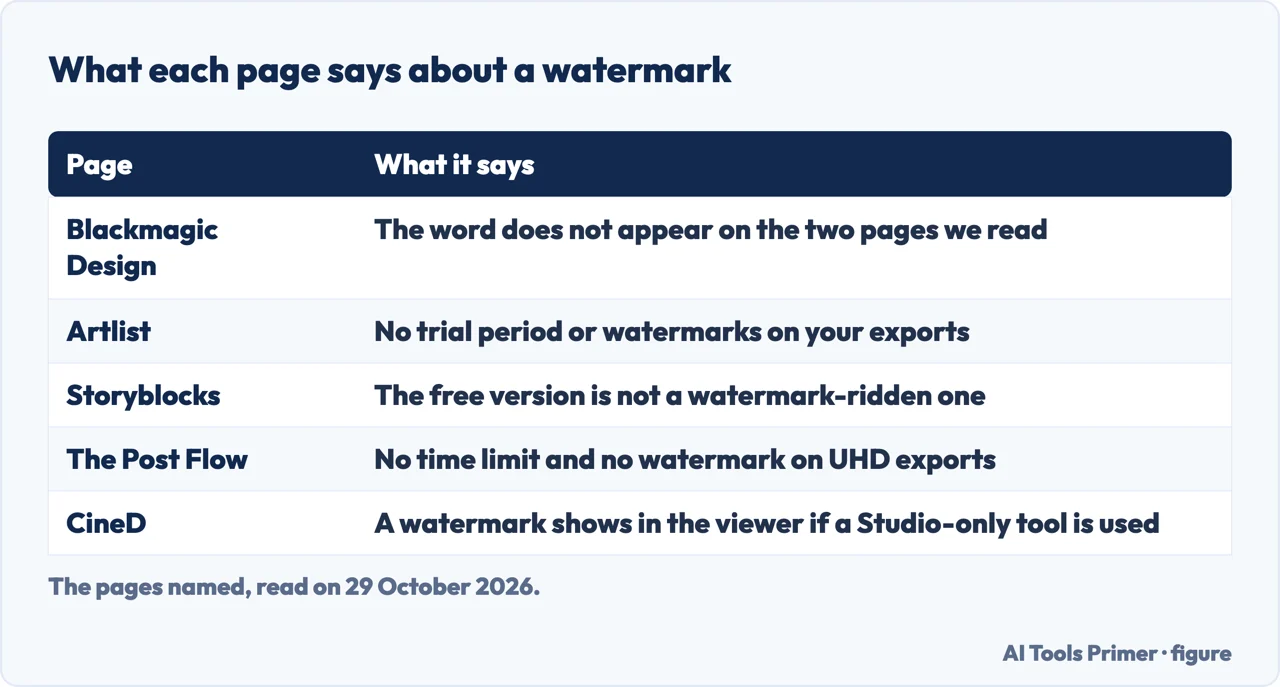
The two Blackmagic pages we read do not contain the word watermark, so the answer comes from articles. Artlist says the free version comes with no trial period or watermarks on your exports. Storyblocks says it is not a watered-down, watermark-ridden version. The Post Flow says there is no time limit and no watermark, with exports up to UHD at 60 fps. CineD says something narrower: its caption says you will see a watermark in your viewer if you try to use a Studio-only tool in the free version. CineD’s article mentions updates up to version 18 (the date is not in the text we read) and we did not test it on version 21. Read together, three articles say exports from the free tools carry no watermark, and CineD says a Studio tool used in the free version shows one.
On what Studio adds, Blackmagic is specific. It lists the DaVinci AI Neural Engine, dozens of additional Resolve FX, temporal and AI spatial noise reduction, text based editing, magic mask, film grain and optical blur, and on the Studio page voice isolation, 45 extra Resolve FX including SuperScale, and Dolby Vision and HDR10+ grading and rendering. Artlist adds Face Refinement among the AI tools, grain and lens distortion among the effects, and says tools to grade 3D projects and to synchronize systems for remote grading are missing from the free version. Storyblocks lists remote grading and stereoscopic 3D tools as Studio only. For noise reduction, The Post Flow says the free version has none.
HDR is where the pages differ. Blackmagic says the free version includes HDR grading. Storyblocks gives the free version basic HDR support and Studio full support including Dolby Vision and HDR10+. The Post Flow says the HDR grading tools are free but the HDR scopes are Studio only, so in the free version you grade by eye, and Artlist also says the professional HDR scopes are missing. These are compatible readings: grading tools in the free version, and Dolby Vision, HDR10+ and the scopes in Studio.
Fusion for effects and Fairlight for audio are in the free version, and the pages describe the gap in different ways. Artlist calls them lite versions, CineD says the effects suite has only minor differences between the free and Studio versions, and The Post Flow says the entire Fusion page and the entire Fairlight page are free. For audio, Blackmagic gives voice isolation to Studio, and Storyblocks adds Dolby Atmos and Auro-3D support.
Windows, HEVC and the signs that Studio is needed
One cost that is not Resolve’s own comes from The Post Flow. It says the free version on Windows relies on the operating system’s HEVC decoder, that Windows does not ship one, and that HEVC footage which will not import is therefore a false trigger for buying Studio; it says the HEVC Video Extensions in the Microsoft Store cost about a dollar. Microsoft Support, on a page about Photos and HEVC files rather than Resolve, lists HEVC Video Extensions at $0.99 from the Microsoft Store. The link between Resolve and that decoder is The Post Flow’s; the price is Microsoft’s.
The articles are less alike on when Studio is worth buying, so these are their readings and not Blackmagic’s. Storyblocks says that if the Ready to Upgrade pop-up keeps appearing, you are hitting the limits of the free version, and that if it rarely appears, spending $295 is probably not worth it. The Post Flow names three situations for buying: high-ISO or log footage that needs noise reduction, deliveries at DCI 4K or above 60 fps, and a workplace where Resolve has to talk to a pipeline. Each can be tied to Blackmagic’s Studio list: noise reduction, resolutions beyond Ultra HD, and Python and Lua scripting with developer APIs, which Blackmagic’s Studio page lists.
The question which is better, CapCut or DaVinci has no answer on this page. The pages we read do not compare them, so this page gives no verdict. What it can offer is the facts on each side. This page covers Resolve; for the other editor, Is CapCut free sets out CapCut’s own free plan, its prices and its watermark statements, and cancelling CapCut covers the paid side.
What we did not use
We ran no export and installed nothing. We did not open the download page, so we cannot say whether it asks for registration, and the pages we read do not give system requirements. We did not read a Reddit thread, the Media Training page or the Davinci Resolve Club page, nor a Simon Says article written for Resolve 18, and two Blackmagic forum threads we opened were left out. The Post Flow also makes claims about Resolve 21.1 scripting that Blackmagic’s pages we read do not confirm for version 21.1, so we left them out. We read no pages on other free video editors, so this page says nothing about them.
Where to start
Four ways in.
- “What can the free version do?”
- What the free version exports, and where it stops — limits
- “How much is Studio?”
- What Studio costs, and why articles disagree — price
- “Does it have a watermark?”
- Watermarks and the Studio-only tools — tools
- “Do I need Studio?”
- Windows, HEVC and the signs that Studio is needed — windows
Free, paid and in between
CapCut’s free plan and cancelling it.
Playing and exporting
Codecs, sharpness and file size.
Questions people also ask
Which is better, CapCut or DaVinci?
The pages we read do not compare them, so we give no verdict. Our pages on each set out the facts: Resolve here, and CapCut’s free plan, prices and watermark statements on the page about whether CapCut is free.
How much does DaVinci Resolve cost?
The free version costs nothing. Studio is $236 on Blackmagic’s page, read on 29 October 2026, reduced from $295, and the articles we read say $295, as a one-time payment. The pages do not say how long the reduced price lasts.
Is there a 100% free video editor?
Blackmagic offers Resolve as a free download, but with limits: Ultra HD at 60 fps, 8-bit formats, and none of Studio’s noise reduction or Neural Engine tools. CineD says Studio-only tools show a watermark in the viewer. We read no pages on other free editors, so we name none. Is CapCut free covers one with its own limits.
What are the limitations of DaVinci Resolve Free?
Blackmagic gives Ultra HD 3840 x 2160 at up to 60 fps and virtually all 8-bit formats. Studio adds 10-bit, up to 32K at 120 fps, noise reduction and the Neural Engine tools. Articles add that DCI 4K export, extra GPUs and hardware encoding need Studio.
Not covered here. We tested nothing in the program. The statements come from Blackmagic Design’s pages for DaVinci Resolve and Resolve Studio, from articles by CineD, TV Technology, Artlist, Storyblocks and The Post Flow, and from a Microsoft Support page, all read on 29 October 2026.
The search volume and difficulty behind this page come from a Semrush reading of 29 August 2026, older than the 60 days the site normally allows.
Sources
- Blackmagic Design — DaVinci Resolve — www.blackmagicdesign.com, read 29 October 2026.
- Blackmagic Design — DaVinci Resolve Studio — www.blackmagicdesign.com, read 29 October 2026.
- CineD — DaVinci Resolve - what are the differences between free and Studio — www.cined.com, read 29 October 2026.
- TV Technology — Blackmagic’s DaVinci Resolve vs. DaVinci Resolve Studio — tvtechnology.com, read 29 October 2026.
- Artlist — DaVinci Resolve’s evolution — the best free video editing software — artlist.io, read 29 October 2026.
- Storyblocks — DaVinci Resolve free vs Studio — www.storyblocks.com, read 29 October 2026.
- The Post Flow — Is DaVinci Resolve free? Studio vs free in 2026 — thepostflow.com, read 29 October 2026.
- Microsoft Support — Photos app Video Editor error: Can’t view this file type — support.microsoft.com, read 29 October 2026.
Written by Alberto Gulotta
Founder and editor of AI Tools Primer, writing from Palermo, Italy. Thirty-five years of taking computers apart, starting with a Commodore 64 — the long version is on the about page.
Something wrong on this page? Write to aitoolsprimer@gmail.com and it gets fixed.
Written on 29 October 2026.
Independence and limits
No affiliate links and no paid placements anywhere on this site. Nobody pays to appear here, and no company has seen this page before you did.
This is general information, not professional advice. Where a page touches money, health, safety or the law, it names its source and the date it was read — and your situation may still differ. See the privacy page and the cookie policy.