
Video · guide
Best video editing app for Android: memory, cost, export
By Alberto Gulotta · Updated · 14 min read
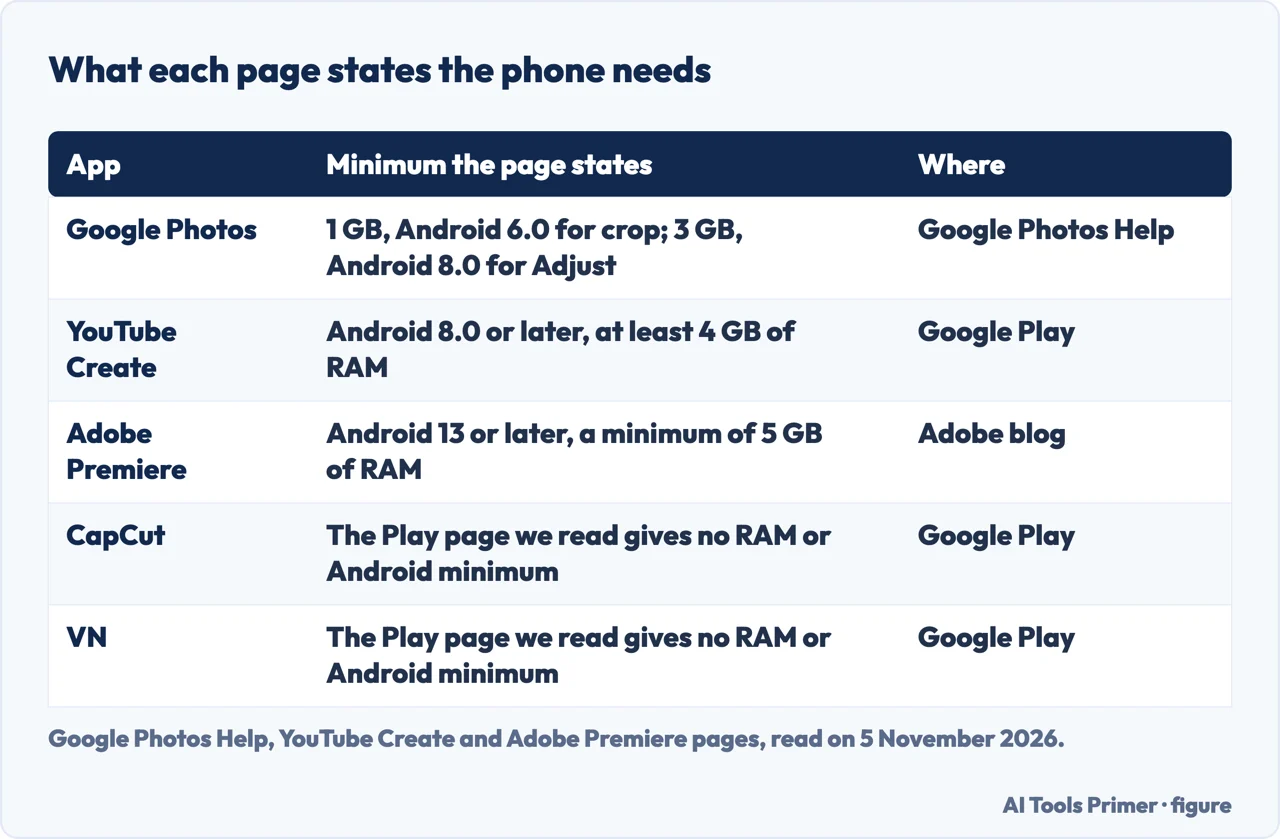
The best video editing app for Android is not named by the Google, YouTube, CapCut and Adobe pages we read. They do state what each app asks of the phone: Google Photos 1 GB of RAM for some tools, YouTube Create 4 GB, Adobe Premiere 5 GB, while CapCut’s Google Play page gives no minimum.
| Question | Answer | Where it comes from |
|---|---|---|
| Does a page name the best app? | The pages we read do not; each one describes its own app | All the pages below |
| What does the phone need? | Adobe states Android 13 and 5 GB of RAM, YouTube Create Android 8.0 and 4 GB, Google Photos 1 GB for some tools | Adobe blog, Google Play, Google Photos Help |
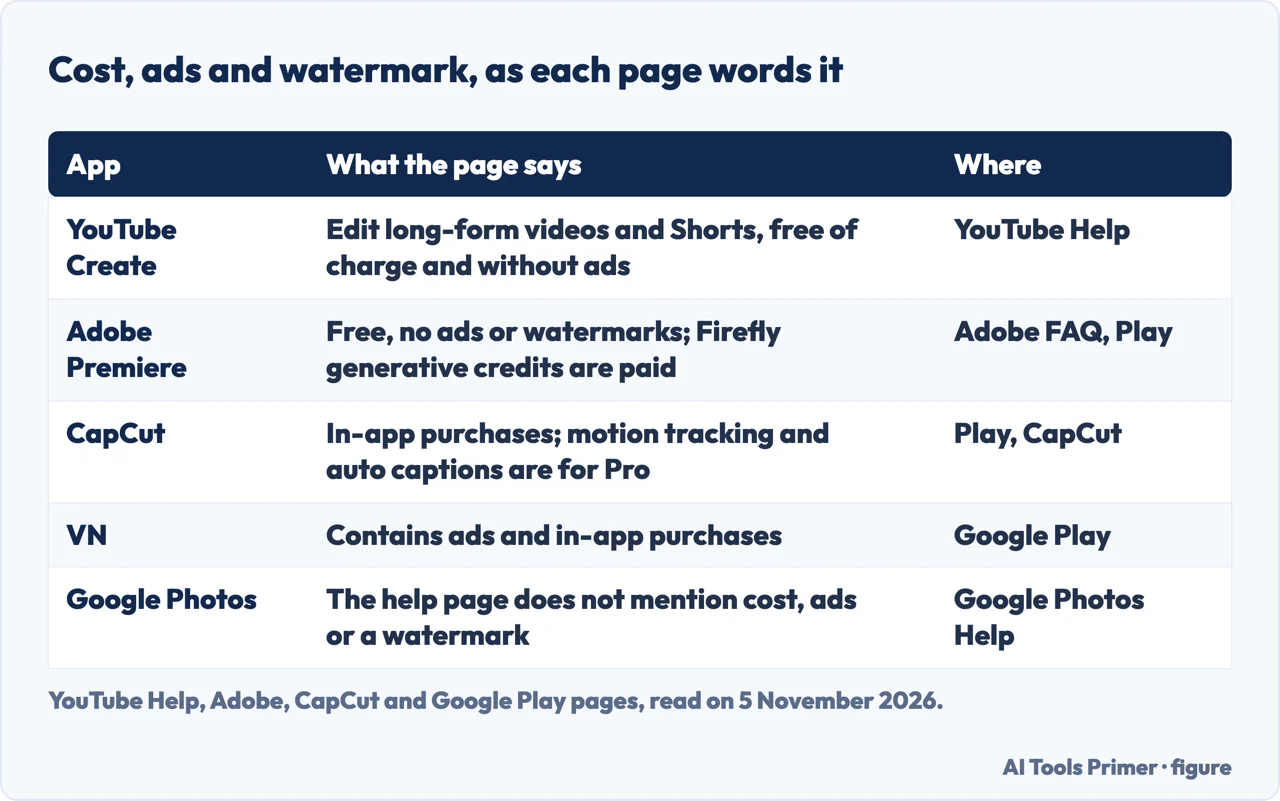
| Which pages say free and without ads? | YouTube Help for YouTube Create; Adobe for Premiere, with paid generative credits | YouTube Help, Adobe |
| Where do ads and purchases appear? | VN’s Google Play page says it contains ads; the Play pages of CapCut, VN and Adobe Premiere list in-app purchases | Google Play |
| Is CapCut’s AI free? | CapCut says motion tracking and the auto caption generator are for Pro users | CapCut |
| What is already on the phone? | Google Photos trims, crops, filters, changes speed and adds music | Google Photos Help |
The pages describe their own apps
The question behind this page asks for the best video editing app for Android. The pages we read answer a narrower one, each for its own app: what the phone must have, what the app costs, and what it lists. Google Photos is covered by a help page, and YouTube Create, CapCut, Adobe Premiere and VN by their Google Play listings, with extra pages from YouTube, CapCut and Adobe. Every statement below is the vendor’s description of its own app, set next to the others, and the order of the sections follows the vendors, not a ranking. The pages we read do not name a best app, and we did not install or try any app.
We read only what each vendor states about its own app, and left out ranked lists and forum threads, which carry opinion rather than a product’s own statements. VN’s Google Play page is used for facts only.
One Adobe page needs a warning. Its comparison of Premiere on iPhone and on Android loses its cells in the text we read, so we cannot say which line belongs to which phone, and we do not use that table to say what is missing on Android. Adobe’s blog also lists keyframes and cropping among the features coming soon, while Adobe’s Android help has articles on keyframes. We do not try to settle which is current.
Google Photos: what the phone may already do
Google Photos’ help page for Android says you can edit videos with special effects, filters and more from a mobile device. It starts with what you need. Some features, among them crop, straighten and filters, work only on Android devices with at least 1 GB of RAM running Android 6.0 or later, and an Important note says that non-Pixel Android devices running Android 9 do not support or have access to video editing. Further down, the Adjust and Filters sections each say the device must have at least 3 GB of RAM and Android 8.0 or later. The page names filters under both requirements, so we give both.
The tools it lists are simple to follow. Under Auto, Enhance improves color and light and Stabilize steadies the video. Trimming is done by touching and holding, then dragging the handles around the part to keep, and Save keeps a copy; Export frame saves a single frame. Crop offers an aspect ratio such as a square, a 90-degree rotation, a dial for small straightening and an Auto straighten whose availability, the page says, depends on the video, plus Mirror. Adjust has thirteen controls, from Brightness and Contrast to Skin tone, Blue tone, Vignette and HDR effect. Effects include B&W Film, Light leak, Lomo, Dust mix, Chromatic, Paper Tear, Framed, Layouts and Poster. Text can be typed, given a font and given a color.
Sound and speed depend on the phone. Changing the audio with Mute and Audio Eraser is, the page says, only for Pixel 8 and later; other phones get Mute alone. Speed can be set to 2x or 4x faster, or one-quarter or one-half slower, on a portion of the clip chosen with the trim handles. To add music, the page says to allow music and audio access for Google Photos in Settings, pick a song on the device, choose its section and set the volume of the video audio and of the soundtrack. The help page does not mention 4K, a watermark, captions or a multi-track timeline. Our pages on editing videos on iPhone and speeding up a video on iPhone cover Apple’s side of the same jobs.
YouTube Create and Adobe Premiere: the two that say free
YouTube Help describes YouTube Create as an app for editing long-form videos and Shorts, free of charge and without ads. To download it you need a Google sign-in, a country or region where the app is available, and an Android phone or an iPhone, where the page asks for an iPhone XR or newer on iOS 17 or later. The app’s Google Play listing, from Google LLC and updated on 3 November 2026, gives the Android condition: phones running Android 8.0 or later with at least 4 GB of RAM. The same listing lists combining videos, photos and audio, trimming, more than 40 transitions, speed changes, templates, background removal with cutout or chroma key, a voiceover, audio cleanup and music from the YouTube Shorts library. It marks the Edit with AI tool and the video and image generation with an asterisk, available in select countries, and says one-tap captions are available in select languages.
Adobe announced Premiere for Android on 22 September 2026. The blog says the app is available on Google Play for free, for devices running Android 13 or later with a minimum of 5 GB of RAM, and the app’s Play listing, updated on 27 October 2026, repeats the 5 GB and describes unlimited tracks. Adobe’s FAQ also says Premiere on Android is a dedicated video app, while Adobe Express supports only basic video manipulation. The blog lists Enhance Audio, a multi-track timeline, templates, effects and transitions, editing and export up to 4K, and an experience without ads or watermark. It names three Firefly generative features, Generative Fill, Image-to-Video and Generate Sound Effects, and a list of features it calls coming soon, among them Adobe Fonts, enhanced captions, keyframes, cropping and beat detection.
Adobe’s FAQ for the Android app adds the details on cost and sign-in. Everything needed to create video is free, it says, while the generative features need Firefly credits. No Adobe account or login is required to edit, save projects locally or export, but signing in is needed for the free Stock music and for generative AI. Media comes from the phone’s gallery and files, and from Google Drive, Dropbox or OneDrive. Sending a project to Premiere on a computer is not currently supported on Android, according to the FAQ, and the app is available in over 150 countries. On sign-in, YouTube Help says you must have a Google sign-in to download YouTube Create, while Adobe’s FAQ says no Adobe account or login is required to edit, save projects locally or export. The two statements are about different steps, so they are not a like-for-like comparison. The remaining pages we read do not say.
CapCut and VN: long feature lists, and a page that says what is paid
CapCut’s Google Play listing is from Bytedance Pte. Ltd., shows in-app purchases and was updated on 5 November 2026. It lists trimming, splitting and merging, speed from 0.1x to 100x with speed curves, a freeze, keyframes for all settings, slow motion with optical flow, chroma key, a multi-track timeline and stabilization. Under intelligent features it lists auto captions, text-to-speech in several languages and voices, and background removal, and its opening lines add motion tracking. Fonts can be imported, and the listing says the editor supports 4K 60fps exports and smart HDR. The listing gives no RAM or Android minimum and does not mention a watermark.
CapCut’s own page on Standard and Pro, dated 23 September 2026, describes the standard version as commonly referred to as the free version. It says that version has limited access to premium templates, advanced effects, fonts and music, and that an advanced AI tool set, including motion tracking and an auto caption generator, is exclusive to Pro users. It also says the 1 GB of free cloud storage was discontinued as of August 2024. The two pages differ: the Play listing sets auto captions and motion tracking among the features without saying they are Pro. We leave prices out; is CapCut free sets out what its pages say about plans, and AI editing assistants covers how CapCut and Adobe describe captions and cuts.
VN’s Google Play listing is from Ubiquiti Labs, LLC, was updated on 3 November 2026 and reads “Contains ads” and “In-app purchases”. It lists a multi-track timeline, auto captions in several languages, masks, reverse, keyframes with 19 built-in effects, speed curves, importable LUTs, the AutoCut and BeatsClips tools, and export up to 4K at 60fps. Here the contrast is with the first pair: YouTube Help and Adobe say without ads, and VN’s own listing says it contains ads. We used the VN page for these facts only.
What the pages let you compare, and what they leave open
Three comparisons hold up across the pages. The first is memory, in the first table: Google Photos asks for 1 GB for some tools and 3 GB for others, YouTube Create for 4 GB and Adobe Premiere for 5 GB, while the CapCut and VN pages we read give no figure. The second is cost, in the second table, where the pages use different words: free of charge and without ads for YouTube Create, free with paid generative credits for Adobe, in-app purchases for CapCut, and ads plus in-app purchases for VN. Google Photos’ help page does not mention cost.
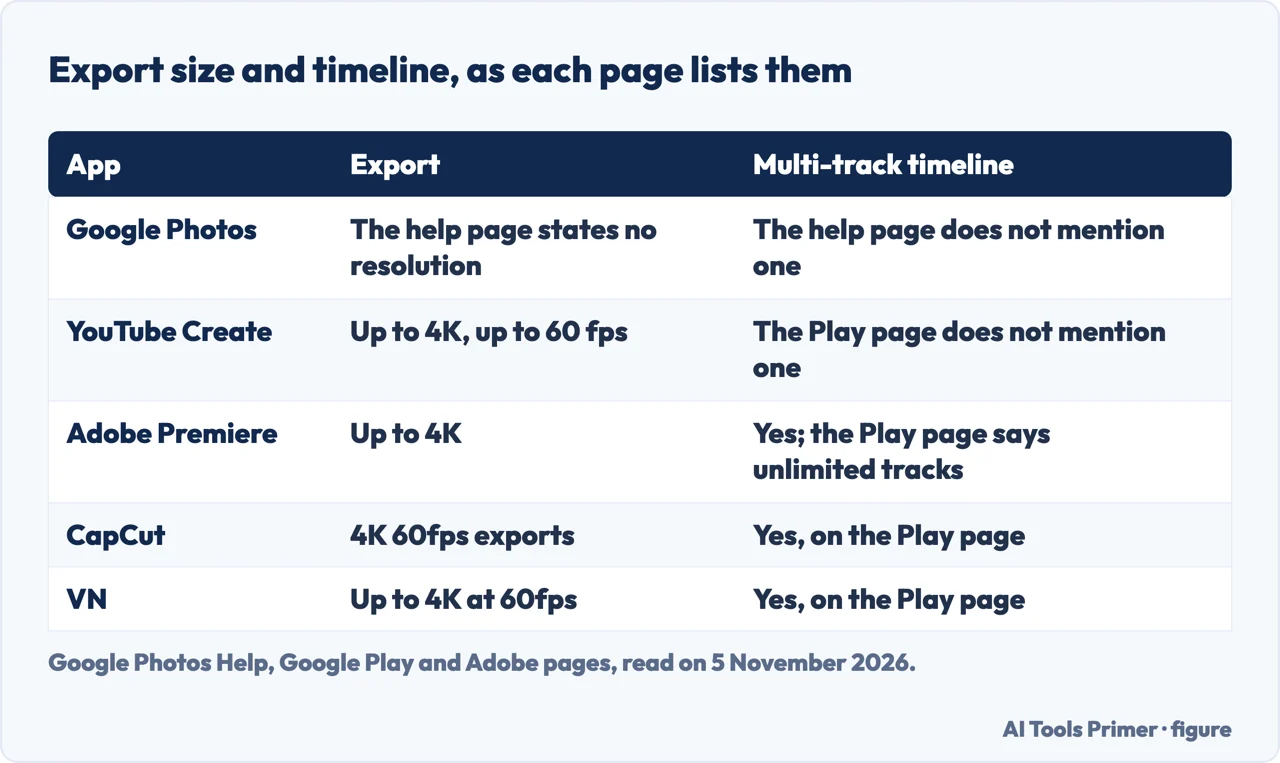
The third is export. YouTube Create, CapCut and VN each say 4K at up to 60 fps, Adobe says up to 4K, and Google Photos’ help page states no resolution. A multi-track timeline is stated by Adobe, CapCut and VN. The YouTube Create listing speaks of combining videos, photos and audio and does not mention a multi-track timeline.
Several things stay open. The pages we read do not say how long a project can be. The Play listings of CapCut and YouTube Create do not name a watermark, while Adobe’s pages say its export is free of one. The pages do not say how any of these apps behave on a particular phone, and a Play listing is a description by the vendor, not a measurement. The facts that would settle a choice, such as the phone’s RAM, its Android version and whether captions or background removal are needed, are things only the reader’s own phone can answer, and the table above shows where each page states its limit.
What we did not read or use
We tried no app on a phone, and we collected no prices. We did not read a page on Edits, so the fourth question below is answered only as far as the pages we have read go. We left out ranked lists, forum threads and download-site pages, and the user reviews inside the Play listings, which are opinions of individual users and not part of the vendors’ descriptions. A YouTube page for creators came back in Italian, so we did not use it. Dates on the pages matter here: the Play listings were updated between 27 October and 5 November 2026, and Google Photos’ help page shows no update date.
Where to start
Four ways in.
- “What does my phone need?”
- The limits the pages state, side by side — limits
- “Is there anything on the phone already?”
- Google Photos: what the phone may already do — photos
- “Which one says no ads?”
- YouTube Create and Adobe Premiere: the two that say free — free
- “What about CapCut?”
- CapCut and VN: long feature lists — capcut
Cutting, speed and AI
What the vendors say about editing.
Free, or not
Plans, limits and cancelling.
Questions people also ask
Which is the no. 1 video editing app for Android?
The pages we read do not name one. Each describes its own app: Google Photos starts at 1 GB of RAM for some tools, YouTube Create wants Android 8.0 and 4 GB, Adobe Premiere Android 13 and 5 GB, and CapCut and VN list long feature sets.
What’s better than CapCut?
The pages we read do not say which app is better than CapCut. They differ on facts: YouTube Help says YouTube Create is free of charge and without ads, Adobe says Premiere is free and watermark-free, and CapCut’s Google Play page shows in-app purchases.
Is CapCut free for Android?
CapCut’s own page, which is not specific to Android, calls the standard version commonly referred to as the free version, with limited access to premium templates, effects, fonts and music. It says motion tracking and the auto caption generator are for Pro users. Its Play page shows in-app purchases.
Is Edits or CapCut better?
The pages we read do not mention Edits, and we did not read a page on it, so we cannot compare the two. For CapCut, the Google Play page lists a multi-track timeline, keyframes and 4K 60fps exports.
Not covered here. We tested no app on a phone. The statements come from Google Photos Help, YouTube Help, the Google Play pages of YouTube Create, CapCut, Adobe Premiere and VN, CapCut’s page on Standard and Pro, and Adobe’s blog, FAQ and Android overview pages, all read on 5 November 2026.
The search volume and difficulty behind this page come from an Ubersuggest reading of 5 November 2026, and the difficulty is Ubersuggest’s own score, not Semrush’s; a Semrush check is still to be made.
Sources
- Google Photos Help — Edit your videos with Google Photos (Android) — support.google.com, read 5 November 2026.
- YouTube Help — Learn more about YouTube Create — support.google.com, read 5 November 2026.
- Google Play — YouTube Create: Video editor — play.google.com, read 5 November 2026.
- Google Play — CapCut — play.google.com, read 5 November 2026.
- CapCut — Standard vs Pro — www.capcut.com, read 5 November 2026.
- Adobe Blog — Adobe Premiere expands to Android — blog.adobe.com, read 5 November 2026.
- Adobe Help — Premiere mobile common questions — helpx.adobe.com, read 5 November 2026.
- Adobe Help — Premiere on Android overview — helpx.adobe.com, read 5 November 2026.
- Google Play — Adobe Premiere — play.google.com, read 5 November 2026.
- Google Play — VN: Photo & Video Editor — play.google.com, read 5 November 2026.
Written by Alberto Gulotta
Founder and editor of AI Tools Primer, writing from Palermo, Italy. Thirty-five years of taking computers apart, starting with a Commodore 64 — the long version is on the about page.
Something wrong on this page? Write to aitoolsprimer@gmail.com and it gets fixed.
Written on 6 November 2026.
Independence and limits
No affiliate links and no paid placements anywhere on this site. Nobody pays to appear here, and no company has seen this page before you did.
This is general information, not professional advice. Where a page touches money, health, safety or the law, it names its source and the date it was read — and your situation may still differ. See the privacy page and the cookie policy.