
Web · guide
Google Drive vs OneDrive vs Dropbox: space, links, encryption
By Alberto Gulotta · Updated · 15 min read
Google Drive vs OneDrive vs Dropbox starts with free space: up to 15 GB at Google, 5 GB at Microsoft and 2 GB at Dropbox. Their own pages then differ on shared links, encryption and what happens past the limit. Prices here are euro amounts shown to a European network on 4 November 2026.
| Question | Answer | Where it comes from |
|---|---|---|
| How much is free? | Up to 15 GB at Google, 5 GB at Microsoft, 2 GB at Dropbox | Google One, Microsoft Support, Dropbox Help |
| Is the space shared with anything? | Google plans show one total for Photos, Drive and Gmail; Microsoft’s 5 GB also covers Outlook.com attachments | Google One, Microsoft Support |
| Which plans can put a password on a link? | Dropbox names seven plans and Plus is not among them; OneDrive marks it for Microsoft 365 subscribers | Dropbox Help, Microsoft Support |
| Can the vendor’s own keys be avoided? | Dropbox offers end-to-end folders to teams; Google lists client-side encryption for four Workspace editions | Dropbox, Google Workspace Help |
| What happens over the limit? | Only Microsoft explains it: read-only files, a frozen account after three months, possible deletion after six | Microsoft Support |
The space each service gives, and what shares it
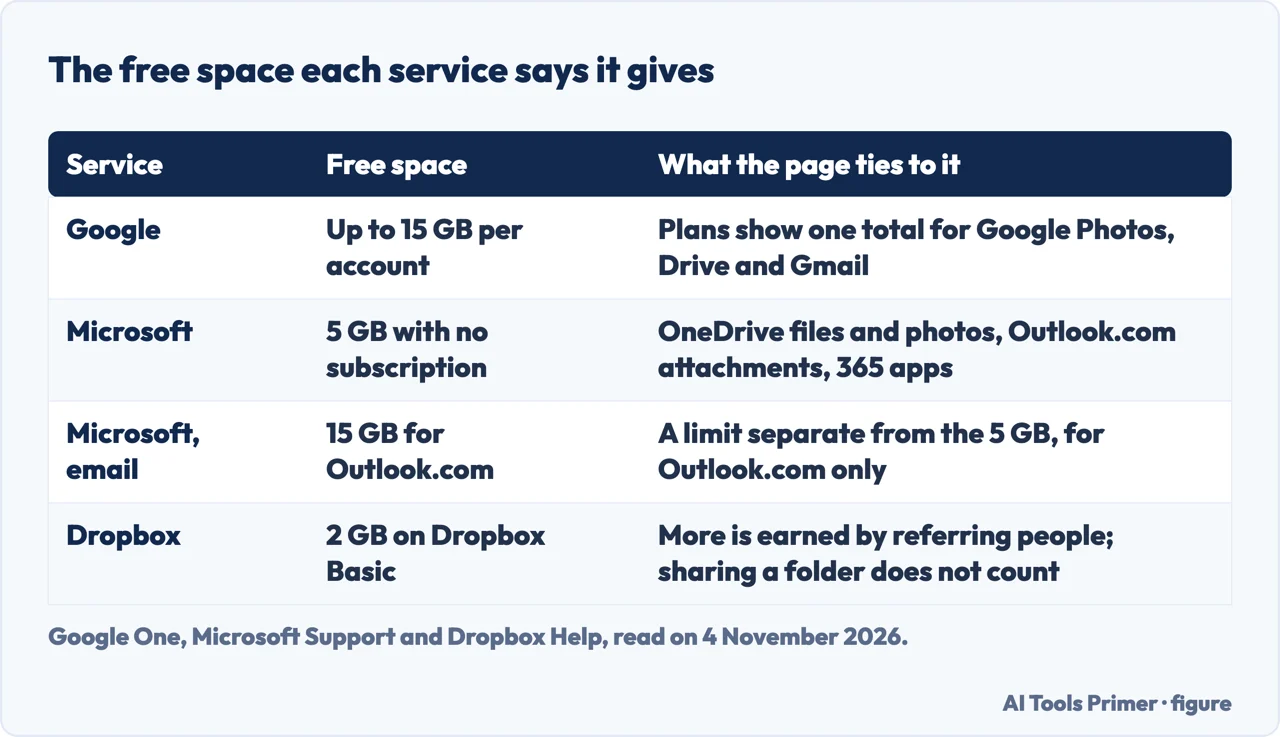
Google. Google One’s plans page says all Google accounts come with up to 15 GB of storage, counted inside the total of the other Google One plans. The paid plans it showed to a European network on 4 November 2026 were Basic with 100 GB at €1.99 a month, Google AI Plus with 2 TB at €9.99 and Google AI Pro with 5 TB at €21.99. Each one is described as a total for Google Photos, Drive and Gmail, so the amount is not a Drive-only allowance, and each carries a line saying you can share the storage with up to five others. The 2 TB and 5 TB plans also list Gemini features, which means the space is sold together with other things. The page offers a monthly and a yearly view, and the yearly one mentions saving up to 16%.
Microsoft. Microsoft’s storage FAQ says an account with no subscription gets 5 GB of cloud storage, shared across files and photos in OneDrive, attachments in Outlook.com and Microsoft 365 apps. Outlook.com email keeps a separate free limit of 15 GB that applies only there. In the quotas table, Basic is 100 GB for one person and Personal is 1 TB for one person. Family, Premium and Pro subscriptions started before 8 October 2026 are listed at 1 TB per person for up to six people. New Family and Premium subscriptions from that date, and renewals from 2 May 2027, are listed at 2 TB shared, and Pro at 5 TB shared, for new subscriptions from 8 October 2026 and existing ones from 1 November 2027. Microsoft says each person’s mailbox, files and folders stay private even when the allowance is shared.
The FAQ adds three rules. Storage from Basic or Personal cannot be shared, while storage from Family, Premium and Pro is shared among the members. Subscriptions can be extended up to 10 TB, only the subscription owner can add space, and a new quota can take up to 24 hours to appear. Cancelling Basic or Personal returns the allowance to 5 GB. The quotas page also says every Microsoft 365 subscription includes 100 GB of mailbox storage.
Dropbox. Dropbox Help says Basic is a free plan with 2 GB of space, along with syncing, security and sharing features. Its personal plans page, read on 4 November 2026 and priced in euros for a European network, lists Dropbox Plus at €9.99 a month for one person, with 2 TB, transfers of files up to 50 GB and 30 days to restore deleted files. For teams, a team plan on the same page is listed with space that “Starts at 3 TB for the team”, 180 days to restore files and transfers up to 100 GB. The page shows two team prices, €12 and €14.50 per user a month, and its text does not say which of them belongs to that plan, so we give neither as its price. The same personal plans page says Dropbox Basic comes with automatic backup of computer files and connects up to 3 devices.
More free space at Dropbox comes from referrals: its help page says you can refer friends, family and coworkers, and that sharing a folder does not count as a referral. Dropbox Plus and Standard users can buy extra space in 1 TB blocks, only on dropbox.com, and the page says a plan bought through Google Play or the Apple App Store cannot take those add-ons. For the same question about Apple and Proton, see our page on free storage.
Passwords and expiry dates on shared links
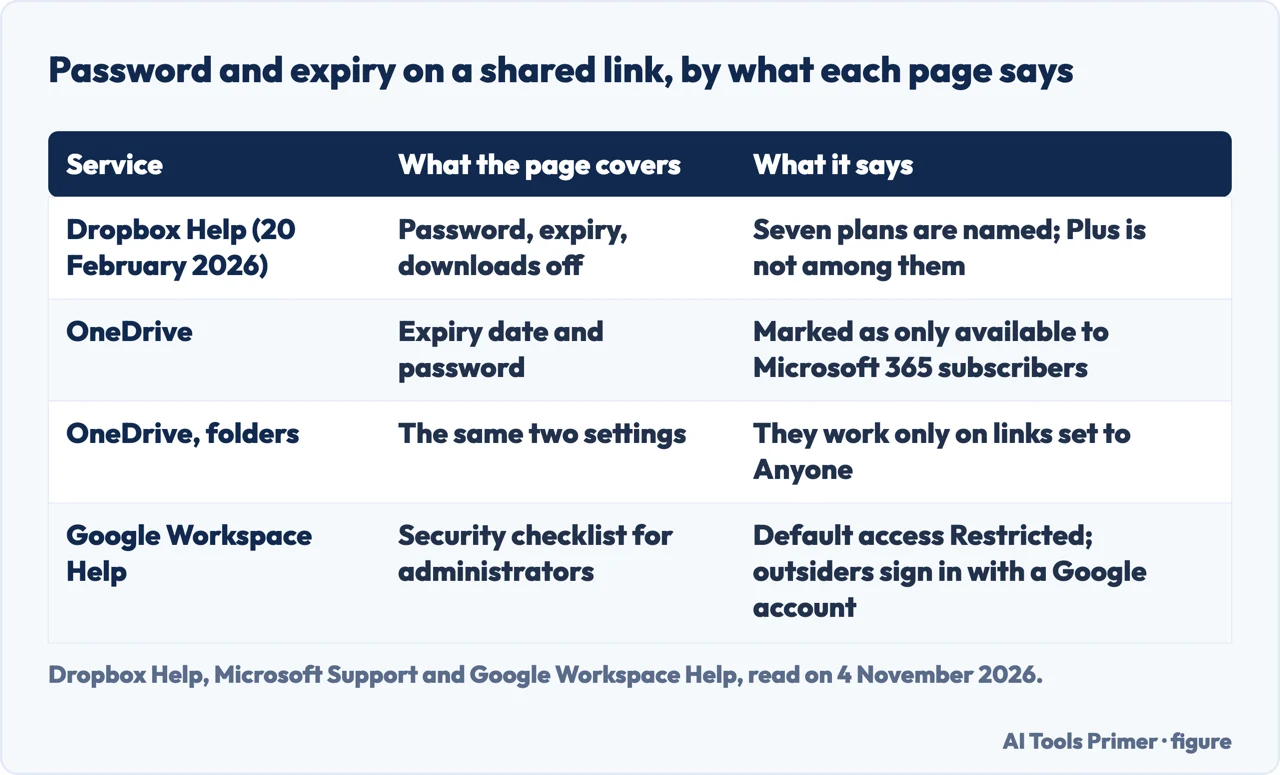
Dropbox. Dropbox Help’s page on shared link permissions, updated on 20 February 2026, says its link features are available to customers on Dropbox Professional, Essentials, Standard, Advanced, Business, Business Plus and Enterprise. Adding a password, setting or removing an expiration date, and disabling downloads each repeat that same list. Dropbox Plus is not on it. The page also says link settings apply only to people who open the link: someone added directly to a file or folder keeps their existing permissions.
OneDrive. Microsoft’s sharing page marks both the expiration date and the password as only available to Microsoft 365 subscribers. For folders it says both can be set only on links of the Anyone kind. After the expiration date the link stops working and you create a new one, and the password has to be given to people separately. “Allow editing” is turned on by default, and “Block download” stops people downloading what they can open. The page adds that an organization’s administrators may disable the Anyone option.
Google. The Google pages we could read on this subject are advice to administrators, not the settings of a personal Drive. Google Workspace Help’s security checklist recommends setting the default access for file sharing to Restricted, so that only the owner has access until the file is shared, and asking outside collaborators to sign in with a Google Account. Google’s own Drive help page on sharing answered our request with a block page, so the roles a personal Drive link can give, and whether it can carry a password, are not described here.
What each one says about encryption
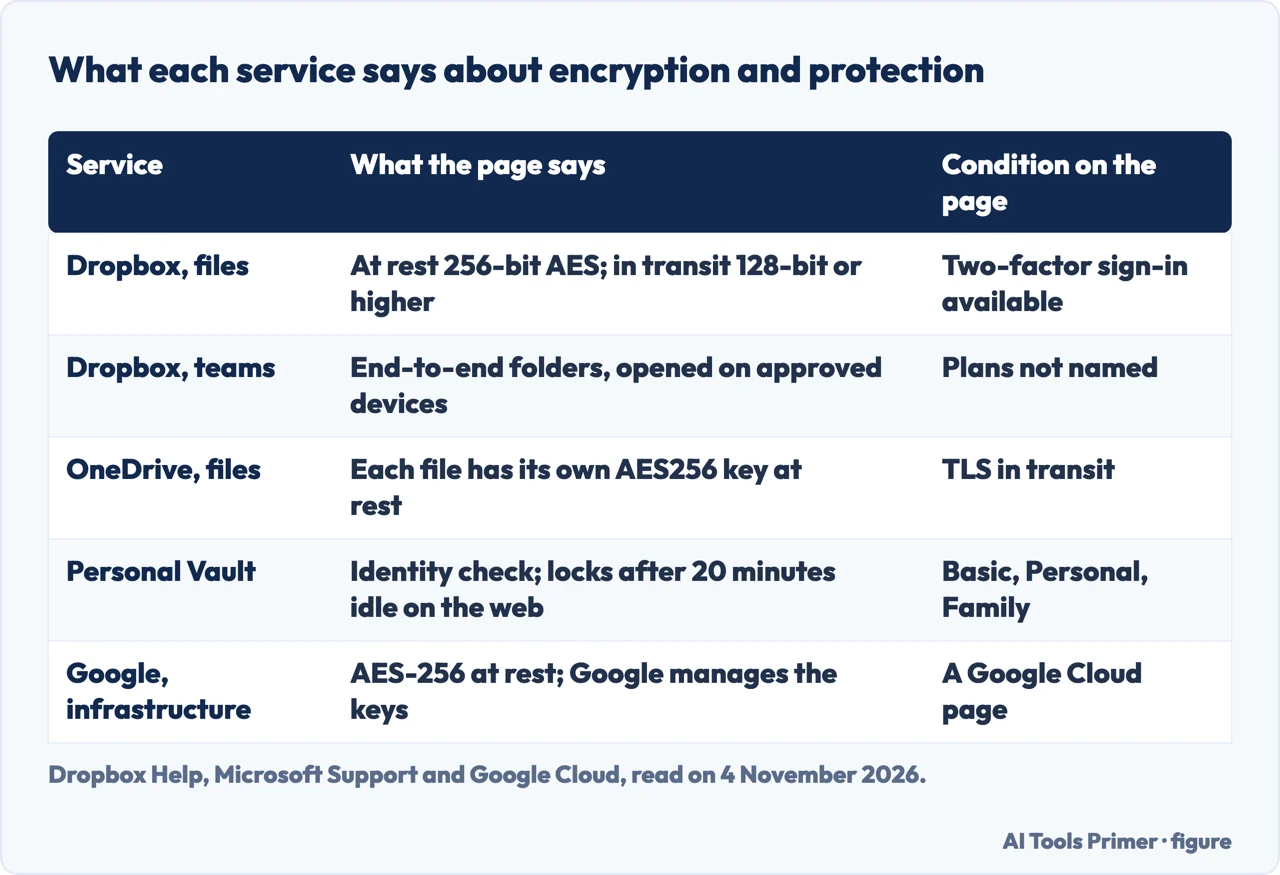
Dropbox. Dropbox Help says files at rest are encrypted with 256-bit AES and that traffic in transit is protected by 128-bit or higher AES. It says two-factor authentication is available and that public files can be viewed only by people who have the link. The same page says a small number of employees must be able to reach user data for reasons stated in the privacy policy, and calls that a rare exception. For teams, Dropbox describes zero-knowledge, end-to-end encrypted folders, where content is encrypted and decrypted on approved devices and never on Dropbox servers. The page attributes the option to teams; it does not say which plans have it, and the pages we read do not say whether a personal Plus account can use it.
OneDrive. Microsoft’s safeguard page says each file is encrypted at rest with a unique AES256 key, which is itself encrypted by master keys kept in Azure Key Vault. In transit it names TLS and says it will not allow authenticated connections over HTTP. Microsoft 365 subscribers get ransomware detection and recovery up to 30 days after an attack, and version history is listed for all file types. Personal Vault is a protected area that asks for identity verification each time, by fingerprint, face, PIN or a code sent by email or text, and, on the web, locks by itself after 20 minutes of inactivity (the same page gives 3 minutes on a mobile device, which can be changed). Microsoft says it is available with OneDrive Basic, Personal and Family subscriptions, on the web, in the mobile app and on Windows PCs. The Vault page does not say which algorithm protects the files inside it. It does give a limit: without a Microsoft 365 Family or Personal subscription you can add only up to three files to the Vault, while subscribers can add as many as they want, up to their storage limit.
Google. The document we read is Google Cloud’s page on default encryption at rest, which describes Google’s infrastructure and Google Cloud, not Drive. It says Google encrypts customer content at rest without any action from you, with AES-256, and that Google owns and manages the keys. Separately, Google Workspace Help describes client-side encryption and lists its supported editions as Frontline Plus, Enterprise Plus, Education Standard and Education Plus; an administrator has to turn it on, and encrypted files open only for the people they are shared with. That is a Workspace feature, not a setting of a free personal account.
“Encrypted at rest” therefore describes how a service stores files, not who holds the keys. The Google Cloud page says Google owns and manages the keys and the Microsoft page says its master keys are kept in Azure Key Vault; Dropbox describes end-to-end folders for teams as content never decrypted on Dropbox servers, and Google lists client-side encryption only for named Workspace editions.
What happens when you go over the limit
Only Microsoft explains it in the pages we read. Its quotas page says that when you exceed your quota some services stop working. OneDrive will not upload, edit or sync new files, including camera roll photos, and the files already there become read-only. Outlook.com stops sending and receiving, and incoming mail is returned to the sender. Teams stops carrying messages with attachments. If you stay over the OneDrive limit for three months, the account is frozen, and after six months Microsoft says it might delete the OneDrive and everything in it, and that deleted files cannot be recovered.
For Google and Dropbox the pages we read do not say. Google’s plans page and the Workspace pages do not describe what a full personal account does, and Dropbox’s help page lists an article on exceeding Basic storage only as a related title that we did not open. Our page on free storage sets out what Google, Microsoft and Apple say about a full account in the sources it read.
Where the comparison pages and the vendors differ
The comparison pages in the results we read are written by other companies, and some of their statements no longer match the vendors’ own pages. Cloudwards writes that Microsoft 365 Family gives 1 TB to each of up to six people; Microsoft’s quotas page, read on 4 November 2026, separates subscriptions started before 8 October 2026 from new ones at 2 TB shared. thedrive.ai, updated on 29 October 2026, mentions the shared 2 TB. The same thedrive.ai page lists Google AI Plus as 400 GB for $4.99 a month, while the Google page we read, served to a European network, showed 2 TB for €9.99. We cannot say whether country or date explains it, so the table above uses only the Google page.
Cloudwards gives Dropbox Plus at $11.99 a month and Dropbox’s own page shows €9.99. The two differ in currency and date, so we do not compare them and cite only Dropbox, with its date. On links, fast.io, updated on 21 October 2026, writes that password protection and expiration dates are available on paid plans; Dropbox Help names the plans and Plus is missing from its list, dated 20 February 2026. For Personal Vault, a separate Microsoft FAQ that we did not read was said to allow unlimited files; the page we did read says subscribers can put in as many as they want, up to their storage limit.
What we did not read
We opened no account and tested no upload or link. Google Drive and Google One help pages on support.google.com answered with a block page, so what we say about Google comes from the Google One plans page, Google Cloud documentation and Google Workspace Help. The Microsoft page on free online cloud storage returned a blocked request and is not used. The pages we read do not say how many people use each service, so the question of whether anyone still uses Dropbox has no figure here. They do not compare the three on the same basis; every comparison on this page is ours, limited to rows that carry a source and a date. Prices change by country, so the euro amounts are those shown to a European network on 4 November 2026.
Where to start
Four ways in.
- “How much space do I get?”
- The space each service gives — space
- “Can I put a password on a link?”
- Passwords and expiry dates on shared links — links
- “Which one is safer?”
- What each one says about encryption — encryption
- “What if it is full?”
- What happens when you go over the limit — over
Space and plans
Free tiers, iCloud and buying more.
Backups and syncing
Photos, copies and a sync that stops.
Questions people also ask
Which is safer, Google Drive or Dropbox?
The pages we read do not rank them. Dropbox says 256-bit AES at rest, two-factor sign-in and end-to-end folders for teams; Google Cloud documentation (about Google infrastructure, not a Drive help page) describes AES-256 at rest with keys Google manages, and Google Workspace Help lists client-side encryption for four Workspace editions. Links and sign-in matter as well.
Why do people prefer Dropbox over Google Drive?
The pages we read do not say what people prefer. They do show documented differences: 2 GB free against up to 15 GB, link passwords on named plans only, and extra space sold in 1 TB blocks.
Which is better to use, OneDrive or Google Drive?
The pages we read do not say. They show that OneDrive space comes with a Microsoft account or a Microsoft 365 plan and Google’s with Google One, with 5 GB and up to 15 GB free, and different paid sizes.
Is anyone still using Dropbox?
The pages we read give no user figures. They show Dropbox still selling plans: its help pages were updated as recently as 14 October 2026, and its plans page listed Plus and Standard on 4 November 2026.
Not covered here. We opened no account and tested no upload. The statements come from Google One, Google Cloud and Google Workspace Help, Microsoft Support and Dropbox Help, plus three comparison pages, all read on 4 November 2026.
The search volume and difficulty behind this page come from an Ubersuggest reading of 4 November 2026 (United States), which gives search volume and its own SEO difficulty score, not Semrush’s.
Sources
- Google One — Plans & pricing — one.google.com, read 4 November 2026.
- Google Cloud Documentation — Default encryption at rest — docs.cloud.google.com, read 4 November 2026.
- Google Workspace Help — Client-side encryption user experience overview — knowledge.workspace.google.com, read 4 November 2026.
- Google Workspace Help — Security checklist for medium and large businesses — knowledge.workspace.google.com, read 4 November 2026.
- Microsoft Support — Microsoft storage quotas — support.microsoft.com, read 4 November 2026.
- Microsoft Support — Microsoft storage FAQs — support.microsoft.com, read 4 November 2026.
- Microsoft Support — Share files and folders in Microsoft OneDrive — support.microsoft.com, read 4 November 2026.
- Microsoft Support — Protect your OneDrive files in Personal Vault — support.microsoft.com, read 4 November 2026.
- Microsoft Support — How OneDrive safeguards your data in the cloud — support.microsoft.com, read 4 November 2026.
- Dropbox — Personal plans — www.dropbox.com, read 4 November 2026.
- Dropbox Help — What is Dropbox Basic — help.dropbox.com, read 4 November 2026.
- Dropbox Help — How to get more storage space — help.dropbox.com, read 4 November 2026.
- Dropbox Help — Shared link permissions — help.dropbox.com, read 4 November 2026.
- Dropbox Help — Is Dropbox safe to use — help.dropbox.com, read 4 November 2026.
- Dropbox — End-to-end encryption — www.dropbox.com, read 4 November 2026.
- Dropbox — Secure cloud storage and encryption — www.dropbox.com, read 4 November 2026.
- fast.io — Dropbox vs Google Drive vs OneDrive Comparison — fast.io, read 4 November 2026.
- thedrive.ai — Dropbox vs Google Drive vs OneDrive — thedrive.ai, read 4 November 2026.
- Cloudwards — Dropbox vs Google Drive vs OneDrive — www.cloudwards.net, read 4 November 2026.
Written by Alberto Gulotta
Founder and editor of AI Tools Primer, writing from Palermo, Italy. Thirty-five years of taking computers apart, starting with a Commodore 64 — the long version is on the about page.
Something wrong on this page? Write to aitoolsprimer@gmail.com and it gets fixed.
Written on 4 November 2026.
Independence and limits
No affiliate links and no paid placements anywhere on this site. Nobody pays to appear here, and no company has seen this page before you did.
This is general information, not professional advice. Where a page touches money, health, safety or the law, it names its source and the date it was read — and your situation may still differ. See the privacy page and the cookie policy.