
Web · guide
Free storage: the amounts and what happens when it is full
By Alberto Gulotta · Updated · 14 min read
Free storage starts at up to 15 GB with Google, 5 GB with Microsoft and Apple, and up to 5 GB on Proton Drive. The same pages say what stops when it fills: uploads, backups and email. Deadlines differ: Microsoft freezes OneDrive after three months, Google may remove content after two years, and the Apple and Proton pages give none.
| Question | Answer | Where it comes from |
|---|---|---|
| How much is free? | Google says up to 15 GB; Microsoft and Apple say 5 GB; Proton says Drive up to 5 GB and Mail up to 1 GB | Google One Help, Microsoft Support, Apple Support, Proton Support |
| What does the space cover? | Google shares it across Gmail, Drive and Photos; Apple across backups, photos and iCloud Drive; Microsoft counts attachments, files and OneDrive photos | Google One Help, Apple Support, Microsoft Support |
| What stops when it is full? | Uploads and backups; Microsoft and Apple say email cannot be sent or received, and Google says sending and receiving “can be impacted” | Google One Help, Microsoft Support, Apple Support |
| When can content be deleted? | Google says after 2 years or longer over the limit; Microsoft says OneDrive might be deleted after 6 months; the Apple and Proton pages we read give no deadline | Google One Help, Microsoft Support |
| Which free plan is best? | The pages we read do not say | All the pages read |
What the four free plans give
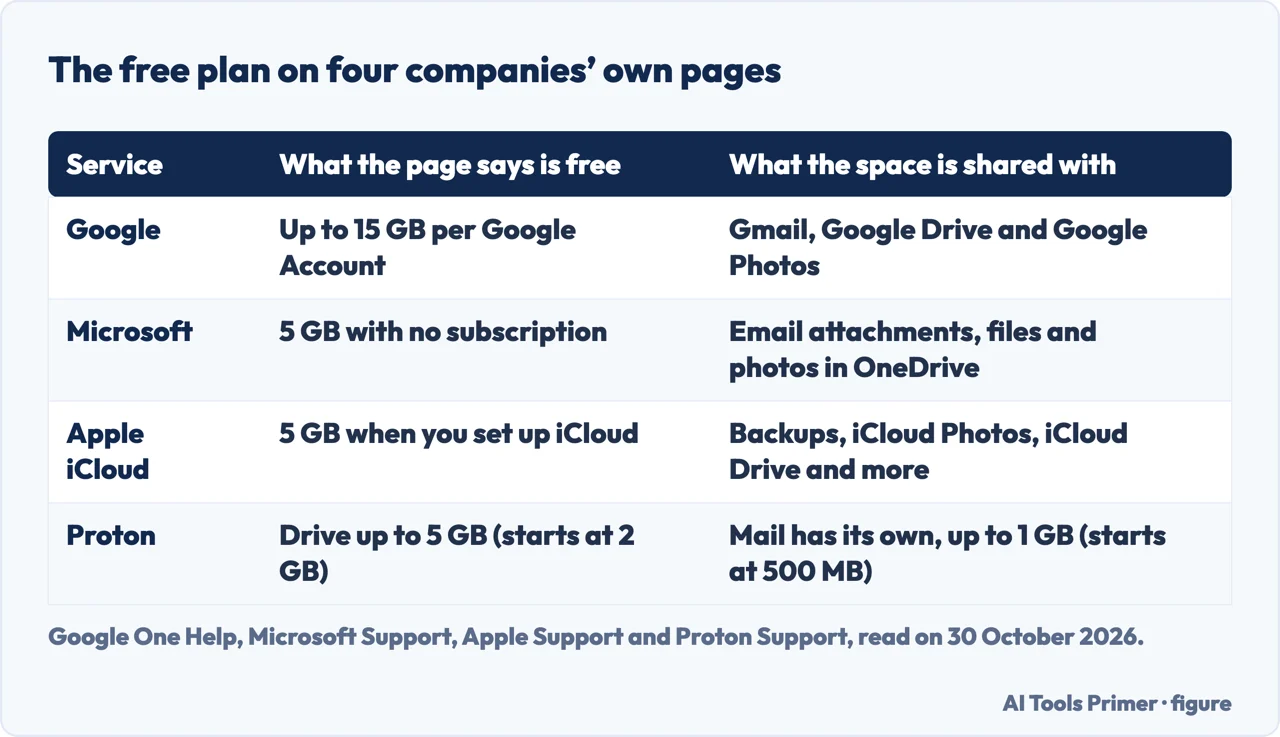
Four support pages give four free allowances, and each page words its own a little differently. Google’s help page says each Google Account includes up to 15 GB of storage, shared across Gmail, Google Drive and Google Photos. It adds that a Google One membership can be bought where available, and that more storage occasionally comes with a special promotion or a related purchase. Microsoft’s quota table lists a free plan, with no subscription, at 5 GB for one person, then Basic at 100 GB and Personal at 1 TB. Apple’s iCloud+ page opens with 5 GB of storage for free, and its storage page says iCloud gives that amount automatically when you set it up.
Proton’s plans page splits its free plan by product. Proton Drive Free is up to 5 GB of total storage, and the page says the 2 GB you start with can be boosted to 5 GB by completing the Drive-specific get started actions. Proton Mail Free is up to 1 GB of dedicated Mail storage, boosted from a starting 500 MB by the Mail-specific actions. The page also says the free plan has lower storage limits than the paid services.
Google and Proton write “up to”; Microsoft and Apple give a flat 5 GB. The pages do not say why they word it that way, so the table below keeps each company’s own wording rather than rounding the four into one comparison.
What stops when it is full
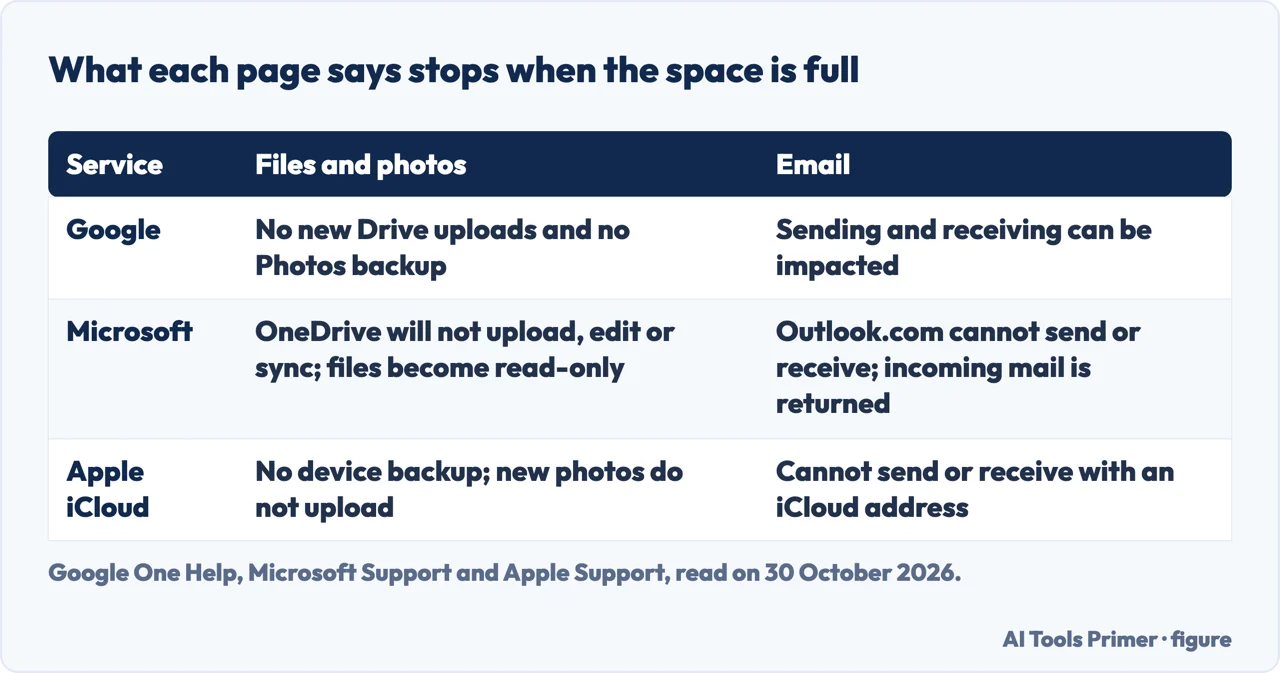
Google, Microsoft and Apple each list what stops once you use more than you have. Google’s page says you cannot upload new files or images to Drive or back up photos and videos to Google Photos, that sending and receiving email in Gmail “can be impacted”, and that you cannot create new files in Docs, Sheets, Slides and the other collaborative apps. It also says you cannot back up new Recorder files, and adds a tip: you can still sign in to and access your Google Account.
Microsoft’s page is the most specific about email. OneDrive will not upload, edit or sync new files, including camera roll files, and the files already there stay but become read-only. Outlook.com cannot send or receive email when either the cloud storage quota or the mailbox quota is exceeded, and incoming messages are returned to the sender and have to be resent after you free up or buy space. In Teams, messages that contain attachments cannot be sent or received.
Apple’s storage page says that if you run out, the device will not back up to iCloud, new photos and videos will not upload to iCloud Photos, iCloud Drive and other iCloud apps will not stay up to date across devices, and you cannot send or receive email with your iCloud address. It gives one further rule for photos: you can recover photos and videos from Recently Deleted for 30 days, but if you exceed the limit, the device removes what you delete immediately and it is not available for recovery.
The Proton plans page and the MEGA page we read do not describe what happens over the limit, so the table has no row for them.
The clock before anything is deleted
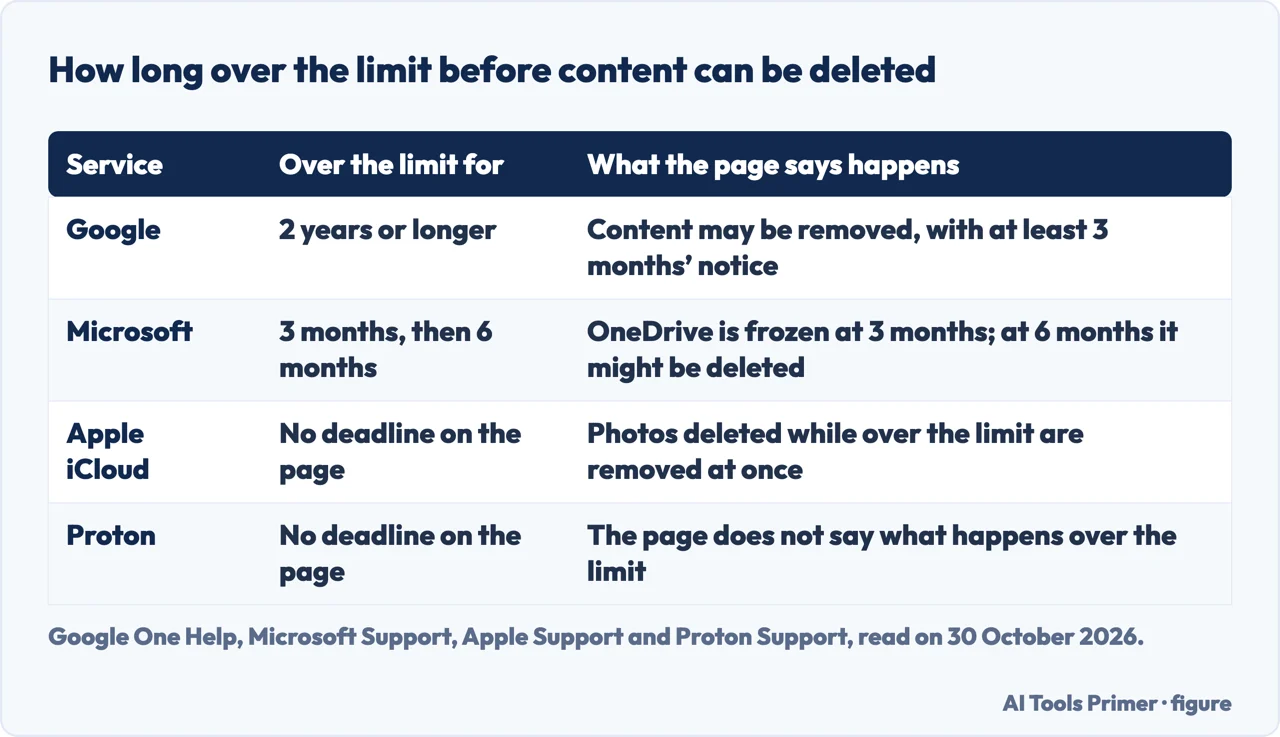
The three big services give very different clocks. Google says that if you are over quota for 2 years or longer, all of the content in your Google Account may be removed, including Gmail, Google Photos, Google Drive and your Android device’s backup. Before that, it says it gives notice by email or in-product notifications at least 3 months before content is eligible for deletion, a chance to avoid it by paying for more storage or removing files, and a chance to download the content. The page says this over-quota policy does not apply to Google Sites, Google Keep, Blogger or YouTube. It also mentions an inactivity policy that covers all content and the account itself, without giving its terms.
Microsoft’s clock is shorter and runs on the OneDrive side. After three months over the OneDrive limit, the page says the OneDrive account is frozen. After six months, it says Microsoft “might delete” the OneDrive and all files in it, and that deleted files cannot be recovered.
The Apple pages we read state no over-quota deadline. They give two other periods that are easy to confuse with one: Recently Deleted keeps photos for 30 days, and iCloud backups are available for 180 days after you turn off or stop using iCloud Backup. Neither is a countdown from running out of space. The Proton page we read does not say how long content is kept over the limit.
Deleting also has its own timing. In the steps for the iOS cleanup tool, Google’s page says Google Photos items go to the trash and are permanently deleted after 30 days, while items deleted from Drive and Gmail are permanently deleted and cannot be recovered.
What the next step costs
When the free amount runs out, the pages point to paid tiers. Microsoft’s table lists Basic at 100 GB and Personal at 1 TB for one person. Family and Premium subscriptions started before 8 October 2026 show 1 TB per person; new ones from that date, and renewals from 2 May 2027, show 2 TB shared. Pro is 5 TB shared for new subscriptions. Its page tells someone on the free 5 GB plan to buy a Microsoft 365 subscription, and someone on Basic to switch to Personal, Family, Premium or Pro.
Apple lists prices per month for each country. In the row for the United States, 50 GB is $0.99, 200 GB is $2.99, 2 TB is $9.99, 6 TB is $29.99 and 12 TB is $59.99, and the page notes that residents in some U.S. states have tax added to the monthly payment. The page lists a separate row for each country or region, and some are in other currencies, so a reader outside the United States needs their own row. For the steps, see our page on buying more iPhone storage, and for what to clear first, freeing up iCloud storage.
Proton’s page quotes in euros. Mail Plus is €4.99 a month for 15 GB shared with Drive, Unlimited is €12.99 a month for 500 GB, and Duo is €19.99 a month for 2 TB shared by up to two family members. Google’s help page says a Google One membership can be bought but does not list plans or prices, so we give none. MEGA’s page lists paid plans from 200 GB to 20 TB, without prices in the text we read.
Reading the larger claims
Some providers advertise more free space than the four plans above. MEGA’s own page says it offers 20 GB of free encrypted cloud storage, with zero-knowledge encryption, meaning files are encrypted on the device before upload. That is MEGA describing its own product, so we treat it as the company’s claim, not as a measurement. The MEGA text we read does not say what happens over the limit or whether the free space expires.
We did not read pages from Dropbox, Blomp or CloudGate, so we give no figures from them. The Google page we read is the English help page, and we cannot say whether regional Google pages give different amounts.
We opened no account and tested no upload. Every figure comes from the pages named below, read on 30 October 2026, and Microsoft’s table already carries dates in 2027, so these amounts can change. The pages we read do not say which free plan is best, and this page does not choose one either.
Where to start
Four ways in.
- “How much is free?”
- What the four free plans give — plans
- “What uses it up?”
- What the space is shared with — shared
- “What if it is full?”
- What stops when it is full — full
- “When is it deleted?”
- The clock before anything is deleted — clock
When the space is full
What fills iCloud, what more costs and what to clear first.
Where files live
Free tiers, photo backup and copies that last.
Questions people also ask
Is it possible to get free storage?
Yes: the support pages we read give a free allowance, up to 15 GB at Google, 5 GB at Microsoft and at Apple, and up to 5 GB of Drive at Proton. MEGA’s own page says 20 GB.
Where can I store 100GB for free?
The free plans we read stop at 15 GB for Google, and MEGA says 20 GB on its own page. Microsoft lists 100 GB as the Basic plan, which is not the free one. We did not read a page from any provider that offers 100 GB free.
How to get 1TB storage for free?
The pages we read list 1 TB under paid plans, such as Microsoft 365 Personal. They do not describe a free route to it, and the Apple page lists 2 TB at $9.99 a month in the United States.
What is the best free storage?
The pages we read do not say. They differ in amount, in what shares the space and in how long content is kept over the limit, which is why this page sets them side by side.
Not covered here. We opened no account and tested no upload. The statements come from Google One Help, Microsoft Support, two Apple Support pages, Proton Support and MEGA’s own storage page, all read on 30 October 2026.
The search volume and difficulty behind this page come from a Semrush reading of 29 August 2026, older than the 60 days the site normally allows.
Sources
- Google One Help — How your Google storage works — support.google.com, read 30 October 2026.
- Microsoft Support — Microsoft storage quotas — support.microsoft.com, read 30 October 2026.
- Apple Support — Manage your iCloud storage — support.apple.com, read 30 October 2026.
- Apple Support — iCloud+ plans and pricing — support.apple.com, read 30 October 2026.
- Proton Support — Proton plans explained — proton.me, read 30 October 2026.
- MEGA — Cloud storage (the company’s own page) — mega.io, read 30 October 2026.
Written by Alberto Gulotta
Founder and editor of AI Tools Primer, writing from Palermo, Italy. Thirty-five years of taking computers apart, starting with a Commodore 64 — the long version is on the about page.
Something wrong on this page? Write to aitoolsprimer@gmail.com and it gets fixed.
Written on 30 October 2026.
Independence and limits
No affiliate links and no paid placements anywhere on this site. Nobody pays to appear here, and no company has seen this page before you did.
This is general information, not professional advice. Where a page touches money, health, safety or the law, it names its source and the date it was read — and your situation may still differ. See the privacy page and the cookie policy.