
Anonymity · guide
Degoogle your life: the levels, what breaks and the order
By Alberto Gulotta · Updated · 16 min read
To degoogle is to remove Google’s influence from your devices, and Android Authority says it comes in levels: alternative apps, self-hosting or a custom ROM. Google’s own pages give the steps in pieces: download your data first, add another email address for any service that uses your Gmail address, then remove Gmail or the account.
| Question | Answer | Where it comes from |
|---|---|---|
| What does it mean? | Removing Google’s influence from your devices, in levels: alternative apps, self-hosting, a custom ROM | Android Authority |
| Does downloading your data remove it? | No: a Takeout download does not delete the data from Google’s servers | Google Account Help |
| How long is an archive good for? | About 7 days, and each archive can be downloaded 5 times | Google Account Help |
| What happens when Gmail is removed? | Emails and settings are deleted after 30 days, and the address cannot be used by anyone in the future | Google Account Help |
| What do banking apps depend on? | Most have extensive dependencies on Play services, says GrapheneOS | GrapheneOS |
What de-Googling means, and the scale it comes on
Wikipedia describes the DeGoogle movement, also called the de-Google movement, as a grassroots campaign that grew as privacy advocates urged users to stop using Google products entirely because of privacy concerns about the company. The same page traces the idea back: in 2008 Lee Hinman began moving away from Google tools “in the interests of privacy” and blogged about it in a post titled “De-googling”, and in 2010 the publisher Jack Yan used the term while moving away from Google’s services, citing privacy concerns. It also lists projects such as ungoogled-chromium, /e/ and MicroG, which it says mainly distinguish themselves from Google-maintained products by relying less on the company’s infrastructure.
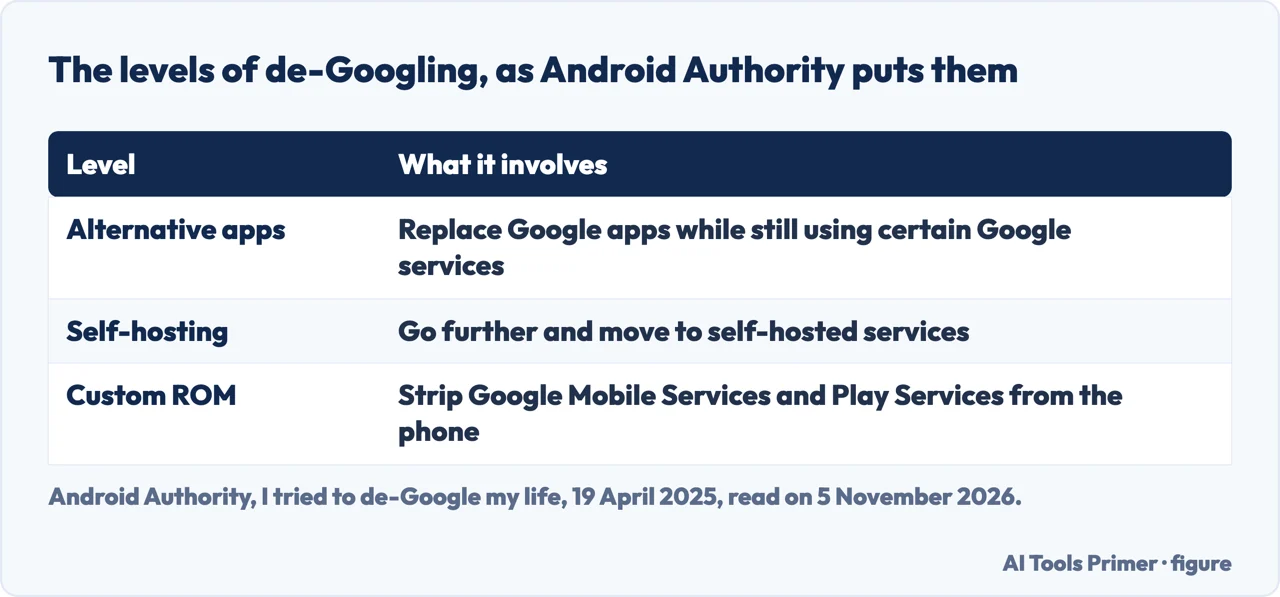
Android Authority, in an article of 19 April 2025, defines de-Googling as removing the company’s influence from one’s devices and says there are “various levels” of it. Some users find alternatives to Google apps and keep using certain Google services. Others take it further and choose self-hosted services. Others install custom ROMs on their phones and strip Google Mobile Services and Play Services entirely. The article adds that, for many, the idea involves retaking control of devices, digital lives and information from big corporations, and that many users explain their reasons are primarily rooted in privacy concerns. On that account the question is not yes or no but how far.
Wikipedia also covers the Android end of the scale. It says GrapheneOS was announced in April 2019 as a privacy-focused Android distribution with no Google app installed by default, and that LineageOS, which it describes as a fork of Cyanogen, was officially launched on 24 December 2016.
What one trial found easy, and what stayed
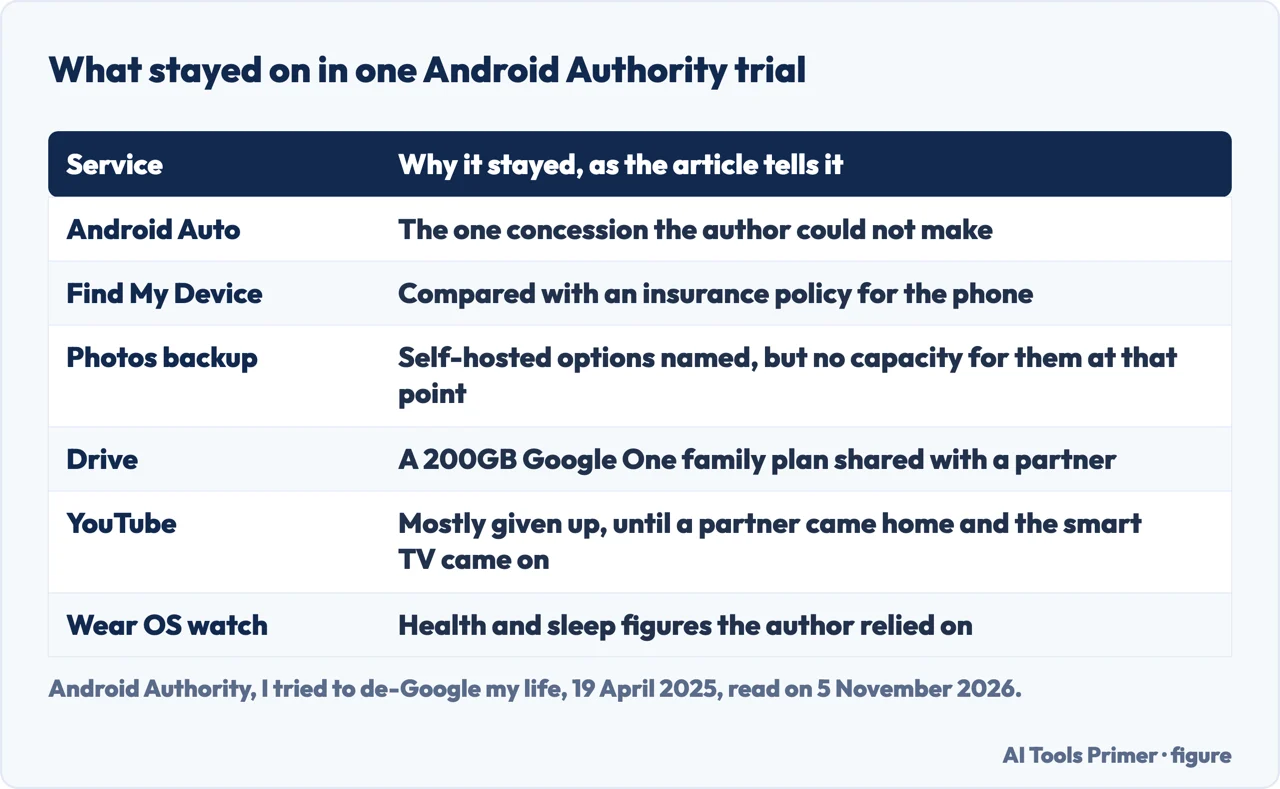
The Android Authority article is the account of an attempt, not a guide: its author took a few days to see how far Google could be dropped and calls the result far more difficult than first thought. Several parts went easily. The article calls Google Search surprisingly easy to ditch in favor of DuckDuckGo or Bing; with Firefox already the browser on Windows and Android, the default search provider was changed in a few seconds, and Microsoft Bing, Brave and Ecosia are named as other options. Gmail was swapped for Thunderbird, Calendar for Business Calendar 2 and Maps for Maps.Me. Chrome was set aside for a Chromium browser such as Vivaldi, Gboard for HeliBoard and Google Keep for Notion, and the Google AI features, Gemini and Circle to Search among them, drew very little need during the test.
Other parts stayed. Android Auto was the one concession the author could not make. Find My Device was kept on and compared to an insurance policy. For photo backup the article names self-hosted options, Plex Photos and Immich, but says the author did not have the capacity for them at that point. Drive stayed because a Google One family plan of 200GB is shared with a partner. YouTube could mostly be given up until the partner came home and the smart TV came on, and the Wear OS watch stayed because the author relied on it for body composition and sleep data. On the Play Store, the article says a fresh start would have lost access to paid apps such as Buzzkill and Tasker, which are tied to the Play Store account; during the test Aurora Store handled Play Store duties, alongside F-Droid and Obtainium.
Near its end the article says the author would take convenience over total control of privacy, and that if you truly rely on a Google service it is probably not worth giving up. For beginners it suggests phases: uninstall the Google apps you do not particularly need, find alternatives for what you can afford to let go, consider self-hosting if you are more technical, and, to remove Google completely, consider a custom ROM without Google-adjacent services. The article also ran a readers’ poll on whether people had de-Googled; the figures change, so we do not repeat them.
Vendors of alternatives start somewhere else. Tuta, a vendor of email, says that for Android the first step is to stop using the Google Play Store and get apps from F-Droid, or to use Aurora Store to download Play Store apps without a Google account. Android Authority puts uninstalling unneeded apps first, and Google’s own page on deleting an account puts reviewing and downloading your data first. The lists of search engines differ as well: Proton, also a vendor, names Brave Search, Qwant and Kagi, while Android Authority names DuckDuckGo, Bing, Brave and Ecosia. We do not rank them.
What breaks, according to Google, GrapheneOS and Wikipedia
Google’s page on deleting an account lists the losses. You lose the data and content in that account, like emails, files, calendars and photos, and you cannot use services where you sign in with it, like Gmail, Drive, Calendar or Play. You also lose subscriptions and content bought with the account on YouTube or Google Play, such as apps, movies, games, music and TV shows. On an Android phone, the page says you cannot get or update apps from the Play Store, you lose contacts stored only in the Google Account, and data such as photos taken with the device is no longer saved to Drive. On a Chromebook, Chrome apps and extensions for that account stop working.
GrapheneOS, which Wikipedia describes as an Android distribution without Google apps by default, says sandboxed Google Play, meaning Play services and the Play Store installed as ordinary apps in a chosen profile, is close to being fully functional. A small subset of privileged functionality is unavailable. For push notifications to work in the background it asks for a battery optimization exception for Play services, and location sharing in Google Maps needs the “Allow all the time” location permission and the Physical activity permission. Android Auto cannot be supported by default, but is supported as an extension with its own toggles, installed from the GrapheneOS App Store and not from the Play Store.
Banking apps get a section of their own. GrapheneOS calls them a particularly problematic class of apps: some work with any configuration, but most have extensive dependencies on Play services, and for many it is enough to set up sandboxed Google Play in the same profile. It also says it passes the basicIntegrity check but is not certified by Google, so it fails the ctsProfileMatch check of SafetyNet. The text we read is about SafetyNet and may be dated, and it points to a community list of banking app compatibility kept by PrivSec.dev, with no guarantee from GrapheneOS that the list is right. The pages we read do not say what any particular bank uses today.
Wikipedia relays a journalist’s account of the cost of going without. The Gizmodo journalist Kashmir Hill claims to have missed meetings and struggled to organize meet-ups without Google Calendar, and wrote in 2020 that disabling Google prevented the use of Dropbox, Uber, Lyft and Yelp. That is one journalist’s report, while the Android Authority trial above found search easy to swap.
Then there are the places you signed in with Google. Google says Sign in with Google lets apps from other developers authenticate you and create an account from your name, email and profile picture, and that to use it you must be signed in to your Google Account. On linked apps, Google says that if you delete a link it stops automatic sign-in to the app but does not delete your data on the app. The pages we read do not say what happens to these sign-ins when the Google Account itself is deleted.
Take your data with you first: what Takeout does and does not do
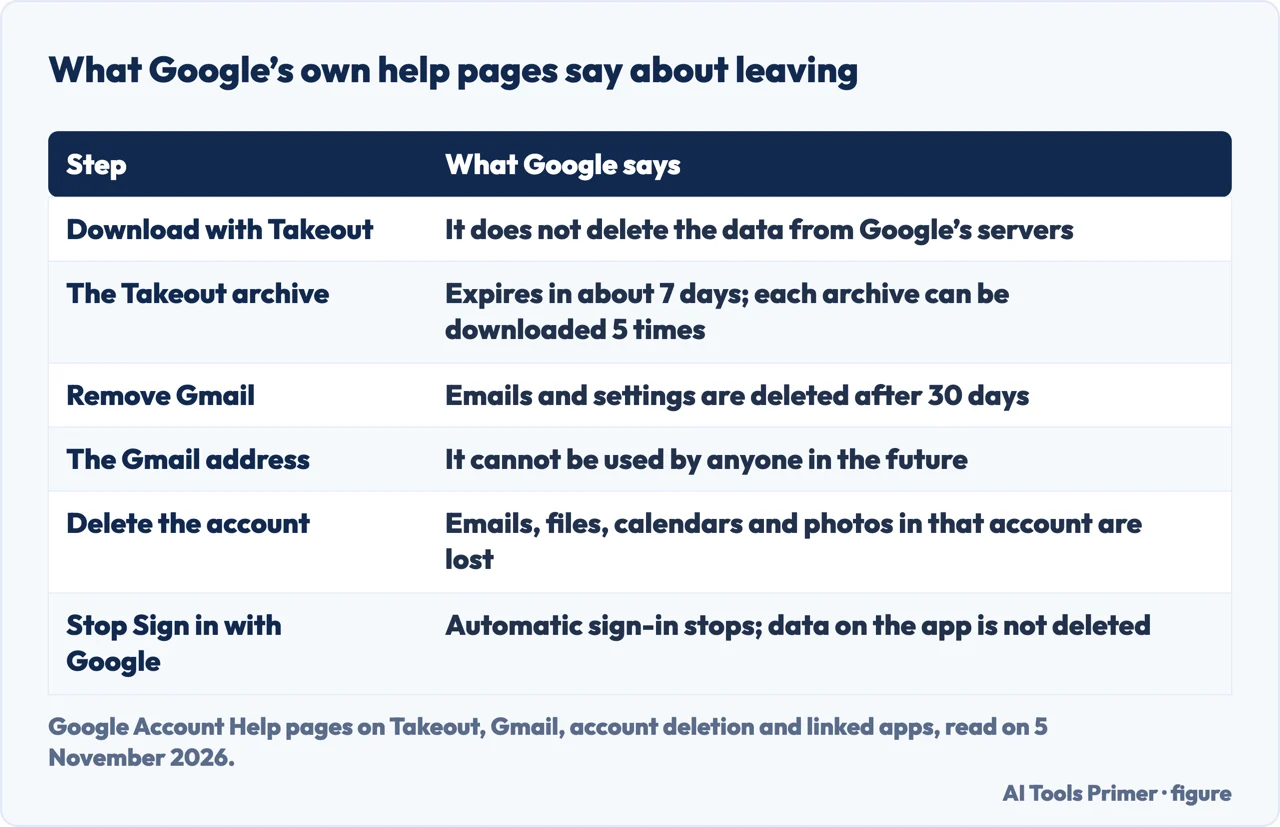
Google’s Takeout page opens with a warning: if you download your Google data, it doesn’t delete it from Google’s servers. Exporting and deleting are two separate acts. In Takeout the products that hold data are selected automatically and you can uncheck any of them. The archive can be sent by email link or added to Drive, Dropbox, Microsoft OneDrive or Box. It can be a one-time archive or a scheduled export every 2 months for one year, though for Google Photos a schedule works only if Photos is the only product selected. The file type is zip or tgz, the latter possibly needing extra software on Windows, and you pick a maximum archive size, above which several archives are made. Our page on Google Photos backup on desktop covers the Photos side.
Google says the wait runs from a few minutes to a few days. The archive expires in about 7 days, each archive can be downloaded 5 times, and Google asks you to re-enter your password if you have not recently. With Advanced Protection, the archive is scheduled two days later and scheduled exports are not available. Google recommends opening an export from a desktop computer, where a file named archive_browser.html describes the formats.
The page also lists what may be missing. Data still in the process of being deleted, such as items from My Activity, photos or documents, is not included. Changes made between the request and the creation of the archive may be left out, for example Drive permission changes, resolved comments and added or deleted photos. Google says it does not currently support exporting data for certain time frames, including mail by timeframe. YouTube videos of a Brand Account need you to switch to that account, and on a work or school account, Google says, administrators can manage whether users can download data from different products.
For Gmail, Google says each message’s labels are kept in a special X-Gmail-Labels header in the download file, and that no mail client recognizes this header now. Contacts come out as vCard, which Google calls a very common format for email providers. If you pick Drive as the destination and plan to delete your account, Google says to move the archive to a different storage space before deleting.
The order Google’s pages give for Gmail and the account
The pages we read do not put the whole sequence in one list, so what follows is assembled from three Google pages, each attributed. Google’s page on deleting an account has a second step before the delete step: review the info in the account, learn how to download what you want to keep, and, if you use your Gmail address for online banking, social media or apps, add a new email address for these services. It also asks you to update your recovery info in case you try to recover the account later. For a hacked account it says to consider Security Checkup first, because once the account is deleted you can no longer use it to review activity.
To remove only Gmail, Google’s Android page says to sign in and download your data first. You need an alternate email address that isn’t Gmail to continue to use other Google services with the account, and if Gmail comes through work or school you contact your administrator. The removal does not start until the alternate address is verified from an email Google sends. After that, Gmail deletes your emails and settings after 30 days, you can no longer send or receive with that address, and the address cannot be used by anyone in the future. You can still reach the account and services not affected, such as your activity across Google services and purchases from Google Play. Google adds that you may be able to recover the address and emails, but after a while the emails might not come back.
The two Google pages describe the same Gmail removal through different menus. The page on deleting an account says to open Data & privacy, scroll to “Data from apps and services you use”, choose Delete a Google Service and select Delete next to Gmail. The Android page says to open Data & privacy, scroll to the “Tools” section and tap Remove data from services you no longer use. We do not pick one; the result described is the same. Our guide How to delete a Gmail account without losing the rest follows that one gesture, removing Gmail while keeping the account, in more detail.
Deleting the whole account is the other route, and the page says that if you have more than one Google Account, deleting one doesn’t delete the others. Google says an account might be recoverable within a certain amount of time, and the pages we read do not say how long that is. Google’s page on linked apps is where Sign in with Google links are listed and removed; it says you can review them at any time. Proton and Tuta, as vendors, explain why and what to switch to, such as Proton’s Easy Switch tool to back up your data and import emails, contacts and calendars, but the pages we read do not give an order for exporting, changing addresses and deleting.
What this page cannot tell you
We tested nothing on a phone. We did not open community forums or GitHub lists of alternatives, and we did not use any AI-generated summary. Proton and Tuta sell products, so we used them only for what they say. The GrapheneOS text we read speaks of SafetyNet, so it may be older than the banking apps you use. The pages we read do not say how many people reach a complete de-Googling, how long an account can be recovered, or what becomes of sign-ins made with Google once the account is deleted. We have not ranked any alternative to a Google service.
Where to start
Four ways in.
- “Why should I do it?”
- What de-Googling means, and the scale it comes on — meaning
- “Is it possible?”
- What one trial found easy, and what stayed — realistic
- “What will stop working?”
- What breaks, according to Google, GrapheneOS and Wikipedia — breaks
- “What do I do first?”
- The order Google’s pages give for Gmail and the account — order
The browser side
Firefox, Brave, and Safari against Chrome.
The Google account side
Results, photo backup and the password manager.
Questions people also ask
Why should I deGoogle?
Wikipedia says privacy advocates urge users to stop using Google products because of privacy concerns about the company, and Android Authority says many users explain that their reasons are primarily rooted in privacy concerns. Proton, a vendor of alternatives, says in its own words that Google seeks to trap users into its services.
What does it mean to DeGoogle your phone?
Android Authority describes levels: alternatives to Google apps, self-hosted services, or a custom ROM that strips Google Mobile Services and Play Services. GrapheneOS is an Android distribution with no Google app installed by default, per Wikipedia.
Is it worth it to DeGoogle?
The pages we read do not measure that. Android Authority concluded for its author that convenience came before total control of privacy, and advises that a Google service you truly rely on is probably not worth giving up.
Is DeGoogling possible?
In part, in the Android Authority trial: search, browser, mail and keyboard were swapped, while Android Auto, Find My Device, photo backup and Drive stayed. GrapheneOS says banking apps mostly depend on Play services.
Not covered here. We tested nothing on a phone. The statements come from Google Account Help pages on Takeout, Gmail, account deletion and linked apps, from Wikipedia, Android Authority, GrapheneOS, Proton and Tuta, all read on 5 November 2026.
The search volume and difficulty behind this page come from an Ubersuggest reading of 5 November 2026, inside the 60 days the site normally allows; the difficulty is Ubersuggest’s own score, not Semrush’s, and awaits confirmation.
Sources
- Google Account Help — How to download your Google data — support.google.com, read 5 November 2026.
- Google Account Help — Delete your Google Account — support.google.com, read 5 November 2026.
- Google Account Help — Remove Gmail from your Google Account — support.google.com, read 5 November 2026.
- Google Account Help — Manage links between your Google Account & apps from other developers — support.google.com, read 5 November 2026.
- Google Account Help — How Sign in with Google works — support.google.com, read 5 November 2026.
- Wikipedia — DeGoogle — en.wikipedia.org, read 5 November 2026.
- Android Authority — I tried to de-Google my life, but it’s not nearly as easy as it sounds — www.androidauthority.com, read 5 November 2026.
- GrapheneOS — Usage guide — grapheneos.org, read 5 November 2026.
- Proton — How (and why) to deGoogle your life and protect your privacy — proton.me, read 5 November 2026.
- Tuta — DeGoogle list with best private alternatives — tuta.com, read 5 November 2026.
Written by Alberto Gulotta
Founder and editor of AI Tools Primer, writing from Palermo, Italy. Thirty-five years of taking computers apart, starting with a Commodore 64 — the long version is on the about page.
Something wrong on this page? Write to aitoolsprimer@gmail.com and it gets fixed.
Written on 6 November 2026.
Independence and limits
No affiliate links and no paid placements anywhere on this site. Nobody pays to appear here, and no company has seen this page before you did.
This is general information, not professional advice. Where a page touches money, health, safety or the law, it names its source and the date it was read — and your situation may still differ. See the privacy page and the cookie policy.