
Audio · guide
How to remove vocals from a song: what Audacity and Apple say
By Alberto Gulotta · Updated · 17 min read
How to remove vocals from a song depends on the mix and on your computer. Audacity’s manual says its center-removal effect is no longer shipped from version 3.5.0, the OpenVINO AI plugin is only for Windows and Linux, Apple’s Stem Splitter needs a Mac with an M1 or later chip, and Soundstripe says completely removing a vocal is usually impossible.
| Question | Answer | Where it comes from |
|---|---|---|
| Can the voice be taken out completely? | Soundstripe says completely removing a vocal is usually impossible; LALAL.AI says there is still no ideal way | Soundstripe, LALAL.AI |
| What does Audacity’s classic effect do? | It tries to remove or isolate audio panned to the center of a stereo track, which also holds bass and solo instruments | Audacity Manual |
| Is that effect still part of Audacity? | The manual says it is not shipped from version 3.5.0 and is a plugin to download; the features page calls it built in | Audacity Manual, features page |
| What does AI separation need? | Audacity’s OpenVINO plugin: Windows or Linux. Logic Pro’s Stem Splitter: a Mac with an M1 or later chip | Audacity Support, Apple Support |
| Can the result be published? | Audacity, Soundstripe and Epidemic Sound tie publishing to the copyright holder’s rights or permission, DistroKid says a remix needs the original artist’s permission, and only Audacity and Soundstripe speak to private use | Audacity, Soundstripe, Epidemic Sound, DistroKid |
What taking a voice out of a song can and cannot do
Soundstripe, which sells licensed music, dated its guide to removing vocals 16 September 2026. It describes an AI vocal remover as a source separation model: software trained on songs whose individual parts were known, so that it learned what a human voice looks like inside a full mix. Given a track, the guide says, the model turns the audio into a spectrogram, estimates which energy belongs to the voice and which to everything else, and rebuilds each estimate as its own file. It adds that the model is not finding hidden tracks inside the file but making an educated reconstruction, which is why the output is never quite perfect, and that many consumer tools are built on open-source models such as Meta’s Demucs.
Two pages are plain about the ceiling. Soundstripe says completely removing a vocal from a mixed song is usually impossible, and that the goal is a result clean enough for your use. LALAL.AI, which sells a vocal remover, calls complete vocal removal an age-old problem and says there is still no ideal way to do it; it then says its own service is the best solution available today, which is the seller’s claim, and we did not test it.
The older family of methods does not estimate anything. It cancels what the two stereo channels have in common. Soundstripe says both Audacity methods exploit a mixing convention, not a property of the voice: they work on a voice mixed to the center, and the cancellation takes out everything else in the center along with it, which it says usually includes the bass and the kick drum. This page follows that split. The center trick comes first, because it is free and shows why results go wrong; then the AI routes and the computers they run on, the reasons an instrumental sounds thin, and the rights that stay with the song.
The free stereo trick in Audacity
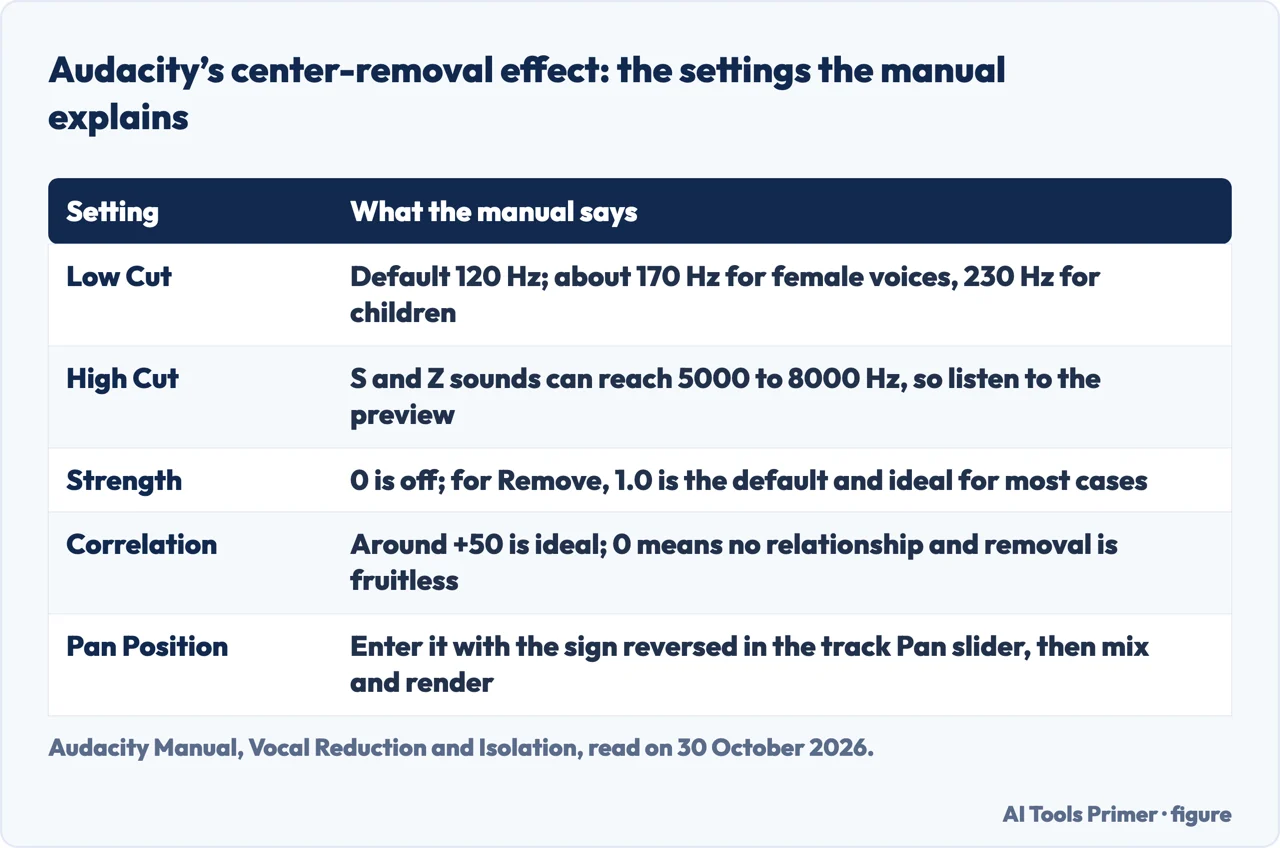
Audacity’s manual describes Vocal Reduction and Isolation as an effect that attempts to remove or isolate center-panned audio from a stereo track, and says vocals are “sometimes (but not always)” recorded that way. You find it under Effect, Special. The simplest and quickest removal subtracts one channel from the other and returns (dual) mono; it is the action called Remove Center Classic: (Mono). The other Remove actions keep the stereo image, and every Isolate action returns (dual) mono. The manual is a development manual; the copy we read ends with a note that this version was created on 2 September 2026.
Before processing, the manual recommends the Analyze action, which only measures and changes nothing. It reports a Pan Position and a Correlation. A correlation of +100 or -100 means the channels are exactly the same, 0 means no relationship and the manual calls an attempt at removal fruitless, and the ideal is normally around +50. If the lead voice is not exactly in the middle, the manual says to select a short passage where only the voice is audible, run Analyze, copy the Pan Position, and enter it with the sign reversed in the track’s Pan slider. You then mix and render the track, after which it says the voice is exactly centered.
The manual’s Low Cut for Vocals defaults to 120 Hz, which it calls good for most lead vocals, or even low male voices; it suggests around 170 Hz for female voices and about 230 Hz for children. Its High Cut note warns that S and Z sounds can reach 5000 to 8000 Hz, so you should listen to the preview.
Three details differ from page to page. The first is Strength. Audacity’s features page describes it as running from 0 to 1 and says to start at 1.0 and reduce it if the instrumental sounds thin or hollow. The manual says that for Remove, 1.0 is the default and the ideal setting for most cases, and that values above 1.0 also take out audio next to the center but not stereo reverb. For Isolate it says high values attenuate most of the side energy and may produce artifacts or musical noise.
The second is where the voice sits. The manual’s Low Cut is 120 Hz and its High Cut note runs to 8000 Hz; the features page says vocals typically occupy 200 to 4000 Hz and suggests a High Cut of 8000 Hz or higher; Epidemic Sound, writing about an equalizer in GarageBand, says vocals usually sit between 85 and 350 Hz. These are three different ranges, and the pages do not reconcile them.
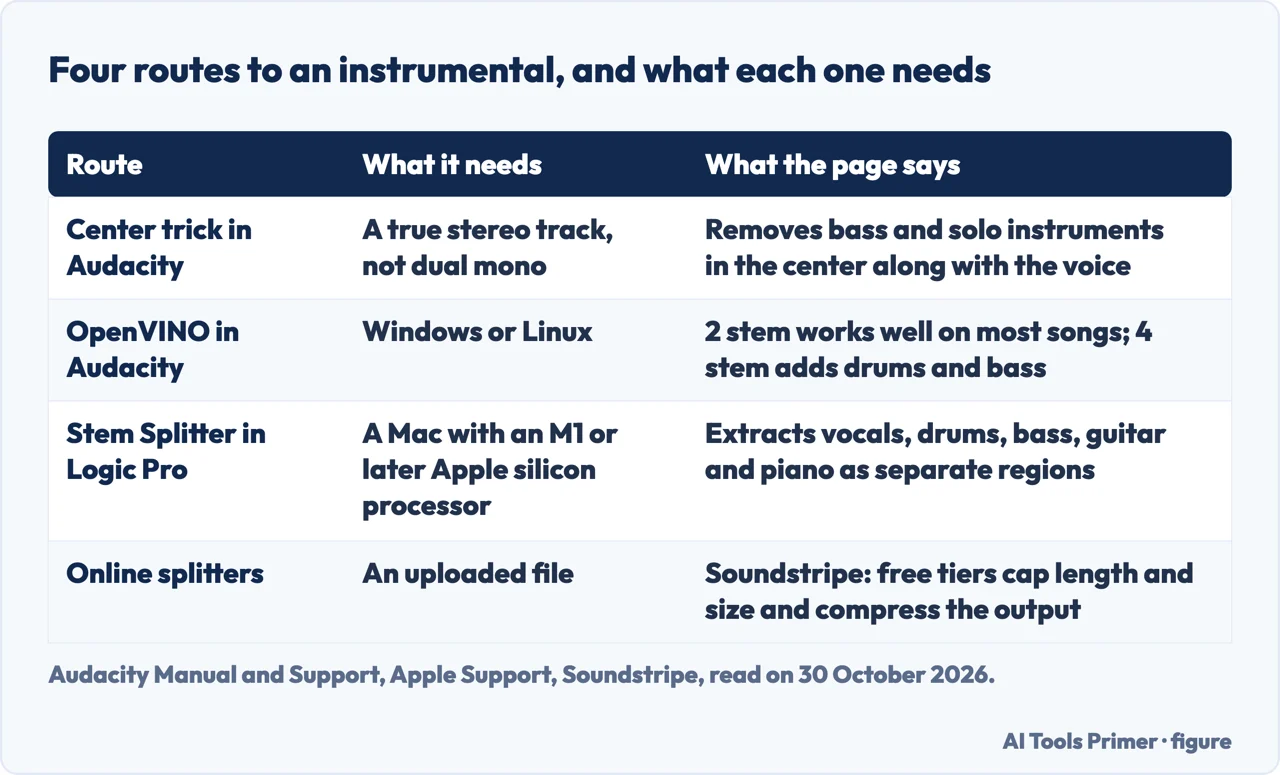
The third is the manual method. Audacity’s support page says to choose Split Stereo to Mono, invert one of the two mono tracks with Effect, Invert, and play back the result. It warns that this removes everything panned in the center, not only the voice, and returns dual mono, and that removal is often incomplete, especially with backing vocals or reverb. The features page calls the same idea a legacy technique and the least reliable method, gives the Invert command as Effect, Special, Invert, and ends with Mix and Render to New Track. The manual lists the limits that apply to the effect itself: it needs a true stereo track, not dual mono; it does not fully remove stereo reverb; it cannot tell what is in the center and removes vocals, bass and solo instruments alike; it is slow except for Classic and Analyze; and because it works in memory, selections over half an hour might crash Audacity.
AI separation, and the computer it runs on
In Audacity. The support page says the Intel OpenVINO Music Separation plugin is available only on Windows and Linux. Once it is installed and Audacity restarted, it appears under Effect, OpenVINO AI Effects. The mode called 2 stem, Instrumental and Vocal, works well on most songs, while 4 stem can pull out drums and bass. The Inference Device setting chooses the processor: the CPU always works but is typically the slowest, the GPU is typically fastest on high-end computers, and the NPU needs a modern Intel processor and is about as fast as the GPU. The page adds that the effect takes a lot of computing power and tends to be faster on a second run. The features page gives the last steps as muting the vocal track and exporting, in WAV for lossless quality or MP3 for a smaller file, and quotes 1 to 3 minutes per song depending on hardware.
In Logic Pro. Apple’s guide says Stem Splitter extracts vocals, drums, bass, guitar, piano and other instrumental parts from a mix into separate audio regions, and that it is available on Macs with an M1 or later Apple silicon processor. You Control-click the audio region in the Tracks area, choose Processing, Stem Splitter, pick a preset or tick individual stems, and click Apply. A summing stack appears below the track with the stems as subtracks, and the original region is muted so you can listen to the stems at once.
Online. Epidemic Sound’s guide describes BandLab’s Splitter as separating a song into four tracks, vocals, bass, drums and other, for songs under 15 minutes; you mute the vocal and export. Soundstripe says free tools such as BandLab Splitter and vocalremover.org exist and work, with limits on file size and length, compressed output on the free tier and more artifacts on dense mixes, and says most run in a browser with nothing to install. It says a run usually finishes in under a minute, while Audacity’s features page quotes minutes on its own plugin, so the time depends on the tool. LALAL.AI’s help page has you upload a file, wait, listen to the previews and download the instrumental and the vocal; if the previews sound overcompressed or one stem leaks into another, it says to change the Enhanced Processing mode.
Which machine. Read side by side, Audacity’s AI plugin is for Windows and Linux, Logic Pro’s Stem Splitter is for Apple silicon Macs, and Audacity’s features page says Mac users can use the Vocal Reduction and Isolation effect, with results that vary by how the song was mixed. That effect is where the pages split. The manual says it is no longer shipped from version 3.5.0 and remains a downloadable Nyquist plugin, with the OpenVINO plugins described as giving a better result; the features page calls it built in and says it works on all platforms; Epidemic Sound calls it a plugin and answers “Sort of” to whether Audacity can remove vocals. The manual is the only one of the three that gives a version number. The pages we read do not say what is left for a Mac with an Intel processor and no Logic Pro beyond those statements.
Why the instrumental sounds thin, and what helps
Soundstripe names three causes of the watery, hollow sound. Overlapping frequencies come first: where a vocal shares space with a guitar, a string pad or a cymbal wash, the model must decide which side of the line the energy falls on, and whatever it cuts wrong becomes the smear you hear. Reverb tails come next, since the echo of a voice is a voice as far as the math is concerned, and heavily mastered, loud mixes give the model less room to tell parts apart. Files that lost data in compression add their own artifacts on top. Its explanation of thin low end in an Audacity result is the center trick itself: the cancellation takes the bass and kick drum along with the voice.
The fixes the pages give are mostly about the input. Soundstripe says to feed the tool a lossless file such as WAV or FLAC rather than a low-bitrate MP3, to prefer the studio version over a live recording and a dynamic older master over a loud modern one, and to preview before committing, listening to the choruses where the arrangement is densest. Audacity’s features page agrees on lossless files, says AI separation works best on studio recordings, and says backing vocals and reverb tails may remain partly audible. It also suggests Noise Reduction or a narrow Notch Filter on the leftover voice. For the center trick, it says a Low Cut around 120 Hz preserves the kick drum and bass guitar.
Epidemic Sound offers a different route in GarageBand on a Mac: open Smart Controls, choose Track, open the EQ, find the peaks where the vocals might be and drag them down. It says every vocal track is different, and it warns that changing the EQ affects the whole mix, since other sounds in the same range are dipped too. Soundstripe says MusicRadar tested 11 stem separation tools on the same three songs and that the results ranged widely; we did not read that test, so we have no ranking of tools to repeat here.
Where the instrumental stops being yours to use
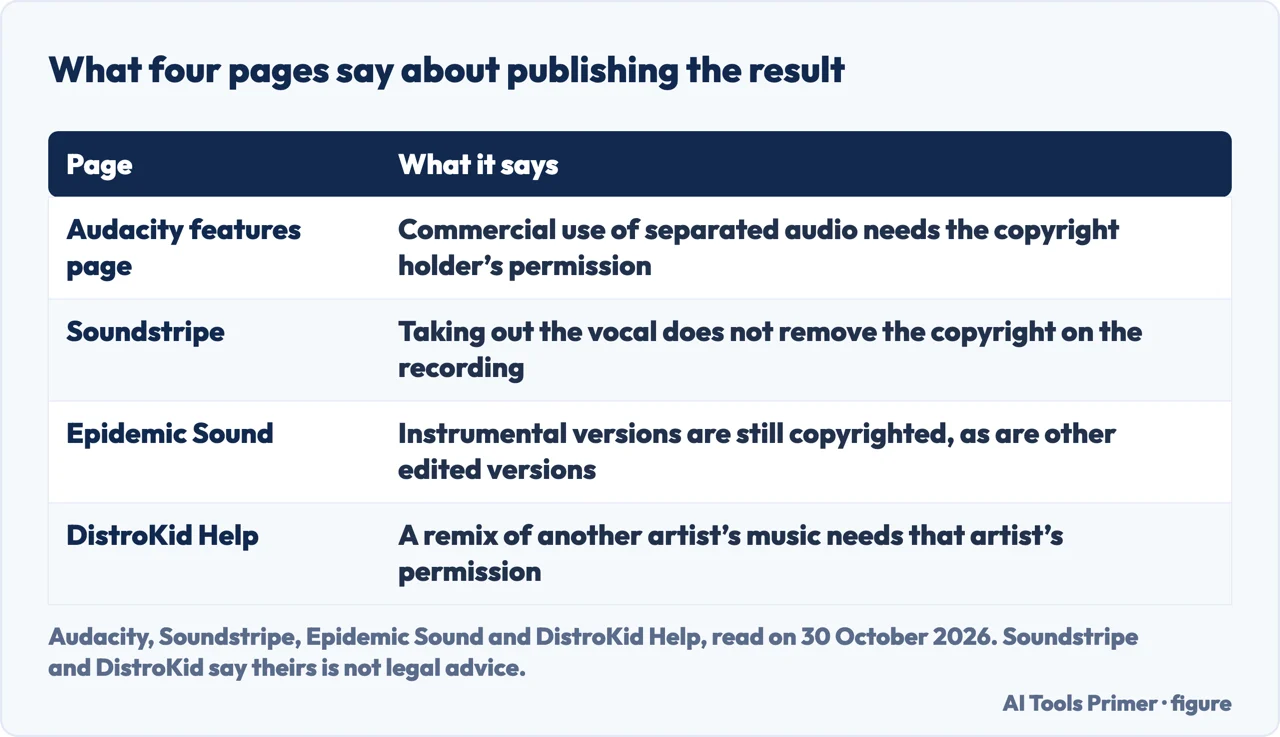
Soundstripe and Epidemic Sound both sell music with stems, and each page ends by pointing to its own catalog, so read their warnings with that in mind. Their statements still agree with the others. Soundstripe says removing the vocals does not remove the copyright: the instrumental is the same protected recording and composition with a part muted, and under U.S. law, it says, a modified version fits the definition of a derivative work, with that right belonging to the copyright owner. We did not read the law; the Copyright Office circular we tried to open could not be read by our tool, so this is Soundstripe’s account. It separates practicing over an instrumental at home from publishing one, and says YouTube compares every upload with reference files, which is how Content ID works, and that an instrumental matches its source recording. It adds that this is not legal advice.
Epidemic Sound says instrumental versions of songs are still copyrighted, as are other edited versions, and that buying a song does not give the right to edit, share and monetize it; without the rights to release your own version, such as a remix, it says you are on “shaky ground”. Audacity’s features page says commercial use of the separated audio requires permission from the copyright holder. The same page says personal, non-commercial use is generally acceptable in most jurisdictions, which is a broader statement than the remaining pages we read make: Soundstripe separates practice from publishing but says it is not legal advice, and the Epidemic Sound text we read on 30 October 2026 does not discuss private use.
DistroKid, a music distributor, answers a nearby question on its page about cover songs. It says a remix of another artist’s music is not a cover, that a remix requires the permission of the original artist, and that this is a different process from licensing a cover. It says a cover license applies only if the lyrics, melody and title stay fundamentally unaltered and the song has been released in the United States, that a cover is a song you perform and record yourself, and that it is not giving legal advice. The DistroKid page does not mention vocal removers, so it does not say which category an instrumental made from someone else’s recording falls into.
What we did not use
We removed vocals from no song and ran no tool. The four questions below are the ones from the FAQ on Soundstripe’s page, not a list of questions taken from a search engine. We did not open the Reddit thread, the Canva page or the tools vocalremover.org, BandLab Splitter, vocal-remover.ai and clumi.ai; what we say about BandLab comes from Epidemic Sound and Soundstripe. We did not read the MusicRadar test that Soundstripe mentions, and the Epidemic Sound guide is dated April 2023, older than the rest of the pages we read. The pages we read do not give a score for comparing methods.
Where to start
Four ways in.
- “Can I do it free in Audacity?”
- The free stereo trick in Audacity — stereo
- “What about an AI splitter?”
- AI separation, and the computer it runs on — ai
- “Why does it sound thin?”
- Why the instrumental sounds thin, and what helps — thin
- “Can I post the result?”
- Where the instrumental stops being yours to use — rights
Audacity and recordings
Plugins, transcripts and phone calls.
Rights and voices
What is allowed once the audio exists.
Questions people also ask
Can you remove vocals from a song for free?
Soundstripe says yes: free browser tools and Audacity can both do it at no cost. Free online tools cap file size and length and often compress the output, and Audacity’s built-in methods work well only when the vocal sits in the center of the mix. Audacity’s features page calls its OpenVINO plugin free as well.
Can Audacity remove vocals from a song?
Audacity’s own pages describe three routes: the Vocal Reduction and Isolation effect, which the manual says is a downloadable plugin from version 3.5.0; the split-and-invert method; and the OpenVINO AI plugin, which its support page limits to Windows and Linux.
Why do vocal removers make the music sound thin?
Soundstripe says a mixed song is not stored as separate parts, so a tool must estimate which frequencies belong to the voice; overlaps with a guitar or a reverb tail get cut wrongly, and phase cancellation also removes whatever is panned to the center, usually including the bass.
Is it legal to use a song after removing the vocals?
The pages we read tie publishing to the copyright holder’s permission: Soundstripe and Epidemic Sound say the instrumental stays copyrighted, and Audacity says commercial use needs permission but calls personal, non-commercial use generally acceptable in most jurisdictions. Soundstripe says it is not legal advice, and the text we read on 30 October 2026 gives no country-specific rule.
Not covered here. We tested nothing in Audacity, Logic Pro or any online tool. The statements come from Audacity’s manual, support page and features page, Apple Support, Soundstripe, Epidemic Sound, LALAL.AI Help and DistroKid Help, all read on 30 October 2026.
The search volume and difficulty behind this page come from a Semrush Keyword Overview reading of 30 October 2026.
Sources
- Audacity Manual — Vocal Reduction and Isolation — manual.audacityteam.org, read 30 October 2026.
- Audacity Support — Isolating or removing vocals from a song — support.audacityteam.org, read 30 October 2026.
- Audacity — Free Vocal Remover (features page) — www.audacityteam.org, read 30 October 2026.
- Apple Support — Extract vocal and instrumental stems with Stem Splitter in Logic Pro for Mac — support.apple.com, read 30 October 2026.
- Soundstripe — How to Remove Vocals from a Song (AI and Manual Methods) — www.soundstripe.com, read 30 October 2026.
- Epidemic Sound — How to remove vocals from a song — www.epidemicsound.com, read 30 October 2026.
- LALAL.AI Help — How to Remove Vocal From a Song — www.lalal.ai, read 30 October 2026.
- DistroKid Help — Uploading Cover Songs to DistroKid — support.distrokid.com, read 30 October 2026.
Written by Alberto Gulotta
Founder and editor of AI Tools Primer, writing from Palermo, Italy. Thirty-five years of taking computers apart, starting with a Commodore 64 — the long version is on the about page.
Something wrong on this page? Write to aitoolsprimer@gmail.com and it gets fixed.
Written on 30 October 2026.
Independence and limits
No affiliate links and no paid placements anywhere on this site. Nobody pays to appear here, and no company has seen this page before you did.
This is general information, not professional advice. Where a page touches money, health, safety or the law, it names its source and the date it was read — and your situation may still differ. See the privacy page and the cookie policy.