
Audio · guide
Narrating a video with a voice generator: what the pages say
By Alberto Gulotta · Updated · 17 min read
A voice generator turns typed text into a spoken file, and the rules around that file differ from page to page. voicegenerator.io allows any use with no attribution, ElevenLabs limits its free service to non-commercial use, and the two YouTube pages we read are not worded alike on whether a synthetic narrator needs a label.
| Question | Answer | Where it comes from |
|---|---|---|
| Is it a screen reader? | They do different jobs: WebAIM describes software that converts digital text into speech and lets users navigate with the keyboard, voicegenerator.io a web app that turns typed text into audio you can download; neither page compares them | WebAIM, voicegenerator.io |
| Can I use the voice in any video? | voicegenerator.io says any purpose with no attribution; ElevenLabs lets free users use its service for non-commercial purposes only | voicegenerator.io, ElevenLabs Terms |
| Does YouTube want a label? | The two pages read are not worded alike: the 2024 blog lists synthetically generating a person’s voice to narrate a video, the Help Center page does not | YouTube blog, YouTube Help |
| Whose voice can I copy? | ElevenLabs bars cloning a living person’s voice without explicit and informed consent | ElevenLabs Prohibited Use Policy |
| What does the FTC warn about? | A scammer can clone a voice from a short clip posted online; call back on a number you know | FTC consumer alert |
A screen reader and a voice generator are different tools
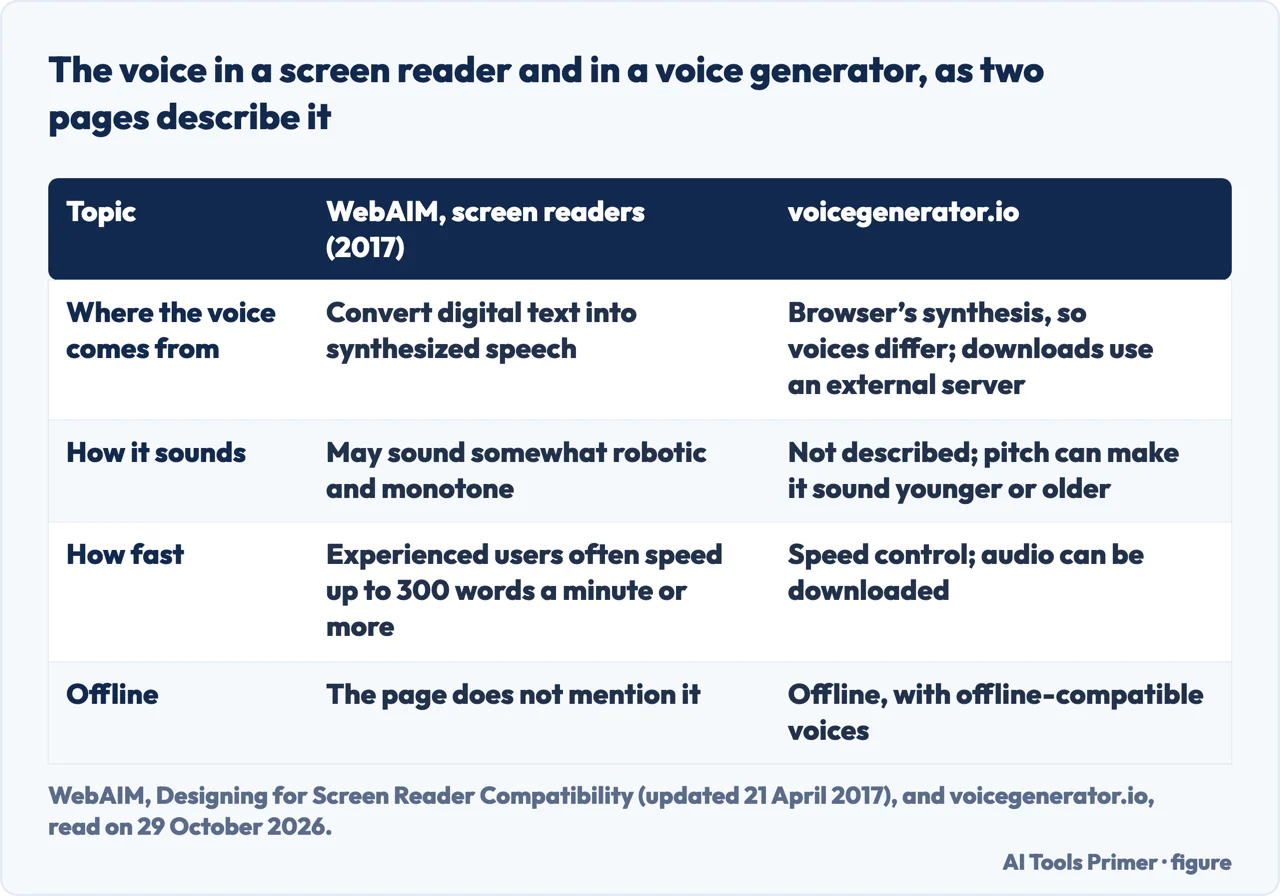
WebAIM’s page on screen readers, last updated on 21 April 2017, says screen readers convert digital text into synthesized speech and let people hear content and navigate with the keyboard. It says the voice may sound somewhat robotic and monotone, and that experienced users often like to speed up the reading rate to at least 300 words per minute, well beyond what an inexperienced listener can easily understand. The voicegenerator.io page describes something else: a web app that generates voice audio from typed text, with no login and no charge, with controls for pitch and speed, and a way to download the audio as a file.
The comparison is ours. The pages we read do not set a generator beside a screen reader, and the WebAIM page was written about screen readers, not about narrating video. What the two share is that both speak from text. The voicegenerator.io page itself suggests its tool as a free voice over generator for narrating videos in cases where you do not want to use your real voice.
The page says it uses the browser’s built-in voice synthesis, so the voices differ depending on the browser. It adds that a downloaded file may use different voices from the ones you hear in the browser, because the downloads come from an external text-to-speech server. If the list of voices is short, or all of them sound the same, the page says you may need to install voices on your device, and it notes that many operating systems, including some versions of Android, come with only one voice by default. With offline-compatible voices installed, it says the web app works offline. If you prefer the browser voice to the downloaded one, or the download fails, it suggests recording the device’s internal sound while the audio plays. It also points to a second site, voicechanger.io, for adding effects to a downloaded file; we did not open that site.
Punctuation is what a screen reader pauses on
WebAIM lists what makes a screen reader pause: periods, semi-colons, commas, question marks, exclamation points and the end of a paragraph. It says punctuation may or may not be read out, depending on the listener’s verbosity setting, and tells page authors to make sure the intended meaning comes through either way. To show the value of punctuation it offers three sentences, among them “Let’s eat, grandpa!”
The same page says screen readers can be thrown off by homographs, words spelled alike and pronounced differently: it gives “read”, which can be “reed” or “red” depending on the context, and says a sentence such as “I read the newspaper every day” is ambiguous to humans and screen readers alike.
These are behaviors of screen readers, described in 2017. The pages we read do not say whether a given generator pauses or pronounces text the same way. What the voicegenerator.io page does give is the pitch and speed controls, which it says can make a voice sound younger or older and the speech faster or slower, and a history list of earlier texts. Because the page warns that a download can use different voices from the browser, the file is worth playing before it goes under a video; that is our suggestion, not the page’s.
Two sites, two answers on using the voice
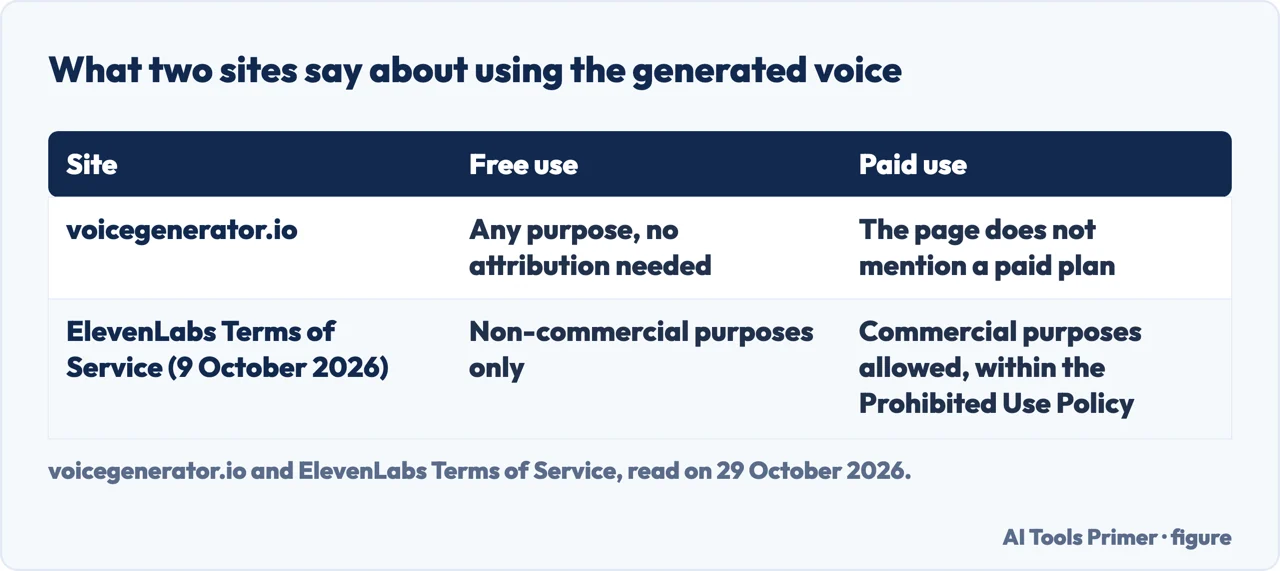
voicegenerator.io says you are free to use the generated voices for any purpose, with no attribution needed. In the same paragraph it suggests narrating videos with the tool.
ElevenLabs words it differently. Its Terms of Service, last updated on 9 October 2026, say that a user of the free service may only use it for non-commercial purposes, that a user on a paid subscription plan may use it for commercial purposes, and that in either case the use and any output must still comply with its Prohibited Use Policy. The Terms also say that a person under 18, or under the age of legal majority where they live, may not use the services, and the Policy repeats that an account needs someone at least 18.
Put side by side, the two pages answer the same question, a generated voice under a video, differently: the first states no condition, the second ties commercial use to a paid plan. They are not the same product, though: the ElevenLabs terms cover output from its own service, while the voicegenerator.io line covers a tool built on the browser’s voices. The pages we read do not say who holds the rights in the voices built into a browser, so the “any purpose” line is voicegenerator.io’s own statement and nothing more. The voicegenerator.io page also does not mention a paid plan.
What YouTube’s Help Center says about disclosure
YouTube’s Help Center page on disclosing GenAI content says creators are required to disclose AI-generated or altered content that seems realistic, and that they can do it during the upload process. It lists four kinds of content that must be disclosed: content that makes a real person appear to say or do something they did not do, content that alters footage of a real event or place, content that generates a realistic scene that did not occur, and music that is the main focus of the video. It says this can include content fully or partially altered or created using AI tools.
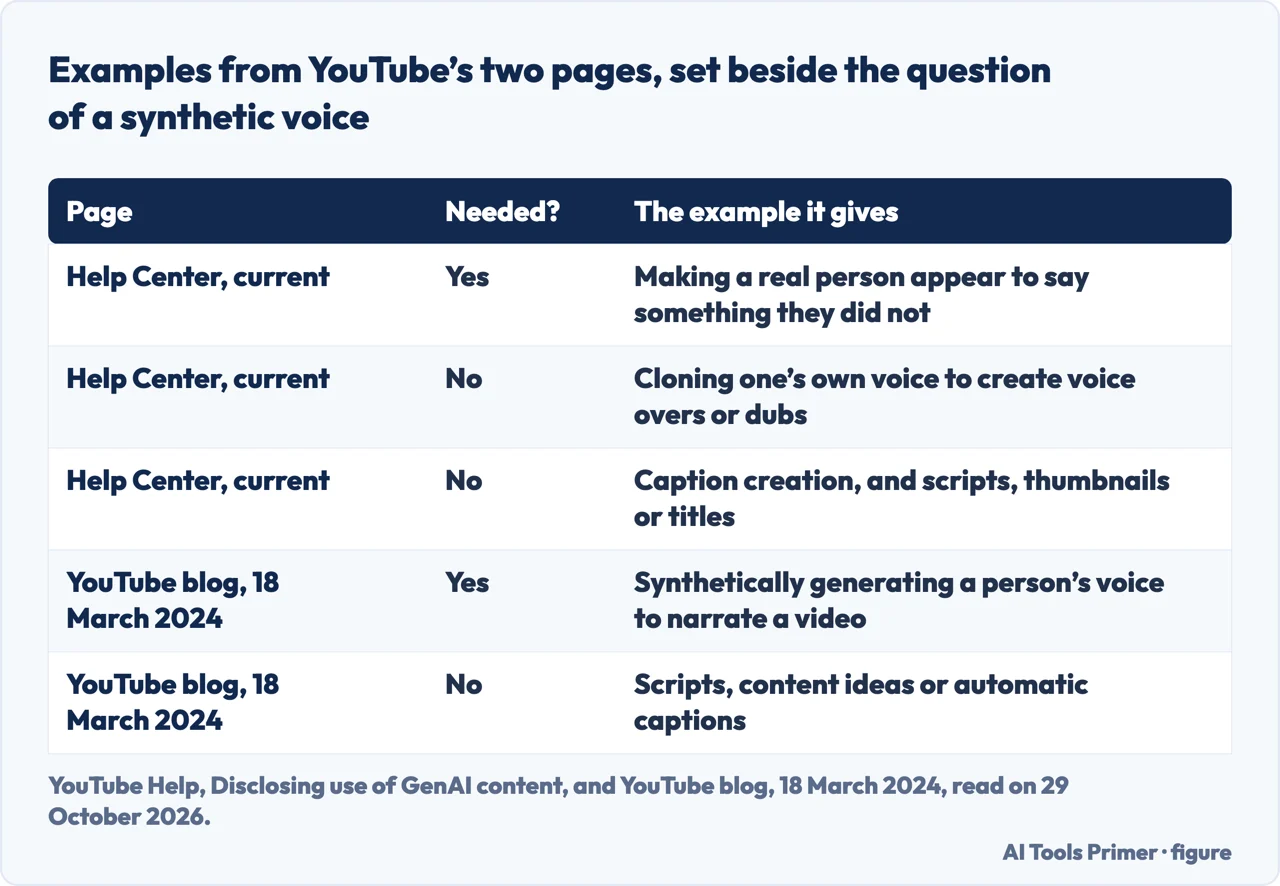
The same page lists examples creators do not have to disclose. Among them are production assistance, such as using generative AI to create or improve an outline, script, thumbnail, title or infographic, caption creation, voice or audio repair, idea generation, and cloning one’s own voice to create voice overs or dubs. It says non-realistic content and minor edits do not need disclosing, and defines minor edits as ones that are primarily aesthetic and do not alter the content in a way that could mislead the viewer about what actually happened.
The examples it gives for content that does need disclosing are AI-generated music, extra AI footage of a real place, a realistic video of a match between two real professional tennis players, making it appear that someone gave advice they did not give, a realistic tornado moving toward a real city, hospital workers turning away patients, a public figure depicted stealing something they did not steal, and a real person made to look arrested or imprisoned. A synthetic voice that narrates a video is not on that list. The page says more than once that its lists are not exhaustive, so the absence is a fact about the list and not a ruling.
To disclose, the page says to go to YouTube Studio, follow the upload steps and, in the Attributes section under “AI use”, select Yes if the content meets the requirements or No if not. Disclosed videos get a label. For AI-generated music or photorealistic content the label may appear in the video player; for non-music AI-generated audio, or content that is not photorealistic or is animated, it may appear in the expanded description. The page adds that disclosing alone will not limit a video’s audience or its eligibility to earn money.
YouTube may also apply the label itself, the page says, for content made with YouTube’s GenAI tools, content with C2PA metadata, and content its internal systems detect as AI generated or altered. A notice appears in YouTube Studio, and in most cases the creator can change the answer to No, but not for content made with YouTube’s AI tools, content containing C2PA metadata or content labeled after manual review. Creators who consistently choose not to disclose may face a manually applied label or penalties, including removal of content or suspension from the YouTube Partner Program.
The 2024 blog post words it differently
YouTube’s blog post of 18 March 2024 announced the disclosure tool. It says creators must tell viewers when realistic content, meaning content a viewer could easily mistake for a real person, place, scene or event, is made with altered or synthetic media, including generative AI. Its first example of what needs disclosure sits under the heading “Using the likeness of a realistic person”, and it reads: digitally altering content to replace one face with another, or synthetically generating a person’s voice to narrate a video.
The post lists what does not need disclosing: generative AI used for productivity, such as generating scripts, content ideas or automatic captions, and synthetic media that is clearly unrealistic or whose changes are inconsequential. On labels, it says that for most videos the label appears in the expanded description, and that for videos on more sensitive topics, such as health, news, elections or finance, a more prominent label also appears on the video itself. It adds that YouTube may add a label even when a creator has not disclosed, especially if the content has the potential to confuse or mislead people.
Where the two YouTube pages leave a gap
Set the pages next to each other, which is what the table above does, and they are not worded alike. The 2024 blog post names a synthetically generated voice narrating a video as an example that requires disclosure, under the likeness of a realistic person. The Help Center page, as we read it on 29 October 2026, lists cloning one’s own voice for voice overs or dubs among the examples that do not need disclosing, and its list of examples that do need it does not include a synthetic narrator.
The pages we read do not say whether a voice picked from a generator’s library, which is not a clone of anyone, has to be disclosed. They also do not say whether a federal law in the United States requires narrated videos to carry a disclosure: the FTC pages we read are about scams and impersonation, not narration. Both pages frame the requirement around realistic content that could be mistaken for something real.
Copying a real person’s voice is a separate act
ElevenLabs’ Prohibited Use Policy, last updated on 9 October 2026, lists under “Deception, Manipulation and Impersonation” the cloning, synthesizing or impersonating of the voice, identity or likeness of any living individual without their explicit and informed consent or other valid authorization. It also bars submitting voice recordings of anyone under 18 to create or train a voice model, and bars creating a voice that uses the likeness of a specific real minor. On disclosure it says users must clearly disclose when people are interacting with AI where required by law or where failing to do so would materially mislead them, and must not remove, alter or conceal its watermarks, metadata or other provenance signals to disguise AI-generated content. A person who believes their voice was used without consent can submit an “Unauthorized Use of Voice” report.
The Federal Trade Commission describes the harm this technology can do. A consumer alert of 20 March 2023, by Alvaro Puig of the FTC, says a scammer could use AI to clone a loved one’s voice from a short audio clip that could come from content posted online, plus a voice-cloning program. Its advice is “Don’t trust the voice”: call the person on a number you know is theirs, or reach them through another family member or friends. The scam this serves is covered in our guide to voice scams.
The FTC Office of Technology wrote about the other side on 8 April 2024, after announcing the winners of its Voice Cloning Challenge. It discusses watermarking, embedding an identifying mark in media so that someone can know a clip was generated by AI, and says it has limits: fraudsters may be able to remove a watermark or distort audio, and visible or invisible watermarks can be altered or removed. The same page names Section 5 of the FTC Act, the Telemarketing Sales Rule and a new Impersonation Rule as tools, and says there is no AI exemption from the laws on the books.
Four checks before a generated voice goes online
- The terms of the site you used. voicegenerator.io says any purpose and no attribution; ElevenLabs says non-commercial only on its free service. Read the terms of the site that made the file.
- The YouTube question. The Help Center page and the 2024 blog post read differently on a synthetic narrator, and the Help Center page says its lists are not exhaustive. The disclosure setting sits in YouTube Studio under “AI use”, in the Attributes section of the upload.
- Whose voice it is. ElevenLabs asks for explicit and informed consent before a living person’s voice is cloned or imitated. The FTC alert shows what the same technology does in a scam.
- Provenance marks. ElevenLabs says not to remove its watermarks or metadata to disguise AI content, and the FTC page notes that watermarks have limits.
This list only gathers what the pages above say. It is not legal advice, and the terms and policies can change: the two ElevenLabs documents carry the date 9 October 2026.
What we did not use
We tested no generator and measured no voice quality. We did not open the product pages of CapCut, Adobe, Cartesia, Canva, Veed, voicechanger.io or Narakeet, so this page says nothing about them. From ElevenLabs we read the Prohibited Use Policy and the Terms of Service, not the home page. The WebAIM page is from 2017, so its figures on listening speed are of that date.
Where to start
Four ways in.
- “Is it a screen reader?”
- A screen reader and a voice generator are different tools — reader
- “Can I use it in a paid video?”
- Two sites, two answers on using the voice — license
- “Do I label it on YouTube?”
- What YouTube’s Help Center says about disclosure — youtube
- “Can it sound like someone real?”
- Copying a real person’s voice is a separate act — real
Voices and who is speaking
Cloned voices, dictation and recorded calls.
Audio into text and files
Transcripts, subtitles and what YouTube permits.
Questions people also ask
Is a voice generator the same as a screen reader?
They do different jobs, though no page we read compares them. WebAIM describes screen readers as software that converts digital text into synthesized speech and lets people navigate with the keyboard, in a voice that may sound robotic; voicegenerator.io describes a web app that turns typed text into audio you can download, with pitch and speed controls.
Can I use a generated voice in a commercial video?
It depends on the site. voicegenerator.io says the voices are free to use for any purpose with no attribution; ElevenLabs says free users may only use its services for non-commercial purposes, and paid users may use them commercially within its Prohibited Use Policy.
Do I have to label a video with an AI voice on YouTube?
The pages differ. The 2024 YouTube blog lists synthetically generating a person’s voice to narrate a video as needing disclosure; the Help Center page lists cloning one’s own voice for voice overs among the examples that do not, and does not list a synthetic narrator among those that do. The pages we read do not settle a library voice.
Can a voice generator copy a real person’s voice?
ElevenLabs bars cloning, synthesizing or impersonating a living person’s voice without explicit and informed consent or other valid authorization. The FTC warns that a short clip posted online can be enough for a scammer to clone a voice.
Not covered here. We tested no generator. The statements come from YouTube Help and blog, ElevenLabs, the FTC, WebAIM and voicegenerator.io, all read on 29 October 2026.
The search volume and difficulty behind this page come from a Semrush reading of 29 August 2026, older than the 60 days the site normally allows.
Sources
- YouTube Help — Disclosing use of GenAI content — support.google.com, read 29 October 2026.
- YouTube Blog — How we’re helping creators disclose altered or synthetic content (18 March 2024) — blog.youtube, read 29 October 2026.
- ElevenLabs — Prohibited Use Policy (updated 9 October 2026) — elevenlabs.io, read 29 October 2026.
- ElevenLabs — Terms of Service (updated 9 October 2026) — elevenlabs.io, read 29 October 2026.
- FTC — Scammers use AI to enhance their family emergency schemes (20 March 2023) — consumer.ftc.gov, read 29 October 2026.
- FTC — Approaches to Address AI-enabled Voice Cloning (8 April 2024) — www.ftc.gov, read 29 October 2026.
- WebAIM — Designing for Screen Reader Compatibility (updated 21 April 2017) — webaim.org, read 29 October 2026.
- voicegenerator.io — Voice Generator (Online & Free) — voicegenerator.io, read 29 October 2026.
Written by Alberto Gulotta
Founder and editor of AI Tools Primer, writing from Palermo, Italy. Thirty-five years of taking computers apart, starting with a Commodore 64 — the long version is on the about page.
Something wrong on this page? Write to aitoolsprimer@gmail.com and it gets fixed.
Written on 29 October 2026.
Independence and limits
No affiliate links and no paid placements anywhere on this site. Nobody pays to appear here, and no company has seen this page before you did.
This is general information, not professional advice. Where a page touches money, health, safety or the law, it names its source and the date it was read — and your situation may still differ. See the privacy page and the cookie policy.