
Audio · guide
Text to speech Spanish: which variants each service lists
By Alberto Gulotta · Updated · 14 min read
Text to speech Spanish is not one voice. Microsoft lists 22 Spanish variants, Google’s voice table two, Amazon Polly three and ReadSpeaker eight Castilian voices. Each service labels quality in its own words, and ElevenLabs says the accent comes from the voice you choose. We read these pages on 5 November 2026.
| Question | Answer | Where it comes from |
|---|---|---|
| How many Spanish variants does Microsoft list? | 22 locales; two Standard voices in 20 of them, more than twenty names in es-ES and es-MX | Microsoft Learn |
| Which Spanish does Google list? | Spain (es-ES) and the United States (es-US) in the voice table; es-MX and es-419 only in Gemini-TTS, as Preview | Google Cloud |
| What does Amazon Polly list? | Three variants: es-ES, es-MX and es-US | Amazon Polly |
| Where does the accent come from? | Microsoft and Google tie it to the locale or the selected language; ElevenLabs says it comes from the voice | Microsoft, Google, ElevenLabs |
| Which Spanish voices does Apple name? | None in the two pages we read, which only say where to choose a voice and dialect | Apple Support |
Which Spanish each page lists
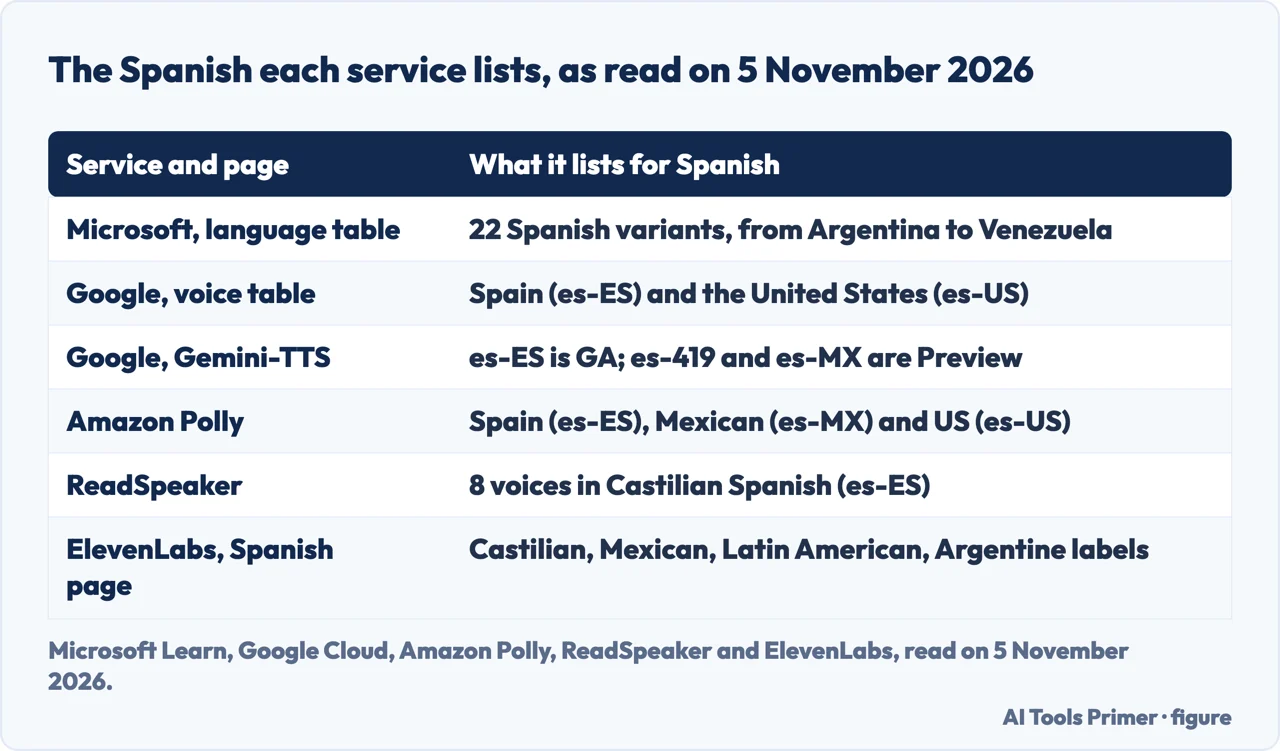
Microsoft’s language table for Azure Speech lists 22 Spanish variants for text to speech, from Argentina to Venezuela, each with a code such as es-AR, es-MX or es-US. Two of them stand out in the voice table: es-ES, for Spain, and es-MX, for Mexico, each with more than twenty voice names. The other 20 variants list two Standard voices each, one female and one male: es-AR has Elena and Tomas, es-CL has Catalina and Lorenzo, es-CO has Salome and Gonzalo, and es-US has Paloma and Alonso.
Google’s page of supported voices and languages has Spanish for two locales, es-ES for Spain and es-US for the United States, with tens of voices in each across several types. The text we saved of that page does not contain es-MX or es-419. A separate Google page, on Gemini-TTS, lists Spanish (Spain) es-ES as GA and Spanish (Latin America) es-419 and Spanish (Mexico) es-MX as Preview, and says that all voices for Gemini 3.1 Flash TTS are in Preview. In the two Google pages we read, then, Mexican and Latin American Spanish appear only in the Gemini-TTS list, and only as Preview.
Amazon Polly lists three: Spanish (Spain) es-ES with Conchita, Lucia, Alba, Enrique, Sergio and Raúl, three female and three male; Spanish (Mexican) es-MX with Mia and Andrés; and Spanish (US) es-US with Lupe, Penélope, Miguel, Pedro and Carlos. ReadSpeaker’s page is about one variant, Castilian Spanish (es-ES), and counts 8 voices, 5 female and 3 male, from 4 voice providers. ElevenLabs’ Spanish page labels its example voices Spanish Castilian, Mexican, Latin American and Argentine, and speaks of voices from Spain and Latin America; its documentation lists the language as Spanish (Spain, Mexico).
The counts are not comparable line by line. Microsoft counts locales, Google counts two in its voice table and three in Gemini-TTS, Amazon counts three, and ReadSpeaker and ElevenLabs describe what they sell. The pages do not say how their lists relate to each other.
How each page labels quality
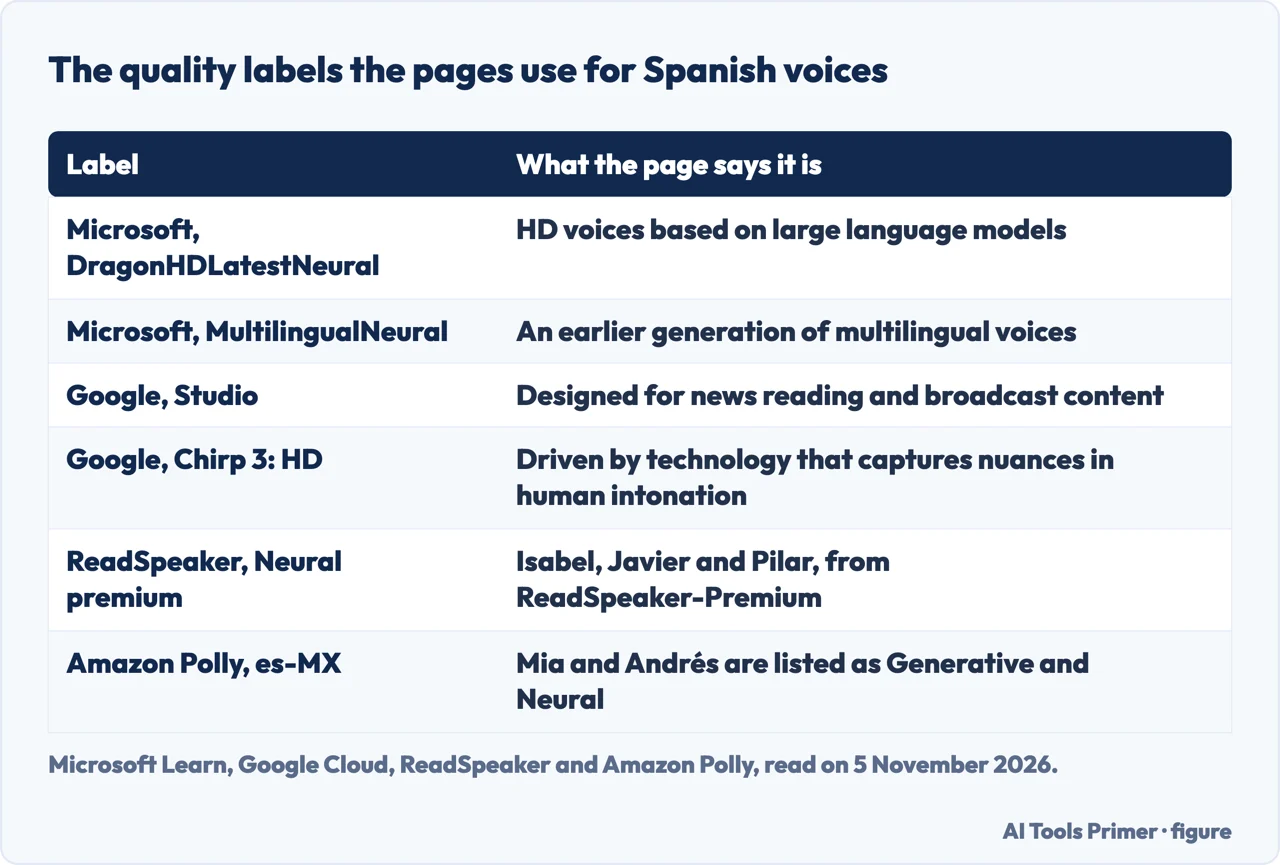
The Microsoft, Google, Amazon and ReadSpeaker pages each say something about the kind of voice, and they do not use the same words. Microsoft describes DragonHDLatestNeural voices as neural high-definition voices based on large language models, which it says can understand the semantic content of the input text. In the voice table, Ximena and Tristan carry that label for both es-ES and es-MX. Microsoft calls the MultilingualNeural voices an earlier generation of multilingual technology, with high naturalness but without the same contextual awareness as the HD voices. Marta for es-ES and Alejo and Valeria for es-MX carry the MAI-Voice-2 name and a note that the neural voice is available in public preview. The same table also lists male voices named Jorge (es-MX-JorgeNeural and a JorgeMultilingualNeural variant), a name that appears in the related search “text to speech spanish jorge”; the page does not say why that voice is searched for. For the Standard voices the page says each model is available at 24 kHz and at high-fidelity 48 kHz.
Google ties Chirp 3: HD to capturing the subtleties of human intonation and says its Studio voices are meant for news reading and broadcast content. The es-ES list shows Chirp 3: HD, Chirp, Neural2, Wavenet, Polyglot, Studio and Standard types; the es-US list shows those and a News type. For Gemini-TTS the page describes style, accent and pace as things a prompt can set.
Amazon Polly’s table has a column for each engine. For Spanish (Mexican), Mia and Andrés are marked Generative and Neural, neither is marked Long Form, and only Mia is marked Standard. A double asterisk next to Lupe means, according to the page, that the voice can be used with the Newscaster speaking styles in the Neural format. The table for Spain and the United States is flattened in the text we saved, so we do not say which voice there has which engine.
ReadSpeaker’s table gives each Castilian voice a technology and a provider. Isabel, Javier and Pilar are listed as Neural premium from ReadSpeaker-Premium, Lola and Manuel as Neural from VoiceText-DNN, Conchita from Ivona and jorgeNVE and Monica from Nuance, the last three with no technology named. Voices marked Cloud are available in ReadSpeaker’s online products, and voices marked Licensing for on-premises and embedded deployments. That page is a product page, so we used it only for these facts.
The labels are each service’s own: HD at Microsoft, Chirp 3: HD at Google, Neural premium at ReadSpeaker. The pages we read do not give a score for any Spanish variant, and do not compare a Spain voice with a Mexican one.
Where the accent comes from
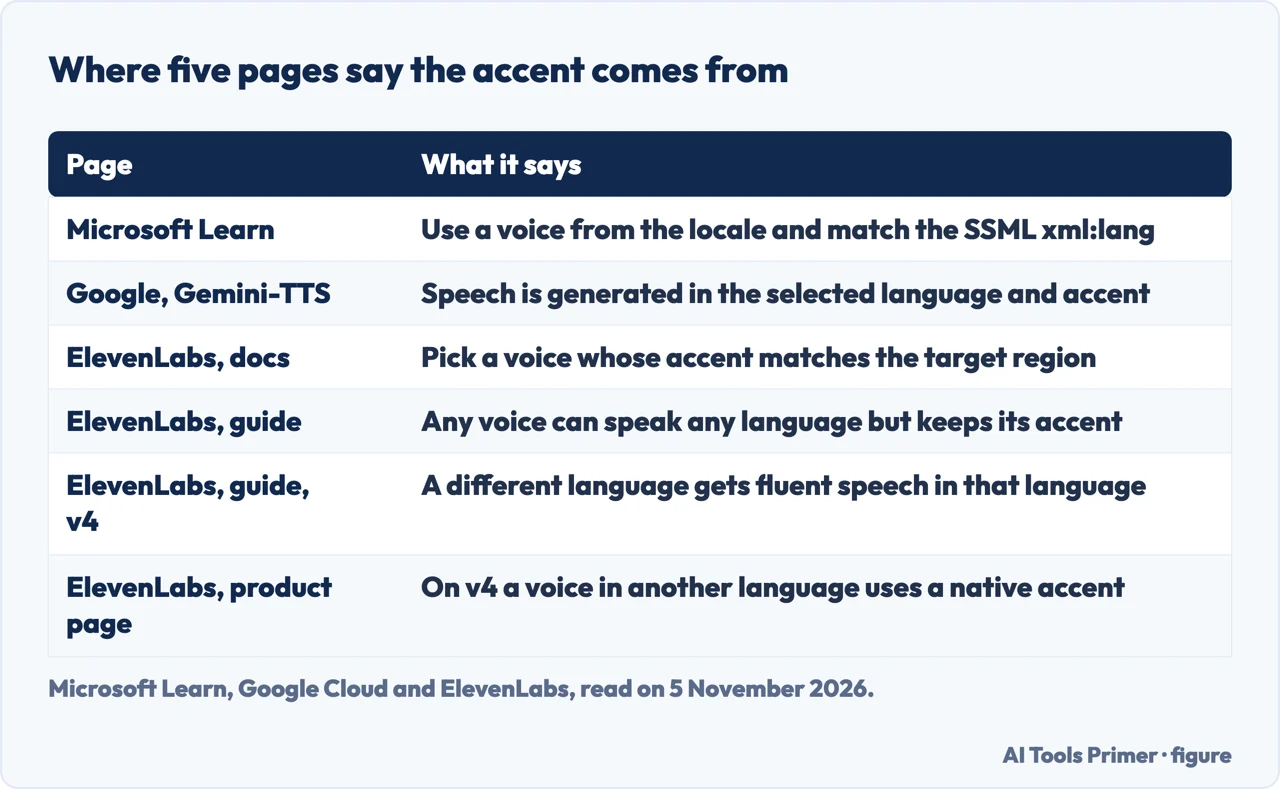
Microsoft’s page gives the rule for its voices in a tip: to synthesize text in a specific language, use a voice from that locale and match the SSML locale to the same language, for example an es-ES voice with xml:lang set to es-ES. It lists a voice from a different locale and an xml:lang value that conflicts with the voice among the common causes of output that does not match the target language. For the multilingual voices, a note says they speak in the language detected in the input text, and that the lang element with xml:lang can set the preferred accent of each language, with a British accent for English as its example.
Google’s Gemini-TTS page says the model generates speech in the selected language and accent, and that it can produce accents when a prompt asks for them. Its list is where Spanish (Mexico) and Spanish (Latin America) appear, as Preview.
ElevenLabs gives the accent to the voice. Its documentation says that for the most natural results you should choose a voice with an accent that matches your target language and region. Its guide says that any voice can technically speak any language but will retain its original accent, and gives an English voice reading French as the example. A second passage in the same guide says the accent comes from the voice you use.
Two ElevenLabs texts differ on what happens when the language changes. The guide says that with Eleven v4, when the language generated differs from that of the reference voice, the model produces fluent, natural-sounding speech in the target language instead of carrying over the original accent; the product page says that on v4 a voice speaking a different language uses a native accent. Another line of the guide says all pre-made and generated voices are English and might not have the correct accent or pronunciation in other languages. For a Spanish reader the practical reading is limited to what the pages say: one text says to pick a voice whose accent matches the target region, and none of the texts says which of the two v4 statements applies to Spanish. The texts do not say which model each line applies to, so we report them side by side, as read on 5 November 2026, without choosing one.
The voices already on an iPhone or a Mac
Apple’s page for the iPhone, published on 20 March 2025, says an iOS or iPadOS device uses a compact voice for VoiceOver, Speak Screen and Speak Selection, and that there are other options. For Speak Screen and Speak Selection the path is Settings, Accessibility, Spoken Content, Voices, where you choose the voice and dialect. Enhanced-quality voices can be 100 MB or larger, and Apple says to connect to Wi-Fi to download one. Our page on text to speech on iPhone follows those steps, and the one on VoiceOver on iPhone covers the VoiceOver side.
Apple’s page for the Mac sends you to System Settings, Accessibility, Read & Speak, and the System voice menu. It says voices are not available in all languages, that to see more voices for the current language, such as for another country or region, you may need to scroll down, and that a voice marked with the download icon is downloaded from Apple automatically (you must be connected to the internet). It also says you can set a custom pronunciation for individual words.
The two Apple pages do not name which Spanish voices exist for which country, and do not say how good they are. So the choice of dialect is in the settings menus, and the list of what is on offer is on the device.
What the pages do not say, and what we did not use
We listened to no voice and tested no service. What the pages leave open is exactly what a reader of this topic might want: how different a Spain voice and a Mexican voice sound to a listener, whether the two Standard voices of a smaller variant sound local or follow another variant’s accent, and where the declared quality is lower. The pages we read do not mention a measure of that kind, and the labels above are what the services declare about themselves.
Microsoft’s page has a second table, of custom voice features, that lists HD voice for several Spanish locales. It is about building a custom voice, not about the stock voices, and we did not use it as a list of voices. We did not read other languages, such as Portuguese, and we did not use the pages of other vendors or online converters.
Several related searches ask for free or online use (“text to speech spanish free”, “online”), and the pages we read answer only in part. ElevenLabs’ pricing table, read on 5 November 2026, shows a Free plan at $0 per month with 10k credits per month. Google’s Gemini-TTS page says billing must be enabled to use the Cloud Text-to-Speech API but that you are not charged unless you exceed the free quota, and refers to its pricing page for the rest. The Microsoft, Amazon and ReadSpeaker pages we read give no prices, and we did not compare free quotas or check whether the free tiers include the Spanish voices described above.
One practical step follows from the sources, and no more than that: since the accent depends on the locale, the voice or the prompt, play the same sentence with the voices of your own variant before using one. If the audio is for something you publish, the terms of use and the labels are a separate question, which we cover on our page about a voice generator, and cloning a voice is covered on cloning your voice.
Where to start
Four ways in.
- “Which Spanish is there?”
- Which Spanish each page lists — variants
- “Which voice is better?”
- How each page labels quality — quality
- “Why does it sound foreign?”
- Where the accent comes from — accent
- “On my phone?”
- The voices already on an iPhone or a Mac — apple
Voices that read aloud
The built-in reader, the generator and the screen reader.
Your own voice, in and out
Cloning, typing and transcribing.
Questions people also ask
Which Spanish accents can text to speech use?
It depends on the service. Microsoft lists 22 Spanish locales, Amazon Polly three, Google two in its voice table and two more in Gemini-TTS as Preview, and ReadSpeaker one, Castilian. ElevenLabs labels voices Castilian, Mexican, Latin American and Argentine.
Is there text to speech in Mexican Spanish?
Microsoft lists es-MX with more than twenty voice names, Amazon Polly lists Mia and Andrés, and Google lists es-MX only in Gemini-TTS, as Preview. The pages we read do not compare these voices.
Can one voice speak Spanish with a Spanish accent?
ElevenLabs says a voice keeps its original accent in another language; on v4 its texts say the model produces speech in the target language. Microsoft says to use a voice from the locale and match xml:lang.
How do I change the Spanish voice on an iPhone?
Apple says to go to Settings, Accessibility, Spoken Content, Voices, and choose the voice and dialect for Speak Screen and Speak Selection. The page does not name the Spanish voices.
Not covered here. We listened to no voice and tested no service. The statements come from pages of Microsoft, Google Cloud, Amazon Polly, ReadSpeaker, ElevenLabs and Apple, all read on 5 November 2026.
The search volume and difficulty behind this page come from an Ubersuggest reading of 5 November 2026, not the Semrush KD, and a Semrush check is still to be made.
Sources
- Microsoft Learn — Language and voice support for the Speech service — learn.microsoft.com, read 5 November 2026.
- Google Cloud — Supported voices and languages (Text-to-Speech) — docs.cloud.google.com, read 5 November 2026.
- Google Cloud — Gemini-TTS — docs.cloud.google.com, read 5 November 2026.
- Amazon Polly — Available voices — docs.aws.amazon.com, read 5 November 2026.
- ReadSpeaker — Castilian Spanish text to speech voices — www.readspeaker.com, read 5 November 2026.
- ElevenLabs — Free Spanish Text to Speech and Spanish AI Voices — elevenlabs.io, read 5 November 2026.
- ElevenLabs — Text to speech (documentation) — elevenlabs.io, read 5 November 2026.
- ElevenLabs — Text to speech (guide) — elevenlabs.io, read 5 November 2026.
- ElevenLabs — Text to speech — elevenlabs.io, read 5 November 2026.
- Apple Support — Adjust voice and speed for VoiceOver and Speak Screen — support.apple.com, read 5 November 2026.
- Apple Support — Change the voice your Mac uses to speak text — support.apple.com, read 5 November 2026.
Written by Alberto Gulotta
Founder and editor of AI Tools Primer, writing from Palermo, Italy. Thirty-five years of taking computers apart, starting with a Commodore 64 — the long version is on the about page.
Something wrong on this page? Write to aitoolsprimer@gmail.com and it gets fixed.
Written on 6 November 2026.
Independence and limits
No affiliate links and no paid placements anywhere on this site. Nobody pays to appear here, and no company has seen this page before you did.
This is general information, not professional advice. Where a page touches money, health, safety or the law, it names its source and the date it was read — and your situation may still differ. See the privacy page and the cookie policy.