Chat · guide
Ollama vs ChatGPT: what the pages say on data, memory and cost
By Alberto Gulotta · Updated
Ollama vs ChatGPT comes down to where the model runs. Ollama says it does not see your prompts when a model runs on your machine. Pluralsight says ChatGPT runs entirely in the cloud, and OpenAI says data sharing is on by default for Free, Plus and Pro. The pages we read give memory figures and prices, not a winner.
| Question | Answer | Where it comes from |
|---|---|---|
| Where do my prompts go? | Ollama says it does not see them when a model runs on your machine; Pluralsight says ChatGPT runs entirely in the cloud | Ollama FAQ, Pluralsight |
| Can Ollama stay local only? | Yes: a setting or an environment variable turns its cloud features off, and cloud models and web search go with them | Ollama FAQ |
| Is ChatGPT trained on my chats? | On Free, Plus and Pro, data sharing is on by default and one setting turns it off; business workspaces are not used for training by default | OpenAI Help Center |
| What does a local model ask for? | For the Quickstart model, a download of about 7.2 GB and 8 GB of VRAM or unified memory | Ollama Quickstart |
| What do the plans cost? | Ollama Pay as you go is $0 and Pro is $20 a month; ChatGPT Plus is $20 a month | Ollama pricing, OpenAI Help Center |
Where the model runs: your machine, Ollama’s cloud or OpenAI’s
Ollama’s FAQ answers its privacy question with a short statement that Ollama runs locally. The same program also offers cloud models. Ollama’s Cloud page describes them as models run in Ollama’s cloud, with no model or app download required, and says the app asks you to sign in to use them. Its examples show a cloud model named with a cloud tag, such as gemma4:cloud. The word local therefore depends on the model you pick: a model downloaded to your computer runs there, and a cloud model is processed on Ollama’s servers.
ChatGPT sits on the other side. Pluralsight’s article of September 11, 2024, says ChatGPT operates entirely in the cloud, with all data and interactions processed on remote servers, and that it limits users to the models on OpenAI’s servers. The article also says ChatGPT raises concerns about latency and dependence on internet connectivity, and that Ollama’s Open WebUI lets you pick open models such as Llama and Mistral and adjust model parameters. Those are the article’s claims; the pages we read give no measurements of either. That article is more than two years older than our reading. The ChatGPT plans page we read on November 6, 2026, lists the GPT-6 and GPT-5.6 families, so a comparison from 2024 describes products that have changed since.
One pair of models links the two names. OpenAI’s announcement says gpt-oss-120b and gpt-oss-20b are open-weight language models under the Apache 2.0 license, with weights free to download from Hugging Face. Ollama’s library lists gpt-oss as OpenAI’s open-weight models and offers a 20b and a 120b size. So Ollama can run a model made by OpenAI. The ChatGPT pricing page lists different models by name, and the pages we read do not describe downloading those. Our page on open source AI models covers what open weights mean.
What happens to your prompts
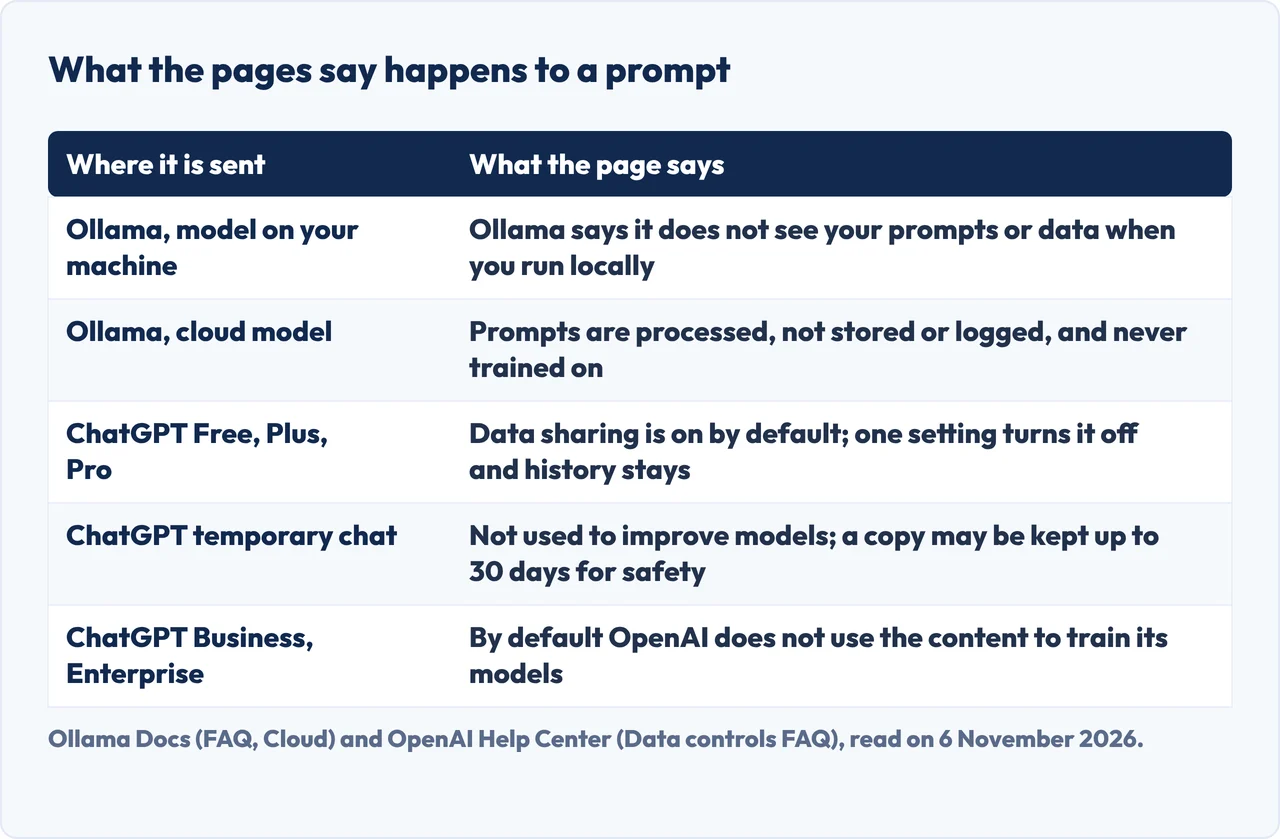
Ollama. The FAQ says Ollama does not see your prompts or data when you run locally. For cloud-hosted models it says it processes prompts and responses to provide the service, does not store or log that content and does not train on it. It adds that it collects basic account information and limited usage metadata that does not include the content of prompts or responses. The Cloud page repeats the point: “We do not use them to train models.” Ollama’s pricing FAQ adds that it hosts cloud models primarily in the United States, may route to Europe for extra capacity, and requires its NVIDIA Cloud Provider partners to have no-logging, no-training and zero-data-retention policies in place. For local only use, the FAQ gives two switches: set disable_ollama_cloud to true in ~/.ollama/server.json, or set the environment variable OLLAMA_NO_CLOUD to 1, then restart Ollama. The price, it says, is the loss of Ollama’s cloud models and web search.
ChatGPT on a personal plan. OpenAI’s Data controls FAQ says that on personal workspaces with ChatGPT Free, Plus or Pro, data sharing is enabled by default. You can turn off “Improve the model for everyone” and keep your chat history. The same page says turning it off does not delete or hide saved chats, and that deleting a chat or an account is a separate step. It also says that if you send thumbs-up or thumbs-down feedback after opting out, the whole conversation tied to that feedback may be used to train OpenAI models, and that voice mode has its own control.
The temporary chat. OpenAI’s help pages say a temporary chat stays out of your history and is not used to improve OpenAI models while it remains temporary, and that OpenAI may keep a copy for up to 30 days for safety purposes. If you save it, it becomes a regular chat and follows your account settings.
The policy and the business plans. OpenAI’s privacy policy says it collects the content you provide, including prompts, files, images, audio and video, and that it may use that content to improve its services, for example to train the models behind ChatGPT, with instructions for opting out. It says deleted data is removed from its systems within 30 days unless it must be kept longer for security, safety or legal reasons. The Data controls FAQ and the enterprise privacy page describe a different default for business plans: OpenAI does not use content from ChatGPT Business, Enterprise, Edu or Healthcare workspaces to train its models by default. The enterprise page adds that deleted conversations are removed within 30 days unless the law requires them to be kept. Personal and business plans therefore start from different settings, and the table below shows the personal plans and the cloud models side by side.
For more on what OpenAI says about reading, training and deletion, see ChatGPT and confidential information. For what stays on a device when you run a model yourself, see run an LLM locally.
What you need on your own machine
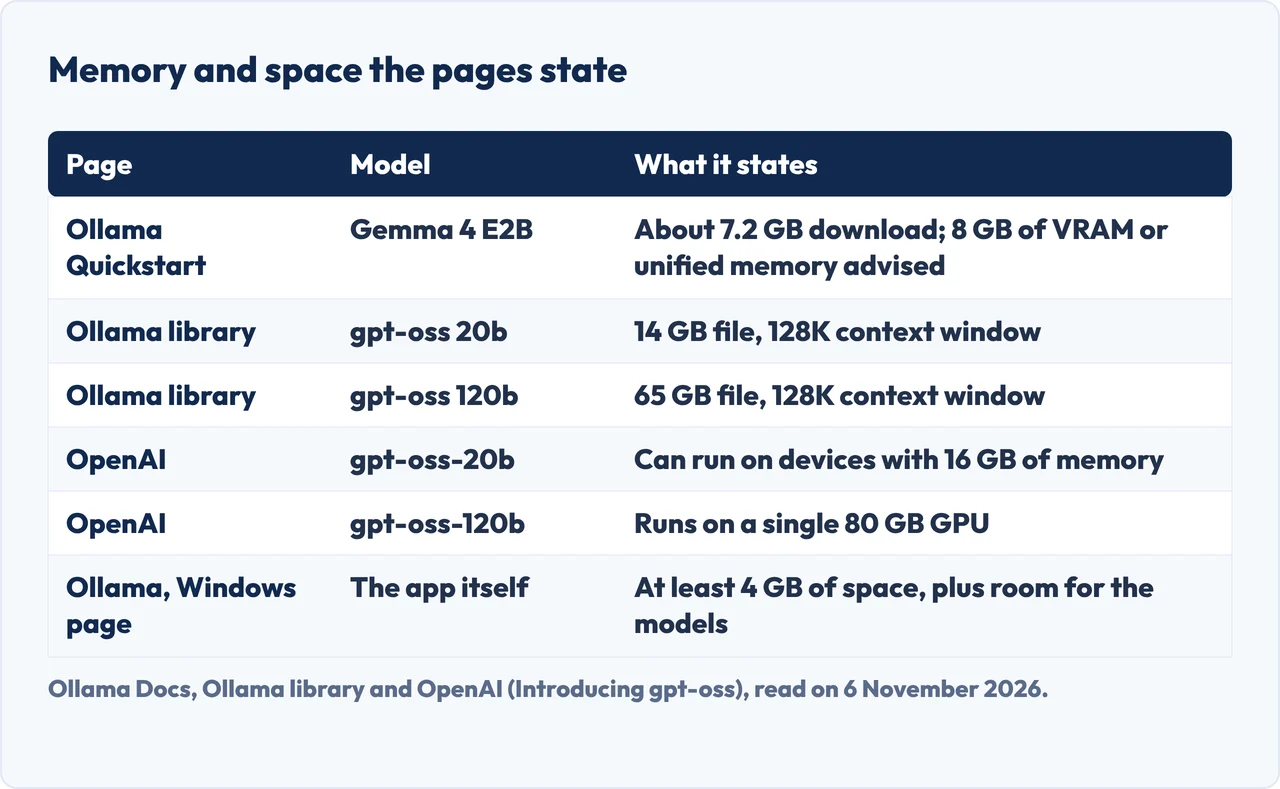
Ollama’s Quickstart runs a model called Gemma 4 E2B. It says the download is about 7.2 GB and recommends 8 GB of available VRAM, or unified memory on a Mac. It adds that larger context windows need more memory, and that with less VRAM Ollama can use system RAM but responses may be slower.
The gpt-oss models give two sets of figures that look alike and measure different things. Ollama’s library lists the 20b model as a 14 GB file and the 120b model as 65 GB, each with a 128K context window. OpenAI says gpt-oss-20b can run on devices with just 16 GB of memory and gpt-oss-120b on a single 80 GB GPU. One is the size of a download and the other is the memory to run the model, so 14 and 16 do not contradict each other.
Ollama’s hardware page says it supports Nvidia GPUs with compute capability 5.0 or higher and driver version 550 or newer, and adds that GPUs with compute capability 5.0 through 6.2 require driver version 570 or newer. Its macOS page lists Apple M series chips with CPU and GPU support, and x86 Macs with CPU only. The Windows page asks for Windows 10 22H2 or newer and at least 4 GB of space for the program, plus room for the models, which it says can be tens to hundreds of GB each. On macOS the models are kept in ~/.ollama/models.
Two settings in the FAQ matter for memory. By default Ollama uses a context window of 4096 tokens, which the OLLAMA_CONTEXT_LENGTH variable can change, and parallel requests enlarge the context and the memory it uses. If there is not enough memory to load a new model while others are loaded, the FAQ says new requests are queued until it can be loaded. ChatGPT’s plans page lists context windows by plan: for the Instant models, 27K on Free, 54K on Go and Plus and 128K on Pro; for the reasoning models, 256K on Go and Plus and 400K on Pro. These are not the same kind of figure, since one is Ollama’s default and the other is what a plan lists. The pages we read do not say how much memory the hosted GPT models need. For the install steps, see how to install Ollama.
What it costs, as the pages state it
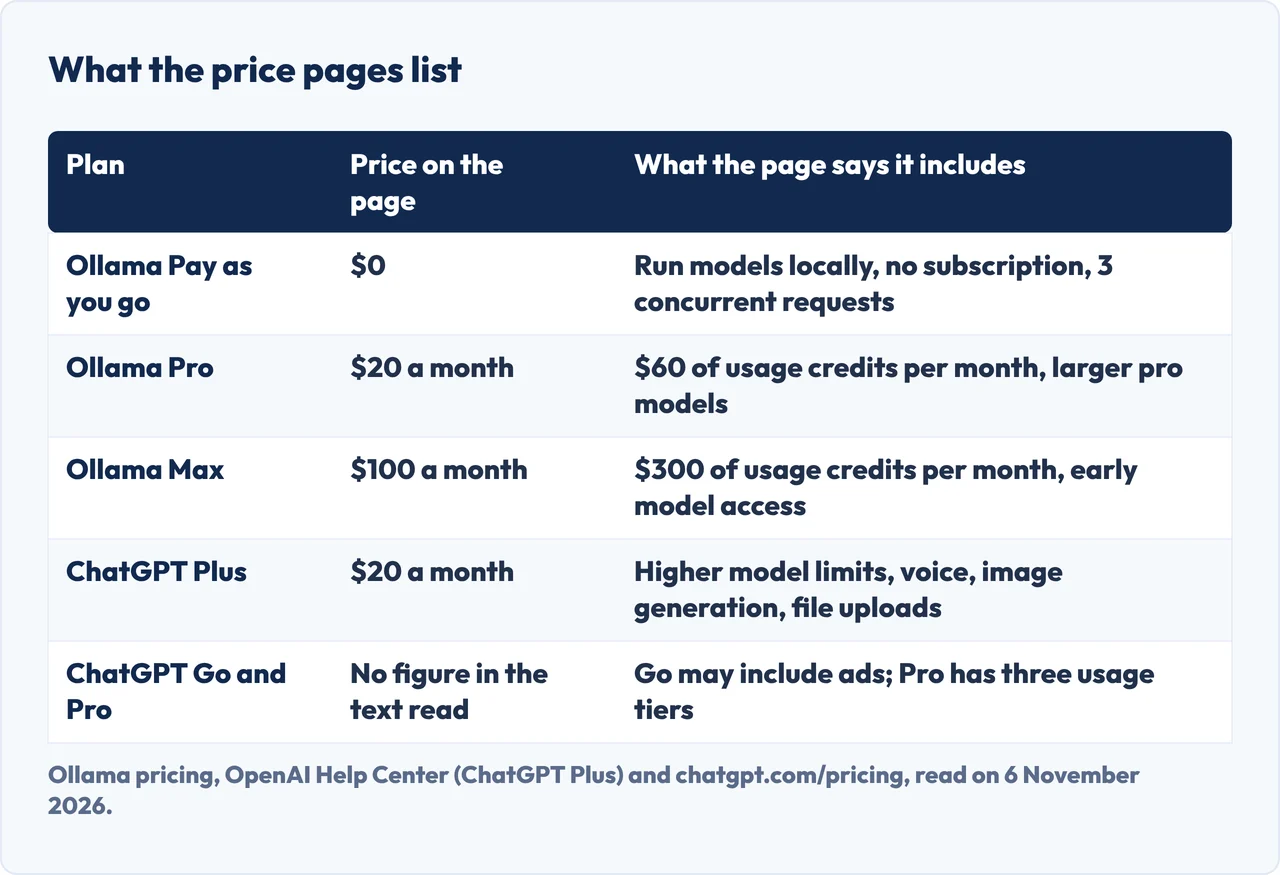
Ollama’s pricing page, read on November 6, 2026, starts with Pay as you go at $0, described as pay per token for every cloud model. It lists Run models locally, a plan without a subscription and 3 concurrent requests. Pro is $20 a month, or $200 a year billed annually, which the page shows as $16.67 a month. It includes $60 of usage credits per month and access to larger pro models. Max is $100 a month, with $300 of usage credits per month, early access to the newest models and 10 concurrent requests. The credits are for cloud models, which the page prices per million tokens.
On the ChatGPT side, OpenAI’s help page for Plus says the plan is for $20/month and that the price is billed monthly. It lists priority access in high-traffic periods, higher model limits, faster responses, voice conversations, image generation and file uploads. It says API usage is separate and billed independently, and that Plus does not offer annual billing. It also says Plus may include usage limits such as message caps, especially during high demand. Ollama’s pricing FAQ says that running models on your own hardware is always unlimited, and that its plans’ included credits apply to cloud models, so the two $20 figures do not buy the same thing. The plans page lists Free, Go, Plus and Pro, but the text we read has blank prices, so we have no figure for Go or Pro. It says Go may include ads and that Pro offers a choice of three usage tiers.
Pluralsight says Ollama can be more cost-efficient for people who already have powerful computing resources, and gives figures for neither side. The pages we read do not mention electricity or hardware costs, so this page does not work out a total. Prices on all these pages change, and the figures above are those on the day we read them.
What the pages do not settle
The pages we read do not say which of the two gives better answers, or how close a 14 GB model on your own computer comes to the hosted models in ChatGPT. They also do not mix the two sides in one place: each page gives figures for its own product, and Pluralsight, the only page covering both, gives no figures for memory or price. For that reason this page names no winner.
Reach is a second difference the pages state but do not weigh. Ollama’s FAQ says it binds the local address 127.0.0.1 by default and that the OLLAMA_HOST environment variable changes the bind address, so a model on your computer answers requests from that computer unless you change it. ChatGPT is reached through a cloud-based interface, with the models hosted by OpenAI. The pages we read do not compare the two on speed or reliability.
The claim that no data leaves the device holds only for local models: the Ollama FAQ and Cloud pages say cloud models process prompts on Ollama’s servers.
Where to start
Four ways in.
- “Where does the model run?”
- Your machine, Ollama’s cloud or OpenAI’s — where
- “Who sees my prompts?”
- What happens to your prompts — prompts
- “What does my computer need?”
- What you need on your own machine — machine
- “What does it cost?”
- What it costs, as the pages state it — cost
Running a model yourself
Install it, size it up and know what open means.
The ChatGPT side
What OpenAI says about your chats and its plans.
Questions people also ask
Is Ollama better than GPT?
The pages we read do not say which gives better answers. They differ on where the model runs: Ollama says it does not see prompts when you run locally, while ChatGPT is hosted by OpenAI and, on Free, Plus and Pro, shares data by default until you turn the setting off.
What are the disadvantages of Ollama?
The pages we read do not list disadvantages as such. They state requirements: a download of about 7.2 GB and 8 GB of VRAM or unified memory for the Quickstart model, slower replies on system RAM, a default context window of 4096 tokens, and queued requests when memory is short.
Can Ollama run ChatGPT?
The pages we read describe Ollama running gpt-oss, OpenAI’s open-weight models, with the 20b size a 14 GB file. The ChatGPT pricing page lists other models, the GPT-6 and GPT-5.6 families, and the pages we read do not describe downloading them.
Is there anything better than Ollama?
The pages we read do not say. They cover Ollama and ChatGPT only. Our guide to running an LLM locally names LM Studio and llama.cpp beside Ollama, and the one on open source models explains open weights.
The statements come from Ollama’s FAQ, Cloud, Quickstart, hardware, macOS and Windows pages, its pricing page and its gpt-oss library page, from OpenAI’s Data controls FAQ, temporary chat page, ChatGPT Plus page, privacy policy, enterprise privacy page, gpt-oss announcement and ChatGPT plans page, and from a Pluralsight article of September 11, 2024, all read on November 6, 2026.
The pages we read do not give the prices of ChatGPT Go and Pro, or any test of how well either product answers.
Sources
- Ollama Docs — FAQ — docs.ollama.com, read November 6, 2026.
- Ollama Docs — Cloud — docs.ollama.com, read November 6, 2026.
- Ollama Docs — Quickstart — docs.ollama.com, read November 6, 2026.
- Ollama Docs — Hardware support — docs.ollama.com, read November 6, 2026.
- Ollama Docs — macOS — docs.ollama.com, read November 6, 2026.
- Ollama Docs — Windows — docs.ollama.com, read November 6, 2026.
- Ollama — Pricing — ollama.com, read November 6, 2026.
- Ollama — gpt-oss library — ollama.com, read November 6, 2026.
- OpenAI Help Center — Data controls FAQ — help.openai.com, read November 6, 2026.
- OpenAI Help Center — Temporary chat FAQ — help.openai.com, read November 6, 2026.
- OpenAI Help Center — What is ChatGPT Plus? — help.openai.com, read November 6, 2026.
- OpenAI — Privacy policy — openai.com, read November 6, 2026.
- OpenAI — Enterprise privacy — openai.com, read November 6, 2026.
- OpenAI — Introducing gpt-oss — openai.com, read November 6, 2026.
- ChatGPT — Plans and pricing — chatgpt.com, read November 6, 2026.
- Pluralsight — Ollama: The Docker for LLMs and how it compares to ChatGPT — www.pluralsight.com, read November 6, 2026.
Written by Alberto Gulotta
Founder and editor of AI Tools Primer, writing from Palermo, Italy. Thirty-five years of taking computers apart, starting with a Commodore 64 — the long version is on the about page.
Something wrong on this page? Write to aitoolsprimer@gmail.com and it gets fixed.
Independence and limits
No affiliate links and no paid placements anywhere on this site. Nobody pays to appear here, and no company has seen this page before you did.
This is general information, not professional advice. Where a page touches money, health, safety or the law, it names its source and the date it was read — and your situation may still differ. See the privacy page and the cookie policy.