
Docs · guide
Subscript in Google Docs: the shortcut, and two guides that differ
By Alberto Gulotta · Updated · 9 min read
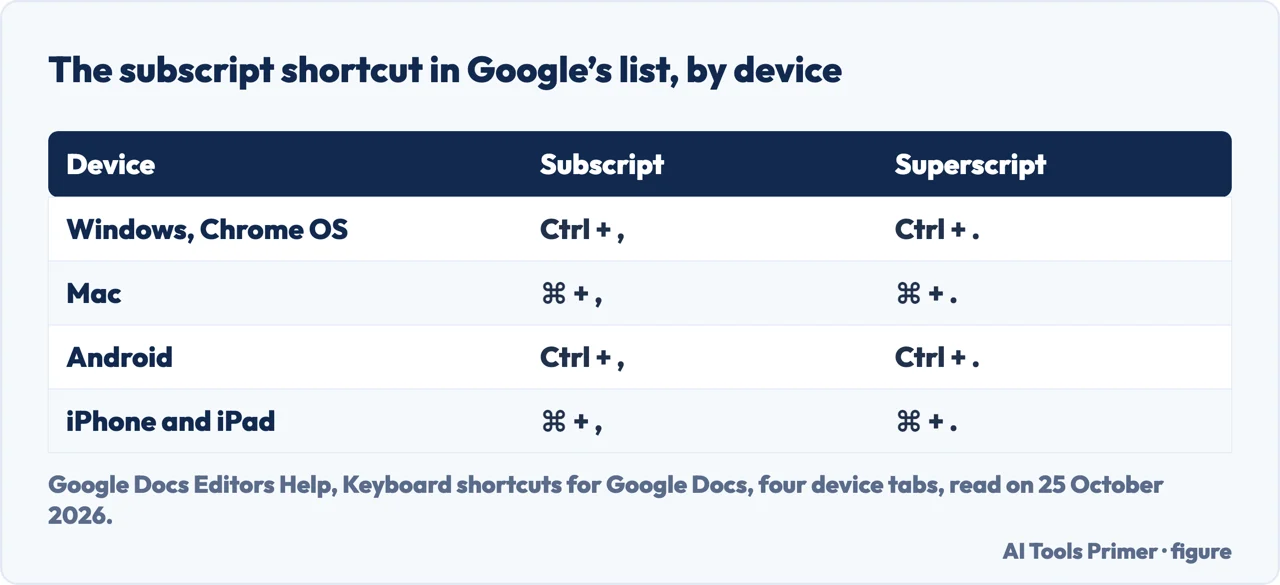
Subscript in Google Docs has a shortcut in Google’s own list: Ctrl + comma on Windows, Chrome OS and Android, and ⌘ + comma on a Mac, iPhone or iPad. Two guides in the results give a different key. This page sets out the shortcut, the menu, the equation route and special characters, and who says what.
| Question | Answer | Where it comes from |
|---|---|---|
| What is the shortcut? | Subscript Ctrl + , and superscript Ctrl + . (Windows, Chrome OS, Android); with ⌘ on a Mac, iPhone and iPad | Google Docs Editors Help |
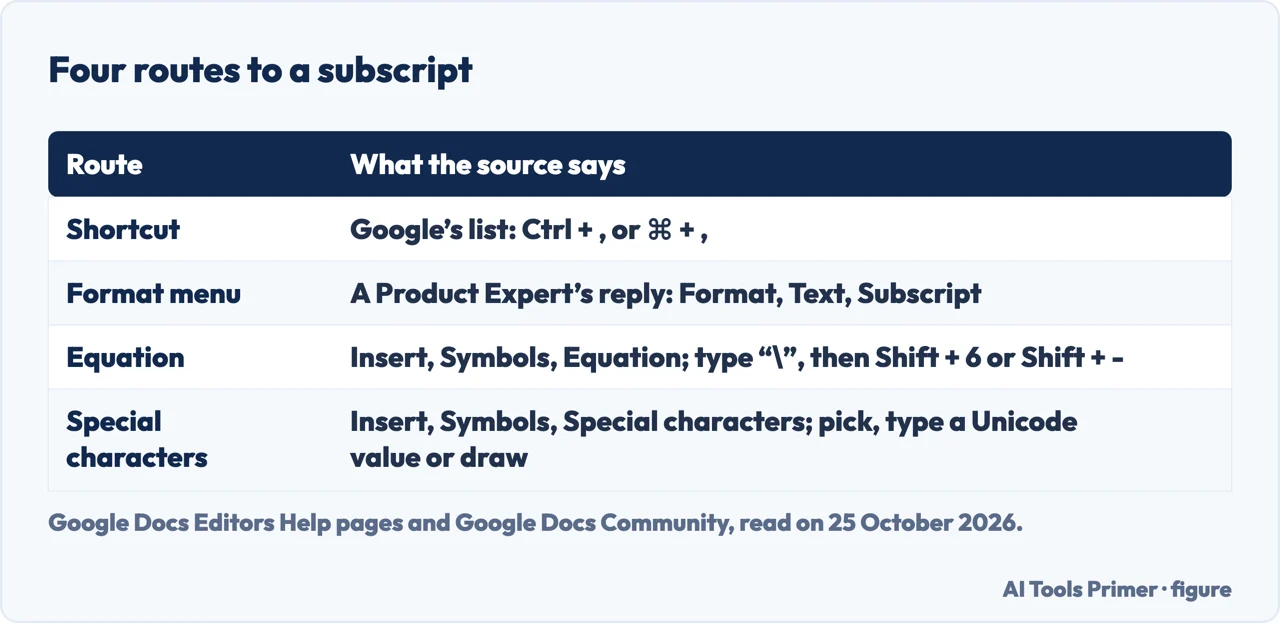
| Is there a menu? | Format, Text, Subscript, according to a Google Product Expert’s reply and three guides | Google Docs Community; the guides |
| Can I type a number as a subscript? | The expert’s reply says no: type it, select it, then apply the subscript | Google Docs Community, 13 November 2024 |
| What about an equation? | Insert, Symbols, Equation; type “\”, then Shift + 6 or Shift + - | Google Docs Editors Help |
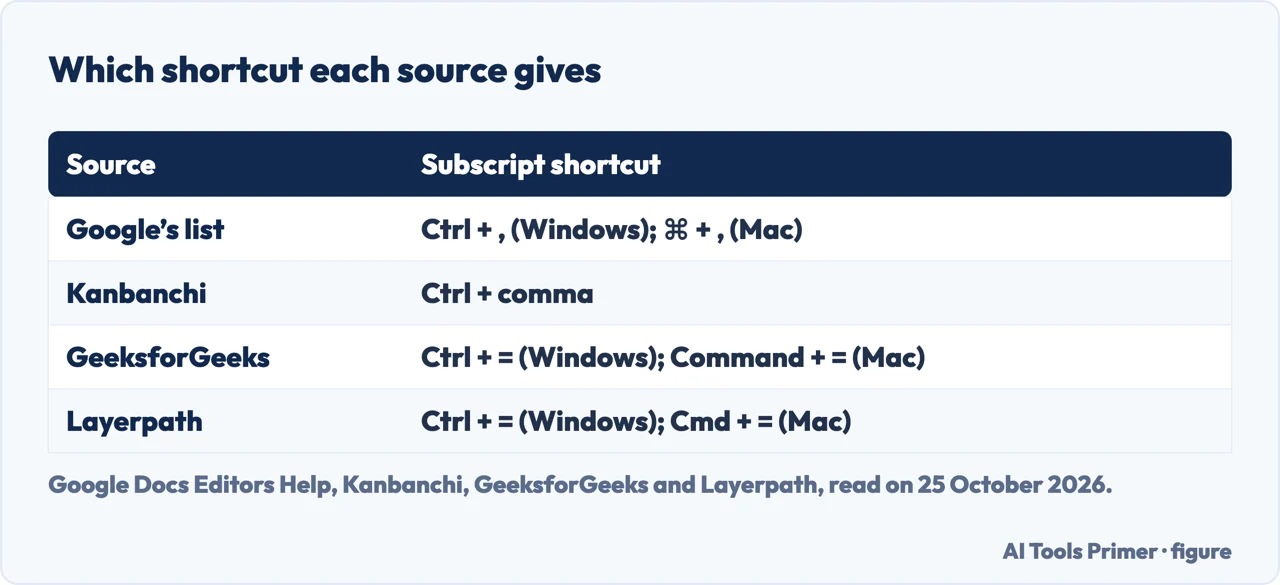
| Is Ctrl + = the shortcut? | Two guides say so; Google’s list has no shortcut with the = key | GeeksforGeeks; Layerpath; Google |
The shortcut in Google’s list
Google’s page of keyboard shortcuts for Google Docs lists the formatting pair on each device. On Windows and Chrome OS, superscript is Ctrl + . and subscript is Ctrl + , (period and comma). On a Mac it is ⌘ + . and ⌘ + ,. The Android phone and tablet tab of the page prints the Ctrl keys, and the iPhone and iPad tab prints the ⌘ keys. To see the list inside the document, the page says to press Ctrl + / on Windows and Chrome OS or ⌘ + / on a Mac.
The same page lists Ctrl + k, ⌘ + k on a Mac, as Insert or edit link, which answers the people-also-ask question about Ctrl+K. In each section of Google’s list the subscript and superscript rows come right after the strikethrough row, which is Alt + Shift + 5 on Windows and Chrome OS and ⌘ + Shift + x on a Mac. The shortcut applies to selected text. Layerpath says to switch the formatting off by repeating the step, and Kanbanchi says it can be applied to highlighted text or switched on and off before and after typing.
Searches such as how to subscript in google docs, how to do a subscript in google docs and how to superscript in google docs end at the same pair of keys: the comma for the subscript and the period for the superscript, with the same two formats under Format, Text according to the expert and the guides.
In an equation, and with special characters
Google’s equation page says to click Insert, Symbols, Equation, then select symbols from the Greek letters, Miscellaneous operations or Math operators menus. For subscripts inside an equation, it says to type “\”, then press Shift + 6 or Shift + -. The people-also-ask boxes ask about H2O and CO2; the first two routes apply to those once the digit is typed, and the equation route is the one Google documents for formulas.
The special characters route is Insert, Symbols, Special characters in Docs or Slides, not in Sheets. Google says you can pick from categories, enter the character’s Unicode value, or write the character in the box on the right. GeeksforGeeks lists it as its third method. Google’s page does not say which character to look for, so we do not.
The shortcut that Google does not list
GeeksforGeeks, updated on 9 May 2026, says to press Ctrl + = on Windows or Command + = on a Mac. Layerpath gives Ctrl + = or Cmd + =, and presents it as the way to switch the formatting off. Kanbanchi gives Ctrl + comma for subscript, as Google does. Google’s lists for the computer, Android and iPhone & iPad tabs contain no shortcut with the = key. We did not try either shortcut in a document, so we give Google’s.
Where to start
Four ways in.
- “Just give me the shortcut.”
- Google’s list — shortcut
- “I want the menu.”
- Who says so — menu
- “It is for a formula.”
- Equation and characters — equation
- “A guide gave me another key.”
- Ctrl + = — keys
More Google Docs formatting
The same menu, other characters of text and page.
Questions people also ask
How to type a small 2 for H2O on Google Docs?
A Google Product Expert says you cannot enter a number as subscript, but you can type the 2, select it and apply the subscript with Format, Text, Subscript or Ctrl + ,.
What is the shortcut for subscript?
Google’s list gives Ctrl + , on Windows, Chrome OS and Android, and ⌘ + , on a Mac, iPhone and iPad.
What does Ctrl+K do in Google Docs?
Google’s list gives Ctrl + k as Insert or edit link, and ⌘ + k on a Mac.
How to write CO2 in Google Docs?
Type CO2, select the 2, then use the subscript shortcut or Format, Text, Subscript; inside an equation, Google says to type “\”, then Shift + 6 or Shift + -.
Not covered here. We did not apply a subscript in a document. The statements come from Google Docs Editors Help (the shortcut list on its computer, Android and iPhone & iPad tabs; the equation page; the special characters page; “Change how paragraphs & fonts look”), a Google Docs Community reply of 13 November 2024, and three guides used for what they claim: Kanbanchi, GeeksforGeeks (updated 9 May 2026) and Layerpath. Menus and shortcuts change with the Docs version.
The Avantix page refused our request; a library PDF and Quora were not read. Google Slides and Sheets, and PowerPoint, are not covered.
The search volume and difficulty behind this page were read in Semrush on 29 August 2026.
Sources
- Google Docs Editors Help — Keyboard shortcuts for Google Docs — support.google.com, read 25 October 2026.
- Google Docs Editors Help — Use equations in a document — support.google.com, read 25 October 2026.
- Google Docs Editors Help — Insert emojis & special characters — support.google.com, read 25 October 2026.
- Google Docs Editors Help — Change how paragraphs & fonts look — support.google.com, read 25 October 2026.
- Google Docs Community — how do I enter a number as a subscript (13 November 2024) — support.google.com, read 25 October 2026.
- Kanbanchi — How to do subscript and superscript in Google Docs? — www.kanbanchi.com, read 25 October 2026.
- GeeksforGeeks — How to Do Subscript in Google Docs (updated 9 May 2026) — www.geeksforgeeks.org, read 25 October 2026.
- Layerpath — How to Add Subscript in Google Docs — www.layerpath.com, read 25 October 2026.
Written by Alberto Gulotta
Founder and editor of AI Tools Primer, writing from Palermo, Italy. Thirty-five years of taking computers apart, starting with a Commodore 64 — the long version is on the about page.
Something wrong on this page? Write to aitoolsprimer@gmail.com and it gets fixed.
Written on 25 October 2026.
Independence and limits
No affiliate links and no paid placements anywhere on this site. Nobody pays to appear here, and no company has seen this page before you did.
This is general information, not professional advice. Where a page touches money, health, safety or the law, it names its source and the date it was read — and your situation may still differ. See the privacy page and the cookie policy.