
Docs · guide
The SUMIF function in Excel, and where SUMIFS takes over
By Alberto Gulotta · Updated · 9 min read
The SUMIF function in Excel adds the values that meet a single condition, as Exceljet puts it: =SUMIF(range, criteria, [sum_range]). Text, and criteria with symbols such as ">5", go in double quotation marks, Microsoft says. For two or more conditions Microsoft points to SUMIFS, which takes the range to add as its first argument instead of its last.
| Argument | Required? | What Microsoft says it is |
|---|---|---|
| range | Yes | The cells evaluated by the criteria; blank and text values are ignored, and dates in standard Excel format are allowed |
| criteria | Yes | A number, expression, cell reference, text or function that decides which cells are added, such as 32, ">32", B5, "3?" or TODAY() |
| sum_range | No | The cells to add when they are not the ones in range; left out, Excel adds the cells in range |
Versions. Microsoft’s SUMIF page lists Excel for Microsoft 365, Excel 2024 and Excel 2021, each also for Mac, plus Excel 2019 and Excel 2016; its SUMIFS page adds the Excel Web App. A plain total with no condition is in summing a column in Excel, and the <> operator used in criteria is in does not equal in Excel.
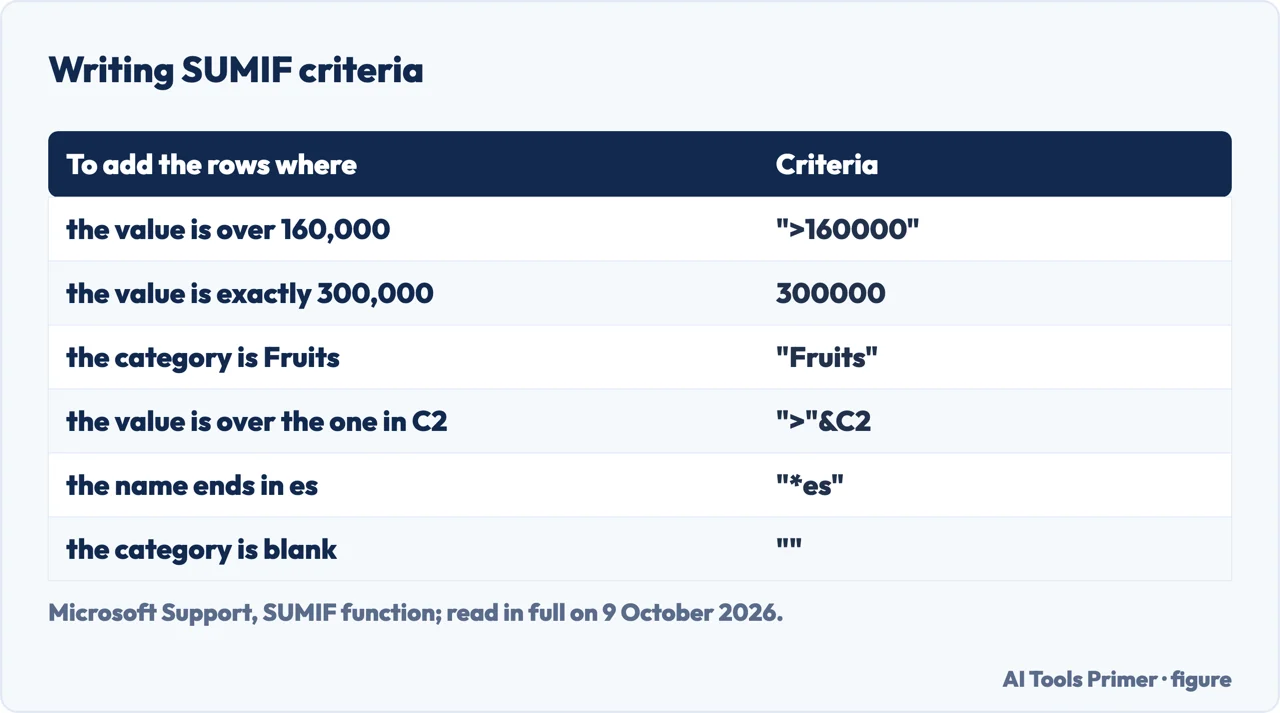
Writing a SUMIF formula
- Pick the range to test. The column the condition is about, such as the categories in Microsoft’s food example, A2:A7.
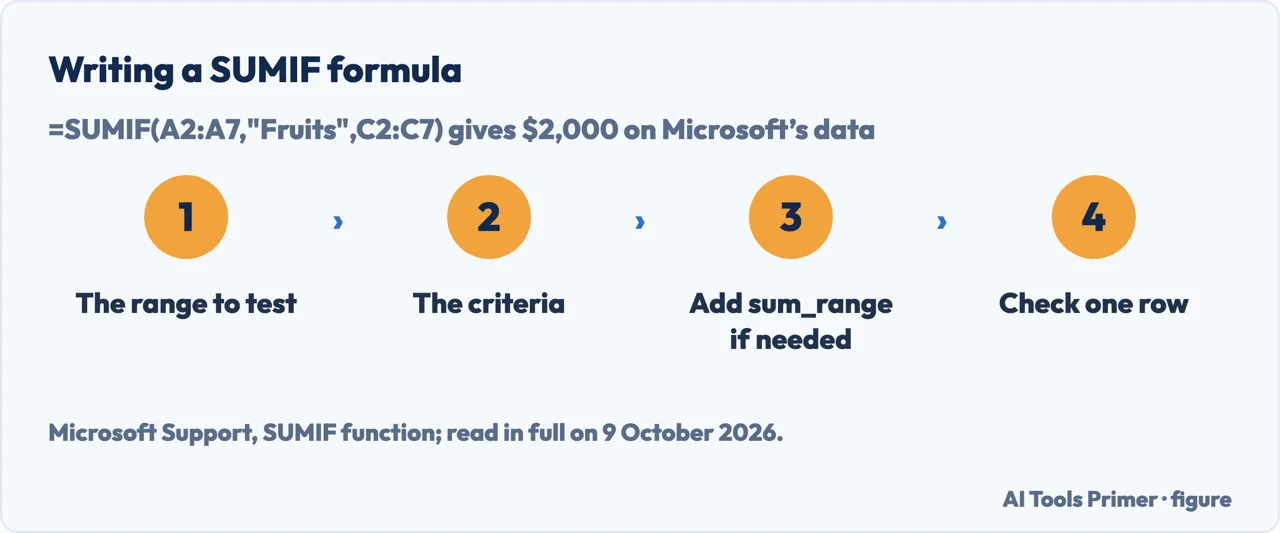
- Write the criteria. Microsoft says text, and any criteria with logical or mathematical symbols, must be in double quotation marks: "Fruits", or ">5". A plain number such as 32 needs none.
- Add the sum_range, if needed. The column to add, such as the sales in C2:C7; Microsoft says it should be the same size and shape as range. Leave it out when the numbers to add are the ones you tested.
- Check one row by hand. =SUMIF(A2:A7,"Fruits",C2:C7) gives $2,000 on Microsoft’s sample data; the check against one row is our suggestion.
Microsoft’s two tables. On property values of $100,000 to $400,000 with commissions beside them, Microsoft’s formulas add the commissions for the values over $160,000, $63,000, and the commission for exactly $300,000, $21,000. The same condition with no sum_range adds the property values themselves, $900,000, because Excel then adds the tested cells. On the food list, =SUMIF(A2:A7,"Vegetables",C2:C7) gives $12,000.
Criteria: the quotation marks, the & and the wildcards
Quotation marks. Microsoft’s rule is that text criteria, and criteria with logical or mathematical symbols, go in double quotation marks; numeric criteria don’t need them. Exceljet adds that an equal sign isn’t needed for an equals test, "jim" rather than "=jim", and that Excel won’t let you enter the formula if the quotes are missing where they are required; Microsoft’s SUMIFS page lists a 0 shown instead of the expected result as a sign that text criteria lack quotation marks.
A value in another cell. To compare with a cell, Microsoft’s example joins the operator and the reference with an ampersand: =SUMIF(A2:A5,">"&C2,B2:B5), which returns $49,000 on its data, where C2 holds $250,000. Exceljet warns that a reference written inside quotes, "A1", becomes text.
Wildcards. A question mark matches any single character and an asterisk any sequence of characters; to find a real question mark or asterisk, Microsoft says to type a tilde before it. Its example =SUMIF(B2:B7,"*es",C2:C7) adds the foods ending in es, Tomatoes, Oranges and Apples: $4,300. Exceljet notes that wildcards work with text, not numbers.
Blanks and dates. =SUMIF(A2:A7,"",C2:C7) adds the rows with no category, $400 in Microsoft’s example; Exceljet uses "<>" for cells that are not blank. For a date, Exceljet joins the operator to a date in a cell or to the DATE function, as in "<"&DATE(2019,3,1).
When sum_range is a different size
Microsoft’s rule. Sum_range should be the same size and shape as range. If it isn’t, Microsoft says performance may suffer, and the formula sums a block that starts with the first cell of sum_range and has the dimensions of range: with range A1:A5 and sum_range B1:K5, the cells added are B1:B5.
What Exceljet adds. Exceljet says SUMIF silently resizes sum_range to match, and that this can create incorrect results that look normal. In our reading, nothing in the result flags it.
The other limits. Microsoft says SUMIF returns incorrect results when it matches strings longer than 255 characters or the string #VALUE!. Exceljet adds that SUMIF isn’t case-sensitive, that it needs a real range rather than an array, so =SUMIF(YEAR(B5:B16),E5,C5:C16) can’t be entered, and that a range in another workbook must have that workbook open or the result is #VALUE!.
Two conditions: the SUMIFS function in Excel
SUMIFS: more than one condition, and sum_range moves first
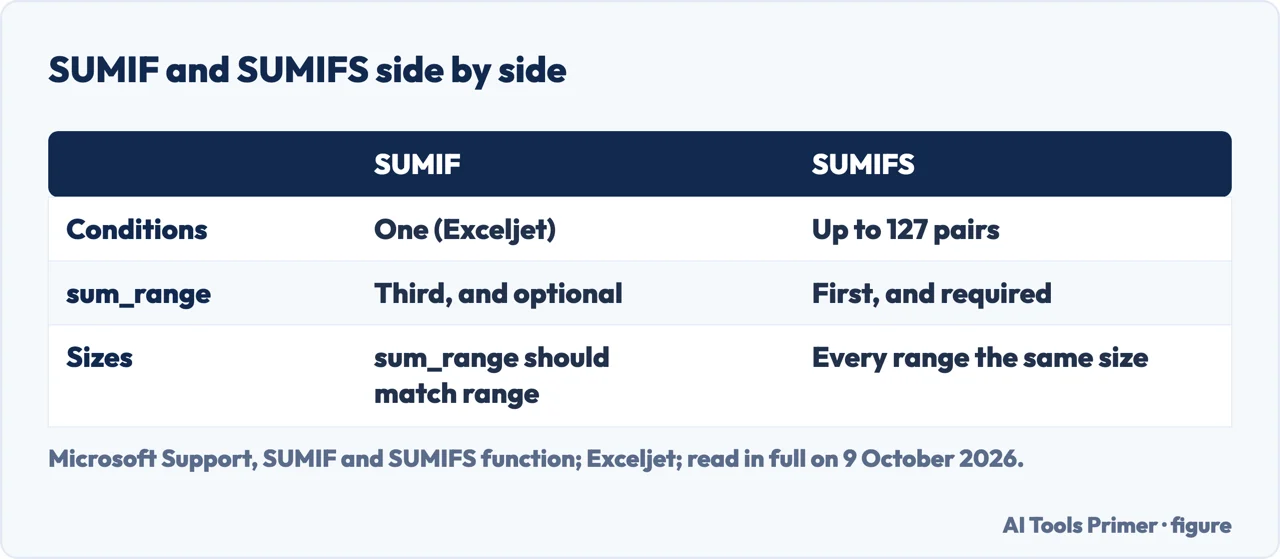
The syntax. SUMIFS(sum_range, criteria_range1, criteria1, [criteria_range2, criteria2], …). Microsoft says it adds the cells that meet multiple criteria, and that up to 127 range and criteria pairs can be entered.
The order. Microsoft calls the argument order a common source of problems: sum_range is the first argument in SUMIFS and the third in SUMIF. If you are copying and editing these functions, Microsoft says to make sure the arguments are in the correct order.
Microsoft’s examples. =SUMIFS(A2:A9, B2:B9, "=A*", C2:C9, "Tom") adds the quantities of products starting with A sold by Tom: 20. =SUMIFS(A2:A9, B2:B9, "<>Bananas", C2:C9, "Tom") leaves bananas out: 30. Microsoft says the criteria ranges must have the same number of rows and columns as sum_range; Exceljet says otherwise SUMIFS returns #VALUE!, and that every condition must be true for a row to count.
Either of two values. Exceljet says SUMIFS joins conditions with AND logic. For red or blue in one range, Exceljet gives =SUM(SUMIF(range,{"red","blue"},sum_range)): SUMIF returns one sum for each value and SUM adds them.
Where to start
Five ways in.
- “Excel won’t take my formula.”
- The quotation marks — criteria
- “I need the syntax.”
- Writing it — write it
- “The total is wrong.”
- The size of sum_range — sum range size
- “I have two conditions.”
- SUMIFS — sumifs
- “Show me examples.”
- Microsoft’s tables — examples
Other formulas with a condition
Totals, counts and comparisons that sit next to a SUMIF in the same sheet.
Questions people also ask
What's the difference between sumif and sumifs?
Exceljet says SUMIF supports a single condition; SUMIFS takes several, up to 127 range and criteria pairs, Microsoft says. Microsoft also points to the order of the arguments: sum_range comes first in SUMIFS and third in SUMIF, which it calls a common source of problems when one formula is edited into the other.
How to do a sumif equation?
Type =SUMIF(range, criteria, sum_range): the cells to test, the condition, then the cells to add. Microsoft’s example =SUMIF(B2:B5, "John", C2:C5) adds the values in C2:C5 where B2:B5 equals John. Leave out sum_range and Excel adds the tested cells themselves.
Can I do a sumif with two criteria?
Exceljet says SUMIF is designed to apply just one condition. SUMIFS adds the rows where all conditions are true, such as Microsoft’s products starting with A and sold by Tom. For either of two values in one column, Exceljet uses =SUM(SUMIF(range,{"red","blue"},sum_range)).
How to sumif in Excel with text?
Put the text in double quotation marks: =SUMIF(A2:A7,"Fruits",C2:C7). Exceljet says SUMIF isn’t case-sensitive. Wildcards match part of the text, such as "*es" for words ending in es, and Microsoft warns that strings longer than 255 characters give incorrect results.
Not covered here. It does not cover SUMPRODUCT, PivotTables, GROUPBY or Google Sheets, and its results are the ones printed in Microsoft’s examples, not recalculated here.
Sources
- Microsoft Support — SUMIF function — support.microsoft.com, read 9 October 2026.
- Microsoft Support — SUMIFS function — support.microsoft.com, read 9 October 2026.
- Exceljet — Excel SUMIF function (Dave Bruns) — exceljet.net, read 9 October 2026.
- Exceljet — Excel SUMIFS function (Dave Bruns) — exceljet.net, read 9 October 2026.
Written by Alberto Gulotta
Founder and editor of AI Tools Primer, writing from Palermo, Italy. Thirty-five years of taking computers apart, starting with a Commodore 64 — the long version is on the about page.
Something wrong on this page? Write to aitoolsprimer@gmail.com and it gets fixed.
Written on 9 October 2026.
Independence and limits
No affiliate links and no paid placements anywhere on this site. Nobody pays to appear here, and no company has seen this page before you did.
This is general information, not professional advice. Where a page touches money, health, safety or the law, it names its source and the date it was read — and your situation may still differ. See the privacy page and the cookie policy.