
Docs · guide
Multiple IF statements in Excel, and where IFS is missing
By Alberto Gulotta · Updated · 13 min read
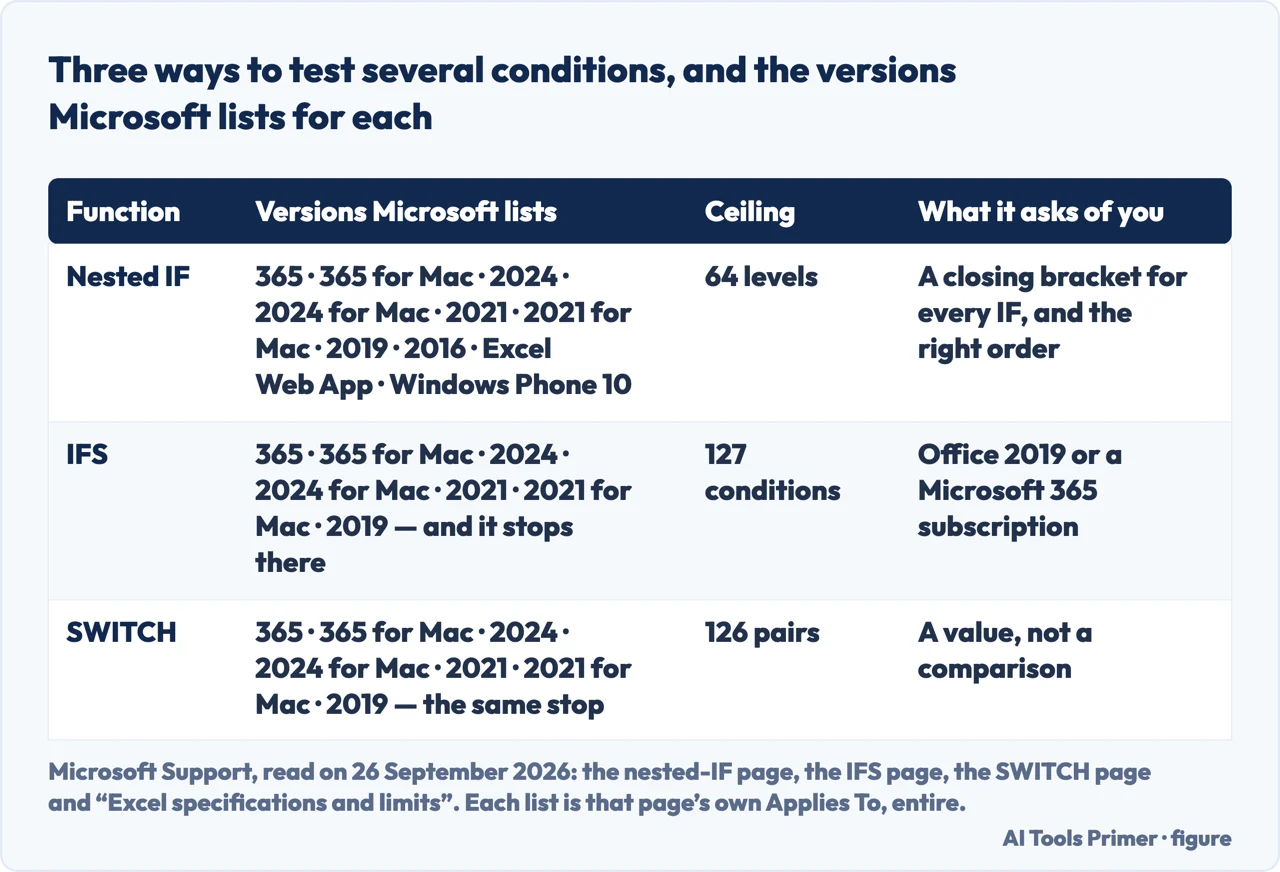
To test several conditions with multiple IF statements in Excel, put each new IF in the false slot of the one before it and close one bracket for each: =IF(D2>89,"A",IF(D2>79,"B","F")). Excel reads them left to right and stops at the first true test. IFS needs no nesting and one pair of brackets, and the IFS page lists it from Excel 2019 up.
| Way in | Versions Microsoft lists on that page | Ceiling | What it costs you |
|---|---|---|---|
| Nested IF | 365, 365 for Mac, 2024, 2024 for Mac, 2021, 2021 for Mac, 2019, 2016, Excel Web App, Windows Phone 10 | 64 nested levels | Every condition adds a bracket to close, and the order decides the answer |
| IFS | 365, 365 for Mac, 2024, 2024 for Mac, 2021, 2021 for Mac, 2019 — and it stops there | 127 conditions | Needs Office 2019 or a Microsoft 365 subscription |
| SWITCH | 365, 365 for Mac, 2024, 2024 for Mac, 2021, 2021 for Mac, 2019 — same stop | 126 value/result pairs | Matches a value, not a comparison |
- Decide the order before you type. Nested IF is read left to right and stops at the
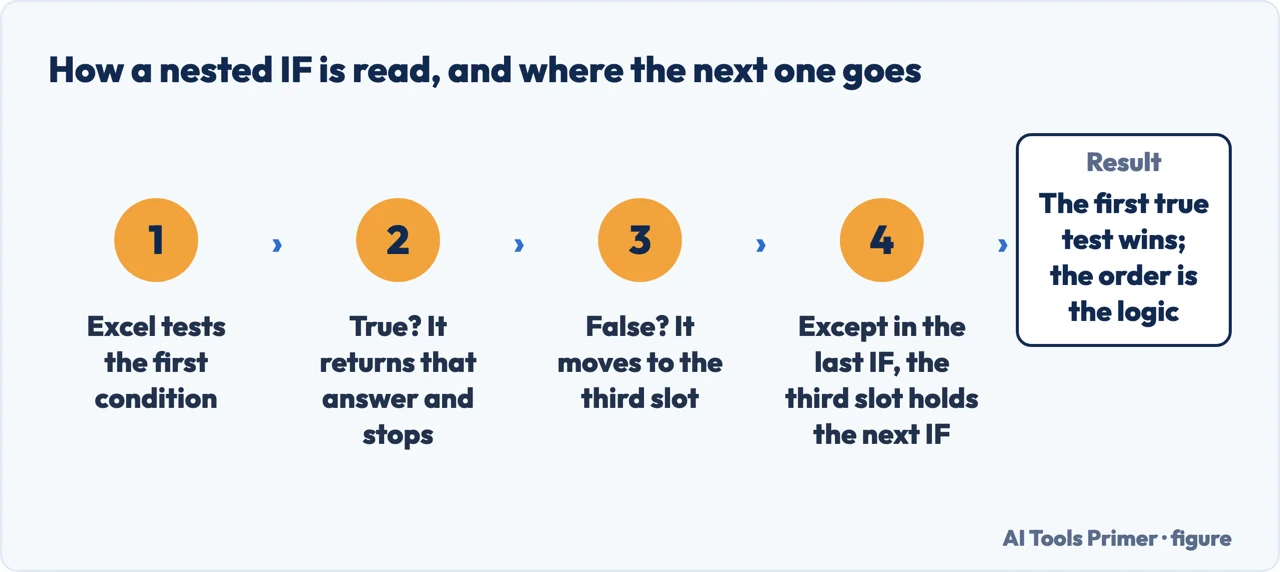
first test that is true, so the strictest test — the one that catches the fewest
rows — goes first. Microsoft’s own grade example runs downwards:
=IF(D2>89,"A",IF(D2>79,"B",IF(D2>69,"C",IF(D2>59,"D","F")))), and above 89 is the narrowest of the four tests. - Write the first test and its answer.
=IF(D2>89,"A",— the comma after the answer is where the next question goes. - Put the next IF where the false answer would be. In this chain, the third slot of each IF except the last holds the next IF; the last one holds the final answer.
- Close one bracket for every IF you opened. Four IF functions need four closing brackets at the end. Microsoft’s tip for checking them is the colouring Excel adds while you edit: move the cursor past a closing bracket and its opening partner turns the same colour.
- Check the version before you reach for IFS. If the workbook has to open in Excel 2016 or in Excel Web App, the nested IF above is the one documented for them: the IFS page does not list either.
- If the formula keeps growing, stop. Microsoft’s advice on its own page is to put the mouse down and rethink, rather than to keep nesting.
Two Microsoft sentences on the same function, and they disagree
“This feature is available on Windows or Mac if you have Office 2019, or if you have a Microsoft 365 subscription.”
That note sits on Microsoft’s IFS page, and the same page’s Applies To line ends at Excel 2019. The nested IF page carries a longer list: it goes down to Excel 2016 and includes Excel Web App. So the two answers to the same question are not interchangeable — they are documented for different products.
For IFS, Microsoft draws that line in two different places. Where the IFS page says Office 2019 or a subscription, the nested IF page says of the same function that it is “only available if you have a Microsoft 365 subscription”. The two sentences are Microsoft’s own and they do not agree; this page follows the IFS page, which lists the function from Excel 2019.
This matters when the file is not only yours. A workbook written with IFS on a current subscription may be opened by somebody on an older build, and nothing in the formula says which version it needs; what that build shows is not on any page read for this guide.
The order carries the logic, not the brackets. Microsoft’s grade example works because each test is looser than the one above it: above 89, then above 79, then above 69. A score of 95 is caught by the first test and never reaches the others. Turn the chain upside down — above 59 first — and every score above 59 comes back as a D, with no error and no warning. Microsoft’s IFS page makes the same point separately, when it says that multiple conditions “need to be entered in the correct order”.
Four things Microsoft states that change how the formula behaves
Each one is on a Microsoft Support page read in full on 26 September 2026.
- The ceiling is 64
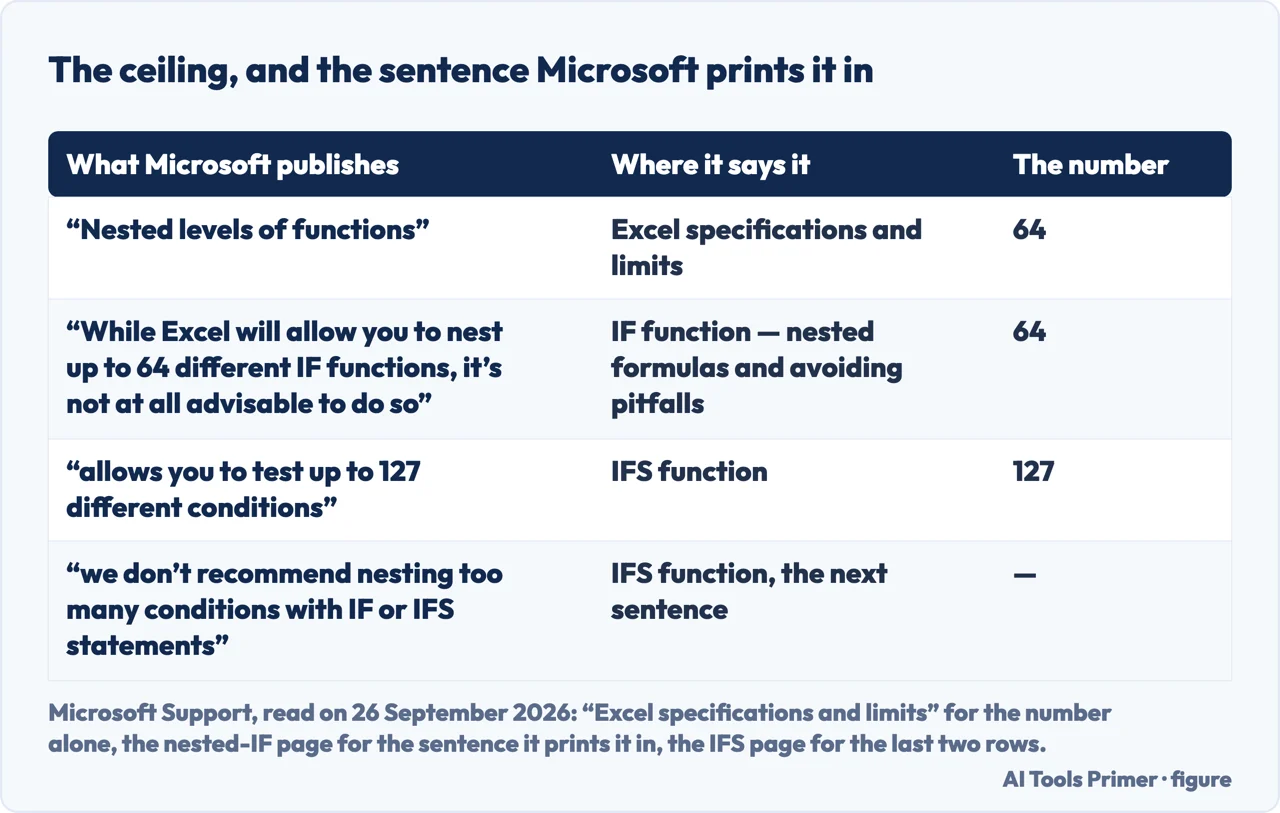
- The specifications page lists “Nested levels of functions” as 64. The nested IF page puts the same number next to a warning rather than an invitation: “While Excel will allow you to nest up to 64 different IF functions, it’s not at all advisable to do so.”
- IFS allows more, and carries the same caution
- On the IFS page, “the IFS function allows you to test up to 127 different conditions” is followed immediately by “However, we don’t recommend nesting too many conditions with IF or IFS statements.” The newer function has the higher ceiling and the same caution.
- Order is not cosmetic
- The nested IF page’s warning is conditional, and the condition is the point: a formula not nested “100% accurately” “might work 75% of the time, but return unexpected results 25% of the time”, and the odds of catching that quarter are slim. The IFS page says separately that multiple conditions “need to be entered in the correct order”.
- A misspelling reads as a missing name
- On the IF function page, the cause Microsoft gives for
#NAME?in the cell is that it “usually means that the formula is misspelled”. Whether a function your version does not have produces the same result is not something these pages say, so this guide does not say it either.
Where this answer stops. The version lists, ceilings and quotations on this page come from Microsoft’s own pages, and the Applies To lines are printed in the table above rather than summarised: the nested IF page reaches Excel 2016 and Excel Web App, the IFS and SWITCH pages stop at Excel 2019. Nothing here covers Google Sheets, and nothing here tells you which of the three fits your sheet: that depends on what the conditions are, and only you can see them.
Where to start
Four ways in.
- “Just show me the formula.”
- Six steps, in order — the six steps in order
- “Can I use IFS instead?”
- The IFS page, from 2019 — the version boundary
- “How many can I have?”
- 64, and a warning — the ceiling and the warning
- “Mine returns the wrong grade.”
- Read the order — why the order decides the answer
How to nest IF statements, in order
In a chain like the grade example, each new IF goes in the false slot of the one before it, and the strictest test — the one that catches the fewest rows — goes first.
Two Microsoft sentences on the same function, and they disagree
The IFS and SWITCH pages list those functions from Excel 2019 up, while the nested IF page reaches Excel 2016 and Excel Web App.
Four things Microsoft states that change how the formula behaves
The 64-level ceiling, the 127 conditions of IFS, the warning about order, and what Microsoft gives as the cause of a #NAME? result.
The order carries the logic, not the brackets
A loose test placed above a strict one returns a valid answer to the wrong rows, and Excel reports nothing.
Questions people also ask
How do I put 3 conditions in an IF formula in Excel?
Nest two IFs inside the first: =IF(A2>89,"A",IF(A2>79,"B",IF(A2>69,"C","F"))). Three tests, three opening brackets, three closing ones. On the versions the IFS page lists — Excel 2019 and later — the same thing is =IFS(A2>89,"A",A2>79,"B",A2>69,"C",TRUE,"F") — the final TRUE is the catch-all, and without it a score of 69 or below returns #N/A, which is what Microsoft says IFS does when no condition is true.
How do I put 2 conditions in an IF?
If both must be true, use AND inside the IF: =IF(AND(A2>10,B2>10),"Yes","No"). If either will do, use OR in the same position. Microsoft documents both on its page for using IF with AND, OR and NOT.
How do I do 2 IF formulas in one cell?
Put the second IF inside the first: Microsoft’s grade example puts it in the third slot of the first one — the value returned when the test is false. A second IF can also go in the true slot, when the second test only applies to the rows that passed the first: =IF(A2>0,IF(B2>0,"Both","A only"),"None").
How do I put 5 conditions in Excel?
Five nested IFs work and are allowed — the ceiling is 64. For chains that keep growing, the advice on Microsoft’s nested IF page is a VLOOKUP reference table: “In most cases, you can use the VLOOKUP function instead of building a complex formula with the IF function.” The same page also offers IFS as a replacement, and the IFS page lists it from Excel 2019 up.
Not covered here. It does not teach the IF function itself — one test, two possible results — which is the subject the nesting is built on.
It does not cover COUNTIF criteria, where the comparison is written as text in quotation marks; that is the sister guide on counting cells that are not blank.
And it does not cover Google Sheets. What holds instead is simple: the version lists, ceilings and quoted sentences on this page are read from the Microsoft Support page named beside each one, on the date given; the working between them is ours.
Sources
- Microsoft Support — IF function, nested formulas and avoiding pitfalls: the 64-level limit set beside the advice not to approach it, the worked grade example, the warning that a formula not nested 100% accurately might work 75% of the time, and the VLOOKUP reference table offered in its place. Applies to Excel for Microsoft 365 and its Mac version, Excel 2024 and its Mac version, Excel 2021 and its Mac version, Excel 2019, Excel 2016, Excel Web App and Excel for Windows Phone 10 — support.microsoft.com, read September 2026.
- Microsoft Support — IF function: the sentence that an IF statement can have two results, and the cause given for a #NAME? result in the cell. Applies to Excel for Microsoft 365 and its Mac version, Excel 2024 and its Mac version, Excel 2021 and its Mac version, Excel 2019 and Excel 2016 — eight products, and neither Excel Web App nor Windows Phone — support.microsoft.com, read September 2026.
- Microsoft Support — IFS function: the note that the feature needs Office 2019 or a Microsoft 365 subscription, the ceiling of 127 conditions, the recommendation against long chains of either function, the line that conditions need to be entered in the correct order, and the sentence that without a TRUE condition the function returns #N/A. Applies to Excel for Microsoft 365 and its Mac version, Excel 2024 and its Mac version, Excel 2021 and its Mac version, and Excel 2019 — support.microsoft.com, read September 2026.
- Microsoft Support — Excel specifications and limits: the line that gives nested levels of functions as 64 — support.microsoft.com, read September 2026.
- Microsoft Support — SWITCH function: a third way to test several conditions, with the same declared versions as IFS, and the line that it returns the result for the first matching value — support.microsoft.com, read September 2026.
- Microsoft Support — Using IF with AND, OR and NOT: the IF(AND()) and IF(OR()) forms the answer above follows. Applies to Excel for Microsoft 365 and its Mac version, Excel 2024 and its Mac version, Excel 2021 and its Mac version, Excel 2019, Excel 2016, Excel Web App and Excel for Windows Phone 10 — support.microsoft.com, read September 2026.
- Stack Overflow — Using multiple nested IF-functions in Excel, is this the right solution, asked 21 September 2022, read in full on 26 September 2026; the answer by Max R, dated 22 September 2022, names LET, tied to the asker having O365, and IFS, and neither of the two answers mentions SWITCH or the 64-level limit — stackoverflow.com, read September 2026.
- chandoo.org — Max formula multiple IF statements, thread started 30 October 2018, read in full on 26 September 2026: several IF statements wrapped in MAX and entered with Ctrl+Shift+Enter, with the reply pointing to MAXIFS or a pivot table instead — chandoo.org, read September 2026.
Written by Alberto Gulotta
Founder and editor of AI Tools Primer, writing from Palermo, Italy. Thirty-five years of taking computers apart, starting with a Commodore 64 — the long version is on the about page.
Something wrong on this page? Write to aitoolsprimer@gmail.com and it gets fixed.
Written on 26 September 2026.
Independence and limits
No affiliate links and no paid placements anywhere on this site. Nobody pays to appear here, and no company has seen this page before you did.
This is general information, not professional advice. Where a page touches money, health, safety or the law, it names its source and the date it was read — and your situation may still differ. See the privacy page and the cookie policy.