To calculate standard deviation in Excel, type =STDEV.S( and select your numbers — that is the answer when your rows are a sample of something bigger. If they are the whole thing, the function is =STDEV.P(. On Microsoft’s own ten measurements the two return 27.46 and 26.05, and the cell shows only the number.
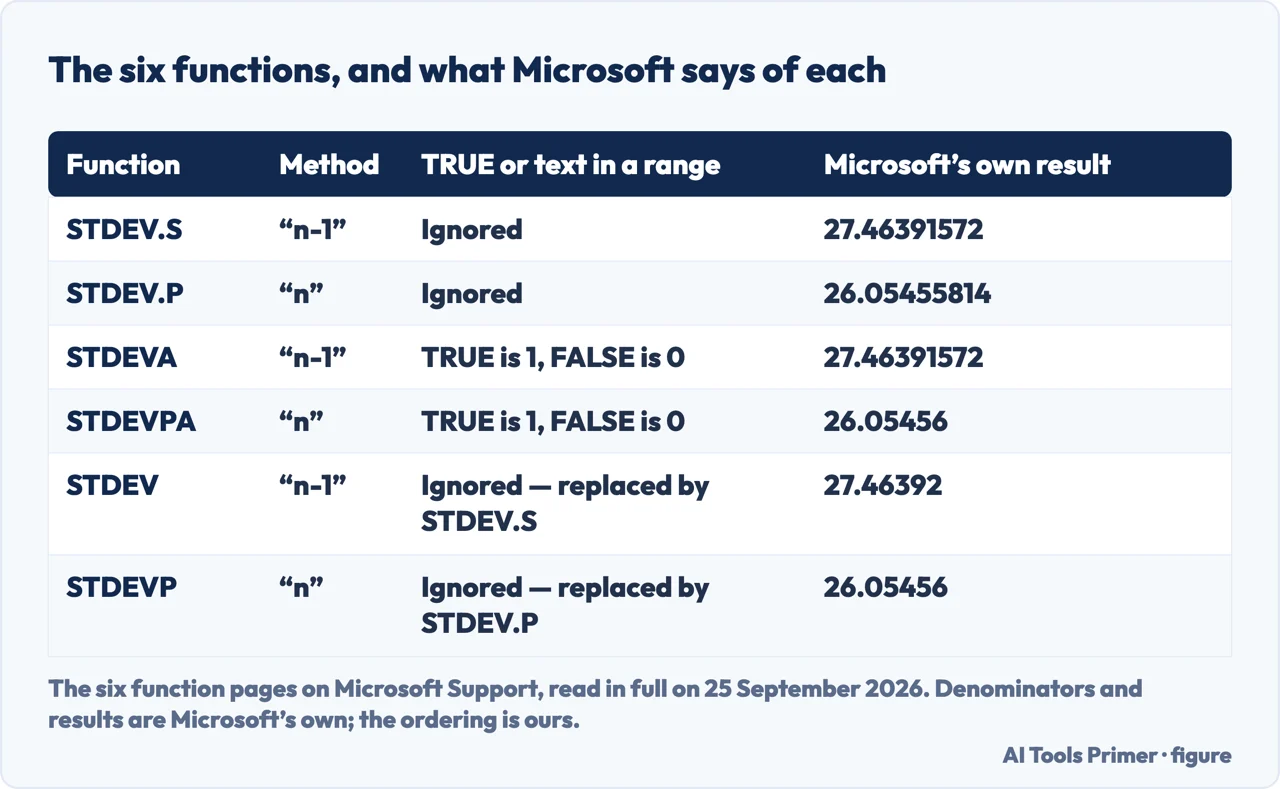
The six functions, the method each one uses, and the result Microsoft publishes for it on its own page, rounded here to two decimals
Function
Method Microsoft names
What it does with TRUE or text inside a range
Microsoft’s own example
STDEV.S
“n-1”
Ignored
27.46
STDEV.P
“n”
Ignored
26.05
STDEVA
“n-1”
TRUE is 1, FALSE is 0
27.46
STDEVPA
“n”
TRUE is 1, FALSE is 0
26.05
STDEV
“n-1”
Ignored — and the function is “replaced”
27.46
STDEVP
“n”
Ignored — and the function is “replaced”
26.05
Six functions, two methods, and the number Microsoft publishes for each on the same ten measurements. Figure drawn by AI Tools Primer from the six Microsoft Support function pages, read in full on 25 September 2026.
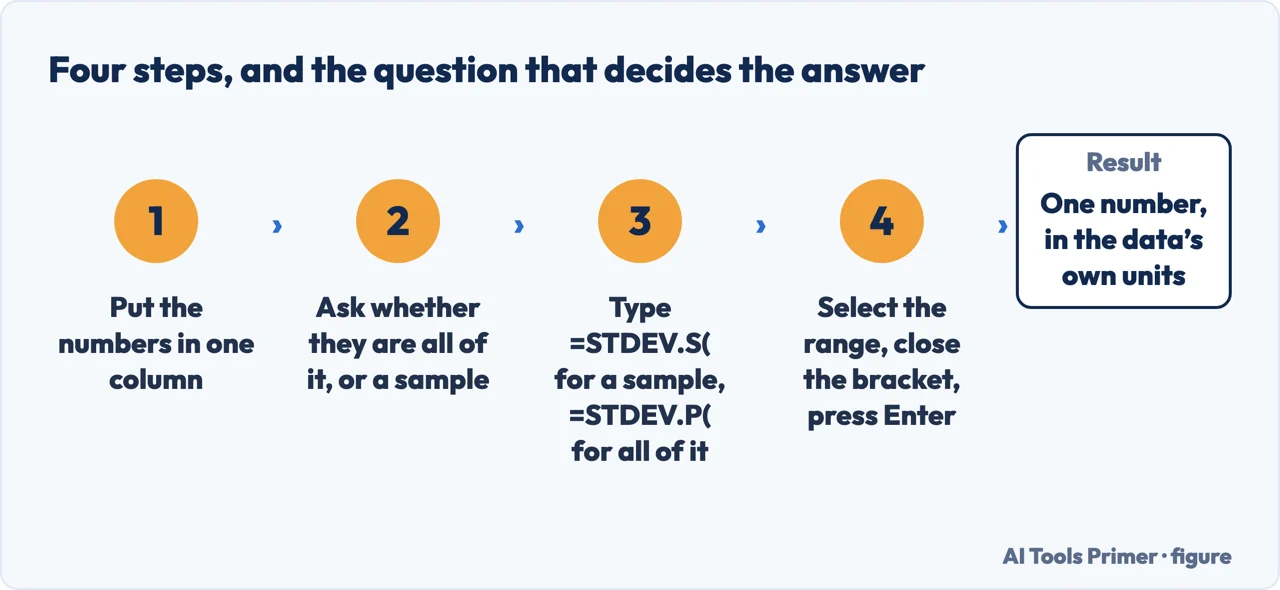
Put the numbers in one column. Microsoft’s own example is ten breaking
strengths in a single column, and every one of the six functions accepts a range in place of a
list of arguments.
Answer one question before you type anything: is this everything, or a sample of it?
That is the whole decision. “STDEV.S assumes that its arguments are a sample of the
population. If your data represents the entire population, then compute the standard deviation
using STDEV.P.”
For a sample, type =STDEV.S( and select the range. Microsoft’s one-line
description: it estimates the standard deviation from a sample, and ignores logical values and
text inside it.
For the whole population, type =STDEV.P( instead. Same range, same ignoring of
text and logical values, different denominator. On Microsoft’s ten numbers the two
answers are 27.46 and 26.05.
Close the bracket and press Enter. The result is in the same units as the data, which
is the reason the standard deviation is quoted rather than the variance: the NIST handbook puts
it as “The standard deviation restores the units of the spread to the original data units
(the variance squares the units).”
If the range holds anything other than numbers, decide that too. With STDEV.S,
“Empty cells, logical values, text, or error values in the array or reference are
ignored”. With STDEVA, a TRUE in the range counts as 1 and a FALSE as 0. A column with TRUE and FALSE in it gives two different numbers depending on which one you picked.
Four steps — and the second one decides which of the two answers you get. Figure drawn by AI Tools Primer.
The same ten numbers, and two answers from Microsoft’s own pages
“The standard deviation is calculated using the ‘n-1’
method” — STDEV.S. “The standard deviation is calculated using the
‘n’ method” — STDEV.P.
Both pages use the same worked example: ten breaking strengths, 1345, 1301, 1368, 1322, 1310,
1370, 1318, 1350, 1303 and 1299. STDEV.S returns 27.46 and STDEV.P returns
26.05 — Microsoft prints both to eight decimal places, and the figure above carries
them in full. Same ten numbers, a gap of about 1.4, and the cell shows only the number.
The division is not Excel’s invention. The NIST/SEMATECH handbook defines the standard deviation with N-1 in the denominator, and explains it as roughly an average of
squared distances from the mean, with the standard deviation as its root — which is why
one far-out value weighs so heavily. Ten measurements out of a production run are a sample, so
n-1 is the honest choice; ten pupils who are the whole class are a population, so n is.
Microsoft adds that the difference shrinks as the data grows: “For large sample
sizes, STDEV.S and STDEV.P return approximately equal values.” On ten values it is
visible in the second digit. On ten thousand it is not, which is why picking the wrong one is
a mistake you can make for years without noticing.
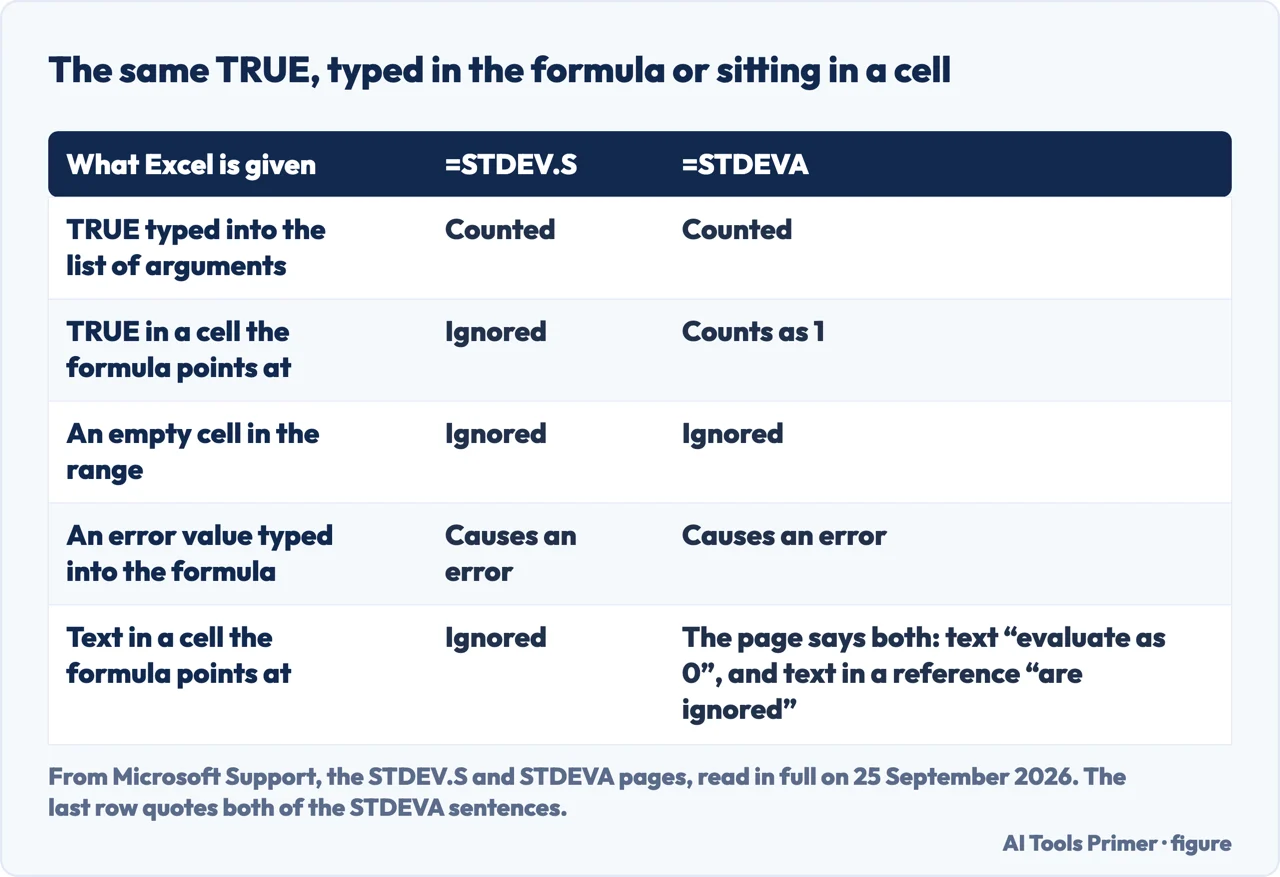
The same TRUE, typed into the formula or sitting in a cell, is not the same value. Figure drawn by AI Tools Primer.
The same TRUE, counted or ignored
“Logical values and text representations of numbers that you type directly into the
list of arguments are counted.” But: “If an argument is an array or reference,
only numbers in that array or reference are counted.”
So =STDEV.S(1,2,TRUE) counts three values and =STDEV.S(A1:A3) over the same three cells
counts two. The function did not change; where you put the TRUE did.
STDEVA turns words into zeros
“Arguments that contain TRUE evaluate as 1; arguments that contain text or FALSE
evaluate as 0 (zero).” A zero in a column of values near 1300 moves the answer a
long way.
The same page also says “Empty cells and text values in the array or reference are
ignored”, so on that one point Microsoft’s page says both things. Try it on
your own column before you trust either sentence.
Two functions are kept only for old files
On STDEV and STDEVP, Microsoft prints the same notice: the function has been replaced
by newer ones with better names, and is kept for backward compatibility.
The warning goes further than tidiness: “this function may not be available in
future versions of Excel”. They still work, and a sheet you inherit may be full of
them.
One of the two modern pages points back at a replaced function. The STDEV.S page sends a population to STDEV.P, which is the modern pair. The STDEV.P page, in the same position, says: “STDEV.P assumes that its arguments are the entire population. If your data represents a sample of the population, then compute the standard deviation using STDEV.” STDEV is the function Microsoft marks as replaced on its own page, with the note that it “may not be available in future versions of Excel”. Follow that sentence and you get the right number from the wrong function.
Six sentences from the documentation, and what each one settles
The six Microsoft function pages and the NIST handbook page, all read in full on 25 September 2026.
Which function for a sample
STDEV.S assumes a sample; for a whole population its own page sends you to STDEV.P. That
is the modern pair, named on the modern page.
What the two methods are called
Microsoft names them on every page: the “n-1” method on STDEV.S, STDEVA and
STDEV, the “n” method on STDEV.P, STDEVPA and STDEVP.
What a text value does
Microsoft says that arguments which are error values, or text that cannot be translated into numbers, cause errors. A stray letter typed into the formula itself is not ignored quietly; it stops the formula. In a range, STDEV.S skips text.
How to include TRUE and FALSE on purpose
“If you want to include logical values and text representations of numbers in a
reference as part of the calculation, use the STDEVA function.” The STDEVA page says
the same thing backwards, and the function it sends you back to is STDEV, not STDEV.S.
How many values you can hand it
STDEV.S and STDEV.P take “Number arguments 2 to 254”. STDEV and STDEVP take
“2 to 255”, and STDEVA and STDEVPA take 255 values from the first. The new pair is
one argument shorter than the pair it replaced.
Why the number is quoted at all
NIST: “The standard deviation restores the units of the spread to the original data
units (the variance squares the units).” That is the whole reason a report prints the
standard deviation and not the variance.
Where this answer stops. All six function pages declare the same eight products: Excel for Microsoft 365 and its Mac version, Excel 2024 and its Mac version, Excel 2021 and its Mac version, Excel 2019 and Excel 2016. None of the six pages read for this guide mentions Excel for the web or the phone apps, so if that is where you are working, the pages behind this guide are not written for you. Nothing here covers which number a statistician would want for your particular data either: that is a question about your sample, not about Excel.
STDEV.S divides by n-1 because the rows are a sample, STDEV.P divides by n because they are everything — and on ten numbers that is a visible difference.
The STDEV.P page sends a sample to STDEV, the function Microsoft marks as replaced, instead of to STDEV.S — which is the one sentence on these pages worth reading twice.
Not covered here. It does not cover the standard error, the confidence interval or the t-test, which start from this number rather than produce it.
It does not cover STDEV.S across several sheets or a filtered list, where SUBTOTAL and AGGREGATE change what gets counted.
And it does not tell you whether your rows are a sample or a population: that is a fact about where the numbers came from, and only you have it. What holds instead is simple: every number on this page is one Microsoft or NIST publishes, on pages read from top to bottom on the day this page names, and where two of those pages disagree the disagreement is printed instead of settled.
Sources
Microsoft Support — STDEV.S function: the description, the “n-1” method, the rule on logical values typed in against the same values inside a reference, the pointer to STDEVA, the limit of 254 number arguments, and the worked example on ten breaking strengths, which returns 27.46 to two decimals. Applies to Excel for Microsoft 365 and its Mac version, Excel 2024 and its Mac version, Excel 2021 and its Mac version, Excel 2019 and Excel 2016 — support.microsoft.com, read September 2026.
Microsoft Support — STDEV.P function: the “n” method, the note that large samples make the two nearly equal, the worked example that returns 26.05 on the same ten numbers, and the sentence that sends a sample to STDEV rather than to STDEV.S — support.microsoft.com, read September 2026.
Microsoft Support — STDEV function: the “replaced” notice, the warning that the function may not be available in future versions of Excel, and the limit of 255 number arguments that the modern pair does not have — support.microsoft.com, read September 2026.
Microsoft Support — STDEVA function: TRUE as 1 and text or FALSE as 0, the sentence in the same Remarks that says text in a reference is ignored instead, and the pointer back to STDEV — support.microsoft.com, read September 2026.
Microsoft Support — STDEVP function: the second “replaced” notice, and the sentence that sends a sample to STDEV — support.microsoft.com, read September 2026.
Microsoft Support — STDEVPA function: the population version that counts text and logical values, with the same “n” method and the pointer to STDEVA for a sample — support.microsoft.com, read September 2026.
NIST/SEMATECH e-Handbook of Statistical Methods, 1.3.5.6 Measures of Scale: the variance and the standard deviation defined with N-1 in the denominator, and the line on why the standard deviation is the one that gets quoted — it restores the units of the original data — www.itl.nist.gov, read September 2026.
AG
Written by Alberto Gulotta
Founder and editor of AI Tools Primer, writing from Palermo, Italy. Thirty-five years of
taking computers apart, starting with a Commodore 64 — the long version is on the
about page.
No affiliate links and no paid placements anywhere on this site. Nobody pays to appear here,
and no company has seen this page before you did.
This is general information, not professional advice. Where a page touches money, health,
safety or the law, it names its source and the date it was read — and your situation may
still differ. See the privacy page and the
cookie policy.