The percentage increase formula in Excel is one line, and Microsoft publishes it with worked numbers: =(new-old)/old, then format the result as a percentage. What the formula does not say is which rows it will refuse to work on, and why two people can measure the same movement and write different sentences about it.
The three percentage formulas, with Microsoft’s own worked numbers
What you want
The formula
Worked example
Source
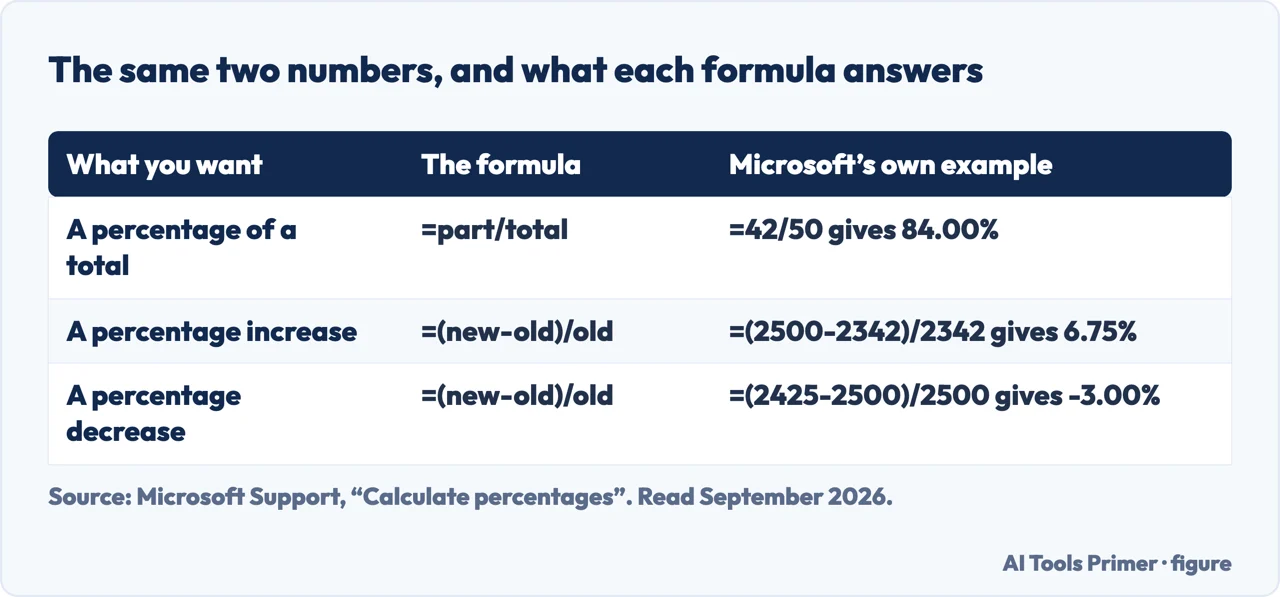
A percentage of a total
=part/total
=42/50 gives 0.84, and 84.00% once formatted
Microsoft
A percentage increase
=(new-old)/old
=(2500-2342)/2342 gives 0.06746, and 6.75%
Microsoft
A percentage decrease
The same formula
=(2425-2500)/2500 gives −0.03000, and −3.00%
Microsoft
More or fewer decimals
—
Home › Increase Decimal or Decrease Decimal
Microsoft
The third step is the one that looks like a failure and is not. Figure drawn by AI Tools Primer.
The same £158, twice, and two different percentages
Microsoft’s own worked example, then the same figures read backwards. Nothing changes
except which number sits under the line.
November → December
=(2500-2342)/23426.75%Microsoft’s example: earnings of 2,342 then 2,500. “The result is 0.06746 … which is the percentage of increase in earnings.”
December → November
=(2342-2500)/2500−6.32%The same 158 in the other direction. Larger starting figure, so the same change is a smaller share of it.
A percentage change is always a share of where you started, which is why a rise and the fall
that undoes it are never the same number. Something that goes up 50% has to come back down by a third
to return to where it was. Nobody is being dishonest when a report shows a 6.75% rise and a 6.32%
fall for the same movement — but a reader who assumes they should match will conclude something
happened, and nothing did.
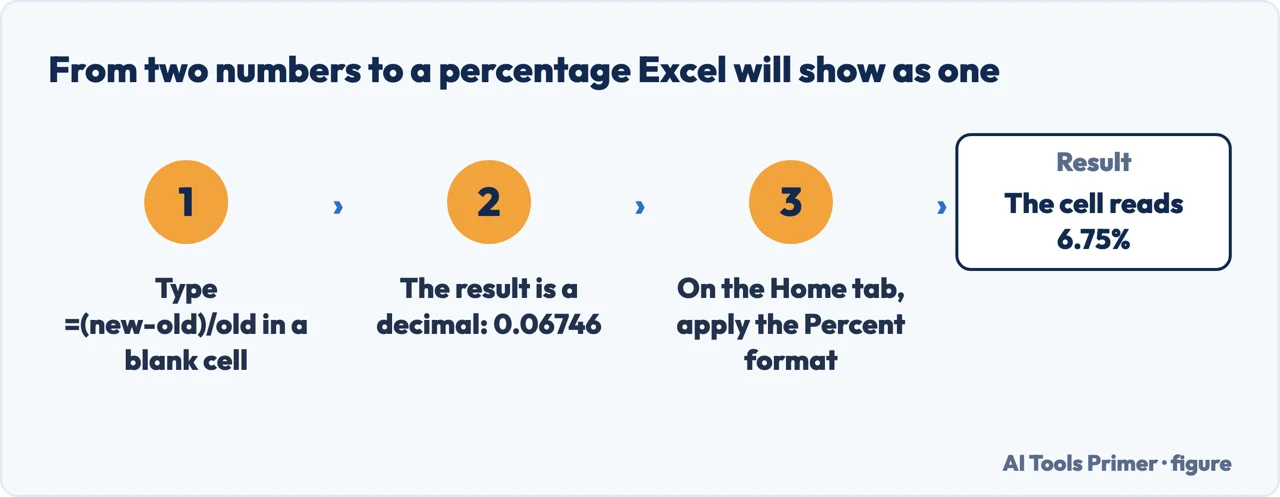
Put the old value and the new value in two cells. Microsoft’s example is earnings of
$2,342 in November and $2,500 in December.
In a blank cell, type =(2500-2342)/2342 and press Enter.New minus old, divided by old. With cell references it is =(B2-A2)/A2.
Look at what you get: 0.06746. That is the right answer in the wrong clothes: the
arithmetic is done, the writing is not.
On the Home tab, apply the Percent format. The same cell now reads 6.75%. Nothing was
recalculated: only the way the number is written changed.
Set the decimals with Increase Decimal or Decrease Decimal. And keep the same number of
them down the column — a run of percentages written to different precisions reads as if some
were measured more carefully than others.
Increase and decrease are the same formula; only the sign changes. Figure drawn by AI Tools Primer.
The number is right before it looks right. A formula that returns 0.06746 has already done the arithmetic; what is missing is the Percent format, which changes how Excel writes the value and nothing else. This is worth being precise about because the usual workaround — multiplying by 100 — makes a cell that says 6.75 and means 675%, and it will be wrong the day somebody formats it properly.
Three starting values that break the formula
The original is zero — or the cell is empty
Microsoft: Excel shows the #DIV/0! error “when a number is divided by zero (0) … or when a formula
refers to a cell that has 0 or is blank”. That second half matters, because a missing figure
for last month is not visibly a zero. Growth from nothing is not a percentage — there is no
starting quantity for the change to be a share of.
The original is negative
The arithmetic runs, and the sign comes out backwards. A loss improving from −100 to −50 gives
=(-50--100)/-100, which is 50 divided by −100: −50%. The figure halved the
loss and the cell reports a fall. Excel is not wrong; the formula simply has no meaning when the
base is below zero, and it says so by producing a number rather than an error.
The two figures are not the same kind of thing
A percentage change compares a quantity with itself at another time. Comparing two different measures — a count against a rate, a total against an average — produces a valid-looking figure that means nothing. This one Excel cannot catch at all, because both cells hold numbers.
The same «1%» spoken two ways, and two different answers. Figure drawn by AI Tools Primer.
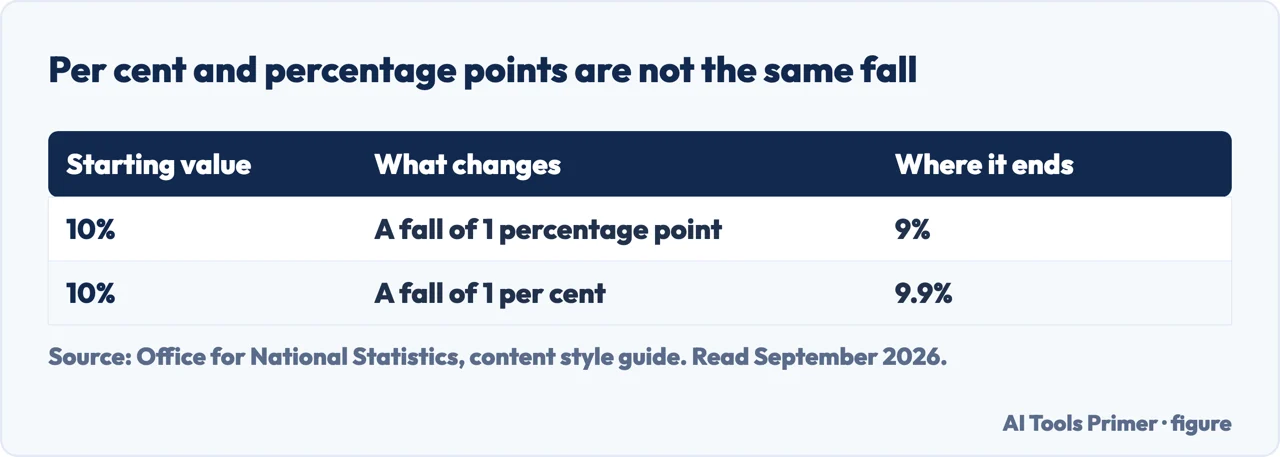
And one thing that is not Excel’s fault at all. A percentage and a percentage point are different quantities, and a growth column invites the mistake. The Office for National Statistics states it in one line: “A percentage point is the difference between percentages. A value of 10% falling by 1 percentage point becomes 9% (10% has 10 percentage points). A fall of 1% would result in a value of 9.9%.” The same guide asks for “the same number of decimal places for a sequence of percentages”, which is the difference between a table that reads as one measurement and one that reads as several.
Dealing with the first one properly. Microsoft’s advice on #DIV/0! is worth reading before you reach for a workaround: “Make sure the divisor in the function or formula isn’t zero or a blank cell.” The error is doing its job. It is telling you that a row has no starting value, and in a growth column that is usually a real fact about the data rather than a formatting nuisance.
When it genuinely cannot be avoided — and Microsoft acknowledges that case, “because your formulas are waiting for input from you or someone else” — the tool is IFERROR. The syntax is IFERROR(value, value_if_error), so a growth column becomes something like =IFERROR((B2-A2)/A2, "") and the empty rows stay empty instead of filling the sheet with red.
But know what you have just switched off. Microsoft lists what IFERROR catches: “#N/A, #VALUE!, #REF!, #DIV/0!, #NUM!, #NAME?, or #NULL!”. All seven. So the wrapper you added to tidy away a division by zero will also silently absorb a #REF! from a deleted column and a #VALUE! from a number that arrived as text. The tidy sheet and the broken sheet look identical. If you use IFERROR, use it on the narrowest formula you can, not around the whole calculation.
Percentage increase against percentage points. The two get used interchangeably and they are different measurements. If a rate rises from 4% to 6%, that is two percentage points and a 50% increase. Both are correct; they answer different questions. Excel computes whichever you asked for and has no way of knowing which one your reader will assume, so the words around the number are doing work that the formula cannot do.
One habit that prevents most of this. Put the old and new figures in their own columns rather than typing them into the formula. Microsoft’s examples use literal numbers because they are demonstrations; in a real sheet, literals mean nobody can see where the figure came from, and the formula bar is the only place a spreadsheet ever explains itself.
The formula, the worked figures, the cause of the #DIV/0! error and the IFERROR syntax are quoted from Microsoft’s own Excel documentation, read on 22 August 2026 and listed below. The reading of the asymmetry, the negative-base case and the warning about IFERROR’s reach are ours.
New minus old, divided by old: =(B2-A2)/A2. Microsoft’s worked example is =(2500-2342)/2342, which gives 0.06746 — and 6.75% once the cell carries the Percent format.
Why does my percentage show as 0.07 instead of 7%?
Because the formula returns a number and the cell is still in the General format. The value is right; select the cell and apply Percent on the Home tab. Excel does not multiply anything by 100 — it only writes the same number differently.
How do I do percentage decrease in the same column?
With the same formula. =(2425-2500)/2500 gives −3.00%: the sign takes care of the direction, so one column handles rises and falls without a second formula.
Is a rise of 1% the same as a rise of one percentage point?
No, and the difference changes the sentence you write next to the number. The Office for National Statistics puts it exactly: “A value of 10% falling by 1 percentage point becomes 9% (10% has 10 percentage points). A fall of 1% would result in a value of 9.9%.”
Not covered here. It will not present the formula as the whole answer. Which figure sits under the line decides the result, and that is where the disagreements come from.
It will not recommend wrapping the sheet in IFERROR. Microsoft lists the seven error types it swallows, and six of them are things you would want to know about.
And it will not treat a percentage increase and a percentage point as the same measurement. What holds instead is simple: the cause of the division error and the IFERROR syntax are Microsoft’s own, quoted with the date each page was read.
Step 6 of 21 in half an hour in a spreadsheet
The order the work actually happens in: the data arrives, it gets cleaned, it gets counted, it gets a chart, and then somebody else opens it.
Microsoft Support — Calculate percentages, including the worked example for a percentage of increase between two months of earnings — support.microsoft.com, read 22 August 2026.
Microsoft Support — How to correct a #DIV/0! error, including the note that a blank cell causes it and the advice to check the divisor first — support.microsoft.com, read 22 August 2026.
Microsoft Support — IFERROR function, including the syntax and the full list of the seven error types it evaluates — support.microsoft.com, read 3 September 2026.
Office for National Statistics — Percentages and percentage points, in the content style guide: the difference between a fall of 1% and a fall of one percentage point, and the rule on decimal places — service-manual.ons.gov.uk, read 3 September 2026.
AG
Written by Alberto Gulotta
Founder and editor of AI Tools Primer, writing from Palermo, Italy. Thirty-five years of
taking computers apart, starting with a Commodore 64 — the long version is on the
about page.
Written on 22 August 2026 · last checked 23 September 2026.
§
Independence and limits
No affiliate links and no paid placements anywhere on this site. Nobody pays to appear here,
and no company has seen this page before you did.
This is general information, not professional advice. Where a page touches money, health,
safety or the law, it names its source and the date it was read — and your situation may
still differ. See the privacy page and the
cookie policy.