
Docs · guide
Excel count if not blank: which function gives which number
By Alberto Gulotta · Updated · 14 min read
To make Excel count if not blank, use =COUNTA(B2:B20) for anything at all in the cell, or =COUNTIFS(B2:B20,"<>") as another way to count cells that are not empty, which is the form Exceljet gives. A second condition goes inside the same COUNTIFS. One catch decides which number you get: a formula that returns empty text is counted as filled.
| What is in the cell | COUNTA (Microsoft) | COUNTIFS with "<>" (Exceljet) | COUNTBLANK (Microsoft) |
|---|---|---|---|
| A number, or text you typed | Counted | Counted | Not counted (Exceljet) |
| An empty cell | Not counted | Not counted | Counted |
| A formula returning a number | Counted | Counted | Not counted (Exceljet) |
| A formula returning "" (empty text) | Counted | Counted | Counted as well |
| An error value | Counted | Counted | Not counted (Exceljet) |
| A zero | Counted | Counted | Not counted |
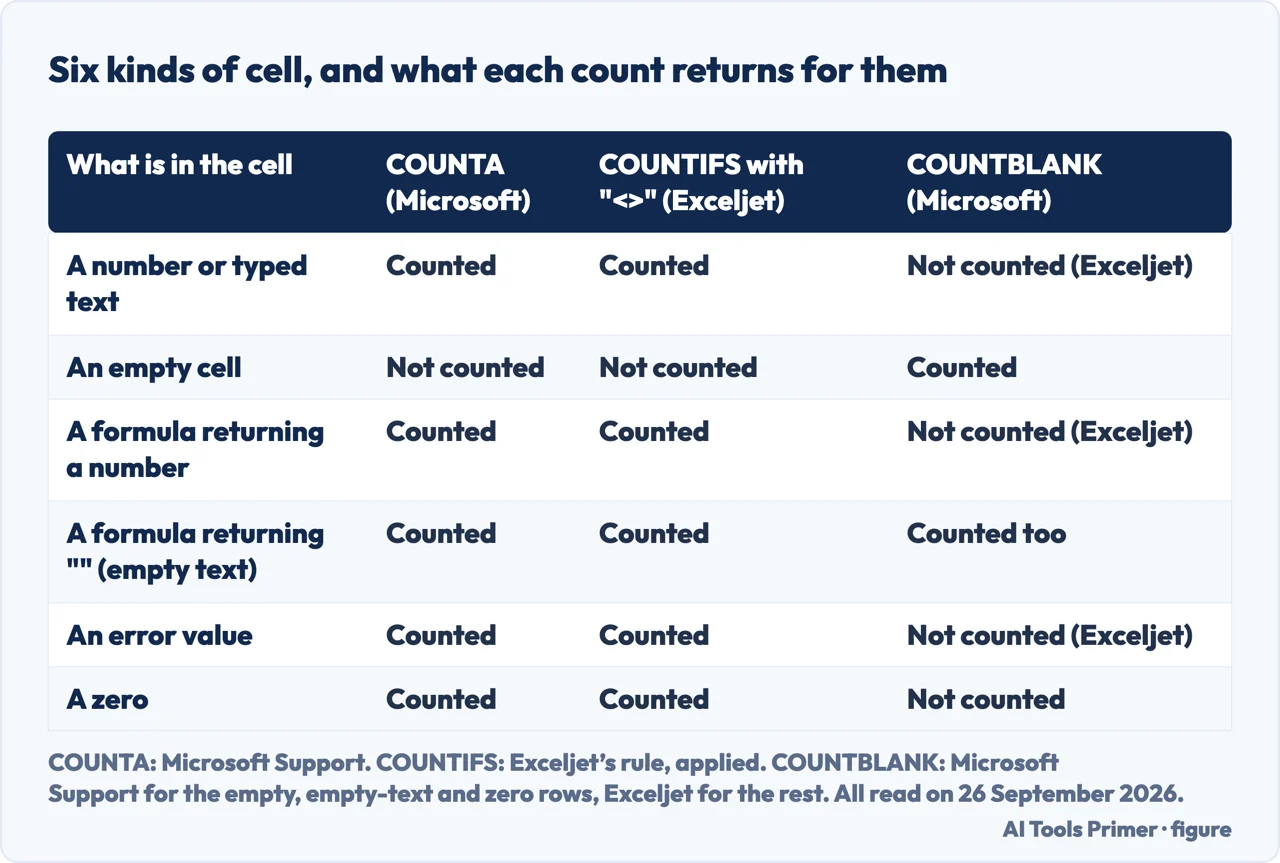
- Decide what a blank means in your column. A cell nobody has typed in, or a cell that looks empty because a formula put nothing there? COUNTA and COUNTIFS count the two differently; COUNTBLANK counts both.
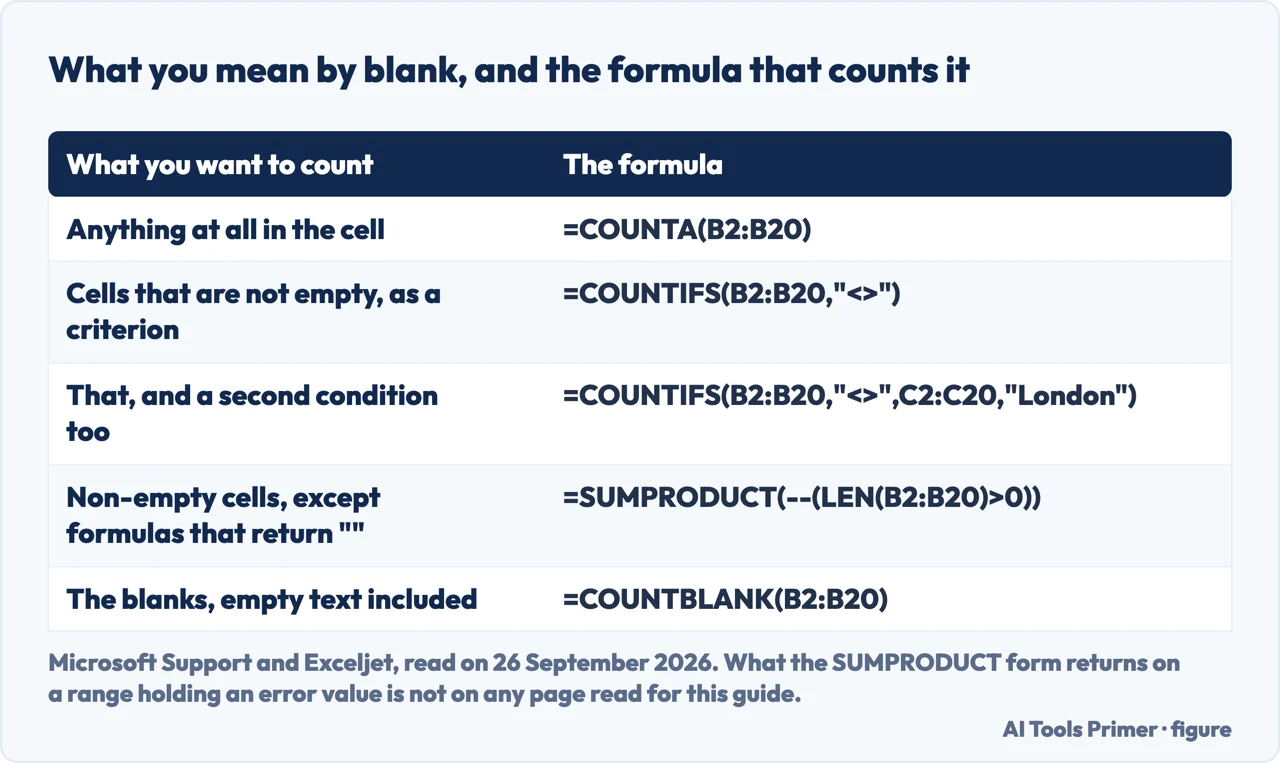
- For anything at all in the cell, use COUNTA.
=COUNTA(B2:B20). Microsoft: it counts cells containing any type of information, and does not count empty cells. - As another way to count cells that are not empty, use COUNTIFS.
=COUNTIFS(B2:B20,"<>")is Exceljet’s form, and the same function takes a second condition without changing shape:=COUNTIFS(B2:B20,"<>",C2:C20,"London")counts the rows where B is not empty — formulas returning "" included — and C says London. - To count the blanks instead, use COUNTBLANK.
=COUNTBLANK(B2:B20). The Remark on that page is the line to read before you trust it against the one above. - Add the two numbers and compare them with the height of the range. Put
=COUNTA(B2:B20)and=COUNTBLANK(B2:B20)side by side and compare their total with=ROWS(B2:B20). If the total comes out higher, some cell is counted on both sides — in the table, the formula returning empty text — and the section below is the reason.
One cell, counted by both sides
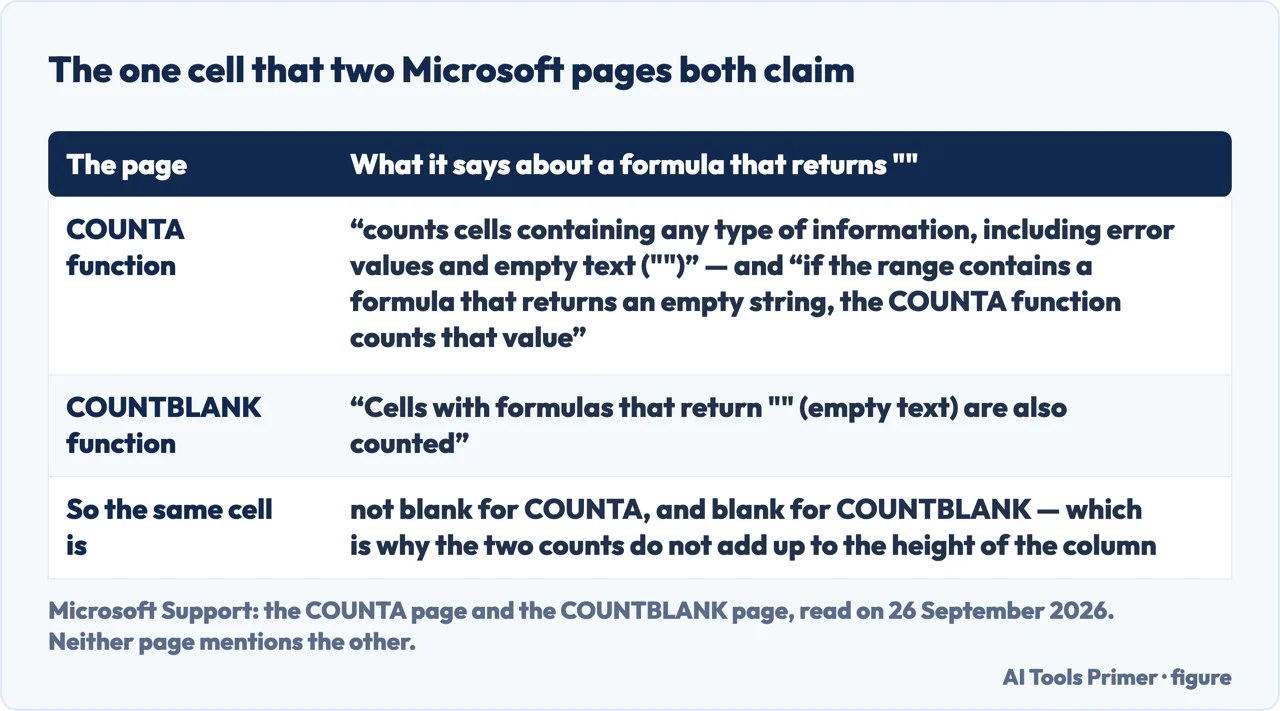
“The COUNTA function counts cells containing any type of information, including error values and empty text (""). For example, if the range contains a formula that returns an empty string, the COUNTA function counts that value.”
“Cells with formulas that return "" (empty text) are also counted.”
The first quotation is from Microsoft’s COUNTA page, the second from its COUNTBLANK
page. Neither page mentions the other. Put them together and take a cell holding =IF(A2="","",A2*2) on a row where A2 is empty, so that the formula returns empty text: that cell is not blank as far as COUNTA is concerned and blank as far as COUNTBLANK is concerned. On a row where A2 holds a number the formula returns a number and both functions agree.
The practical consequence is a sum that does not close. Count the filled cells and the blank ones in a twelve-row range and you can get thirteen, with no error anywhere, because one cell was counted twice. Nothing is broken: the two functions are answering two different questions about the same cell.
Why the two numbers are both right. It helps to read the two functions as asking different questions rather than the same one from opposite ends. COUNTA asks whether the cell holds anything — and a formula is something, whatever it returns. COUNTBLANK asks whether the cell is empty or has a formula that returns empty text. The difference is not “shows nothing”: a cell with a single space shows nothing on screen, but it holds text, and Exceljet is explicit that spaces are not counted as blank. Once the question is stated that way the overlap stops being a bug and becomes a choice: if a formula returning empty text should count as done, COUNTA is the one; if it should count as still to do, COUNTBLANK is.
Three lines worth reading before you trust a count, and a note on versions
Each one is on a Microsoft Support page read in full on 26 September 2026.
- COUNTA counts errors too
- Error values are “any type of information”, so a column with a stray
#N/Ain it counts that row as filled. If the point of the count is how much work is done, an error is not done. - COUNTBLANK ignores zeros
- “Cells with zero values are not counted.” A zero is a value, which is the answer to the worry that a column of zeros will read as empty.
- The operator has to be written as text
- Inside COUNTIF the not-equal comparison goes in quotation marks:
"<>". Microsoft’s own worked line for the general case is=COUNTIF(B2:B5,"<>"&B4), where the ampersand joins the operator to the value; the page adds, plainly, “Be sure to enclose the criteria argument in quotes.” - The version lists differ from page to page
- Count nonblank cells in Excel stops at Excel for Microsoft 365 and its Mac version, Excel 2024 and its Mac version, Excel 2021 and its Mac version; Use COUNTA to count cells that aren’t blank is narrower still, at Excel for Microsoft 365, Excel 2024 and Excel 2021; and the COUNTIF page carries the same six entries as Count nonblank cells. The COUNTA, COUNTBLANK and COUNTIFS pages reach back to Excel 2016, and so does the how-to page Ways to count values in a worksheet: the difference is not a rule about how-to pages, it is these three lists.
Where this answer stops. The COUNTA column of the table is what Microsoft describes. The COUNTIFS column applies Exceljet’s reading of “<>”, cells “not equal to nothing”, because none of the Microsoft pages read here describes that criterion on its own. The COUNTBLANK column is Microsoft’s for the empty, empty-text and zero rows and Exceljet’s for the cells marked so. Each page is named in the notes with the versions it declares. This page does not cover SUMIF and conditional totals, which add rather than count; it does not teach DCOUNTA and the criteria range, which Microsoft documents separately; and it does not cover counting inside a filtered list. Nor does it cover Google Sheets.
Where to start
Four ways in.
- “Just give me the formula.”
- Five steps — the five steps
- “My two counts do not add up.”
- One cell, both sides — the cell both sides claim
- “Which one should I use?”
- It depends what blank means — the five things to count
- “Are both numbers wrong, then?”
- No — different questions — why both numbers are right
How to count cells that are not blank
COUNTA for anything at all, COUNTIFS with a not-equal criterion as a second way, and the same COUNTIFS when a second condition matters.
One cell, counted by both sides
A formula returning empty text is not blank for COUNTA and blank for COUNTBLANK, and neither Microsoft page mentions the other.
Three lines worth reading before you trust a count, and a note on versions
COUNTA counts errors, COUNTBLANK ignores zeros, the operator has to be written as text, and the Count nonblank, Use COUNTA and COUNTIF how-to pages list fewer versions than the COUNTA, COUNTBLANK and COUNTIFS pages.
Why the two numbers are both right
COUNTA asks whether the cell holds anything and COUNTBLANK whether it is empty or has a formula that returns empty text, so the overlap is a choice rather than a fault.
Questions people also ask
How do I calculate only if a cell is not blank in Excel?
Wrap the calculation in an IF that tests the cell first: =IF(A2<>"",A2*2,""). The formula runs when A2 is neither empty nor empty text, and returns empty text when it is — which is the same empty text that COUNTA will later count as filled.
How do I check in Excel if a cell is not blank?
Compare it with empty text: =A2<>"" returns TRUE when the cell holds a number, non-empty text or a logical value. What the comparison returns when A2 holds an error value is not on any page read for this guide, and this guide counts an error as content. Microsoft also documents ISBLANK, but the two are not opposites: ISBLANK is TRUE only for “a reference to an empty cell”, so for a formula returning empty text both tests return FALSE.
How do I count only filled cells in Excel?
=COUNTA(B2:B20). Microsoft’s description is that it counts cells containing any type of information and does not count empty cells — so errors and zeros are included in that total.
How can I make Excel’s COUNTIF formula ignore blank cells?
The "<>" criterion already skips empty cells — the form read for this guide is Exceljet’s, and it is written with COUNTIFS. What it does not skip is a cell whose formula returns empty text. To skip those as well, Exceljet gives =SUMPRODUCT(--(LEN(B2:B20)>0)), which counts only cells with a length greater than zero; what that formula returns when the range holds an error value is on none of the pages read here, so on a column that may hold one it is not the formula to trust.
Not covered here. It does not cover SUMIF or SUMIFS, which add the values rather than count the rows.
It does not teach DCOUNTA and the criteria range, which Microsoft documents on their own pages and which this guide only names.
And it does not cover counting inside a filtered list, or Google Sheets. What holds instead is simple: the counts under COUNTA are Microsoft’s, those under COUNTIFS apply Exceljet’s reading of “<>”, and those under COUNTBLANK are Microsoft’s except the cells marked Exceljet.
Sources
- Microsoft Support — COUNTA function: the sentence that it counts cells containing any type of information including error values and empty text, and the worked note that a formula returning an empty string is counted. Applies to Excel for Microsoft 365 and its Mac version, Excel 2024 and its Mac version, Excel 2021 and its Mac version, Excel 2019 and Excel 2016 — support.microsoft.com, read September 2026.
- Microsoft Support — COUNTBLANK function: the Remark that cells with formulas returning empty text are also counted, and that cells with zero values are not. Applies to Excel for Microsoft 365 and its Mac version, Excel 2024 and its Mac version, Excel 2021 and its Mac version, Excel 2019 and Excel 2016 — support.microsoft.com, read September 2026.
- Microsoft Support — Use the COUNTIF function in Microsoft Excel: the definition of the criteria argument, the instruction to enclose it in quotes, and the worked line in which the ampersand joins the not-equal operator to a value. It does not describe the “<>” criterion on its own. Applies to Excel for Microsoft 365 and its Mac version, Excel 2024 and its Mac version, and Excel 2021 and its Mac version — support.microsoft.com, read September 2026.
- Microsoft Support — COUNTIFS function: the several-condition form used in the steps above. It says nothing about how empty text, error values or zeros in the range are counted. Applies to Excel for Microsoft 365 and its Mac version, Excel 2024 and its Mac version, Excel 2021 and its Mac version, Excel 2019, Excel 2016 and Excel Web App — support.microsoft.com, read September 2026.
- Microsoft Support — Count nonblank cells in Excel, read in full on 26 September 2026: about 89 words of article text on that reading, counted on the article and not on the page furniture, and an Applies To line that stops at Excel 2021 and its Mac version — support.microsoft.com, read September 2026.
- Microsoft Support — Use COUNTA to count cells that aren’t blank: the warning that “data” can include spaces you cannot see. Applies to Excel for Microsoft 365, Excel 2024 and Excel 2021 — the narrowest list of the pages behind this guide — support.microsoft.com, read September 2026.
- Microsoft Support — Ways to count values in a worksheet: the long reference behind these functions. Applies to Excel for Microsoft 365 and its Mac version, Excel 2024 and its Mac version, Excel 2021 and its Mac version, Excel 2019 and Excel 2016 — support.microsoft.com, read September 2026.
- Microsoft Support — IS functions: the sentence that ISBLANK returns TRUE only for a reference to an empty cell. Applies to Excel for Microsoft 365 and its Mac version, Excel 2024 and its Mac version, Excel 2021 and its Mac version, Excel 2019, Excel 2016 and Excel Web App — support.microsoft.com, read September 2026.
- Exceljet — Count cells that are not blank, read in full on 26 September 2026; the only page in this list that says COUNTIFS with “<>” also counts empty strings returned by formulas, the only one that gives a formula which skips them, and the only one that says what COUNTBLANK does with numbers, text and an error value: “Cells that contain text, numbers, errors, spaces, etc. are not counted.” It declares no Applies To — exceljet.net, read September 2026.
Written by Alberto Gulotta
Founder and editor of AI Tools Primer, writing from Palermo, Italy. Thirty-five years of taking computers apart, starting with a Commodore 64 — the long version is on the about page.
Something wrong on this page? Write to aitoolsprimer@gmail.com and it gets fixed.
Written on 26 September 2026.
Independence and limits
No affiliate links and no paid placements anywhere on this site. Nobody pays to appear here, and no company has seen this page before you did.
This is general information, not professional advice. Where a page touches money, health, safety or the law, it names its source and the date it was read — and your situation may still differ. See the privacy page and the cookie policy.