
Software · guide
AirPrint printers: how to tell whether yours is one
By Alberto Gulotta · Updated · 9 min read
AirPrint printers are the ones whose maker built Apple's wireless printing into the printer, and Apple says its printer information comes from each manufacturer. This page sets out how Apple, Canon, Epson and Xerox describe it, the checks one blog gives for any model, and what it lists when a printer is not one.
| Question | Answer | Where it comes from |
|---|---|---|
| Where is the list of printers? | Apple links its search for AirPrint-enabled printers from its AirPrint page | Apple Support |
| Who supplies the list? | Printer information is provided by each manufacturer and updated regularly by Apple | Apple Support |
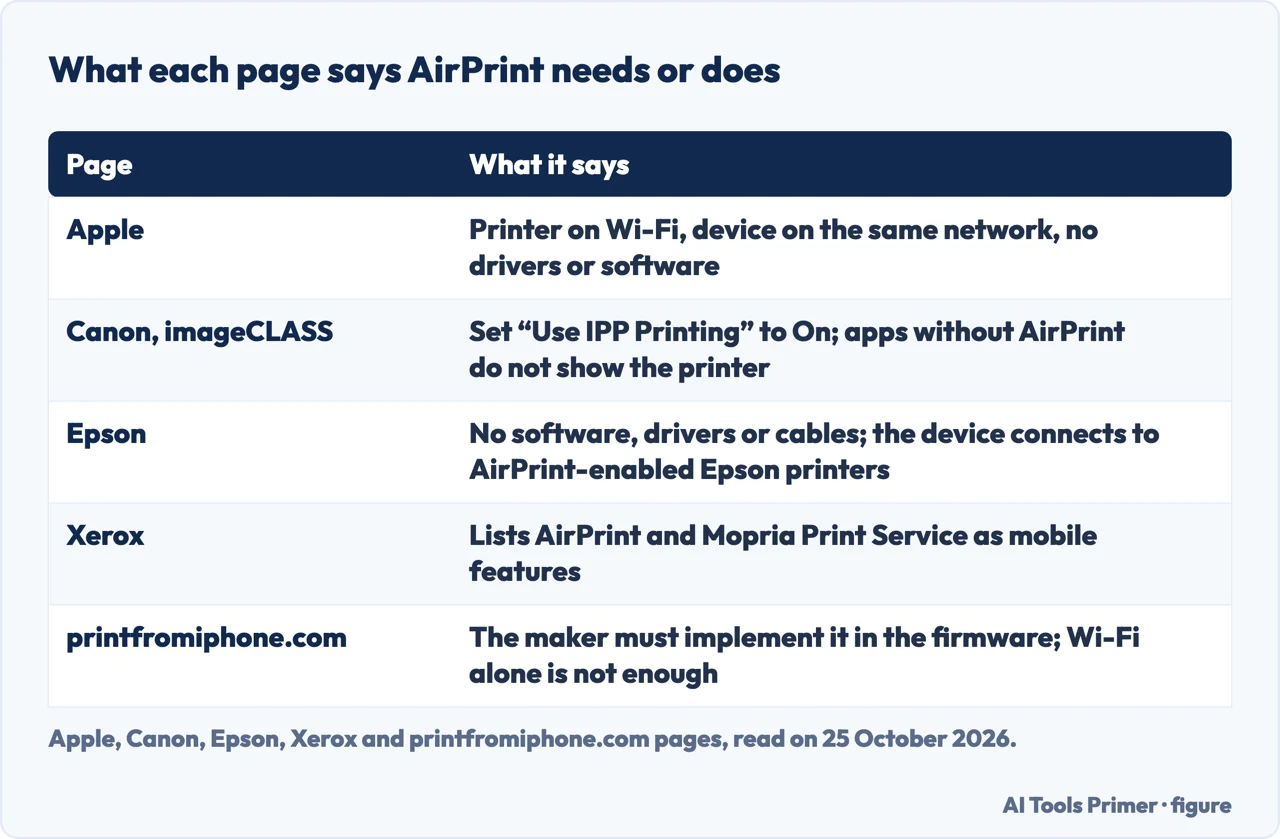
| Is a driver needed? | No: connect the printer to Wi-Fi, put the device on the same network, choose the printer | Apple Support |
| Is a Wi-Fi printer an AirPrint printer? | Not by itself: the maker must have implemented AirPrint in the printer | printfromiphone.com |
| Not on the list? | Check with the manufacturer | Apple Support |
What Apple’s page says
Apple’s About AirPrint page, published on 17 March 2026, is short. It says printer information is provided by each manufacturer and updated regularly by Apple, and it puts a link, “Search for AirPrint-enabled printers”, at the top; the link goes to a search tool on a separate Apple address, which our browser tool would not let us read, so no printer list is reproduced here. It adds that printers categorized as USB-only support driverless printing or scanning only from your Mac over a USB connection, and that if your printer is not listed you should check with the manufacturer.
For an AirPrint-enabled printer, Apple says you do not need to install additional drivers or other software. Connect the printer to your Wi-Fi network, make sure your iPhone, iPad, Mac or Apple Vision Pro is on the same Wi-Fi network, and choose the printer in the app’s print dialog. The page also names Adobe Systems Inc., Conexant Systems Inc. and Qualcomm Technologies Inc. as AirPrint technology providers. For the steps on an iPhone see adding a printer on iPhone, and for the Mac, printing on a Mac.
What the makers’ pages add
Epson’s AirPrint page says there is no software to download, drivers to install or cables to connect, and that the Apple device will automatically connect to AirPrint-enabled Epson printers; it then lists its models. Xerox’s page for colour laser printers lists AirPrint together with Mopria Print Service among mobile-ready features. Canon’s article for its imageCLASS machines goes further on the setup side: for printing it says the setting “Use IPP Printing” must be set to On, that the Apple device and the machine must be on the same LAN, directly connected, or the Mac connected by USB, and that in applications that do not support AirPrint the printer does not appear in the Printer list, so you cannot print from them.
Epson’s and Xerox’s pages are product pages for the makers’ own models, not Apple’s list. We copied no model list from either.
How to tell, according to one blog
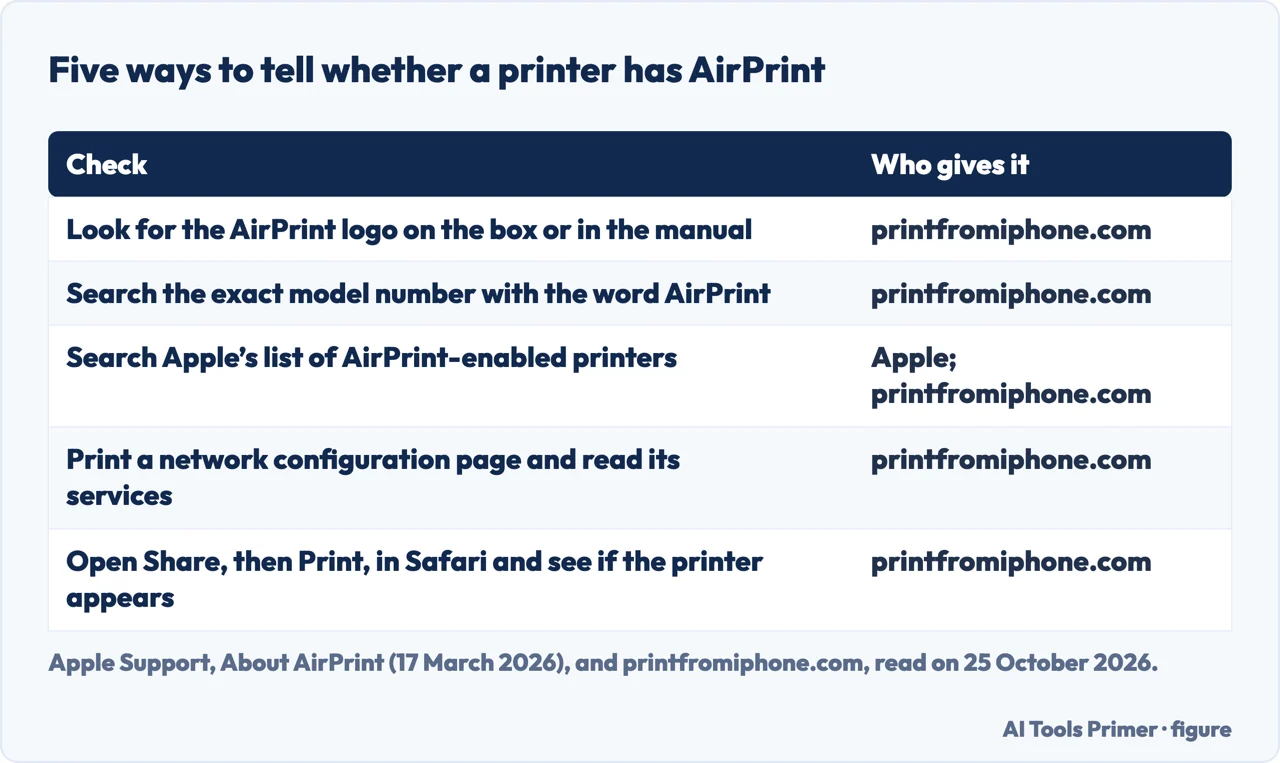
The page that carries the title “AirPrint-Compatible Printers: The Full Compatibility List” is a blog on printfromiphone.com, which promotes an iPhone printing app called Smart Printer and shows no date that we could read. It gives five ways to check a printer, which the figure above sets out. Its main advice is to verify support for the exact model number printed on the device or the box, not the product line or the series name. Its checks are the AirPrint logo on the packaging or in the manual, a search for the model number plus “AirPrint”, Apple’s printer list, a network configuration page that lists the supported services, and a test print: with the printer and iPhone on the same Wi-Fi network, open Safari, tap Share, then Print, and if the printer appears in the list, the blog says it supports AirPrint.
The same blog says AirPrint was built into most Wi-Fi printers from HP, Canon, Epson, Brother and other major brands from roughly 2010 onward, which is the blog’s own statement, not a date from Apple.
Wireless is not the same as AirPrint
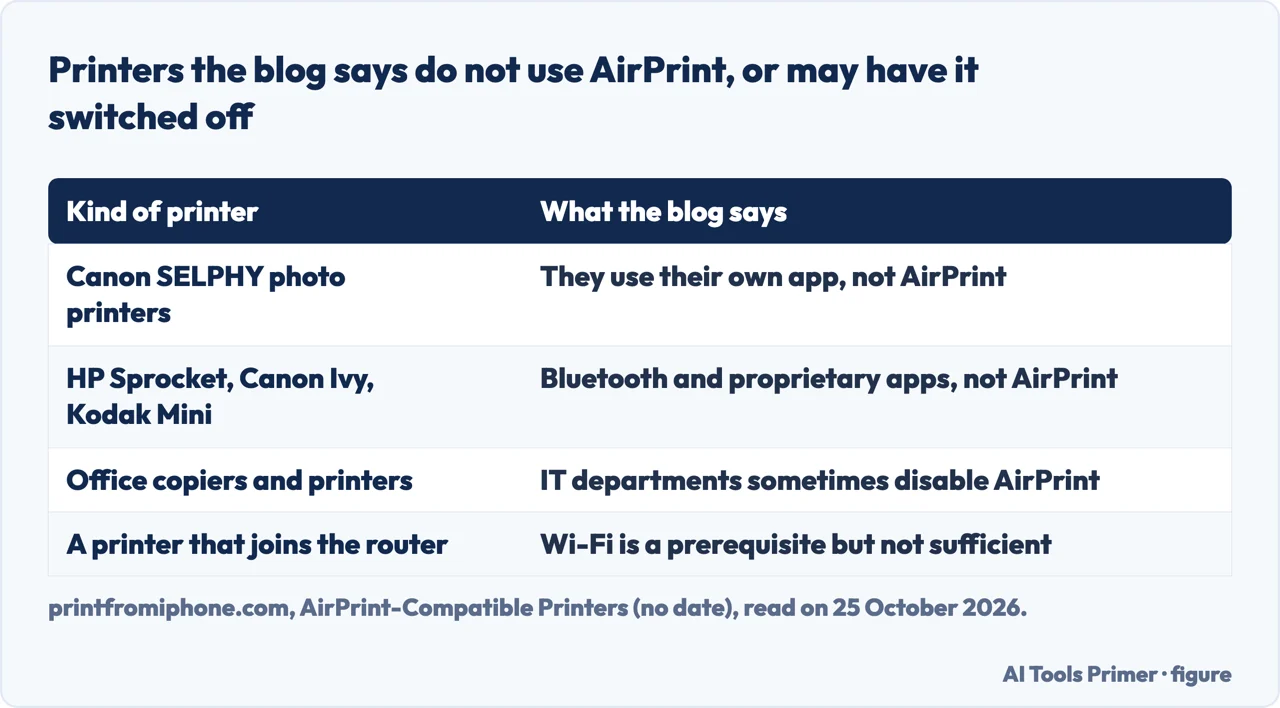
One of the questions people ask is the difference between an AirPrint printer and a wireless printer. Apple’s page does not use the term wireless printer. The blog says that Wi-Fi connectivity is a prerequisite but not sufficient: a printer can connect to your router and still lack AirPrint if the manufacturer chose to support only its own app or other protocols, and that AirPrint is not something you toggle on or download later, because the manufacturer has to implement it in the printer’s firmware. It gives as examples Canon SELPHY compact photo printers, which it says use their own app, and portable thermal printers such as HP Sprocket, Canon Ivy and Kodak Mini, which it says connect through Bluetooth and proprietary apps. For office printers it says IT departments sometimes disable AirPrint, so at work it suggests asking whether it is enabled on the network. These are the blog’s statements about brands and we did not check them against the makers.
When the printer is not one
For a printer that works from a computer but that the iPhone cannot see, the blog lists four options. Replace the printer with an AirPrint model. Share the printer from a Mac or PC connected to it by USB, which it says Macs can advertise as an AirPrint device through printer sharing. Use the maker’s own app, for example HP Smart, which it says can send jobs to HP printers that lack native AirPrint, though that is not AirPrint and depends on the manufacturer. Or buy a print-server adapter; it says such products are largely discontinued and may not support modern iOS reliably. Wi-Fi Direct is another route that the iPhone page covers from a different guide. If the printer is simply not printing, see why a printer is not printing, and for a printer that shows as offline, how to fix printer offline.
What we did not read
We did not open Apple’s printer search, so we cannot say whether a given model is on it. HP’s explainer on AirPrint printers, dated 5 May 2020, showed no article text in the page we read. The shop pages for the term, the ranking of printers, a Q&A page and an encyclopedia entry were not read, and we tested no printer.
Where to start
Four ways in.
- “Where is the list?”
- What Apple says — apple
- “How do I check mine?”
- The five checks — blog
- “It has Wi-Fi.”
- Wireless is not AirPrint — wireless
- “Mine is not one.”
- The other routes — notlisted
Printing from Apple devices
The steps, once the printer is one.
When the printer does not cooperate
Wi-Fi, offline and the head clean.
Questions people also ask
Which printers are AirPrint printers?
Apple points to its search for AirPrint-enabled printers, with information supplied by each manufacturer; Epson and Xerox list models on their own pages.
How do I AirPrint to my printer?
Apple: connect the printer to Wi-Fi, put the device on the same network and choose the printer in the app’s print dialog; no drivers needed.
How do I know if a printer has AirPrint?
Apple says to search its list; a blog adds the logo, the exact model number, a network configuration page and a test print from Safari.
What is the difference between an AirPrint printer and a wireless printer?
A blog says Wi-Fi is a prerequisite but not enough: the maker must implement AirPrint in the printer’s firmware. Apple’s page does not draw this distinction.
Not covered here. We tested no printer and opened no printer list from Apple. The statements come from Apple Support (About AirPrint, published 17 March 2026), a Canon article for imageCLASS machines, product pages from Epson and Xerox, and a blog on printfromiphone.com that promotes the Smart Printer app and shows no date; the blog is used for what it claims.
HP’s explainer, the shop pages, the ranking and the question-and-answer pages in the results were not used. The search volume and difficulty behind this page were read in Semrush on 29 August 2026.
Sources
- Apple Support — About AirPrint (published 17 March 2026) — support.apple.com, read 25 October 2026.
- Canon — Printing with AirPrint (imageCLASS), no date read — support.usa.canon.com, read 25 October 2026.
- Epson — Apple AirPrint — epson.com, read 25 October 2026.
- Xerox — Color Laser Printers with AirPrint — www.xerox.com, read 25 October 2026.
- printfromiphone.com — AirPrint-Compatible Printers: The Full Compatibility List (blog promoting the Smart Printer app, no date read) — printfromiphone.com, read 25 October 2026.
Written by Alberto Gulotta
Founder and editor of AI Tools Primer, writing from Palermo, Italy. Thirty-five years of taking computers apart, starting with a Commodore 64 — the long version is on the about page.
Something wrong on this page? Write to aitoolsprimer@gmail.com and it gets fixed.
Written on 25 October 2026.
Independence and limits
No affiliate links and no paid placements anywhere on this site. Nobody pays to appear here, and no company has seen this page before you did.
This is general information, not professional advice. Where a page touches money, health, safety or the law, it names its source and the date it was read — and your situation may still differ. See the privacy page and the cookie policy.