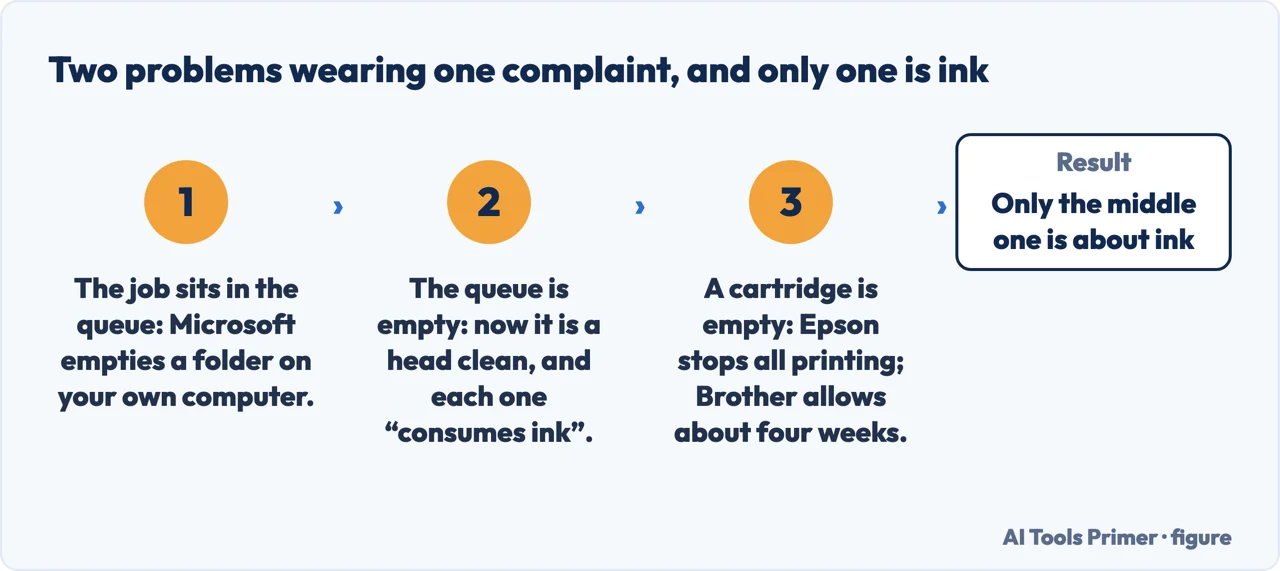
Why is my printer not printing splits into two very different problems, and the first one never reaches the printer at all. If the job vanished into the queue and the machine never moved, the fault is on the computer — and it has a documented fix that costs nothing.
Before the printer, the queue
If the computer accepted the job and the printer never moved, the fault may be entirely on the
computer’s side, and it has a documented cure that is not a setting. Microsoft’s
instruction is to empty the spool folder by hand: “In the search box on the taskbar, enter
%WINDIR%\system32\spool\printers, select %WINDIR%\system32\spool\PRINTERS in the
list of results, and then delete all files in the folder.” It is a folder on your computer, and it has nothing to do with ink.
If the queue is empty and the printer still produces nothing, or produces blank pages, the next move is a head cleaning. Here the manufacturers agree on the action and disagree on how many times you may repeat it and what to do when you stop — and two of them state in writing that each attempt costs ink.
Canon
two, then deeper
“If the problem is not resolved after cleaning the print head twice, clean the print
head deeply.”
And the deep cleaning has its own wait: “If the problem is not resolved, turn off the power
and clean the print head deeply again after 24 hours.”
Epson
three, then twelve hours
“If you don’t see any improvement after cleaning the print head up to 3
times, turn off the product and wait at least 12 hours.”
Epson does not say why the ceiling exists. Brother does, and it applies to all four: “Cleaning the print head consumes ink. Cleaning too often uses ink unnecessarily.”
HP
three, then new cartridges
“If the page that prints has defects, the Printhead might be badly clogged. Run up
to two more cleaning cycles.”
Then a different conclusion from everyone else’s: “If the page that prints still
has defects after three cleanings, replace the cartridges.”
Brother
no number at all
“If you clean the print head several times and the print has not improved, try the special cleaning method, which cleans the print head with more force.”
The only one of the four that names no number — and the only one whose answer to a head that stays blocked is a different procedure rather than another go at the same one. Brother adds a condition the others do not: “make sure all ink tanks are filled more than halfway, as this method consumes a large amount of ink”.
Line those up and the useful part is not the ceiling but the instruction that follows it. Canon says clean deeper. Epson says stop and wait half a day. HP says the cartridges are the problem. Brother says clean again. Four manufacturers, four different conclusions from the same evidence — and a reader following a generic article that says “run a few cleaning cycles” is being told none of them.
The waiting periods are the part most easily lost, and they are the cheapest thing on this page: Epson’s at least 12 hours with the machine off, Canon’s 24 hours before a second deep clean. Ink dries and re-dissolves on its own schedule; a night of doing nothing is a documented step, not a delay.
Then the instruction that appears in almost every troubleshooting sequence, including Microsoft’s own.
Unplug it — except that two manufacturers say not to
Microsoft: “Turn off your printer and unplug it, wait 30 seconds, plug your
printer back in, and then turn the printer back on.”
Canon, in the middle of the deep-cleaning procedure: “Do not unplug the power cord
when turning off the power.”
Brother, listing what ends black-and-white-only mode on a machine with an empty colour
cartridge: “If you unplug the machine or remove the ink cartridge.”
These are not in conflict about electricity; they are about different situations. But the
consequence for a reader is real, because the advice to pull the plug is generic and the two
warnings against it are specific — and the specific cases are exactly the ones where
somebody is already in trouble. Mid-way through a Canon deep clean, or on a Brother that is only
still printing because it is holding a state in memory, the universal remedy is the wrong move
and the manufacturer has written so.
The other half of this question is about ink, and specifically the belief that a printer with an empty colour cartridge should still manage black text. Two manufacturers answer that explicitly, and they do not answer it the same way.
Epson: “Note: You cannot print when any ink cartridge is expended even if
the other cartridges are not expended.”
Brother: “Your Brother machine is designed to stop ALL printing operations when any of the ink cartridges are empty.” — followed by an exception
with a duration: “You can use the machine as a black and white printer for approximately four weeks.”
So the answer to “surely it can still print in black” depends on whose printer it
is, and both companies put it in writing. Epson states the block without exception; Brother
states the same block and then grants roughly four weeks of black-and-white. That is a
published difference between two manufacturers on the same question, and it is worth knowing
before buying a machine as much as before troubleshooting one.
Three problems arrive as one complaint. Quotations from Microsoft, Epson and Brother. Figure drawn by AI Tools Primer.
One warning that belongs here because the obvious next step is to reach inside. Brother:
“DO NOT touch the print head. Touching the print head may cause permanent damage and may
void the print head’s warranty.” Cleaning a head by hand is a real technique and
there are situations for it; it is not a first move, and on at least one manufacturer’s
written terms it costs the warranty on the part you are trying to save.
A note on scope, because it decides whether any of the numbers above are yours. These figures come from documents for specific machines — Canon’s from the G2260/G3260 and MX532 pages, Epson’s from the ET-4810/L5590 and a WorkForce user guide, Brother’s from the MFC-T4500DW and an MFC-J985DW FAQ, HP’s from its general blank-pages and cannot-print documents. A different model from the same company may publish a different ceiling. The point that survives is not the individual number but that the numbers exist, are published, and differ, which is the opposite of what a single confident instruction implies.
A note on other guides, with its limit stated. Google returned an anti-bot page rather than results, so this page makes no claim about what is on Google’s first page. On Bing, in the United States, on 23 August 2026, the first ten results were two Microsoft pages, one HP support document, an HP marketing article, and six general technology sites. None of the ten result summaries carried a cleaning-cycle limit or a waiting period.
What this page will not do is tell you which brand you have or which model document applies. The ceilings differ by manufacturer and can differ by machine, and the authority is the manual for the printer in front of you.
It will not recommend third-party ink. That is a real market with real savings and real risks, nothing here has been tested, and the manufacturers have an obvious interest in the answer — which is a reason to be careful with their claims, not a reason to substitute ours.
And it will not tell you to clean the head by hand as an early step. One manufacturer publishes that touching it may void the warranty on that part.
Where to start
Three ways in. If the job disappeared and the printer never moved, take the first.
Two, three, three and five cleanings — and four different instructions for what to do once you reach the limit. Two manufacturers state that each attempt consumes ink.
Not covered here. It will not give you one number of cleaning cycles. Four manufacturers publish four, with four different instructions afterwards, and flattening them is how the ink gets wasted.
It will not recommend third-party ink or refill kits. Untested here, and the only parties publishing on it have a direct interest either way.
It will not tell you to touch the print head. One manufacturer states in writing that doing so may void that part’s warranty.
And it carries no affiliate links, including for cartridges and printers, which is the category where the margins in this whole section actually live. What holds instead is simple: each ceiling, wait and warning above is quoted from the manufacturer that published it, with the model each document covers named alongside.
The printer jobs
Five guides: a printer that is not printing, a printer offline, streaks on the page, a test page and setting up a printer.
HP — HP printer prints blank pages (the printhead cleaning ceiling: that if the page that prints has defects the Printhead might be badly clogged and you should run up to two more cleaning cycles, and that if the page that prints still has defects after three cleanings you should replace the cartridges) — support.hp.com, read 27 August 2026.
Canon, Deep Print Head Cleaning — Canon Inkjet Manuals, G7000 series (that if the problem is not resolved after cleaning the print head twice you should clean it deeply; that if it is still not resolved you should turn off the power and clean the print head deeply again after 24 hours; and the instruction not to unplug the power cord when turning off the power) — ij.manual.canon, read 24 August 2026.
Epson, Cleaning the Print Head Using the Product Buttons — Epson Support (that if you do not see any improvement after cleaning the print head up to 3 times you should turn off the product and wait at least 12 hours, then check the nozzles and clean again if necessary) — files.support.epson.com, read 24 August 2026.
Epson, Replace Ink Cartridges — Epson Support (the Note that you cannot print when any ink cartridge is expended even if the other cartridges are not expended, and that expended cartridges must be replaced before printing) — files.support.epson.com, read 24 August 2026.
Brother, Why can’t I print when an ink cartridge is empty? — Brother Support (that the machine is designed to stop ALL printing operations when any of the ink cartridges are empty, because print jobs and cleaning cycles would suck air from the empty cartridge and damage the print head; that selecting black-only or grayscale does not avoid this because cleaning cycles are programmed to clean ALL the ink nozzles; and that the only way to continue printing is to replace the empty cartridges) — support.brother.com, read 24 August 2026.
Brother, Print using only the black ink cartridge when the Color cartridges have run out — Brother Support (that the machine can be used as a black and white printer for approximately four weeks, depending on the number of pages printed; and that this mode ends if the machine is unplugged or an ink cartridge is removed, after which the colour cartridges must be replaced) — support.brother.com, read 24 August 2026.
Brother, Clean the Print Head from Your Brother Machine — Brother Support (the IMPORTANT warning not to touch the print head, since touching it may cause permanent damage and may void the print head’s warranty) — support.brother.com, read 24 August 2026.
Microsoft, Fix printer connection and printing problems in Windows — Microsoft Support (the instruction to turn off the printer and unplug it, wait 30 seconds, plug it back in and turn it on again) — support.microsoft.com, read 24 August 2026.
Canon, Cleaning the Print Head — Canon Inkjet Manuals, G7000 series (the standard cleaning procedure, that it takes about two minutes and should be followed by printing the nozzle check pattern, and the note that if the problem is not resolved after cleaning the print head twice the print head should be cleaned deeply) — ij.manual.canon, read 26 August 2026.
AG
Written by Alberto Gulotta
Founder and editor of AI Tools Primer, writing from Palermo, Italy. Thirty-five years of
taking computers apart, starting with a Commodore 64 — the long version is on the
about page.
Written on 23 August 2026 · last checked 23 September 2026.
§
Independence and limits
No affiliate links and no paid placements anywhere on this site. Nobody pays to appear here,
and no company has seen this page before you did.
This is general information, not professional advice. Where a page touches money, health,
safety or the law, it names its source and the date it was read — and your situation may
still differ. See the privacy page and the
cookie policy.