
Software · guide
How to change ringtone on Android: three paths and what fails
By Alberto Gulotta · Updated · 9 min read
How to change ringtone on Android depends on the phone. Google puts it under the Phone app's Sounds and vibration, Phone ringtone. Samsung puts it under Settings, Sounds and vibration, Ringtone. Your own song goes through Files by Google or Add, and Samsung says streamed songs and SIM-only contacts cannot take a custom tone.
| Question | Answer | Where it comes from |
|---|---|---|
| Where is the setting? | Phone app, More, Settings, Sounds and vibration, Phone ringtone; on a Galaxy, Settings, Sounds and vibration, Ringtone | Google, Samsung |
| How do I use my own file? | In Files by Google, play the audio file, tap More and Set as ringtone, then allow system settings | |
| Can I use a streamed song? | On a Galaxy, no: the song must be a file stored on the phone | Samsung |
| Can one contact have a tone? | Yes, from the contact in Contacts, but not for contacts stored only on the SIM card | Samsung |
| Does it change message alerts? | No: Samsung says they are set separately, under Notification sound | Samsung |
Choosing a tone that is already on the phone
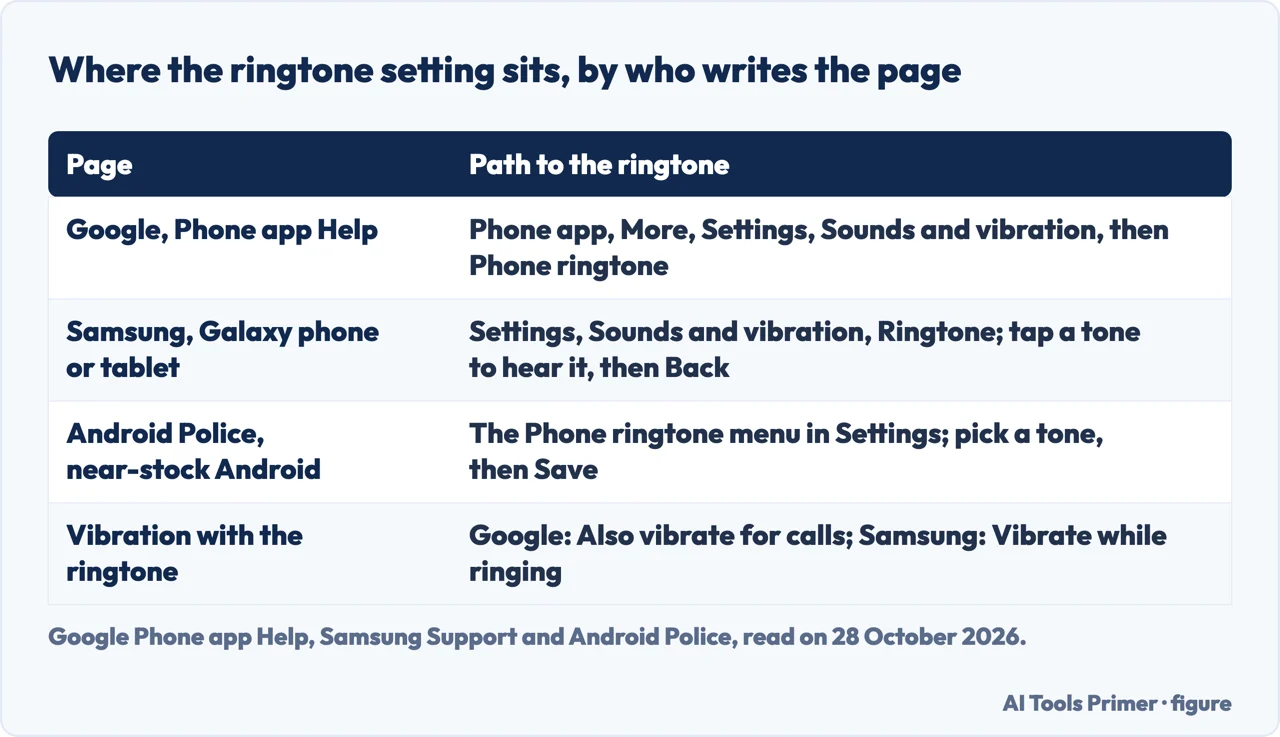
Google’s help page for the Phone app gives the path: open the Phone app, tap More and Settings, tap Sounds and vibration, and to pick from the available ringtones tap Phone ringtone. On the same screen it puts the option to make the phone vibrate for calls, Also vibrate for calls, and a Dial pad tones switch, called Keypad tones if the first name is missing. It says some of these steps work only on Android 7.0 and up. Android Police, writing about a near-stock Android phone with a Google Pixel, says to select a ringtone to play it and tap Save in the upper-right corner to set it as the default.
On a Galaxy phone or tablet the menu is different. Samsung says to open Settings, tap Sounds and vibration, tap Ringtone and swipe through the list of tones; tapping a tone plays a preview, and when you have found one you like you tap Back to set it. Samsung adds that every Galaxy comes with default ringtones but that the ones available may differ depending on your carrier. For vibration it puts a switch called Vibrate while ringing on the Ringtone settings screen, with a Call vibration intensity slider and a Sync with ringtone option, and says some sounds will not sync with the ringtone you picked.
Using your own song or sound
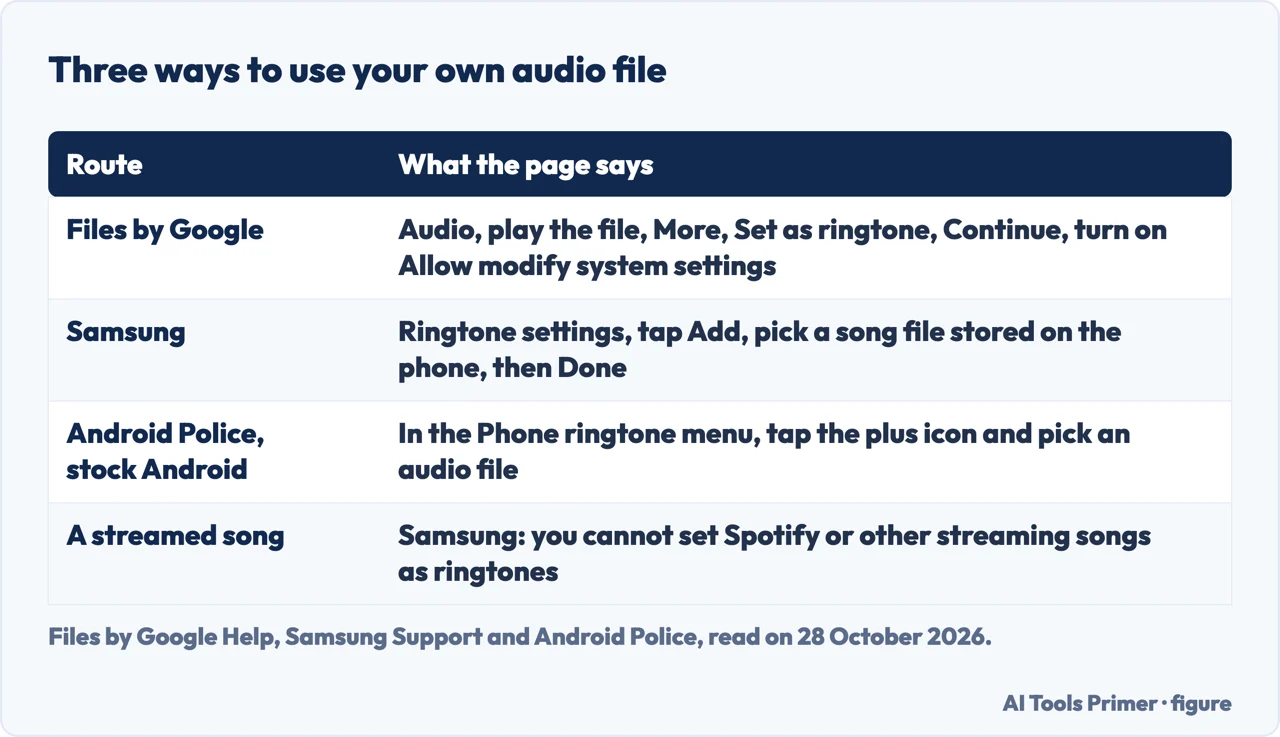
Google’s Files page has the shortest route for an audio file already on the phone. Open the Files by Google app, scroll to Audio under Categories, find and play the file, tap More and then Set as ringtone. On the permission dialog tap Continue and turn on Allow modify system settings, after which a message confirms that the ringtone is set. Samsung’s route is inside the Ringtone settings: tap Add, the plus sign, tapping Allow if it is the first time or you have not changed ringtones for a while, select a song from the files stored on the phone, and tap Done. Android Police describes the stock Android version as going to the Phone ringtone menu, tapping the plus icon in the lower-right corner and picking an audio file from the file manager, and says that on a Galaxy you tap the plus in the upper-right corner and look under Custom, where a red minus icon removes a tone.
Samsung is the one page that says what does not work. You must have the song files downloaded on the device, and you cannot set Spotify or other streaming services’ songs as ringtones. It also has a Play selected highlights only switch: when it is off the song plays from the beginning, and when it is on only certain parts of the song play. We did not try any of this on a phone.
A tone for one contact, and tones that are separate
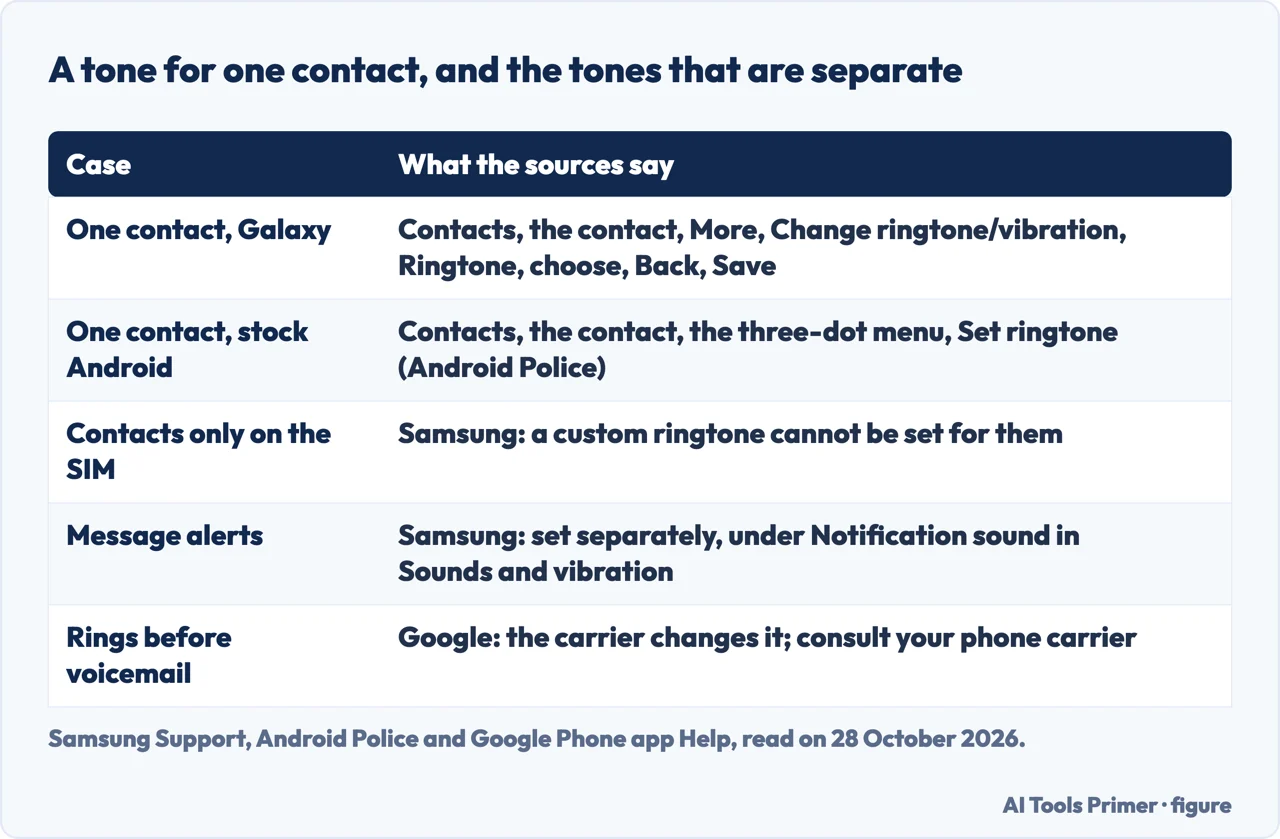
For a ringtone for one person, Samsung says to open the Contacts app, select the contact and tap More, tap Change ringtone/vibration and then Ringtone, allowing the permissions if asked, choose a ringtone, tap Back and tap Save. It warns that you cannot set a custom ringtone for contacts stored only on the SIM card. A second switch there, Ring even when set to Vibrate or Mute, decides whether that contact’s calls ring whatever the phone’s sound mode. Android Police gives the stock Android steps as opening the Contacts app, opening the contact, tapping the three-dot menu and then Set ringtone, which opens the Sounds menu, and says the process is similar on many other phones.
Other tones are separate. Samsung says message alerts are not the same as a regular ringtone: for a default alert for all messages you open Settings, tap Sounds and vibration and Notification sound, and pick a tone, and you can also set tones for certain contacts. Android Police adds that calls on apps such as WhatsApp have their own: in WhatsApp you open Settings from the three-dot menu and choose Sounds. For how many times the phone rings before voicemail, Google’s page says many carriers allow changing it and that you should consult your phone carrier; our page on voicemail on Android covers the voicemail side.
What we did not use
We changed no ringtone on a phone. We did not read the Consumer Cellular blog, the wikiHow guide or the Reddit thread, which is about Microsoft Teams and not about Android’s own ringtone, and the Google AI box was not detected in our read. The Android Police article opens with an author biography and a summary line that we did not use. Steps differ by maker and by Android version, as Google’s page itself says for the Phone app, and we have covered the Pixel, the Galaxy and Files by Google, not other makers. The iPhone is on its own page.
Where to start
Four ways in.
- “Where is the setting?”
- Choosing a tone that is already on the phone — builtin
- “Can I use my own song?”
- Using your own song or sound — song
- “Can one person have a tone?”
- A tone for one contact, and tones that are separate — contact
- “Which phone is mine?”
- What we did not use — notread
Other tones on a phone
The iPhone version, and voicemail.
More on Android
Small settings that hide in menus.
Questions people also ask
How do I set custom ringtones on Android?
Google’s Files page says to open Files by Google, play an audio file under Audio, tap More and Set as ringtone, then allow system settings. Samsung says to tap Add in the Ringtone settings and pick a song file stored on the phone.
How do I change the ring on my Android Phone?
Google says Phone app, More, Settings, Sounds and vibration, Phone ringtone. Samsung says Settings, Sounds and vibration, Ringtone, then tap a tone to hear it and tap Back to set it.
Where is the ring tone in settings?
On a Galaxy it is Settings, Sounds and vibration, Ringtone. In Google’s Phone app it is under More, Settings, Sounds and vibration, as Phone ringtone.
How do I set any song as my ringtone?
Samsung says it must be a song file downloaded to the phone: songs from Spotify or other streaming services cannot be set as ringtones. Add the file with Files by Google or the Add button in the Ringtone settings.
Not covered here. We changed no ringtone on a phone. The statements come from Google’s Files and Phone app help pages, Samsung Support and Android Police, all read on 28 October 2026.
The search volume and difficulty behind this page come from a Semrush reading of 29 August 2026, older than the 60 days the site normally allows.
Sources
- Files by Google Help — Set an audio file as your ringtone — support.google.com, read 28 October 2026.
- Phone app Help — Change call settings — support.google.com, read 28 October 2026.
- Samsung Support — Set a ringtone on your Galaxy phone or tablet — www.samsung.com, read 28 October 2026.
- Android Police — Android: Change your ringtone and assign custom contact ringtones — www.androidpolice.com, read 28 October 2026.
Written by Alberto Gulotta
Founder and editor of AI Tools Primer, writing from Palermo, Italy. Thirty-five years of taking computers apart, starting with a Commodore 64 — the long version is on the about page.
Something wrong on this page? Write to aitoolsprimer@gmail.com and it gets fixed.
Written on 28 October 2026.
Independence and limits
No affiliate links and no paid placements anywhere on this site. Nobody pays to appear here, and no company has seen this page before you did.
This is general information, not professional advice. Where a page touches money, health, safety or the law, it names its source and the date it was read — and your situation may still differ. See the privacy page and the cookie policy.