
iPhone · guide
How to set up voicemail on Android, and which kind you have
By Alberto Gulotta · Updated · 10 min read
How to set up voicemail on Android depends on which of three kinds you have. Android Authority says to press and hold 1 in the Phone app's keypad. Verizon uses *86 and a 4 to 7 digit password. Google's visual voicemail is a list in the Phone app and turns off if you use your carrier's own app.
| Question | Answer | Where it comes from |
|---|---|---|
| How do I dial it? | Phone app, keypad, press and hold 1, enter the PIN and follow the prompts | Android Authority |
| What does Verizon use? | Call *86 from the handset and set a 4 to 7 digit password | Verizon |
| How do I get the list in the Phone app? | More options, then turn on Visual voicemail; only some carriers offer it | |
| What if I use my carrier’s voicemail app? | The Phone app’s visual voicemail turns off to avoid a conflict | |
| How long can a Google Fi greeting be? | Up to 40 seconds | Google Fi |
Which kind of voicemail you have
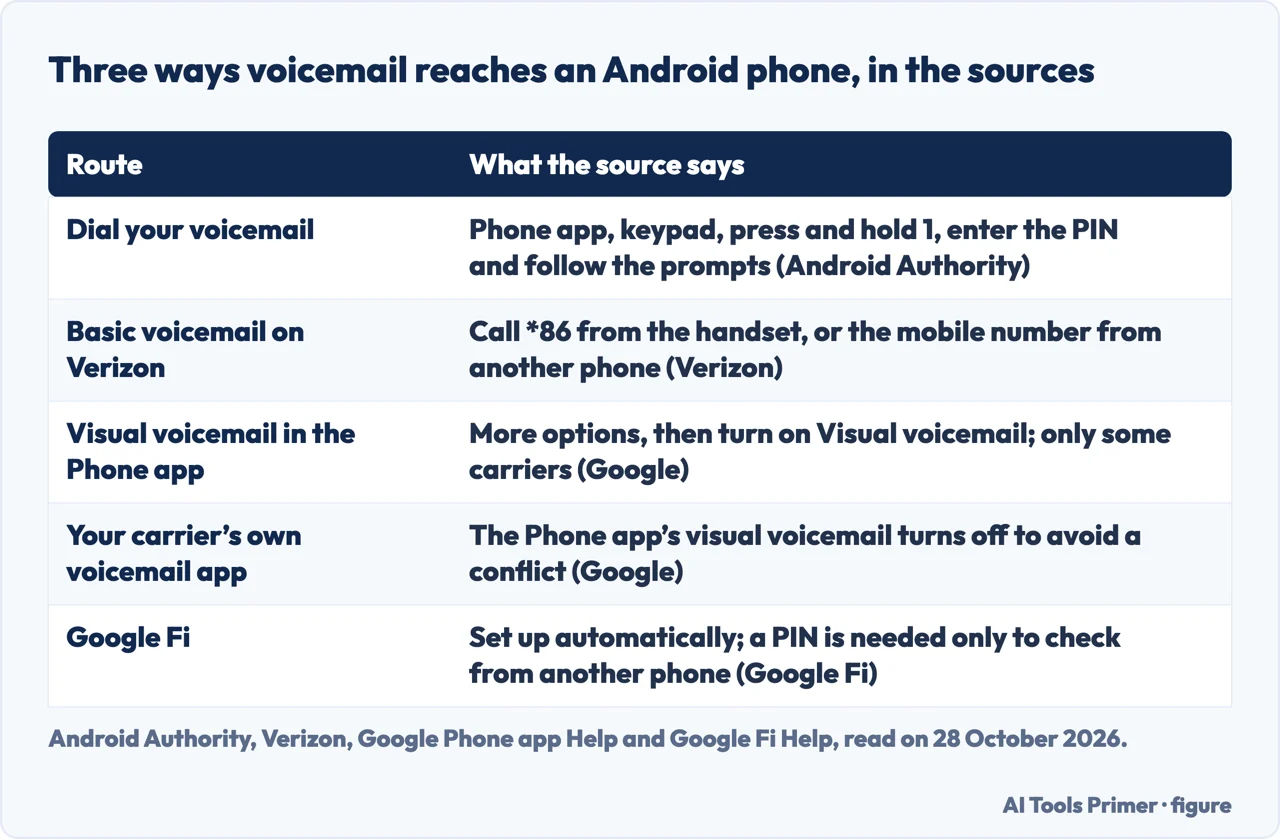
The sources we read describe three setups that share the name. The first is calling your voicemail number: Android Authority says to open the Phone app, tap the keypad and press and hold the number one, then follow the prompts. The second is visual voicemail, a list of messages inside the Phone app. Google’s Phone app help says not all carriers or countries offer it and lists AT&T, Cellcom, Coriolis, Google Fi, O2, Orange and T-Mobile; it adds that your data plan needs to include access to it. The third is your carrier’s own voicemail app, and Google says that when you use it the visual voicemail feature in the Phone app turns off to avoid a conflict.
Verizon draws the same line from the carrier’s side. Its steps are only for Android devices with Basic Voicemail, and for Visual Voicemail it sends you to a separate section for each maker: Alcatel and TCL, BlackBerry, Google, Kyocera, Motorola, Orbic, Samsung and Sonim. Google Fi is a case of its own: its help page says voicemail on the phone is set up automatically. Our page on voicemail on iPhone covers the other system.
Setting it up by dialling
Android Authority’s steps, written with a Google Pixel 7 on Android 14 and with a warning that steps can differ by hardware and software, are to tap the keypad at the bottom right, press and hold the number one to call the voicemail service, and follow the instructions. If voicemail is already set up the phone asks for a PIN, which you can reset if you forgot it; if it is not, the article says you may hear that no voicemail number is stored on the card. After setup you press and hold one again and enter the PIN. It says setup takes less than five or ten minutes.
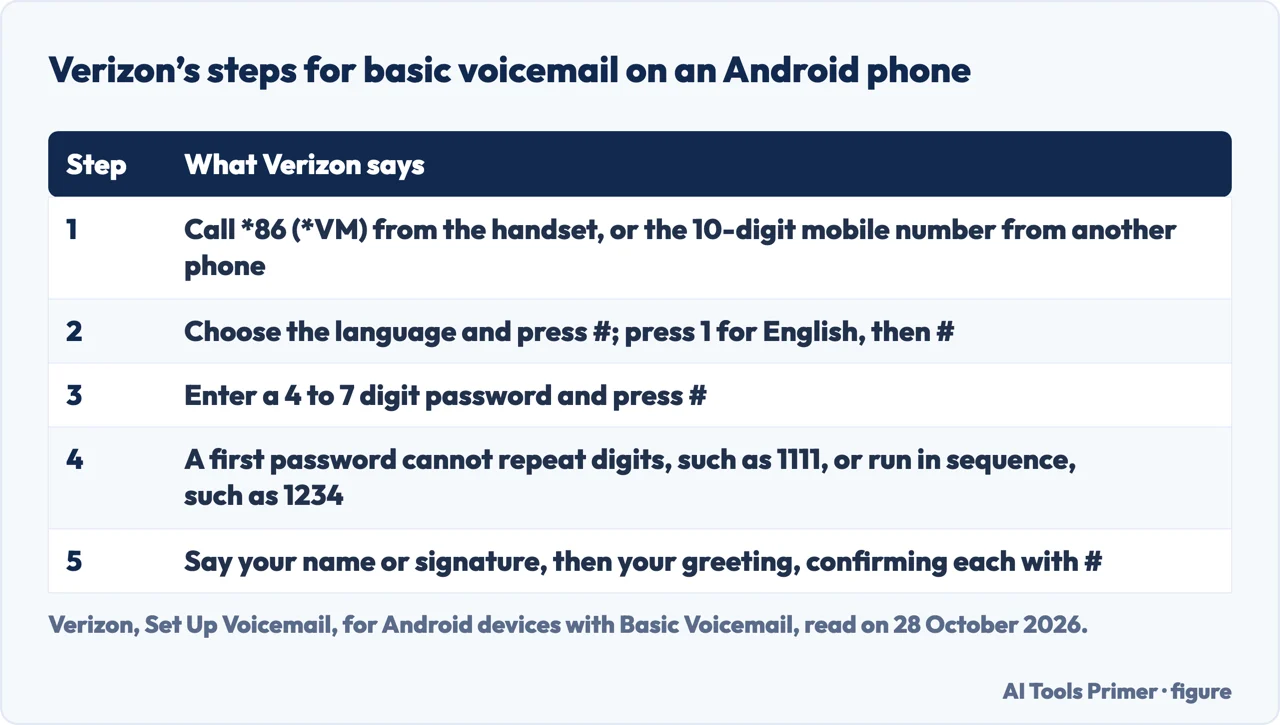
Verizon’s page for basic voicemail gives the carrier version. Call *86 (*VM) from the handset, or the 10-digit mobile number from another phone; choose the language and press the # key, pressing 1 for English; enter a password of 4 to 7 digits and press #. A password set for the first time cannot repeat digits, such as 1111, or run in sequence, such as 1234. Then say your signature or name and press #, press # to confirm, say your greeting and press #, and press # to confirm.
Visual voicemail and transcripts
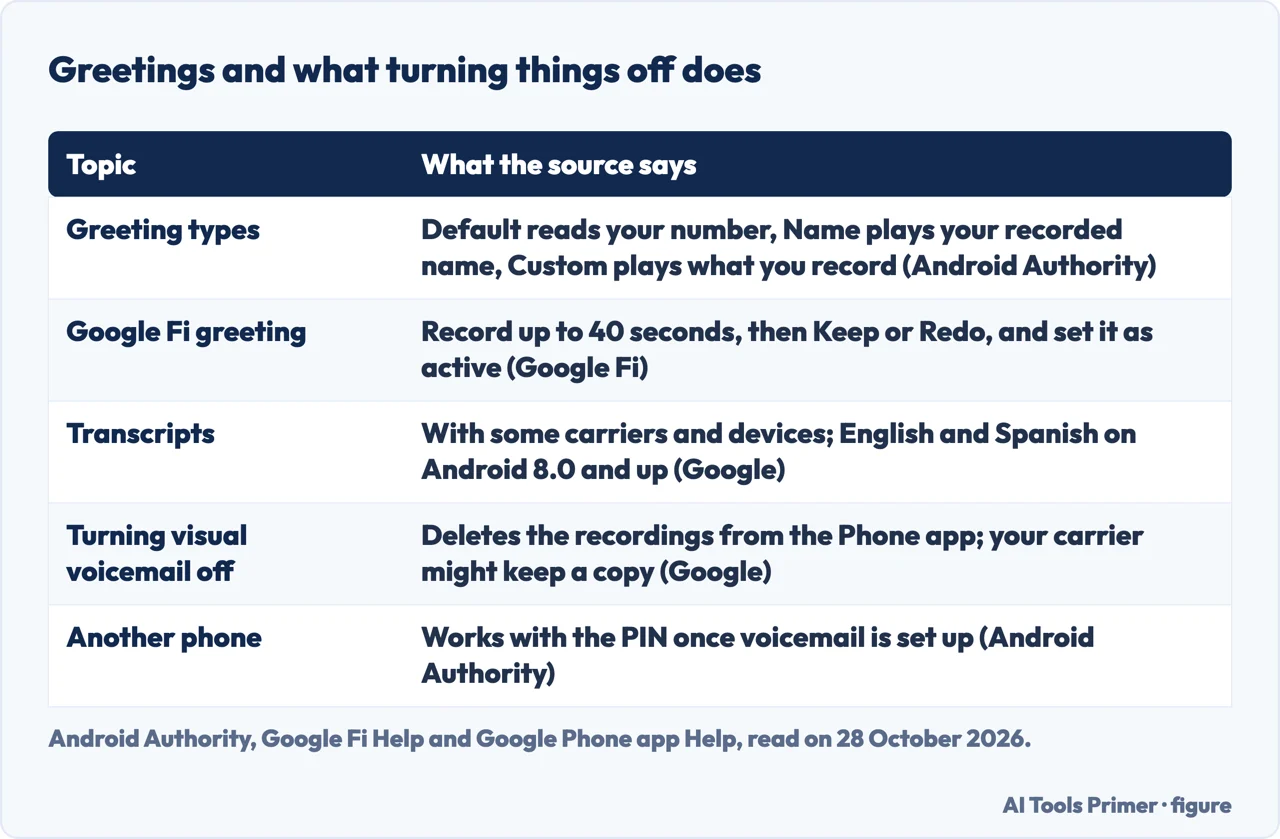
Google’s help page for the Phone app says that with some devices and carriers you can view your voicemails as a list. To turn it on, tap More options at the top right and turn on Visual voicemail. Turning it off deletes the recordings from the Phone app, although Google says your carrier might keep a copy. On a phone with two SIMs it says the feature may not be supported by the device or carrier, that visual voicemail for different SIMs shows in separate tabs, and that you may have to re-enable it if you change your data SIM. If the Voicemail tab is missing, Google says to call your voicemail instead.
Transcripts are a further step on the same page: with certain carriers and devices you can turn on voicemail transcription under More options, Settings and Voicemail. Google says transcription is available only in English and Spanish on Android 8.0 and up, that availability varies by country, and that if the option is missing on a supported carrier you should check that visual voicemail is on. Android Authority describes the same app from the user’s side: a separate Visual Voicemail app that comes with most new Android phones, which shows the number, the date and the length of each message, and which on newer Pixel phones is part of the Phone app.
The greeting, the PIN and another phone
Android Authority says the Visual Voicemail app’s settings, under the three dots at the top right, offer three greetings: a default that has an automated voice read out your number, a name greeting that announces your name as you recorded it, and a custom greeting that plays whatever you record. Verizon makes you record the greeting during the call. On Google Fi, the help page says to go to Voicemail under Phone settings in the Fi app, choose Manage greeting, record up to 40 seconds and tap Keep, or Redo to record again, and on Android 6 and newer to choose Set as active for the one you want.
For checking from another phone, Android Authority says that once voicemail is set up you should be able to reach it from any phone with the PIN. Google Fi says you must turn on voicemail access from any phone and set a PIN, in the Fi app or on its website, and that if you forget the PIN you can follow the same steps again to make a new one. Android Authority also says carriers usually keep around 20 to 30 messages for a month or two, a figure it gives as typical and not as a rule.
What we did not use
We set up no voicemail on a phone. We did not read the Asurion, Ultra Mobile, Lifewire or wikiHow guides, the forum thread or the Samsung and T-Mobile support pages. The Motorola help page gave us only a 71-word shell when we fetched it, so it is not cited. This is why the question about Samsung stays open here: Verizon lists Samsung among the makers with a visual voicemail section, which we did not open. Verizon’s page covers its own network, and *86 is its code; other carriers use their own numbers, which we have not checked. We did not read a Google AI box.
Where to start
Four ways in.
- “Which voicemail do I have?”
- Which kind of voicemail you have — route
- “How do I dial it?”
- Setting it up by dialling — dial
- “Where is the list?”
- Visual voicemail and transcripts — visual
- “How do I record a greeting?”
- The greeting, the PIN and another phone — greeting
Calls you choose to take
Voicemail on the other system, and blocking.
Calls without a SIM signal
Wi-Fi, unknown callers and video.
Questions people also ask
How do I activate voicemail on Android?
Android Authority says to open the Phone app, tap the keypad, press and hold 1, enter the PIN and follow the prompts. Verizon says to call *86 from the handset. Google says visual voicemail is turned on from More options in the Phone app, on supported carriers.
How to set up voicemail on Samsung?
None of the pages we read is a Samsung page. Verizon lists Samsung among the makers with their own visual voicemail section, which we did not open, and the dialling steps in Android Authority and Verizon are not specific to one maker.
How to reset voicemail on Android?
Neither source we read gives a general reset. Android Authority says a forgotten PIN can be reset, without steps, and Google Fi says to follow its PIN steps again to create a new one.
How do I create my own voicemail on Android?
Verizon has you say the greeting during the call. Android Authority describes default, name and custom greetings in the Visual Voicemail app, and Google Fi lets you record up to 40 seconds and set the one you want as active.
Not covered here. We set up no voicemail on a phone. The statements come from Android Authority, Verizon, Google’s Phone app help and Google Fi’s help, all read on 28 October 2026.
The search volume and difficulty behind this page come from a Semrush reading of 29 August 2026, older than the 60 days the site normally allows.
Sources
- Android Authority — How to easily set up voicemail on Android phone — www.androidauthority.com, read 28 October 2026.
- Verizon — Set Up Voicemail — www.verizon.com, read 28 October 2026.
- Google Phone app Help — How to check your voicemail — support.google.com, read 28 October 2026.
- Google Fi Wireless Help — Set up your voicemail — support.google.com, read 28 October 2026.
Written by Alberto Gulotta
Founder and editor of AI Tools Primer, writing from Palermo, Italy. Thirty-five years of taking computers apart, starting with a Commodore 64 — the long version is on the about page.
Something wrong on this page? Write to aitoolsprimer@gmail.com and it gets fixed.
Written on 28 October 2026.
Independence and limits
No affiliate links and no paid placements anywhere on this site. Nobody pays to appear here, and no company has seen this page before you did.
This is general information, not professional advice. Where a page touches money, health, safety or the law, it names its source and the date it was read — and your situation may still differ. See the privacy page and the cookie policy.