
Software · guide
What is difference between Chromebook and a laptop: who says what
By Alberto Gulotta · Updated · 17 min read
The difference between a Chromebook and a laptop is mostly software: Google says a Chromebook is a laptop powered by ChromeOS, while Lenovo and ASUS compare it with a Windows laptop. What changes is which programs install, how long updates last, and what each maker claims for hardware, battery and price.
| Question | Answer | Where it comes from |
|---|---|---|
| Is a Chromebook a laptop? | Google’s Chromebook site says yes; Lenovo and ASUS set Chromebooks against Windows laptops | Google, Lenovo, ASUS |
| What changes? | The operating system: ChromeOS from Google instead of Windows from Microsoft | Lenovo, ASUS |
| Does desktop Office install? | No: Microsoft says to use the web apps in the browser | Microsoft Support |
| How long do updates last? | Google says 10 years from the platform release date; HP says typically seven or eight | Google, HP |
| Does a Chromebook cost less? | HP and ASUS say so and Google says it works to keep them affordable; the pages we read do not give a price | Google, HP, ASUS |
The short answer depends on which page you ask
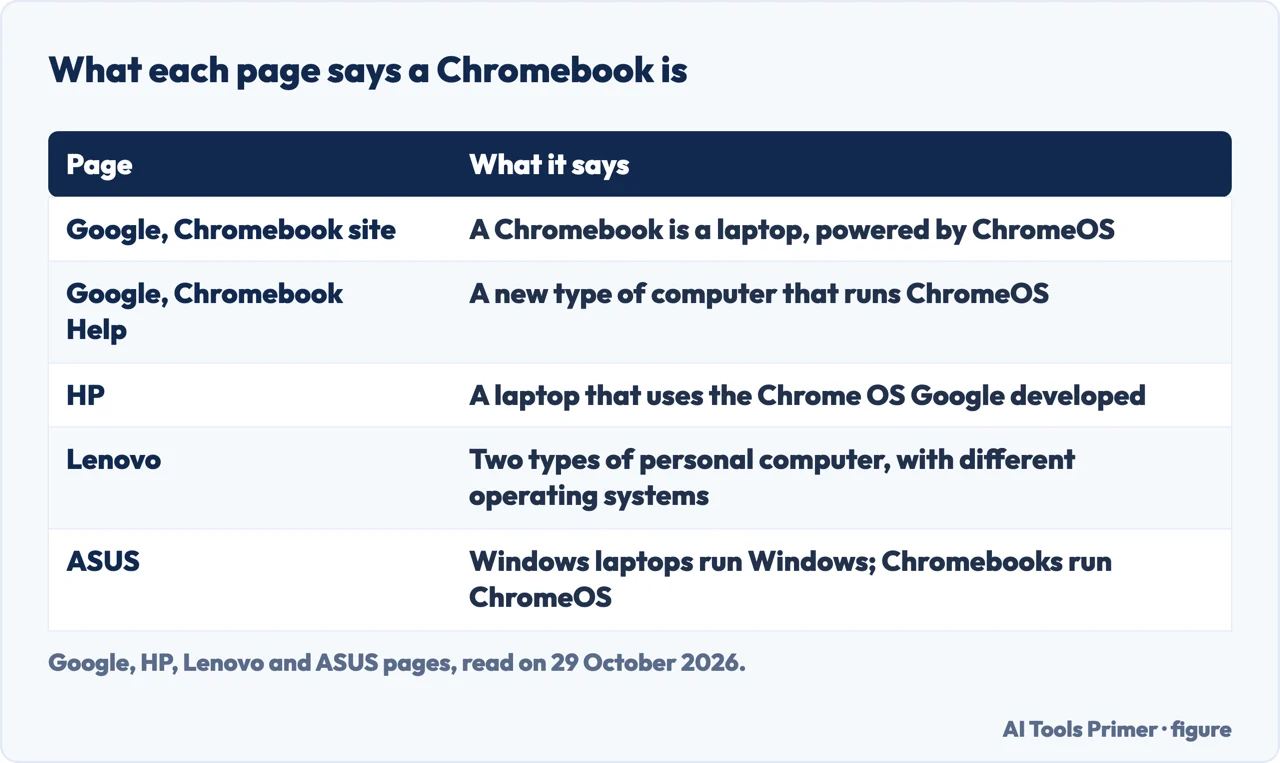
Google’s Chromebook site opens its answer with a flat statement: there is no difference between a Chromebook and a laptop, because a Chromebook is a laptop. What sets it apart from other laptops, the page says, is ChromeOS, the operating system developed by Google. Google’s Chromebook Help page words it another way. It calls Chromebooks a new type of computer that runs ChromeOS, with cloud storage, the best of Google built in and multiple layers of security. The two Google pages agree that the operating system is what sets a Chromebook apart. They differ on whether to call the machine a laptop.
Pages from three computer makers, Lenovo, HP and ASUS, draw the line in their own ways. HP says a Chromebook is a laptop that uses the Chrome OS Google developed, and that the main difference from a traditional laptop is minimal internal storage, with the machine relying on cloud-based storage. Lenovo says Chromebooks and Windows laptops are two types of personal computer that differ in operating system, functionality and price. ASUS says Windows laptops run Microsoft Windows and can handle traditional desktop programs and professional software, while Chromebooks run ChromeOS, designed for online and Android applications.
So the word “laptop” is used two ways. Google’s site and HP use it for the machine itself, which a Chromebook is. Lenovo and ASUS use it for a Windows laptop and compare the two. The rest of this page follows that comparison, a Chromebook against a Windows laptop, and says whose claim each statement is. We tested neither kind of computer.
Software: what installs on a Chromebook and what does not
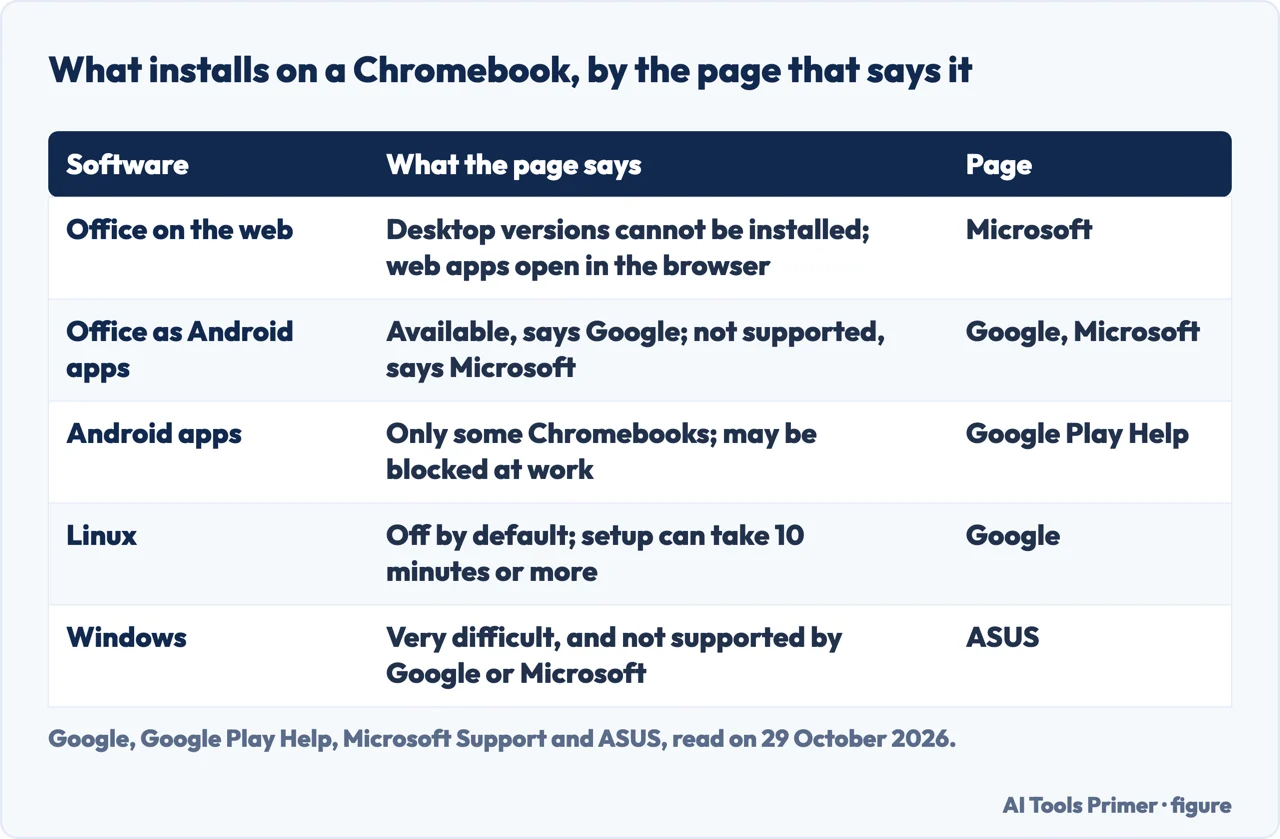
ASUS describes the Windows side as a laptop that lets you download and use desktop programs such as Adobe Photoshop, Microsoft Office, games and special work tools. It describes a Chromebook as working mainly through web browsers and the Android apps from the Google Play Store. Google adds that you can choose from thousands of apps at no charge from the Chrome Web Store.
Microsoft Office. Microsoft’s own support page is the plainest. It says you can’t install the Windows or Mac desktop versions of Microsoft 365 or Office 2016 on a Chromebook. You use the web apps (Word, Excel, PowerPoint, OneNote, OneDrive and Outlook) in the browser, starting at microsoft365.com (Outlook at outlook.com). With a free Microsoft account you can view files and do basic editing; a Microsoft 365 subscription adds the more advanced editing features. ASUS says the same about the desktop version and adds that Office Online or the Office apps from the Play Store work fine for basic document editing. HP says a Chromebook can run Microsoft applications, including the Office suite, through the Chrome browser.
Google’s Chromebook Help adds that on all Chromebooks you can open, edit, download and convert many Microsoft Office files, so a file sent in Word or Excel format is not a dead end even without the desktop programs. The pages disagree on Android versions of Office. Google’s Chromebook Help says that on Chromebooks that support Android apps, Microsoft Office is available as an Android app, and Lenovo says the web versions can be opened in Chrome or installed as Android apps. Microsoft says the Android versions of Office, Outlook, OneNote and OneDrive are not currently supported on a Chromebook. The pages we read do not say which statement is newer, so we put Microsoft’s first, because the page is about its own software.
Android apps. Google Play Help says you download them from the Play Store, which is available on only some Chromebooks. To check, open Settings, then Apps, then Manage Google Play preferences; if that option is missing, Google says the Chromebook doesn’t work with Android apps. On a Chromebook from work or school the administrator may block the Play Store. The Chromebook does not download your phone’s apps by itself, some apps do not work with some Chromebooks, and the store and its apps are available only for the account that signed in first. Lenovo adds that not every Android app is optimized for a Chromebook.
Linux. Google describes Linux as a feature for developing software, off by default and switched on under Settings, About ChromeOS, Developers. Setup can take 10 minutes or more, and it gives you a Debian environment where you can install more tools with the APT package manager. Google lists what is not yet supported, among them Android emulators and hardware acceleration, including the graphics chip and video decoding. All Linux apps share one sandbox: a harmful Linux app can affect other Linux apps, Google says, but not the rest of the Chromebook. As with Android apps, a work or school Chromebook may not allow it. ASUS says Linux apps cover languages such as Python and JavaScript for learning projects, while Windows laptops offer full programs such as Visual Studio, database tools and virtual machines. Lenovo says a Chromebook can suit web development, and a Windows laptop may fit better where a local development environment is needed.
Windows. ASUS says installing Windows on a Chromebook is very difficult and not supported by Google or Microsoft, and that if you need Windows programs it is better to buy a Windows laptop. Our page on getting Windows on a Chromebook sets out five routes and what each one costs.
Updates and security: where the pages differ
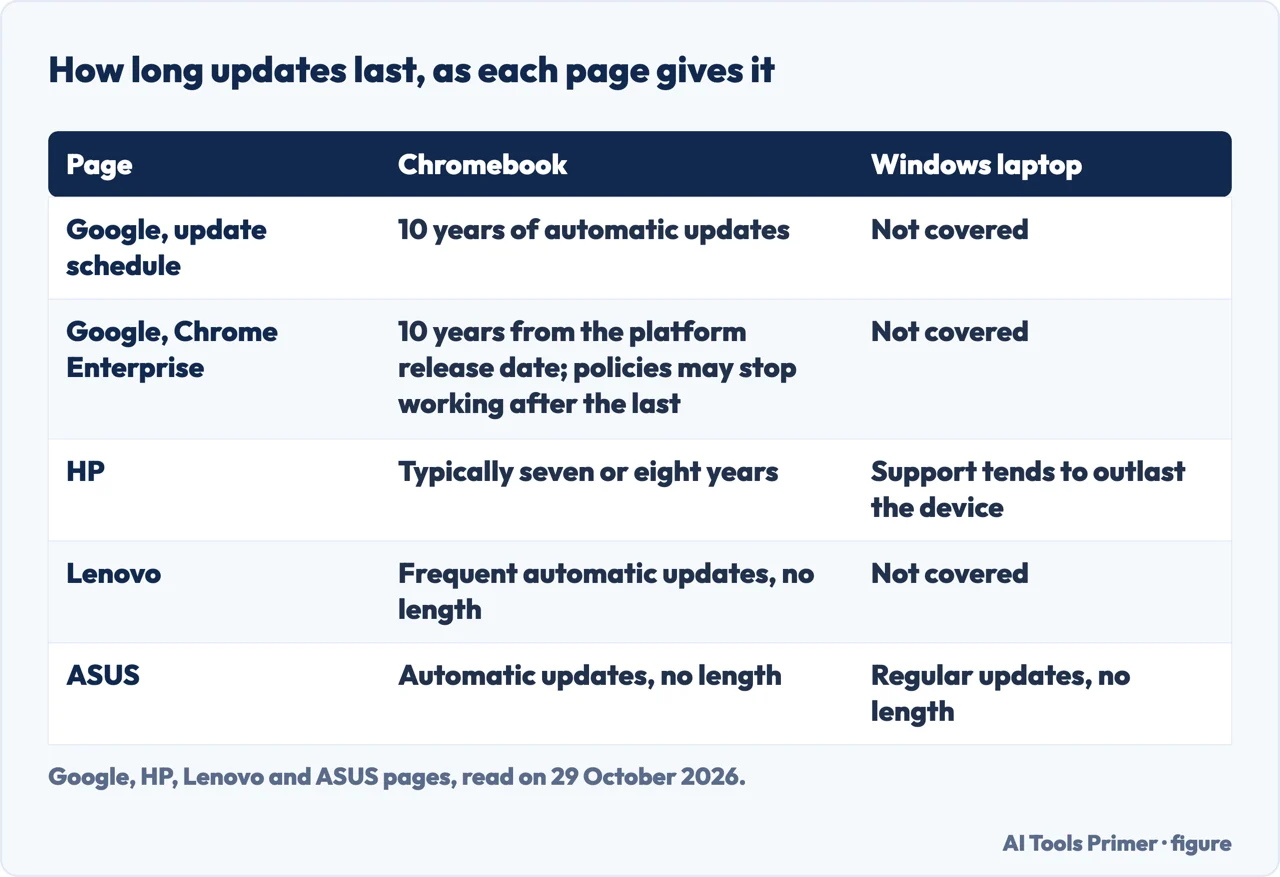
Google’s update-schedule page says Chromebooks receive 10 years of automatic updates. Its Chrome Enterprise and Education page says the 10 years run from the platform release date. A platform, that page explains, is a series of components designed to work together, which a manufacturer selects for any given device. The count therefore starts when the platform is released, and that is not the same as the day you buy the machine.
To see the date on a Chromebook you own, select the time at the bottom right, then Settings, About ChromeOS and Additional details; the “Update schedule” section shows when it receives its last update. Google says it publishes how long each platform receives updates and tells buyers to check the date before buying. It also says the “End of Sale” date is controlled by the manufacturer and is not related to a device’s eligibility for Google updates. For devices from before 2021 that receive extended updates, Google says some features and services may not be supported.
After the last update a “Final software update” notification appears, and the device no longer receives ChromeOS and browser updates: security updates, bug fixes and new features. Google says existing features may stop working, and so may support for apps that need a specific ChromeOS or browser version. The Chromebook still comes with a verified boot, and Google says that if the system is tampered with, it repairs itself. On managed devices, Google’s policy page says that after the final update the education and enterprise policies may not work as intended, and technical support is not provided.
HP gives a different figure. Its page, dated 31 March 2023, says Google supports devices made by other companies for a set number of years, typically seven or eight, and that security updates end at the Auto Update Expiration date. Google’s own pages now say 10 years, and the Google pages are the ones about Google’s policy. HP also says that Microsoft’s support for Windows-based laptops tends to outlast the device. The pages we read do not say how many years a Windows laptop receives updates. Lenovo and ASUS mention automatic updates without a term.
On security, ASUS lists automatic verified boot, sandboxing and automatic updates for ChromeOS, and Windows Defender, regular security updates and the flexibility to add other protective software for Windows. Lenovo lists sandboxing and frequent automatic updates for Chromebooks. Our pages on a dying Chromebook and on how to Powerwash a Chromebook cover the update date and Google’s reset steps.
Hardware, battery and price: claims from the makers
Everything in this section is a statement by a maker or by Google. The pages we read do not give a price for either kind of computer, and the pages we read do not report a test.
Processor, memory and storage. ASUS says Chromebooks use processors such as Intel Celeron or MediaTek with 4 GB to 8 GB of memory, enough for browser tabs and Android apps, while Windows laptops use Intel Core i3, i5 or i7, AMD Ryzen or Snapdragon X Series processors, with memory up to 32 GB or more. HP says laptops offer significantly more memory and can take a separate graphics card, such as the NVIDIA range. The pages differ on storage. HP’s general statement is that a Chromebook has minimal internal storage, and its example, the Chromebook x360 14b, has 8 GB of memory and 128 GB of eMMC storage. ASUS describes its Chromebook Plus CX34 as one of the most powerful Chromebooks, with an Intel Core i7 processor, 16 GB of memory and 512 GB of SSD storage. A Chromebook is not one hardware level.
Battery. ASUS says Chromebooks typically run 10 to 12 hours or longer on one charge, and Windows laptops usually give 6 to 20 hours, though some models reach 32. Lenovo and HP also say a Chromebook’s battery lasts longer, without figures; HP ties it to lower power use and less heat, which it says means less cooling hardware. These are makers’ figures, not measurements.
Price. Google says it works with manufacturers to keep Chromebooks affordable and that you do not need to worry about the prices of most software. HP says the Chromebook design focuses on affordability, so a Chromebook is typically available for a lower cost than a Windows-based laptop with equivalent features and performance. ASUS says Chromebooks cost less, and that Windows laptops come in a wide range of prices, from affordable entry-level to premium.
Offline and files. Google says a Chromebook works offline with offline-ready apps, among them Offline Gmail, Google Keep, the Google Drive apps (Docs, Sheets and Slides), Google Calendar, the built-in photo editor and the media player. HP says the same where applications store local copies. Files can be kept on the Chromebook or in Google Drive, and every Google Account comes with 15 GB of storage shared across Drive, Gmail and Google Photos. Google says a Chromebook has no CD or DVD drive, but plays files from a USB drive or SD card, prints once a printer is set up, and works with USB drives, mice, keyboards and external storage.
Games and creative work
Games. Google says you can play on a Chromebook through cloud gaming platforms, naming NVIDIA GeForce NOW, Xbox Cloud Gaming, Amazon Luna and Boosteroid, and through Android games from the Play Store, such as Roblox, Minecraft and Stardew Valley. Its notes say some platforms and titles may require a subscription, that GeForce NOW is available on certain Chromebooks only, and that an internet connection may be required. HP says a Chromebook can run any game that supports streaming, as long as it meets the game’s minimum requirements. Lenovo and ASUS say Windows laptops are better for demanding titles; Lenovo points to external graphics cards, ASUS to graphics card support and full PC games. HP says laptops offer significantly better operation for high-performance gaming.
Creative and work programs. Google’s list of Chromebook apps names Adobe Photoshop, with a note that it requires a subscription, along with LumaFusion, Clipchamp, Cubasis 3, Figma and Clip Studio Paint Pro. ASUS, for its part, says a Chromebook may not run traditional desktop programs such as Adobe Photoshop. Lenovo says Windows laptops offer more for professional video editing and graphic design, HP says the same for video editing and 3D rendering, and ASUS names video, graphics, music and 3D models. ASUS adds AutoCAD and company software that runs only on Windows.
HP describes one bridge between the two: with Chrome Remote Desktop a Chromebook can use the programs on a laptop, as long as the laptop is running and both devices are online. HP warns about the security of a laptop left on when you are away and of sensitive information passing between the devices over the internet.
Who each page points to
The makers name the same two groups. HP says Chromebooks suit students because they are simple and easy to configure where a school has adopted Google’s toolset, and that laptops are better for business workflows, video editing, 3D rendering, high-performance gaming and places without a guaranteed internet connection. ASUS says a Chromebook fits students doing regular homework, online research and virtual classes, and that Windows laptops are vital for students in engineering, design or programming. Lenovo says Chromebooks are often considered more suitable for students for affordability, ease of use and integration with Google services, and that software compatibility for specialized courses may matter. Google’s site says a Chromebook is good for note taking, word processing, spreadsheets, presentations, video streaming, gaming, web browsing and email.
The pages also point to a short list of things to check, which we did not test:
- The programs you need. Microsoft says desktop Office does not install, and ASUS names AutoCAD and company software as examples of Windows-only programs.
- The update date. Google says to check it before buying, and that it follows the platform release date.
- Who manages the machine. Google says an administrator may block the Play Store and Linux on a work or school Chromebook.
- The connection. Google says some Android games may need an internet connection to download or play, and HP says laptops matter where connectivity is not guaranteed.
Where to start
Six ways in.
- “Is a Chromebook a laptop?”
- The short answer depends on which page you ask — answer
- “Does Office work on it?”
- Software: what installs on a Chromebook and what does not — software
- “How long does it get updates?”
- Updates and security — updates
- “What about battery and price?”
- Hardware, battery and price: claims from the makers — hardware
- “Can I game or edit on it?”
- Games and creative work — games
- “Who is it for?”
- Who each page points to — choose
More on the Chromebook itself
Windows programs, resets and the update date.
When a Chromebook misbehaves
Charging and a black screen.
Questions people also ask
Is it better to buy a Chromebook or a laptop?
The pages we read do not give one answer. ASUS says to pick a Chromebook for everyday tasks and online work, and a Windows laptop when you need high performance or professional applications. Google says to check the update date before buying.
What is the disadvantage of a Chromebook?
The pages name several. Microsoft says desktop Office cannot be installed, and HP says laptops are better for video editing, 3D rendering and high-performance gaming. Google says the Play Store is available on only some Chromebooks and that updates end on a set date.
Is it worth buying a Chromebook in 2026?
The pages we read do not give a verdict. Google says Chromebooks receive 10 years of updates from the platform release date and to check that date before buying; HP says typically seven or eight years. The pages we read do not give a price.
Why would anyone use a Chromebook?
Google lists note taking, word processing, streaming, gaming and email. HP says Chromebooks suit students where a school has adopted Google’s tools, and ASUS says they suit people who do most things online. Google adds that you need not worry about the prices of most software.
Not covered here. We tested nothing on a Chromebook or a Windows laptop. The statements come from pages by Google, Microsoft, Lenovo, HP and ASUS, all read on 29 October 2026; the comparisons between the two kinds of computer are the makers’ claims, and we say whose each one is.
The search volume and difficulty behind this page come from a Semrush reading of 29 August 2026, older than the 60 days the site normally allows.
Sources
- Google — What is a Chromebook good for? — www.google.com, read 29 October 2026.
- Google Chromebook Help — Learn about Chromebooks — support.google.com, read 29 October 2026.
- Google Chromebook Help — Check your Chromebook’s update schedule — support.google.com, read 29 October 2026.
- Chrome Enterprise and Education Help — Auto Update policy — support.google.com, read 29 October 2026.
- Google Chromebook Help — Set up Linux on your Chromebook — support.google.com, read 29 October 2026.
- Google Play Help — Install & use Android apps on your Chromebook — support.google.com, read 29 October 2026.
- Microsoft Support — How to access Microsoft 365 on a Chromebook — support.microsoft.com, read 29 October 2026.
- Lenovo — Chromebook vs Windows laptops — www.lenovo.com, read 29 October 2026.
- HP — Chromebooks vs Laptops: what are they and their uses — www.hp.com, read 29 October 2026.
- ASUS — Windows Laptop vs Chromebook: key differences — www.asus.com, read 29 October 2026.
Written by Alberto Gulotta
Founder and editor of AI Tools Primer, writing from Palermo, Italy. Thirty-five years of taking computers apart, starting with a Commodore 64 — the long version is on the about page.
Something wrong on this page? Write to aitoolsprimer@gmail.com and it gets fixed.
Written on 29 October 2026.
Independence and limits
No affiliate links and no paid placements anywhere on this site. Nobody pays to appear here, and no company has seen this page before you did.
This is general information, not professional advice. Where a page touches money, health, safety or the law, it names its source and the date it was read — and your situation may still differ. See the privacy page and the cookie policy.