
Software · guide
How to charge a Chromebook without a charger: socket first, then watts
By Alberto Gulotta · Updated · 13 min read
If you need to know how to charge a Chromebook without a charger, the answer is another charger: a phone charger, a power bank or a car charger can stand in, but only if the Chromebook charges over USB-C and the substitute delivers enough watts. HP lists 45W for its Chromebooks.
To charge a Chromebook without a charger of its own, the sections below go in the order that decides it: the socket, the watts and what a weaker charger does, then each substitute in turn, what the makers warn against, and how to replace the original.
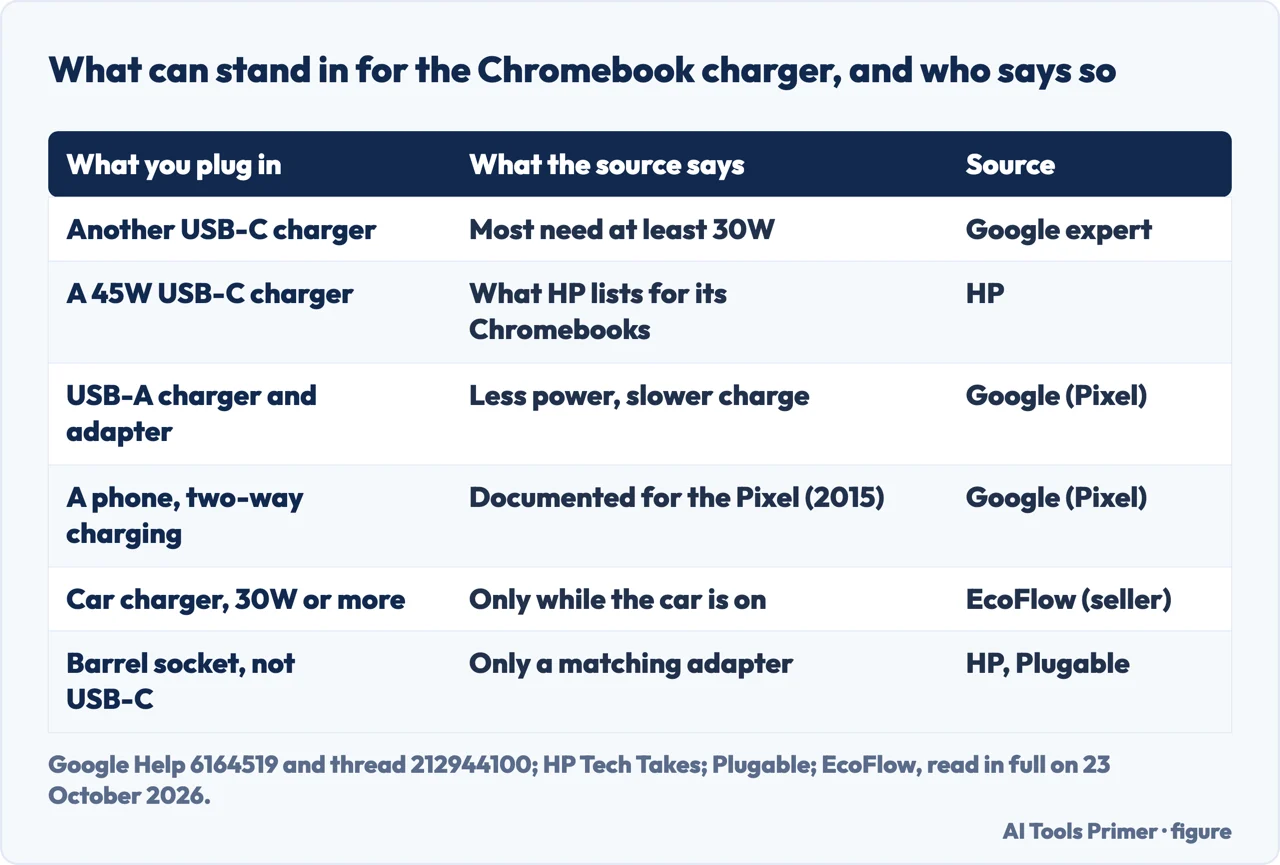
| What you plug in | Who says | What they say |
|---|---|---|
| Another USB-C charger | Google Product Experts | Any compatible USB-C charger works; most Chromebooks need at least 30W |
| A 45W USB-C charger | HP | The wattage HP lists for its Chromebook 14, Chromebook x360 14 and Chromebook 11 |
| A USB-A charger with an adapter cable | Works on the Chromebook Pixel (2015), with less power and a longer charge | |
| A phone with two-way charging | Documented for the Chromebook Pixel (2015) | |
| A Chromebook with a barrel socket | Plugable, HP | Needs its own type of charger; USB-C alternatives do not apply |
First, look at the socket
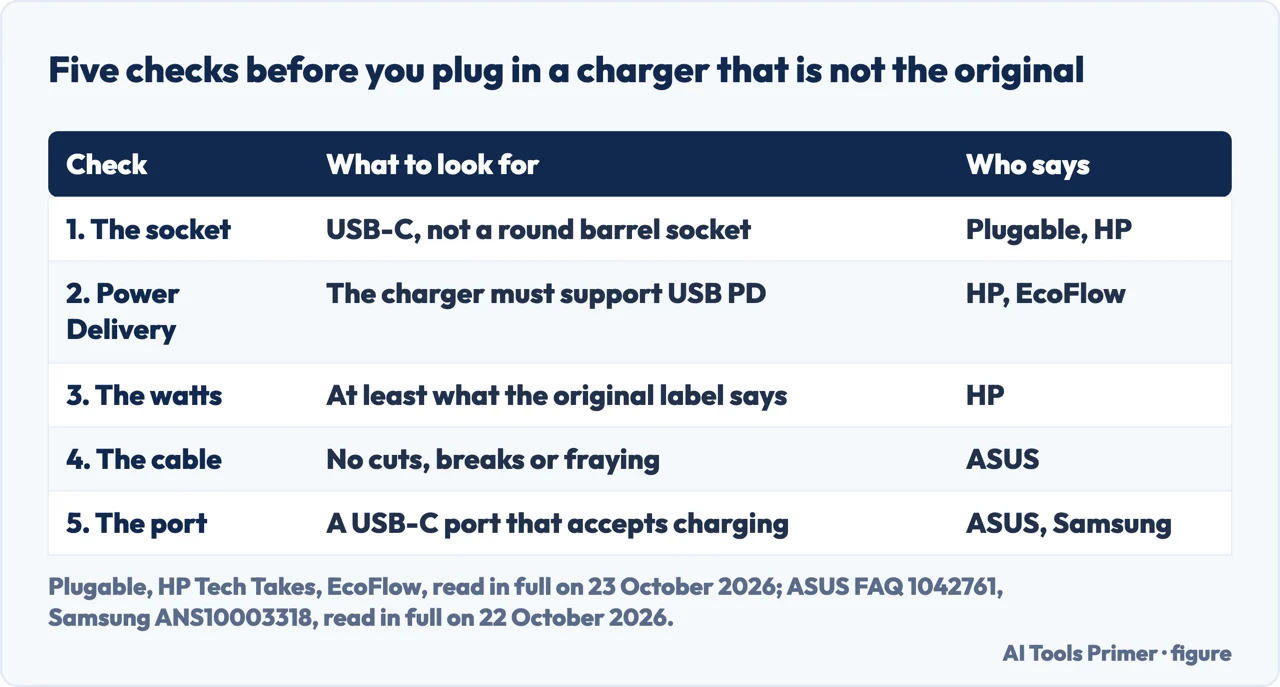
Everything else on this page depends on one detail: where the charger goes into the Chromebook. Plugable’s knowledge base on USB charging puts it plainly: not all USB-C devices can charge over that connection, and some still need the dedicated DC barrel jack charger they shipped with. HP draws the same line from the charger’s side: its advice that a higher-watt charger is safe applies to USB-C chargers with Power Delivery, and it says this is not always the case with older barrel-pin chargers, which operate differently. A round barrel socket means a replacement of the same kind, not any of the routes below.
If the charger plugs into a USB-C port, the port still has to take power. ASUS asks you to make sure the USB Type-C port supports battery charging and supplying power to the Chromebook, and to check the model’s user manual if you are unsure. Samsung says that if its Chromebook has a USB-C charger, any USB-C port works. Which side to use on older models, and what the charging light means, is on a Chromebook that won’t charge.
How many watts the substitute needs
The number that decides whether a borrowed charger works is its wattage. HP’s guide to its chargers, dated 6 April 2026, lists 45W for its Chromebooks and thin laptops, naming the HP Chromebook 14, Chromebook x360 14 and Chromebook 11, and 65W for standard models. In a Google community thread from April 2023, a Platinum Product Expert wrote that most Chromebooks need at least a 30W charging plug. In HP’s community, a forum member answered a question about the HP Chromebook 14-db0023dx by reading its specifications: it requires a 45W adapter, so 45W or higher should work. The surest figure is the one printed on your own charger; HP says the wattage is usually on the label.
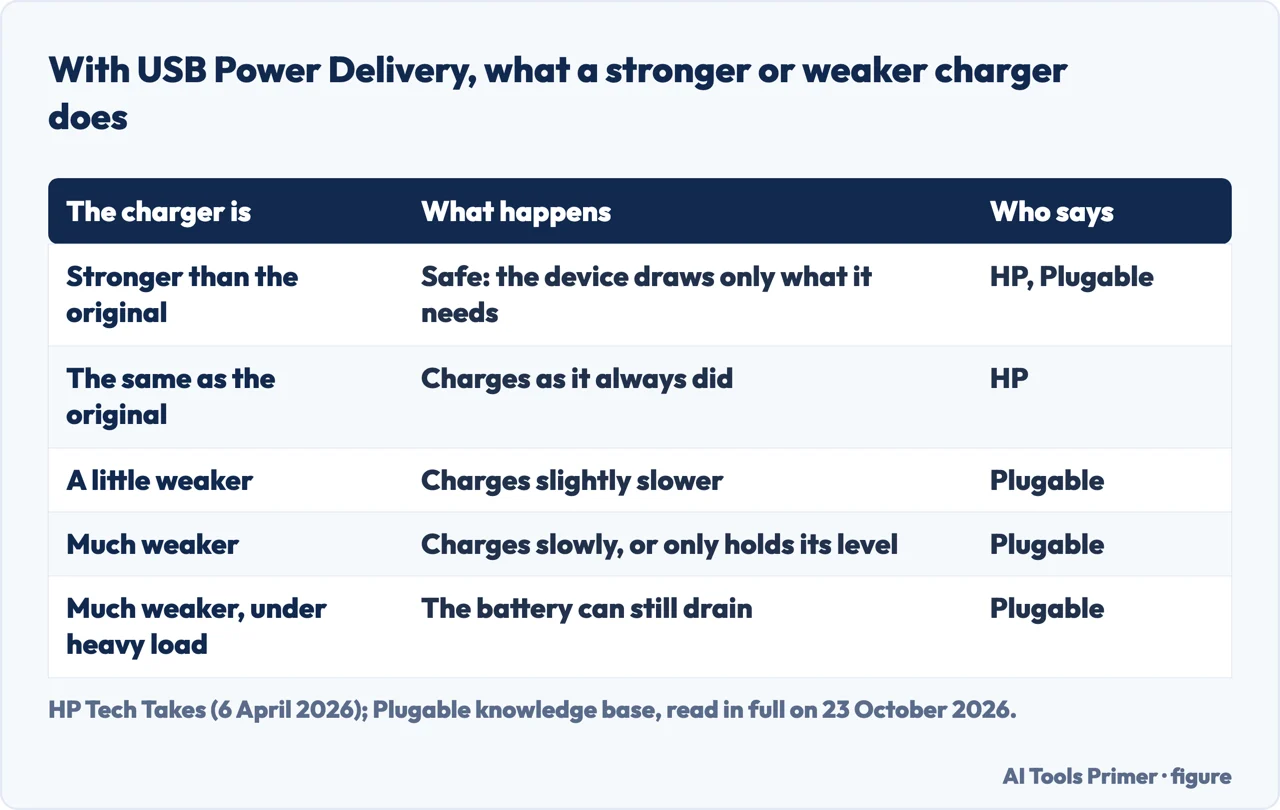
Higher is not a risk with USB Power Delivery, the charging standard HP says all its USB-C chargers use. HP says you can safely use a higher-watt USB-C charger in most cases, because the device consumes only the power it needs, and gives its 65W charger as the example: it delivers 15W, 27W, 60W or 65W depending on what is connected. Plugable explains the mechanism: USB-C Power Delivery starts at 5V and only moves up to 9V, 12V, 15V or 20V once the charger and the device have negotiated it, so chargers do not push power, devices pull it.
Lower is where the trouble starts, and Plugable describes the steps down. A laptop that wants 65W on a 60W charger charges slightly slower. For a laptop that needs more than the charger can give, Plugable says it may charge slowly, or only hold its battery level without gaining, and under heavy load it can still drain while plugged in; in some cases it gains charge only while asleep or off. That matches the person who opened the Google thread above: they had a USB-C charger, but it “doesn’t give enough battery”. USB-IF, which sets the standard, says USB Power Delivery reached 240W with Revision 3.1 in 2021, and was limited to 100W before it.
A phone charger
A phone charger is the substitute closest to hand, and whether it works is the wattage question again. A Google Diamond Product Expert, in the thread above, put it simply: if the Chromebook’s charger is USB-C, any compatible USB-C charger will work, and a phone charger that supports Power Delivery and reaches the watts above is one. A small one may not: Plugable notes that some USB-C ports supply only 1.5A or 3A at 5V, which is 7.5W or 15W. EcoFlow, which sells portable power stations, advises against phone chargers under 30W, saying they often do not provide enough power for Chromebooks.
An older USB-A charger is a slower case. For the Chromebook Pixel (2015), Google says you can charge it from most USB-A ports or USB chargers with a Type-C to Type-A adapter cable, but that these chargers provide less power and take longer than the original. That page is for one model, and on it Google recommends the charger that came with the Chromebook, as Lenovo and ASUS do for theirs.
A power bank or a portable power station
A power bank is a charger with a battery inside, and the same two checks apply: a USB-C output that supports Power Delivery, and enough watts. EcoFlow says the power bank should support at least 30W of Power Delivery output, and recommends a PD charger or power station rated at a minimum of 45W. Both figures come from a company selling those products, so the manufacturer’s number for your Chromebook, or the label on its own charger, is the one to match.
Portable power stations add an AC outlet: EcoFlow says to use the USB-C PD port, or the AC outlet if needed. The AC outlet means plugging in a charger anyway, so the station replaces the wall socket, not the charger.
From a phone, a tablet or another laptop
Google documents this route for one model. The Chromebook Pixel (2015) can charge from a phone, tablet or laptop with a USB Type-C port if that device supports two-way charging: unplug the power adapter, connect the other device, and choose the port it is on, for example USB-C device (left port). Google does not give a rate for it. EcoFlow says a phone’s output for this is often low.
In a car
A car charger is a USB-C charger like the others, and the same checks apply. EcoFlow says a car USB-C PD charger must be rated at 30W or more, and that it only works while the car is on or in accessory mode. HP’s 45W figure for its own Chromebooks is, in our reading, the more cautious target. No Chromebook maker we read gives instructions for charging in a car.
What not to plug in
The makers agree on one thing: they want the charger and cable that came with the Chromebook. Lenovo, on its page for the N21 Chromebook, asks for the cable and adapter that came with it, because “substitute cables by other manufacturers may deliver either more or less power than the Chromebook is engineered for.” ASUS asks for the original adapter and cable, and says to examine the cable for cuts, breaks or fraying and to have a damaged one replaced at a repair center. Samsung says to use the proper charging cable to prevent damage. Google, on the Chromebook Pixel page, says not to plug in a charger whose connector is damaged, because it could permanently damage the device.
Not every charger sold as USB-C behaves like the standard says, either. USB-IF runs compliance testing and keeps a certified product list, and only companies that pass and sign its license may use the certified USB logos. In the HP thread, the forum member called it “50/50” whether any USB-C Power Delivery charger would work, because ports that follow the same standard on paper do not always behave the same in practice. Plugable says early USB-C Power Delivery implementations, starting in 2015, could be unreliable. On the Chromebook Pixel page, Google lists a charger that is getting too hot among the reasons to contact customer support. One user’s account of a faulty charger and a battery fire is on a Chromebook that won’t charge.
Replacing the charger
If the original is lost, the replacement follows the same three checks: the connector, Power Delivery for USB-C, and the wattage. HP says to check the label on the existing charger, look up the laptop model on its site, or use its Power Advisor tool. Google points owners of the Chromebook Pixel (2015) to the Google Store for a new charger. Lenovo and ASUS, on the pages above, ask for the adapter that came with the Chromebook.
Where to start
Five ways in.
- “Will my phone charger work?”
- Watts decide — phone charger
- “Can a power bank charge it?”
- Power Delivery — power bank
- “How many watts?”
- The number — watts
- “Is a bigger charger safe?”
- It draws what it needs — watts
- “I lost the charger.”
- Replace it — replace
More on Chromebooks
The pages next to this one: a Chromebook that will not charge, a battery that runs down, and a full reset.
Charging on other devices
The same question about power on a phone and a Mac.
Questions people also ask
What can I use instead of a Chromebook charger?
Another USB-C charger with Power Delivery and enough watts: a phone charger, a power bank or a car charger. A Google Product Expert says most Chromebooks need at least 30W, and HP lists 45W for its own. A Chromebook with a round barrel socket needs its own type of charger.
Can I charge my Chromebook with a USB?
Through a USB-C port that accepts charging, yes, from a charger that delivers enough power. For the Chromebook Pixel (2015), Google says a USB-A charger with a Type-C to Type-A adapter cable works, with less power and a longer charge than the original.
Can I charge my Chromebook with a phone charger?
If it is a USB-C charger with Power Delivery and enough watts. Plugable says some USB-C ports give only 7.5W or 15W, and a charger far below what the Chromebook needs may only hold the battery level. EcoFlow, a seller, advises against phone chargers under 30W.
What to do if I lost my Chromebook charger?
Read the wattage from your model’s specifications and buy a USB-C Power Delivery charger at that rating or above, or the maker’s own adapter. HP says a higher-watt USB-C charger is safe because the device draws only what it needs; Lenovo and ASUS ask for the original.
Not covered here. We did not test a Chromebook, a charger or a power bank for this page. The figures credited to HP, USB-IF, Plugable and Google are from their pages, read on 23 October 2026, and those credited to Lenovo, ASUS and Samsung from pages read on 22 October 2026; the Google community answers come from Product Experts and the HP community answer from a forum member, and each is attributed where it is used. EcoFlow sells power banks and power stations, and its figures are given as a seller’s.
Charging from a phone and from a USB-A charger is documented by Google for the Chromebook Pixel (2015) only. The Reddit and Renogy results could not be read, and the videos in the results were not watched. A Chromebook that will not charge even on its own charger is on a Chromebook that won’t charge.
The search volume and difficulty behind this page were read in Semrush on 29 August 2026.
Sources
- Google Pixelbook Help — Charge your Chromebook Pixel (2015) — support.google.com, read 23 October 2026.
- Google Chromebook Community — How do i charge my HP chromebook without a actual charger (April 2023, answers from Product Experts) — support.google.com, read 23 October 2026.
- HP Tech Takes — What Watt Charger Do You Need? HP Laptop Charging Guide (6 April 2026) — www.hp.com, read 23 October 2026.
- HP Support Community — Chromebook requirements for charging via USB-C (December 2019, answer from a forum member) — h30434.www3.hp.com, read 23 October 2026.
- USB-IF — USB Charger (USB Power Delivery) — www.usb.org, read 23 October 2026.
- Plugable Knowledge Base — USB Power Delivery and Charging Battery-Powered Devices — kb.plugable.com, read 23 October 2026.
- Lenovo Support — How to Troubleshoot Charging: N21 Chromebook — support.lenovo.com, read 22 October 2026.
- ASUS Support — [Chromebook] Troubleshooting: Charging Issues with Chromebook (updated 24 July 2023) — www.asus.com, read 22 October 2026.
- Samsung Support — How to charge your Samsung Chromebook and get the best battery life — www.samsung.com, read 22 October 2026.
- EcoFlow blog — How to Power a Chromebook Without Its Charger (5 August 2025; EcoFlow sells power banks and power stations) — www.ecoflow.com, read 23 October 2026.
Written by Alberto Gulotta
Founder and editor of AI Tools Primer, writing from Palermo, Italy. Thirty-five years of taking computers apart, starting with a Commodore 64 — the long version is on the about page.
Something wrong on this page? Write to aitoolsprimer@gmail.com and it gets fixed.
Written on 23 October 2026.
Independence and limits
No affiliate links and no paid placements anywhere on this site. Nobody pays to appear here, and no company has seen this page before you did.
This is general information, not professional advice. Where a page touches money, health, safety or the law, it names its source and the date it was read — and your situation may still differ. See the privacy page and the cookie policy.