
Software · guide
Inkjet vs laser printer: what a page actually costs
By Alberto Gulotta · Updated · 13 min read
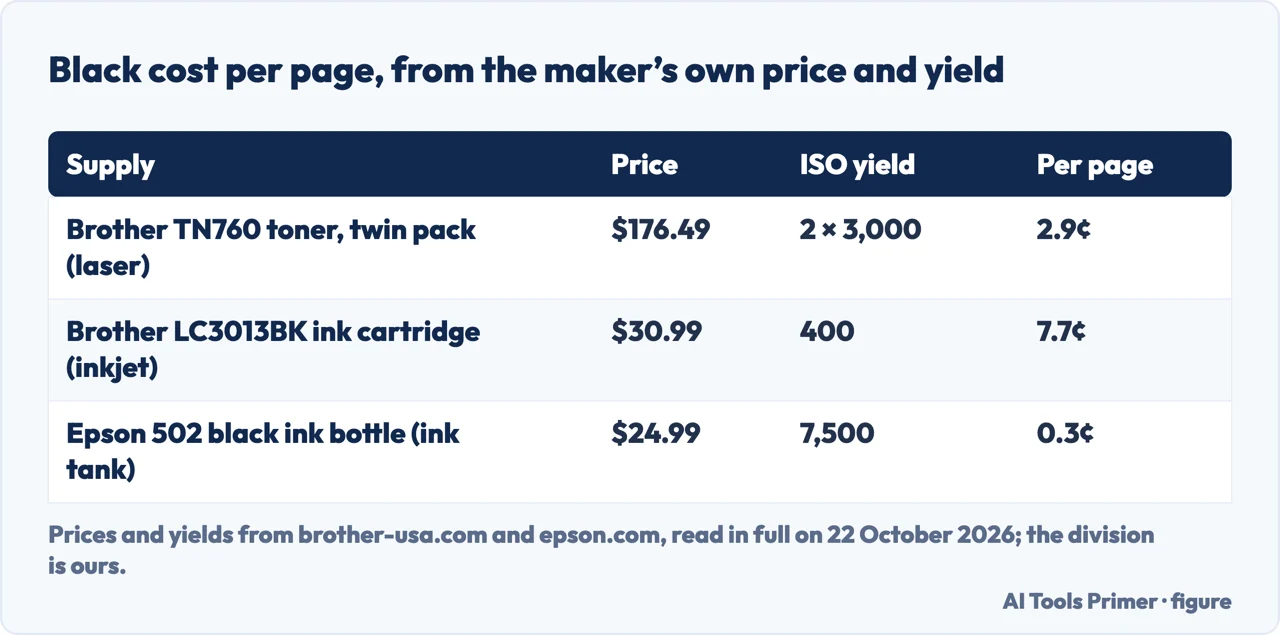
For black text, a laser printer is usually cheaper per page; for photos and colour on glossy paper, an inkjet does better. In the inkjet vs laser printer question the price gap can be measured: on 22 October 2026, Brother’s toner came to 2.9 cents a page and its own ink cartridge to 7.7 cents.
An ink tank printer, which you refill from bottles, upsets that order: Epson’s black bottle works out at 0.3 cents a page, before the higher price of the printer itself.
| Supply | Type | Price | Yield | Per page |
|---|---|---|---|---|
| Brother TN7602PK (two TN760 toner cartridges) | Laser | $176.49 | 2 × 3,000 pages, ISO/IEC 19752 | 2.9¢ |
| Brother LC3013BK ink cartridge | Inkjet | $30.99 | 400 pages, ISO/IEC 24711 | 7.7¢ |
| Epson 502 black ink bottle | Inkjet, ink tank | $24.99 | 7,500 pages, ISO/IEC 24712 pattern | 0.3¢ |
How each one puts marks on paper
HP’s comparison, published on its Tech Takes blog in August 2024, gives the difference in one line each. An inkjet printer sprays droplets of liquid ink through tiny nozzles in a printhead. A laser printer uses a laser beam and powdered toner to form an electrostatic image on a drum, which is then transferred to the paper and fused with heat.
That answers the question do laser printers use ink: they do not. HP describes toner as a fine powder that is melted onto the paper, and lists two consequences: it does not dry out in the cartridge, and the printed page resists smudging.
Colour is possible on both. A colour laser printer works with the four process colours, cyan, magenta, yellow and black, and PCMag notes that this is all a colour laser is capable of. Consumer photo inkjets such as the Canon Pixma TS9120 and the Epson Expression Photo XP-8600, in PCMag’s examples, use six inks instead of four to widen the range of colours.
The cost per page, worked out
Brother sells both kinds of printer, and its comparison page sums up the money side in one sentence: “inkjet costs less upfront, while laser offers lower long-term costs”. HP, which also sells both, says the same without a figure. The figure can be worked out from what the two makers print on their own supply pages: the price in their US store and the page yield measured under an ISO standard. We read both on 22 October 2026 and did the division.
- Laser toner. Brother’s TN7602PK, two TN760 cartridges for monochrome laser printers such as the HL-L2350DW, costs $176.49. Each cartridge is rated for up to 3,000 pages under ISO/IEC 19752, so 6,000 pages in all: about 2.9 cents of toner per page.
- Inkjet cartridge. Brother’s LC3013BK black cartridge, for Work Smart inkjets such as the MFC-J491DW, costs $30.99 for up to 400 pages under ISO/IEC 24711: about 7.7 cents per page. The store listed it as out of stock on the day we read it, with the price still shown.
- Ink tank. Epson’s 502 black ink bottle costs $24.99, and Epson’s page for the EcoTank ET-4850 rates it at 7,500 pages: about 0.3 cents per page.
Colour changes the gap. Brother’s three-pack of LC3013 colour cartridges costs $47.29 for up to 400 pages per cartridge; with the black one, that is $78.28 for four cartridges of 400 pages, or about 19.6 cents per page if all four ran out together. Epson’s three colour bottles cost $16.99 each and are rated at 6,000 pages, which with the black bottle comes to about 1.2 cents. Both colour figures are our arithmetic on the makers’ numbers, not a figure either maker publishes.
Two things are missing from these sums. The first is the price of the printer itself, which runs the other way: PCMag writes that bulk-ink machines cost more up front and are worth it only if you print enough. The second is that a cheap laser is not always the cheaper machine to run. In January 2021 PCMag gave 1.1 cents a page for the Canon imageClass LBP226dw laser against 0.8 cents for the Epson WorkForce Pro WF-M5299 inkjet, and added: “I’ve never seen a laser printer that prints in color for less than 5 cents per page.”
What the page count on the box measures
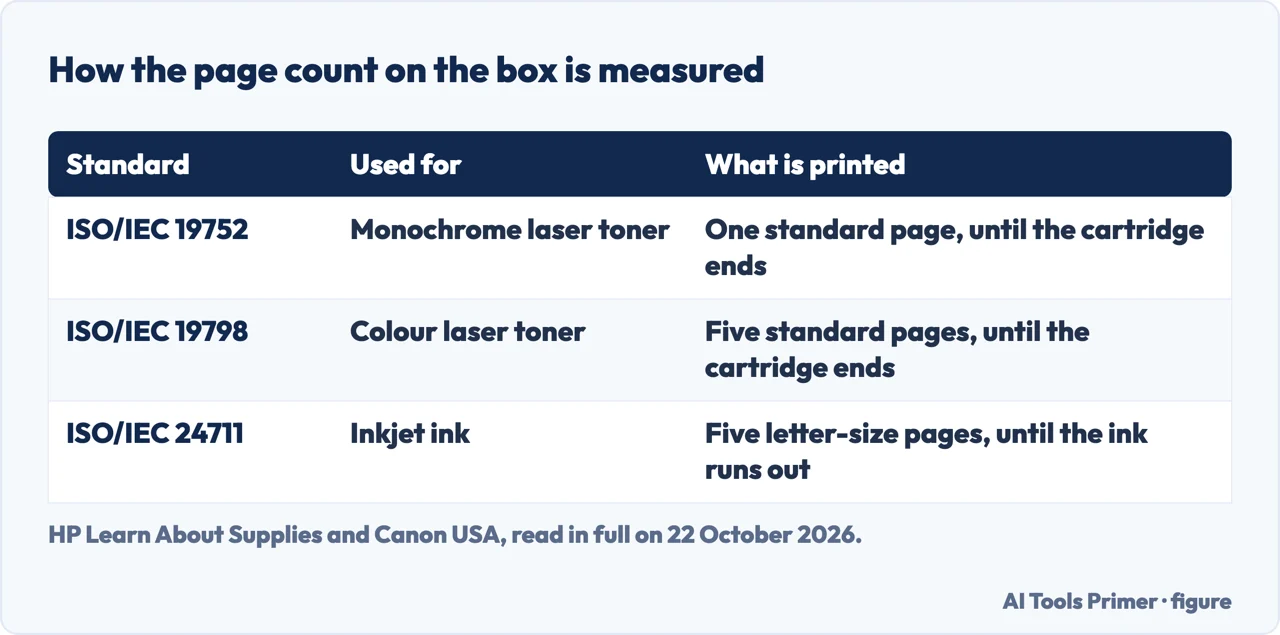
Every yield in the table above comes from a test laid down by the International Organization for Standardization, and HP and Canon each explain theirs.
- For monochrome laser toner, HP uses ISO/IEC 19752: one standard page is printed continuously until the cartridge reaches its end. For colour laser toner it uses ISO/IEC 19798, a set of five pages mixing text and graphics. HP tests at least three cartridges of each type in each of three printers.
- For inkjet ink, Canon describes ISO 24711 as five letter-size pages that every maker prints until the ink runs out. Its quoted yield is the average of three identical printers, each run three times with a new set of cartridges, and the inks are used immediately after they are unsealed.
Both tests print continuously, which is not how a home printer is used. HP calls its yields “a starting point for comparison purposes” and says they are not a prediction of what you will get, nor a minimum. Real yield depends on what is on the page, how many pages each job has and the conditions in the room. The cartridge in the box with a new printer may also print fewer pages: HP says some of its printers ship with an introductory cartridge, and Epson says part of the ink in the first bottles goes into setting the printer up.
Epson’s own footnote is the one to read if you print rarely. Its bottle yields are based on the ISO/IEC 24712 pattern with Epson’s methodology, may be lower when you print infrequently or mostly in one colour, and all the colours are used for printing and for printer maintenance.
Speed, photos and paper
HP puts laser printers at often 20 to 40 pages per minute and inkjets at typically 5 to 15. PCMag, which tests both, narrows the claim. The cheapest inkjets are slower than the cheapest lasers, some at 8 pages per minute or less, but comparable office machines are close. Its example: Brother’s MFC-J6945DW inkjet at 22 pages per minute against the same company’s MFC-L3770CDW laser at 25. HP’s PageWide inkjets, with a printhead as wide as the page, reach about 70.
For photos the sources agree on inkjet. PCMag credits the finer nozzles with more detail and a wider range of colour, especially on glossy photo paper, which laser machines cannot handle well. HP lists what else an inkjet can do: borderless pages, glossy photo paper, on some models 11 by 17 inch sheets, and materials such as fabric. A laser, in HP’s list, takes heavier paper and suits standard sizes.
For text, PCMag gives lasers the edge only in typesetting detail: they follow a font’s character shapes and spacing more closely, while a current inkjet on plain paper prints text that is fine for most uses. If text comes out with gaps or lines, that is a fault to fix rather than a reason to change technology: see printer streaks.
An inkjet that sits unused, and which lasts longer
HP writes that most inkjets run self-cleaning routines to stop the printhead clogging, and that heavy use or long idleness can raise maintenance and ink costs. Ink can dry out if the printer is not used regularly; toner does not. PCMag’s advice for an inkjet is to switch it off at night rather than let it sleep, because the start-up routine flushes a little ink through the printhead, and to print a few colour pages each month.
For the case at the other end, PCMag suggests that if you print only a few pages every few months, a low-end personal laser printer may suit you better, even at around 5 cents a page. If a printhead has already clogged, our page on a printer that accepts the job and prints nothing covers the cleaning cycles and the limits each maker sets on repeating them.
As for which lasts longer, PCMag found no rule by technology: it depends on the model and how it is used. It notes that many inkjets it sees come with two- and three-year warranties, against one year for most lasers. What does last longer is the printed page: PCMag writes that toner output is more resistant to fading and to smearing when wet, that some regulations require it for that reason, and that a laser is the better choice for documents kept on paper for years.
PCMag also names a running cost that is often overlooked: electricity. HP says inkjets often use less energy, especially when idle, and PCMag writes that a laser printer can draw two to ten times the power of a comparable inkjet.
Which one to choose
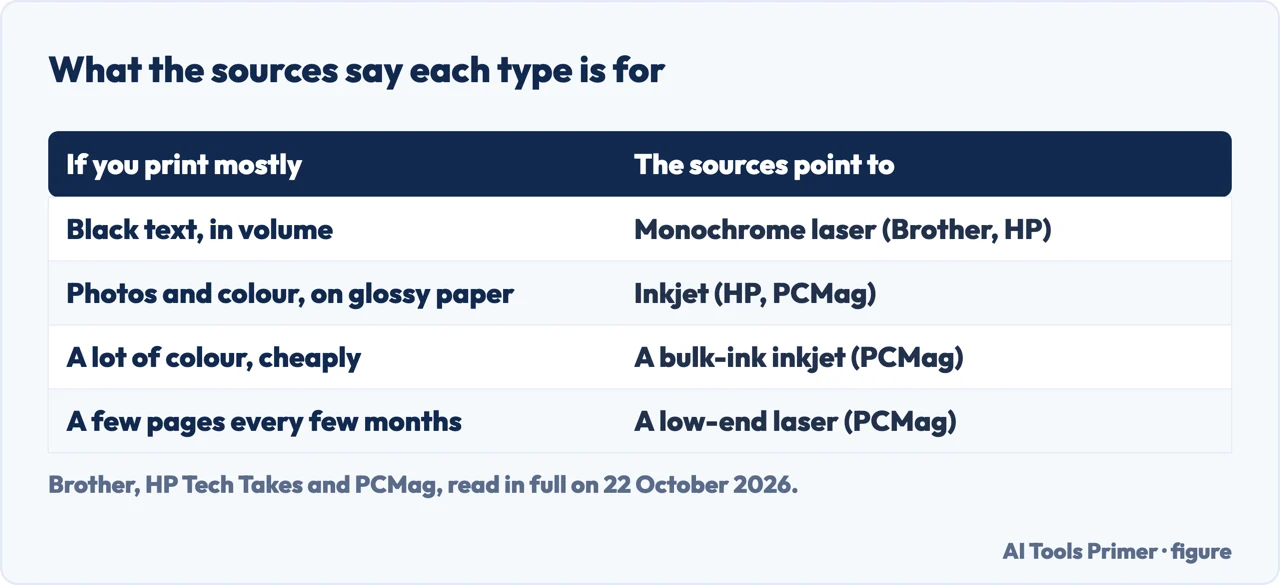
Brother’s advice for black-and-white printing is a monochrome laser printer, and HP’s summary points the same way for mostly text, high volume and lower long-term costs. Both point to an inkjet for photos and colour graphics, and HP adds a lower upfront cost and more paper types. PCMag adds two cases the makers leave out:
- a lot of colour on a budget, where a bulk-ink inkjet beats a colour laser on running cost once you print around 500 pages a month or more;
- a household that copies and prints the occasional colour page, for which PCMag calls a monochrome laser with no other functions a poorer choice than an inkjet all-in-one.
Whichever you choose, the next steps are the same: adding the printer to the computer, and if it prints on one side only, printing double sided by hand. When something goes wrong, a printer test page helps narrow down where the fault lies, and a printer that shows offline is a separate problem with its own order of checks.
Where to start
Five ways in.
- “Which is cheaper to run?”
- The cost — cost
- “Is the page count on the box real?”
- The yield — yield
- “Which is faster, and better for photos?”
- Speed and photos — speed
- “I hardly ever print.”
- Idle printers — idle
- “Just tell me which one.”
- Choosing — choose
More on printers
The pages next to this one: setting a printer up, printing on both sides, and the faults that stop it printing.
Questions people also ask
What are the disadvantages of a laser printer?
PCMag lists photos and colour, where an inkjet gives more detail and works on glossy paper; fewer paper types and no borderless printing; colour pages at no less than 5 cents in its experience; and two to ten times the power of a comparable inkjet. HP adds a higher upfront cost.
What lasts longer, a laser or inkjet printer?
PCMag found it depends on the model and its use, not the technology, and notes that many inkjets carry two- or three-year warranties against one year for most lasers. The printed page lasts longer from a laser: toner resists fading and smearing.
Is it worth getting a laser printer for home use?
If you print mostly black text, or rarely: toner does not dry out, says HP, and Brother’s toner worked out at 2.9 cents a page against 7.7 for its ink cartridge. For a household that copies and prints in colour, PCMag prefers an inkjet all-in-one.
Do laser printers use ink?
No. HP explains that a laser printer uses toner, a fine powder that is fused onto the paper with heat, while an inkjet sprays liquid ink through nozzles in a printhead.
Not covered here. We did not test any printer for this page. Prices and yields were read on the Brother and Epson US store pages on 22 October 2026; the cost per page is our division of one by the other, and prices change.
PCMag’s speeds, running costs and warranties date from its article of January 2021 and refer to the models it names.
The Reddit and LabelValue results could not be read, and the videos were not watched.
The search volume and difficulty behind this page were read in Semrush on 29 August 2026.
Sources
- Brother — Inkjet vs Laser: Choosing the Right Printer for You — www.brother-usa.com, read 22 October 2026.
- Brother — TN7602PK High-Yield Black Twin Pack Toner Cartridges (price and ISO/IEC 19752 yield) — www.brother-usa.com, read 22 October 2026.
- Brother — LC3013BK High-yield Black Ink Cartridge (price and ISO/IEC 24711 yield) — www.brother-usa.com, read 22 October 2026.
- Brother — LC30133PKS High-yield 3 pack color Ink Cartridges — www.brother-usa.com, read 22 October 2026.
- Epson — Epson 502 Ink Bottles (prices) — epson.com, read 22 October 2026.
- Epson — EcoTank ET-4850 (replacement ink yields and footnotes) — epson.com, read 22 October 2026.
- HP — Page Yield: Inkjet & LaserJet Printer Yields — learn-about-supplies.ext.hp.com, read 22 October 2026.
- Canon USA — How Page Yields Are Measured — www.usa.canon.com, read 22 October 2026.
- HP Tech Takes — Laser Printer vs Inkjet: How to Choose the Right Printer (8 August 2024) — www.hp.com, read 22 October 2026.
- PCMag — Inkjet vs. Laser: Which Printer Technology Is Better? (28 January 2021) — www.pcmag.com, read 22 October 2026.
Written by Alberto Gulotta
Founder and editor of AI Tools Primer, writing from Palermo, Italy. Thirty-five years of taking computers apart, starting with a Commodore 64 — the long version is on the about page.
Something wrong on this page? Write to aitoolsprimer@gmail.com and it gets fixed.
Written on 22 October 2026.
Independence and limits
No affiliate links and no paid placements anywhere on this site. Nobody pays to appear here, and no company has seen this page before you did.
This is general information, not professional advice. Where a page touches money, health, safety or the law, it names its source and the date it was read — and your situation may still differ. See the privacy page and the cookie policy.