
Screens · guide
MacBook screen white tint: what to check first
By Alberto Gulotta · Updated · 9 min read
MacBook screen white tint: before you suspect the display, check the settings Apple documents. Automatic brightness, Night Shift, True Tone, the contrast slider and a colour filter can all leave a screen looking pale, and Apple Diagnostics tests the built-in display if it stays that way with them off.
| Setting | What Apple says |
|---|---|
| Night Shift | Shifts the display’s colours to the warmer end of the spectrum after dark |
| True Tone | Adjusts the colour and intensity of the display to match the ambient light |
| Automatic brightness | Adjusts the display brightness automatically based on current ambient lighting conditions |
| Display contrast | A slider in Accessibility settings: drag it to increase or decrease the screen contrast |
| Colour filters | Can view the entire screen in grayscale, or tint it a colour of your choosing |
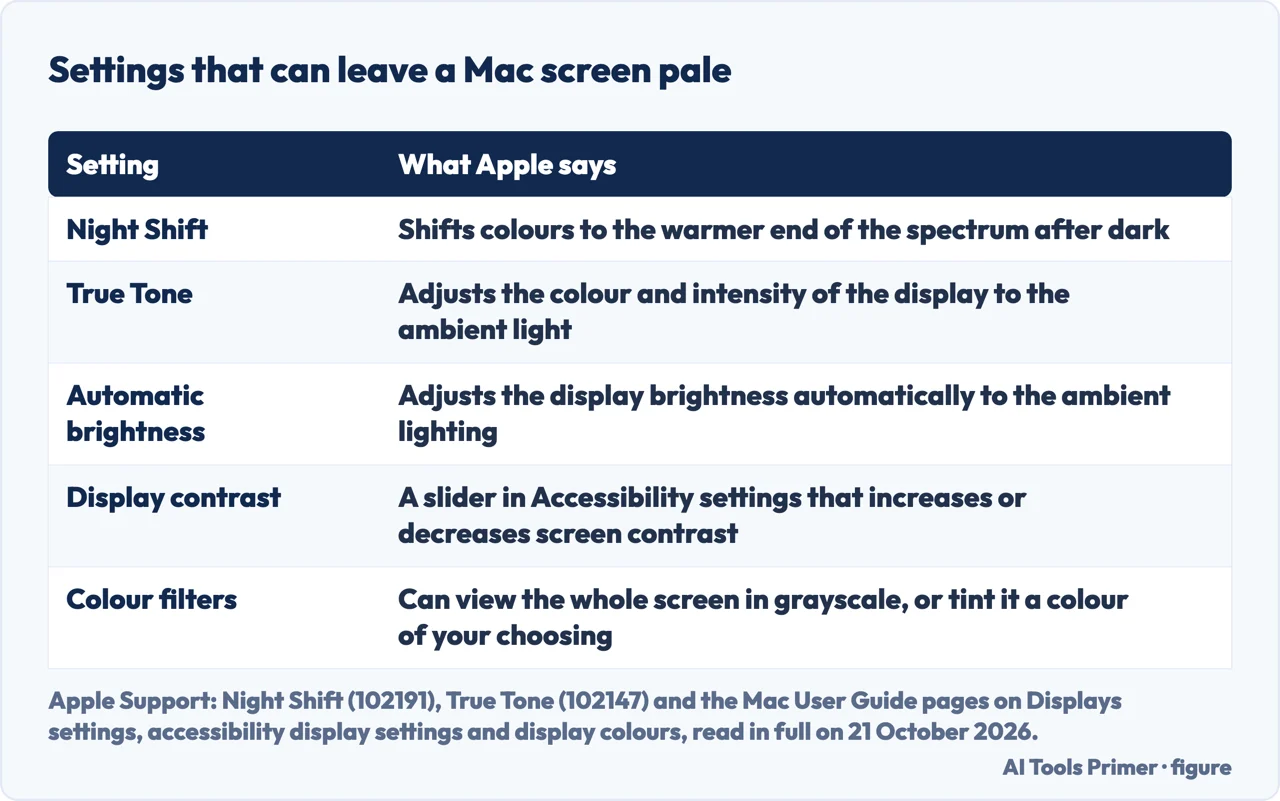
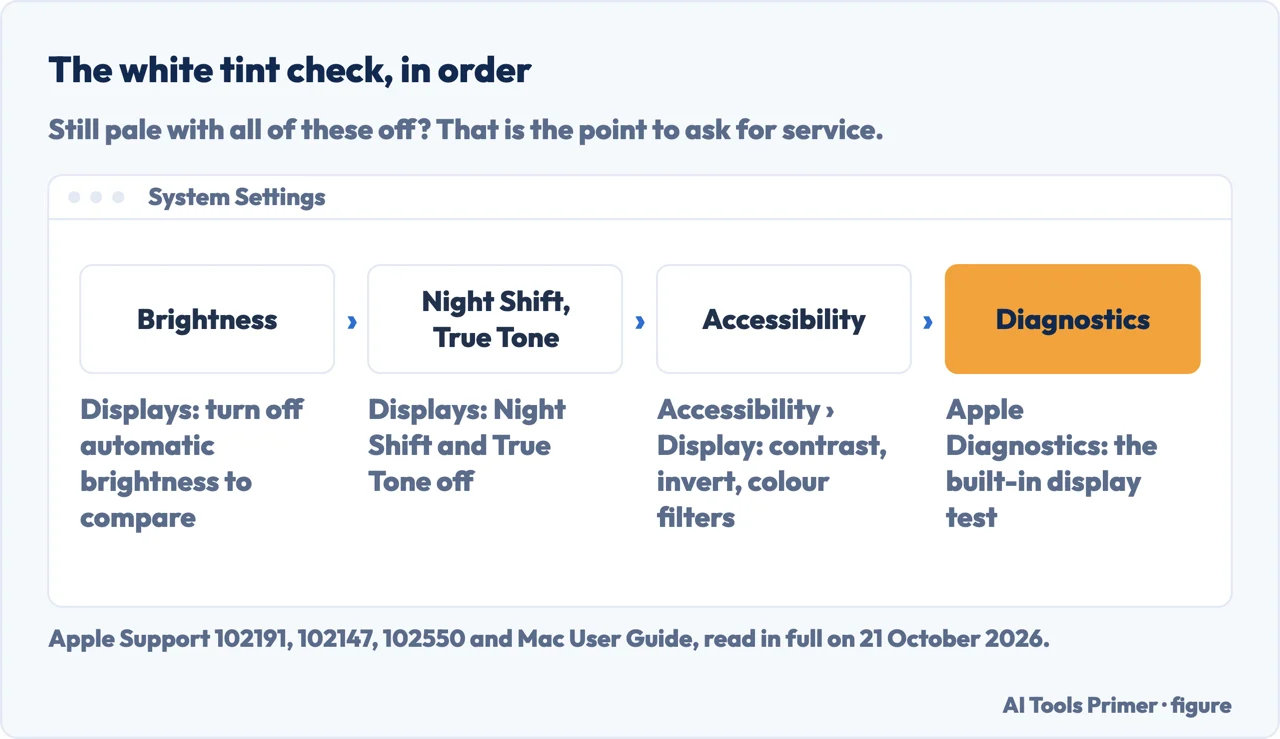
- Automatic brightness. In System Settings, Displays, Apple lists Automatically adjust brightness (or Ambient light compensation, depending on your display), which changes brightness with the room’s light. Switch it off, set the brightness slider by hand and see whether the screen still looks pale. Turning it off is our suggestion, not Apple’s; some users under an iFixit thread wrote that it fixed theirs, as set out below.
- Night Shift and True Tone. Also in Displays: Apple says Night Shift shifts colours to the warmer end of the spectrum and True Tone adjusts colour and intensity to the ambient light. Turn both off to compare. Both appear only on Macs that support them.
- Accessibility display settings. Choose Apple menu > System Settings, click Accessibility, then Display. Apple lists a Display contrast slider there, an Invert colors switch (Smart or Classic) and Color Filters. Check that contrast has not been lowered, that invert is off, and that no filter is set; a Grayscale filter shows the whole screen in grayscale. Apple says turning on Night Shift or colour filters turns Invert colors off, and the other way round.
- Colour profile or preset. Apple says your Mac selects the recommended colour profile by default, so it isn’t usually necessary to adjust it. For a 14-inch or 16-inch MacBook Pro from 2021 or later, Displays settings has a Preset menu of built-in reference modes: check that it is not set to something you did not choose.
- Another screen. With the settings above off, plug in an external display. If it shows normal colour while the built-in screen stays pale, that points at the built-in display or its connection: a deduction, set out below.
- Apple Diagnostics. Shut down, disconnect everything except keyboard, mouse, display, Ethernet and power, then on a Mac with Apple silicon hold the power button until Options appears and hold Command-D; on an Intel Mac hold D as it starts. In macOS Tahoe 26 and later, Apple says you choose a diagnostic, such as the built-in display.
Why another screen tells you something
Our reasoning. Night Shift, True Tone, contrast and colour filters are all settings applied by the Mac, so once they are off, the same Mac sending a normal picture to an external display points away from software and towards the built-in panel or the cable that feeds it. This is our deduction, not an Apple statement, and we have not tested it on a faulty Mac.
What it does not tell you. It cannot say which part has failed, and it needs a display and a cable that suit your Mac. Apple Diagnostics is the step that gives a reference code to take to a repairer.
A screen that slowly fades to white: what users reported on an old MacBook
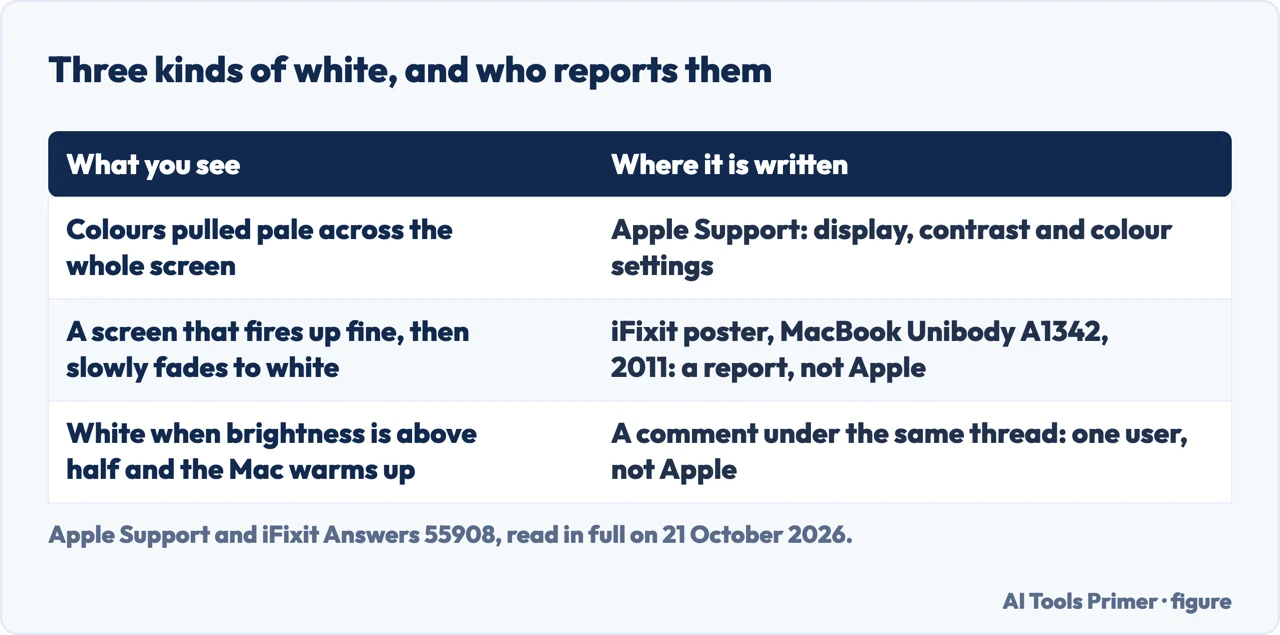
The thread. An iFixit Answers thread of June 2011 concerns a white plastic MacBook Unibody (model A1342). The poster wrote that the display either fires up fine and then slowly fades to white, or distorts with lines if you move the display and fades to white, and that it had happened on quite a few of more than 50 machines.
What replies said. The chosen solution, of 24 June 2011, said it was most likely a problem with the LCD panel. A reply of July 2011 said the LCD was not faulty and the LVDS cable needed replacing. Another of August 2011 described an end user who made the problem go by flexing the top-left of the display housing, and wrote that replacing the LCD panel solved it. A reply of January 2012 said replacing the LCD was the solution in that user’s case, and not the cable. These replies disagree, which is the honest picture: the thread shows that the cause was argued over, not settled.
Comments that point to a setting. A comment of August 2014 said the screen got white when brightness was above 50% and the laptop warmed a little. A comment of January 2018 said that turning off Automatically Adjust Brightness under Displays had fixed the problem in the past, and comments of July 2019 and November 2020 said it did the same for them. These are users’ reports on a 2011 model, not Apple statements, and the repairs they describe mean opening the Mac, which this page does not cover. If the screen looks yellow rather than white, see MacBook Pro yellow screen. A backlight that has gone out altogether is in display backlight stops working.
When to ask for service. Apple says that if Apple Diagnostics shows reference codes and you can’t resolve the issue yourself, you might need service, and to give the code to the Apple Store, Authorized Service Provider or Independent Repair Provider that repairs the Mac. What a display repair involves and costs, from Apple’s repair page, is in black lines on a MacBook Pro screen; back up first with backing up a MacBook.
Where to start
Four ways in.
- “Where do I start?”
- The settings check — settings check
- “Why another screen?”
- The reasoning — why another screen
- “Fading to white.”
- What one thread reported — fading to white
- “Do I need service?”
- When to ask — service
Other colour faults on a screen
A cast, a tint and a frame of the wrong colour each have their own test.
Questions people also ask
Why does my MacBook screen look washed out or white?
Apple lists settings that change how a display looks: Night Shift, True Tone, automatic brightness, a Display contrast slider and colour filters. If the screen stays pale with all of them off, Apple Diagnostics has a test for the built-in display.
How do I fix a white tint on my MacBook screen?
Start with the settings: Displays for brightness, Night Shift and True Tone, then Accessibility, Display for contrast, Invert colors and Color Filters. If nothing changes, run Apple Diagnostics and, if it shows a reference code, give the code to a repairer. Apple says you might need service if you can’t resolve the issue yourself.
Not covered here. It does not cover a Mac stuck on a white screen that will not start, opening a MacBook, replacing the display yourself, or a tint on an external display.
Sources
- Apple Support — Use Night Shift on your Mac (article 102191, published 10 February 2026) — support.apple.com, read 21 October 2026.
- Apple Support — Use True Tone on Mac (article 102147, published 10 March 2026) — support.apple.com, read 21 October 2026.
- Apple, Mac User Guide — Change Display settings for accessibility on Mac — support.apple.com, read 21 October 2026.
- Apple, Mac User Guide — Change display colors on Mac to make it easier to see what’s onscreen — support.apple.com, read 21 October 2026.
- Apple, Mac User Guide — Change the color profile on Mac — support.apple.com, read 21 October 2026.
- Apple, Mac User Guide — Displays settings on Mac — support.apple.com, read 21 October 2026.
- Apple Support — Use Apple Diagnostics to test your Mac (article 102550, published 19 December 2025) — support.apple.com, read 21 October 2026.
- iFixit Answers — My display is slowly fading to white, MacBook Unibody A1342 (posts from 2011 to 2020) — www.ifixit.com, read 21 October 2026.
Written by Alberto Gulotta
Founder and editor of AI Tools Primer, writing from Palermo, Italy. Thirty-five years of taking computers apart, starting with a Commodore 64 — the long version is on the about page.
Something wrong on this page? Write to aitoolsprimer@gmail.com and it gets fixed.
Written on 21 October 2026.
Independence and limits
No affiliate links and no paid placements anywhere on this site. Nobody pays to appear here, and no company has seen this page before you did.
This is general information, not professional advice. Where a page touches money, health, safety or the law, it names its source and the date it was read — and your situation may still differ. See the privacy page and the cookie policy.