
Work · guide
Portfolio website: what career pages and four builders say
By Alberto Gulotta · Updated · 15 min read
A portfolio website puts a collection of work samples online. CareerOneStop, sponsored by the U.S. Department of Labor, calls the samples the foundation, and Tufts says the portfolio could be a website, blog or video channel. Wix, Adobe, Canva and Portfoliobox state their own limits and prices, read on 5 November 2026.
| Question | Answer | Where it comes from |
|---|---|---|
| What is a portfolio? | A collection of work samples that shows your skills and qualifications | CareerOneStop |
| Must it be a website? | No: Tufts adds a blog or a video channel, and CareerOneStop adds a simple PDF and a paper binder | Tufts, CareerOneStop |
| What is the core of it? | The work samples; the rest is optional | CareerOneStop |
| Can it cost nothing? | Wix and Portfoliobox describe free plans with stated limits (storage and bandwidth, or pages and images); Canva describes a free site on a Canva address, with no limit stated on the page we read; Adobe Portfolio comes with Creative Cloud | The four builder pages |
| Does a recruiter look at it? | A recruiter quoted by Penn says some do and some do not | Penn Career Services |
What a portfolio is, and who is said to need one
CareerOneStop, the careers site sponsored by the U.S. Department of Labor, defines a portfolio as a collection of work samples that shows your skills and qualifications. It says you can post one online, show it during an interview or share it at other times in a job search, and that it can give evidence of work you have done, illustrate your skills, show the quality of your work and help you get a job offer or attract clients. Tufts Career Center describes the online version more loosely: an online portfolio, it says, may also be called a digital portfolio or e-portfolio, and it could be a website, a blog or even a video channel. The four builder pages we read, from Wix, Adobe, Canva and Portfoliobox, each describe a website. So a portfolio website is one of several things the career pages call a portfolio.
On who uses one, Tufts says it is becoming increasingly important for artists, engineers, computer scientists, photographers, designers, filmmakers and other creative people to have a way to showcase and promote their work. A portfolio, it says, lets you organize your work in one place even when the work spans different disciplines. CareerOneStop says “Few job applicants have one” and that a good portfolio can leave a strong impression of your experience and accomplishments. It adds that creating one helps you prepare to network and interview, because organizing the material reminds you of examples and stories from your career.
The Penn Career Services blog, which republishes an article first published on Forage, is a secondary source, and we use it only for what it attributes to recruiters. A recruiter quoted there says an online portfolio should not typically be seen as a substitute for a resume. Another passage says it is not guaranteed that a hiring manager will look at one: some do, and some do not. The same article quotes a former recruiter who lists graphic designers, writers, photographers, architects and construction managers as people for whom a portfolio is a good idea, and a production foreman at an automotive company as a maybe not. It also says professional experience is not required: school newspaper articles, research for a class, a video game made in an extracurricular activity or graphic design done in spare time all count.
What goes in: the samples first, the rest optional
CareerOneStop calls the work samples the foundation of a portfolio and says to choose your best work. For each item it asks for a description of the project, who the client or employer was, how you contributed and any results. Its examples are by occupation: photographs of paintings for an artist, photos of graphic, interior or web design work for a designer, recordings for a dancer, actor or musician, lesson plans for a teacher, copies of articles and grant proposals for a writer, graphs showing sales results for a sales person, and copies of interactive programs for a multimedia specialist.
Everything else on its list is marked optional: an About page that introduces you, a resume, testimonials and letters of recommendation, a list of three to five references, articles that mention you, and a call to action such as “contact me” or “learn more”. The page warns against overloading the viewer and says every person, and every portfolio, is different. Tufts goes a step further on two of those items: it says to include contact information and a resume, CV or bio, and to use clearly named tabs, such as UI/UX against photography. Wix, which sells site-building, lists the parts most portfolios need as a homepage, projects, an About page, contact information and proof such as client testimonials, logos or results.
How to describe the work is where two sources add something to CareerOneStop’s four-part description. Figma, in a guide of portfolio examples, lists four tips: curate your best work, write strong project descriptions that detail measurable impact, make the portfolio your own, and update it regularly. Its examples of impact are a fintech designer showing that a redesigned banking app reduced errors and a developer showing improved checkout load times. Tufts lists ten tips, among them knowing your audience and including work directly related to what the employer needs, asking faculty, career staff or trusted professionals for feedback, and documenting growth with design notebooks, process outlines and photographs of stages of work. Its short rule for upkeep is “Collect, select, reflect.”
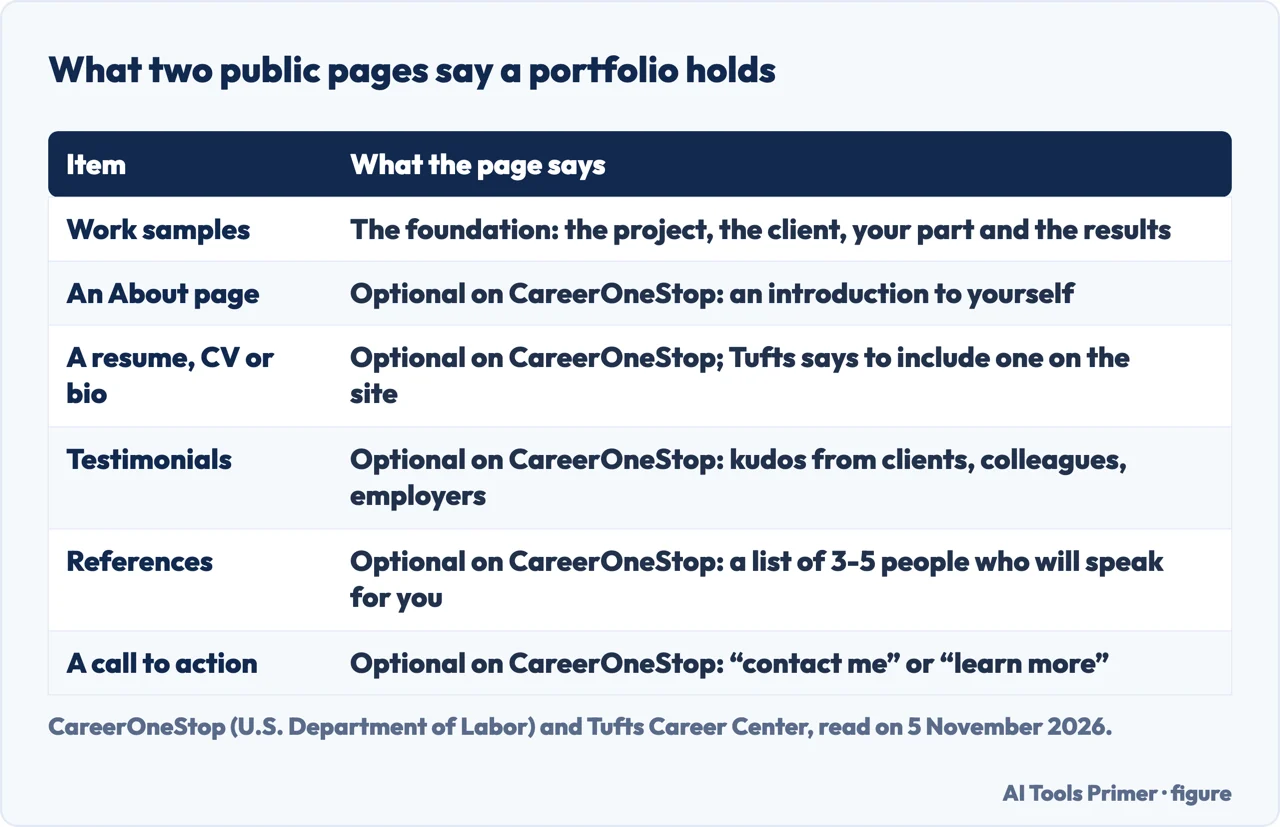
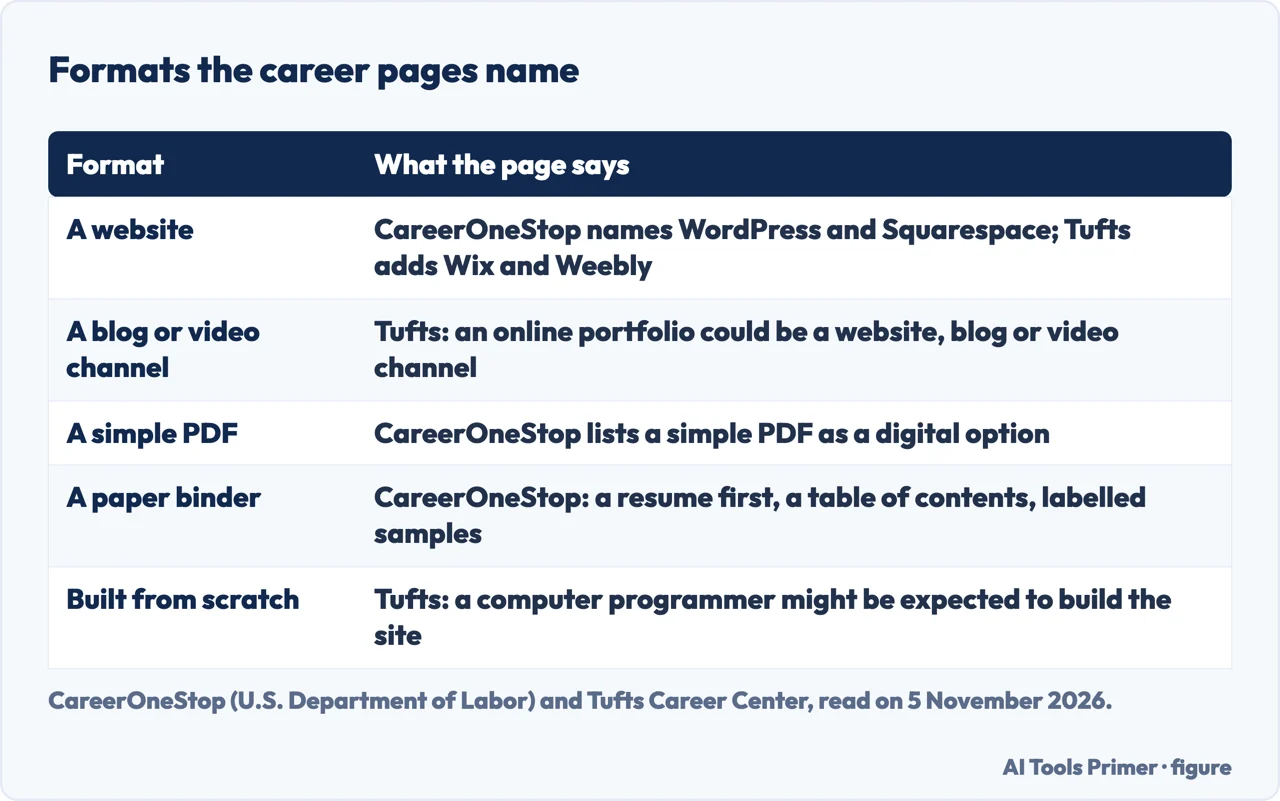
A website, a PDF or a paper binder
For a digital portfolio, CareerOneStop names three routes: a website such as WordPress or Squarespace, a simple PDF, or a portfolio builder tool. It describes free builder sites as automating most of the design, with possible limits on the size, type or number of files, minimal customization and ads displayed on the portfolio. Subscription-based ones, it says, have fewer file limits, tend to work well for visual and graphic elements, and come with templates tailored for different industries and greater customization. Tufts lists tools to build with, including Behance, Squarespace, Wix, Weebly and WordPress, and says some offer a free option while others are fee-based.
One difference sits in a short note on the Tufts page: if you are a computer programmer, it might be expected that you build the site from scratch to show that capability. The builder pages we read do not mention building from scratch, so this note belongs to the career page alone. Tufts also suggests a master portfolio that stores all your images and projects for you to work from, and an external one that is client-facing or that you share with employers.
CareerOneStop’s tips for a digital portfolio are to organize the material with a clear structure, keep ample white space, use high-quality images, make it mobile-friendly, and proofread it and check all the links and the overall appearance before sending it out. It also says to put a link to the portfolio website on your resume, cover letter and social media profiles. Tufts says to add the URL to a resume, business cards, social media and LinkedIn, and the Penn article lists a LinkedIn profile, networking messages and job applications. Our pages on what to put on a resume and on uploading a resume to LinkedIn cover the documents that link sits on.
The paper version is a loose-leaf binder with dividers. CareerOneStop says to use a clean copy of your resume as the first page or front cover, add a table of contents, display the contents in clear page protectors, group samples into logical categories, and label and describe each item, your involvement and the skills used. To reduce the volume it suggests partial work samples, with full versions offered if requested. Tufts says that in some cases a concise hard copy that you bring to interviews is another way to show work.
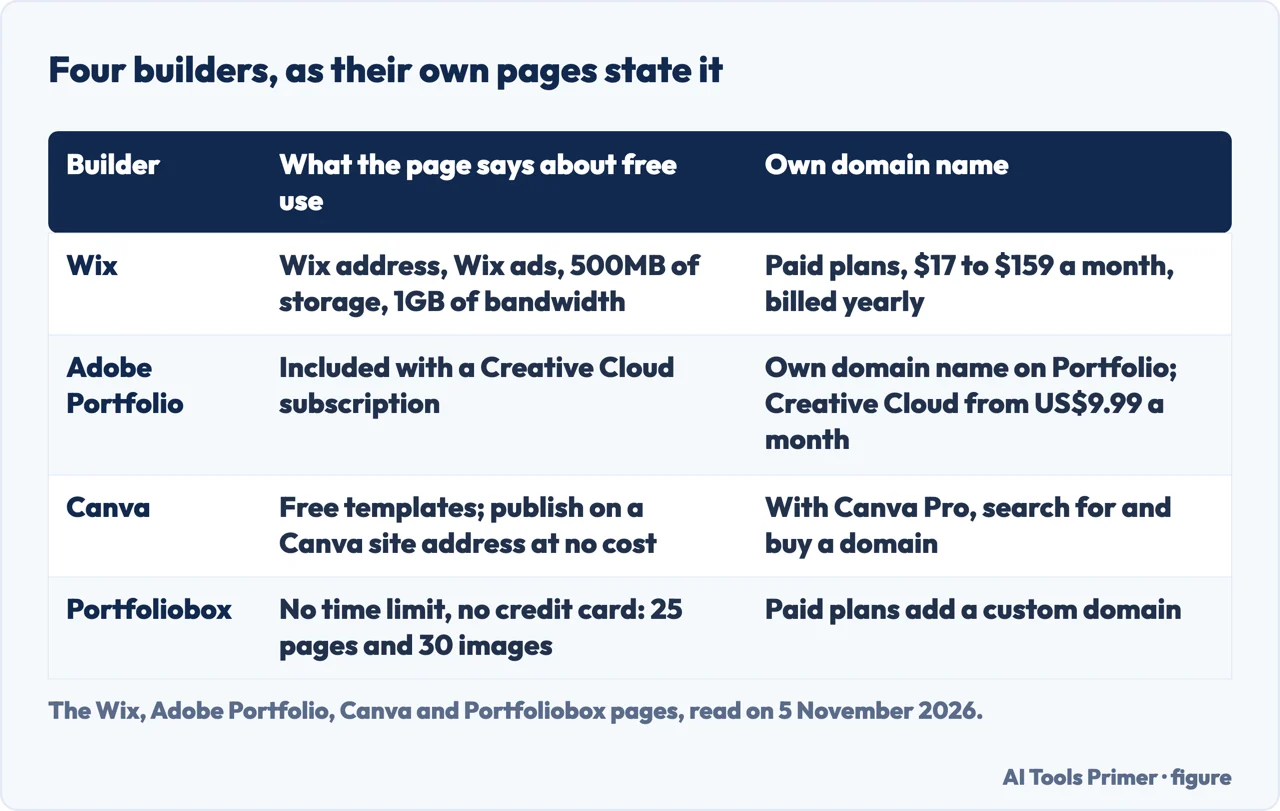
What four builders say about themselves, and what it costs
Each builder page tells you its own free limits and prices, in its own units, so the figure sets them side by side without ranking them. Wix says its free plan gives a Wix web address of the form yourname.wixsite.com/yoursite, shows Wix ads, and includes 500MB of storage and 1GB of bandwidth, with no obligation to upgrade. Its paid plans, it says, connect a custom domain and remove the ads, and selected yearly plans include a free domain for the first year. Wix also says hosting is included on every site, free plan too, and offers an AI Portfolio Generator that makes a first draft from a description. Figma, whose guide we also read, says its Figma Sites (listed as beta) publishes responsive websites from a design file; we read no price or limits for it, so we give none.
Adobe Portfolio says it is included for free with a Creative Cloud subscription, and that Creative Cloud is available for as low as US$9.99 a month. It offers a multi-page collection of work or a one-page welcome page, themes it describes as fully responsive, import from Behance and Lightroom, Adobe Fonts, your own domain name, and password protection for the whole site or selected pages. The page we read does not give a price for Portfolio on its own.
Canva describes a one-page portfolio website built from hundreds of free templates, published on a Canva site address at no cost. With Canva Pro, it says, you can search for and buy your own domain. It calls its templates SEO-friendly and mobile-responsive, which are Canva’s own claims, and it also offers printing, with photo book templates for a portfolio on paper. We did not read the price of Canva Pro.
Portfoliobox says you can build and publish a portfolio website for free with no time limit and no credit card. The free plan, it says, gives 25 pages, 30 images and gallery layouts; paid plans add a custom domain, more storage, e-commerce, bookings, invoicing, custom email and analytics. It says an AI assistant built into the editor is included on every plan. We did not find paid prices on the page we read, so we give none.
On the cost of the whole job, Wix gives three lines. A portfolio website costs nothing to start on a free plan, and its paid plans run from $17 to $159 a month, billed yearly. Hiring a site designer or developer for a custom build costs, in Wix’s estimate, about $500 to $5,000 or more up front. A domain name is usually renewed every year. The page says prices are as of November 2026. Wix sells the plans it prices, so the estimate of a professional’s fee is the company’s own. The free plans cannot be compared directly: Wix counts storage and bandwidth, Portfoliobox counts pages and images, and Canva and Adobe do not state a limit of either kind on the pages we read.
What the pages do not say, and the checks they do give
The CareerOneStop, Tufts and Penn pages do not say in which kinds of hiring an employer asks for a portfolio, or what share of applications include one. CareerOneStop says only that few applicants have one, and the recruiter quoted by Penn says some hiring managers look and some do not. The builder pages we read do not mention how many visitors or interviews a portfolio brings. The pages we read do not put the four free plans in the same unit.
The checks the career pages do give are plain. CareerOneStop says to proofread the portfolio and check all links and the overall appearance before sending it out. The Penn article quotes a recruiter saying to click through it before sending and to view it on tablets, phones and laptops, because recruiters might use different devices. Tufts says to ask for feedback and to keep revisiting the content. Our pages on skills on a resume, writing about what you did and tracking applications sit next to this one.
We built no portfolio on any of the four builders. We read no galleries of portfolio designs, no forum threads or image boards, and no help articles beyond the pages named below. Where a builder describes its own product, as with the free plans, the prices and the SEO claim, we give what the page states and attach the name of the company.
Where to start
Four ways in.
- “What is a portfolio, and do I need one?”
- What a portfolio is, and who is said to need one — what
- “What goes in it?”
- What goes in: the samples first — inside
- “Website, PDF or paper?”
- A website, a PDF or a paper binder — format
- “What does it cost?”
- What four builders say about themselves — builders
Building the document
What a portfolio link sits beside: the sections, the skills and the results.
Sending it out
Where the link goes once the portfolio exists.
Questions people also ask
How much does it cost to create a portfolio website?
Wix says it costs nothing to start on a free plan, with paid plans from $17 to $159 a month billed yearly, and gives about $500 to $5,000 or more for a professional build. Adobe Portfolio comes with Creative Cloud, from US$9.99 a month. Portfoliobox describes a free plan with no time limit; Canva Pro’s price was not read.
How to create a portfolio website?
CareerOneStop starts with the work samples: your best, each with the project, the client, your part and the results. Wix says to pick a template or use its AI generator, add your work, pick a domain and publish. CareerOneStop and the Penn article both say to check the links before sending it out.
What are the different types of portfolio websites?
Tufts says an online portfolio could be a website, a blog or a video channel. CareerOneStop adds a simple PDF and a paper binder. The builders describe two shapes: Adobe offers a multi-page collection or a one-page welcome page, and Canva describes a one-page site.
What are the benefits of a portfolio website?
CareerOneStop says a portfolio can give evidence of work you have done, show your skills and the quality of your work, and help you get a job offer or attract clients. Tufts says it gives more people access to your work and keeps it in one place. A recruiter quoted by Penn says some look and some do not.
What are the key features of a portfolio website?
CareerOneStop lists a clear structure, ample white space, high-quality images and a mobile-friendly layout, with proofread text and working links. Wix lists a homepage, projects, an About page, contact information and proof such as testimonials. Adobe lists responsive themes and password protection.
Not covered here. We built nothing on any of the four builders. The statements come from the CareerOneStop, Tufts and Penn Career Services pages and from the Wix, Adobe Portfolio, Canva, Portfoliobox and Figma pages, all read on 5 November 2026.
The search volume and difficulty behind this page come from an Ubersuggest reading of 5 November 2026, not from Semrush, and are still to be confirmed with Semrush.
Sources
- CareerOneStop — Portfolios (U.S. Department of Labor) — www.careeronestop.org, read 5 November 2026.
- Tufts Career Center — Online Portfolios: Who, What, How & Why — careers.tufts.edu, read 5 November 2026.
- Penn Career Services — How to Create an Online Portfolio (Even When You Don’t Have Work Experience) — careerservices.upenn.edu, read 5 November 2026.
- Wix — Free Portfolio Website Builder — www.wix.com, read 5 November 2026.
- Adobe — Adobe Portfolio — portfolio.adobe.com, read 5 November 2026.
- Canva — Free Portfolio Website Maker — www.canva.com, read 5 November 2026.
- Portfoliobox — Portfolio Website Builder — www.portfoliobox.com, read 5 November 2026.
- Figma — 23 Inspiring Portfolio Website Examples & Tips — www.figma.com, read 5 November 2026.
Written by Alberto Gulotta
Founder and editor of AI Tools Primer, writing from Palermo, Italy. Thirty-five years of taking computers apart, starting with a Commodore 64 — the long version is on the about page.
Something wrong on this page? Write to aitoolsprimer@gmail.com and it gets fixed.
Written on 5 November 2026.
Independence and limits
No affiliate links and no paid placements anywhere on this site. Nobody pays to appear here, and no company has seen this page before you did.
This is general information, not professional advice. Where a page touches money, health, safety or the law, it names its source and the date it was read — and your situation may still differ. See the privacy page and the cookie policy.