
Work · guide
A job application tracker you can run in five minutes a day
By Alberto Gulotta · Updated · 17 min read
One question sits behind a job application tracker: what happened to every application you sent. Career services at several universities already publish the columns worth logging, and the shortest route is to borrow theirs rather than compare tools that all do roughly the same thing.
| Fact | Source |
|---|---|
| Average duration of US unemployment: 24.8 weeks; median: 11.5 weeks | U.S. Bureau of Labor Statistics, Table A-12, September 2026 |
| Indeed marks an application “Response seems unlikely” after at least two weeks of silence | Indeed Help Center for Job Seekers |
| USAJOBS deletes every application — active and archived — 36 months after the job’s closing date | USAJOBS Help Center (U.S. OPM) |
| Candidates reporting being ghosted by an employer: 52% (vendor survey) | Greenhouse, 2024 Candidate Experience Report |
| Candidates reporting being ghosted, a three-year high: 53% (survey by a pre-employment testing company, reported by Fortune) | Fortune, citing a survey from Criteria |
What to track: the columns career services recommend
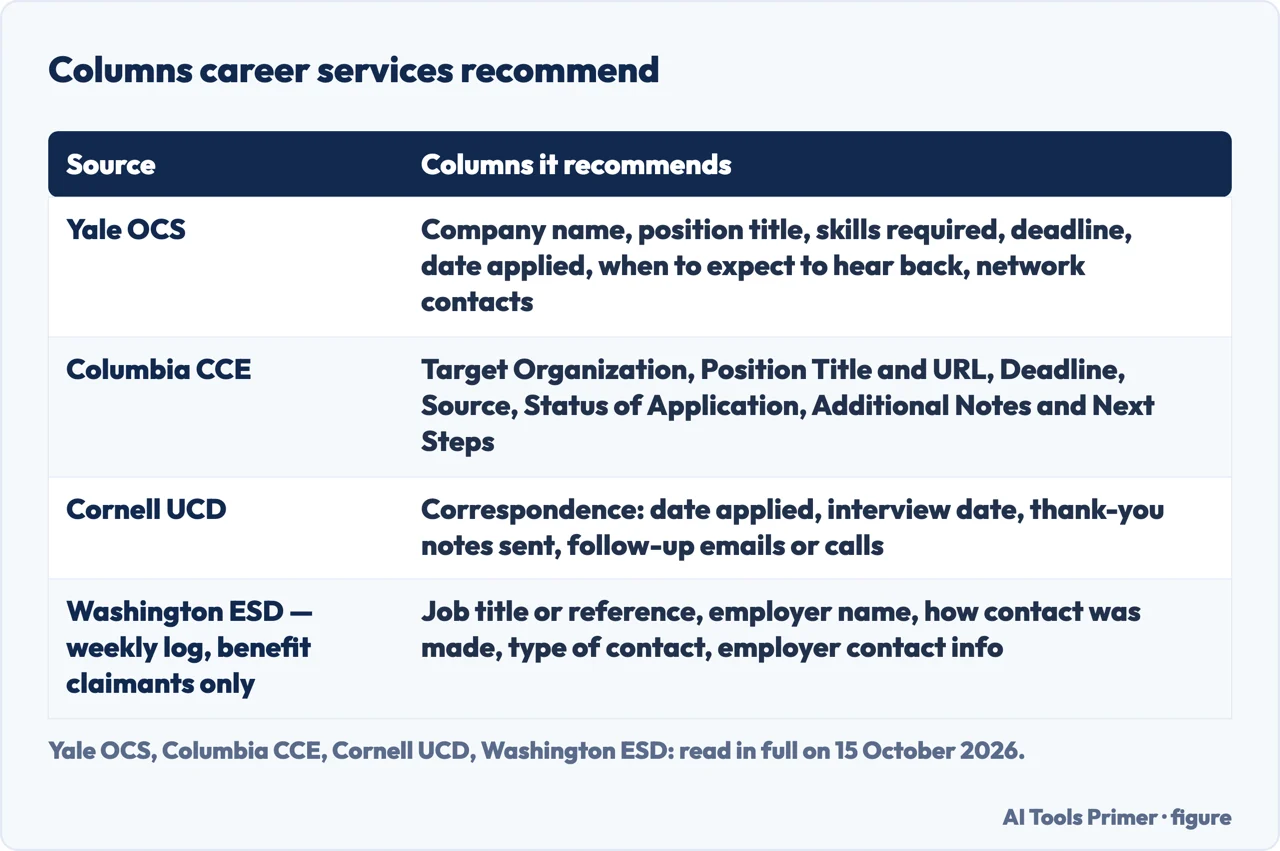
Three university career offices publish exactly what belongs in a tracker, not just that one exists. Yale’s Office of Career Strategy opens its tracking tool by inviting students to log “companies of interest, job applications, and networking conversations” in Excel or Word, then lists seven columns for every application: company name, position title, the main skills required, the deadline and materials needed, the date applied, when to expect to hear back, and any network contacts and conversation details.
Columbia’s Center for Career Education names a similar structure a “Search Tracker”, opening with a Target Organization column and a Position Title and URL column that links straight to the posting, then Deadline, Source (referral, networking, a job board), a Status of Application column with example values such as Submitted, Completed or In Process, and a closing Additional Notes and Next Steps column meant, in the office’s own words, to record whether the next move is to finalise the application or follow up with the recruiter.
Cornell’s Career Development spreadsheet goes further on correspondence: alongside application details (the posting URL, date posted, deadline, time zone, materials required, hiring-manager contact information and status) and company details, it gives follow-up its own column — date applied, interview date, thank-you notes sent, and follow-up emails or calls — the only one of the three read in full to name chasing a reply as a tracked item in its own right.
Three more university pages — MIT Career Advising & Professional Development, the University of Washington Career & Internship Center, and UC Berkeley Career Engagement — confirm that a free downloadable tracker exists, without describing its columns on the page itself; the columns above borrow from the three that do. One further log sits outside this group entirely: Washington State’s Employment Security Department requires unemployment-benefit claimants to log three employer contacts or approved job-search activities every week, recording the job title or reference, employer name, how and what kind of contact was made, and the employer’s own contact details — a weekly, mandatory record for benefit claimants in one US state, not a general tracking tip. And Penn Career Services’ own advice on tracking is scoped to faculty jobs: keeping records of where and when you applied, which documents each school asked for, and the length specified for each one.
Where platforms already show your application status
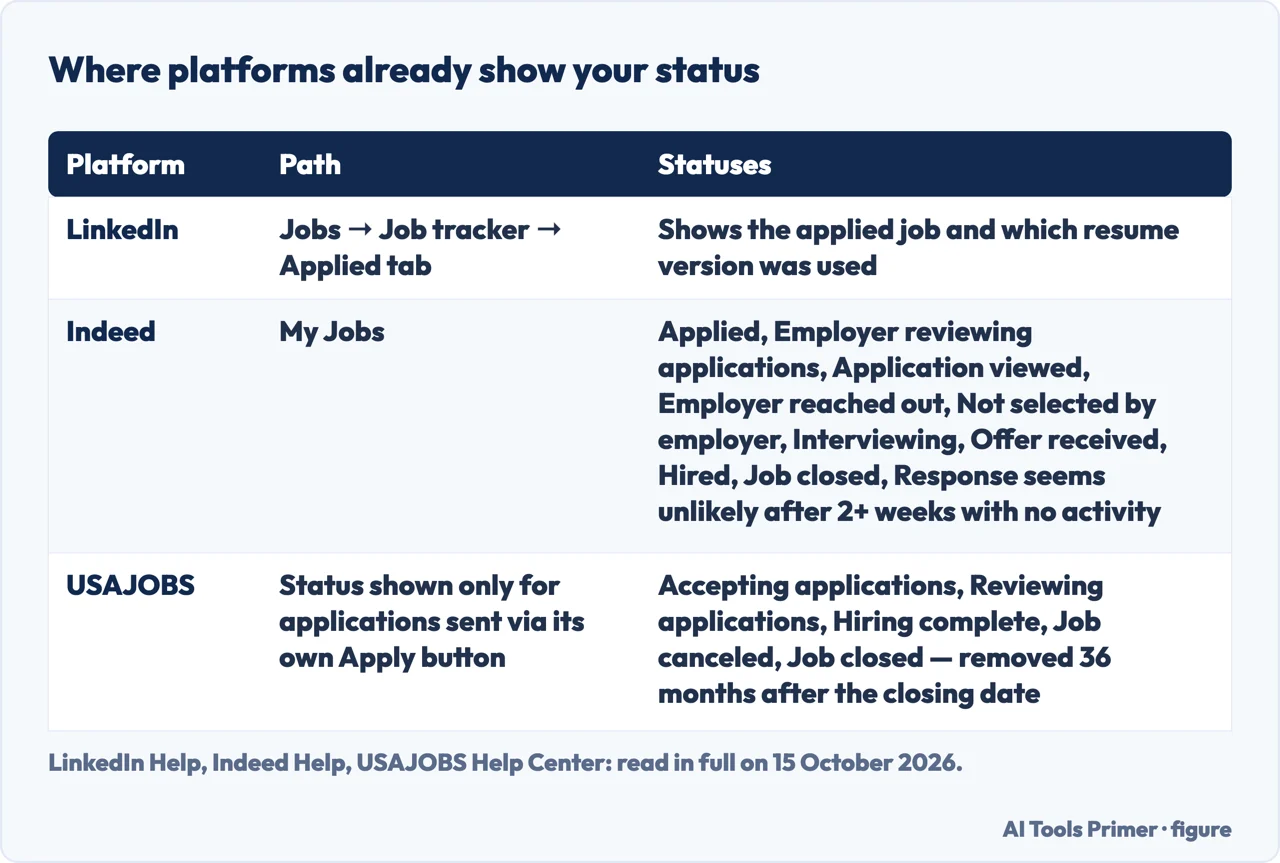
Before building anything, it is worth checking what three platforms already show for free. LinkedIn lists every application already submitted through the platform under Jobs, then Job tracker, then the Applied tab, where clicking a job also shows which version of the resume was used to apply.
Indeed goes further with named statuses. Four are set by Indeed itself — Applied, Employer reviewing applications, Job closed and “Response seems unlikely”, which appears, in Indeed’s own words, once the employer has already filled the role or when “there has been no activity on your application for at least two weeks”. Three more are set by the employer directly — Application viewed, Employer reached out, Not selected by employer — and four are ones a jobseeker can set personally: No longer interested, Interviewing, Offer received, Hired. Indeed’s own help pages add a caveat worth keeping in mind: some of these options only work for jobs posted directly on Indeed, not ones that send the applicant to another site to apply.
USAJOBS, the United States federal government’s hiring platform, shows a job status rather than an application status by default — Accepting applications, Reviewing applications, Hiring complete, Job canceled or Job closed — because, as its help centre puts it, “the hiring agency sends the status to USAJOBS” and the platform “does not have any control over the status or lack of a status”. Clicking Track this application on the My jobs page shows the agency’s own update when one exists; if there is no link, USAJOBS says to contact the agency’s own point of contact listed on the announcement instead. One limit is worth logging separately: USAJOBS only tracks applications sent through its own Apply button, not ones submitted directly to an agency website or by fax, email or mail, and it permanently removes every application, active and archived, 36 months after the job’s closing date — after which, its own help centre advises, exporting the information to Excel is the only way to keep a record.
None of the three follows an application once it leaves that platform — by email, through a company’s own site, or through a recruiter — which is exactly the gap a personal log is built to close.
How long a job search actually takes
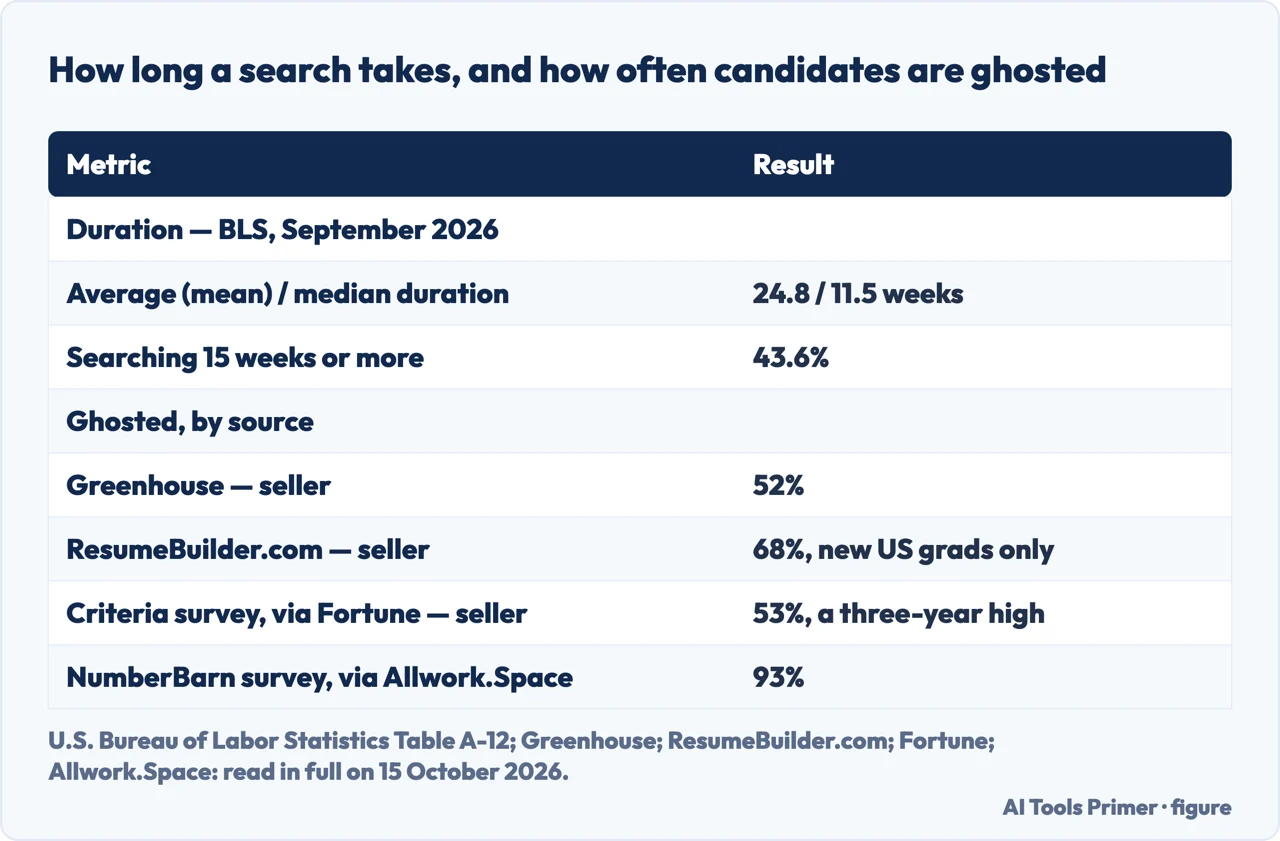
The U.S. Bureau of Labor Statistics’ Table A-12 puts the average (mean) duration of unemployment at 24.8 weeks for September 2026, the most recent month with a complete figure, against a median of 11.5 weeks — roughly half the mean, a gap that signals a long tail of much longer searches pulling the average upward. The same table’s percent distribution shows why: 29.2% of unemployed people had been searching for under five weeks, 27.2% for five to fourteen weeks, and 43.6% — nearly half — for fifteen weeks or more. One footnote explains a gap elsewhere in the same series: data for October 2025 were not collected because of the federal government shutdown.
How often candidates get ghosted
Four separate surveys put a number on being ghosted, and two come from companies selling hiring or resume products. Greenhouse, which sells applicant-tracking software, reported in its 2024 Candidate Experience Report that 52% of candidates say it has happened to them — a 22% decrease from the year before. ResumeBuilder.com, which sells resume- and cover-letter-building tools, surveyed 1,000 recent and soon-to-graduate US college students online via Pollfish in May 2026 and found that 68% were ghosted by an employer after job interviews — a figure scoped to people who earned a four-year degree in the past year or are due to graduate in 2026, aged 20 to 28, not every candidate.
The two figures reported by independent outlets — both from surveys run by companies, not by the outlets themselves — run higher still. Fortune reports, citing a survey from the pre-employment testing company Criteria, that 53% of job seekers experienced ghosting within the last year — a three-year peak, up from 48% in 2025 and 38% in 2024 — and quotes Criteria’s chief executive Josh Millet attributing the rise to “a surge in application volume, largely fueled by AI tools” that leaves hiring teams “getting less meaningful signals from each one.” Allwork.Space, citing a survey from NumberBarn, reports that 93% of Americans who applied for a job in the past year had applied for at least one position and never received a response, and that 66% said an employer had stopped communicating after they had already spoken with or interviewed someone at the company. The same survey found ghosting runs both ways: 34% of job seekers admitted they had intentionally stopped responding to an employer because of how they had been treated.
One more figure is worth flagging rather than using: Zippia, which sells its own resume builder and AI job assistant, states on the same page both that it takes “21 to 80 job applications to secure one job offer” and, further down, that it “typically requires anywhere from 100 to 200 applications” — two numbers four times apart, never reconciled on the page itself.
Is there a free job application tracker available?
Yes, and it does not require choosing a product. Yale, Columbia and Cornell publish their career services’ exact tracker columns for free, and MIT, the University of Washington and Berkeley each link to a free downloadable tracker of their own, though without describing its columns on the page itself. Copying the columns above — company, role, deadline, date applied, status and next step — into a spreadsheet already sitting on a laptop costs nothing beyond the time it takes to fill it in.
The market also sells its own versions of the same idea. Teal offers a dedicated, freemium tracker; Notion’s own template marketplace lists hundreds of job-tracking templates built by other users rather than by Notion itself; Kickresume, Simplify, Enhancv and Sprout each sell a tracker of their own, and each manages only what is logged inside that one product. None of them is ranked here: the columns above come from universities’ own pages, not from a vendor’s marketing page.
The five-minute daily routine
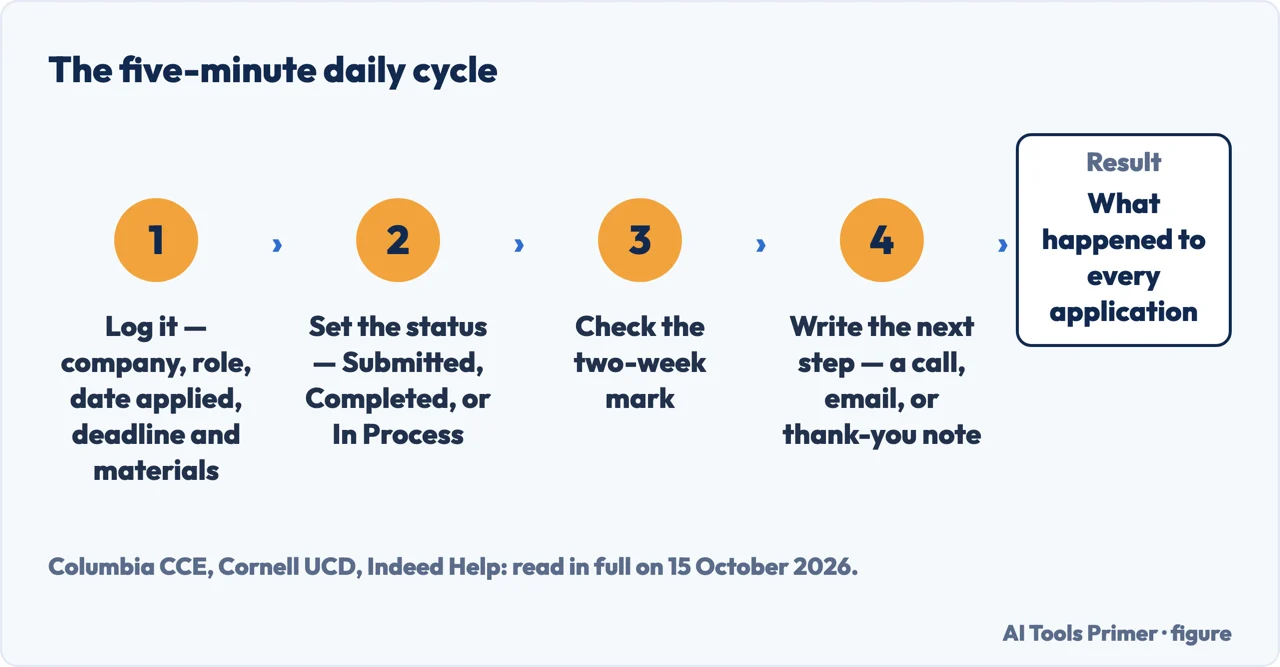
Nothing above requires a daily habit on its own — Washington ESD’s log is weekly, and Indeed’s own threshold is measured in weeks, not days. But the four steps below, built from Columbia’s and Cornell’s own tracker columns and Indeed’s own stalled-application threshold, take about five minutes once a tracker already exists:
- Log it. Company, role and the date applied, the moment the application goes out — Yale’s and Columbia’s first columns — plus the deadline, the materials required and, per Cornell’s own column, the time zone, so nothing closes unnoticed.
- Set the status. Columbia’s own example values — Submitted, Completed, In Process — or Interviewing, Offer, Rejected.
- Check the two-week mark. Indeed’s own threshold for a stalled application, applied to every open row, not just the ones Indeed itself can see.
- Write the next step. A follow-up call, an email, or a thank-you note — Columbia’s and Cornell’s own closing column.
The result, at the end of each day, is one line per application that says where things stand and what happens next — which is the whole point of keeping one.
Where to start
Five ways in.
- “What should actually go in a tracker?”
- The columns three offices recommend — what to track the columns career services recommend
- “Doesn’t LinkedIn or Indeed already show this?”
- What each platform shows, and its limit — where platforms already show your application status
- “How long should I expect this to take?”
- The government’s own numbers — how long a job search actually takes
- “Am I the only one hearing nothing back?”
- Four surveys, labelled by who paid for them — how often candidates get ghosted
- “Is there a free tracker, or do I need to buy one?”
- The free versions, university by university — is there a free job application tracker available
Building the application
The CV, the letter and the systems that read them come before anything to track.
After you've applied
What a tracker cannot do once a status actually changes to Interviewing.
Questions people also ask
What is the best way to track job applications?
There is no single winning tool, but there is a reliable method: log company, role, deadline and date applied the day you apply (Yale OCS), add one line for status and one for the next step (Columbia CCE), and keep a correspondence column for every follow-up call or email (Cornell Career Development).
How can I track my job application?
Start with the platform itself: LinkedIn lists submitted applications under Job tracker, then Applied; Indeed marks one Response seems unlikely after at least two weeks of silence; USAJOBS shows the hiring agency’s own status under Track this application. None of the three follows applications sent elsewhere, so a personal log still closes the gap.
Is there a free job application tracker available?
Yes: Yale, Columbia and Cornell publish their career services’ exact spreadsheet columns for free, and MIT, the University of Washington and Berkeley each offer a free downloadable tracker of their own. Copying those columns into a spreadsheet you already own costs nothing beyond the five minutes a day it takes to fill it in.
What is the best job tracking app?
No single app earns that title. Teal, Kickresume, Simplify, Enhancv and Sprout each sell a tracker and each only manages what you log inside their own product. A spreadsheet built from a university’s own columns tracks the same five things: company, role, dates, status, next step, without a subscription.
Not covered here. It does not rank a tracking app, and it reports Zippia’s own two figures — 21 to 80 applications per offer in one section, 100 to 200 in another — as an unreconciled discrepancy rather than choosing between them. It also stops at the general principle Penn Career Services states for faculty applications, and at the weekly log Washington State’s Employment Security Department requires of unemployment-benefit claimants, without turning either into a full guide. What goes into the CV and the covering letter themselves is covered in what to put on a CV and how to write a cover letter, and preparing for the interview picks up once a status actually changes to Interviewing. What holds instead is simple: every number above is attributed to the source that states it by name, and every figure a vendor sells is named as a vendor’s, not reported as a neutral fact.
Sources
- Yale Office of Career Strategy — Job Search Tracking Tool: the seven recommended tracker columns for job applications — ocs.yale.edu, read 15 October 2026.
- Columbia University Center for Career Education — Tools to Organize Your Job or Internship Search: the Search Tracker’s full set of columns — www.careereducation.columbia.edu, read 15 October 2026.
- Cornell University Career Development — Job and Internship Application Spreadsheet: the correspondence, application-details and company-details columns — career.cornell.edu, read 15 October 2026.
- MIT Career Advising & Professional Development — Sample Job/Internship Search Tracker: confirmation that a free Excel tracker exists. Applies to: existence only, columns not verifiable from this page — capd.mit.edu, read 15 October 2026.
- University of Washington Career & Internship Center — Job & Internship Search Action Plan: confirmation that a free spreadsheet exists. Applies to: existence only, columns not verifiable from this page — careers.uw.edu, read 15 October 2026.
- University of Pennsylvania Career Services — Tracking Faculty Job Applications: record-keeping advice. Applies to: faculty (academic) job applications, not generic ones — careerservices.upenn.edu, read 15 October 2026.
- UC Berkeley Career Engagement — Jobs: confirmation that a free Application Tracking Sheet exists. Applies to: existence only, columns not verifiable from this page — career.berkeley.edu, read 15 October 2026.
- Washington State Employment Security Department — Job-search log for week ending (Month/Day/Year): the weekly log’s required fields. Applies to: unemployment-benefit claimants in Washington State only, not a general tracking recommendation — esd.wa.gov, read 15 October 2026.
- LinkedIn Corporation — View jobs you’ve applied for on LinkedIn: the Job tracker path and the Applied tab. Applies to: applications submitted on LinkedIn itself — www.linkedin.com, read 15 October 2026.
- Indeed Help Center for Job Seekers — My Jobs: Managing Applied Jobs: the full set of application statuses and the two-week threshold — support.indeed.com, read 15 October 2026.
- USAJOBS Help Center (U.S. Office of Personnel Management) — How to see your application and job status: job statuses, the Track this application path, and the 36-month removal — usajobshelp.opm.gov, read 15 October 2026.
- U.S. Bureau of Labor Statistics — A-12. Unemployed persons by duration of unemployment, seasonally adjusted: the mean, median and distribution figures for September 2026 — www.bls.gov, read 15 October 2026.
- Fortune (Emma Burleigh) — Job seekers aren’t imagining things: the number of candidates ghosted by employers just reached a three-year high thanks to AI: the Criteria-sourced ghosting figure — fortune.com, read 15 October 2026.
- Allwork.Space News Team — 66% Of Job Seekers Have Been Ghosted By Employers During The Hiring Process: the NumberBarn-sourced ghosting figures — allwork.space, read 15 October 2026.
- Greenhouse — First impressions of employers often falling flat: Results from the 2024 Greenhouse Candidate Experience Report, declared here as a vendor of applicant-tracking software: its own ghosting figure — www.greenhouse.com, read 15 October 2026.
- ResumeBuilder.com — 7 in 10 Class of 2026 Grads Were Ghosted After Job Interviews, declared here as a vendor of resume-building tools. Applies to: recent US college graduates surveyed in 2026 only — www.resumebuilder.com, read 15 October 2026.
- Zippia — How Many Applications Does It Take To Get A Job? [2026], declared here as a vendor of resume and AI job-assistant tools: the page’s own unreconciled figures — www.zippia.com, read 15 October 2026.
Written by Alberto Gulotta
Founder and editor of AI Tools Primer, writing from Palermo, Italy. Thirty-five years of taking computers apart, starting with a Commodore 64 — the long version is on the about page.
Something wrong on this page? Write to aitoolsprimer@gmail.com and it gets fixed.
Written on 15 October 2026.
Independence and limits
No affiliate links and no paid placements anywhere on this site. Nobody pays to appear here, and no company has seen this page before you did.
This is general information, not professional advice. Where a page touches money, health, safety or the law, it names its source and the date it was read — and your situation may still differ. See the privacy page and the cookie policy.