
Software · guide
Samsung TV won't turn on: the order Samsung and iFixit give
By Alberto Gulotta · Updated · 11 min read
A Samsung TV that won't turn on is sorted by its red standby light. Lit, off or blinking, Samsung gives a different order of steps and says to unplug the set for 30 seconds. iFixit says 60, then 30 more with the TV's power button held. The remote, the input and a connected HDMI device come before opening the set.
| Question | Answer | Where it comes from |
|---|---|---|
| What do I look at first? | The red standby light at the lower edge of the TV: lit, off or blinking | Samsung Support, iFixit |
| How long do I unplug it? | Samsung says 30 seconds; iFixit says 60, then 30 more with the TV’s power button held | Samsung Support, iFixit |
| Does the surge protector matter? | Samsung says not to use one for a blinking light; iFixit says to take surge protectors and power strips out of the path | Samsung Support, iFixit |
| Could it just be the remote? | Yes: try the TV’s own power button before anything else | Samsung Support |
| When is it service? | Samsung says when the light is lit and neither button works, or when it is blinking after a reset | Samsung Support |
The red standby light decides the order
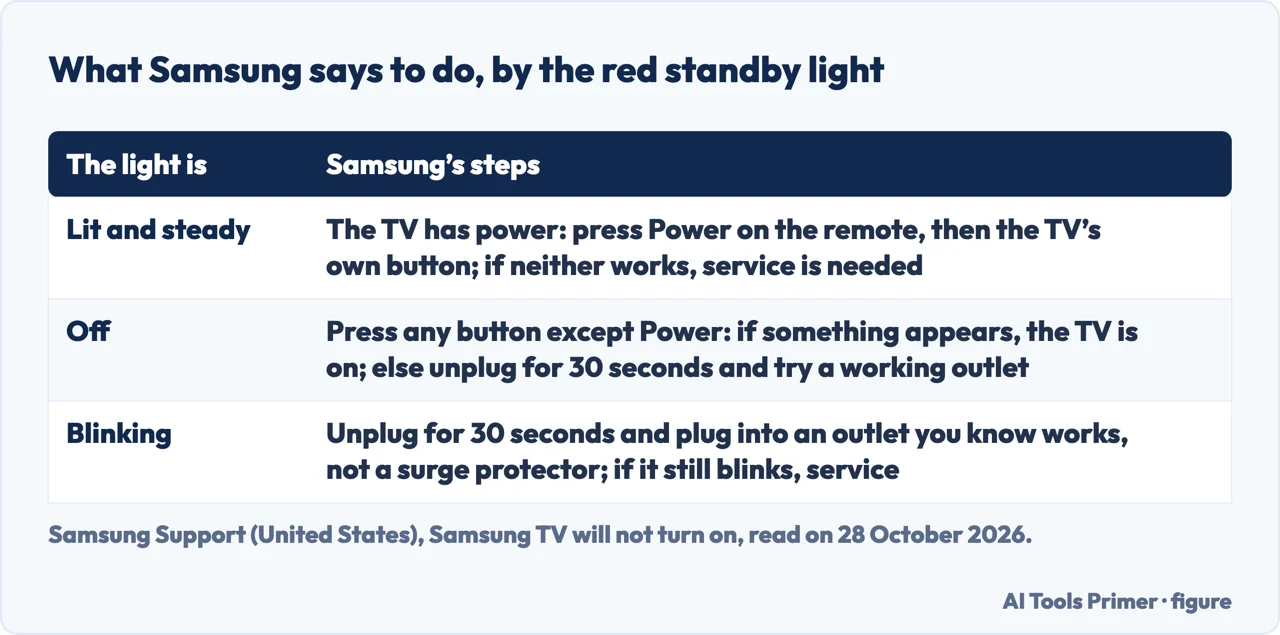
Samsung’s support page says a TV that won’t turn on can be hard to troubleshoot, and that in some cases it is actually on and showing a black screen. The key, it says, is the red standby light, a small red light at the edge of the TV that you aim the remote at. In normal use the light is on when the TV is off, in standby, and off when the TV is on. iFixit gives the same reading: you usually see it on when the TV is off, you do not see it when the TV is on or unplugged, and if you see it blinking it indicates a problem, generally with power supply. iFixit adds that its page applies to newer Samsung TVs, not to rear projection units or projectors.
If the light is lit, Samsung says the TV has power and the only thing left to rule out is the remote: press Power on the remote, then press the Power button on the TV itself, whose place varies by model. If the TV turns on with its own button, the remote is the problem; if it will not turn on with either while the light is lit, Samsung says service is needed. If the light is off, the TV either has no power or is on with a black screen: press any button on the TV except Power, and if anything appears the TV is on. Otherwise unplug it for 30 seconds and plug it into an outlet you know works, testing the outlet with a lamp, and ask for service if the light never comes on. If it is blinking, Samsung says to unplug it for 30 seconds, plug it into a working outlet and not a surge protector, and to treat a light that keeps blinking as a sign that something is wrong with the TV.
The reset, as three pages give it
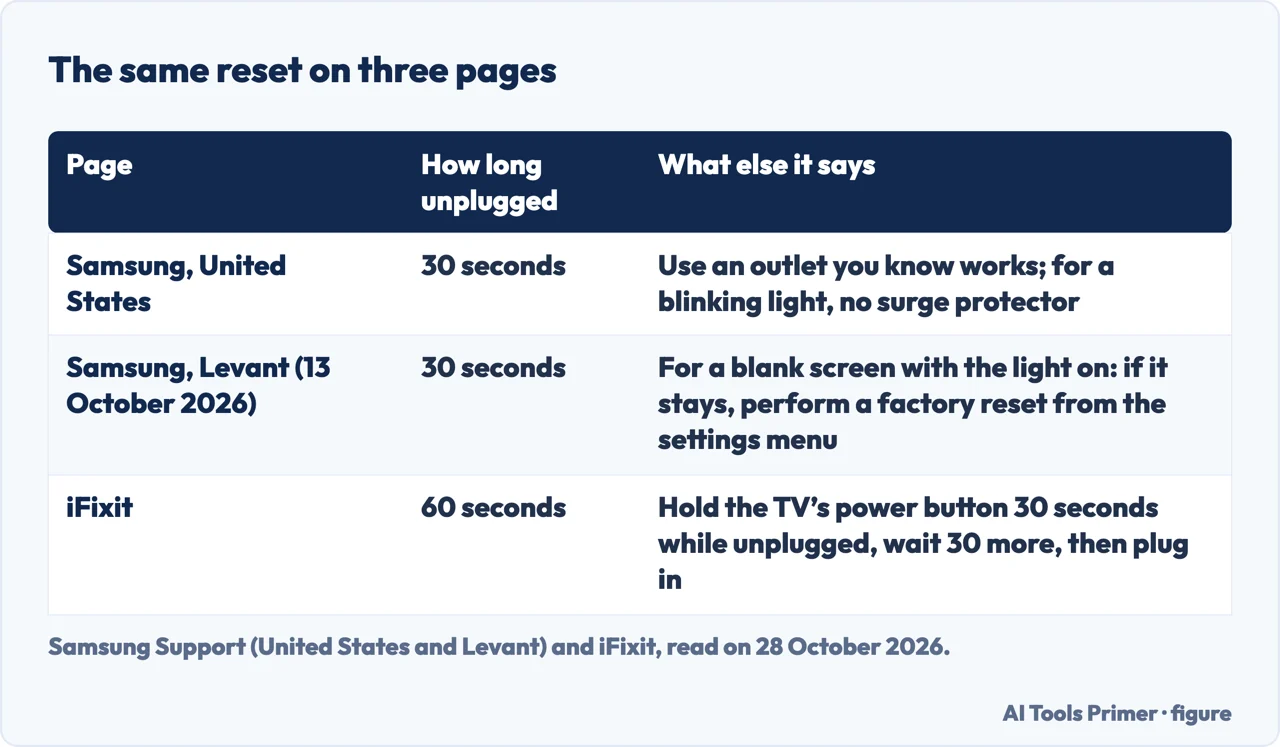
All three pages ask for a power cycle and none of them says it the same way. Samsung’s page for the United States says to unplug the TV for 30 seconds, and the Levant page, updated on 13 October 2026, says the same, adding that if the screen stays blank with the light on you should perform a factory reset from the settings menu. iFixit says to unplug the TV for 60 seconds, then press and hold the TV’s own power button for a full 30 seconds while it is still unplugged, wait another 30 seconds and plug it back in. It describes this as a way to clear a software glitch or hung process. The pages do not say which length is the better one.
On the power path, Samsung’s page says to use an outlet you know works and, for a blinking light, not a surge protector, because it says they may eventually wear out and stop providing the voltage the TV needs. iFixit says to remove surge protectors, extension cords and power strips from the path between the outlet and the TV and plug directly into an outlet you have confirmed works, and that if the light then becomes solid the problem was one of the cables in the middle, which you can add back one by one. For a TV with an external One Connect box, the Levant page says to disconnect and reconnect the cable between the TV and the box.
The remote, the input and the HDMI device
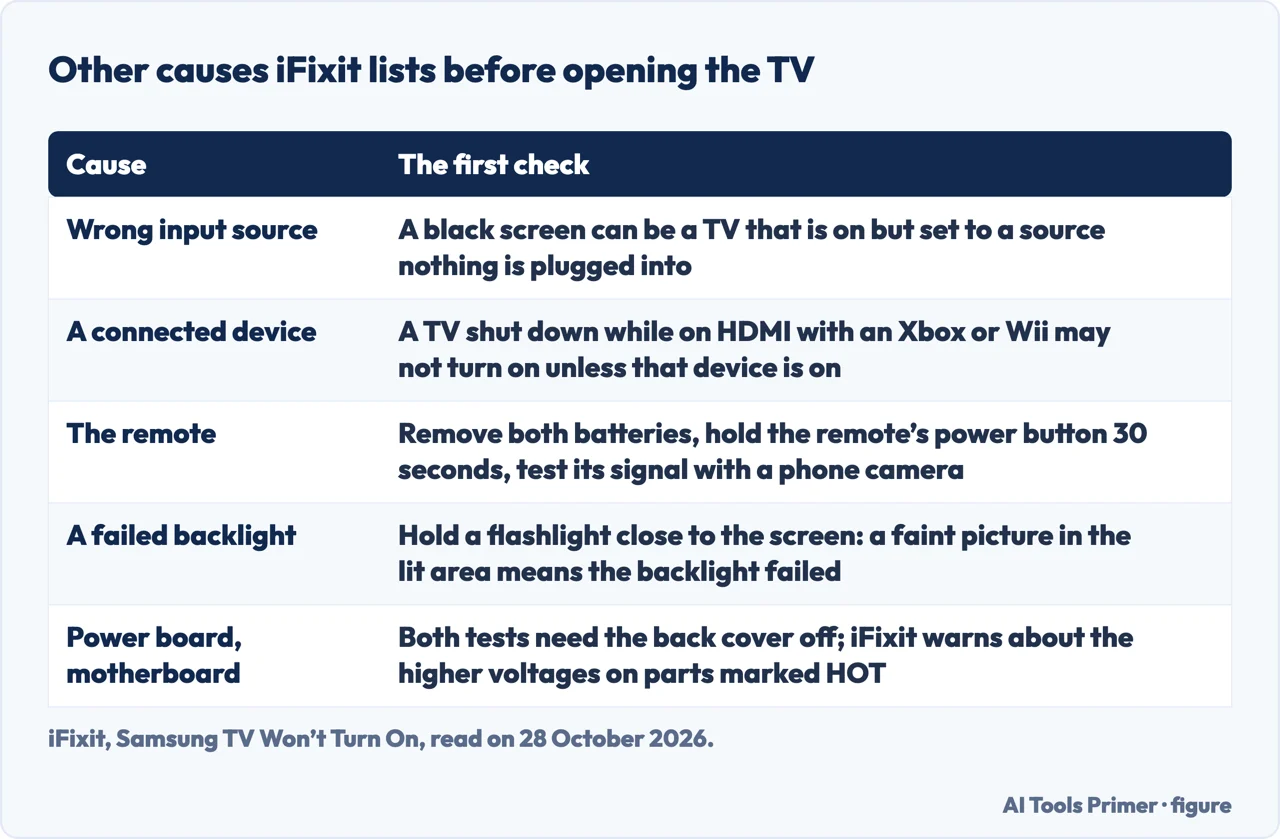
Before anything inside the set, iFixit lists causes that are not faults. A remote can be reset by removing both batteries completely, holding its power button for 30 seconds and putting the batteries back, preferably new ones; you can check whether it sends a signal by pointing it at a phone camera and looking for a light. The TV can show a black screen and be working if its input source does not match what is connected: with HDMI 1 selected and the device in HDMI 2, you see nothing, and the power light may even blink. iFixit also says a TV shut down while connected to an Xbox, a Wii or another device through HDMI will frequently not turn on unless that device is on; turn the device on, then disconnect it once the TV is on and shut the TV down to test it. Our page on a TV remote that does not work covers the remote in more detail.
If the TV is receiving power and the light is off, iFixit says the TV may be on with a failed backlight, and gives a test: hold a flashlight close to the screen and look for a faint picture in the lit area; if it is there, the backlight has failed, which it says can be a bad power supply board feeding the backlight or the backlight components. It notes that a shorted backlight can also show as a blinking standby light.
What iFixit says about opening the TV
For a blinking light that survives all of that, iFixit says the likely cause is the power supply board, though a significant number of other causes are possible. Its tests need the back cover off, and it says opening the TV can be physically difficult and that you may not feel comfortable doing it. It tells you to unplug the power cord and every other cable first, and to be cautious around the power supply board, especially the part marked HOT, where the voltages are appreciably higher. On the board it says to look for burn marks or swollen components, especially capacitors, and for a blown fuse, which it says usually signals other failures. To test the motherboard it unplugs the cable between the power supply board and the motherboard and, with the TV plugged in and turned on, watches the backlight through the small holes in the rear plate; if it is lit, that is a general indication of a failed motherboard. We did not open a TV, and Samsung’s pages send you to service at this point.
What we did not use
We tested nothing on a TV. We did not read the iFixit answers, the Reddit thread, the JustAnswer page, the Samsung community thread, the Quora question or the third Samsung page, for Latin America, that Google listed. The Samsung page for the Levant closes with a note about which models the guide applies to that names Galaxy phones and foldables, not TVs, so we used it only where it agrees with Samsung’s page for the United States or with iFixit. The Google AI box, which opens with two questions about the standby light and the TV’s own button, was read only in part. Samsung also lists guides we did not open, among them one for a TV with no picture or a black screen and one on a TV that turns on and off by itself.
Where to start
Four ways in.
- “What does the red light mean?”
- The red standby light decides the order — light
- “How long do I unplug it?”
- The reset, as three pages give it — reset
- “Is it just the remote?”
- The remote, the input and the HDMI device — remote
- “Should I open it?”
- What iFixit says about opening the TV — inside
Remotes that stop answering
The remote is often the first suspect.
Other things on the screen
Volume, mirroring and a computer that stays dark.
Questions people also ask
How to fix the black screen of death on a Samsung TV?
Samsung says a red standby light that is off means the TV either has no power or is on with a black screen: press any button on the TV except Power, and if anything appears it is on. iFixit adds checking the input source and, with a flashlight near the screen, whether the backlight has failed.
How to force a Samsung TV on?
The pages we read do not describe a forced start. The nearest steps are Samsung’s 30-second unplug and iFixit’s, which holds the TV’s own power button for 30 seconds while it is unplugged.
How to reset an unresponsive Samsung TV?
Samsung says to unplug the TV for 30 seconds; iFixit says 60 seconds, then hold the TV’s power button for 30 seconds and wait another 30. The Levant page adds a factory reset from the settings menu if a blank screen stays.
Why is my TV all of a sudden not turning on?
The Levant page lists a loose or disconnected power cord, dead remote batteries, a TV in standby with a faulty display and a One Connect box that is not properly connected. iFixit lists eight causes, from a software glitch to a failed motherboard.
Not covered here. We tested nothing on a TV. The statements come from two Samsung Support pages (United States and Levant) and an iFixit troubleshooting guide, all read on 28 October 2026.
The search volume and difficulty behind this page come from a Semrush reading of 29 August 2026, older than the 60 days the site normally allows.
Sources
- Samsung Support — Samsung TV will not turn on (United States) — www.samsung.com, read 28 October 2026.
- Samsung Support — How to Fix a Samsung TV That Won’t Turn On (Levant) — www.samsung.com, read 28 October 2026.
- iFixit — Samsung TV Won’t Turn On (troubleshooting guide) — www.ifixit.com, read 28 October 2026.
Written by Alberto Gulotta
Founder and editor of AI Tools Primer, writing from Palermo, Italy. Thirty-five years of taking computers apart, starting with a Commodore 64 — the long version is on the about page.
Something wrong on this page? Write to aitoolsprimer@gmail.com and it gets fixed.
Written on 28 October 2026.
Independence and limits
No affiliate links and no paid placements anywhere on this site. Nobody pays to appear here, and no company has seen this page before you did.
This is general information, not professional advice. Where a page touches money, health, safety or the law, it names its source and the date it was read — and your situation may still differ. See the privacy page and the cookie policy.