
Software · guide
How do you turn safe mode off on an Android, and why it came on
By Alberto Gulotta · Updated · 9 min read
How do you turn safe mode off on an Android has three answers in Google's and Samsung's pages: restart the phone, tap the Safe mode notification, or force a restart. This page sets out each, with Google's Pixel steps, why the phone went into safe mode, and what it changes while it is on.
| Question | Answer | Where it comes from |
|---|---|---|
| How to turn off safe mode on Android? | Restart the phone; Samsung says it will then reboot normally | Samsung US |
| Without restarting by hand? | Swipe down, tap the Safe mode is on notification, then tap Turn off | Samsung US |
| On a Pixel 6 or later? | Hold Power and Volume Up for a few seconds, then tap Restart | Pixel Phone Help |
| On a Pixel 5a or earlier? | Hold Power for about 30 seconds, or until the phone restarts | Pixel Phone Help |
| If a normal restart fails? | Hold Volume Down and Power for at least 5 seconds to force a restart | Samsung New Zealand |
Restart first
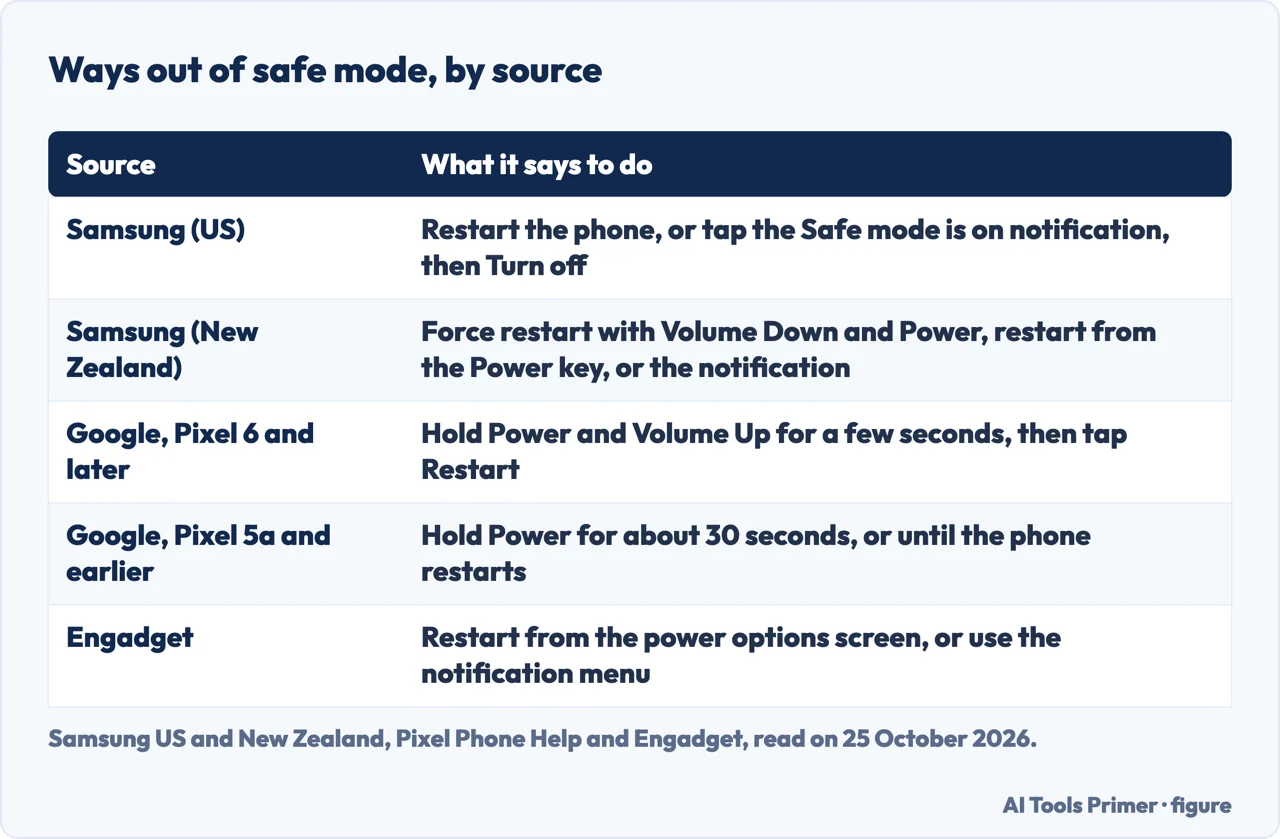
Samsung’s US page says that to exit Safe mode you simply restart your phone or tablet and it will reboot normally. Engadget, in an article dated 1 September 2026, gives the same first step: open the power options screen, by holding the power button or, depending on the model, the power and volume down buttons, tap Restart, and Safe Mode will be turned off when the phone restarts. Samsung New Zealand’s page puts it as the Power key held on the right-hand side and then Restart on the screen, and adds that all of the ways out require the phone to restart completely.
The notification
Samsung US says you can also swipe down from the top of the screen, tap the notification that says Safe mode is on, and tap Turn off. Samsung New Zealand describes the same notification and says Turn Off on the prompt restarts the device. Engadget says to swipe down from the left side of the screen, find the notification saying the phone is in Safe Mode, and tap it for an option to turn Safe Mode off. Google’s Pixel article does not mention this notification.
Google’s Pixel steps
Pixel Phone Help’s article on finding problem apps gives the exit as its step 3. On a Pixel 5a and earlier, press and hold the Power button for about 30 seconds, or until your phone restarts. On a Pixel 6 and later, including the Fold, press and hold the Power button and the Volume up button for a few seconds, then tap Restart. The same article describes entering safe mode on the Pixel 6 and later by holding Power and Volume Up and then touching and holding the Power off or Restart button, and says you will see Safe mode at the bottom of the screen.
If it comes back, or will not leave
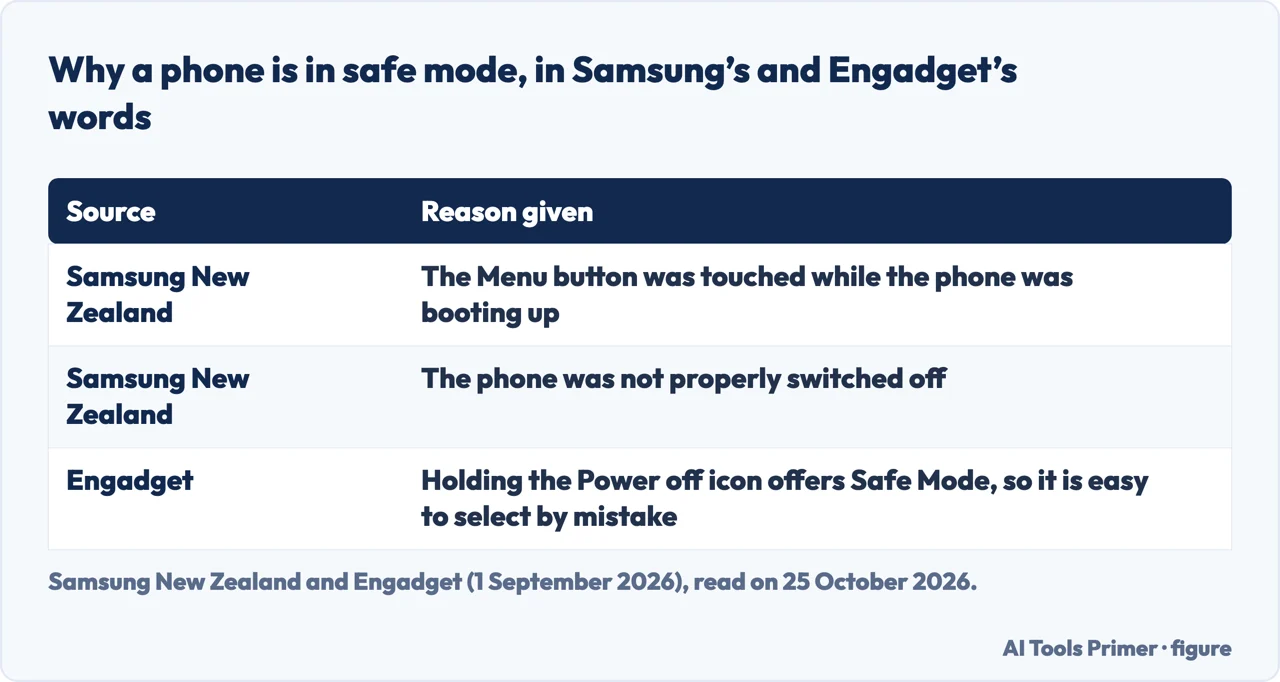
Samsung New Zealand lists three ways out and says all of them require the device to restart completely: hold Volume Down and Power for at least 5 seconds to force a restart, hold the Power button and select Restart, or use the notification. The same page says a phone may be in Safe Mode because the Menu button was touched while the phone was booting up, because the phone was not properly switched off, or because of unnecessary installed apps, which is Samsung’s own wording. Engadget makes a different point: holding the Power off icon in the power menu offers a Safe Mode option, so it is quick to select by mistake. Samsung New Zealand’s page carries an update date of 29 November 2021, so button names may have changed since. We did not test whether a force restart clears Safe mode on any phone.
What safe mode changed
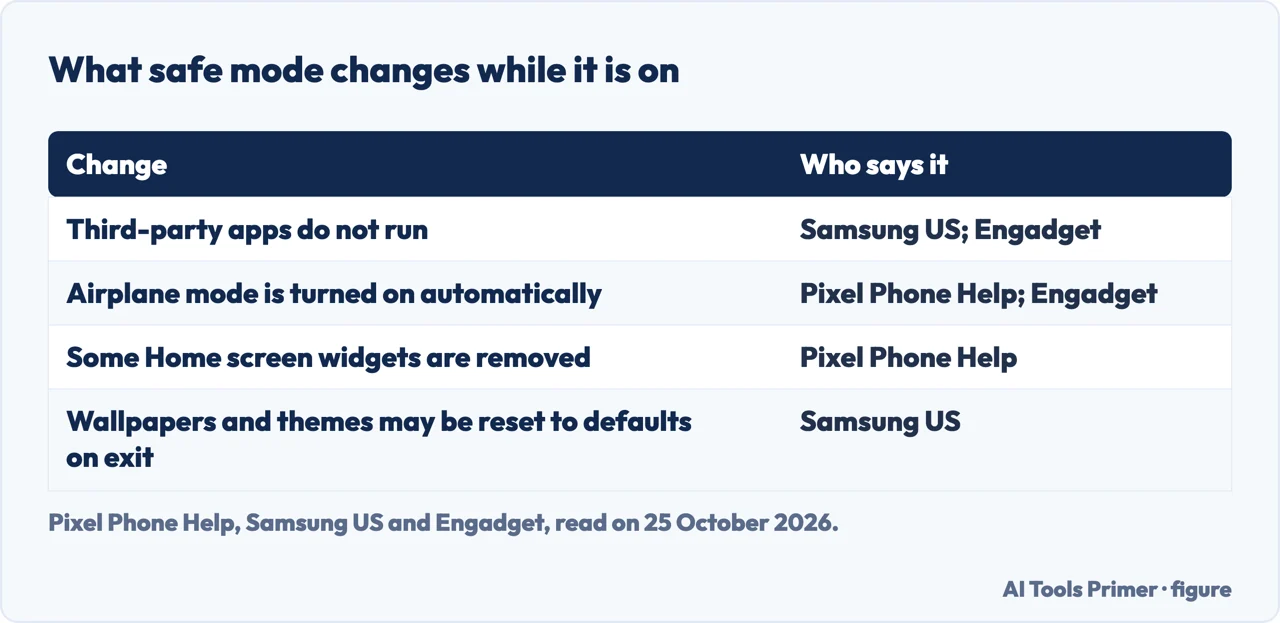
Samsung US says that in Safe mode your device does not run any third-party apps, and that when you exit, some customization options, such as wallpapers and themes, may be reset to defaults. Pixel Phone Help adds two changes: safe mode removes some Home screen widgets, so it suggests a screenshot of them first, and airplane mode is turned on automatically when you enter it, which Google recommends turning off to use GPS, Wi-Fi and calls. Engadget says airplane mode may still be active after you leave safe mode, and that you can tell by the airplane icon in the status bar; swipe down from the right to Quick Settings and tap the plane icon. After exiting, Google says you can put back any removed widgets.
What it is for
Safe mode exists to find a bad app. Pixel Phone Help says some apps you download can cause problems, and that if the problem goes away in safe mode an app is likely the cause. It then says to remove recently downloaded apps one by one, restarting normally after each, and to reinstall the others afterwards. Samsung US likewise says to start by removing apps that were updated or installed when the problem started. For removing an app see uninstalling apps on Android; for a phone that is slow or whose apps keep stopping, fixing a slow Android phone and apps crashing on Android; and for the Windows meaning of the same words, safe mode on Windows.
What we did not use
We did not read the guides from a security software site, a parental-control help centre, a paid question service, a VPN provider and Quora that also cover the topic. We ran none of these steps on a phone, and button combinations differ by model: Pixel Phone Help separates the Pixel 5a and earlier from the Pixel 6 and later, and Samsung’s pages are for Galaxy phones.
Where to start
Four ways in.
- “Just turn it off.”
- Restart first — restart
- “I have a Pixel.”
- Google’s Pixel steps — pixel
- “It keeps coming back.”
- If it comes back — force
- “What did it change?”
- What safe mode changed — after
Finding the bad app
What to do once safe mode shows it.
Other things that go wrong on Android
Restarts, cache and malware.
Questions people also ask
Why did my phone suddenly go into safe mode?
Samsung New Zealand gives reasons including that the Menu button was touched while the phone was booting and that it was not properly switched off. Engadget says holding the Power off icon offers Safe Mode, so it is easy to pick by mistake.
Why won’t safe mode turn off?
A plain restart is the first step in every source. Samsung New Zealand adds a force restart with Volume Down and Power for at least 5 seconds; we did not test it.
How do I get my phone back to normal after safe mode?
Restart; check airplane mode, which Google says is turned on automatically; and put back any Home screen widgets Google says were removed. Samsung says wallpapers and themes may be reset.
Where can I find safe mode on my phone?
Samsung: swipe down with two fingers, tap the Power icon, touch and hold Power off, tap Safe mode. Pixel 6 and later: hold Power and Volume Up, then touch and hold Power off or Restart.
Not covered here. We ran no step on a phone. The statements come from Pixel Phone Help, Samsung’s US, Canada (updated 3 June 2026) and New Zealand (updated 29 November 2021) pages and an Engadget article dated 1 September 2026, all read on 25 October 2026.
The remaining guides were not used. The search volume and difficulty behind this page were read in Semrush on 29 August 2026.
Sources
- Pixel Phone Help — Find problem apps by rebooting to safe mode — support.google.com, read 25 October 2026.
- Samsung US — Power on your Galaxy phone or tablet in Safe mode — www.samsung.com, read 25 October 2026.
- Samsung Canada — Booting your Samsung Galaxy into Safe mode (updated 3 June 2026) — www.samsung.com, read 25 October 2026.
- Samsung New Zealand — My smartphone is on Safe mode (updated 29 November 2021) — www.samsung.com, read 25 October 2026.
- Engadget — Android stuck in Safe Mode? Here’s how to turn it off (1 September 2026) — www.engadget.com, read 25 October 2026.
Written by Alberto Gulotta
Founder and editor of AI Tools Primer, writing from Palermo, Italy. Thirty-five years of taking computers apart, starting with a Commodore 64 — the long version is on the about page.
Something wrong on this page? Write to aitoolsprimer@gmail.com and it gets fixed.
Written on 25 October 2026.
Independence and limits
No affiliate links and no paid placements anywhere on this site. Nobody pays to appear here, and no company has seen this page before you did.
This is general information, not professional advice. Where a page touches money, health, safety or the law, it names its source and the date it was read — and your situation may still differ. See the privacy page and the cookie policy.