
Software · guide
How to uninstall Microsoft Edge, and where Microsoft allows it
By Alberto Gulotta · Updated · 10 min read
How to uninstall Microsoft Edge: in the European Economic Area, Settings, Apps, Installed apps has an uninstall option for it, says Microsoft’s Windows blog. Microsoft Learn says users outside that area won’t be able to. The ways round it are not in Microsoft’s documentation; what is documented is switching the default browser and turning off startup running.
This page puts Microsoft’s pages in order, says what the guides propose without reproducing it, and gives the settings that stop Edge without removing it.
| Question | Answer | Where it comes from |
|---|---|---|
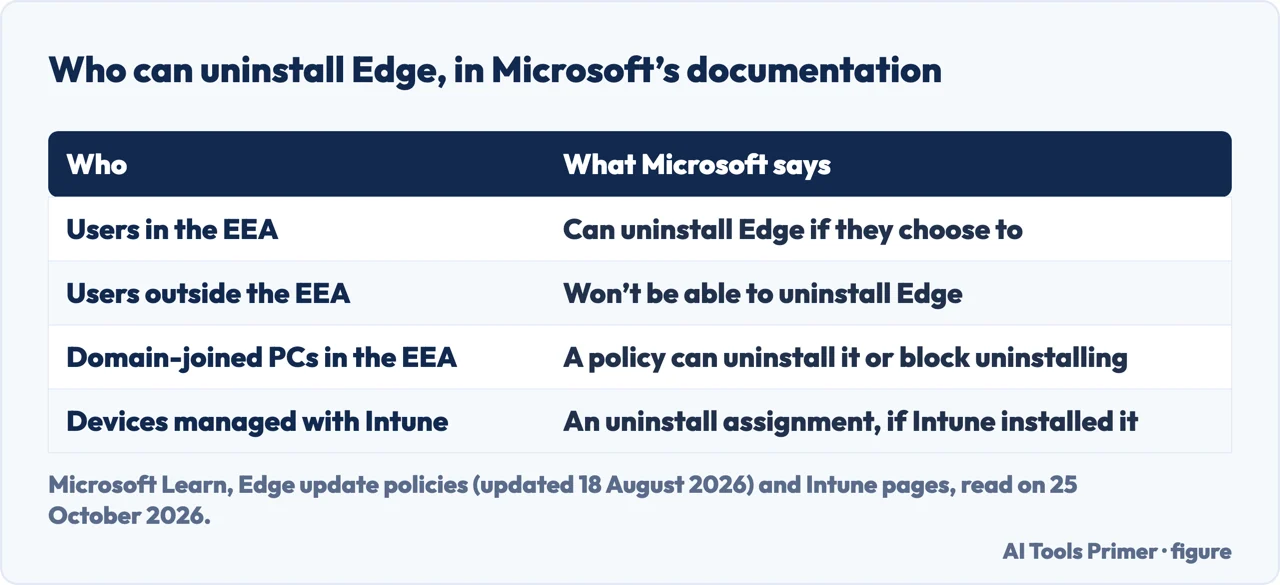
| Can I uninstall Edge in the EEA? | Yes: Settings, Apps, Installed apps now has an uninstall option for Microsoft Edge in the EEA | Windows blog, 16 November 2023 |
| Can I uninstall it elsewhere? | Microsoft’s documentation says users outside the EEA won’t be able to uninstall Edge | Microsoft Learn |
| Can an administrator? | In the EEA, on domain-joined PCs, with a policy; with Intune if Intune installed it | Microsoft Learn |
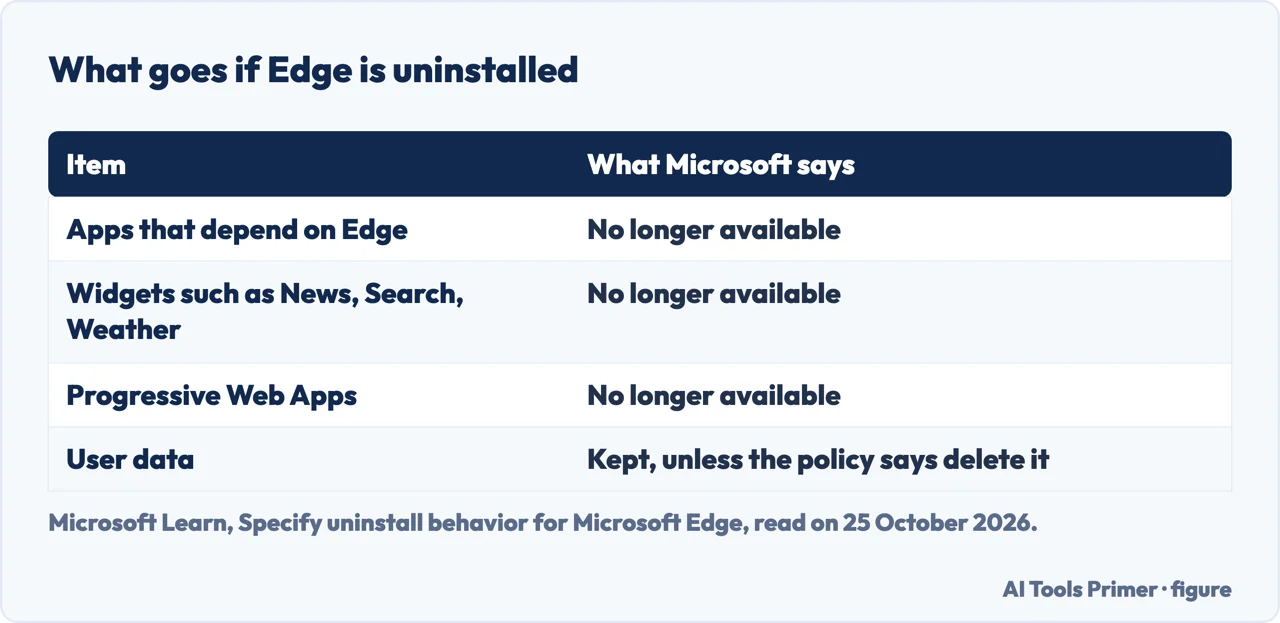
| What goes with it? | Apps, widgets and web apps that depend on Edge are no longer available | Microsoft Learn |
| Can I stop it instead? | Switch the default browser, and turn off startup boost and background mode | Microsoft Support; Microsoft Learn |
Where Microsoft allows it
Microsoft’s Windows blog of 16 November 2023, about changes for the European Economic Area, says “All apps in Windows can be uninstalled” and lists “Microsoft Edge, in the EEA” among the apps that gain an uninstall option. Settings, Apps, Installed apps continue to show all the apps installed on the PC, with the added ability to uninstall. That post was written for Windows Insiders, and we did not check how it behaves on every release version today.
Microsoft Learn, in its documentation of the policy called Specify uninstall behavior for Microsoft Edge (updated 18 August 2026), says the same for the other side: “Only users in EEA countries are able to uninstall Microsoft Edge if they choose to do so. Users outside of this area won’t be able to uninstall Microsoft Edge.” The sentence belongs to the description of the setting that decides, on a domain-joined device, whether a user’s Windows region setting allows it. So the Windows region setting, not a menu you have not found, is what decides.
For an administrator
The same Learn page describes what an administrator can do on domain-joined devices in the EEA, on Windows 10 22H2 and Windows 11 23H2 and later. If the policy is set to Enabled, Edge is uninstalled on all devices in the EEA where it is deployed and user data is kept; if set to Enabled and delete user data, the data goes too; if set to Disabled, all users in the EEA are prevented from uninstalling it. Learn adds that if Edge is uninstalled, applications, widgets such as News, Search and Weather, and any Progressive Web Apps that depend on Edge will no longer be available. To reinstall, an administrator can set the Install policy to Force Installs (Machine-Wide), which overrides the Uninstall policy.
Microsoft Intune has its own route. Its page on adding Edge says the app is uninstalled from devices in the selected groups if Intune previously installed it onto the device through an Available or Required assignment, and that a group assigned both to install and to uninstall keeps the app.
Outside the EEA: what the guides propose
The search results are full of ways round this, and none of them is in Microsoft’s documentation that we read. The page Microsoft itself titles “Uninstall Microsoft Edge” contains, in the text we read, no uninstall steps: it is a promotional page about Edge’s features. wikiHow says that “While you cannot remove Microsoft Edge the same way you can with other programs in Windows 10 & 11 (unless you live in the EU)” there are workarounds: a registry change that re-enables the Uninstall button, a free uninstaller called Wise Program Uninstaller, and an open-source PowerShell script. Of the uninstaller it says that Edge “might be reinstalled automatically later through a Windows Update”, and of the script that some Windows 11 users report that it has been patched.
A Medium article describes uninstalling from an elevated Command Prompt with a forcing option, written for Edge version 98 in February 2022; a Microsoft Tech Community reply recommends the paid Revo Uninstaller Pro; and IObit’s blog calls its own IObit Uninstaller a foolproof method. The first is not documented by Microsoft, the second is a user’s advice and the third is a seller recommending its product. We have not reproduced the commands, and we did not run any of them: Microsoft’s page on the policy says that what depends on Edge stops working, and it does not describe these methods.
What Microsoft documents instead
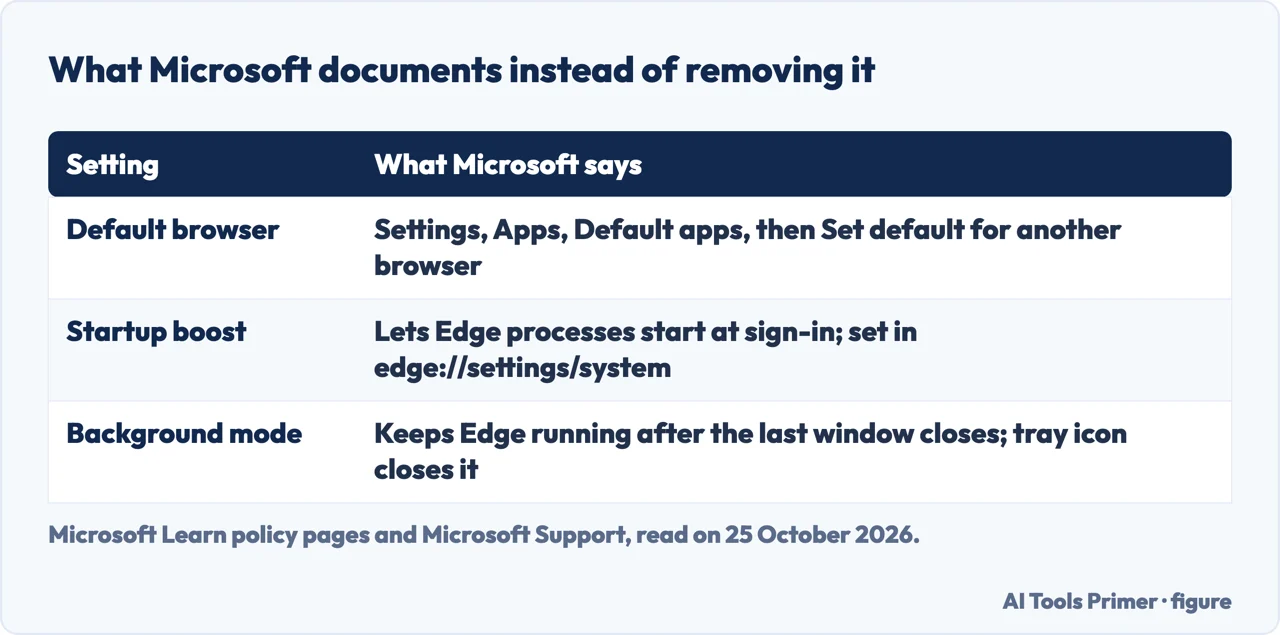
Three things are documented. The default browser is a setting in Windows: Settings, Apps, Default apps, then Set default for the browser you want; the page on the default browser covers it for three systems. Startup boost, in Microsoft’s policy documentation, “allows Microsoft Edge processes to start at OS sign-in and restart in background after the last browser window is closed”; and background mode, called Continue running background apps after Microsoft Edge closes, keeps Edge processes running after the last window closes, with an icon in the system tray that can always close it. For both, if the setting is not managed by an organization, the user can configure it in edge://settings/system. Turning them off stops Edge from running when you are not using it; it does not remove it.
If Edge slows the computer, the page on the memory error and the page on extensions cover the other causes. If you removed Edge and want it back, the page on a missing Edge has Microsoft’s repair and reinstall steps.
Where to start
Five ways in.
- “Is there an Uninstall button?”
- In the EEA — allowed
- “I manage PCs.”
- The policy and Intune — admin
- “The guides say use a command.”
- What is not documented — elsewhere
- “I just want it to stop.”
- Default, startup, background — instead
Edge, before and after
Getting Edge back, switching away from it, and what it keeps.
Removing and slimming down
Uninstalling other programs, browser extensions and memory use.
Questions people also ask
Can I uninstall Microsoft Edge?
In the European Economic Area, yes: the Windows blog of 16 November 2023 lists Edge among the apps with an uninstall option in Settings, Apps, Installed apps. Microsoft Learn says users outside that area won’t be able to uninstall it.
Why is the uninstall button greyed out for Edge?
Microsoft’s documentation says that, outside the EEA, users won’t be able to uninstall Edge. A user in a Tech Community thread reports the option greyed out in Settings and the Control Panel.
What happens if Edge is uninstalled?
Microsoft Learn says applications, widgets such as News, Search and Weather, and Progressive Web Apps that depend on Edge will no longer be available.
How do I stop Edge without uninstalling it?
Set another browser as the default in Settings, Apps, Default apps, and turn off startup boost and background mode in edge://settings/system, which Microsoft’s policy pages document.
Not covered here. We did not uninstall Edge for this page. The statements come from Microsoft Learn (the Edge update policy documentation, updated 18 August 2026; the pages on the startup boost and background mode policies; Add Microsoft Edge for Windows to Microsoft Intune), the Windows Insider Blog of 16 November 2023 and Microsoft Support (Change default apps in Windows), read on 25 October 2026. Menu names follow those pages and may differ by version and region.
wikiHow, Medium, IObit, the Microsoft Tech Community and Microsoft Q&A pages are used only to say what they propose; the commands and registry changes they describe are not reproduced and were not run. Reddit and one result whose title was cut off were not read. Edge on a Mac is not covered.
The search volume and difficulty behind this page were read in Semrush on 29 August 2026.
Sources
- Microsoft Learn — Microsoft Edge Update Policy Documentation (updated 18 August 2026) — learn.microsoft.com, read 25 October 2026.
- Microsoft Learn — Add Microsoft Edge for Windows to Microsoft Intune — learn.microsoft.com, read 25 October 2026.
- Microsoft Learn — Microsoft Edge Browser Policy Documentation: StartupBoostEnabled — learn.microsoft.com, read 25 October 2026.
- Microsoft Learn — Microsoft Edge Browser Policy Documentation: BackgroundModeEnabled — learn.microsoft.com, read 25 October 2026.
- Windows Insider Blog — Previewing changes in Windows to comply with the Digital Markets Act in the European Economic Area (16 November 2023) — blogs.windows.com, read 25 October 2026.
- Microsoft — Uninstall Microsoft Edge — explore.microsoft.com, read 25 October 2026.
- wikiHow — How to Remove Microsoft Edge from Windows: 2 Easy Tricks — www.wikihow.com, read 25 October 2026.
- IObit — How to Uninstall Microsoft Edge on Windows 10/11 — www.iobit.com, read 25 October 2026.
Written by Alberto Gulotta
Founder and editor of AI Tools Primer, writing from Palermo, Italy. Thirty-five years of taking computers apart, starting with a Commodore 64 — the long version is on the about page.
Something wrong on this page? Write to aitoolsprimer@gmail.com and it gets fixed.
Written on 25 October 2026.
Independence and limits
No affiliate links and no paid placements anywhere on this site. Nobody pays to appear here, and no company has seen this page before you did.
This is general information, not professional advice. Where a page touches money, health, safety or the law, it names its source and the date it was read — and your situation may still differ. See the privacy page and the cookie policy.