
Study · guide
Anki cards from notes: what the manual and SuperMemo say
By Alberto Gulotta · Updated · 20 min read
Anki cards are made from notes: in Anki you add a note, and Anki creates the cards. This page follows the Anki manual and SuperMemo from a sentence in your notes to a cloze, one memory per card and a text file to import, and ends with what two student surveys do and do not show.
| Question | Answer | Where it comes from |
|---|---|---|
| What is an Anki card? | A question and answer pair; you add a note, and Anki creates the cards from it | Anki manual |
| What is a cloze? | A sentence with part of it hidden, written as {{c1::1913}} inside the text of the note | Anki manual |
| How long should a card be? | Short: the manual says to keep it simple, and SuperMemo asks for one small piece of information per item | Anki manual, SuperMemo |
| Can I import a file of notes? | Yes, a plain text file in UTF-8 with fields split by commas, semicolons or tabs | Anki manual |
| Do the studies show it works? | The two surveys report how students use Anki and what they think; the score difference in the Jordan survey was not statistically significant | Cureus, BMC Medical Education |
What counts as an Anki card
The Anki manual defines a card as a question and answer pair, like a paper flashcard with the question on the front and the answer on the back, with one difference: when you show the answer, the question stays visible by default. Its example is a question, the chemical symbol for oxygen, and the answer O. After you decide on the answer you click Show Answer, confirm it, and tell Anki how well you remembered it. Anki then chooses when to show the card again; in the manual’s example it is in 3 days, which the manual calls a 3 day interval.
What you type, though, is not a card. The manual says that in Anki you add notes rather than cards, and Anki creates the cards for you. You click Add in the main window, fill in the fields, and press the Add button or Ctrl+Enter (Command+Enter on a Mac); a card is created as well and placed in the deck you chose. A note is a collection of related information, each piece held in a field. The manual’s example has three fields, French, English and Page, holding bonjour, hello and 12. A card type is the blueprint that says which fields go on the front and the back, written with field names in double curly brackets such as {{French}}, and when you add a note Anki creates one card for each card type. That is how one note can give both a recognition card and a production card, and the manual adds that a typing mistake or a factual error can be fixed once and every related card updates.
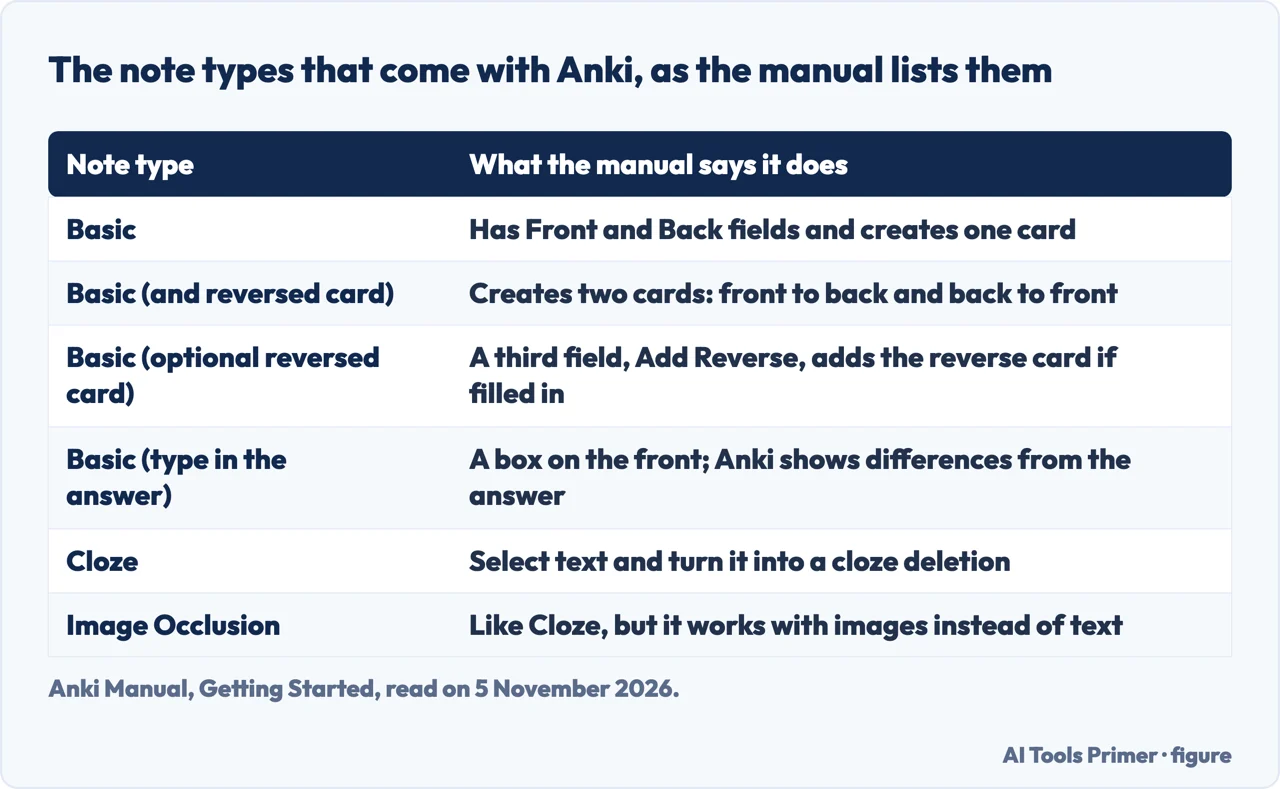
Anki comes with standard note types, listed in the table below. The manual says they are there to make Anki easier for new users, and that in the long run it recommends creating your own note types for the content you are learning. The American Medical Association’s page “What is Anki?”, dated 4 August 2023 and reviewed by a medical student the day before, describes the program from the user’s side: you create flashcards with questions or prompts, indicate your level of retention, and Anki schedules the reviews. It says Anki runs on Windows, macOS and Linux and on iOS and Android, and names review modes that include a standard question and answer format and a cloze deletion format. The AMA page we read does not describe how a card is written, which is why the manual and SuperMemo carry the rest of this page.
From a sentence in your notes to a cloze
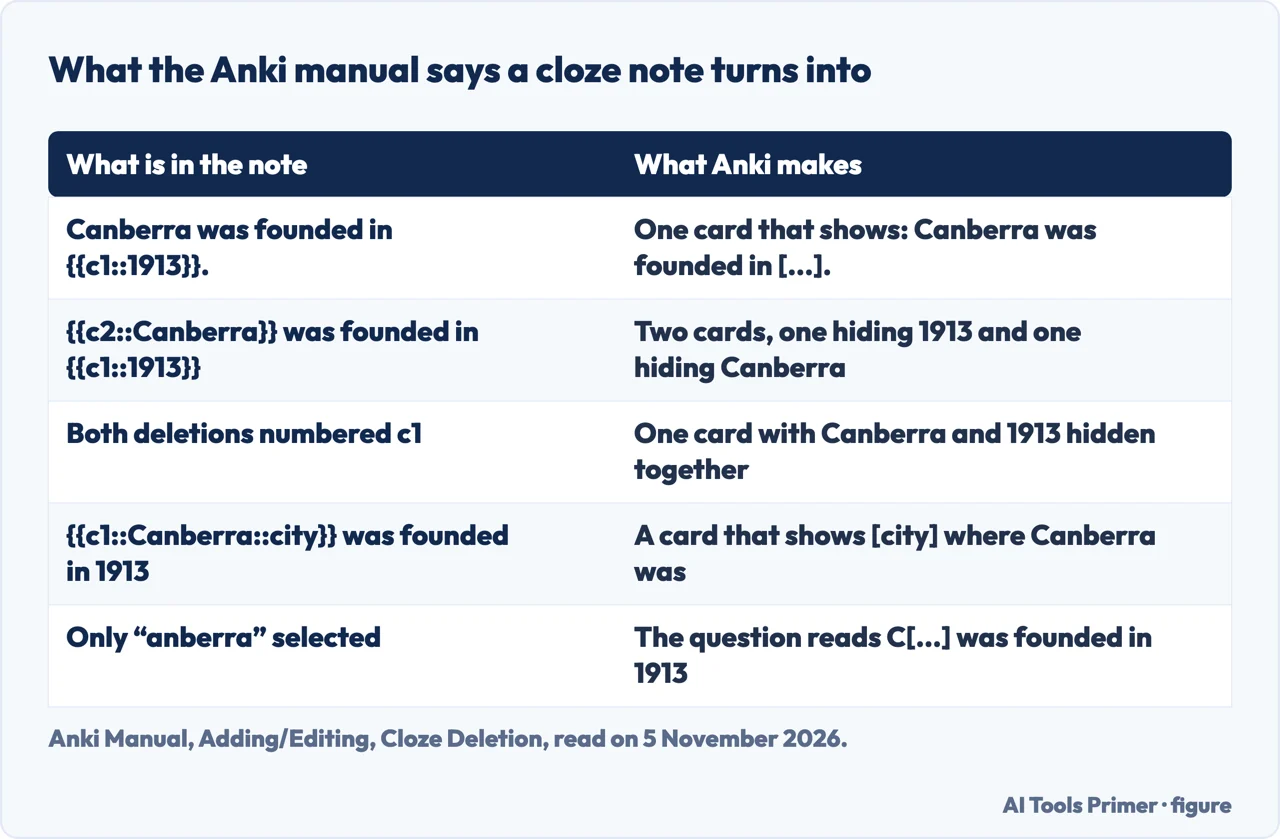
A cloze deletion hides part of a sentence, so a sentence that is already in your notes can become a card without being rewritten as a question. The manual’s example is the sentence “Canberra was founded in 1913.” With a cloze on 1913 it becomes “Canberra was founded in [...].” To make one, you choose the Cloze note type, type text into the Text field, drag the mouse over the words to hide and click the [...] button. Anki writes the text as Canberra was founded in {{c1::1913}}. The c1 means one cloze deletion has been made. Select Canberra and click again, and the text becomes {{c2::Canberra}} was founded in {{c1::1913}}; when you add that note, Anki creates two cards, one asking for 1913 and one asking for Canberra. If you change c2 to c1, only one card is created, with both words hidden. Holding Alt (Option on a Mac) while creating a cloze makes Anki use the same number instead of increasing it.
The manual gives a few refinements. A cloze does not have to fall on a word boundary: selecting “anberra” instead of “Canberra” gives the question C[...] was founded in 1913, which works as a hint. You can also write a hint that is not part of the text: Canberra::city makes the card show [city]. Nested clozes are supported from version 2.1.56, while partial overlaps are not; the manual says the limit is 3 levels in Anki 24.11 and around 8 in other versions, and that it is best to use only a few. The Cloze note type has a second field called Extra, shown on the answer side, and the manual says you cannot add extra card templates to it; to customise it, you clone the existing Cloze type rather than another type. A single deletion can also appear on several cards, written as {{c1,2,3,4::feminine}}.
Three sources give reasons to start with cloze, and they are not the same reason. SuperMemo’s article by Dr Piotr Wozniak (February 1999, updated) puts it as rule 5 and says a beginner who finds it hard to follow the minimum information principle should use cloze deletion; it calls it a quick and effective way to convert textbook knowledge into material for spaced repetition. SuperMemo’s glossary adds that cloze items can effectively remedy knowledge complexity. The Med School Insiders page, by Kevin Jubbal, MD and dated 23 June 2026, gives a different reason: clozes are quick to create because you can copy text from your slides or notes and make cloze cards in seconds. That site sells tutoring and courses, so we use its page only for advice it attributes to its author. A third reason is a preference: the Cureus survey reports that 78% of its Anki users preferred fill-in-the-blank cards. A preference is not a result, and the pages we read do not measure whether cloze cards are remembered better.
One memory per card
The manual and SuperMemo both ask for short cards, in different strengths. The manual’s Effective Learning passage points to the SuperMemo article and says to keep it simple: the shorter the cards, the easier they are to review, and including lots of information “just in case” makes reviews painful. It adds that you should not memorize without understanding. SuperMemo puts the same order first in its list: rule 1 says not to learn what you do not understand, and rule 2 says to build the overall picture before memorizing individual facts. For a page of notes that is the step before any card. SuperMemo goes further. Its rule 4, the minimum information principle, says material should be formulated as simply as it can be, and it gives a scheduling reason: if an item has two sub-items, you have to repeat it often enough to keep the harder one in mind, while split items can each be repeated at their own pace. It says inexperienced students often make items that could be split into ten or more simpler ones.
SuperMemo’s example is the Dead Sea. The long version is one question, “What are the characteristics of the Dead Sea?”, with an answer that packs in the location, the shoreline as the lowest point on Earth, an average level of 396 m below sea level, a length of 74 km, the saltiness, why swimmers float and what lives there. The short version is nine questions, such as where the Dead Sea is located (on the border between Israel and Jordan) and how long it is (70 km). Its cloze example works the same way: a paragraph about the company Kaleida becomes a series of cards from one source sentence, each hiding one item, such as the amount of funding, the backers or the year.
SuperMemo states what the split costs. The two versions are not equivalent: you may remember why the Dead Sea keeps swimmers afloat but forget that it has the property at all, rounding 396 to 400 and 74 to 70 loses a little information, and you lose the ability to recite the whole description. It says these can be remedied by adding more questions or making the existing ones more precise. It also states an assumption underneath the rule: that you will keep learning with spaced repetition. Our page on spaced practice covers the schedules.
Med School Insiders agrees on the principle and puts it strongly. Its page calls complex cards “arguably the biggest offense” of students new to Anki, says the author made cards like that for much of medical school, and answers the worry that more cards means more work by saying the total number of repetitions decreases over time. It also asks for brevity, because when you review hundreds of cards a day a superfluous word adds up. On lists, SuperMemo’s rule 9 says to avoid sets and, if they are unavoidable, to convert them into enumerations (ordered lists), and rule 10 says to avoid enumerations too and, if you cannot, to deal with them using cloze deletions, overlapping ones if possible; Med School Insiders’ tip 8 also converts a set into an ordered list and suggests overlapping cloze deletions when an enumeration is hard to repeat. The pages we read do not say how many cards one page of notes should give.
Getting notes in without retyping
The manual has a chapter on importing text files. Any plain text file with fields separated by commas, semicolons or tabs can be imported, provided it is plain text and in UTF-8; a file saved as xls, rtf or doc has to be saved as plain text first. To save a spreadsheet for Anki, the manual suggests the free LibreOffice program, with File, Save As and CSV as the file type, because it handles UTF-8 and multi-line content, which it says Excel does not do as well. The pages we read do not walk from a page of notes to a finished import in one place; this section joins what the import chapter says.
Anki determines the number of fields from the first line that is not a comment. If later records have fewer fields, the missing ones are treated as blank; if they have extra fields, the extra content is not imported. Anki guesses the separator, and if it guesses wrong you can change it in the import options window and preview the result, or add a header line such as a separator setting to force one. Fields can be mapped to any field in the note, including the tags field, and you choose the deck. Lines that begin with # are treated as comments. The manual’s sample file has three fields on each line, beginning “apple;banana;grape”.
Line breaks need care. The manual gives two ways to put a new line or the separator inside a field: put the field in quotation marks, or use an HTML line break and turn on “Allow HTML in fields” in the import dialog. For cloze deletions that span several lines it says the quotation method will not work correctly and that HTML line breaks are needed. A double quote inside a field has to be written as two double quotes, and the manual says a spreadsheet program such as LibreOffice takes care of that when it creates the CSV file.
The first field also decides duplicates. By default, if the first field of a row matches an existing note of the same type, the existing note’s other fields are updated from the file; a drop-down lets you ignore duplicates or import them as new notes. The match scope can be the note type alone or the note type and deck. Notes updated in place stay in their current decks, and the manual says the scheduling information on their cards is preserved. The same first field is what Anki checks when you add a note by hand: it warns about a repeated Front within the same note type, and the Browser has a Find Duplicates function for the other fields.
Images, reversed cards and keeping the deck tidy
Image Occlusion is built into Anki from version 23.10. The manual calls it a special case of cloze deletion for images: you choose Image Occlusion as the note type on the Add screen, load an image, and draw rectangles, ellipses or polygons over the parts to hide. There are two modes, Hide All, Guess One and Hide One, Guess One, and the default fields are Header, Back Extra and Comments. Anki adds a card for each shape or group of shapes, and two or more single shapes that are grouped make only one card. SuperMemo’s rule 8 calls graphic deletion as good as cloze deletion and says one illustration can be used for 10 to 20 items. The Med School Insiders page recommends an image on most cards and names an add-on, Image Occlusion Enhanced, for blocking parts of a diagram; the manual describes the built-in type.
For cards in both directions, the manual offers two note types. “Basic (and reversed card)” makes two cards. “Basic (optional reversed card)” makes a forward card from the first two fields and a reverse card only if you type something into Add Reverse, such as a “y”; the contents of that field are not displayed on a card.
Deleting works differently from what you might expect. The manual says it is not possible to delete individual cards by hand, because the card would be recreated the next time the note is edited; instead you empty the relevant field and use Tools, then Empty Cards. Anki does not create a card whose front is empty, and it does not delete cards at once when an edit leaves them blank, to avoid accidental data loss. The same applies to occlusion shapes: deleting a shape does not delete its card until you run Empty Cards.
On decks, the manual and Med School Insiders point the same way for different reasons. The manual says decks are for broad categories and advises against small ones such as a single book chapter: you would see cards in a recognizable order, which makes them easier to answer from context and leads to weaker memories. It suggests tags instead, because a note can have several tags while a card belongs to one deck, and filtered decks for a temporary focus before a test. Med School Insiders advises a single deck for a large exam with tags by organ system, because fragmentation complicates review and a whole deck keeps you in the habit of reviewing everything. The page also suggests listing the source on a card, editing or deleting cards without fear, and setting a daily limit for new cards while leaving reviews uncapped. It says a range suitable for everyone cannot be given, and describes its own case: up to 100 new cards a day at one point, later 25 to 50. The manual sections we read give no number.
What the studies say, and what they leave out
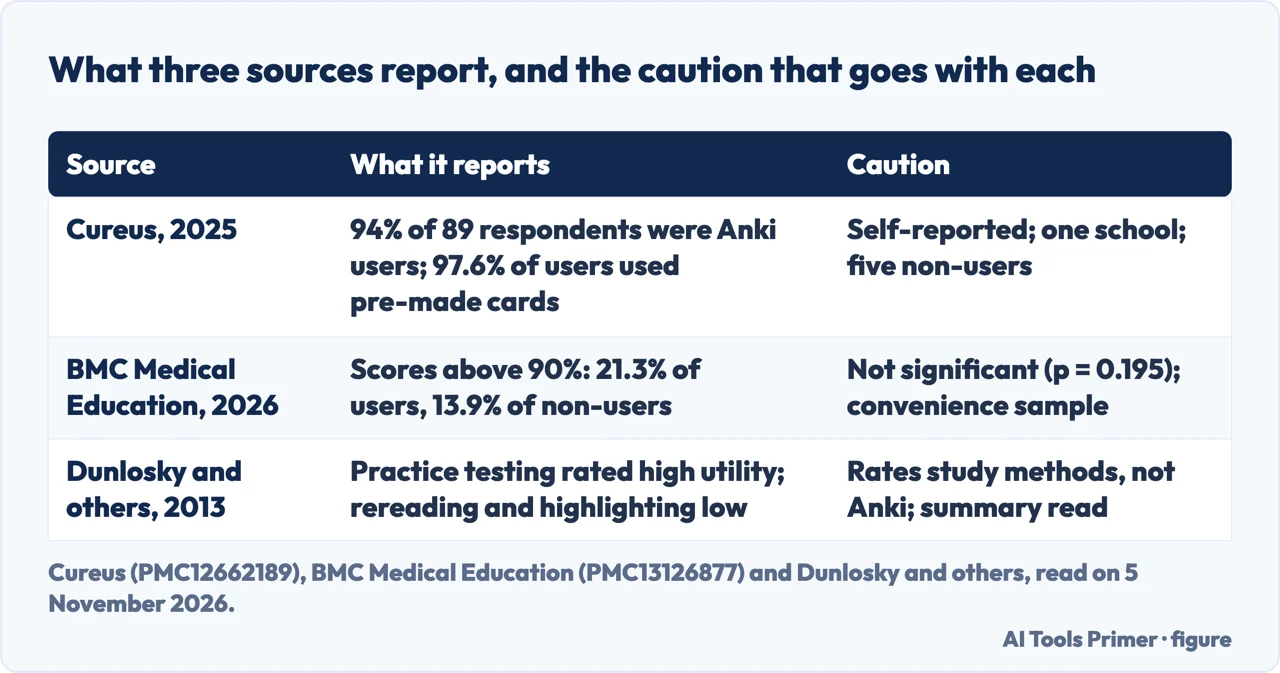
Dunlosky and others (2013, Psychological Science in the Public Interest) reviewed ten learning techniques. Practice testing and distributed practice received high utility assessments; summarization, highlighting, the keyword mnemonic, imagery use for text learning and rereading received low ones. The link to cards is ours: a card asks you to recall an answer, which is a practice test, and the review schedule is the spacing. The summary we read does not mention Anki.
The Cureus paper (2025, College of Medicine at the University of Central Florida, first-year students) is a survey. Of 120 possible students, 89 took part, 74.1%, and 94% of them were Anki users. Among users, 97.6% relied on pre-made cards and 78% preferred fill-in-the-blank cards. It also reports a correlation of r = 0.621 between the share of the study strategy given to Anki and the perception of success. The authors list limits: self-reported data, one school, a student body asked at the end of the first year, and five non-users, too few to compare. It measures perception and use, not results.
The BMC Medical Education paper (2026) surveyed 318 medical students in Jordan, recruited by convenience sampling between October 2024 and May 2025. Only 80 of them, 25.2%, used Anki. Among users, 21.3% reported scores above 90%, against 13.9% of non-users, but the paper says the difference was not statistically significant (OR 3.93, 95% CI 0.50 to 31.24, p = 0.195). Of the users, 82.5% perceived that Anki improved their academic performance, and the conclusion calls for structured guidance because of the cognitive and time demands.
The sources also differ on one point that matters for notes. The manual says creating your own deck is the most effective way to learn a complex subject, because entering the information forces you to decide what the key points are, and that shared decks should supplement external material, not replace it, for complex subjects. The Cureus survey reports that most of its users used pre-made cards. The BMC survey did compare them: it found no significant association between the type of deck used (premade, self-made, both or neither) and perceived academic performance (p = 0.405). That is a comparison of what students reported, not a test of which cards teach better, and the manual states its view without data. We also did not read about other flashcard tools or about any Anki feature that uses AI, so this page does not cover them.
Where to start
Four ways in.
- “What is a card, and what is a note?”
- What counts as an Anki card — card
- “How do I turn a sentence into a cloze?”
- From a sentence in your notes to a cloze — cloze
- “How long should a card be?”
- One memory per card — one
- “Can I import my notes?”
- Getting notes in without retyping — import
Practice and review
Where the cards get used once they exist.
Notes before the cards
Where the notes come from, and the tools that hold them.
Questions people also ask
What is an Anki card?
The manual defines a card as a question and answer pair. After you show the answer you tell Anki how well you remembered it, and Anki chooses when to show the card again. You do not usually type a card: you add a note, a set of fields, and Anki creates the cards from the note’s card types.
How to create Anki cards?
The manual says to click Add, choose the note type and deck, fill in the fields and press Add or Ctrl+Enter (Command+Enter on a Mac). For a cloze, choose the Cloze type, select the words and click the [...] button. For many notes at once, import a plain text file in UTF-8 with fields separated by commas, semicolons or tabs.
How to use Anki cards effectively?
The manual says to keep cards short and not to memorize what you do not understand. SuperMemo says to build the overall picture first, then split a complex item into simple ones. Med School Insiders suggests one deck with tags and a daily limit on new cards. The surveys report use and opinions, not a test of these tips.
What are the different types of Anki cards?
The manual lists six standard note types: Basic, Basic (and reversed card), Basic (optional reversed card), Basic (type in the answer), Cloze and Image Occlusion. A note type has one or more card types, and Anki creates one card for each; a Cloze note makes one card for each cloze number.
Not covered here. We did not try any of this in Anki. The statements come from the Anki manual, SuperMemo, the AMA, Med School Insiders (a site that sells courses, cited only for advice it attributes), Cureus, BMC Medical Education and the summary of Dunlosky and others, all read on 5 November 2026.
The search volume and difficulty behind this page come from an Ubersuggest reading of 5 November 2026 (United States), which gives search volume and its own SEO difficulty score, not Semrush’s; a Semrush check is still to be made.
Sources
- Anki Manual — Getting Started — docs.ankiweb.net, read 5 November 2026.
- Anki Manual — Adding/Editing — docs.ankiweb.net, read 5 November 2026.
- Anki Manual — Card Generation — docs.ankiweb.net, read 5 November 2026.
- Anki Manual — Importing text files — docs.ankiweb.net, read 5 November 2026.
- American Medical Association — What is Anki? — www.ama-assn.org, read 5 November 2026.
- SuperMemo — Twenty rules of formulating knowledge — www.supermemo.com, read 5 November 2026.
- SuperMemo Help — Glossary: Cloze deletion — help.supermemo.org, read 5 November 2026.
- Med School Insiders — Anki Flashcard 13 Best Practices — medschoolinsiders.com, read 5 November 2026.
- Cureus — Utilization Patterns and Perceptions of a Spaced Repetition Flashcard Program, Anki, Among First-Year Medical Students — www.ncbi.nlm.nih.gov, read 5 November 2026.
- BMC Medical Education — Using Anki and its association with recall and study practices among medical students in Jordanian universities — pmc.ncbi.nlm.nih.gov, read 5 November 2026.
- Dunlosky and others — Improving Students’ Learning With Effective Learning Techniques (2013) — journals.sagepub.com, read 5 November 2026.
Written by Alberto Gulotta
Founder and editor of AI Tools Primer, writing from Palermo, Italy. Thirty-five years of taking computers apart, starting with a Commodore 64 — the long version is on the about page.
Something wrong on this page? Write to aitoolsprimer@gmail.com and it gets fixed.
Written on 6 November 2026.
Independence and limits
No affiliate links and no paid placements anywhere on this site. Nobody pays to appear here, and no company has seen this page before you did.
This is general information, not professional advice. Where a page touches money, health, safety or the law, it names its source and the date it was read — and your situation may still differ. See the privacy page and the cookie policy.