
Study · guide
Math answer checker: substitute first, then compare a tool
By Alberto Gulotta · Updated · 16 min read
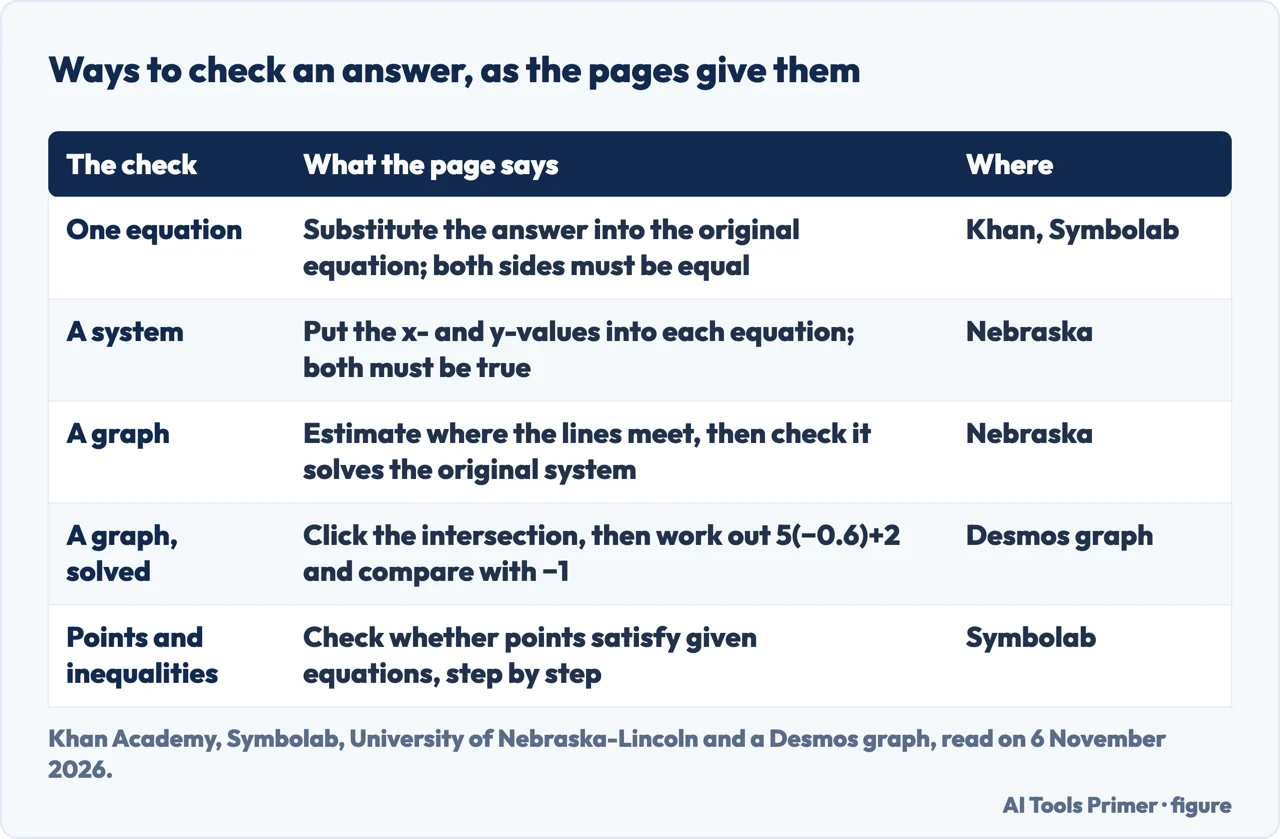
To use a math answer checker well, check your own answer first: put it back into the original equation, simplify both sides and see whether they are equal. A Khan Academy lesson reply and Symbolab's algebra page both describe this. For a system, put the values into each equation. Symbolab's Verify button needs a subscription.
| Question | Answer | Where it comes from |
|---|---|---|
| How do I check one equation? | Substitute the answer into the original equation, simplify both sides and see that they are equal | Khan Academy, Symbolab |
| And a system? | Put the x- and y-values into each equation; both statements must be true | University of Nebraska-Lincoln |
| Can a graph do the checking? | A graph estimates the answer; substituting is what checks it | Nebraska, a Desmos graph |
| Does a tool check my answer? | Symbolab has a Verify button, and its page asks for a subscription | Symbolab |
| Can the tool be wrong? | Symbolab warns that AI content may be inaccurate; a 2025 study measured errors in a chat assistant | Symbolab, PNAS |
What checking your own answer means
A check compares an answer with the problem it came from, so the method is to put the answer back and see whether it holds. The Mathway, QuickMath and Photomath pages we read describe solvers: you give the problem and the tool works it.
This page is about something narrower: you already have an answer and want to know whether it is right. That is a different job from asking a tool to work the problem, and the pages we read treat it differently. A Khan Academy lesson page, Symbolab’s algebra text and the University of Nebraska-Lincoln’s precalculus book describe checking by substitution. The tool pages describe how the tool solves, shows steps or graphs. For the solver side, with Photomath, OneNote and Wolfram|Alpha, and for a classroom trial of what a chat tool did to exam results, see our page on math solver apps.
Method: the statements about pages come from the pages as they read on 6 November 2026. The worked examples below are ours, and each one says so.
Check by putting the answer back
The Khan Academy page is a lesson on testing solutions to equations. Its description says the lesson tests different values for x to see which one satisfies the equation, and that substituting x with the given options finds the value that makes both sides equal. The comments under the video add more. One reply lays out three steps: put the value in for the variable, do the arithmetic on each side in the order of operations, then compare the two sides; if they are the same number, the value is a solution. Another reply answers a question about checking your own answer: yes, substitute it back into the original equation, simplify both sides and make sure they are equal. Its example is 5x − 3 = 4x + 3 with x = 6, where 5(6) − 3 is 27 and 4(6) + 3 is 27, so it checks. These are replies in the comment section, not the lesson’s own text.
Symbolab’s algebra calculator page says the same in a section headed Verifying the Solution: substitute your solution into the original equation and see that it satisfies it. Its example is 5x + 2 = x + 10, which the page solves in four steps to x = 2. It then asks whether 5(2) + 2 equals 2 + 10, finds 12 on both sides, and says x = 2 is correct. The page that sells a Verify button therefore also describes the check you can do by hand.
Our worked example, not a page’s: take 9x + 7 = −7. Subtract 7 from both sides to get 9x = −14, so x = −14/9. To check, put it into the original equation. 9 times −14/9 is −14, and −14 + 7 is −7, which is the right side. Had we slipped and written x = −2, then 9 times −2 plus 7 is −11, not −7, and the check would show it. One more point is ours: the check looks only at the final value, so it tells you whether the answer is right and not which step went wrong. Under the Khan video, a reply to a student who cancelled the 3s in 5x − 3 = 4x + 3 says that −3 and +3 are on different sides of the equals sign, so they do not cancel; the reply adds 3 to both sides first.
For a system of two equations, the Nebraska book says to substitute the x- and y-values into each equation and simplify to see whether you get a true statement in both. Its Example 3.1 tests the pair (1, 0) in x − y = 1 and −2x + 3y = 5. The first gives 1 = 1, the second gives −2 = 5, so (1, 0) satisfies the first equation but not the second and is not a solution. Our worked example: for x + y = 5 and x − y = 1, the pair (3, 2) gives 5 and 1, so both are true. The pair (4, 1) gives 5 for the first, which is true, and 3 for the second, which is not 1, so it fails.
The book also carries a caution about solving by substitution: you must substitute one equation into the other, and substituting back into the equation you started with gives a misleading result. That caution is about the solving step, where an answer is being built; the check goes the other way and uses the original equations. The two pieces of advice apply to different jobs and do not conflict.
Symbolab also has a Testing Solutions Calculator page, which describes checking whether points satisfy given equations and inequalities step by step, with examples such as a point against y = 44x. For inequalities the pages we read give no check of their own. Our worked example: −2x > 6 gives x < −3, because dividing by a negative number turns the sign around. Test x = −4: −2 times −4 is 8, and 8 > 6 is true. Test x = 0: 0 > 6 is false. Trying one value from each side of the boundary is the same substitution the pages describe.
A graph estimates; substitution confirms
The Nebraska book uses graphs for systems, and it is clear about what they do. It says to use the graph to estimate the point where the lines intersect and then check whether that point solves the original system. In its first graphed example the intersection appears to be (−1, 3), and in a second it appears to be (3, −4); each is followed by a check. The graph supplies the estimate and the substitution supplies the confirmation.
A Desmos graph titled Solving Equations shows the same order for one equation. It writes 5x + 2 = −1 as two lines, y = 5x + 2 and y = −1, tells you to click the point where they cross, and reports (−0.6, −1), so x is −0.6. A last line then works out 5(−0.6) + 2 and gets −1. That is a graph hosted on desmos.com, one example, not a page of the Desmos user guide.
The Desmos Graphing Calculator guide says the calculator can graph functions, plot tables of data and evaluate expressions, and that its expression list lets you plot points, graph equations and evaluate expressions. The guide text we read does not describe checking a solution, so we do not claim a Desmos method beyond the example above. One arithmetic note of ours: a graph shows x as a decimal, so for 9x + 7 = −7 you would compare the crossing point with −14/9, which is about −1.56, rather than expect to see the fraction.
What the tool pages say about steps and checking
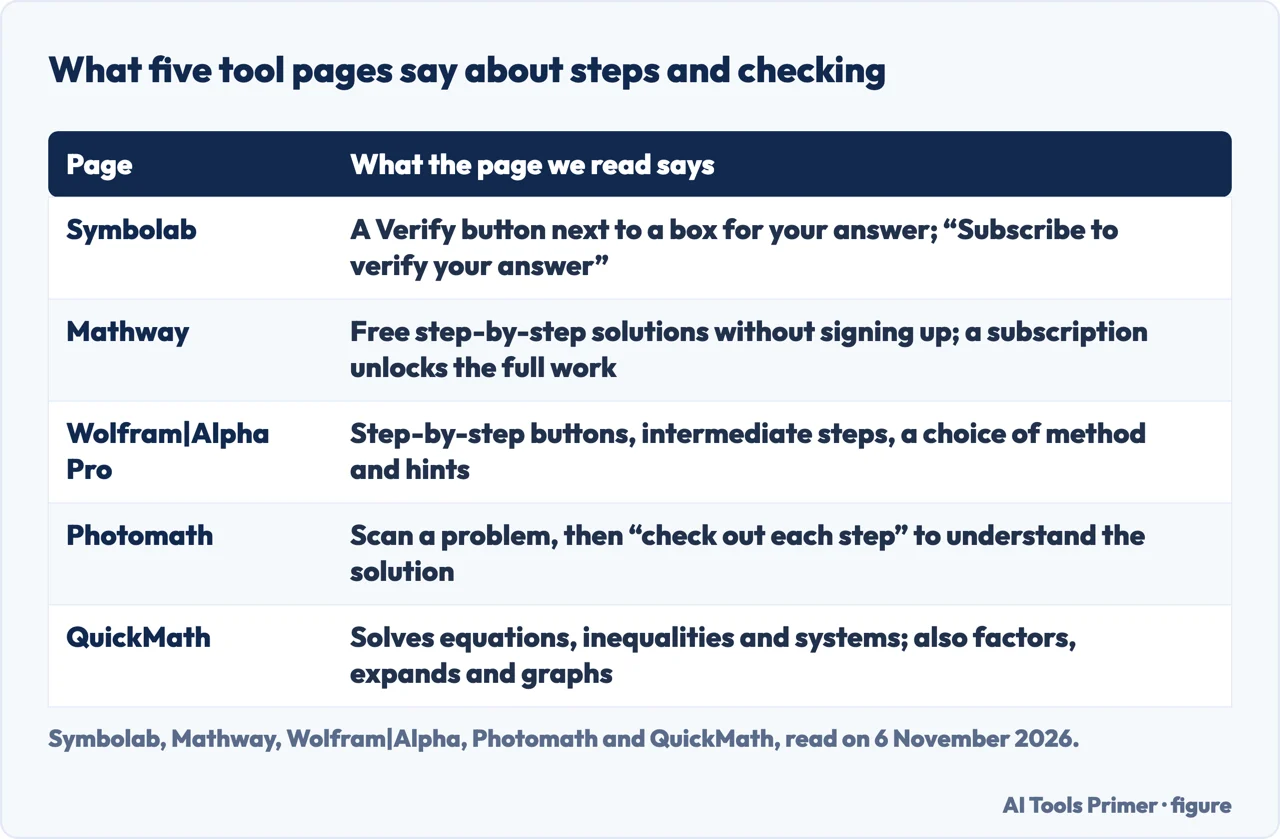
Symbolab. The algebra calculator page has a box labelled Type your Answer with a Verify button, and the line beside it reads Subscribe to verify your answer. The menu has an entry called Verify Solution. The pages we read do not say what Verify checks or what the subscription costs. Symbolab’s home page reached us in Italian, with the entry as Verifica soluzione; the calculator pages were in English.
Mathway. The page says Mathway is free to use, that you can get step-by-step solutions without signing up, and that an optional subscription unlocks the full work shown for every step. You type the problem or upload a photo. The page calls Mathway AI-powered and says it is backed by Chegg; its footer has links named Academic Integrity and Honor Code, which we did not open.
Wolfram|Alpha Pro. The Pro page says step-by-step buttons expand answers and explain how the answer was found. It lists Show Intermediate Steps, Choose a Method, which it describes as using your classroom’s teaching method, and Show Hints, which it says are meant to guide you towards finding the solution yourself. The page shows a monthly price, but currency and amount depend on where it is read, so we leave it out. The examples page says the step-by-step solutions cover over 200 topics, and one of its linear examples is solve 2x + 3 = 6.
Photomath. The home page describes scanning a problem and getting a solution, sometimes with several methods, and asks you to check each step to make sure you understand the solution. That is a check of understanding. QuickMath. The page title calls it a step-by-step math problem solver, and the text lists solving equations, inequalities and systems, simplifying, factoring, expanding and graphing.
The Mathway, Photomath, Wolfram|Alpha and QuickMath pages we read do not describe using the tool to check an answer you worked by hand. They differ on what is behind a subscription: Symbolab asks for one for Verify, Mathway for the full work of every step, and Wolfram|Alpha for its Pro steps. We read no page that compares the tools with each other, so this page ranks none.
Where the tools can be wrong
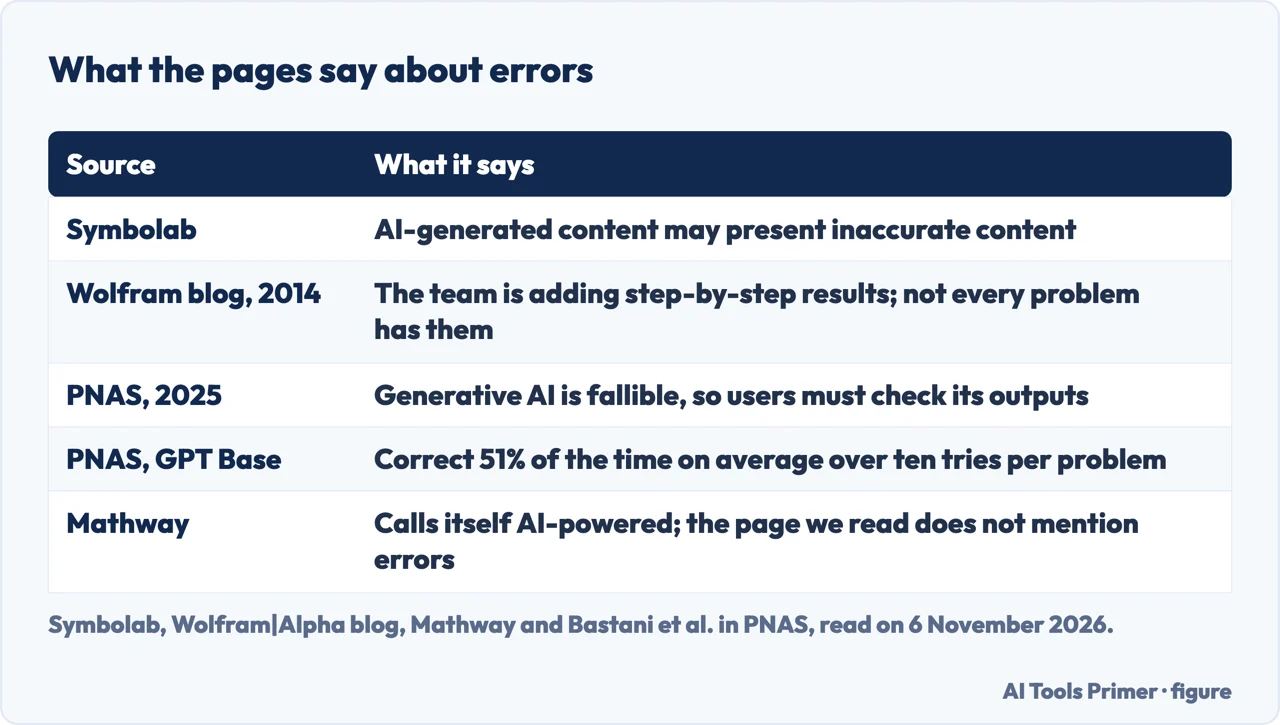
Symbolab is the one tool page we read that says so. Its algebra page states that AI explanations are generated using OpenAI technology and that AI-generated content may present inaccurate or offensive content that does not represent Symbolab’s view, and a second line beside its chat box says AI may present inaccurate content. Mathway calls itself AI-powered, and the page we read does not mention errors. The Photomath, QuickMath and Wolfram|Alpha pages we read do not mention errors either.
The Wolfram|Alpha blog gives a different kind of limit, and an old one. In a post of 15 January 2014 it says Pro users get unlimited access to step-by-step solutions. In April 2014 a reader asked how to force the step-by-step button when it was missing, and the team replied that it was continually working to add new step-by-step results and asked for feedback on any missing one. Read as a 2014 exchange, it says a problem could come without steps. The current pages we read do not address it.
The measurement of errors we read is a 2025 study in the Proceedings of the National Academy of Sciences by Bastani and colleagues, run at a high school in Turkey. Its abstract says generative AI is fallible and users must check its outputs. The authors asked their GPT Base assistant, a chat tool based on GPT-4, “What is the answer?” ten times for each of 57 practice problems. It gave a correct answer 51% of the time on average, with logical errors 42% of the time and arithmetic errors 8% of the time. Those figures describe that assistant. They do not describe Symbolab, Mathway, Photomath or Wolfram|Alpha, and we do not apply them to any of them. The same study found that students with GPT Base scored 17% lower on the exam without the tool than the control group; our math solver page covers it.
Our reading, not a finding: when a tool’s answer and yours disagree, neither has yet been shown right. Putting each into the original equation settles it without trusting either one.
A routine, and what the pages do not say
The pages we read do not give one sequence for checking your own work. This order is ours, assembled from them:
- Work the problem by hand and write the final value or pair.
- Substitute it into the original equation, or into each original equation for a system, and simplify both sides (Khan Academy, Symbolab, Nebraska).
- If a graph helps, treat its crossing point as an estimate and substitute it too (Nebraska, Desmos).
- Only then compare with a tool, and read each step it shows, which is what the Photomath page asks; the Wolfram|Alpha Pro page says its hints are meant to guide you towards finding the solution yourself.
- If the tool disagrees, put both answers into the original equation. Symbolab warns that its AI explanations may be inaccurate, so the substitution is the tie-breaker.
Some things the pages we read do not say. The Mathway, Photomath, Wolfram|Alpha and QuickMath pages do not say how often their solvers are wrong. The Symbolab pages do not say what Verify checks. The Desmos guide text does not describe checking solutions. We read nothing about Microsoft Math Solver, so we write nothing about it. The other AI solving and paid-help sites were not opened, so nothing is written about them.
Where to start
Four ways in.
- “How do I check it myself?”
- Check by putting the answer back — substitute
- “Can a graph check it?”
- A graph estimates; substitution confirms — graph
- “What does Verify do?”
- What the tool pages say about steps and checking — vendors
- “Can the tool be wrong?”
- Where the tools can be wrong — limits
Maths, practice and tutoring
Solvers, questions and tutors.
Planning and repeating
Dates, spacing and method.
Questions people also ask
How do you check math answers?
Substitute your answer into the original equation, simplify both sides and see whether they are equal. A Khan Academy lesson reply and Symbolab’s algebra page say this. For a system, Nebraska’s precalculus book says to put the values into each equation and look for a true statement in both.
How to solve 9x+7 =-7?
Our worked example, not a source’s: subtract 7 from both sides to get 9x = −14, so x = −14/9. Check: 9 times −14/9 is −14, and −14 + 7 is −7, which matches the right side.
What is the real answer to 8 2 2 2?
This question is not about checking an answer, and the pages we read do not cover it. As typed, it does not show which operations connect the numbers, so we do not answer it.
What is the 7 * 11 * 13 trick?
The pages we read do not mention it. The product itself is 1,001, by our own arithmetic: 7 times 11 is 77, and 77 times 13 is 1,001.
Not covered here. The statements come from a Khan Academy lesson page, Symbolab, the University of Nebraska-Lincoln precalculus book, Desmos, Wolfram|Alpha, Mathway, Photomath, QuickMath and a 2025 PNAS study, all read on 6 November 2026; the Wolfram blog post is dated 15 January 2014.
The search volume and difficulty behind this page come from an Ubersuggest reading of 5 November 2026 (United States), which gives search volume and its own SEO difficulty score, not Semrush’s; a Semrush check is still to be made.
Sources
- Khan Academy — Testing solutions to equations (lesson and comments) — www.khanacademy.org, read 6 November 2026.
- Symbolab — Algebra Calculator — www.symbolab.com, read 6 November 2026.
- Symbolab — Testing Solutions Calculator — www.symbolab.com, read 6 November 2026.
- University of Nebraska-Lincoln — Precalculus, Systems of linear equations — mathbooks.unl.edu, read 6 November 2026.
- Desmos — Solving Equations (a graph hosted on desmos.com) — www.desmos.com, read 6 November 2026.
- Desmos — Graphing Calculator User Guide — help.desmos.com, read 6 November 2026.
- Wolfram|Alpha — Pro step-by-step solutions — www.wolframalpha.com, read 6 November 2026.
- Wolfram|Alpha — Examples: step-by-step solutions — www.wolframalpha.com, read 6 November 2026.
- Wolfram|Alpha Blog — What Can Step-by-step Solutions Do? (15 January 2014) — blog.wolframalpha.com, read 6 November 2026.
- Mathway — Math Problem Solver — www.mathway.com, read 6 November 2026.
- Photomath — home page — photomath.com, read 6 November 2026.
- QuickMath — Step-by-Step Math Problem Solver — quickmath.com, read 6 November 2026.
- Bastani et al. — Generative AI without guardrails can harm learning, PNAS 2025 (PubMed Central) — pmc.ncbi.nlm.nih.gov, read 6 November 2026.
Written by Alberto Gulotta
Founder and editor of AI Tools Primer, writing from Palermo, Italy. Thirty-five years of taking computers apart, starting with a Commodore 64 — the long version is on the about page.
Something wrong on this page? Write to aitoolsprimer@gmail.com and it gets fixed.
Written on 6 November 2026.
Independence and limits
No affiliate links and no paid placements anywhere on this site. Nobody pays to appear here, and no company has seen this page before you did.
This is general information, not professional advice. Where a page touches money, health, safety or the law, it names its source and the date it was read — and your situation may still differ. See the privacy page and the cookie policy.