
Study · guide
Best math solver app: steps, cost and what students learn
By Alberto Gulotta · Updated · 16 min read
The pages we read do not name a best math solver app. They describe steps: Photomath, OneNote and Wolfram|Alpha each show the working, with different costs and access. One high school trial found that students who could ask a chat tool for answers scored lower on the exam without it.
| Question | Answer | Where it comes from |
|---|---|---|
| What does a solver with steps show? | The solution to the problem, the steps behind it and, on some pages, a choice of methods | Photomath, Microsoft, Wolfram|Alpha |
| What does it cost? | Photomath’s Basic plan is $0; Wolfram’s steps are Pro; OneNote needs a Microsoft 365 plan for Enterprise or Education | Photomath, Wolfram|Alpha, Microsoft Support |
| What if it cannot solve a problem? | Photomath says some problems are not solved yet, and a misread scan can be corrected by hand | Photomath |
| What did the one trial we read measure? | Practice scores rose with a chat tool; exam scores without it fell 17% for the group that could ask for answers | PNAS, 2025 |
| Which app is best? | The pages we read do not say | All of them |
What a solver with steps does, in each page’s words
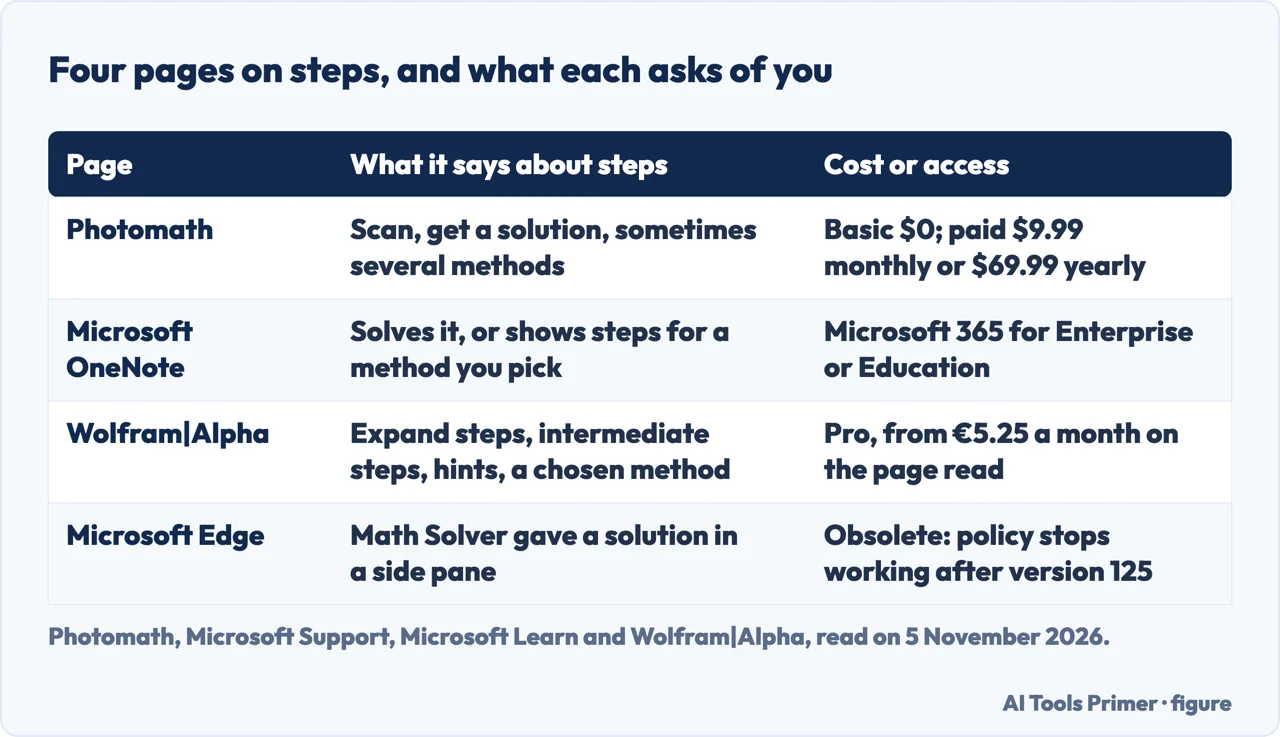
Photomath’s home page describes three moves. Scan: point the app at the problem, word problems included, or type it into the smart calculator. Solve: a solution appears for the exact problem, and the page adds that there might even be multiple methods to choose from. Learn: the page says Photomath is designed for learning and asks you to check each step to make sure you understand the solution. Its Photomath 101 article fills in the screen. After a scan, the solution card at the bottom of the screen often comes as several cards, each with a different method or explanation, and tapping Show Solving Steps opens each step. If the scan misread the equation, the pencil edit button changes it, and holding a corner of the viewfinder resizes the scanning window before you scan.
The subjects the home page lists are elementary math, algebra, geometry, trigonometry, statistics and calculus. A separate Photomath article on what the app can solve adds word problems, and says that when the exact word problem is not found the app shows a similar one. For trigonometry, the same article tells you to scroll all the way down the solution screen to see a graph of what you scanned.
Microsoft describes the same idea inside a note-taking program. On its support page for Math Assistant in OneNote, you write or type a math problem, draw a circle around it with the Lasso Select tool on the Draw tab, and open the Math pane. The page says Math Assistant can solve the problem for you, or display step-by-step instructions that help you learn how to reach the solution on your own. After you choose an action, a Show steps button opens the detail, and to learn how OneNote solved the problem you select the method you want from the options provided.
Wolfram|Alpha’s page on step-by-step solutions makes a similar promise in its own terms. It says the Pro feature does not only give you the answers, but helps you learn how to solve problems. It lists four features: buttons that expand an answer and explain how it was found, optional intermediate steps that break a step down further, a choice of method (the page suggests using your classroom’s teaching method), and hints that it says guide you towards finding the solution yourself. The examples it shows run from calculus, equation solving and basic math to chemistry.
What the pages say about cost and access
The pages differ most on who can see the steps. Photomath’s home page lists a Basic plan at $0 USD with step-by-step explanations, custom visual aids and extra “how” and “why” tips, next to two paid options: $69.99 USD billed annually and $9.99 USD billed monthly. Those prices are what the page showed on 5 November 2026. The Photomath 101 article says you can download the app and see basic step-by-step explanations at no charge, and that Photomath Plus, its premium version, adds Animated Tutorials, teacher-approved definitions and deep dives into the “why” behind steps.
The store pages repeat the same offer. Apple’s App Store page lists the app as free with in-app purchases, names Google as the developer, shows 733K ratings, and describes Photomath Plus as adding custom Animated Tutorials and detailed Textbook Solutions. Google Play names Google LLC as the developer and shows 100M+ downloads. Because the home page, the App Store and Google Play are all the seller describing its own product, we count them as one voice, not three separate confirmations.
Wolfram|Alpha puts the steps behind its Pro subscription. The page we read, which showed euros, offered the feature starting at €5.25 a month. Microsoft’s page ties Math Assistant to an account type: it says the feature is only available if you have a Microsoft 365 subscription for Enterprise or Education. The same page says the option to generate a practice quiz is not currently available while Microsoft works to optimise the experience. We do not repeat the date the page gives for its return, because the page does not say which year.
One Microsoft tool has gone. The Microsoft Learn page for the MathSolverEnabled policy describes a tool that let people in Microsoft Edge snip a math problem and get the solution with a step-by-step explanation in a side pane. The page marks the policy obsolete, says it does not work after Microsoft Edge version 125, and explains that Math Solver is deprecated from Microsoft Edge. The page was last updated on 22 May 2026. We did not read the Math Solver site itself, so we say nothing about what it offers today.
What Photomath says it cannot do
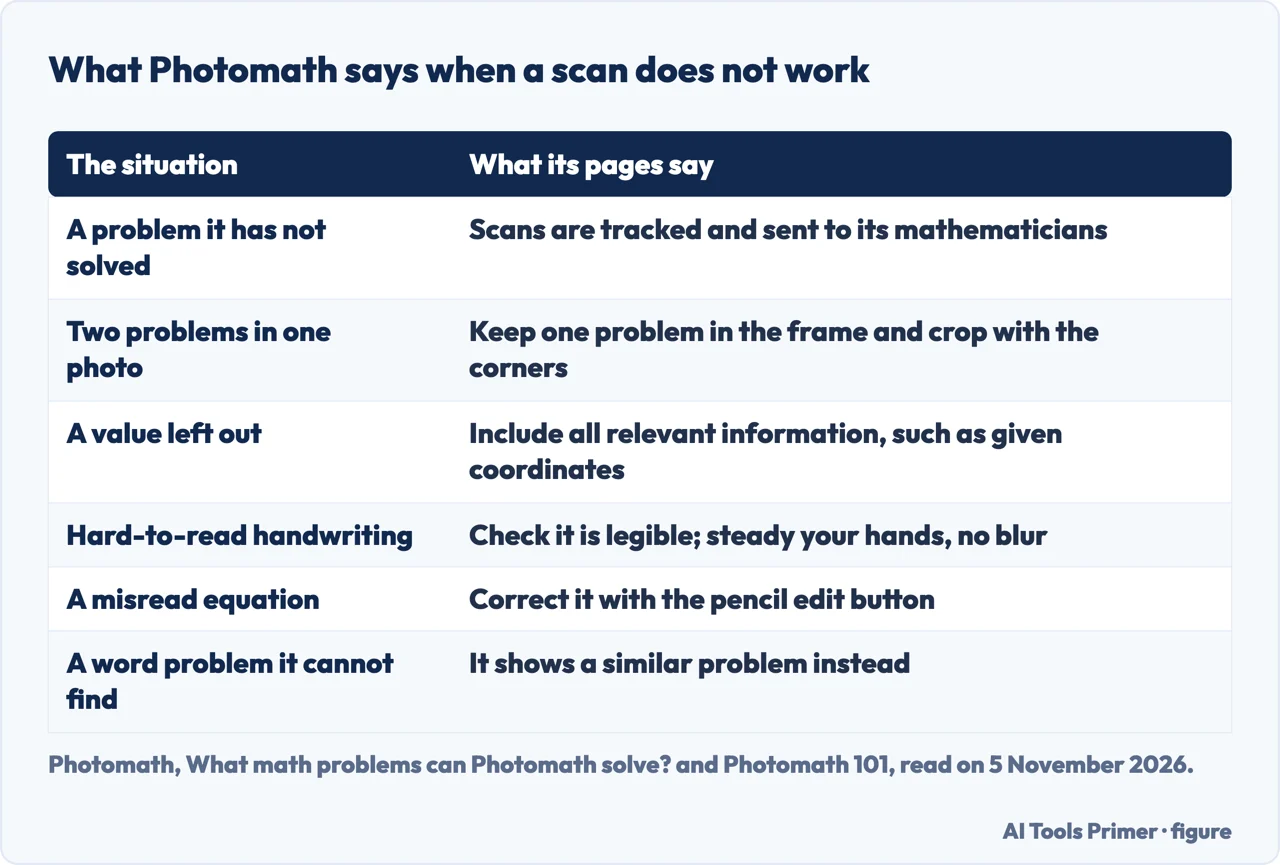
Photomath’s article on what the app can solve states a goal and an admission in the same stretch. It says the company strives to provide math help 100% of the time, and then says that there are some problems it has not solved yet. It explains that every scanned problem is tracked, both to train its technology and to send to its mathematicians, who it says are constantly solving what the app could not before. The article adds that the more a problem is scanned, the more the company understands it needs to be solved.
It then separates two kinds of failure. Sometimes the app could help but cannot recognise the problem because of the scan, and the article lists four tips: keep one problem in the frame and crop with the viewfinder corners, include all relevant information such as given coordinate values, check that handwriting is legible, and steady your hands so the photo is not blurry. The Photomath 101 article says the same of a recognition error, which you can correct with the edit function. For a problem the app cannot solve at all, that article says a team of math experts, including former math teachers, is always working on explanations, and that feedback is welcome.
Photomath’s pages also make positive claims about quality. The App Store description promises step-by-step explanations with accurate solutions and a variety of teacher-approved methods, the Google Play page credits its educational content to its own team of mathematicians and former math teachers, and the Photomath 101 article says the app uses both AI and real-life math experts. The how-it-helps article calls its explanations clear and verified.
What the Photomath pages we read do not give is a measure. They do not say how often a solution is wrong, and their limits sections are about problems not solved and scans not recognised. The vendor pages we read, from Photomath, Microsoft and Wolfram, do not cite a test of what using the tool does to learning. They also do not say whether reading the steps is enough to learn without first trying the problem yourself. Those gaps are why the next section matters.
The one trial we read on learning
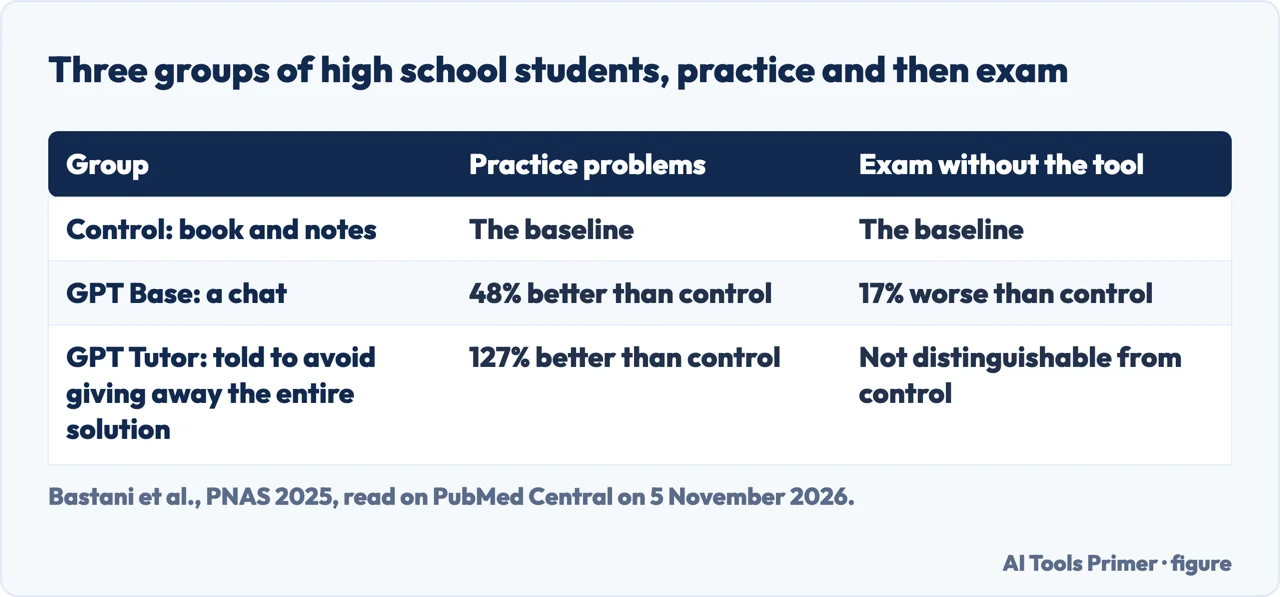
The only page we read that measures learning is a study by Bastani and colleagues in the Proceedings of the National Academy of Sciences in 2025, which we read in its PubMed Central text. It was a preregistered randomised controlled trial at a large high school in Turkey, run in the autumn semester of the 2023–2024 school year. There were four 90-minute sessions with about fifty classes of 9th, 10th and 11th graders, nearly 1,000 students in all, reviewing material they had already covered. Each class was assigned to one of three groups. The control group worked through the practice problems with course books and notes and no device. The other two got a laptop and a tool built on GPT-4.
The first tool, GPT Base, is described as a simple chat interface similar to ChatGPT, with a prompt that includes the current practice problem and tells GPT-4 to act as a tutor. The second, GPT Tutor, uses the same chat, but its prompt includes the solution to each problem and instructions to avoid giving away the entire solution. A student in this group is meant to be guided step by step, with hints for common mistakes.
Practice went up in both groups. Relative to the control group, scores on the assisted practice problems were 48% higher with GPT Base and 127% higher with GPT Tutor. The exam told a different story. When students sat an exam without the tool, the GPT Base group scored 17% lower than the control group, which the authors call statistically significantly worse. The GPT Tutor group was statistically indistinguishable from the control group, so the study found no gain on the exam from either tool.
Students did not notice the difference. The authors report that the GPT Base group did not perceive that they performed worse or learned less, and that the GPT Tutor group perceived that they performed significantly better, even though their exam scores matched the control group. The authors also say that part of the Tutor group’s practice advantage may come from being able to ask the tool to check their answers, which the control group could not do until after submitting.
Wrong answers, copied answers, and what the pages put side by side
The study also measured how often the chat tool was right. The authors asked GPT Base the question students sent most often, “What is the answer?”, ten times for each of the 57 practice problems. It gave a correct answer 51% of the time on average, made logical errors 42% of the time and arithmetic errors 8% of the time. The authors mention that GPT Tutor, whose prompt contains the solution, rarely makes mistakes. This is a measurement of GPT-4 used as a chat. It is not a measurement of Photomath, OneNote or Wolfram|Alpha, and the study does not say it is.
The authors do not read the exam drop as students being misled by wrong answers. They tested whether the tool’s logical errors on a practice problem carried over to the similar exam problem, and found no evidence that they did. They also note that arithmetic and logical errors had similar effects on practice scores, though students could be expected to catch arithmetic mistakes more easily if they were reading the solutions. From both results they conclude that students were simply copying answers from GPT Base, using the tool as a crutch. The message data points the same way: students in the Base group most often just asked for the answer, while students in the Tutor group asked for help and tried answers themselves, and sent more messages. In the first interaction on a problem across the first session, 67% of Base students and 37% of Tutor students repeated the question or asked for the answer.
Photomath’s home page, by contrast, describes steps for the problems it solves and asks you to check each step. Wolfram|Alpha’s page says its hints guide you towards finding the solution yourself. Photomath’s how-it-helps article suggests five uses: checking homework answers, practising before tests (it says you can look back at scanned problems and bookmark them), catching up after missed classes, help at any hour, and building confidence. Putting the pages beside the study, the claims about steps are the sellers’ own, and the trial is about a chat that hands out answers. The pages we read do not mention a test of a scanning app on exam results.
If you want to learn from a solver, the pages and the trial give one thing to hold on to, and it is our reading, not a finding about any app. Photomath asks you to check each step, and Wolfram|Alpha says its hints guide you towards finding the solution yourself. In the trial, the group whose tool held back the full solution and gave hints ended up level with the control group on the exam, while the group that could simply ask for answers ended up 17% lower. The students in the Tutor group also tried answers themselves and sent more messages. None of the pages we read tests whether trying the problem first, then comparing your work with the steps, protects exam results when you use a scanning app, and they do not say which mode of Photomath, OneNote or Wolfram|Alpha behaves like the hint-giving tutor. Treat that as a question the sources leave open.
The authors list limits of their own. The study covers two GPT tutors for a single topic, mathematics, at a single high school in Turkey, in the autumn of 2023, when they say generative AI was still very new. It measured short-term learning, and the authors say additional studies are needed for other tutor designs and settings. A correction published on 20 August 2025 concerns the affiliation of one author and not the results.
What we did not use
We tested no app. We opened two lists that rank apps, from Setapp and thinkassist.app, and did not use them, because this page names no winner. We did not read forum threads or videos about math solvers, and we opened the QuickMath page but found too little text to use. The questions below are answered only from the pages above. We did not read the Math Solver site that Microsoft’s Edge page refers to. Photomath and Wolfram|Alpha prices are the ones shown on the pages on 5 November 2026 and may have changed since.
Where to start
Four ways in.
- “Does it show the working?”
- What a solver with steps does, in each page’s words — steps
- “What will it cost?”
- What the pages say about cost and access — pages
- “What if it cannot solve mine?”
- What Photomath says it cannot do — limits
- “Will I learn from it?”
- The one trial we read on learning — study
Practising on your own
Questions, spacing and retrieval.
Around the homework
Planning, notes and citing a chatbot.
Questions people also ask
What is the most reliable math solver?
The pages we read do not rank solvers or measure how often they are right. Photomath’s store page promises accurate solutions, which is the seller’s claim. The one accuracy figure we read is the study’s: a GPT-4 chat answered correctly 51% of the time, and it was not a scanning app.
Is ChatGPT better than Photomath?
The pages we read do not compare them. The PNAS study used a chat built on GPT-4 and described as similar to ChatGPT, with no Photomath group, so it cannot say which is better. Photomath describes its own method as AI together with math experts.
Which AI math solver is considered the best?
The pages we read do not name one. Photomath offers step-by-step explanations free in its Basic plan, Wolfram|Alpha puts them in its Pro plan, and OneNote ties them to a Microsoft 365 plan for Enterprise or Education. Microsoft’s Edge page says Math Solver is deprecated.
Does Photomath show the steps for free?
Photomath’s home page lists a Basic plan at $0 USD with step-by-step explanations, and its Photomath 101 article says basic step-by-step explanations come at no charge. The paid Plus version adds Animated Tutorials. These are the seller’s statements, and the prices are those shown on 5 November 2026.
Not covered here. The statements come from Photomath’s own pages, the App Store and Google Play, Microsoft Support and Microsoft Learn, Wolfram|Alpha, and a PNAS study, all read on 5 November 2026.
The search measure behind this page is an Ubersuggest reading of 5 November 2026, not a Semrush one, and is still to be confirmed with Semrush.
Sources
- Photomath — The Ultimate Math Help App (home page) — photomath.com, read 5 November 2026.
- Photomath — Photomath 101: Get Math with Photomath — photomath.com, read 5 November 2026.
- Photomath — What math problems can Photomath solve? — photomath.com, read 5 November 2026.
- Photomath — How Photomath Helps with More than Just Homework — photomath.com, read 5 November 2026.
- Apple App Store — Photomath — apps.apple.com, read 5 November 2026.
- Google Play — Photomath — play.google.com, read 5 November 2026.
- Microsoft Support — Solve math equations with Math Assistant in OneNote — support.microsoft.com, read 5 November 2026.
- Microsoft Learn — Microsoft Edge policy MathSolverEnabled — learn.microsoft.com, read 5 November 2026.
- Wolfram|Alpha — Step-by-Step Solutions — www.wolframalpha.com, read 5 November 2026.
- Bastani et al. — PNAS 2025, on PubMed Central — pmc.ncbi.nlm.nih.gov, read 5 November 2026.
- Correction to Bastani et al. (20 August 2025), on PubMed Central — pmc.ncbi.nlm.nih.gov, read 5 November 2026.
Written by Alberto Gulotta
Founder and editor of AI Tools Primer, writing from Palermo, Italy. Thirty-five years of taking computers apart, starting with a Commodore 64 — the long version is on the about page.
Something wrong on this page? Write to aitoolsprimer@gmail.com and it gets fixed.
Written on 5 November 2026.
Independence and limits
No affiliate links and no paid placements anywhere on this site. Nobody pays to appear here, and no company has seen this page before you did.
This is general information, not professional advice. Where a page touches money, health, safety or the law, it names its source and the date it was read — and your situation may still differ. See the privacy page and the cookie policy.