
Video · guide
What is an AI avatar, and what platforms say about consent
By Alberto Gulotta · Updated · 16 min read
What is an AI avatar: Colossyan, a video seller, calls it a digital human that replicates human movements, expressions and speech patterns. Synthesia builds avatars from actors’ footage, a photo or your video, with consent. HeyGen’s developer docs say it runs no consent check on photo avatars. YouTube, TikTok and Meta ask for labels on realistic AI content.
| Question | Answer | Where it comes from |
|---|---|---|
| What is an AI avatar? | Colossyan calls it a digital human that replicates human movements, expressions and speech patterns | Colossyan |
| How is one made? | Synthesia builds one from a single photo or a video of one to five minutes, plus a live consent video | Synthesia |
| Is consent the same everywhere? | Synthesia asks for it live; HeyGen’s developer docs say a photo avatar gets no consent check | Synthesia, HeyGen |
| What stays after a deletion? | Synthesia says the videos already generated with the avatar continue to exist | Synthesia |
| Does a video need a label? | YouTube, TikTok and Meta ask for one on realistic AI content; the pages do not mention avatars | YouTube, TikTok, Meta |
What the word covers, and who defines it
Colossyan, which sells an AI video platform, defines an AI avatar as a “digital human” that replicates human movements, expressions and speech patterns to create realistic virtual interactions. Its article first says that an avatar on its own is a digital representation of a person, typically used in virtual environments, video games or social media, and often a 2D or 3D image. AI avatars are, in its words, one category of these. Unlike traditional digital avatars, which Colossyan describes as more animated and less human-like, AI avatars mimic human movements, gestures and facial expressions and can even replicate a user’s voice.
On how they work, Colossyan says AI avatars combine machine learning, computer vision and natural language processing. On its own platform, it says, they are created using videos of real people, whose likeness is synchronised so that the lip sync follows the text you type, and text-to-speech then lets the avatar read any script. The article lists education and training, customer service and corporate communications as uses. For the last it gives the example of an avatar of a CEO or other executives, for messages when there is no time to film them each time.
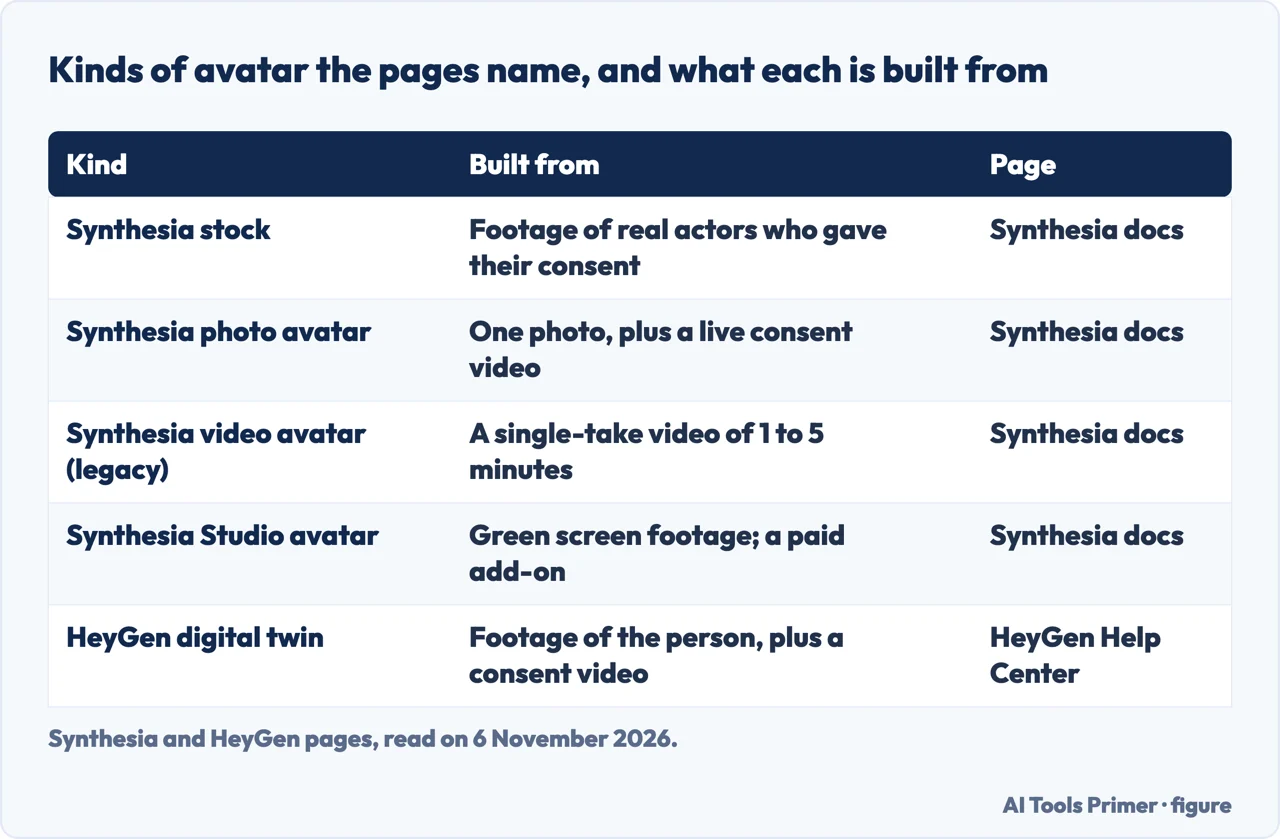
Synthesia’s avatar feature page also answers the question in its FAQ: an AI avatar is a digital presenter made by artificial intelligence that speaks a script you supply, with no camera or studio, and it adds that Synthesia’s stock avatars are built from real actor performances or from AI-generated identities. The HeyGen pages we read do not define the term; they describe what its tools make, and its help pages call the video-based avatars Digital Twins. Colossyan’s article was last updated on 26 February 2025.
The kinds of avatar, and how each is made
Synthesia’s documentation sorts avatars into stock and custom. Stock avatars, it says, are created from video footage of real actors who have given their consent. Custom avatars come in three types: a personal avatar from a photo, which the page marks as recommended; a personal avatar from video, which it marks as legacy; and a Studio avatar made from green screen footage, which is a paid add-on. For the Studio add-on built on the Express-1 model, the page says it is available only on annual plans. HeyGen’s developer documentation uses a different set of words: a digital twin, built from footage of a person, and avatars built from a photo or from a text prompt.
A Synthesia photo avatar starts from one photo, a .jpg or .png file up to 250 MB. The page asks for a landscape photo, smiling, framed from the waist up, of one person, clearly lit and shown against a neutral background, and it says that photo quality directly affects how realistic the avatar looks and moves. You can upload a photo, which it calls higher quality, or use a webcam, which it calls faster. The avatar is typically ready within minutes after the consent step, and the option is on paid plans only. Synthesia says the motion comes from a speech-driven animation model rather than motion learned from recorded footage: lip sync and expressions are generated from the spoken words, body language is neutral, and the movement will not exactly match how you move in real life. Its avatar library page adds that a personal avatar from photo cannot be previewed there.
The video route is the older one. Synthesia asks for a video of one to five minutes, filmed as a single continuous take, as a .webm, .mp4 or .mov file up to 2 GB, with one person in the foreground. The avatar is ready in 24 hours and always has a single camera angle. The page describes the movement as a looping technology called auto-alignment, and its summary of the option says the avatar repeats your exact gestures. Voice cloning is built into the video route and optional for the photo route, where Synthesia’s own voice is used if you skip it.
HeyGen’s Digital Twin FAQ describes the movement differently: the hand movements and facial expressions of a video avatar are derived from your original materials, so footage without hand movements, or with too many, gives an avatar that behaves the same way. Each video avatar includes voice cloning, and removing the background from the footage is offered at no credit cost. HeyGen counts avatars in slots, and says one slot allows up to 500 looks of a single avatar, based on one consent video and meant for the same individual. A redo is possible once per billing cycle. The FAQ also says that a video made with HeyGen can be used and distributed on any platform, including for commercial purposes, as long as the inputs follow its standard guidelines.
Consent, and where Synthesia and HeyGen differ
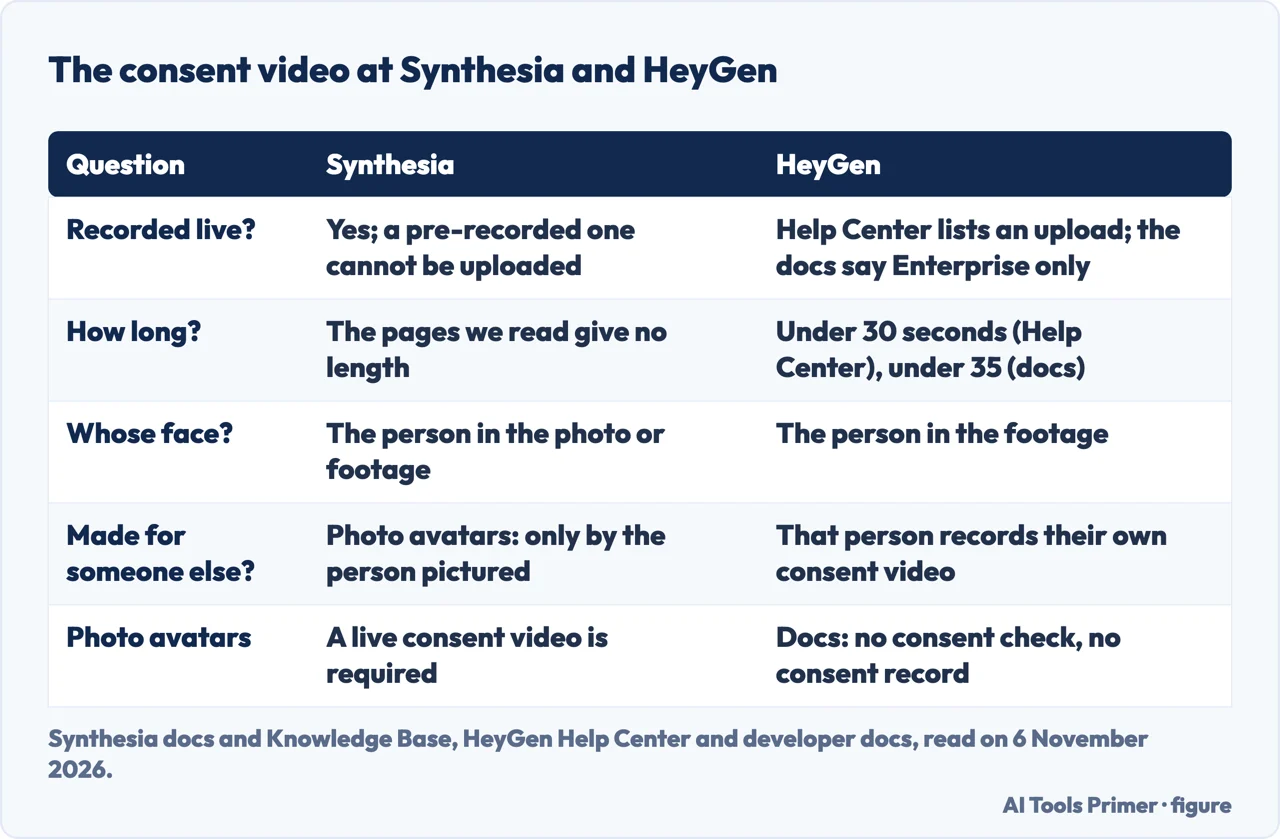
For a personal avatar made from video, Synthesia says the consent video must be recorded live and must show the same person as the footage. A pre-recorded consent video cannot be uploaded, even when the footage itself was recorded earlier. Its Knowledge Base page on photo avatars, dated 15 July 2026, sets two requirements for every submission, an identity match between the photo and the consent video and clear, informed consent, and says a submission that misses either is rejected. It also says a photo avatar must be created directly by the person whose likeness is used: you may not submit one on behalf of another person, even if you have their permission.
The same page lists what it will not accept as a photo: AI-generated images, illustrations, avatars, mannequins or dolls, and celebrities, historical figures or deceased people. The consent statement must communicate that the person understands their likeness will be used to create a digital avatar and that the avatar can be used to generate videos, and the person reads a passcode aloud. Synthesia says it rejects a video that appears edited, replayed or staged, or that shows screens or still images in place of a live recording. For a colleague who has no account, the documentation describes a request, which is open to Enterprise plans only. The emailed link expires seven days after the request, and if the recipient opens an account with the same email address, the avatar moves from the requester’s account to theirs.
HeyGen’s Help Center asks for a consent video for every video-based digital twin. The person must be the one in the footage, must read the provided text as written, and must keep the video under 30 seconds, in MP4, MOV or WebM. A recording of a screen playing the statement is listed as a reason for rejection. If you are creating an avatar for someone else, that person records their own consent video, which can be done from a phone by scanning a QR code, at the same time as the footage is submitted. The Help Center lists a file upload among the ways to submit it and separately says Enterprise accounts can send a pre-recorded consent video through the API.
HeyGen’s developer documentation gives three levels of consent access: a webcam recording for all customers, an uploaded consent video for Enterprise only, and, for Enterprise accounts that have signed an indemnity agreement, skipping the flow. It puts the limit at under 35 seconds, where the Help Center says under 30, and says the webcam link is valid for 24 hours. It adds that the consent step applies only to digital twins. For an avatar built from a photo, it says HeyGen runs no consent check and keeps no record of one, and that agreeing with the person and keeping a record is the user’s responsibility. Synthesia, by contrast, requires a live consent video for a photo avatar. Colossyan’s article says only that custom avatars need the express consent of the person creating them, who decides who can use the result, and that its stock avatars use consenting actors who were paid.
What happens to the avatar and the videos
Synthesia’s Avatar Policy Foundation page, dated 14 July 2026, calls an avatar created from someone’s face or voice a biometric representation that carries legal and ethical implications. It names four roles: the Talent, whose face or voice is used, the Owner, who manages rights and permissions, the User, who makes videos with the avatar, and the Approver, who reviews content before release. It says individuals can review and revoke permissions at any time, that owners can ask for their data to be deleted at any time, and that takedown requests should be honoured in line with GDPR.
The same page says avatars stay in a company workspace after a user leaves unless the user or an administrator deletes them. An avatar that was shared can still be used to make new videos after the original user leaves, and for one that was not shared, administrators can ask Support to transfer ownership. Sharing gives access without transferring ownership, and only the owner can revoke access or delete the avatar. On videos, the page is plain: all previously generated videos containing the avatar continue to exist, even if the avatar is deleted. The avatar library page agrees. Deleting an avatar permanently deletes it and the data tied to it and cannot be undone, but it does not remove it from videos already generated, and removing someone’s access does not remove it from videos they made.
HeyGen’s Digital Twin FAQ is shorter on this. It says an avatar can be deleted from its slot and redone once per billing cycle, and that in the first month of a subscription its support will help if an avatar is deleted by mistake. The HeyGen pages we read do not say what happens to videos already generated when an avatar is deleted.
Saying that a video is synthetic
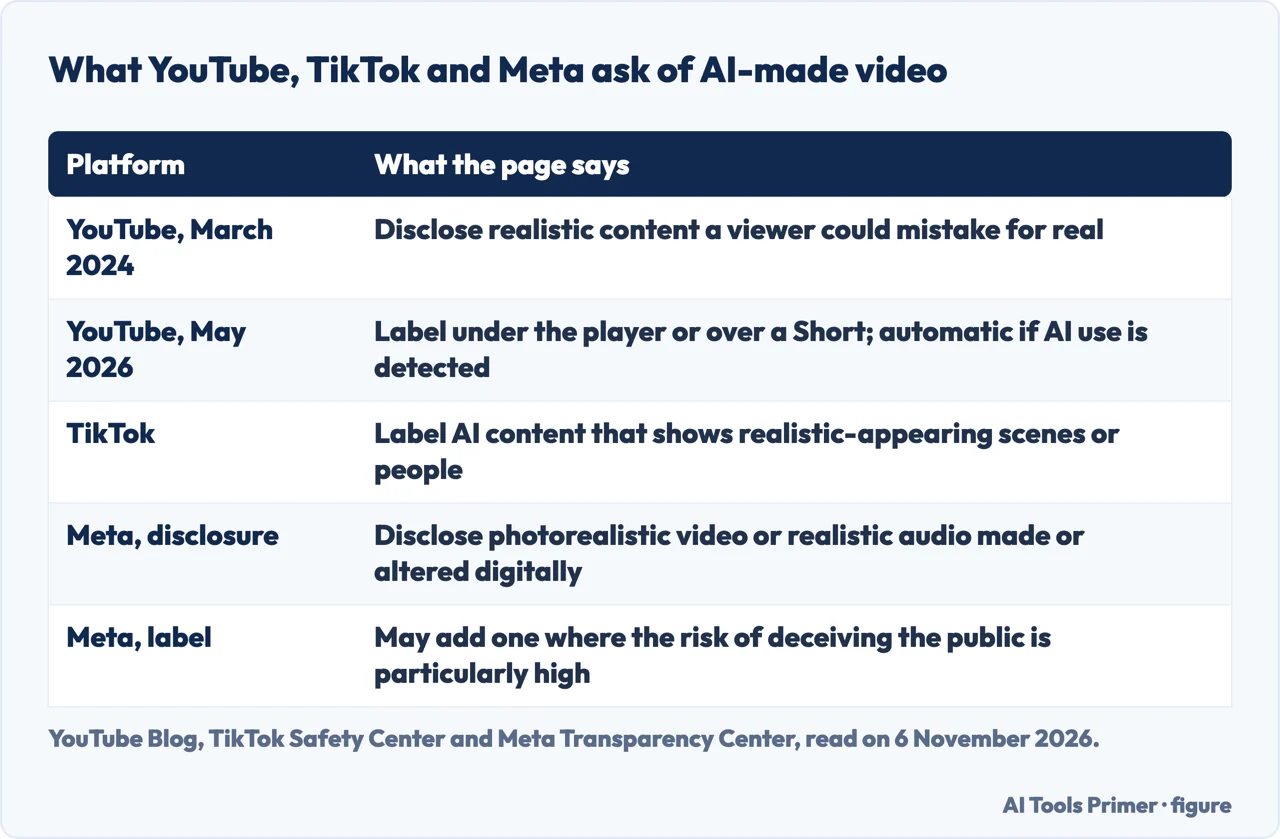
YouTube’s blog post of 18 March 2024 announced a tool in Creator Studio that requires creators to disclose realistic content made with altered or synthetic media, meaning content a viewer could easily mistake for a real person, place, scene or event. Its examples include replacing one person’s face with another’s and synthetically generating a person’s voice to narrate a video. It says disclosure is not required for clearly unrealistic content such as animation, for special effects, or when generative AI is used for production help such as scripts, content ideas or automatic captions. It adds that YouTube may add a label even when a creator has not disclosed, especially if the content could confuse or mislead people.
The post of 27 May 2026 changes where the label sits and who can trigger it. For long videos the label moves below the player, above the description, and for Shorts it becomes an overlay on the video. YouTube says that from May 2026, if a creator does not say whether AI was used but its systems detect significant photorealistic AI use, it now applies a label automatically. A creator who thinks that is wrong can update the status in YouTube Studio, but the disclosure stays permanent for content made with YouTube’s own AI tools and for content whose C2PA metadata indicates it is fully generative AI. The post also says a disclosure label alone does not change how a video is recommended or whether it can earn money.
TikTok’s page on AI-generated content says it requires creators to label content that shows realistic-appearing scenes or people. It labels automatically the content made with its own AI effects and content carrying Content Credentials, the standard from C2PA. The page also says TikTok does not allow content with the likeness of people under 18, or of adult private figures used without their permission, and prohibits AI content that falsely shows public figures being impersonated or endorsing something. A TikTok newsroom post of 19 September 2023 dates the label tool and says the synthetic media policy was introduced earlier that year.
Meta’s Community Standards on misinformation say people must disclose, with Meta’s AI-disclosure tool, when they post organic content with photorealistic video or realistic-sounding audio that was digitally created or altered, and that penalties may apply. Meta may also label such content, or reject it when submitted as an advertisement, where the risk of materially deceiving the public on a matter of public importance is particularly high. The YouTube, TikTok and Meta pages we read do not name Synthesia or HeyGen, and the Meta page does not mention avatars, so they do not say which label an avatar video would carry.
What we did not read
We could not open YouTube’s Help page on disclosure, which sat behind a robot check, and we did not open the pages of other sellers of AI video tools: SendSpark, Visla, Hedra, Artlist, VideoGen, AI Studios, Pictory and Tagshop. The four questions below are ones this page chose to answer.
We compare no prices, judge no quality and rank nothing. They do not say how many AI avatars are in use. Colossyan’s article is a seller’s page, and the Synthesia and HeyGen pages describe their own products, so the differences set out above are between what each says, not between what each does. For the neighbouring jobs, see cloning your voice and face swap apps.
Where to start
Four ways in.
- “What is it?”
- What the word covers, and who defines it — meaning
- “How is one made?”
- The kinds of avatar, and how each is made — types
- “Do I need consent?”
- Consent, and where Synthesia and HeyGen differ — consent
- “Does it need a label?”
- Saying that a video is synthetic — labels
Video made by AI
Clips from text, from a picture and from generators.
Voices, faces and edits
Likeness, consent and the tools that cut.
Questions people also ask
What is an AI avatar?
Colossyan, which sells an AI video platform, calls it a digital human that replicates human movements, expressions and speech patterns. The Synthesia feature page gives a similar definition, a digital presenter made by artificial intelligence that speaks a script you supply; the HeyGen pages we read describe their avatars instead of defining the term.
How is an AI avatar made?
Synthesia builds one from a single photo or a video of one to five minutes, after a live consent video. HeyGen builds a digital twin from footage plus a consent video, and Colossyan says its avatars are created using videos of real people.
Do you need consent to make an AI avatar of someone?
Synthesia says a photo avatar must be created by the person pictured, even if another person has given permission. HeyGen asks for a consent video from the same person for a digital twin, and its developer docs say it runs no consent check for a photo avatar.
Do AI avatar videos have to be labelled?
The YouTube, TikTok and Meta pages we read do not mention avatars. YouTube asks creators to disclose realistic altered or synthetic content, TikTok to label realistic-appearing AI content, and Meta to disclose photorealistic video or realistic audio made or altered digitally.
Not covered here. The statements come from Colossyan, Synthesia, HeyGen, YouTube, TikTok and Meta pages, all read on 6 November 2026.
The search volume and difficulty behind this page come from an Ubersuggest reading of 5 November 2026; a Semrush reading is still to be made.
Sources
- Colossyan — What Is an AI Avatar? — colossyan.com, read 6 November 2026.
- Synthesia Documentation — Create an Avatar — docs.synthesia.io, read 6 November 2026.
- Synthesia Documentation — Avatars — docs.synthesia.io, read 6 November 2026.
- Synthesia — AI Avatars — www.synthesia.io, read 6 November 2026.
- Synthesia Knowledge Base — Photo Avatars Content Moderation — help.synthesia.io, read 6 November 2026.
- Synthesia Knowledge Base — Avatar Policy Foundation — help.synthesia.io, read 6 November 2026.
- HeyGen Help Center — Digital Twin FAQ — help.heygen.com, read 6 November 2026.
- HeyGen Help Center — Recording your Consent Video — help.heygen.com, read 6 November 2026.
- HeyGen Documentation — Avatar Consent — developers.heygen.com, read 6 November 2026.
- YouTube Blog — How we’re helping creators disclose altered or synthetic content — blog.youtube, read 6 November 2026.
- YouTube Blog — Improving AI labels for viewers and creators — blog.youtube, read 6 November 2026.
- TikTok — Supporting responsible, transparent AI-generated content — www.tiktok.com, read 6 November 2026.
- TikTok Newsroom — New labels for disclosing AI-generated content — newsroom.tiktok.com, read 6 November 2026.
- Meta Transparency Center — Misinformation (Community Standards) — transparency.meta.com, read 6 November 2026.
Written by Alberto Gulotta
Founder and editor of AI Tools Primer, writing from Palermo, Italy. Thirty-five years of taking computers apart, starting with a Commodore 64 — the long version is on the about page.
Something wrong on this page? Write to aitoolsprimer@gmail.com and it gets fixed.
Written on 7 November 2026.
Independence and limits
No affiliate links and no paid placements anywhere on this site. Nobody pays to appear here, and no company has seen this page before you did.
This is general information, not professional advice. Where a page touches money, health, safety or the law, it names its source and the date it was read — and your situation may still differ. See the privacy page and the cookie policy.