
Work · guide
Remote interviews: how to set up, and where the pages disagree
By Alberto Gulotta · Updated · 17 min read
Remote interviews come with a checklist, and the pages that publish it do not agree on every line. Amazon, four university career pages and a WayUp article reprinted by CSUN differ on how early to test the tools, where to put the camera, when to join and what to do when the connection drops.
| Question | Answer | Where it comes from |
|---|---|---|
| When do I test the setup? | At least 15 minutes before, a day or two before, or a full call the day before: three pages, three answers | Northeastern, University of Cincinnati, CSUN |
| How early do I join? | Five minutes early, or five to ten | Northeastern, University of Cincinnati, CSUN |
| Where does the camera go? | At eye level, or an inch above it | Northeastern, WCSU |
| Where does the light go? | In front of you, not behind you; WCSU says both that a window in front is the best option and, further down, not to sit in front of windows | Northeastern, K-State, CSUN, WCSU |
| What if the connection drops? | Re-enter, then dial in, or switch to phone audio, or use a phone hotspot | Amazon Jobs, Northeastern, CSUN |
| How do I show a technical solution? | Share a drawing tool or a web whiteboard, or hold paper up to the camera | Amazon Jobs |
What a remote interview is, and what it adds
The University of Cincinnati defines a remote job interview as an interview held over a video call or by phone for a role that is remote at least part of the time. Its page says interviewers still care about the basics: whether you can do the job, whether you will communicate well with the team, and whether you seem reliable and engaged. In a remote interview, it adds, they are also evaluating how smoothly you handle the technology, whether you can work independently and manage your time, whether you stay organized when nobody is nearby, and whether you fit into a remote team.
That shapes the questions. Cincinnati lists several that sit alongside the usual ones: how you stay organized and manage your time when you work independently, a time you collaborated with team members online, how you stay connected with a supervisor or a remote team, and which challenges you expect from working remotely and how you would handle them. It tells readers to build their answers with the STAR method, which stands for Situation, Task, Action and Result; our page on the STAR method covers that separately.
Cincinnati also answers the obvious worry in its own FAQ: remote interviews are different, it says, not necessarily harder. You control the environment and the technology, but you have to manage distractions and convey professionalism and personality through a screen. Northeastern says that virtual interviews over Zoom, Teams or other video platforms are now standard, and that in-person interviews are often saved for final-round candidates. Kansas State’s career center opens its page with a figure of 55% of employers using video interviewing; the page credits its tips as adapted from the National Association of Colleges and Employers, and it was last updated on 25 March 2026.
The platform, and when to test it
Amazon’s page, on its jobs site, starts with logistics. Your recruiter tells you whether the interview is on Zoom or Amazon Chime, and your recruiting contact sends the link and the instructions by email. If you will be sharing your screen, the page says to download the desktop version of the platform. It also says that if a nondisclosure agreement is required you should complete it beforehand, and that if a remote interview on either platform is not fully accessible for you, you should discuss it with your recruiting contact so they can offer an accommodation. Northeastern adds that you can ask for the video conference link ahead of time. Kansas State lists Zoom, Skype, Google Hangout, Facetime or a webcam as programs an employer may use, tells you to have the right one downloaded and running in time to start on schedule, and suggests asking which time zone is being used.
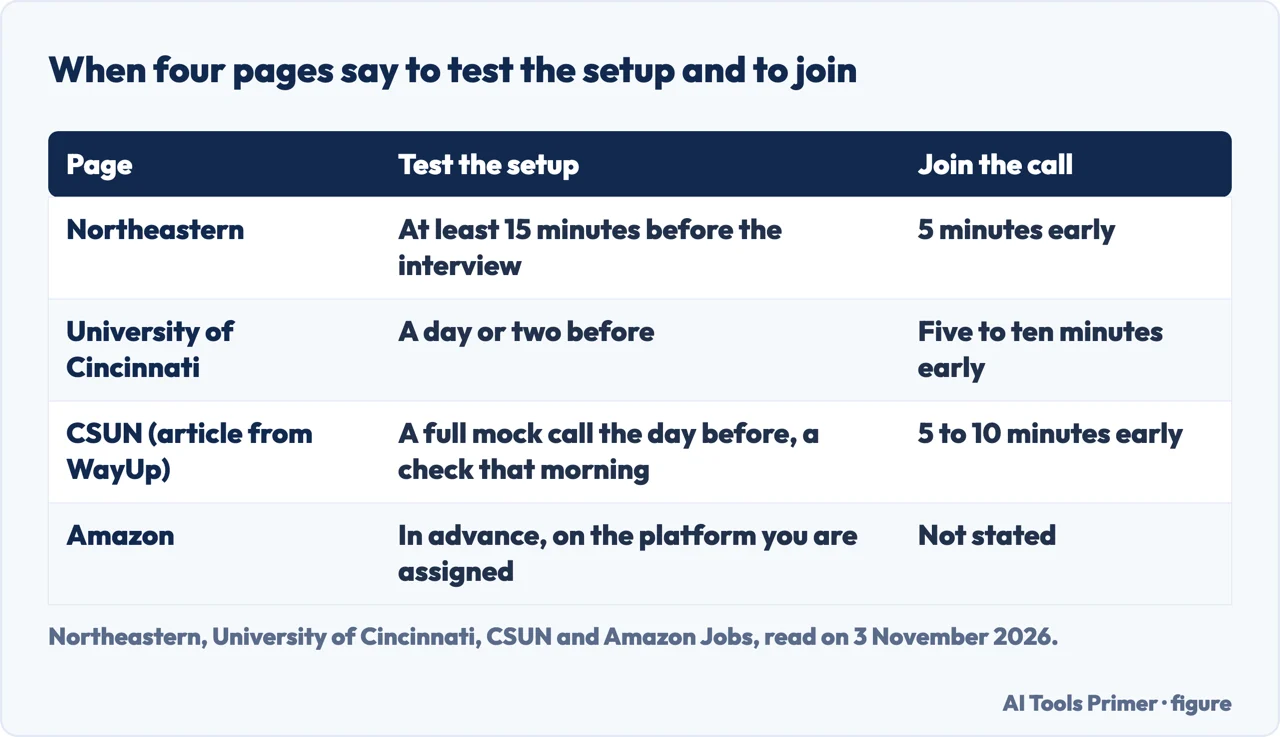
Amazon, Northeastern, Cincinnati and the CSUN article all say to test the technology, and they do not agree on when. Amazon says it is a good idea to practice on your assigned platform and test your audio and video in advance, without saying how far in advance. Northeastern says to test your webcam, microphone, speaker and internet connection at least 15 minutes before the interview, and to close unnecessary applications and browser tabs and plug the computer in. Cincinnati says to use the same device you will use for the real interview, to make sure the platform is updated, and to do this a day or two beforehand, because that can prevent most tech-related stress. The CSUN page is an article that says it was originally published on WayUp. It argues that a quick camera check proves only that the hardware works, and asks for a full mock call, on the actual platform, at roughly the time of your interview, the day before, with a shorter check that morning. Its reason is that light changes through the day: its example is a setup that looked fine at 9am and washed out by 2pm.
The pages we read do not say which of the three timings to choose. The differences are in the table below. On joining, Northeastern says to log in 5 minutes early and check your audio and video, Cincinnati says to join about five to ten minutes early, and the CSUN article says to log into the platform 5 to 10 minutes early and close every other tab and app that might trigger a notification.
The room: light, camera and sound
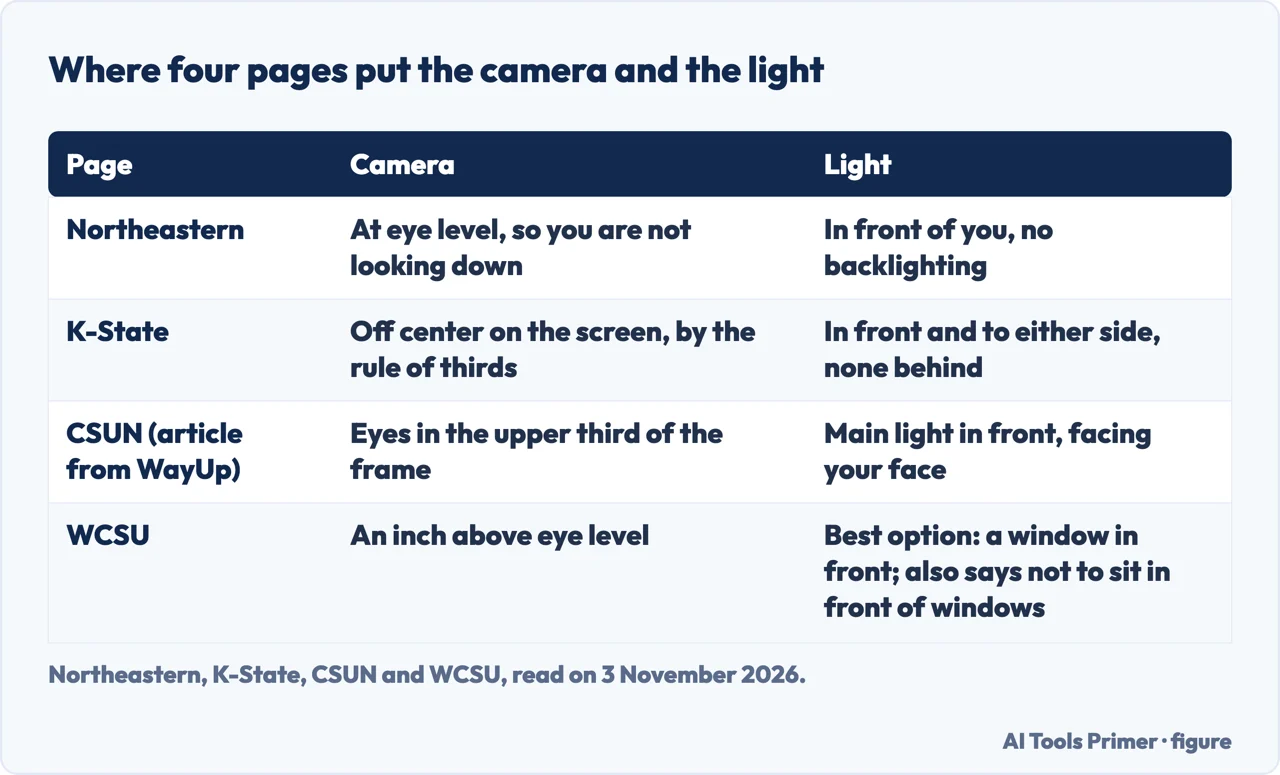
Light. Four pages put the light in front of you. Northeastern says to have adequate lighting in front, with no backlighting that creates a silhouette. Kansas State says there should be no lighting behind you and suggests light in front and to either side. Cincinnati says to face a window or another light source so your face is clearly visible. The CSUN article says to put your main light in front, facing you, because a window or a lamp behind you turns you into a silhouette. The WCSU page words it differently: it says to put a light behind your computer, at eye level, so your face is illuminated and shadows are avoided, and that sitting with a window in front of you is the best option; a later passage on the same page says not to sit in front of windows, because of glare or a face in shadow, so the page contradicts itself. Read alone, “behind your computer” sounds like the opposite of the others, but the sentence states the same aim, a lit face without shadows.
Camera. Here the pages differ in the details. Northeastern says to position the camera at eye level so you are not looking down. WCSU says to keep it an inch above eye level and suggests propping the computer on a box. Kansas State says to use the rule of thirds and sit off center on the screen, and to clean the camera lens. The CSUN article says your eyes should land roughly in the upper third of the frame, with your face and shoulders clearly visible but without leaning into the camera. Amazon and Cincinnati do not give a height. On where to look, Northeastern and Kansas State say to look at the camera rather than the screen, and Cincinnati says to look at the camera when you speak and glance at the screen when you listen.
Sound and space. Amazon asks for a well-lit, quiet environment free of distractions, a working webcam, and, if you have no headset, a readiness to mute the microphone when you are not talking. The CSUN article recommends headphones with a built-in microphone and says built-in laptop microphones pick up more room echo and background noise; it also says to silence the phone completely, not just on vibrate. Northeastern says to close the door and windows, mute notifications and choose a clean, neutral or virtual background. If you have no quiet space at home, the CSUN article names a library, a co-working space or a parked car with good lighting, and WCSU says this is not the time to use a coffee shop’s wifi, and not to take the call from your current job if they do not know you are looking.
Clothes. Kansas State says to wear a complete professional outfit and to choose clothing that contrasts with the wall behind you. WCSU says to dress fully even though only your top half shows, and lists what to avoid on camera: white, all-black outfits, fluorescent colors, busy patterns such as pinstripes or plaid, heavy makeup and large jewelry. These are career-service advice; the pages we read give no evidence about whether clothes, framing or light change the outcome. Our page on what to wear covers the question in general.
When the connection fails
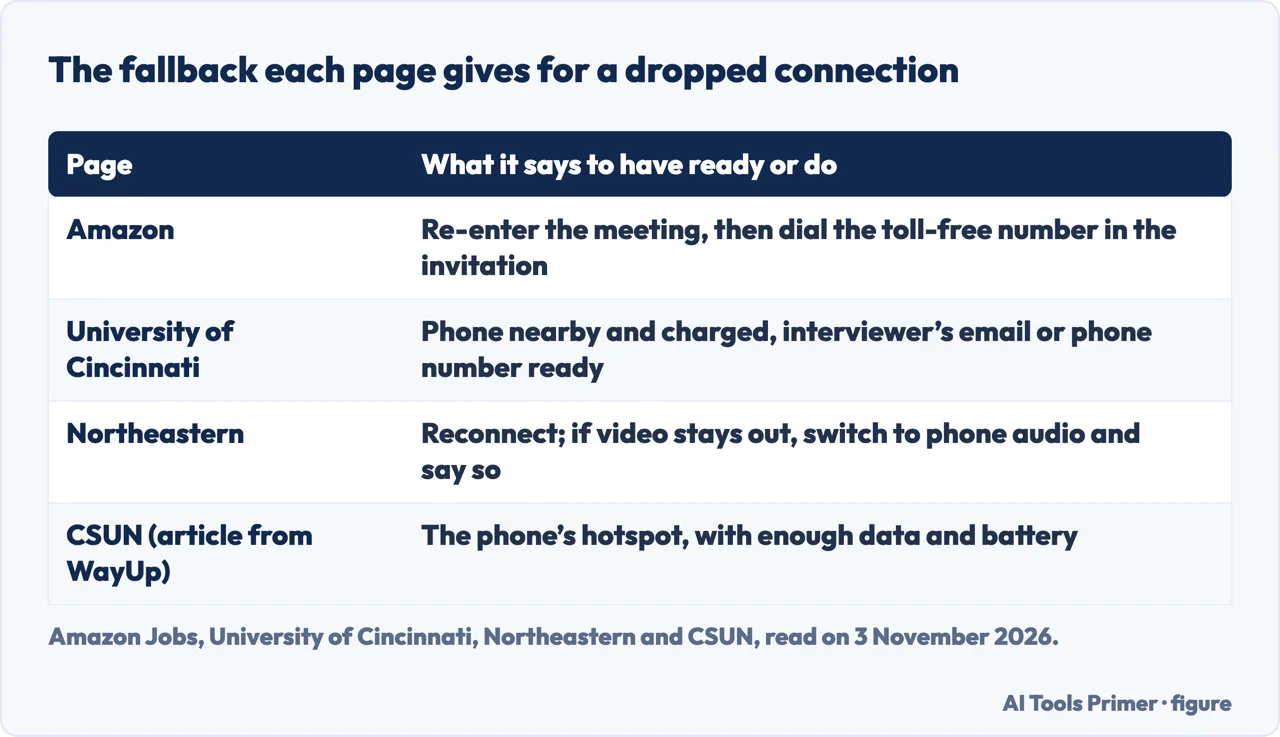
Amazon gives an ordered sequence. If you have technical difficulties, close and re-enter the meeting; if you still cannot connect, dial in on the toll-free number included in your interview invitation; and if you cannot connect by phone either, email your recruiting contact immediately. Cincinnati and Kansas State give a fallback each, and they are close to each other: both keep a phone contact for the interviewer. Cincinnati says to keep your phone nearby and charged, with the interviewer’s email or phone number ready in case the connection drops. Kansas State lists, among the things to settle beforehand, whether you have a back-up phone number for the interviewer to call in case of disconnection.
Northeastern covers a call that is going wrong while you are in it. If the video cuts out momentarily, it says, stay calm and try reconnecting. If you cannot get video back, switch to phone audio, and the page supplies a sentence to say that names the video problem and asks whether you can continue with just audio. It adds that you should stay professional, not waste time troubleshooting and keep the conversation moving. For a slight delay on the line it says to pause a little longer before speaking so you do not talk over the interviewer.
The CSUN article plans for the connection itself. It says to know exactly how you would switch to your phone’s hotspot in the middle of a call, and to make sure the phone has enough data and battery to do it. It says to decide beforehand, not during the call, what you will do if video freezes or audio cuts out, which it describes as a quick message to the interviewer with a phone number or a fast switch to the backup connection you already tested. Its FAQ says it is fine to tell the interviewer about a technical problem, and that having a second device, such as a laptop or tablet or a phone with the app installed, is worth knowing about. Cincinnati gives a general rule for any mishap: acknowledge it briefly, fix what you can and keep going.
Technical exercises and recorded answers
Amazon’s page deals with a technical part of an interview, such as coding or a design exercise. It says it may be easier to draw your solution and show it to the interviewer, and gives three ways to do it: use a drawing or diagramming tool on your own computer and share that window through the meeting platform; use a free web-based whiteboarding product, the page names the Miro app as an example, and share the browser’s screen; or draw on a piece of paper and show it to the camera when you are ready. We tested none of them.
Kansas State mentions a different format. Some companies, it says, use an asynchronous format in which you answer prerecorded questions and save your answers. That is the whole of what the page says about it: the pages we read do not say how common this is, how long the answers can be or how many tries you get. Three of the university pages also name a practice service, Big Interview, for practising on video and seeing how you come across; Cincinnati offers it to its own students, and we have not tried it. Kansas State suggests the same check without a service: record a video of yourself to make sure the camera and microphone work properly.
In the call, and afterwards
Cincinnati’s advice for the call itself is short. Close unrelated tabs, silence notifications and ask roommates not to interrupt. Let the interviewer finish before you answer. Use notes sparingly: a few bullet points are fine, but do not read full paragraphs. It also says to aim for about 60 to 90 seconds per question unless the interviewer asks you to go deeper. Kansas State says to pause briefly after each question before answering, to look directly at the camera, and to keep answers specific and to the point. Northeastern says it is fine to jot notes during the interview, and also says to keep pen and paper within reach but out of view; the CSUN article suggests a printed resume, the job description and a short list of questions near the camera. The pages differ in where the notes sit: the CSUN article puts them near the camera so you can glance at them, while Northeastern says to keep pen and paper within reach but out of view, and Cincinnati only asks that you not read paragraphs.
Cincinnati and Northeastern both say to have questions of your own ready; our page on questions to ask covers that.
Afterwards, Northeastern says to send a thank-you email within 24 hours and to refer to specific things from the conversation. Cincinnati says the same, to each person you spoke with, and goes on: if they gave you a timeline, wait until that date passes before checking in, and if they did not, a short follow-up after about a week is reasonable. Kansas State says to thank the recruiter and be sure the connection is closed before you do anything else, then send a follow-up note to the person who interviewed you. The CSUN article says not to spend the evening before rehearsing answers you have already prepared, and to get an early night; that is its claim, not something the pages show to be true. More on the two follow-ups is on the pages about the thank-you email and following up.
What the pages do not say
The pages we read do not say how long a remote interview lasts. They do not say which of the three testing times to prefer, and they give no figure for how much a bad connection costs a candidate. Amazon’s page lists three questions in its FAQ, about asking for a remote interview in place of an in-person one, about dialing in by phone without video, and about whether remote interviews are treated the same as onsite ones. In the text we read they appear without answers, so we do not report what Amazon says to them.
We tested nothing on a call. One further page returned no text when we tried to read it, so we did not use it.
Where to start
Four ways in.
- “How early do I test and join?”
- The platform, and when to test it — platform
- “Where do the camera and light go?”
- The room: light, camera and sound — room
- “What if the connection drops?”
- When the connection fails — fails
- “What happens after the call?”
- In the call, and afterwards — call
Getting ready
Preparation, answers and clothes before the call.
Questions and afterwards
What to ask, and what to send once the call is over.
Questions people also ask
What is a remote interview?
The University of Cincinnati defines it as an interview held over a video call or by phone for a role that is remote at least part of the time. Northeastern describes virtual interviews as held over Zoom, Teams or other video platforms.
How do I prepare for a remote interview?
Cincinnati says to test your tech and space, research the company and practice answering common questions aloud. Amazon says to confirm the meeting platform, test audio and video in advance, and, on the day of the interview, fully charge the laptop, phone or tablet.
How do you get an interview for a remote job these days?
The pages we read cover what to do once an interview is arranged, not how to get one. Cincinnati names Handshake as a place its students can search for remote internships, co-ops and entry-level jobs.
Can I use ChatGPT for an interview?
The pages we read do not mention it.
Not covered here. We tested nothing on a call. The statements come from Amazon Jobs and the career pages of the University of Cincinnati, Northeastern, Kansas State, CSUN (an article it says was originally published on WayUp) and WCSU, all read on 3 November 2026.
The search volume and difficulty behind this page come from a Semrush reading of 29 August 2026, older than the 60 days the site normally allows.
Sources
- Amazon Jobs — Remote interview — amazon.jobs, read 3 November 2026.
- University of Cincinnati — How to interview for a remote position — www.uc.edu, read 3 November 2026.
- Northeastern University — Interview Type: Virtual — careers.northeastern.edu, read 3 November 2026.
- Kansas State University Career Center — Virtual Interviewing Tips — www.k-state.edu, read 3 November 2026.
- CSUN Nazarian Careers (republished from WayUp) — What to Actually Do in the 24 Hours Before a Virtual Interview — nazariancareers.csun.edu, read 3 November 2026.
- WCSU Career Success Center — Video Interviewing — www.wcsu.edu, read 3 November 2026.
Written by Alberto Gulotta
Founder and editor of AI Tools Primer, writing from Palermo, Italy. Thirty-five years of taking computers apart, starting with a Commodore 64 — the long version is on the about page.
Something wrong on this page? Write to aitoolsprimer@gmail.com and it gets fixed.
Written on 4 November 2026.
Independence and limits
No affiliate links and no paid placements anywhere on this site. Nobody pays to appear here, and no company has seen this page before you did.
This is general information, not professional advice. Where a page touches money, health, safety or the law, it names its source and the date it was read — and your situation may still differ. See the privacy page and the cookie policy.