
Work · guide
Free resume templates: what each source gives and says to avoid
By Alberto Gulotta · Updated · 15 min read
Free resume templates mean different things on different pages. Canva, Zety, Resume Templates and Harvard name different file formats, Adobe Express marks each template Free or Premium, and the Columbia, Minnesota Duluth and UNC Charlotte career offices list layout elements to avoid and differ on Word or PDF. We read ten pages on 5 November 2026.
| Question | Answer | Where it comes from |
|---|---|---|
| How do I download one free? | Zety: Tags menu, Free, then Download Template as PDF or DOCX. Canva: PDF, JPG or PNG | Zety, Canva |
| Is the builder free too? | Zety: the TXT download is free. Resume Templates: may cost, depending on the format. Novoresume: templates free, premium features in the builder | Zety, Resume Templates, Novoresume |
| What layout do career offices want? | Simple formatting; each page names tables or text boxes among the things to avoid | Columbia, Minnesota Duluth, UNC Charlotte |
| Word or PDF? | Columbia says Word; Minnesota Duluth says PDF unless another type is specified; UNC Charlotte says .docx or a plain PDF; Novoresume says PDF | Columbia, Minnesota Duluth, UNC Charlotte, Novoresume |
| Do I need a photo? | Canva and Microsoft show templates with photos; Zety has a With Photo filter; Novoresume says a photo is not needed; Minnesota Duluth lists pictures to avoid | Canva, Microsoft, Zety, Novoresume, Minnesota Duluth |
Where the free ones come from, and in what file
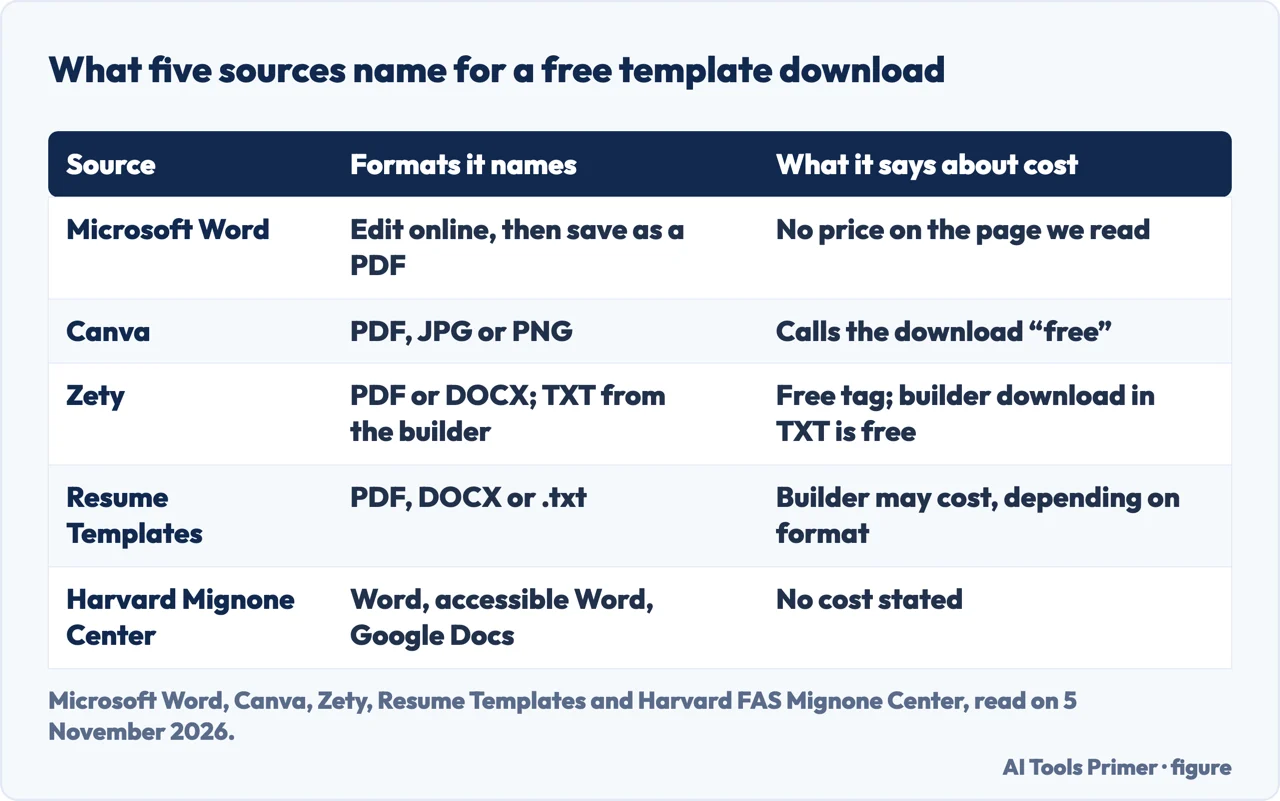
Microsoft’s page for Word is titled Free customizable resume templates and groups them by job: nursing, office manager, doctor, accountant, teacher, attorney and graphic designer among them. Several carry ATS in their names, such as an ATS healthcare resume, an ATS finance resume and an ATS office manager resume, and one description mentions a welcoming photo and a large nameplate. The steps are short: double-click a template to edit it online, replace the placeholder text, then save, print and share it as a PDF. The page says each template is fully customizable, and that colors or fonts can be changed instantly.
Canva’s page sorts its templates by style, from modern and minimalist to creative, and says some designs have ample space for photos. It tells you to download the free template in PDF, JPG or PNG, and one template in its grid is titled Pink and Maroon Photo Modern Resume. Zety’s page, updated on 26 October 2026, filters by industry, experience level, style and layout, with one or two columns, with or without a photo, and one or two pages. Its FAQ gives the free route: open the Tags menu, choose Free, hover over a template, click Download Template and pick PDF or DOCX. It also offers chronological, combination and functional formats.
Resume Templates says free templates can be downloaded as a PDF, DOCX or .txt file, and filters its grid by style, from basic to student, with a toggle that shows only its ATS templates. Adobe Express shows a Free label on the templates in its grid, offers a Free or Premium filter, and says it has hundreds of designed free templates. Novoresume says it offers both free and premium templates. Harvard’s Mignone Center gives one bullet-point template in three versions, Word, an accessible Word version and Google Docs, and describes it as a way to build a first draft.
What “free” covers on each page
The word covers different things. On Zety it is a tag on a template you download as PDF or DOCX, and a premium template customized in the builder can be downloaded as plain text for free. Resume Templates says the templates are free in PDF, DOCX or .txt, and then adds that resumes built with its builder may have a cost, depending on the format, while TXT files can be downloaded free. On Adobe Express the templates in the grid carry a Free label, and a Free or Premium filter separates them.
Novoresume says all the templates listed on its page are free, and describes a builder with premium features: a custom layout, extra fonts and themes, specialized sections, creative backgrounds and rating styles. It also says it has no hidden fees, and contrasts itself with builders that show a paywall when you click download. That is the company’s description of its own service, and we did not test it. Microsoft’s page states no price beside the templates; its header carries a link to plans and pricing. Harvard states no cost for its three files.
The pages we read do not say whether a free template keeps any mark after you edit it. Adobe Express shows the wording Free to use and No credit card required near its search box. We give no prices for paid plans.
Zety, Resume Templates and Novoresume describe their templates as built for applicant tracking systems, and Novoresume says all of its templates are entirely ATS-friendly, with a clean layout, simple fonts and clear headings. The pages we read do not name a hiring system that any of these templates was checked against; Novoresume says its templates are built with the most popular systems in mind. Resume Templates says its ATS templates have single-column layouts and standard fonts.
The layout the career offices tell you to avoid
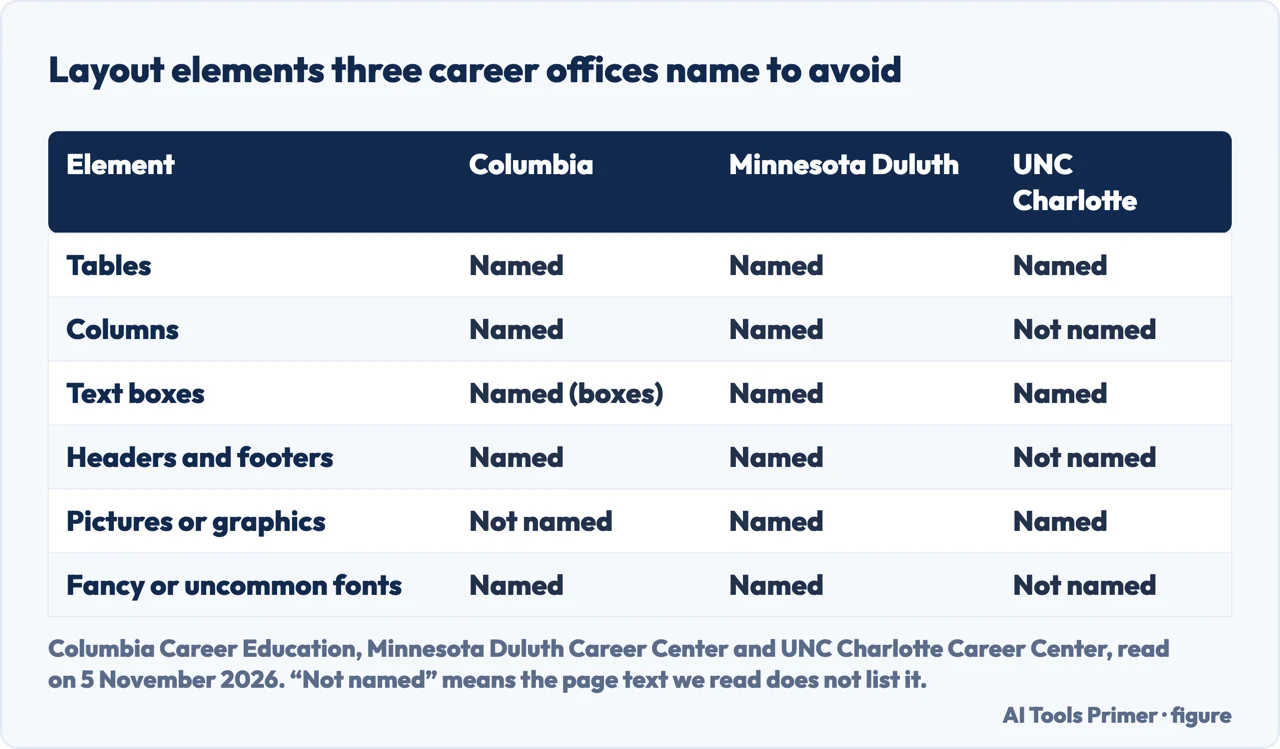
Three university career pages give lists, and the lists are not the same. Columbia Career Education says to use simple formatting and avoid headers, footers, tables, templates, borders, lines, shading, fancy fonts, font colors other than black, columns and boxes; it says bullet points are fine and asks for months and years to be written out. The University of Minnesota Duluth says to avoid pictures, graphics, logos, tables, text boxes, columns, headers, footers, uncommon fonts and unique bullet points. UNC Charlotte’s blog, dated 22 August 2025, says to choose a standard layout with clear section headers and to avoid tables, graphics, images or text boxes, which it says can confuse the software.
Minnesota Duluth gives reasons for some of the items. It says the software reads left to right across the page even with tables and columns, that headers and footers may get dropped completely, that it is not able to pull information from graphics, graphs, logos or images, and that downloaded fonts may be hard to analyze. It lists what to use instead: bold and italics, circle or square bullets, common fonts such as Arial, Helvetica, Times New Roman and Calibri, and common headings such as Education and Experience. Canva’s FAQ gives a similar short list for an ATS-friendly template: clear headings such as Work Experience or Skills, a standard legible font, and no text boxes, tables or images.
Charlotte also names Workday, Greenhouse, iCIMS and Lever and says they have all advanced in their ability to analyze more complex resume formats, but are still sensitive to structure, language and relevant content. The pages we read give no test behind any of the lists, and the Columbia page carries no date in the text we read.
Photos, graphics and the templates that have them
The template pages and the career pages point in different directions. Canva and Microsoft show templates with photos, Zety has a With Photo filter, and Canva’s own FAQ says it is best to avoid images in an ATS-friendly resume. Minnesota Duluth lists pictures and graphics among the things to avoid. Novoresume answers the question directly on its page: you do not need to include your photo, and it lists marital status, birthday, gender and photo among personal details to leave out of a US resume, saying such details can lead to discrimination.
The same split shows up with graphics. Novoresume lists rating styles, circles, bars or other formats for skills, among its premium features, and says elsewhere that its templates avoid complex graphics. Minnesota Duluth says the software is not able to pull information from graphs or images. The Novoresume page we read does not say how a system reads its rating styles, and Minnesota Duluth does not mention them by name.
On the word “templates” itself the career pages differ. Columbia lists templates among the things to avoid, in a sentence that also lists borders, shading and columns. Minnesota Duluth says only to avoid complex or overly designed ones. Charlotte does not use the word. Microsoft, Canva, Zety, Novoresume and Resume Templates, which sell or give away templates, each label some of them as ATS. A template labelled that way is the vendor’s statement, and the pages we read do not say how it was checked.
Harvard’s page is a different case. It offers a plain bullet-point template in Word, accessible Word and Google Docs versions. The text of the page does not say what the accessible version changes.
Word or PDF: four answers
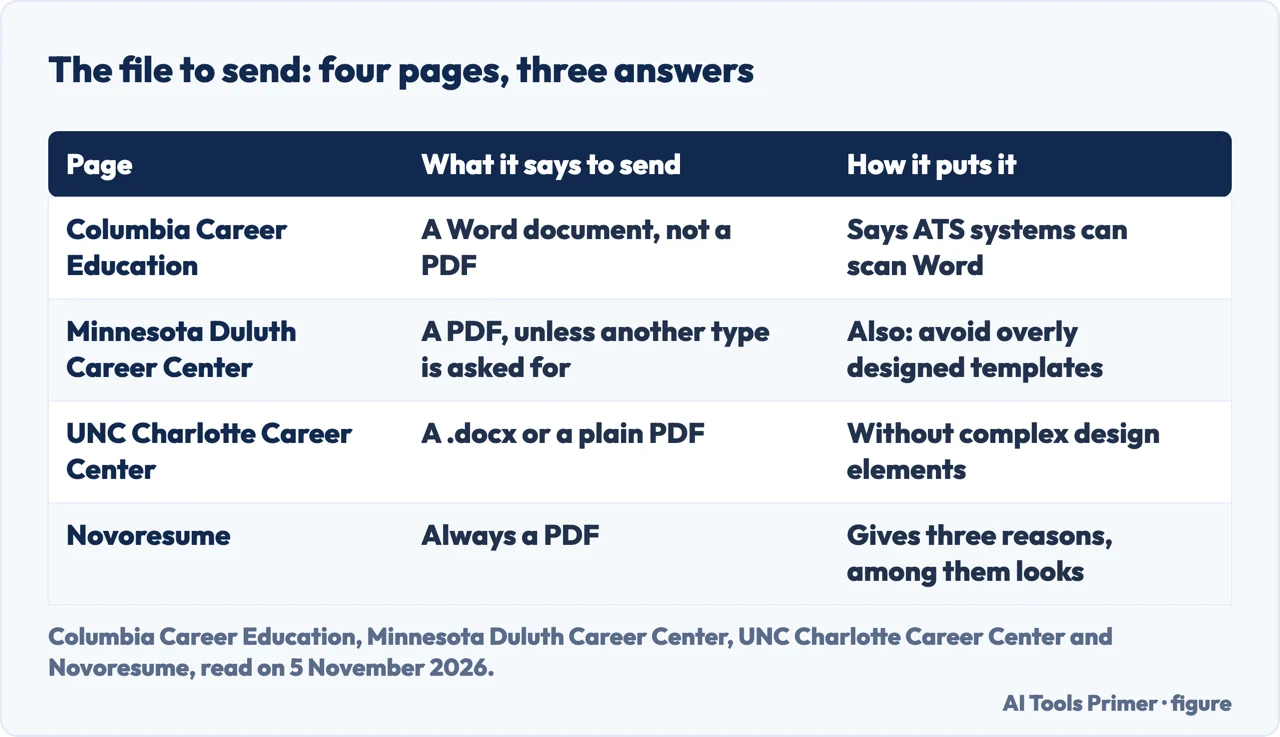
Columbia Career Education says to use or submit Word documents, not PDFs, because all ATS systems can scan and read them. The University of Minnesota Duluth says to create the resume in a Google or Word document and save it as a PDF when submitting it, unless another file type is specified. UNC Charlotte says to save it as a Word document (.docx) or a plain PDF without complex design elements. Novoresume, a template seller, says you should always download and save a resume as a PDF, and gives three reasons: the formatting does not get messed up, it is compatible with practically any system or device, and PDFs look cleaner and more professional.
The sentence on the Minnesota Duluth page is badly worded in the original, so we give its sense rather than its words. The fact that the four answers disagree is the finding. The pages we read do not say which file type each hiring system handled best, apart from Columbia’s statement about Word. The template makers offer more than one: Zety offers PDF or DOCX, Resume Templates offers PDF, DOCX or .txt, and Canva offers PDF, JPG or PNG. Canva says to download the format you need to attach to emails or online applications, and its page does not say which one suits an applicant tracking system.
The date matters as well. Charlotte’s blog is from August 2025, and says the large platforms have advanced in reading complex formats. Columbia’s page has no date in the text we read. Zety, updated 26 October 2026, and Resume Templates, updated 19 October 2026, are the template pages that give an update date.
Choosing without a ranking
We do not rank the sites, because the pages we read each describe only their own templates. They do raise the same few questions. The first is which file the employer asks for; Minnesota Duluth’s wording, unless another file type is specified, points to the employer’s own instructions. The second is the layout. Zety and Resume Templates both let you filter for it, one column or two on Zety and an ATS-friendly switch on Resume Templates. The third is the photo, which Zety lets you filter in or out and Novoresume says you do not need. The fourth is where you will edit: Word on the web, Canva, the builder of a template seller, or Google Docs for Harvard’s version.
What the template does not decide is the content. How a parser reads a document is covered in how your CV is read first, and the sections to include are in what to put on it.
What we did not use
We downloaded no template and opened none in an application. We did not read Google’s own page on Docs templates, because the support site showed a CAPTCHA, so this page describes Google’s templates only through the Google Docs version on Harvard’s page. We did not open a Reddit thread about Google Docs templates, and we did not use any automatically generated summary of these sites. We give no prices for paid plans. Columbia’s page and Charlotte’s blog quote percentages of large employers that use these systems; we did not repeat them, since the Columbia page is undated in the text we read.
Where to start
Five ways in.
- “Where do I download one free?”
- Where the free ones come from — sources
- “What does free cover?”
- What free covers on each page — free
- “What layout should I avoid?”
- The layout the career offices name — layout
- “Do I need a photo?”
- Photos, graphics and templates — photos
- “Word or PDF?”
- Four answers — disagree
The rest of the document
What a parser reads, what goes on the page and how long it runs.
Filling the template in
The skills, the results and the letter that goes with it.
Questions people also ask
Are there any totally free resume templates?
Several pages offer them. Zety tags templates Free, as PDF or DOCX; Resume Templates says its templates are free as PDF, DOCX or .txt; Novoresume says all the templates on its page are free; Harvard gives three versions of one template, with no cost stated. Resume Templates says its builder may cost, and Novoresume says its builder has premium features.
Is Google Docs resume free?
The pages we read do not describe Google’s own templates, and we could not open Google’s support page. Harvard’s Mignone Center offers a Google Docs version of its bullet-point resume template, and the page states no cost for it.
Which is the best site to create a resume for free?
The pages we read do not rank sites. They differ on what is free: Zety offers a free TXT download from its builder, Resume Templates says builder downloads may cost depending on the format, and Novoresume says its templates are free but the builder has premium features.
Where can I download a free resume template?
Zety: Tags, Free, then Download Template as PDF or DOCX. Canva: PDF, JPG or PNG. Resume Templates: PDF, DOCX or .txt. Microsoft: edit a template online in Word, then save it as a PDF. Harvard: Word, accessible Word or Google Docs versions of one bullet-point template.
Not covered here. We tested no template and ran no applicant tracking system. The statements come from ten pages, from Microsoft, Canva, Harvard, Adobe, Zety, Novoresume, Resume Templates, Columbia, Minnesota Duluth and UNC Charlotte, all read on 5 November 2026 and each attributed to the page that makes it.
The search volume (74,000 a month, United States) and the difficulty (66) behind this page come from Ubersuggest, read on 5 November 2026; the difficulty is the SEO difficulty score of Ubersuggest, not the Semrush KD, and has not yet been confirmed with Semrush.
Sources
- Microsoft Word — Free customizable resume templates — word.cloud.microsoft, read 5 November 2026.
- Canva — Free printable resume templates you can customize — www.canva.com, read 5 November 2026.
- Harvard FAS Mignone Center for Career Success — Harvard College Bullet Point Resume Template — careerservices.fas.harvard.edu, read 5 November 2026.
- Adobe Express — Free Resume Templates — www.adobe.com, read 5 November 2026.
- Zety — Free Resume Templates for 2026 (updated 26 October 2026) — zety.com, read 5 November 2026.
- Novoresume — Free Resume Templates — novoresume.com, read 5 November 2026.
- Resume Templates — Free Resume Templates — www.resumetemplates.com, read 5 November 2026.
- Columbia Career Education — Optimizing Your Resume for Applicant Tracking Systems (undated in the text read) — www.careereducation.columbia.edu, read 5 November 2026.
- University of Minnesota Duluth Career Center — Applicant Tracking System (ATS) Tips — career.d.umn.edu, read 5 November 2026.
- UNC Charlotte Career Center — ATS and Guide to Resumes in 2025 (blog dated 22 August 2025) — career.charlotte.edu, read 5 November 2026.
Written by Alberto Gulotta
Founder and editor of AI Tools Primer, writing from Palermo, Italy. Thirty-five years of taking computers apart, starting with a Commodore 64 — the long version is on the about page.
Something wrong on this page? Write to aitoolsprimer@gmail.com and it gets fixed.
Written on 5 November 2026.
Independence and limits
No affiliate links and no paid placements anywhere on this site. Nobody pays to appear here, and no company has seen this page before you did.
This is general information, not professional advice. Where a page touches money, health, safety or the law, it names its source and the date it was read — and your situation may still differ. See the privacy page and the cookie policy.