
Anonymity · guide
Third party cookies: what each browser does, and what followed
By Alberto Gulotta · Updated · 20 min read
Third party cookies are cookies whose domain and scheme differ from the page in the address bar. MDN says Firefox and Safari restrict them by default and Chrome does not. Google’s 2025 posts keep the choice in settings and retire Topics, and WebKit’s October 2026 post describes what followed: identity resolution, which ties an email address to a tracking ID.
| Question | Answer | Where it comes from |
|---|---|---|
| What makes a cookie third-party? | Its domain and scheme differ from the page in the address bar | MDN |
| Does Chrome block them by default? | MDN says not in a normal window, only in Incognito or when the user sets it | MDN, Chrome Help |
| Do Firefox and Safari? | Both restrict them by default: Total Cookie Protection in Firefox, Intelligent Tracking Prevention in Safari | MDN |
| What did Google decide in 2025? | To keep the choice in settings, and to retire Topics, Protected Audience and other Privacy Sandbox APIs | Google Privacy Sandbox |
| What came after cookies? | WebKit describes identity resolution, which ties an email address to a tracking ID, and announces a block | WebKit |
What makes a cookie third-party
MDN starts from where a cookie belongs. A cookie is associated with a domain and a scheme, usually https. When both match the page the user is looking at, the one whose address shows in the address bar, MDN calls it a first-party cookie. When the domain and scheme are different, the cookie is not from the same site and MDN calls it a third-party cookie. Google’s Chrome Help gives the same split in plainer words: first-party cookies are created by the site you visit, and third-party cookies are created by outside sites whose images, ads or text the page embeds.
MDN adds that third-party cookies are sometimes called cross-site cookies, which it calls arguably more accurate. The word third-party suggests ownership by another company, while the behavior and the potential issues are the same when one owner runs every site involved, for example a site that loads images from a different domain it also owns.
WebKit, the engine behind Safari, defines the term from the other side. Its Tracking Prevention page says a third-party cookie is not a special kind of cookie: the question is whether content loaded from a third party has access to its cookies. In WebKit’s example a page on news.example loads an image from adtech.example. If the browser allows it, the request to adtech.example may carry cookies and the response may set new ones. WebKit counts both capacities, sending existing cookies and accepting new ones, as what people mean by third-party cookies.
MDN lists two common situations in which they are sent. One is a click on a link that takes the user from one site to another. The other is a page that embeds components from outside sites, such as images or documents in an iframe. Besides the original request for the component, MDN says, those components may generate further requests that set more third-party cookies.
MDN’s worked example is a fictional company with an online shop at shop.site, forums at forum.site and a customer service site at service.site. Each of the three embeds a sign-in widget hosted at auth.site. A user who signs in on one of them creates a cookie for auth.site that holds a session ID. On reaching another of the sites, the embedded auth.site instance has access to that cookie, can send it to the server, check that it is still valid and sign the user in at once. That is a third-party cookie doing the job it was built for.
What they were used for, and why they became a problem
MDN names several uses. A link to a partner site can set a cookie so that a reward banner or a discount appears, or so that a commission can be paid back to the referrer. Besides the shared sign-in widget there is sharing user preferences or theme information across sites, collecting analytics across several sites, and counting ad impressions and recording interests so that ad platforms can serve more relevant ads.
The same page then turns to the problem. MDN says third-party cookies can also be used without the user’s consent for purposes that are technically undistinguishable from the valid ones. Following a link to a third party, or filling in a form or clicking a button in an embedded iframe, could result in cookies that put a user’s information in the hands of someone unexpected. MDN lists what that information could be used for: chasing users around the web with targeted ads, targeting them with spam emails or phone calls, and manipulating their behavior to raise affiliate revenue or distort statistics.
It gets worse, MDN says, because third-party servers can combine information from the cookies set across the sites where their content is embedded. The result can be a detailed profile of a user’s browsing history, interests, habits and personal information. In that case MDN calls them tracking cookies, and its note says information gained through illegitimate means is also often sold to other third parties.
MDN credits legislation with some help. It names the General Data Protection Regulation in the European Union and the California Consumer Privacy Act as laws that make it a legal requirement for companies to be transparent about the cookies they set and the information they collect, with examples such as asking customers to opt in or letting them see and delete what a company holds. MDN’s verdict is that it is still not always clear to customers how their data is used.
Wikipedia, which we use only for context because its article carries a notice asking for more citations, shows how old the arrangement is. It says RFC 6265, released in April 2011, explicitly allowed user agents to implement whichever third-party cookie policy they wish, and it gives the same kind of example MDN does: an advertising company hosting banner images on its own servers for two websites can follow the same browser across both.
What each browser does by default
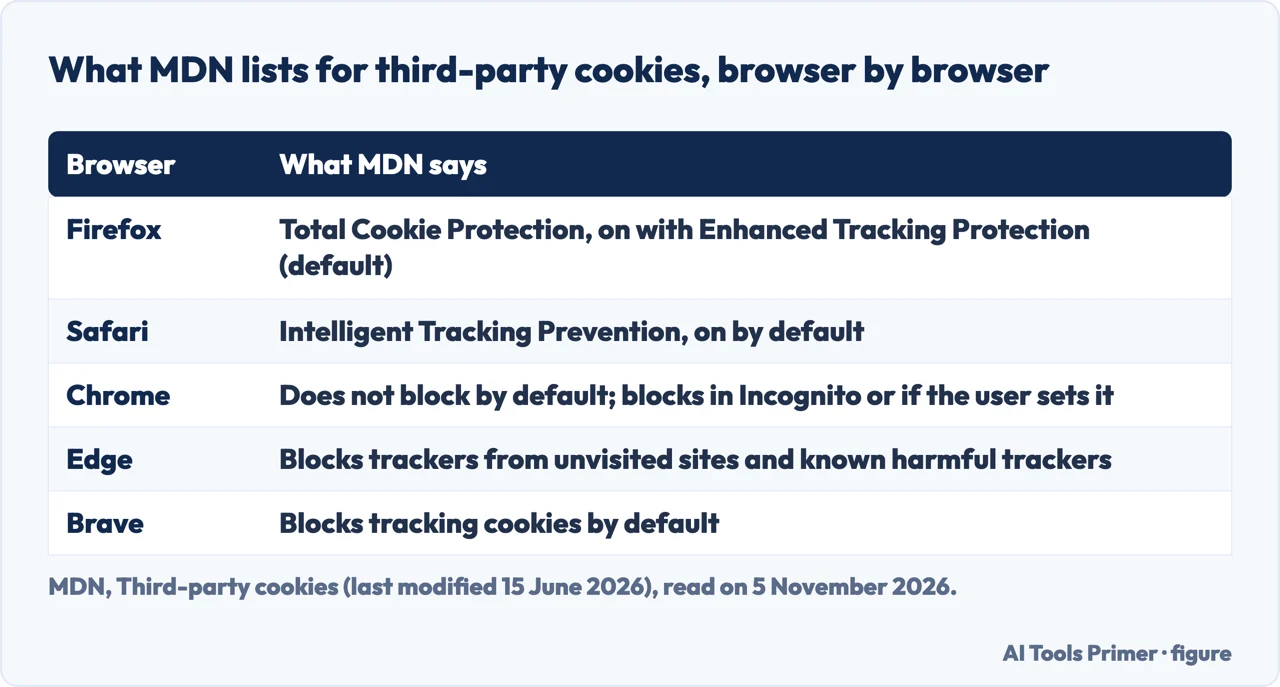
MDN’s guide, last modified on 15 June 2026, says some browser makers have started to block third-party cookies by default, and lists a selection. Firefox enables Total Cookie Protection when Enhanced Tracking Protection is on, as it is by default, which gives third-party cookies a separate cookie jar per site. Safari has a tracking prevention policy with a similar set of protections, on by default. Chrome does not block third-party cookies by default, MDN says, only in Incognito mode or when the user sets it in chrome://settings. Edge blocks trackers from unvisited sites and known harmful trackers by default, and Brave blocks tracking cookies by default.
On allowing them, MDN separates the browsers. In Firefox, Chrome and Edge it is possible to allow third-party cookies case by case through the browser settings. In Safari control is more limited: a user can turn off cross-site tracking prevention, but allowing access per frame can only be done in code, through the Storage Access API. MDN also notes that extensions may block third-party cookies, and that blocking can stop website functionality and components such as social media widgets from working as intended, which is why browsers include exceptions and heuristics for long-standing issues on popular sites.
Mozilla’s own pages add detail on Firefox. Its support article, last updated on 20 May 2025, says Total Cookie Protection is on by default in standard browsing and works by keeping a separate jar for each website. In Mozilla’s example, a social network you visit cannot see your activity on a shop or a blog you open later. The 2022 Mozilla blog post explains the difference from the older Enhanced Tracking Protection: that feature blocks by a maintained list, so a tracker that is not on the list can still track, while Total Cookie Protection restricts all cookies. That post is older than the support article, and we did not use its rollout dates.
WebKit’s side of the story is the oldest. Its Tracking Prevention page says the default cookie policy since Safari 1.0 stops a third party from setting a new cookie unless it already has one, so a domain has to become first-party and set its first cookies there. WebKit’s blog post of 24 March 2020 announced full third-party cookie blocking by default in iOS and iPadOS 13.4 and Safari 13.1 on macOS. WebKit called Safari the first mainstream browser to do so, and wrote that, as far as it knew, only Tor Browser had done it before, with Brave holding a few exceptions. The live page now says ITP blocks all third-party cookies by default, and that access comes only through the Storage Access API and a temporary compatibility fix for popups.
Chrome: the setting, and what Google decided
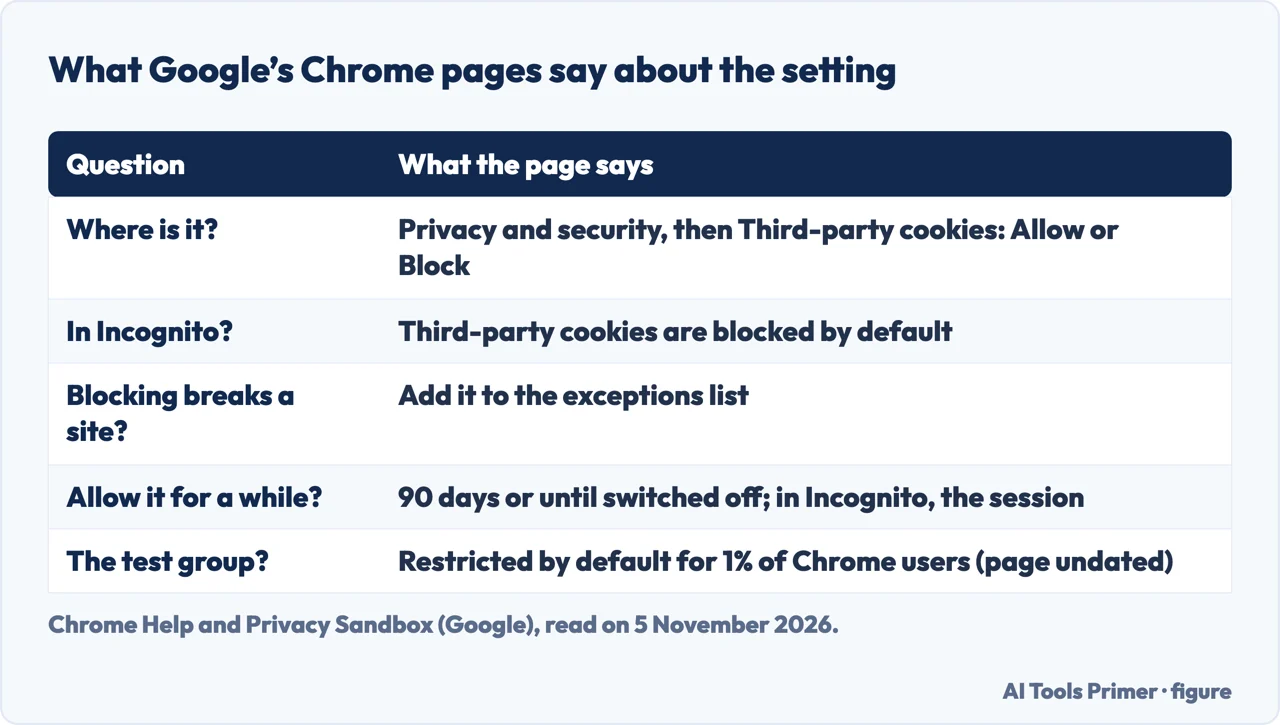
Chrome Help puts the setting under Settings, Privacy and security, Third-party cookies, where a user picks Allow or Block. It says third-party cookies are blocked by default in Incognito mode. With blocking on, all third-party cookies from outside sites are blocked unless the site is on the exceptions list, and Chrome says sites that rely on them may not work as expected. An exception made from the address bar in a normal window, Chrome says, lasts 90 days or until the setting is turned off; in Incognito it lasts for the session. Our guide to enabling cookies in Chrome covers the steps.
A second Google page, on cookie blocking, gives the address chrome://settings/cookies and states that third-party cookies are restricted by default for 1% of Chrome users. That page is undated and carries a banner saying some Privacy Sandbox technologies are being phased out. It also points to chrome://settings/content/siteData for blocking all on-device site data, and warns that many sites will not function properly if a user does. For developers it names a test flag, test-third-party-cookie-phaseout, that makes Chrome behave as it does when third-party cookies are restricted.
The pages we read do not give a date by which Chrome blocks third-party cookies for everyone, and they do not say how many users remain outside the 1% group. What they do give is two decisions, dated, which we only summarise here because our guides to Safari vs Chrome privacy and enabling cookies in Chrome already retell the 22 April and 17 October 2025 posts in full; what this page adds is the browser-by-browser default, ITP beyond cookies and identity resolution.
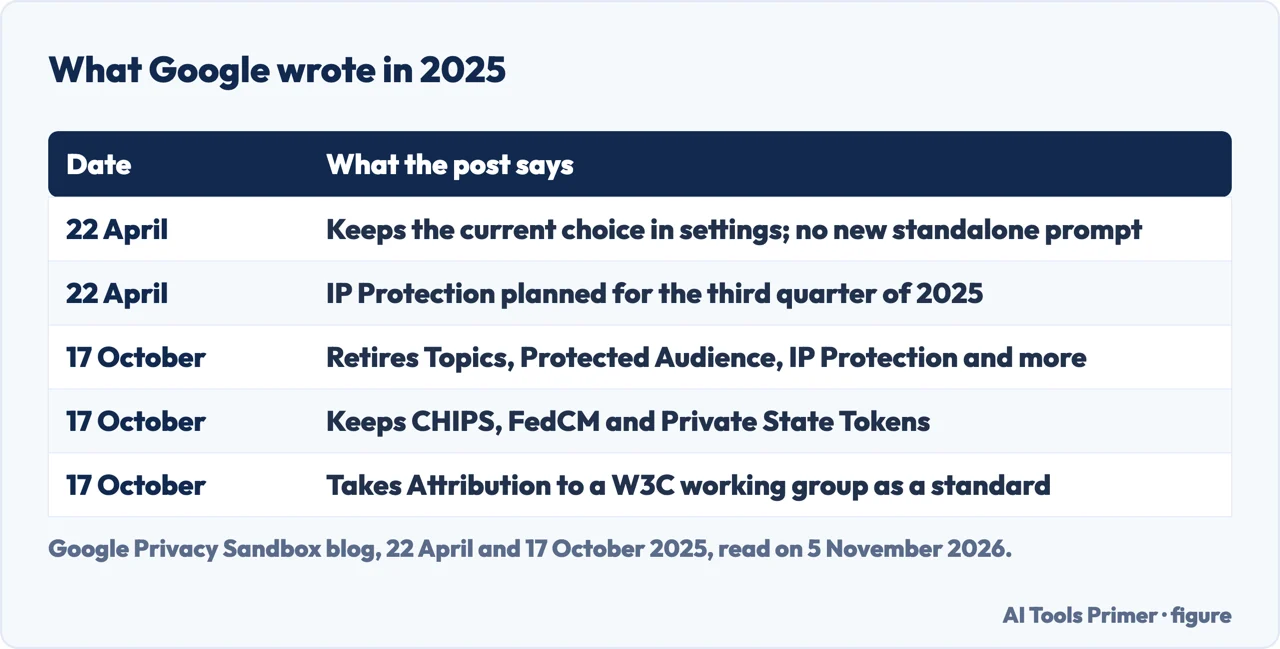
On 22 April 2025 Anthony Chavez, who signs as vice president of Privacy Sandbox, wrote that Google had decided to maintain its current approach to offering users third-party cookie choice in Chrome and would not roll out a new standalone prompt. Users, the post says, can continue to choose in Chrome’s Privacy and Security Settings, and Incognito already blocks them by default. The same post said IP Protection was planned for the third quarter of 2025.
On 17 October 2025 a second post named what Google would retire: the Attribution Reporting API, IP Protection, On-Device Personalization, Private Aggregation (including Shared Storage), Protected Audience, Protected App Signals, Related Website Sets (including requestStorageAccessFor and Related Website Partition), SelectURL, SDK Runtime and Topics. Google gave low adoption and ecosystem feedback as the reasons. It said it would keep supporting CHIPS and FedCM, which it described as widely adopted, including with support from other browsers, and would maintain Private State Tokens. It also said it will pursue an interoperable Attribution standard through the Private Advertising Technology Working Group of the W3C.
The two posts disagree on one point. The April post plans IP Protection for the third quarter of 2025, and the October post retires it, so we give the October state. Pages from 2024 are older still. CookieYes, a cookie-consent vendor, wrote on 24 July 2024 that Chrome would introduce a new setting for privacy choices, which the April 2025 post then replaced with the decision above. TechTarget, on 10 October 2024, describes Topics as a Chrome tool, and the October 2025 post lists Topics among the retired technologies. Cookie-Script, another vendor, stops its Chrome story in July 2024, as does Wikipedia, which says the plan to phase out was reversed that month.
Why blocking cookies was not the end of tracking
WebKit’s Tracking Prevention page shows how much Intelligent Tracking Prevention does beyond cookies. Third-party referrers are reduced to their origin. ITP classifies domains that show tracking patterns across sites, frames and redirects, and deletes the website data of classified domains the user has not interacted with in the last 30 days. Cookies written by JavaScript, and other storage that scripts can write, such as IndexedDB and LocalStorage, are deleted after seven days of no user interaction with the site. Where ITP detects link decoration, meaning click IDs added to URLs, it caps the expiry of JavaScript cookies at 24 hours, and for CNAME cloaking it caps cookies set in the HTTP response at seven days.
The March 2020 post says why. After script-written cookies were capped, third-party scripts moved to other kinds of first-party storage such as LocalStorage, which has no expiry function at all. WebKit also lists a benefit of full blocking: it removes the ability to use an auxiliary third-party domain to identify users in a way that survives when they delete a first-party site’s data. It also says full blocking disables login fingerprinting, a technique that lets a website invisibly detect where you are logged in.
Fingerprinting works without cookies. Mozilla’s support page, updated on 4 November 2025, says that when everything a browser exposes is combined, the combination can act as a fingerprint that makes a person identifiable across the web, potentially to profile them for targeted content without cookies. Firefox’s Enhanced Tracking Protection blocks a list of known fingerprinters, taken from Disconnect’s list, and limits the information exposed to suspected ones. Known-fingerprinter protection is on in normal browsing and in Strict; the suspected-fingerprinter limits are on in private browsing and in Strict. Mozilla names rare breakage, including custom fonts, emoji detection and some video effects.
The Electronic Frontier Foundation’s Cover Your Tracks says advertising networks rely on two methods, cookies and fingerprinting. Cookies, it says, track users until the point a user deletes them, while fingerprinting uses more permanent identifiers such as hardware specifications and browser settings. It warns that protections can themselves become part of a fingerprint, calls Tor Browser the most realistic protection currently available, and says Tor Browser and Brave work by making a fingerprint less unique, less consistent, or both. Blocking trackers, it adds, stops them reading the fingerprint, but more advanced techniques may still gather information. CookieYes lists device fingerprinting among the technologies beside third-party cookies; as a vendor page it is used here only for what it listed in 2024. WebKit lists its own anti-fingerprinting changes, from a permission for motion sensors to a user agent string that stays stable across minor updates. Our guide to the browser fingerprint goes further.
What WebKit says came after cookies
WebKit’s post of 19 October 2026 begins from the point that Safari fully blocked cross-site cookies six years earlier. The tracking industry, it writes, did not stay idle, and a post-cookie method emerged that it calls identity resolution. In WebKit’s description, third parties that are not the website owner invisibly collect an email address when someone logs in or signs up for a newsletter. They send the address to their own servers, create an opaque tracking ID permanently linked to it, and send the ID back to the web page, where it can be used for purposes such as building a profile of browsing or targeting ads across websites. Logging out or unsubscribing, WebKit says, does not remove the ID or the address held by the third party.
Over time, according to the post, these companies collect more data as the person logs in with the email address or fills in forms, and use it to build what WebKit calls an identity graph. It notes that an email address or a phone number allows cross-site and also cross-device tracking, and that an email address can serve as a globally unique ID kept for years.
WebKit draws a line. It writes that first-party personalization is not tracking and is not what its technologies seek to prevent. The concern is the central resolver, a third party that holds cross-site, cross-device and cross-party data and can match and target like a clearinghouse, which a single first party cannot do alone.
The post announces a response. In the iOS, iPadOS, macOS and visionOS 27 releases, Safari and WebKit will block network access to identity resolution infrastructure, per the post. The blocking is done at the domain level, so changing the structure of a request does not get around it. For people who subscribe to iCloud+, WebKit points to Hide My Email, which supplies a unique random address for each new website. The post closes by saying that blocking cross-site cookies is not enough to prevent cross-site tracking today.
Two cautions apply. The page is written by the team that builds the blocking, so it is a description of their own choice and not an independent check. And it does not give a figure for how widespread identity resolution is. The pages we read from Mozilla and MDN do not mention the term.
What we did not use
We changed no setting in any browser and measured nothing. The pages we read do not give the share of people using each browser, so this page states no percentages. MDN does not mention fingerprinting or identity resolution, and WebKit does not say how common identity resolution is. Mozilla says fingerprinting can profile a person without cookies, and does not say it has replaced them. The Chrome Help page and the Privacy Sandbox cookie-blocking page carry no date. We also left out an older Google developer page that still lists Topics and Protected Audience among tools to prepare with, because the October 2025 post retires them. The pages we read do not say whether turning third-party cookies on or off is the better choice, so this page does not recommend either.
Where to start
Four ways in.
- “What is a third-party cookie?”
- What makes a cookie third-party — what
- “Does my browser block them?”
- What each browser does by default — browsers
- “How do I turn them off in Chrome?”
- Chrome: the setting, and what Google decided — chrome
- “Did blocking them end tracking?”
- What WebKit says came after cookies — identity
Browser defaults
What each browser blocks, and how.
Beyond cookies
Other ways a site recognises you.
Questions people also ask
What is a third-party cookie?
MDN says it is a cookie whose domain and scheme differ from the page in the address bar, set or sent when a link leads to another site or when a page embeds components from outside sites. WebKit says it is not a special kind of cookie but content loaded from a third party having access to its cookies.
Should I enable 3rd party cookies?
The pages we read do not say whether to enable them. MDN lists uses such as shared sign-in widgets and preferences, and also tracking; Chrome says sites that rely on them may not work as expected when they are blocked.
How do I unblock 3rd party cookies from my browser?
In Chrome, Settings, Privacy and security, Third-party cookies, then Allow, or add one site to the exceptions list. MDN says Firefox, Chrome and Edge allow it case by case and Safari limits it. Mozilla says that turning Enhanced Tracking Protection off for a site disables the protection on that site only; it continues to block trackers everywhere else.
How do I disable 3rd party cookies in Chrome?
Chrome Help says to open Settings, Privacy and security, Third-party cookies, and select Block third-party cookies. Sites on the exceptions list still work, and Incognito blocks them by default.
Not covered here. We changed no setting in any browser. The statements come from MDN, four Google pages, three WebKit pages, three Mozilla pages and the Electronic Frontier Foundation, all read on 5 November 2026.
The search volume and difficulty behind this page come from an Ubersuggest reading of 5 November 2026 (United States), which gives search volume and its own SEO difficulty score, not Semrush’s; a Semrush check is still to be made.
Sources
- MDN — Third-party cookies (Privacy on the web) — developer.mozilla.org, read 5 November 2026.
- Chrome Help — Delete, allow, and manage cookies in Chrome — support.google.com, read 5 November 2026.
- Google Privacy Sandbox — Cookie blocking — privacysandbox.google.com, read 5 November 2026.
- Google Privacy Sandbox — Next steps for Privacy Sandbox and tracking protections in Chrome (22 April 2025) — privacysandbox.google.com, read 5 November 2026.
- Google Privacy Sandbox — Update on Plans for Privacy Sandbox Technologies (17 October 2025) — privacysandbox.google.com, read 5 November 2026.
- WebKit — Tracking Prevention in WebKit — webkit.org, read 5 November 2026.
- WebKit — Full Third-Party Cookie Blocking and More (24 March 2020) — webkit.org, read 5 November 2026.
- WebKit — Blocking Identity Resolution Infrastructure (19 October 2026) — webkit.org, read 5 November 2026.
- Mozilla Support — Introducing Total Cookie Protection in Standard Mode — support.mozilla.org, read 5 November 2026.
- Mozilla Support — Firefox’s protection against fingerprinting — support.mozilla.org, read 5 November 2026.
- Mozilla blog — Firefox rolls out Total Cookie Protection by default to all users worldwide — blog.mozilla.org, read 5 November 2026.
- Electronic Frontier Foundation — Cover Your Tracks: Learn — coveryourtracks.eff.org, read 5 November 2026.
- Wikipedia — Third-party cookies (context only) — en.wikipedia.org, read 5 November 2026.
- CookieYes — Third-Party Cookies: What Are They And How Do They Work — www.cookieyes.com, read 5 November 2026.
- TechTarget — What is a third-party cookie? — www.techtarget.com, read 5 November 2026.
Written by Alberto Gulotta
Founder and editor of AI Tools Primer, writing from Palermo, Italy. Thirty-five years of taking computers apart, starting with a Commodore 64 — the long version is on the about page.
Something wrong on this page? Write to aitoolsprimer@gmail.com and it gets fixed.
Written on 6 November 2026.
Independence and limits
No affiliate links and no paid placements anywhere on this site. Nobody pays to appear here, and no company has seen this page before you did.
This is general information, not professional advice. Where a page touches money, health, safety or the law, it names its source and the date it was read — and your situation may still differ. See the privacy page and the cookie policy.