
iPhone · guide
Apple Watch won't charge: Apple's checks and the 80 per cent case
By Alberto Gulotta · Updated · 11 min read
An Apple Watch that won't charge may just be flat. Apple says a red bolt means too little battery to turn on, and a dead watch can need 30 minutes on the charger. Then Apple lists cable, adapter, alignment, cleaning and a force restart. A watch at 75 to 80 percent may be using Optimized Battery Charging.
| Question | Answer | Where it comes from |
|---|---|---|
| What does a red lightning bolt mean? | Not enough battery to turn on; connected, it becomes a red bolt inside a ring | Apple Support |
| How long should I wait? | A dead watch might need up to 30 minutes before the bolt appears | Apple Support |
| How do I force a restart? | Hold the side button and Digital Crown for at least 10 seconds, or until the Apple logo appears | Apple Support |
| Why might it stop at 80 percent? | Optimized Battery Charging can hold it between 75 and 80 percent | Apple Support |
| When is it service? | If the watch still isn’t working after the checks, Apple says to get service | Apple Support |
What the screen is telling you
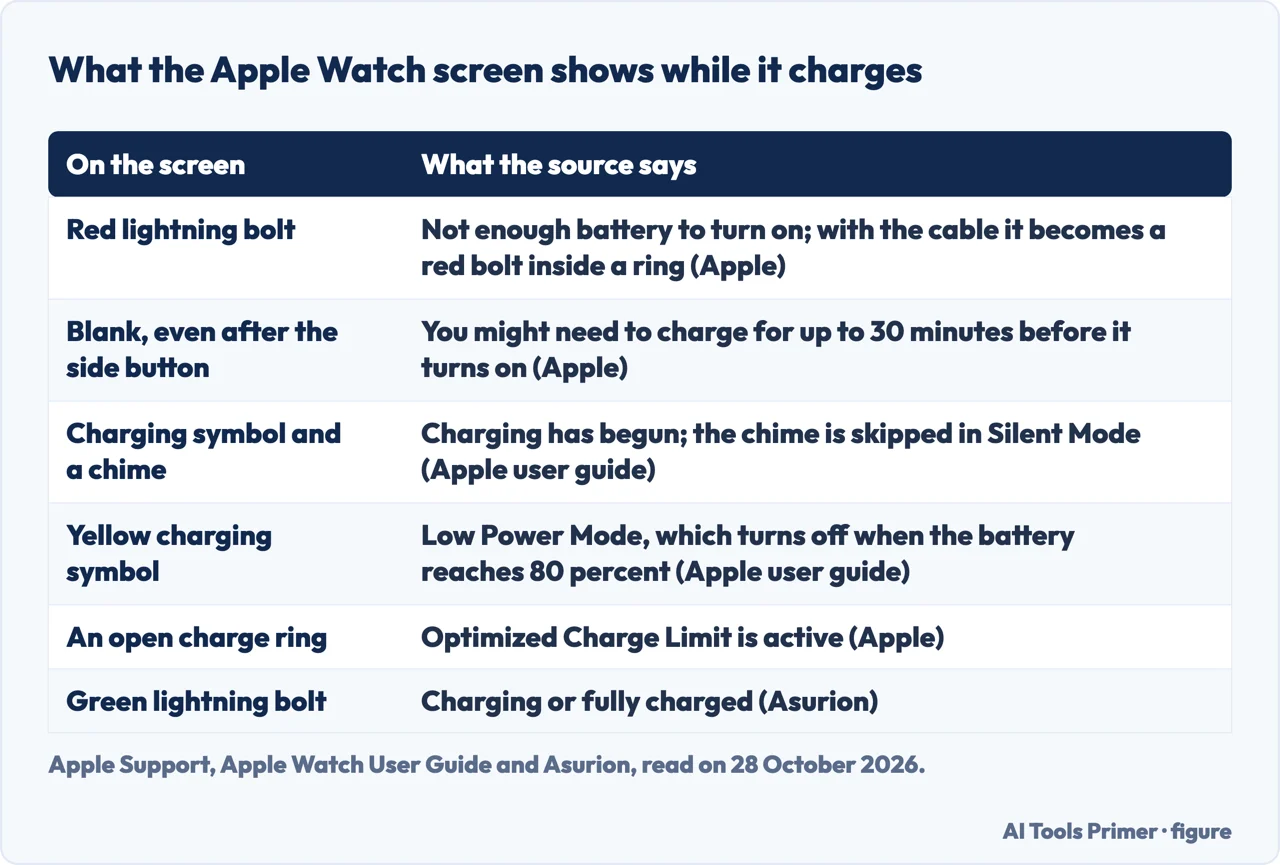
Apple’s page for a watch that won’t turn on or won’t charge, published on 17 September 2026, starts with the red lightning bolt. If one appears on the screen, Apple says the watch doesn’t have enough battery power to turn on, and when you connect it to its charging cable the bolt changes to a red lightning bolt inside a ring. If the screen stays blank even when you press the side button, or if the charging cable icon appears, you might need to charge the watch for up to 30 minutes before it turns on. Apple’s user guide describes a healthy start: when charging begins a charging symbol appears on the watch face and a chime plays, unless the watch is in Silent Mode. If the symbol is yellow, Apple says the watch is in Low Power Mode, which turns off when the battery is charged to 80 percent.
Asurion, which says on its page that it troubleshoots devices, reads the icons slightly differently: a green lightning bolt means the watch is charging or fully charged, and a red bolt, a red bolt with a cable icon or no bolt means it needs a charge of 30 minutes or so. Apple’s page does not mention a green bolt, and the user guide names the charging symbol and its yellow colour. We did not see any of these on a watch.
Apple’s checks, in its order
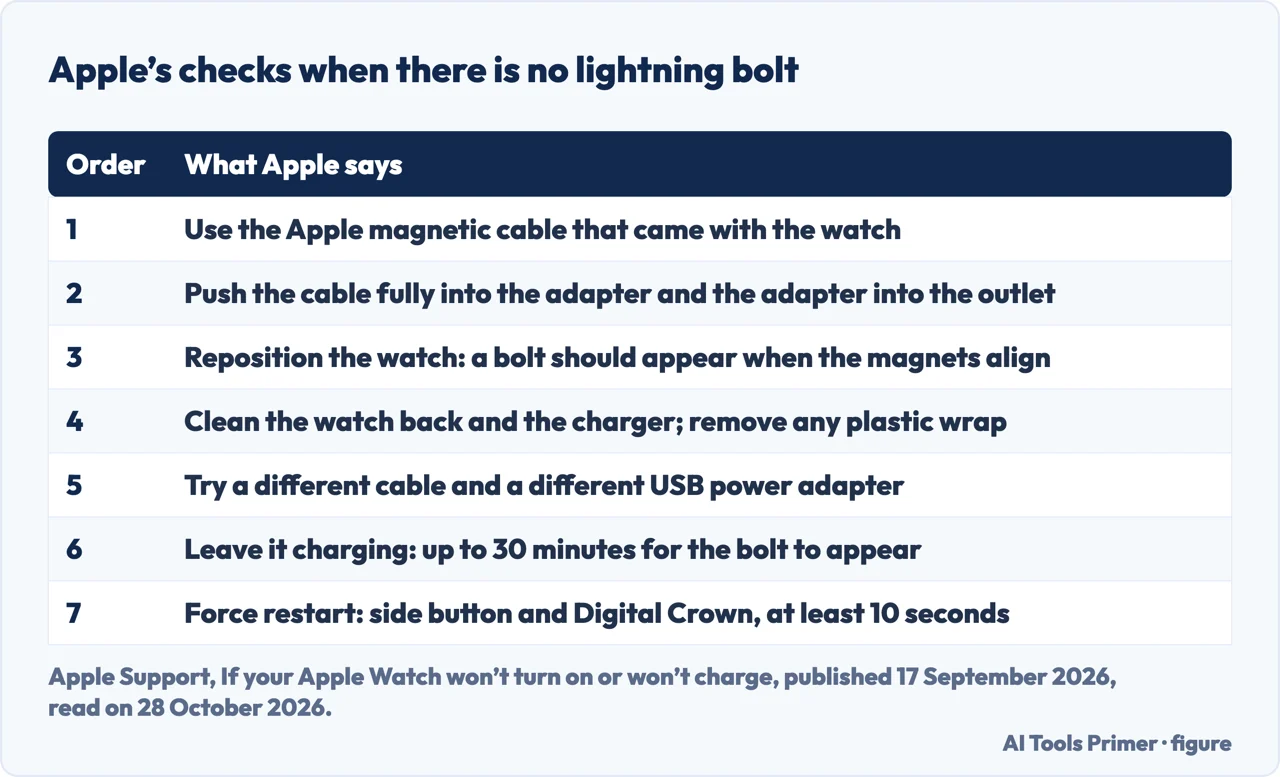
If you connect the watch and no lightning bolt appears, Apple lists the checks in this order. Use the Apple Magnetic Charging Cable or the USB-C Magnetic Fast Charging Cable that came with the watch. Plug the cable all the way into the USB Power Adapter and the adapter all the way into a power outlet. Reposition the back of the watch on the charger, because when the magnets align correctly a lightning bolt should appear. Make sure the back of the watch and the charger are clean, and completely remove any plastic wrap from both sides of the charger. Try a different charging cable and a different USB Power Adapter. Leave the watch connected for a while, because a watch that is out of power might need up to 30 minutes for the bolt to appear. Only then does Apple say to force it to restart.
Two charger notes follow. With the Magnetic Charging Dock or the MagSafe Duo Charger and a larger watch of 44mm, 45mm or 49mm, you might need to adjust the charger to a different angle, or lay it completely flat, so the magnets line up. And if you use a WPT-compliant charger bought in China or Indonesia with an incompatible watch, the watch shows a message that it is unable to charge because it is a country-specific charger. Apple’s user guide adds that the included magnetic charger is best, that the MagSafe Duo Charger or a compatible third-party charger can be used, that the charger should sit on a flat surface in a well-ventilated area, and that fast charging needs a compatible charger and a USB-C Power Adapter of 18W or greater.
The force restart and what the sources differ on
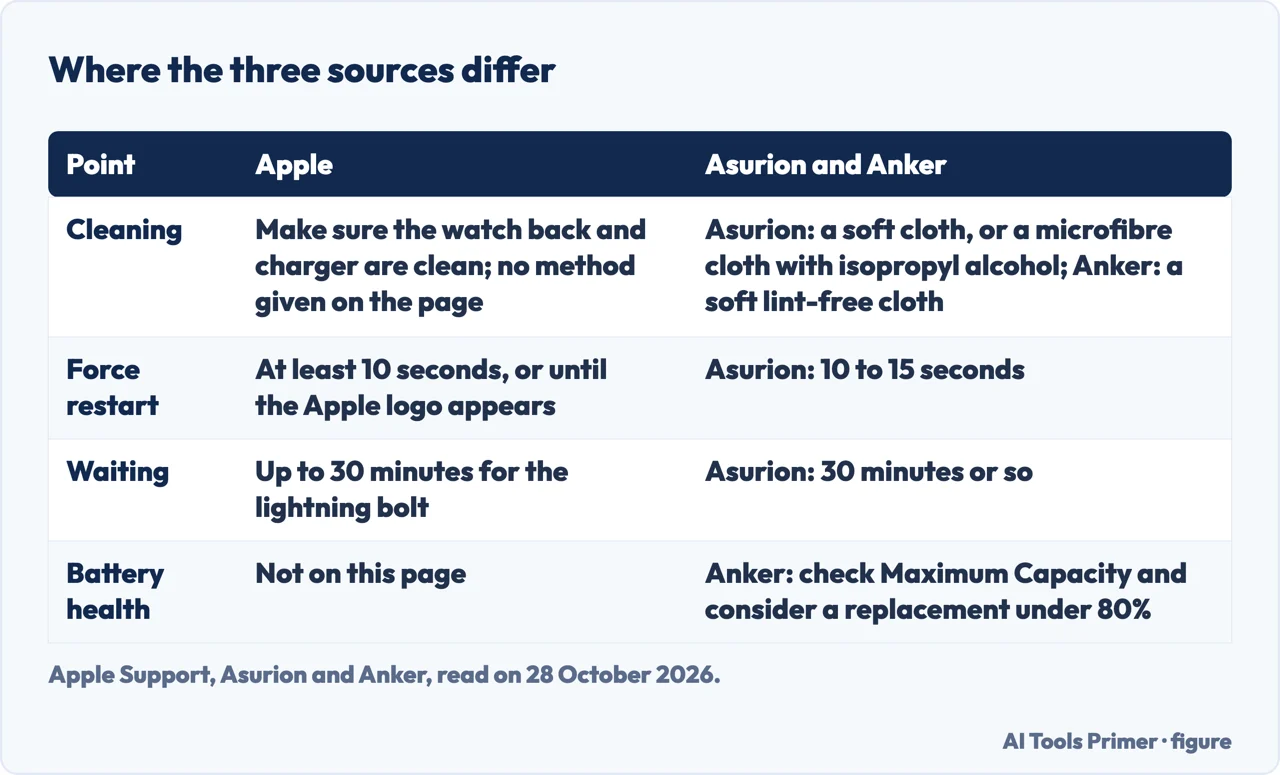
Apple’s force restart is to press and hold both the side button and the Digital Crown for at least 10 seconds, or until the Apple logo appears. Asurion says 10 to 15 seconds, then to let go when the logo appears, wait for the watch to turn on and put it back on the charger. Anker, a maker of chargers whose page also promotes its own chargers, gives the same two buttons and says a force restart can clear minor software glitches that stop a watch charging after it has died. The three also differ on cleaning. Apple says to make sure the back of the watch and the charger are clean, and does not say how on that page. Asurion says to wipe the back and front of the watch and the stand gently with a microfibre cloth dabbed in isopropyl alcohol, and elsewhere to wipe the back with a soft cloth; Anker says dust, sweat or lotion can block the connection and to use a soft, lint-free cloth. Anker adds that a watch may pause charging if it gets too hot, which Apple’s page does not say.
A watch that stops at 80 percent may not be faulty
Apple has a separate page on Optimized Battery Charging, which it says is on by default when you set up the watch. With it on, the watch delays charging past 80 percent in certain situations, keeping the battery between 75 and 80 percent, and it uses on-device machine learning to learn your daily routine so that it activates only when it predicts the watch will be on the charger for an extended period. To charge to full by hand, Apple says to keep the watch on its charger, tap the watch to show the charging screen and tap the circle with the green or yellow charging icon; a new watch says Charging to full while it learns. In Settings, Battery, you can turn it off until tomorrow or turn it off, but on Apple Watch Series 9 or later and any Ultra, Apple says the feature is always on.
Models from the Apple Watch SE and Series 6 onward with watchOS 10 or later also have Optimized Charge Limit, which Apple says is on by default and shows an open charge ring when the watch is connected. It changes dynamically with how you use the watch, so it might charge to 100 percent on some days and less on others. Apple says optimized charging activates only in places where you spend the most time, such as home and work, and does not turn on when your habits vary, as when you travel. Our page on optimized battery charging covers the feature on iPhone, Mac and Watch.
When the checks have run out
Apple’s page ends by saying that if the watch still isn’t working you might need to get service, and it links to a page on a battery that drains too quickly, which we did not open. Anker says to contact Apple Support or an authorized service provider if every fix fails, and lists three signs: severely degraded battery health, a failed software recovery and overheating during charging. For battery health Anker says to go to Settings, Battery, Battery Health and look at Maximum Capacity, and to consider a replacement if it is below 80 percent. Apple’s pages we read do not give that figure or that path for the watch, so we treat it as Anker’s advice, not Apple’s.
What we did not use
We charged no Apple Watch. We did not read the JustAnswer page, the Reddit thread or the Iniu shop blog that Google listed, and the Google AI box was not detected in our read. Anker’s page also sells its own chargers, and we used only its list of causes and fixes. We did not read Apple’s pages on fast charge, on the battery draining too quickly or on WPT-compliant charging, and we left out the lines of the Anker and Asurion pages that advertise their services. The Apple Watch’s Magnetic Charging Dock, a damaged watch and water are not covered here.
Where to start
Four ways in.
- “It shows a red bolt.”
- What the screen is telling you — bolt
- “What do I check?”
- Apple’s checks, in its order — checks
- “It stops at 80.”
- A watch that stops at 80 percent may not be faulty — eighty
- “Is it service?”
- When the checks have run out — service
Batteries and charging
The 80 per cent case, battery health and charging ports.
Other Apple small things
Off, clean and reset.
Questions people also ask
How to restart a dead Apple Watch?
Apple says to force restart by holding the side button and the Digital Crown for at least 10 seconds or until the Apple logo appears, after the cable, adapter, alignment and cleaning checks. Asurion says 10 to 15 seconds.
Why is my Apple Watch stuck on Red Lightning Bolt?
Apple says a red lightning bolt means the watch does not have enough battery power to turn on. Connected to the charging cable, it becomes a red bolt inside a ring, and the watch might need up to 30 minutes before it turns on.
Can a dead Apple Watch be fixed?
Apple says a watch with no battery can often just be charged for up to 30 minutes; if it still isn’t working after the checks and a force restart, it says you might need to get service.
How to tell if a dead Apple Watch is charging?
Apple says a lightning bolt should appear when the magnets align, and its user guide says a charging symbol appears on the watch face and a chime plays unless Silent Mode is on. A yellow symbol means Low Power Mode.
Not covered here. We charged no Apple Watch. The statements come from three Apple Support pages, Asurion and Anker, all read on 28 October 2026.
The search volume and difficulty behind this page come from a Semrush reading of 29 August 2026, older than the 60 days the site normally allows.
Sources
- Apple Support — If your Apple Watch won’t turn on or won’t charge — support.apple.com, read 28 October 2026.
- Apple Support — About Optimized Battery Charging on Apple Watch — support.apple.com, read 28 October 2026.
- Apple Watch User Guide — Charge the battery on Apple Watch — support.apple.com, read 28 October 2026.
- Asurion — Apple Watch not charging? How to fix it — www.asurion.com, read 28 October 2026.
- Anker — Apple Watch Not Charging? Here’s Why & How to Fix! — www.anker.com, read 28 October 2026.
Written by Alberto Gulotta
Founder and editor of AI Tools Primer, writing from Palermo, Italy. Thirty-five years of taking computers apart, starting with a Commodore 64 — the long version is on the about page.
Something wrong on this page? Write to aitoolsprimer@gmail.com and it gets fixed.
Written on 28 October 2026.
Independence and limits
No affiliate links and no paid placements anywhere on this site. Nobody pays to appear here, and no company has seen this page before you did.
This is general information, not professional advice. Where a page touches money, health, safety or the law, it names its source and the date it was read — and your situation may still differ. See the privacy page and the cookie policy.