
Screens · guide
MacBook screen internally cracked: costs, cover and causes
By Alberto Gulotta · Updated · 18 min read
With a MacBook screen internally cracked, the glass can look fine. MacbookFix, a UK repair shop, and The Mac Observer place the damage in the LCD panel. Apple's pages list a $99 screen fee with AppleCare+ and, without a plan, an inspection for other damage with no screen price, and owners in 2021 described being asked to pay.
| Question | Answer | Where it comes from |
|---|---|---|
| What is it? | Damage to the LCD panel under glass that looks fine, as repair sites and forum answers describe it | MacbookFix, The Mac Observer, iFixit |
| What does Apple list for screen damage? | $99 with AppleCare+ on a MacBook Pro; $49 on a MacBook Neo | Apple Mac Repair, Fees and Deductibles |
| And without a plan? | The text we read shows a dash for other damage and says Apple needs to inspect the product | Apple Mac Repair |
| Does the warranty cover it? | Apple says its warranty does not cover accidental damage | Apple Mac Repair |
| What were owners told in 2021? | Answers ranged from a free repair to a charge between $400 and $800 | Tom’s Guide, 9to5Mac |
What “internally cracked” means on a MacBook
The Apple pages we read do not use the word “crack” at all, so the phrase comes from repair shops, news sites and forums. MacbookFix, a UK repair shop, says in a post dated 14 May 2026 that on a modern MacBook the LCD panel and the outer layer are laminated together as one unit. It describes the LCD as rigid and often thinner than a credit card, and the outer layer on Apple silicon models (M1 to M5) as “a laminated optical composite” that can flex a little. Its explanation is that a knock, a pinch in a bag or a firm lid close puts pressure on the screen, and the LCD gives way first, silently, while the outer layer shows nothing. That is a shop’s account of how the parts behave, not a measurement, and it is also the shop that sells the LCD-only repair.
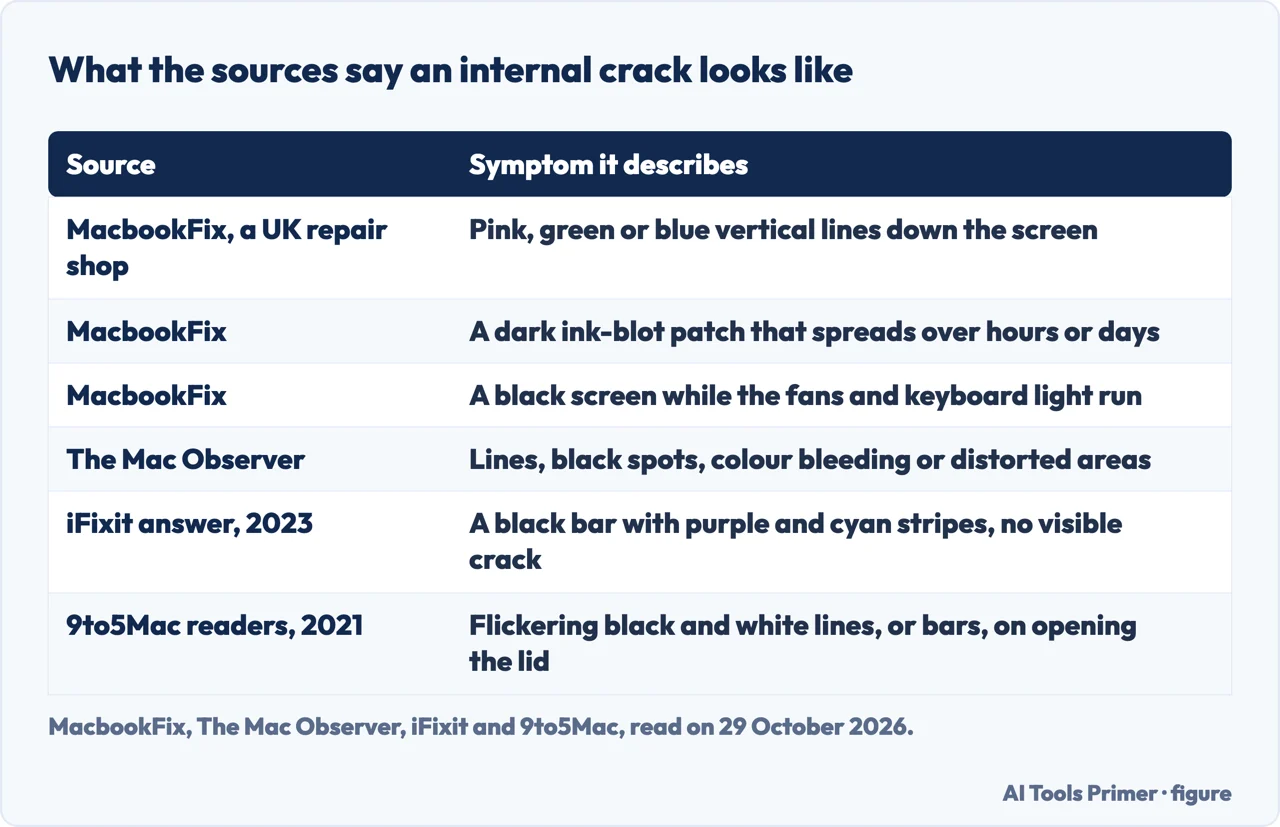
The Mac Observer, in a two-minute piece dated 25 February 2026, says an internal crack points to damage in the LCD panel while the glass looks fine. It says the damage often shows as lines, black spots, colour bleeding or distorted areas under intact glass, and that pressure from objects, tight bags or hinge stress can cause it.
Community answers on iFixit read the same way. A 2020 answer about a late-2012 MacBook Pro 13-inch says the back glass, meaning the LCD panel, is cracked, and that this is often seen when a pen or pencil was resting on the keyboard and the lid was closed on it. A 2023 answer about a 2021 MacBook Pro 14-inch, which had a vertical black bar with thin purple and cyan stripes and no visible crack, says the panel has been cracked and that the display assembly has to be replaced. A comment in that thread says the damaged pane is the back one of the two glass panes and calls it the more brittle. These are contributors’ views. The sources do not measure which layer gives way first.
The symptoms they list are in the first table below. MacbookFix names pink, green or blue vertical lines, a dark patch that spreads over hours or days, flicker, a black screen while the fans and keyboard light are on, horizontal bands that change as the lid is flexed, and a white or grey screen.
Check it is the screen, then protect the data
MacbookFix gives one test: plug the MacBook into an external monitor. A clean picture on the monitor, it says, means the fault is in the screen only; the same fault on the monitor means the problem is elsewhere, which it puts on the logic board. An iFixit asker with a 2017 MacBook Air, which showed coloured lines after pressure on the lid, reported that the machine worked normally on an external display. The answer chosen in that thread says the likely cause is the LCD panel or its flat cable, and that a video or a picture cannot settle it: a known good part is needed to be sure.
The Mac Observer lists steps for a suspected internal crack. Shut the MacBook down, wipe the screen gently with a microfibre cloth, look for damage that sits under the glass, then turn it back on and watch for lines or dark areas. If the glass feels smooth but the picture looks damaged, it says the internal LCD layer is likely broken. It then says to back up at once, because a cracked internal display can worsen over time: connect an external drive, open System Settings, General, Time Machine, and choose Add Backup Disk. It also says to note the serial number and warranty under Settings, General, About, and to check AppleCare+ coverage. For the other ways Apple lists to back up, see our page on backing up a MacBook.
On using the machine meanwhile, MacbookFix says short-term use is possible, especially with an external monitor, and that people run an affected MacBook as a desktop. It also says internal LCD damage tends to spread, and that a small ink-blot patch can grow over a few weeks. The Mac Observer’s tips are not to press on the damaged area, to use an external monitor if needed, not to close the lid with objects inside, and to carry the MacBook in a padded sleeve. MacbookFix adds that a screen repair does not touch the SSD or the logic board, and still recommends a Time Machine backup before sending a device away.
What caused it, and why it is argued about
The largest set of accounts is from 2021. On 30 July of that year 9to5Mac reported multiple cases of M1 MacBook Air and MacBook Pro screens cracking during normal use, drawn from threads on Apple Support Communities and Reddit. The users said either that the crack appeared when they opened or closed the lid, or that it was already there the next time they used the machine. 9to5Mac names two possible circumstances: debris on the bottom section when the lid is closed, or the screen flexing as it is closed, opened or carried, with one user suggesting the frame is too weak. Tom’s Guide and Notebookcheck give the same two theories, and Notebookcheck words the second as grabbing the closed laptop with one hand or moving it by the edge of the screen.
TechRadar wrote that the accounts in those threads had not pinpointed a specific cause, and that a handful of users said Apple Support told them the lid had closed on a speck, in one user’s words “size of a rice berry”. Tom’s Guide adds that anonymous internet stories should not necessarily be taken at face value. 9to5Mac said it had reached out to Apple for comment, and Tom’s Guide, TechRadar and Notebookcheck each wrote that Apple had not yet commented or released a statement. The pages we read do not include a reply from Apple.
A single iFixit question from July 2022 shows the same split from one side. An owner in New Zealand, with a 2021 MacBook Pro 14-inch and no marks on the screen, says the service centre wrote “customer induced damage” with an impact or pressure note, and that Apple took the service centre’s word. The thread has no answer. The sources therefore do not agree on fault: Apple’s contract, covered below, speaks of an external event, the 2021 accounts say centres treated a crack without any visible impact as pressure damage, and the owners say they did nothing. The pages we read do not settle who is right. Our page on black pressure marks on a laptop screen covers what a closed lid can leave behind.
What Apple charges and what it covers
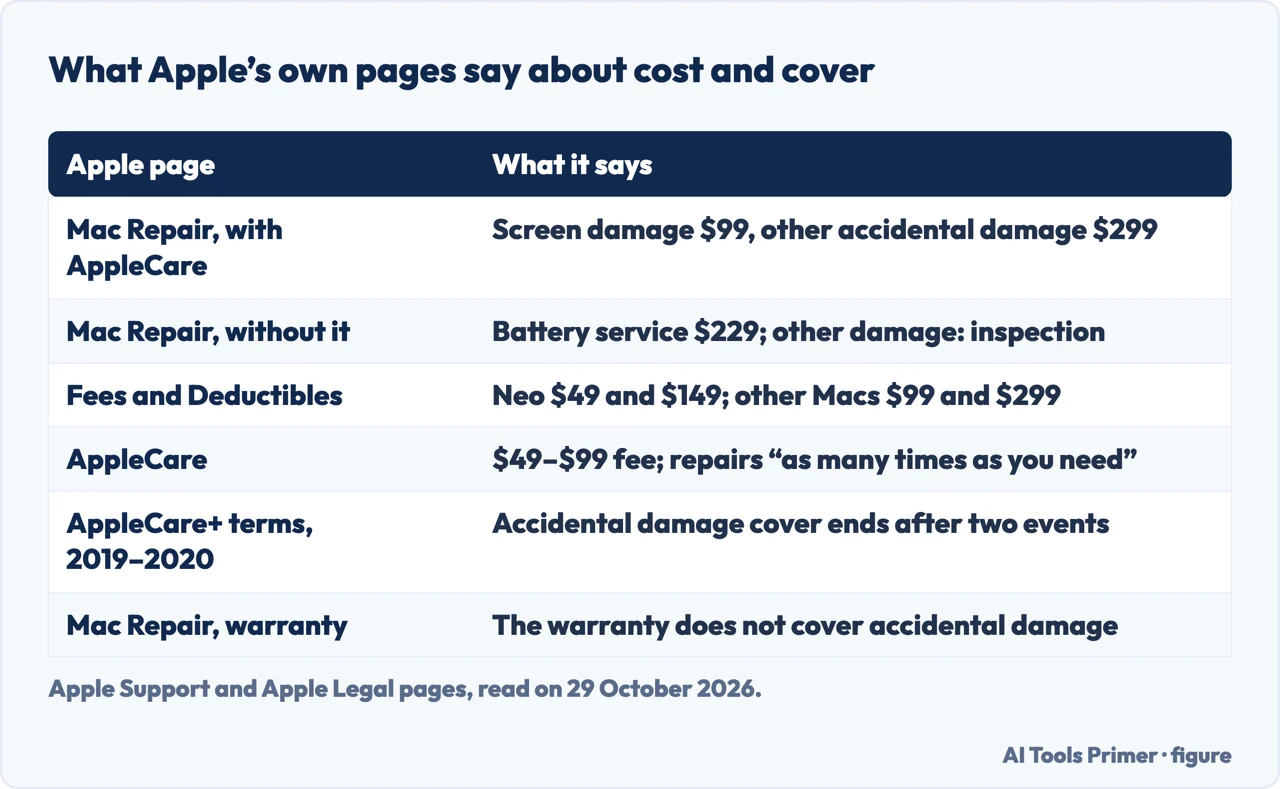
Apple’s Mac Repair page has two cost blocks. The block for a Mac with an AppleCare plan lists, for a MacBook Pro, Screen damage $99, External enclosure damage $99, Other accidental damage $299 and Battery service $0. The block for a Mac without a plan lists Battery service $229 and a dash against Other damage, with a note that Apple needs to inspect the product to give a personalised estimate. The page says estimated fees are for out-of-warranty service and may be subject to tax, and that Apple Authorized Service Providers can set their own fees. For service covered by an AppleCare plan, it says the fee is the same at Apple and all Apple Authorized Service Providers. The text we saved also carried a “Pricing failed to load” notice in each block, and we did not see the per-model figures load in a browser.
Apple’s Fees and Deductibles page, for AppleCare+, AppleCare+ with Theft and Loss and AppleCare One, gives for the Mac a split by model: on a MacBook Neo $49 for screen or enclosure accidental damage and $149 for other accidental damage, and on all other Mac models and Apple Display $99 and $299. Apple’s AppleCare page gives the same ranges as $49–$99 for damaged screens or external enclosures and $149–$299 for other accidents such as liquid damage. It says screens and enclosures can be repaired “as many times as you need”, and that a plan is started when buying a new product or, for 60 days after a new Apple purchase, from the Settings app.
The warranty is separate. Apple’s page says the Apple Limited Warranty covers manufacturing issues for one year and that it does not cover accidental damage; where a situation is not covered and consumer law does not apply, it says there is a cost for repairs through Apple. Repairs are guaranteed for 90 days or the remainder of the warranty, whichever is longer, and service is in person at a Genius Bar or an Apple Authorized Service Provider, or by mail with a prepaid box.
The contract is where the question of fault sits. We read an archived version of the AppleCare+ terms for Mac, dated December 10, 2019 to September 14, 2020, which points newer plans to a different page. It defines accidental damage from handling as damage from an unexpected and unintentional external event, giving drops and liquid spills as examples. A screen-only or enclosure-only event is Tier 1 at US$99 and all other damage is Tier 2 at US$299, and Tier 1 applies only if there is no other damage that would prevent Apple from repairing the display; otherwise the Tier 2 fee is charged. The exclusions include normal wear and cosmetic damage that does not affect function, excessive or catastrophic damage such as a crushed or bent product, reckless, abusive or willful conduct, a Mac opened or repaired by anyone other than Apple or an authorized representative, and, for a plan bought after the product, pre-existing conditions.
That version also says accident cover ends after two service events, while the current AppleCare page says “as many times as you need”. The two do not match, and because we read only the archived contract we cannot say which wording applies to a plan bought today. The Apple pages we read do not say how a crack with no visible impact is classified. The Mac Observer says Apple does not offer a general repair program for accidental internal display cracks; we did not find that confirmed on the Apple pages we read.
Repair routes, and the prices people report
MacbookFix lists three routes for a UK customer: Apple or an authorised service provider, an independent shop that replaces the whole display assembly, and an independent shop that replaces only the LCD panel, which is the service it sells. It says Apple’s service generally replaces the full top case, and that on a recent 14- or 16-inch MacBook Pro the bill “can run into four figures”. The article points to live pricing on each model’s page. It offers a 12-month warranty and a No Fix, No Fee policy.
The sources disagree on what is replaced. Two iFixit answers (2020 and 2023) say the whole display assembly has to be replaced, and The Mac Observer says it usually does, while MacbookFix says that on most modern models only the LCD needs to be. A third iFixit answer, on a 2017 MacBook Air, says the LCD alone can be replaced, but warns that the job is difficult. These are a repair shop, a news site and community contributors, not a neutral source on a given model, and we cannot say which is right for a particular MacBook.
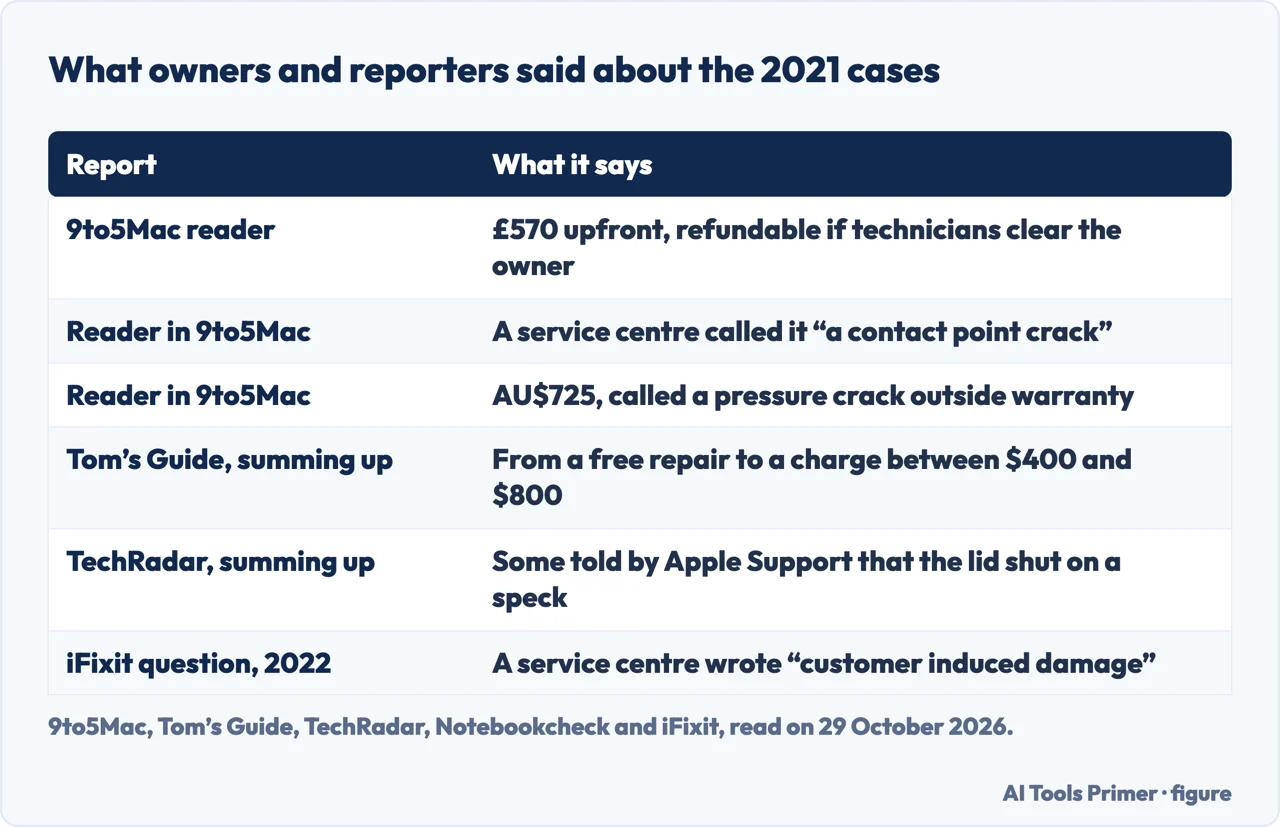
The amounts below come from owners and reporters in different years and countries, and should not be added together or averaged. A 9to5Mac reader paid £570 upfront in 2021, with Tom’s Guide adding that a refund would be issued, as it understood it, if technicians decided he had done nothing to cause the damage. Notebookcheck says Apple in Australia quoted AU$725 for a display replacement. Tom’s Guide sums up the responses as running from a free repair to a charge between $400 and $800. An Apple Community post about an M3 MacBook that cracked on a desk mentions $750 for a new screen. The table above, after the section on causes, sets the 2021 reports side by side. In those reports the charge came before the technicians’ finding: the 9to5Mac reader paid £570 upfront while Apple said the technicians would decide whether he had caused the damage, and Tom’s Guide wrote that it was not clear how that would be ascertained. Before agreeing to a repair it is reasonable to ask, in writing, what the fee is and what happens to it if the finding goes your way; that is our suggestion, not something the sources prescribe.
In an Apple Community thread of 23 May 2024 titled “Internally cracked screen”, the asker had a crack at the bottom right with the glass intact and asked whether it was worth fixing. One member replied that Apple can give the cost because the price is not reported online, and that, if it is the first Apple silicon MacBook Air, the repair cost should be compared with the price of a newer model (for an Intel model the member would upgrade). That is a member’s opinion, in line with the dash Apple’s page shows for other damage. For liquid as a cause rather than pressure, see our page on a wet LCD screen.
What we did not use
We tested nothing on a MacBook. We used one repair shop, MacbookFix, and the forum threads named in the sources below. Apple’s display repair page concerns Apple displays and not the MacBook, so we left it out. We read the AppleCare+ terms for Mac only in an archived version, and not the terms in force for a plan bought today. The Mac Observer’s repair menu path was not checked against Apple’s site.
Where to start
Four ways in.
- “What is an internal crack?”
- What “internally cracked” means on a MacBook — what
- “Is it the screen?”
- Check it is the screen, then protect the data — check
- “What does Apple charge?”
- What Apple charges and what it covers — apple
- “Who pays for the repair?”
- Repair routes, and the prices people report — routes
When the screen takes a squeeze
A closed lid, a liquid and lines that begin at the bottom.
Other MacBook screen faults
Tints and marks that have a cheaper explanation first.
Questions people also ask
How much does it cost to fix an internal MacBook screen?
Apple’s Mac Repair page lists Screen damage at $99 with AppleCare. Without a plan, the text we read shows a dash for other damage and says Apple must inspect the product. MacbookFix says a recent 14- or 16-inch MacBook Pro bill at Apple can run into four figures; 2021 owners reported £570, AU$725 and $400 to $800.
Can a cracked screen on a MacBook be fixed?
Two iFixit answers (2020 and 2023) say the whole display assembly has to be replaced, and The Mac Observer says it usually does. MacbookFix says that on most modern models the LCD alone can be replaced, which is the service it sells; an iFixit answer on a 2017 MacBook Air also mentions replacing only the LCD, a difficult job.
Can I still use my MacBook with a cracked screen?
MacbookFix says short-term use is possible, especially with an external monitor, but that internal LCD damage tends to spread. The Mac Observer says not to press on the damaged area and to back up, because a cracked internal display can worsen over time.
Are MacBook screens prone to cracking?
The pages we read do not give a rate. 9to5Mac reported multiple cases on M1 MacBook Air and MacBook Pro screens in 2021, Tom’s Guide noted that the accounts were anonymous, and Apple had not commented in the pieces we read. MacbookFix says the LCD inside is thin and gives way first under pressure.
Not covered here. We tested nothing on a MacBook. The statements come from Apple Support and Apple Legal pages (including an archived AppleCare+ contract for Mac), a MacbookFix article, The Mac Observer, four iFixit threads, an Apple Community thread, and 9to5Mac, Tom’s Guide, TechRadar and Notebookcheck reports, all read on 29 October 2026.
The search volume and difficulty behind this page come from a Semrush reading of 29 August 2026, older than the 60 days the site normally allows.
Sources
- Apple Support — Mac Repair & Service — support.apple.com, read 29 October 2026.
- Apple Legal — AppleCare Fees and Deductibles — www.apple.com, read 29 October 2026.
- Apple — AppleCare — www.apple.com, read 29 October 2026.
- Apple Legal — AppleCare+ for Mac (archived version, 2019–2020) — www.apple.com, read 29 October 2026.
- MacbookFix — MacBook screen broken but no crack visible? — macbookfix.co.uk, read 29 October 2026.
- The Mac Observer — Internal Crack on MacBook Screen: What To Do — www.macobserver.com, read 29 October 2026.
- iFixit Answers — colored lines caused by pressure (MacBook Pro 13” Retina, late 2012) — www.ifixit.com, read 29 October 2026.
- iFixit Answers — vertical lines that move when opening and closing (MacBook Pro 14” 2021) — www.ifixit.com, read 29 October 2026.
- iFixit Answers — Help diagnosing broken display assembly (MacBook Air 13” 2017) — www.ifixit.com, read 29 October 2026.
- iFixit Answers — MacBook Pro 14 2021, customer induced damage — www.ifixit.com, read 29 October 2026.
- Apple Community — Internally cracked screen (thread of 23 May 2024) — discussions.apple.com, read 29 October 2026.
- 9to5Mac — Reports of M1 MacBook screen cracks occurring during normal usage — 9to5mac.com, read 29 October 2026.
- Tom’s Guide — M1 MacBook screens are reportedly cracking without warning — www.tomsguide.com, read 29 October 2026.
- TechRadar — Did cracks appear on your M1 MacBook screen for no reason? — www.techradar.com, read 29 October 2026.
- Notebookcheck — M1 MacBook owners complain that their screens cracked — www.notebookcheck.net, read 29 October 2026.
Written by Alberto Gulotta
Founder and editor of AI Tools Primer, writing from Palermo, Italy. Thirty-five years of taking computers apart, starting with a Commodore 64 — the long version is on the about page.
Something wrong on this page? Write to aitoolsprimer@gmail.com and it gets fixed.
Written on 29 October 2026.
Independence and limits
No affiliate links and no paid placements anywhere on this site. Nobody pays to appear here, and no company has seen this page before you did.
This is general information, not professional advice. Where a page touches money, health, safety or the law, it names its source and the date it was read — and your situation may still differ. See the privacy page and the cookie policy.