
Video · guide
Best computer for video editing: the specs, side by side
By Alberto Gulotta · Updated · 14 min read
The best computer for video editing is not a model on the pages we read, which give figures for parts instead. Adobe, Apple, Blackmagic Design, Avid and Lenovo list processor, memory, graphics and storage numbers that differ from page to page, and Adobe’s own two pages differ too. Here they are side by side, with dates.
| Question | Answer | Where it comes from |
|---|---|---|
| Does a page name a computer? | The pages we read give figures for parts, not a model to buy | All six pages |
| How many processor cores? | Avid and Lenovo say 6; Adobe’s recommendations page says at least eight | Avid, Lenovo, Adobe |
| How much memory? | From 8 GB on Adobe, Apple and Blackmagic’s Mac minimums to a 32 GB minimum on Avid’s page | Adobe, Apple, Blackmagic, Avid |
| How much graphics memory? | 4 GB on four pages, 6 GB on Lenovo’s, 8 GB recommended on Adobe’s requirements | Adobe, Blackmagic, Avid, Lenovo |
| What storage? | A fast SSD, with Adobe adding a second fast drive for media | Adobe, Avid, Lenovo |
| How old are the pages? | Adobe 7 October 2026 and 7 January 2026, Blackmagic 5 November 2025, Avid 2 December 2020, Apple and Lenovo show no date | Dates on each page |
Why a spec sheet is not a diagnosis
The pages we read are thresholds. Adobe’s requirements page says its minimum specifications are for editing HD video and its recommended specifications are for HD, 4K or higher resolutions, and it applies them to Premiere versions 26.0 to 26.5.2. Blackmagic Design’s release message lists minimum system requirements for DaVinci Resolve Studio 20.2.3 and no recommended column. Apple’s page lists what Final Cut Pro needs to run and what it recommends. Avid and Lenovo each give a short list of parts in plain words. These figures do not say which part is slowing a particular edit, and the pages we read do not mention that. We name no model on this page.
We read the two guides that explain the parts, Avid’s and Lenovo’s, and added the pages that the software companies publish for their own programs. Avid’s article is dated 2 December 2020, Lenovo sells computers, and Lenovo’s page carries no date, so the comparison below says which is which each time.
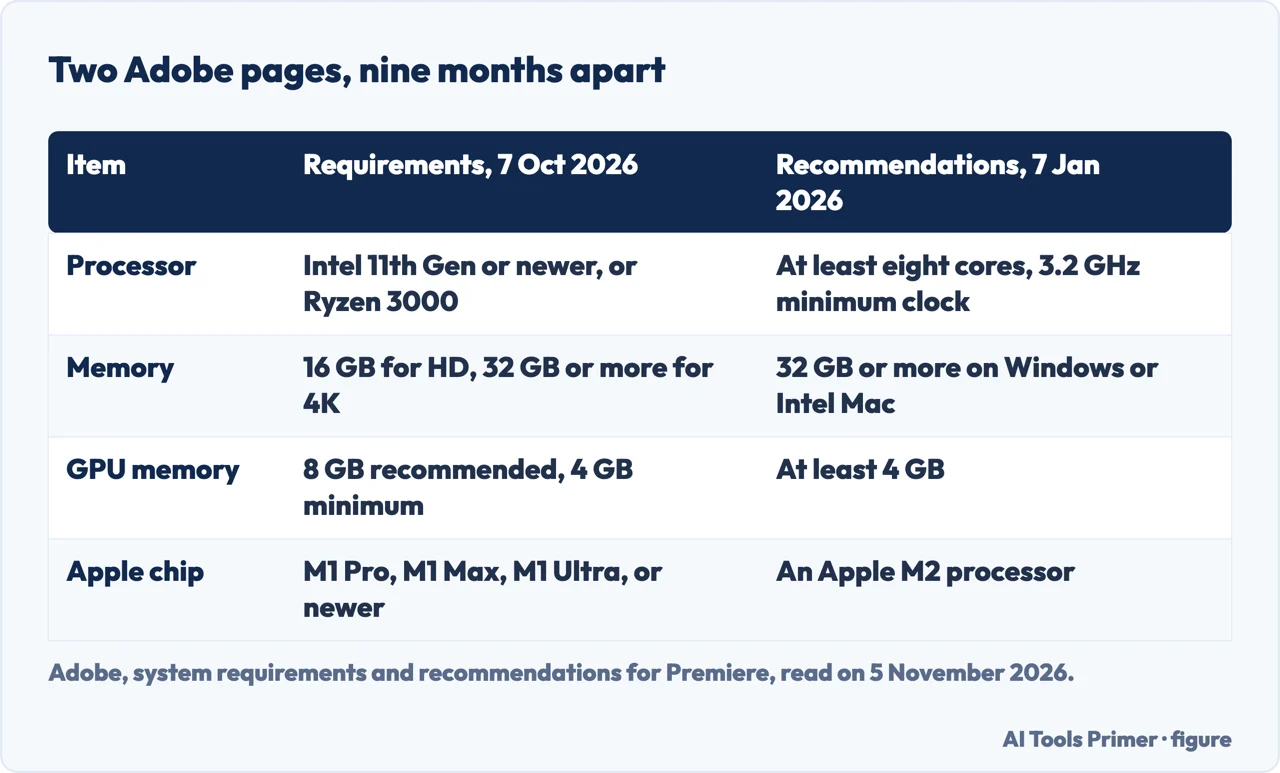
Even one company can say two things. Adobe has a requirements page, updated on 7 October 2026, and a page of processor, memory and GPU recommendations, updated on 7 January 2026. They do not give the same figures, and the pages we read do not say which one takes precedence. The newer of the two is the requirements page.
The processor: cores, clock speed and Quick Sync
Adobe’s requirements page starts with the processor. On Windows the minimum is an Intel 6th Generation or newer CPU, or an AMD Ryzen 1000 Series or newer, with AVX2 support; the recommended specification is an Intel 11th Gen or newer CPU with Quick Sync, or a Ryzen 3000 Series or Threadripper 3000 series or newer. On a Mac the minimum is an Intel 8th Generation or newer CPU with AVX2, and the recommended specification is Apple silicon M1 Pro, M1 Max, M1 Ultra or newer. For Windows on Arm the page names a Qualcomm Snapdragon X series processor.
Adobe’s recommendations page counts instead of naming generations. It asks for a CPU with a minimum clock speed of 3.2 GHz and at least eight cores, which it says lets Premiere run at 93–98% efficiency, and it names an Intel Core i7 or i9, an AMD equivalent or an Apple M2 processor. It adds that Intel Core i7/i9 or the latest mobile Xeon processors offer Quick Sync technology, which accelerates the decoding or playback of H.264 and HEVC. For RED, Sony Venice, ARRI or XDCam HD formats it points to desktop Intel Xeon CPUs without Quick Sync.
Avid’s 2020 article says a six-core processor is suitable for most video work and that one running at 3.0 GHz or faster will likely match the performance you need. Lenovo, which sells computers, recommends a minimum of 6 cores and calls 8 or more ideal for professional workloads. So the pages differ on the count, six on Avid’s and Lenovo’s and eight on Adobe’s recommendations, and on the clock speed, 3.0 GHz on Avid’s and 3.2 GHz on Adobe’s.
The requirements sentence on Apple’s page for Final Cut Pro names macOS, memory, a Metal card for Intel-based Macs and disk space, and adds that some features need Apple silicon. Visual Search and Transcript Search each require a Mac with Apple silicon and macOS 15.6 or later, and are available only in U.S. English.
Memory: from 8 GB to 32 GB, depending on the page
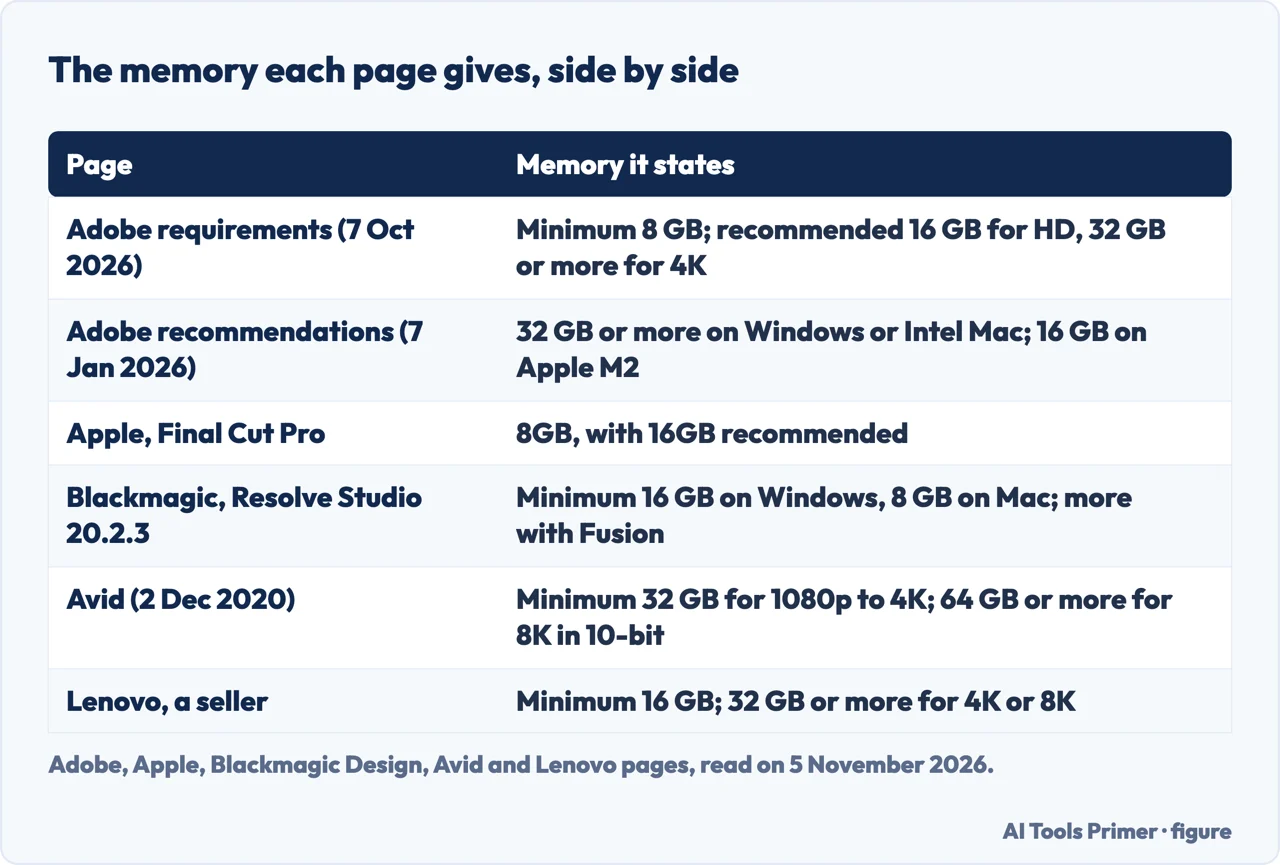
Memory is where the pages differ most. Adobe’s requirements give 8 GB of RAM as the minimum (16 GB on Windows on Arm) and recommend 16 GB for HD media and 32 GB or more for 4K and higher; for a Mac with Apple silicon the recommendation is 16 GB of unified memory. Adobe’s January recommendations page says 32 GB of RAM or more for Windows or Intel-based Mac systems and 16 GB for Apple M2 systems. Apple says Final Cut Pro for Mac requires 8GB of memory, with 16GB recommended, and Compressor requires 8GB. Compressor’s Apple Immersive Video processing requires 32GB, with 64GB recommended.
Blackmagic’s message for Resolve Studio 20.2.3 gives four minimums. On macOS it is 8 GB of system memory, or 16 GB when using Fusion. On Windows it is 16 GB, or 32 GB when using Fusion. Windows for Arm needs 16 GB, or 32 GB for 4K or when using Fusion, and Linux needs 32 GB. The message was posted on 5 November 2025, a year before we read it, and we did not check a newer release message, so the figures are those of that release.
Avid is higher still. Its 2020 article says to aim for a minimum of 32 GB of RAM for 1080p to 4K footage, and says 8K footage in 10-bit may need 64 GB or more. It gives a reason: the main use of RAM in video editing is caching preview files for playback, and a larger frame size takes more space. It also says to look for DDR4 memory, which it calls the highest-performing RAM available when the article was published, so that detail belongs to 2020. Lenovo recommends a minimum of 16 GB, with 32 GB or more for 4K or 8K footage.
The graphics card and its memory: 4, 6 or 8 GB
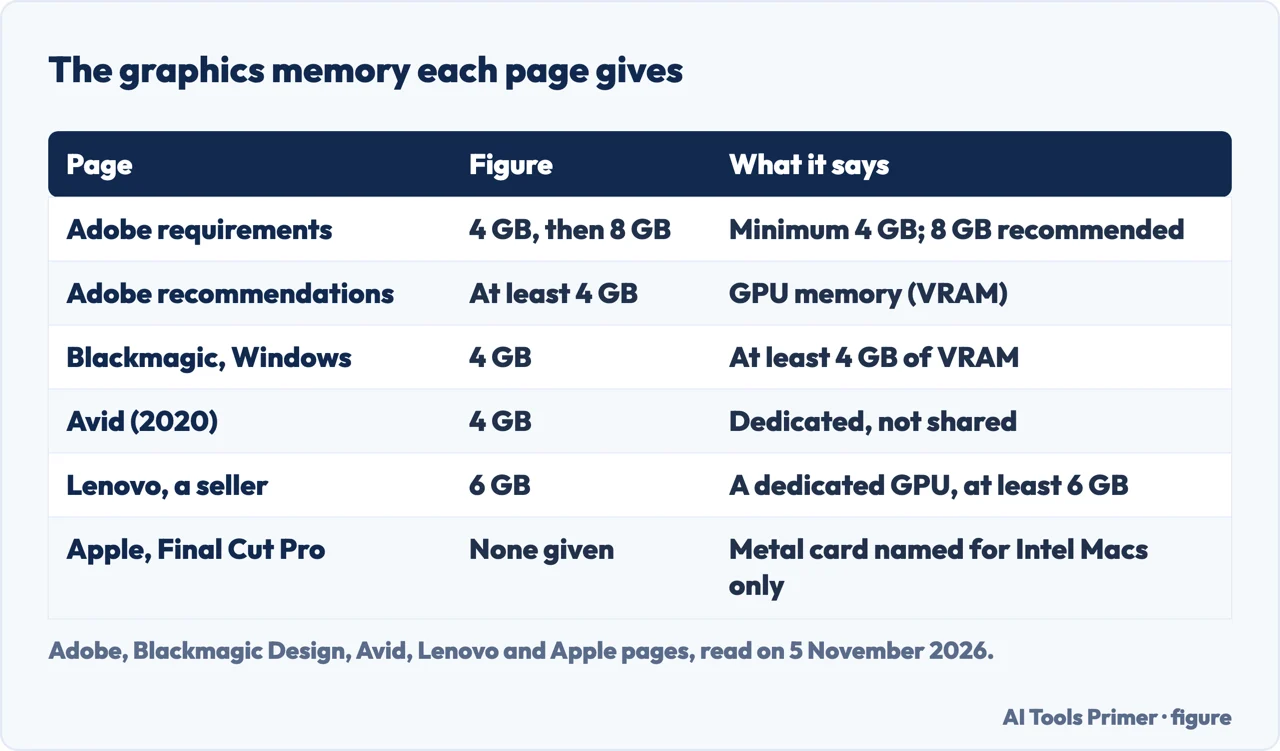
Four pages give 4 GB of graphics memory. Adobe’s requirements call for an NVIDIA GPU of the Maxwell generation (2014) or newer with at least 4GB of GPU memory, or an Intel or AMD GPU with at least 4GB, and on a Mac with Apple silicon 8GB of unified memory; Intel Macs need integrated graphics or an AMD discrete card with 4GB. The same page recommends 8 GB of GPU memory on Windows and 16 GB of unified memory on Apple silicon. Adobe’s recommendations page says a GPU with at least 4 GB of memory and adds that multiple GPUs, including eGPUs, speed up export and rendering. Blackmagic lists an integrated GPU or a discrete GPU with at least 4 GB of VRAM on Windows, and a discrete GPU with at least 4 GB on Linux. Avid says a midrange AMD or Nvidia unit with at least 4 GB of VRAM will be enough for most video editing, and that the memory should be dedicated, not shared with the CPU.
Lenovo, a seller, says to opt for at least 6 GB of VRAM and calls a dedicated GPU essential. Apple names a Metal-capable graphics card for Intel-based Macs only, and gives no graphics figure for Apple silicon on the page we read.
The pages add conditions beyond the size. Blackmagic asks for a GPU that supports OpenCL 1.2 or CUDA 12.8, official AMD or Intel drivers, and an NVIDIA Studio driver 570.65 or newer on Windows. Adobe says outdated graphics drivers often cause performance issues, including Intel integrated ones. Blackmagic also notes that the AI features Magic Mask 2, Depth Map and Super Scale show a vastly improved performance on Windows with modern Intel platforms, with a compatible Intel GPU that supports OpenVINO and a recent Intel driver. That note is about speed, not a minimum, and it comes from the same year-old message. Avid says faster GPUs do not provide higher quality, only faster render times.
Storage and screen
Adobe asks for 8 GB of available disk space to install Premiere, which cannot be installed on removable flash storage. Its recommended specification is a fast internal SSD for the app and its cache plus an additional high-speed drive for media. Avid’s 2020 article splits it differently: footage lives on external drives, which it says keeps media apart from the operating system and adds protection if the computer fails, while the internal drive, it says, is ideally an SSD of at least 1 TB to 2 TB. Lenovo says to aim for at least 1 TB of SSD storage and to consider external drives for more space. Apple lists 7.2GB of available disk space for Final Cut Pro and 1.2GB for Compressor, and recommends a storage read speed of 2GB/s or faster for Apple Immersive Video processing.
For the screen, Adobe’s minimum is 1920x1080 pixels, and its recommendation is 1920x1080 or more, with DisplayHDR 1000 for HDR workflows. Lenovo, a seller, says to look for 4K or higher, wide color gamut support and IPS panels, and says a high refresh rate is not essential. For a shared network, Adobe lists 1 Gigabit Ethernet for HD only and 10 Gigabit Ethernet for 4K shared network workflows.
Where the pages disagree, and what each one covers
Part of the gap in the minimum memory, graphics memory and core counts above is a difference in what is being asked: Adobe’s minimum is for HD, Avid’s figure is for footage from 1080p to 4K, and Blackmagic’s figures are minimums for a release of one program. The pages do not say how far each difference comes from the footage, the program or the date.
The age of a page matters too. Avid’s article is from December 2020, Blackmagic’s message is from November 2025, and Adobe’s two pages are from 2026. Lenovo’s page carries no date, and Apple’s shows none in the text we read. For the Mac operating system, Apple’s page names macOS 15.6 or later, while Adobe’s and Blackmagic’s name macOS Sonoma (version 14).
The pages we read stop at the figures. Our page on why a computer is slow covers how to tell which cause you have. For the programs these requirements belong to, we have pages on what Premiere Pro costs, on whether DaVinci Resolve is free and on AI editing assistants.
Where to start
Four ways in.
- “How many cores do I need?”
- The processor: cores, clock speed and Quick Sync — processor
- “How much RAM?”
- Memory: from 8 GB to 32 GB, depending on the page — memory
- “What about the graphics card?”
- The graphics card and its memory: 4, 6 or 8 GB — graphics
- “Why do the pages disagree?”
- Where the pages disagree, and what each one covers — disagree
The programs behind the numbers
Prices, free versions and AI tools.
When the computer is the problem
A slow machine, more memory and graphics drivers.
Questions people also ask
What kind of PC is best for video editing?
The pages we read do not name a kind of PC, only figures. Adobe’s recommendations say at least eight cores at 3.2 GHz, 32 GB of RAM on Windows and a GPU with at least 4 GB. Lenovo, a seller, says 6 cores, 16 GB, 6 GB of VRAM and a 1 TB SSD.
What computer is best for video editing?
Avid’s 2020 article says it depends on how the computer will be used, how tight the deadlines are and the budget. The pages we read rank no computers. They give parts: a multicore processor, memory, a graphics card with its own memory and a fast SSD.
What is the best PC for video editing?
Adobe’s requirements page gives, for Windows, an Intel 11th Gen or newer CPU with Quick Sync or a Ryzen 3000 or newer, 16 GB of RAM for HD and 32 GB or more for 4K, 8 GB of GPU memory and a fast internal SSD. It names no model.
Do you need a powerful PC to edit videos?
Avid’s article, from 2020, says any modern computer can edit video and the key difference is how quickly and efficiently it does so. Adobe’s minimum for HD is 8 GB of RAM and a GPU with 4 GB; Lenovo, a seller, says 16 GB is sufficient for basic editing and 32 GB or more for 4K or 8K work.
Not covered here. We tested nothing on a computer and recommend no model. The statements come from two Adobe pages, Apple’s page for Final Cut Pro, a release message on Blackmagic Design’s forum, an Avid article and a Lenovo guide, all read on 5 November 2026.
The search volume and difficulty behind this page come from an Ubersuggest reading of 5 November 2026 (United States), which gives search volume and its own SEO difficulty score, not Semrush’s. We have not yet confirmed this reading with Semrush.
Sources
- Adobe — Adobe Premiere technical requirements (updated 7 October 2026) — helpx.adobe.com, read 5 November 2026.
- Adobe — Processor, memory, and GPU recommendations (updated 7 January 2026) — helpx.adobe.com, read 5 November 2026.
- Blackmagic Design forum — Release of DaVinci Resolve 20.2.3 (5 November 2025) — forum.blackmagicdesign.com, read 5 November 2026.
- Apple — Final Cut Pro, specs — www.apple.com, read 5 November 2026.
- Avid — What’s the Best Computer for Video Editing? (2 December 2020) — www.avid.com, read 5 November 2026.
- Lenovo — How to Choose Computers for Video Editing and Production — www.lenovo.com, read 5 November 2026.
Written by Alberto Gulotta
Founder and editor of AI Tools Primer, writing from Palermo, Italy. Thirty-five years of taking computers apart, starting with a Commodore 64 — the long version is on the about page.
Something wrong on this page? Write to aitoolsprimer@gmail.com and it gets fixed.
Written on 6 November 2026.
Independence and limits
No affiliate links and no paid placements anywhere on this site. Nobody pays to appear here, and no company has seen this page before you did.
This is general information, not professional advice. Where a page touches money, health, safety or the law, it names its source and the date it was read — and your situation may still differ. See the privacy page and the cookie policy.