
VPN · guide
What is split tunneling? What it sends outside the VPN
By Alberto Gulotta · Updated · 20 min read
What is split tunneling? It sends part of a device's traffic through a VPN and lets the rest go straight to the internet. Security.org, Windscribe and Wikipedia describe it that way, while Security.org and Windscribe weigh its cost differently. Mullvad’s guide adds where it breaks, and Microsoft Learn gives the word a second meaning.
| Question | Answer | Where it comes from |
|---|---|---|
| What does it do? | Sends part of the traffic through the VPN tunnel and lets the rest go straight to the internet | Security.org, Windscribe, Wikipedia |
| Which way round can it be set? | Exclude chosen apps or sites from the VPN, or include only chosen ones (the inverse mode) | Security.org, Windscribe, Wikipedia |
| What does it cost? | Excluded traffic is outside the VPN: the internet provider can see it and websites see your real IP address | Security.org, Windscribe, Mullvad |
| Does it work on every system? | Windows and Android have the fullest support; iOS and iPadOS are ruled out by Windscribe and Mullvad | Security.org, Windscribe, Mullvad |
| Does Microsoft mean the same thing? | Not quite: Microsoft Learn says the term is defined differently for the Windows VPN client | Microsoft Learn |
What the word means, and the two directions
Wikipedia opens with a definition from networking: split tunneling allows a user to reach distinct security domains at the same time, over the same network connection or different ones. It adds that the usual way to set it up is a remote-access VPN client, which lets a user be on a nearby wireless network, on an off-site corporate network and on the open internet together. The article carries a notice, dated March 2020, that it needs more citations, and its list of advantages is marked “citation needed”, so we take the definition and the terms from it and leave the claims about benefits to the pages that explain them.
Security.org and Windscribe describe the same thing for someone at home. Security.org says split tunneling divides internet traffic into two pathways: one runs through the encrypted VPN tunnel, and the other connects directly to the internet, bypassing the VPN. Windscribe, which sells a VPN, calls them Path 1, the encrypted tunnel, and Path 2, the direct connection, and says both run at the same time. It adds that the VPN app changes the system’s routing table with rules that decide which path each packet takes.
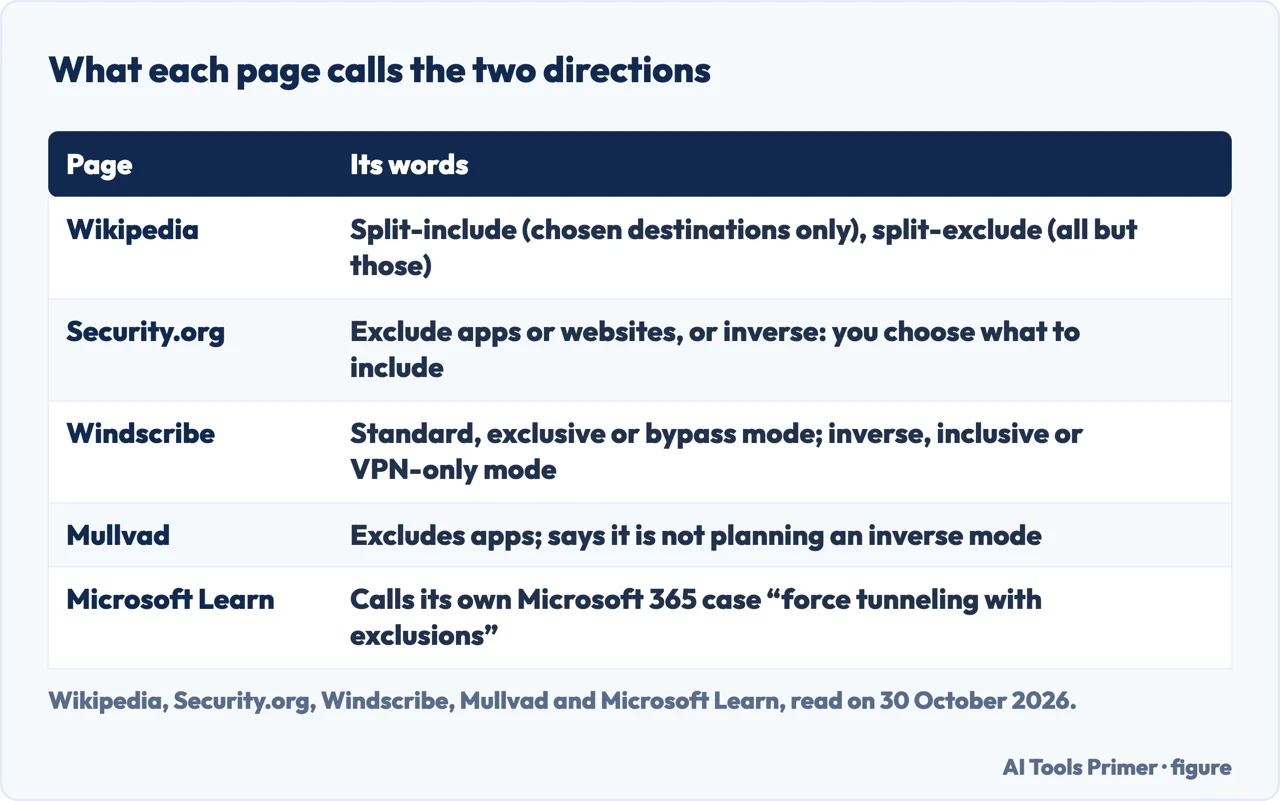
The pages name the two directions in different ways. Wikipedia calls a tunnel that carries only a chosen set of destinations a split-include tunnel, and one that carries everything except a chosen set a split-exclude tunnel. Security.org says most of the VPNs it tested offer three settings: exclude specific apps, exclude certain websites, or use inverse split tunneling, where you choose what to include and everything else connects directly. Windscribe calls the ordinary kind standard, exclusive, blacklist or bypass mode, and the inverse kind inclusive, whitelist or VPN-only mode.
Wikipedia uses “inverse” for a tunnel that takes every datagram except the destinations the VPN gateway explicitly allows out, which it says keeps control with a central policy device. That starts from the other end than the inverse mode Security.org and Windscribe describe, where the user picks what enters the tunnel.
Windscribe also lists app-based, URL-based, policy-based and route-based types, the policy-based one set by an administrator and aimed at businesses. Portnox, a seller of access-control software, divides the field into static split tunneling, where apps, services or destination addresses are fixed in advance, and dynamic, where the decision is made at the time from criteria such as the type of data. Wikipedia’s dynamic is a different thing: addresses worked out at runtime from a list of hostname rules.
Microsoft uses the term for something else. A Microsoft Learn page on optimizing Microsoft 365 traffic for the Windows VPN client calls its approach force tunneling with exclusions, and says that approach is sometimes “confusingly called split tunnels” by other vendors and in some online documentation. For the Windows VPN client, the page says, split tunneling is defined differently, and it points to a separate article on VPN routing decisions, which we did not open. Two other Microsoft Learn pages use the term in its own sense: the device tunnel page says a device tunnel does not support force tunnel and must be configured as split tunnel, and the Always On VPN overview says exclusion routes only work in a split tunnel setup and that routing policies can be set per application. In a Windows profile the choice is written as ForceTunnel or SplitTunnel.
Why people switch it on
Security.org lists four examples. Streaming services use your IP address to decide your region, so letting them bypass the tunnel keeps the shows available where you are, and setting one to use the tunnel does the opposite and changes its region. Local services such as weather and news also read your location from the IP address. Some banking apps block VPN addresses or addresses from outside their service area. And on a closed-off network such as a work network, a local printer or a NAS drive, split tunneling lets local traffic stay local. Security.org says it finds this valuable for remote workers who need company resources and want privacy for everything else.
Windscribe describes the last case from the other side: with the VPN on, the device is treated as if it were on a separate network, so printers disappear, smart home devices go offline, and Chromecast, AirPlay, file sharing and NAS drives stop working. Its fix is to add the printer’s address to the exclusion list, or a whole local range such as 192.168.x.x or 10.0.x.x. Mullvad’s blog, in a 2021 post that carries a notice saying it is five years old and may be out of date, names three uses: gaming, where playing outside the tunnel may give a more direct route and lower ping times; banking, because some banks reject VPN connections or lock an account when they detect one; and streaming, because providers offer regional catalogs and reject VPN connections. For browser-based banking it recommends a dedicated second browser configured to stay permanently outside the tunnel.
The business case is about load. Wikipedia lists alleviating bottlenecks and conserving bandwidth, again marked “citation needed”. Portnox says less traffic on the VPN servers can mean better performance and lower costs. Fortinet, which also sells security products, says many organizations have bandwidth restrictions and that encrypting and carrying everything through a distant server can cause performance problems. Microsoft’s page gives the example of Microsoft 365: it says to exclude the address ranges in the “Optimize” categories so that traffic goes directly instead of looping through the organization’s network and back out.
Speed is one of the reasons the pages give, and the numbers need care. Security.org says that when it tests VPN speed, a drop below 40 percent counts as pretty good. Windscribe says in one place that a VPN can reduce speed by 10 to 40 percent, and in its FAQ that apps routed through the VPN see the normal 10 to 30 percent reduction. Neither page gives a measurement of what an excluded app gains. Security.org states that the purpose is not to raise security but to reach apps, sites and services at normal speed, and Windscribe closes by calling split tunneling “best of both worlds”.
What leaves the tunnel
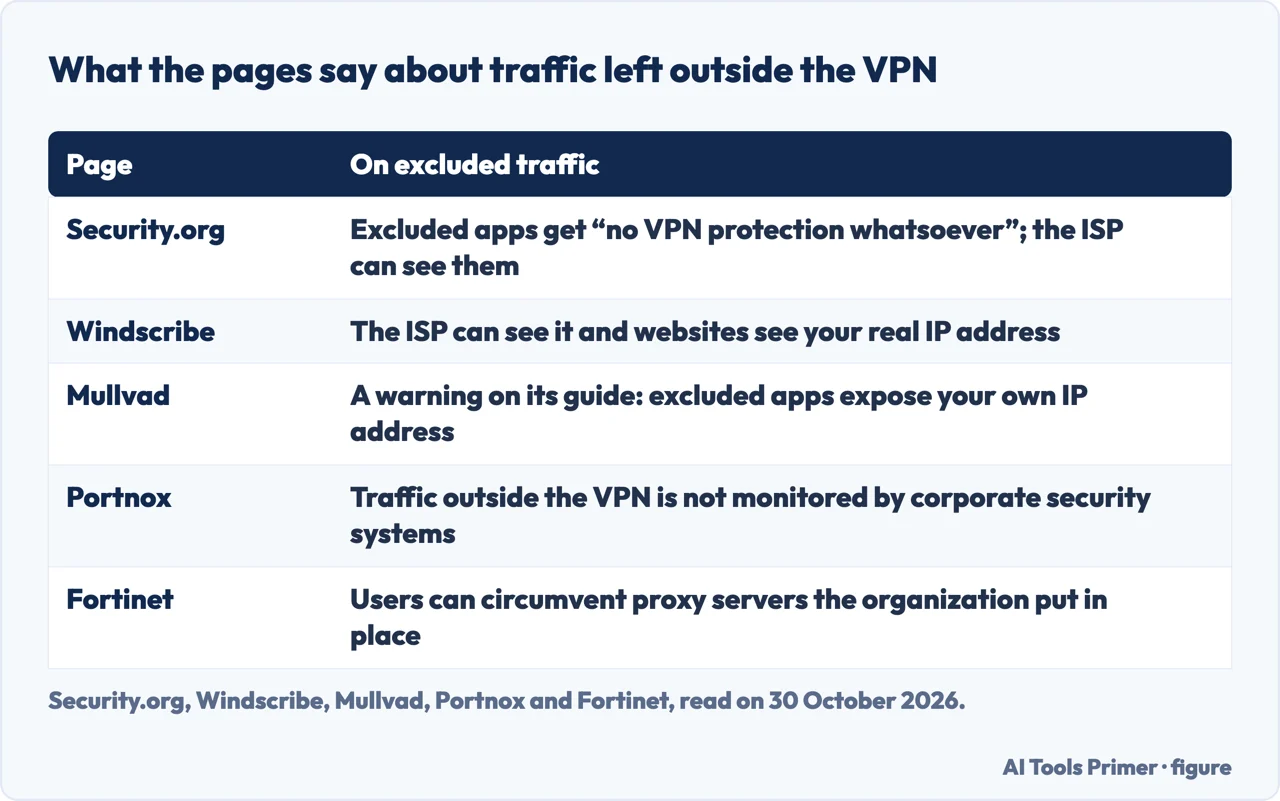
The pages that sell VPNs and the one that reviews them agree on the cost. Security.org says excluded apps get “no VPN protection whatsoever”, and that traffic routed outside the VPN is visible to the internet provider and potentially open to interception. Windscribe says that without the tunnel the provider can see the traffic and websites can detect your real IP address, and gives the example that excluding Netflix lets the provider see you are streaming it. Windscribe also says split tunneling is less secure than sending everything through the VPN. Mullvad’s guide puts a warning at the top: the traffic of excluded applications does not go through the VPN, and your own IP address is exposed.
They weigh it differently. Security.org ends by saying split tunneling is not always necessary and has no direct effect on privacy, and advises choosing exclusions wisely. Windscribe says it is safe when used correctly with a trusted provider. On banking the Windscribe page speaks in two voices: its use-case section says a banking connection is already encrypted with HTTPS, so excluding it “doesn’t compromise security”, while its safe-use list says to keep banking, email and passwords routed through the VPN, and its FAQ lists financial transaction apps among those never to exclude.
DNS is a separate matter. Mullvad’s guide says an excluded app still uses the DNS server on the Mullvad server you are connected to. Its two remedies are a DNS-over-HTTPS service in the web browser, or a custom DNS server set in the app, which it notes changes the apps inside the tunnel as well. Its 2021 blog post gives a gaming example: a player in Japan, connected to a server in California, excludes a game, but the game assigns servers by DNS and picks the one nearest the VPN location, so the speed gain is lost. Windscribe mentions DNS in its banking troubleshooting, where it says a bank can still detect a VPN when DNS is routed through it. The Security.org article we read does not mention DNS.
For employers the worry is oversight. Wikipedia lists potentially bypassing gateway-level security as a disadvantage. Portnox says traffic that bypasses the VPN is not monitored by corporate security systems, endpoints are more exposed, and some organizations have policies that prohibit split tunneling. Fortinet says users can circumvent the proxy servers and DNS protections an organization has set up, and that if an employee’s system is infected, what it sends to a command-and-control server will not be visible to corporate IT. Windscribe says it lets employees bypass corporate security policies and can lead to compliance violations.
Where it breaks
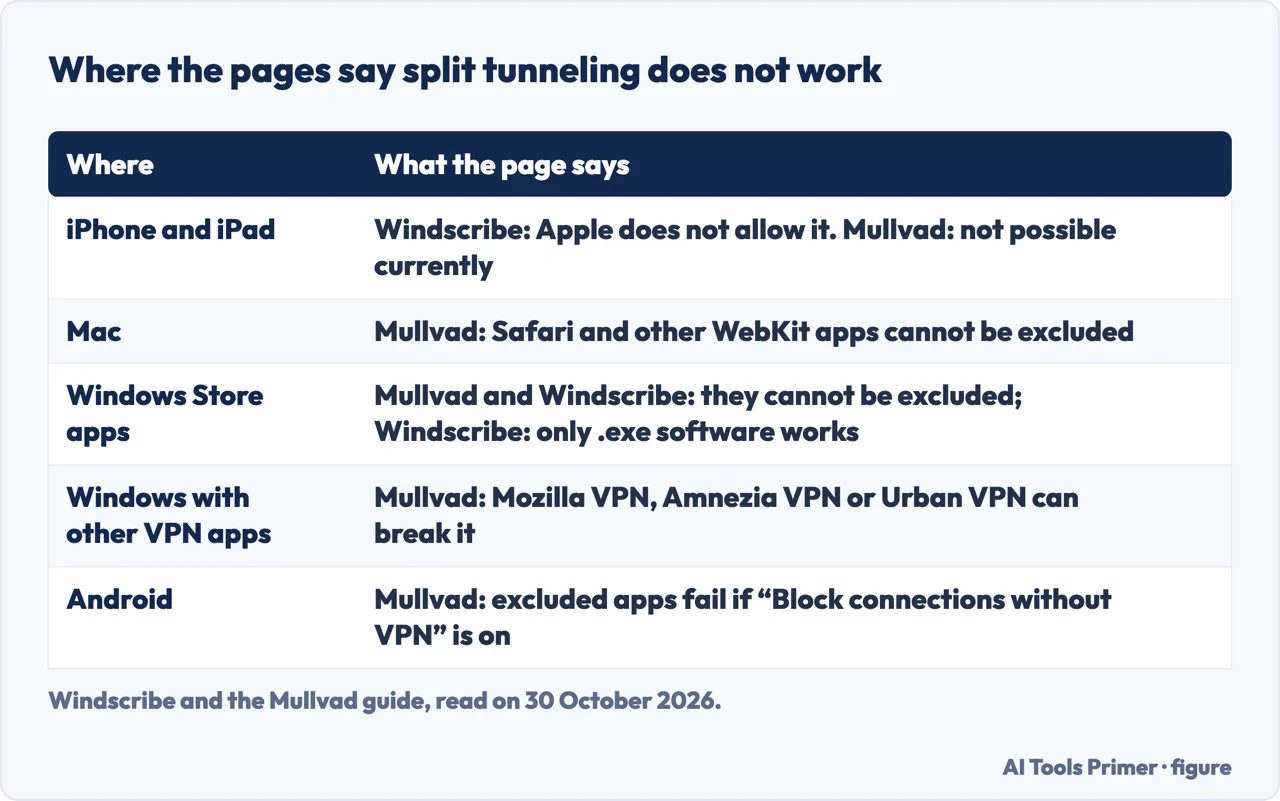
Support depends on the system, and the pages give different pictures. Security.org says Windows and Android offer the most comprehensive support, that Linux users can reach the feature through the command line with more technical knowledge, and that Apple’s ecosystem restricts it because of sandboxing, with macOS facing similar restrictions that some VPNs, Windscribe among them, work around. Windscribe’s FAQ says iOS and iPadOS do not allow VPN apps to implement it at all. Mullvad’s current guide, updated on 20 October 2026, lists its app for Windows, Linux, macOS and Android and says it is not possible on iOS and iPadOS. The two Mullvad blog posts from 2021 list Windows, Android and Linux (the first says it is currently only available there), without macOS, so the guide has added a system since.
On a Mac, Mullvad’s guide says Safari and other apps that use WebKit cannot be excluded, that only outgoing connections are split, and that the Full Disk Access permission can turn itself off. On Windows, Mullvad and Windscribe agree on one limit: Mullvad says you cannot exclude Windows Store apps, and Windscribe says Store apps such as Mail will not work with split tunneling, which it says applies to software run from an .exe file. On Android, Mullvad says excluded apps will not work if the setting Block connections without VPN is on.
Mullvad’s guide also lists apps and games it calls difficult or impossible to exclude, from reports it received: games and apps that use Java, such as Minecraft: Java Edition; games with anti-cheat technology, among them Apex Legends and Helldivers 2; games using Vivox voice chat; Parsec; and Proton Drive. It says Docker works with TCP ports only.
The second kind of break is exclusion spreading further than intended. The Mullvad guide gives these cases: excluding Plex Media Server may exclude the web browser opened from it; with Thunderbird excluded, a link in an email that opens a browser may exclude that browser too; an installer started from inside an excluded browser will likely be excluded; and if Chrome is excluded and a magnet link launches qBittorrent, qBittorrent is excluded and, the guide says, “will leak your IP” even when set to use the Mullvad network interface. The 2021 post explains the mechanism for Steam: the implementation tracks which application started which, so excluding Steam excludes every game started from within it. Windscribe describes the opposite miss, an excluded app that still shows the VPN’s IP address possibly because it uses several processes and the split catches only some.
Other network software can also stop it working. Mullvad’s guide says other VPN apps may interfere with its Windows driver, names Mozilla VPN, Amnezia VPN and Urban VPN, and lists further software to disable or uninstall, among them Proxifier, GoodbyeDPI and Kaspersky, with Tailscale on Linux and AdGuard on a Mac. The 2021 post describes the same collision between kernel drivers, including proxy software and firewalls, and adds a claim about its own design: when splitting stops working this way, “Security is guaranteed” because the traffic that cannot be split is blocked, which it says is in contrast to other implementations it examined. That is Mullvad’s statement about its own product, and we did not test it.
Windscribe’s troubleshooting section adds causes of its own: not disconnecting and reconnecting after a change, choosing the wrong .exe file, a WebRTC leak in a browser, and a firewall conflict. The 2021 post adds that on Windows excluded apps are generally prevented from connecting to local services on a UDP socket, and that on Linux most connections from excluded apps depend on the life of the tunnel, so switching servers or disconnecting breaks them.
How to check yours, and the kill switch
Two of the pages give a test. Mullvad’s guide says to exclude a web browser and open its Connection check, which should say “Not using Mullvad VPN”; on a Mac it adds that the browser should be quit and started again first, and on Linux that some apps show a yellow mark as a reminder to close the app if it is already running. Windscribe says to open an IP address checker from an excluded app and from a protected one: the excluded app should show your real IP address, the protected one the VPN server’s, and if both show the same address something is misconfigured. The Security.org, Portnox and Wikipedia pages we read do not describe a test.
The kill switch is a separate feature, and the pages agree on that. Security.org says split tunneling creates two paths so you choose which apps use which, while a kill switch cuts the device’s internet connection when the VPN connection drops. With both on, it says, the kill switch cuts only apps and websites that are not excluded, and some VPNs do not let the two run together. Windscribe says the same about its own app: if the VPN drops, the kill switch blocks internet access for apps routed through the VPN, while excluded apps may continue to work over the unprotected connection, which it calls expected behavior. It also names its Firewall as its version of a kill switch and says a dropped internet connection under split tunneling can be that Firewall at work. Our page on the VPN kill switch covers what a kill switch blocks and a test of your own.
The pages differ on whether the inverse mode is worth having. Security.org recommends choosing a VPN that offers both standard and inverse split tunneling, says very few offer the inverse kind, and names Private Internet Access as one. Windscribe says its exclusive mode is the safer one, and that inclusive mode fits a clear need to protect just a few apps. Mullvad’s FAQ says it is not planning to add inverse or reverse split tunneling because a VPN should be “used by default and not by exception”.
Names vary too. Security.org says ExpressVPN calls the feature “route list”, NordVPN “app split tunneling” and Surfshark “Bypasser”. That is Security.org’s statement, and we did not check it on those sellers’ pages. Security.org is a review site: its page shows a notice that it may earn compensation from some providers and carries a NordVPN offer. For a plain account of what a VPN is used for, see What is a VPN used for?, and for a VPN set up on a router, VPN router.
Where the pages disagree, and what we did not use
- Safety. Security.org says the purpose is not security and that excluded apps have no VPN protection; Windscribe calls the result the best of both worlds and says an excluded bank connection does not compromise security, then lists banking among the traffic to keep inside.
- Speed. Windscribe gives 10 to 40 percent for the VPN’s encryption in one place and 10 to 30 percent for apps routed through it in another; Security.org gives a 40 percent threshold used in its tests. The pages we read do not mention a measured speed gain from excluding an app, and Mullvad’s 2021 post shows how DNS can cancel the gain in a game.
- Systems. Mullvad’s 2021 posts name three systems and its current guide four. Security.org says Apple restricts the feature; Mullvad’s guide covers a Mac with limits.
- Inverse mode. Security.org advises a VPN with both modes; Mullvad says it has no plan to add one. Wikipedia uses the word for a gateway-controlled tunnel.
- The term. Microsoft Learn defines split tunneling differently for the Windows VPN client and calls its Microsoft 365 setup force tunneling with exclusions.
We tested no VPN, so every statement here is a page’s statement, attributed to it. Windscribe, Mullvad, Portnox and Fortinet sell products, and we used their pages for facts and for what they say about their own apps. The Fortinet page was stored in part, so we used only the passages on its definition, its benefits and its risks. The Microsoft Learn page on Microsoft 365 showed a notice that access required authorization, though its body was readable. We did not open a Palo Alto community post on the subject, the Microsoft article on VPN routing decisions, or the other parts of Mullvad’s five-part series.
Where to start
Four ways in.
- “What does the word mean?”
- What the word means, and the two directions — meaning
- “Why would I turn it on?”
- Why people switch it on — why
- “What stays unprotected?”
- What leaves the tunnel — leaves
- “Why does mine not work?”
- Where it breaks — breaks
Around the tunnel
The kill switch, turning a VPN off, and a router that runs one.
Before you choose one
What a VPN is for, one that costs nothing, and one that offers this setting.
Questions people also ask
What is VPN split tunneling and how does it work?
Security.org says it divides internet traffic into two paths, one through the encrypted VPN tunnel and one straight to the internet. Windscribe says the VPN app adds rules to the routing table that decide which path each packet takes, and Wikipedia names the two directions split-include and split-exclude.
Should split tunneling be on or off?
Security.org says to turn it on when you need to balance security with performance or compatibility. Windscribe lists public or unsecured networks and sensitive information among the cases for a full tunnel instead, and trusted networks and services that block VPNs for split tunneling.
How safe is split tunneling?
The pages agree that excluded traffic is outside the VPN: the internet provider can see it and websites see your real IP address. Security.org says it has no direct effect on privacy; Windscribe says it is safe when used correctly; Portnox and Fortinet list monitoring and policy risks for employers.
What is the difference between full tunneling and split tunneling?
Windscribe says a full tunnel routes all traffic through the VPN, while a split tunnel routes only part of it. Fortinet says the default setting of a VPN routes all internet traffic through it. Microsoft Learn calls its Microsoft 365 case force tunneling with exclusions and defines split tunneling differently for Windows VPN.
Not covered here. We tested no VPN. The statements come from Security.org, Wikipedia, Windscribe, Portnox, Fortinet, three Mullvad pages and three Microsoft Learn pages, all read on 30 October 2026.
The search volume and difficulty behind this page come from a Semrush reading of 29 August 2026, older than the 60 days the site normally allows.
Sources
- Security.org — Understanding VPN Split Tunneling and How It Works — www.security.org, read 30 October 2026.
- Wikipedia — Split tunneling — en.wikipedia.org, read 30 October 2026.
- Windscribe — What is Split Tunneling and how to use it — windscribe.com, read 30 October 2026.
- Portnox — What is Split Tunneling? — www.portnox.com, read 30 October 2026.
- Fortinet — What is VPN Split Tunneling? — www.fortinet.com, read 30 October 2026.
- Mullvad — Split tunneling with the Mullvad app — mullvad.net, read 30 October 2026.
- Mullvad blog — When is split tunneling useful? (2021) — mullvad.net, read 30 October 2026.
- Mullvad blog — The limitations of split tunneling (2021) — mullvad.net, read 30 October 2026.
- Microsoft Learn — Optimize Microsoft 365 traffic for remote workers with the Windows VPN client — learn.microsoft.com, read 30 October 2026.
- Microsoft Learn — Configure the VPN device tunnel in Windows client — learn.microsoft.com, read 30 October 2026.
- Microsoft Learn — About Always On VPN — learn.microsoft.com, read 30 October 2026.
Written by Alberto Gulotta
Founder and editor of AI Tools Primer, writing from Palermo, Italy. Thirty-five years of taking computers apart, starting with a Commodore 64 — the long version is on the about page.
Something wrong on this page? Write to aitoolsprimer@gmail.com and it gets fixed.
Written on 3 November 2026.
Independence and limits
No affiliate links and no paid placements anywhere on this site. Nobody pays to appear here, and no company has seen this page before you did.
This is general information, not professional advice. Where a page touches money, health, safety or the law, it names its source and the date it was read — and your situation may still differ. See the privacy page and the cookie policy.