
Detect · guide
Is Grammarly safe, and who holds your text now?
By Alberto Gulotta · Updated · 13 min read
People asking is Grammarly safe are almost never asking about viruses. They are asking a sharper question that the word “safe” hides: this thing reads everything I type, so where does it go, who keeps it, and is it being used to build something.
The answer is available, it is specific, and it changed recently in a way that almost nothing written about this subject has caught up with. So start with the change, because it determines which document you should be reading.
Where Grammarly’s privacy policy actually goes, checked on 21 August 2026
- grammarly.com/privacy-policy301superhuman.com/legal/privacy-policy
Not a broken link and not a mistake. The policy that governs your text opens by describing the company as “(formerly Grammarly) and our subsidiaries (such as Grammarly Inc., Coda Project LLC, and Superhuman Labs LLC)”, and states that it “covers our products, including those offered as ‘Grammarly’, ‘Docs’ (formerly known as ‘Coda’), ‘Superhuman Go’, and ‘Superhuman Mail’”. One policy, several products, a different name on the door.
This matters for a practical reason rather than a dramatic one. If you went looking for Grammarly’s privacy policy, you would end up reading Superhuman’s, and if you had bookmarked an older summary of Grammarly’s terms, you would be reading about a document that no longer governs anything.
The company’s own policy is one answer. The people whose job is to decide whether it may run on a university’s machines are another, and the three university IT pages read for this guide do not agree with each other.
“We made this change because certain versions of Grammarly incorporate AI tools that can scan users’ screens and collect the data that is being displayed.”
That is the University of Missouri, explaining why the free and premium versions went off the machines of “employees and student employees across the four UM System campuses and MU Health Care” in January 2025. The objection is not about the keyboard: it is about what an assistant that watches the screen can see while you work. Its licensed edition, Grammarly for Education, is still allowed — “The use of Premium and Free licenses for university work purposes is strictly prohibited.”
The University of Colorado Denver draws the same line in the other direction, by naming what is allowed: “The university’s enterprise instance is the only version of Grammarly (free or paid) that is approved to be used with university data and information. All other instances are not compliant with university IT security and compliance policies or requirements.”
Grammarly answers the sharpest version of the charge on its own support site, and the answer is worth reading next to the policies rather than instead of them: “Is Grammarly a keylogger? No. A keylogger is a type of malicious software or surveillance tool that records every keystroke typed on a keyboard without the user’s knowledge.” None of the three university IT pages read for this guide says it is malicious. What the three IT offices object to is narrower and duller: the free and personal editions are not covered by a contract the university has signed.
The University of Pennsylvania reaches a different verdict on the same facts, and the difference is the useful part. It does not ban it — it draws the line at the material: “You can continue to use your personal Grammarly account. Do not use personal Grammarly accounts for Moderate or High Risk Data. Do not input confidential or sensitive data, including HIPAA data, personal health information (PHI), financial account information, SSNs, and credit card data.”
Three security offices, the same product, three different lines — banned outright for university work at Missouri, allowed only in the enterprise instance at Denver, allowed personally but not for sensitive material at Penn. None of them is careless, and the company’s own denial is not careless either. That is the honest answer to “is it safe”: safe is not a property of the tool, it is a relation between the tool, the account you are signed in to, and what you are about to type into it.
What the policy actually commits to
Superhuman’s privacy policy, effective 6 July 2026, read on 21 August 2026. Quoted rather than summarised, because summaries of privacy policies are where the meaning goes missing.
- TrainingYes, with a control you have to go and find “We also use information we collect to train our AI models. You can decide whether Superhuman can use your user content to train our AI models by adjusting the available training control(s) in your account settings.” The setting exists. It is not the thing you are shown when you install anything.
- SellingExplicitly ruled out, in plain words “We make money when users purchase our paid products and not by selling or monetizing user content.” That is specific for a policy sentence: it names what the money does not come from, not only what it does.
- Third partiesRestricted from training on your text “We restrict our AI service providers from training their models on user content of Superhuman customers.” Note the boundary: it constrains the providers, not the company itself.
- InferenceYour writing style and your industry Depending on your settings, the company “may infer what industry you work in and your writing style based on your use of our products”. Nobody thinks of that as data they handed over.
- RetentionNo number anywhere “We retain personal data for as long as necessary to provide our products to you… We retain the data we collect for different periods of time depending on what it is, how it’s used, and how you configure your settings.” Standard wording, and it means there is no date you can point to.
Read together, that is neither a scandal nor a clean bill of health. It is an ordinary commercial arrangement, written down more honestly than most — and it involves your text being used to train models unless you go and say otherwise.
So: is it safe? The question only becomes answerable once you replace it with a better one, which is safe for what. Three situations, and the honest answer differs in each.
Personal writing. Emails, applications, essays about your own life. The arrangement above is the one you are accepting, and whether it is an acceptable trade for a tool that genuinely improves their writing. If you would rather your sentences not become training material, the control exists and turning it off costs you nothing.
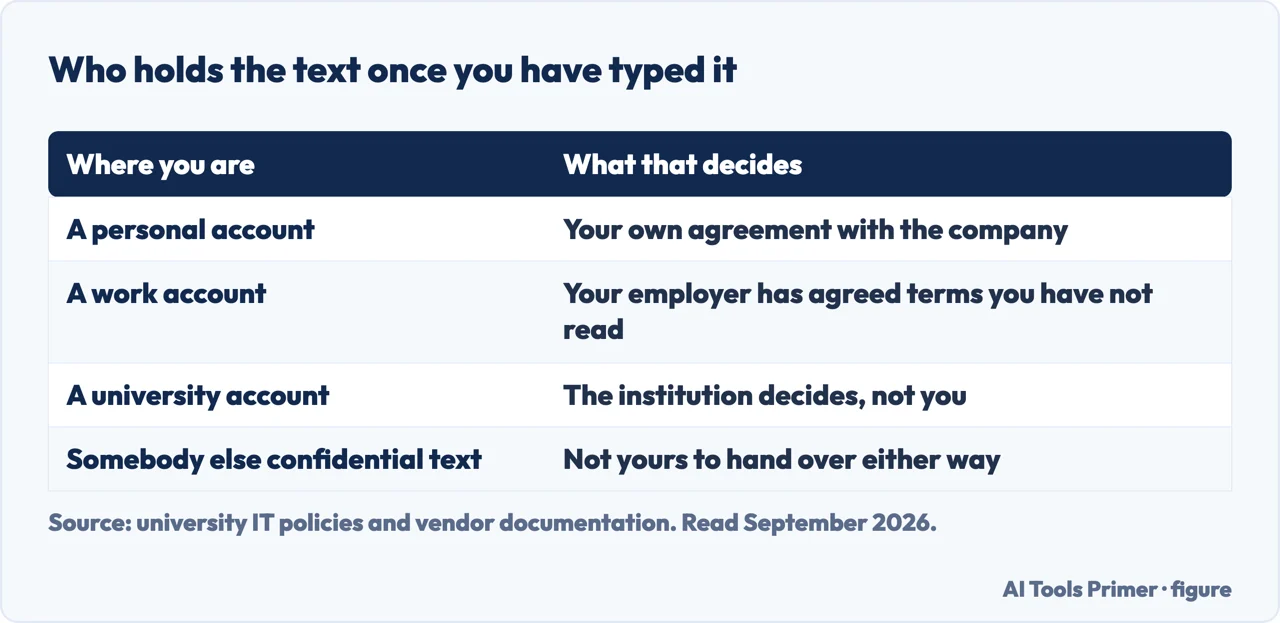
Work under an obligation. This is where the answer changes, and it changes hard. If you have signed a confidentiality agreement, handle client material, or work with anything regulated — legal drafts, patient records, unreleased financials, unpublished research — the relevant question is not whether the company is trustworthy. It is whether pasting that text into any third-party service is permitted by the agreement you signed. Very often it is not, and the tool’s privacy policy has no bearing on that at all. Your employer’s policy decides it, and the enterprise version of a product usually exists precisely because the consumer version does not satisfy it.
Student work. A separate issue again, and one people conflate with privacy. The risk here is not that your essay leaks; it is that heavy suggestion-taking on a graded piece of writing may fall foul of an academic integrity policy that says the words must be yours. That is a rules question rather than a security question, and the guide on where the line sits covers it.
What to actually do, in order. Open your account settings and find the training control, because it is the only lever on this page that changes anything and it takes under a minute. Then decide, once, what you are willing to paste — a rule of your own is more reliable than judging every document as it arrives. If work material is involved, check your employer’s policy before the tool’s, because that is the one with consequences attached. And treat the browser extension as the widest part of the surface: it sees far more fields than the ones you consciously use it on.
One thing worth saying plainly, because this subject attracts more alarm than it deserves. Nothing quoted above is unusual. Nearly every free writing tool is funded the same way and states similar terms in similar language, and this company has written down a clearer commitment on selling user content than most of its competitors have. The reason to read the policy is not that this one is worse. It is that the differences between them are exactly where the decision lives.
Every quotation above carries the date the document was read, and the policy itself carries an effective date of 6 July 2026. Privacy policies change without announcement, and a page about them that does not say when it was written is not telling you enough to act on.
Where to start
Four ways in.
- “I want to turn off training on my writing.”
- Read the settings guides in the tools
- “I use it for work and I am not sure I am allowed.”
- That is work and confidentiality
- “Will this get me in trouble at university?”
- Go to school and university
- “Is there a version that does not do this?”
- See the alternatives
The tools
What each writing tool says it keeps and trains on, quoted with the date rather than summarised. Policies change quietly, so a summary without a date is worth very little.
Work and confidentiality
The situation where the tool’s own policy stops being the document that decides. What you signed matters more than what they published.
School and university
A rules question rather than a security one, and the two get confused constantly. Using a tool is not the same as breaking a policy, and neither is it automatically fine.
The alternatives
The honest options if the arrangement above is not one you want, including the one nobody sells because there is no money in it.
Not covered here. It will not tell you the tool is dangerous. Nothing in the policy supports that, and saying it would be the easiest traffic on this page and the least honest.
It will not tell you it is fine either. Whether it is fine depends on what you paste into it, and that is a question about your obligations rather than about the software.
And it will not carry an affiliate link to a writing tool, which for this particular search is one of the better-paid links on the site — the coupon site currently on page one is there for a reason. What holds instead is simple: every quotation on this page is taken from the current privacy policy or from the university IT page that published it, each with the date it was read.
Sources
- Superhuman — Privacy Policy, effective 6 July 2026, the document reached by following grammarly.com/privacy-policy, covering the products offered as Grammarly, Docs, Superhuman Go and Superhuman Mail — superhuman.com, read 21 August 2026.
- University of Missouri, Division of Information Technology — Grammarly for Education now available, published 8 January 2025 and updated 11 May 2026 (that the free and premium versions of Grammarly are no longer available for use by employees and student employees across the four UM System campuses and MU Health Care, a change that took effect 9 January 2025, because certain versions incorporate AI tools that can scan users’ screens and collect the data being displayed; and that the use of Premium and Free licences for university work purposes is strictly prohibited) — doit.missouri.edu, read 16 September 2026.
- University of Colorado Denver, Office of Information Technology — Grammarly (that the university’s enterprise instance is the only version of Grammarly, free or paid, approved for use with university data and information, and that all other instances are not compliant with its IT security and compliance policies or requirements) — www.ucdenver.edu, read 16 September 2026.
- Grammarly Support — Is Grammarly a keylogger? (the company’s own answer: no, and its definition of a keylogger as malicious software or a surveillance tool that records every keystroke typed on a keyboard without the user’s knowledge) — support.grammarly.com, read 16 September 2026.
- University of Pennsylvania, Grammarly — Information Systems & Computing (that Grammarly is currently not approved for use by undergraduate students, that a personal Grammarly account may continue to be used but not for Moderate or High Risk Data, and that confidential or sensitive data including HIPAA data, personal health information, financial account information, SSNs and credit card data must not be entered) — isc.upenn.edu, read 16 September 2026.
Written by Alberto Gulotta
Founder and editor of AI Tools Primer, writing from Palermo, Italy. Thirty-five years of taking computers apart, starting with a Commodore 64 — the long version is on the about page.
Something wrong on this page? Write to aitoolsprimer@gmail.com and it gets fixed.
Written on 21 August 2026 · last checked 16 September 2026.
Independence and limits
No affiliate links and no paid placements anywhere on this site. Nobody pays to appear here, and no company has seen this page before you did.
This is general information, not professional advice. Where a page touches money, health, safety or the law, it names its source and the date it was read — and your situation may still differ. See the privacy page and the cookie policy.