
Footprint · guide
How to delete yourself from the internet, place by place
By Alberto Gulotta · Updated · 20 min read
Delete yourself from the internet means asking in several places, and the pages we read answer differently at each one. Google says the information stays on the source page, the Internet Archive offers a review with no promised outcome, and the FTC says opting out leaves public records untouched.
| Question | Answer | Where it comes from |
|---|---|---|
| Does Google removing a result delete the page? | No: Google says the information still exists on the source web page | Google Search Help, EFF |
| How do you ask the Internet Archive? | Email info@archive.org with the addresses, the period to exclude and, if it applies, the period you controlled the site or account; a review follows with no guarantee | Internet Archive Help Center |
| How long does a Search Console block last? | About six months, unless the removal is made permanent | Google Search Console Help |
| Does an opt-out delete public records? | No: the FTC says someone could still find them on a government website | FTC Consumer Advice |
| What did a test find for paid removal services? | 117 of 332 items removed after four months | Consumer Reports |
What deleting yourself can mean
The EFF’s guide to managing a digital footprint, last reviewed on 16 May 2025, says most information available about people is found in two places. The first is a site where you posted data voluntarily, such as pictures and videos on social media, comments in reviews and forums, and classified postings for items you sold. The second is a data broker, a company that collects personal information, repackages it and sells it. EFF also says you cannot protect everything all the time, and that you can manage the data once you know what is out there.
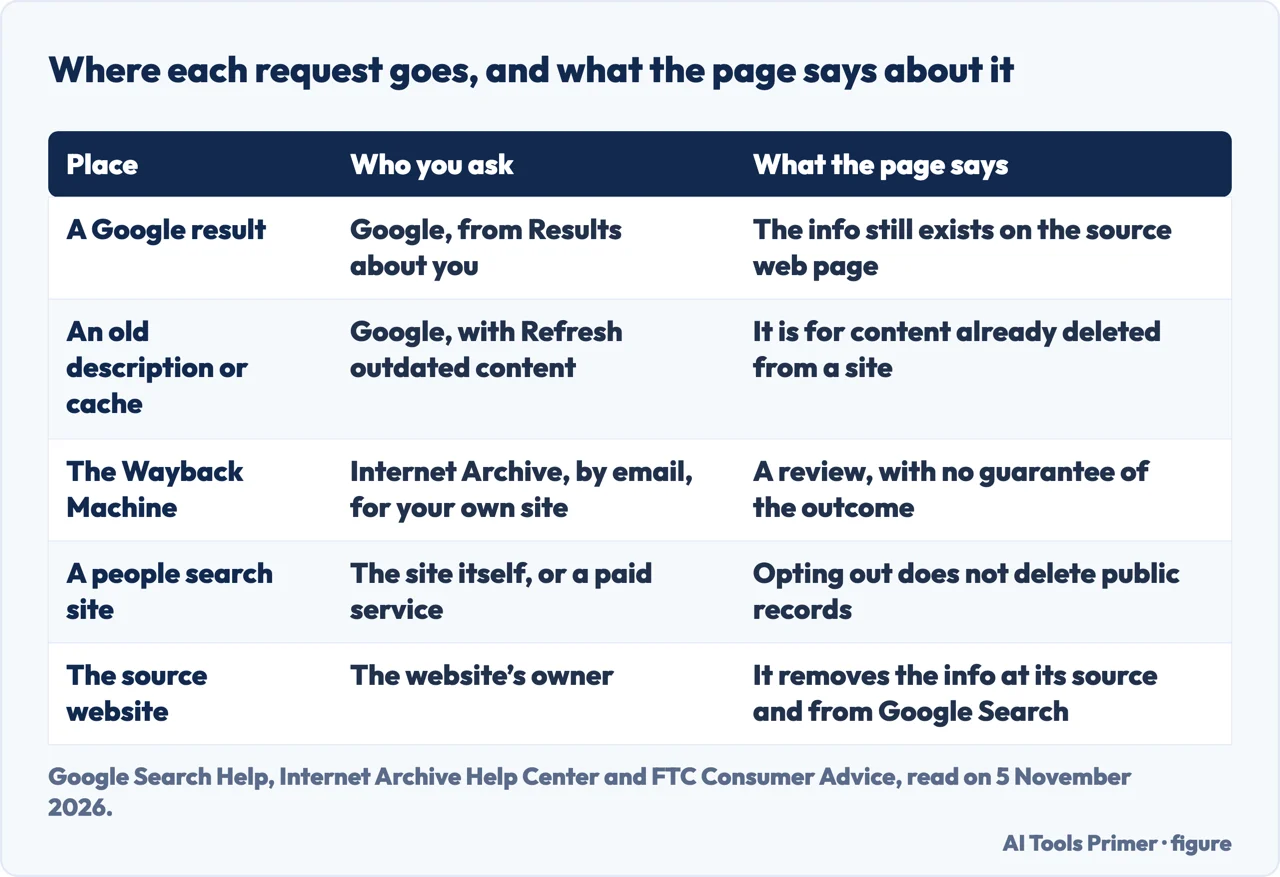
That gives the page its shape. The FTC’s page on people search sites, dated July 2022, says those sites build a report by buying information from other data brokers, by collecting it from social media profiles that are public, and by compiling federal, state and local government public records. Google’s help page says that removing a result from Search does not mean the information is gone from the internet. The pages we read therefore describe different requests to different recipients: the owner of the site where something lives, Google for its results and cached copies, the Internet Archive for its saved copies, and the people search sites for their reports.
EFF suggests looking for yourself once the security baseline is in place (see the next section). Search your name, nickname or handle, and also your address, phone number and email addresses, in a private browsing window or a separate browser, so that a logged-in account such as a Google account does not skew the results. It adds “It’s common to be overwhelmed by what you find”, and advises keeping track of what each piece of information is and where you found it. The Consumer Reports study covered below was about people search sites only, so its numbers are not a measure of every place on this page.
An order that follows from the pages. Each page we read covers its own place, so the order below is ours, built only from what they say. First, as EFF advises, set up a strong security baseline, then look for yourself and note what each item is and where it lives. Then remove what you control at the source, because Google says removing information at its source also removes it from its results. Then, if the content is already gone but still shows in Google, use Refresh outdated content; use Results about you for a phone number, home address or email that remains on a page you do not control. Then ask the Internet Archive by email if an archived copy matters, knowing there is no guarantee. Last, opt out of people search sites and check again: the FTC says to check periodically, and Consumer Reports suggests treating it as maintenance twice a year.
What you can delete at the source
Google’s page on personal info in Search says it does not remove information that you can take off the internet yourself, and gives as examples a social media page or a personal blog that you own. For the rest, it says that removing the information at its source means contacting the website’s owner, and that this in turn removes it from Google Search results. The page adds that doing so is something to try if you are comfortable with it.
EFF’s advice for the accounts you control is an audit. Make a list of every social media or forum account you have had over the years; if you use a password manager, its list of accounts is a place to start. Then review the settings in each account. EFF gives its own example of when to choose private: if you do not use a social media account for any public communication or activism, it may be best to make it private. It also puts a security baseline first, with unique passwords and two-factor authentication, because someone who gets into an important account such as email or social media may reach the same private information you are trying to protect.
Closing an account is a separate job with its own pages. Our page on deleting an account properly follows one example, Facebook, through the waiting period and the copies that remain. Old posts and profiles is about the older material left on social networks, and deleting a Gmail account is about the email address.
Search results and cached copies
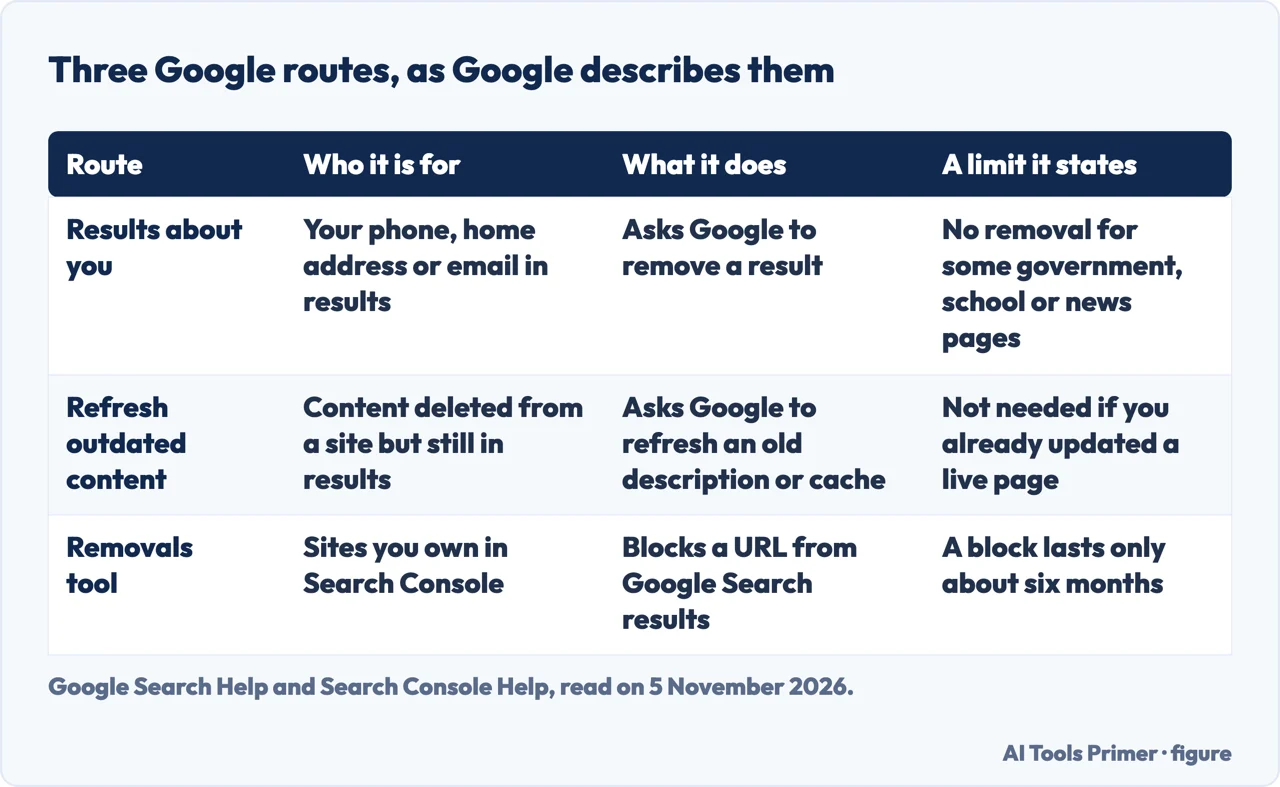
Results about you. Google’s page says the tool lets you find out whether your home address, phone number or email address shows up in search results. You enter your name and the personal info to look for, and it accepts extras such as a nickname, a maiden name or several phone numbers. With notifications on you hear from Google within a few hours if results matched. Google says some of these features are rolling out for users over 18 in certain markets, and that a request about a person under 18 goes through the detailed removal request form. The same form is for a request made for someone else, and for a result behind a paywall that you found yourself.
From a result you can choose Request to remove, and Google emails a confirmation and status updates. The page lists four states for a request: in progress, approved, denied and undone. Google says it considers some results valuable to the public and gives no Remove result option for them. In one place it names government or educational websites, online newspapers and business websites; in the policy list it names educational or government institutions and newspapers. It also says it does not remove information that you control yourself. Requests are about a phone number, a home address or an email address, and for professional info posted to harm you, Google points to the detailed form.
What approval does. Google says that when a URL is approved, one of two things happens. The URL does not appear for any search, which it says is what happens most of the time, or it does not appear for searches that contain your name, which it calls query-based removal. It says the second case happens when the page also carries content valued by the public or information about other people or businesses. Either way, Google says, the information still exists on the source page, whether the request is approved or denied. It also notes a delay between approval and the result disappearing, and suggests checking within a few hours. Undoing a request makes it possible for the URL to appear again; if someone else asks for the same URL to be removed and Google approves it, the URL cannot be shown again even after you undo yours. EFF agrees about the limit: when Google approves a request, the website that hosts the data deletes nothing, and the data can be found through other search engines. EFF still calls the process useful because Google remains the most popular search engine.
Refresh outdated content. This is Google’s page for content that was deleted from a site but still comes up in results, where the page description or cache might be outdated. You enter the URL of the page and select Submit; for an image, you copy the image link address from images.google.com and paste it into the form. Google says that if you have already updated a live page you do not have to fill out the form, and that you can follow the request in Search Console.
The Removals tool. This one is for people who own the site. Google’s Search Console page says a successful request lasts only about six months, and that blocking a URL does not stop Google from crawling the page, only from showing it in results. To make a removal permanent, it lists three actions: remove the content so the server returns a 404 or 410 status, block access with a password, or add a noindex meta tag, which it calls less secure than the other two. It says not to use robots.txt as a blocking mechanism. The page also says plainly that the tool removes content only from Google Search, not from the internet and not from other search engines. For content on a site you do not own, it points to Refresh outdated content when the content is gone from the current page, and to another Google page when it is still there. The Results about you page we read gives no expiry date for an approved removal; the six months belong to the owner’s tool.
For removals under a law, Google’s page points to its own page on removing content from Google. We cover the legal side in the right to be forgotten, and the requests themselves in removing results from Google.
The Wayback Machine
The Internet Archive’s help page gives reasons a site may be missing from the Wayback Machine: its automated crawlers did not know the site existed, the site was password protected or blocked by robots.txt, or it was otherwise inaccessible to them. It adds that site owners might have asked for their sites to be excluded. In its list of what makes some sites harder to archive, it says a site’s robots.txt document may have prevented the crawling.
The Help Center page is written for people asking about their own material ("How can I exclude or remove my site’s pages from the Wayback Machine?"). To have the archived copies of a site or account excluded from web.archive.org, it says to send a request to info@archive.org and indicate four things:
- the URL or URLs of the material;
- the time period you want excluded;
- the time period during which you had control of the site or the relevant user account, if that applies; and
- any other information that would help the team understand the request.
The page says this starts a review by the Archive’s team, and that it makes no guarantee beforehand about the outcome. The page we read does not say how long a reply takes, and it does not say whether an exclusion is permanent. It also does not say that a robots.txt file removes captures already made. The advice it gives about robots.txt and meta robots is for owners who want their sites included: make sure those rules do not tell crawlers to avoid the site. Google gives different advice for a different job, saying not to use robots.txt as a way of blocking a page from its results.
The Help Center also lists an article on requesting removal of intimate images published without consent. We read only its title, so we do not describe what it says. The pages we read do not cover cached copies held by search engines other than Google, or archives other than the Wayback Machine.
People search sites and public records
The FTC lists the public records those sites may use: property records, driving records, voter registration information, criminal records, civil actions and judgments, birth, marriage, divorce and death records, and professional licenses such as those for pilots, doctors, lawyers or architects. With one detail such as a name or phone number, it says, someone could buy a report showing details such as age, previous addresses, marital status, education and employment history, and the name and address of family members. The FTC adds that survivors of domestic violence or stalking may not want anyone to find where they live.
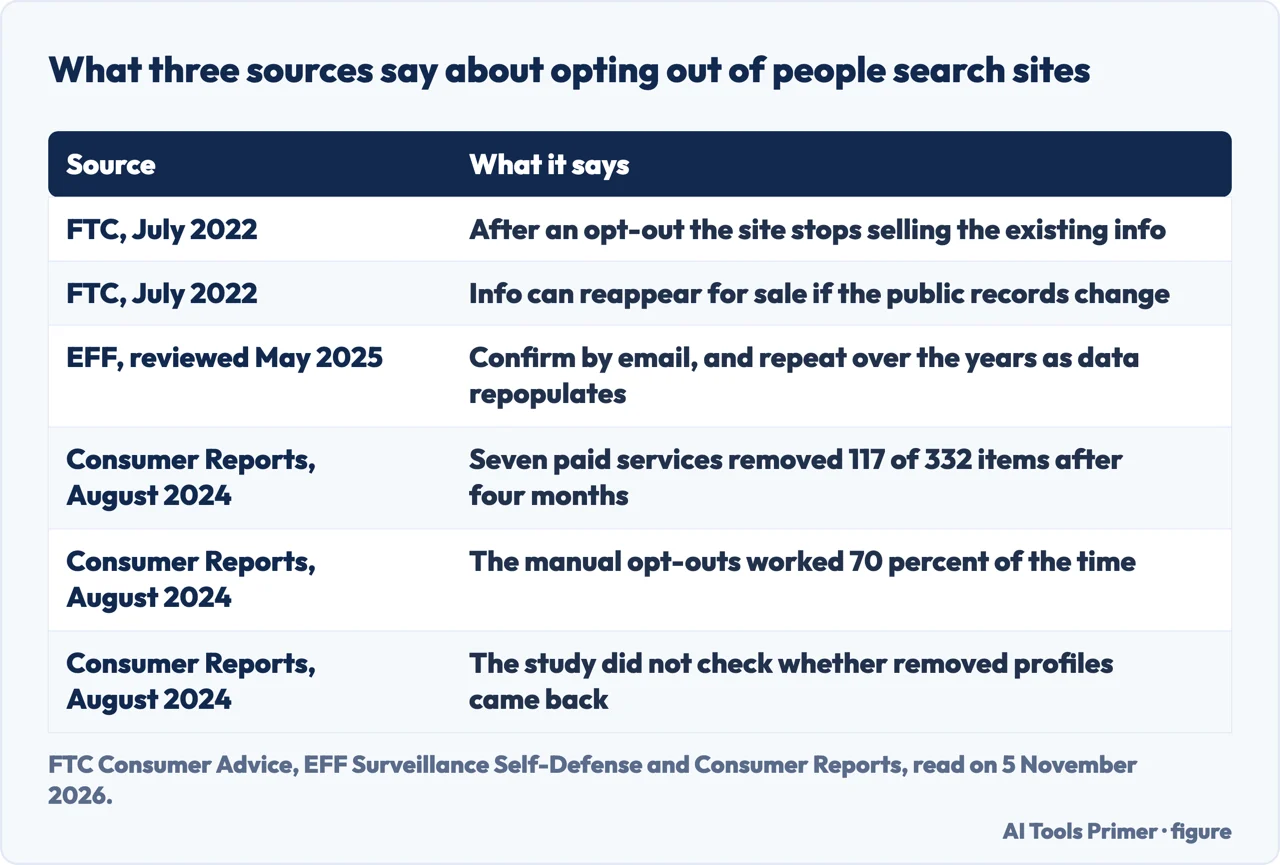
Opting out. The FTC says “Most people search sites have a way for you to tell them to stop selling your information.” A site will let you opt out of sharing some types of information, such as an address or phone number, but not others, such as sex offender status. There are two routes: do it yourself, site by site, for free, or pay a service. The steps it gives are to search your name on a site, start with a phone number or address, follow the opt-out link on any report that shows your information, repeat the first two steps on further people search sites, and check periodically and submit a new request if something new appears. It says the process may ask you for information to verify your identity.
What an opt-out leaves. After you opt out, the FTC says, the site stops selling your existing information. But your information may still appear in the reports of relatives, neighbors or associates, it can reappear for sale if the information in your public records changes, and opting out does not delete anything from public records, so someone could find them on a government website. EFF describes the same cycle from the broker side: brokers keep scraping public records, the information is often repopulated, and most sites want an opt-out confirmed by email, so you may need to repeat it several times over the years. EFF points to some US states that run address confidentiality programs, sometimes called Safe at Home, which act as a proxy address for your home against property records, voting records and data brokers. The pages we read do not say how many public records exist or how to ask a specific records office to remove an entry.
Paying someone to do it. The FTC says to ask three things before signing up to a service: how many websites it covers, whether it gives you a report on the sites it has opted you out of, and how often it scans them and deletes information that has reappeared or is new. EFF describes automated services as claiming to minimize the data about you, says they can require ongoing subscriptions to be most effective, and says they cannot promise coverage of every possible source. It says it may be worth doing some of the steps by hand for the most problematic results and using an automated service for the rest.
What Consumer Reports measured. The study, reported on 8 August 2024, recruited 32 volunteers and tried to remove their data from 13 prominent people search sites. Seven paid removal services each had a group of four volunteers, and a final group of four was handled by hand with the sites’ own opt-out tools. The researchers checked after one week, one month and four months. For the 28 volunteers signed up to the services they found 332 pieces of personal information, and only 117 of them, or 35 percent, were removed after four months. The best two services reached 65 and 68 percent, and the worst two 4 and 6 percent. The manual group did better than every service, at 70 percent, and Grauer says that even this will not get the information off all of the sites. The services charged between $19.99 and $249 a year.
Consumer Reports gives its own reasons for caution. The researchers noted a small sample, volunteers who were not chosen at random, and that the services were given limited information about each volunteer. They did not look back to see whether deleted profiles came back. They also saw conflicts of interest: some removal services advertise on people search sites or appear to partner with them. Yael Grauer, program manager on CR’s digital privacy team, is quoted saying there is no comprehensive federal legislation giving people the right, or a viable way, to keep their data off these sites. For the do-it-yourself route, Consumer Reports says it takes anywhere from several hours to several days, and that privacy experts suggest treating it as maintenance twice a year. Grauer’s advice to repeat the whole process about twice a year agrees with that.
These readings do not match perfectly, and their dates differ: the FTC page is from July 2022, the Consumer Reports study from August 2024 and the EFF guide from May 2025. The FTC describes the opt-out as stopping the sale of existing information, Consumer Reports measures how often it worked, and EFF describes the data coming back. For the options in more detail, see people search sites, data broker opt-outs and removal services. The FTC also points to ftc.gov/yourprivacy for how to opt out of data broker sites, in a 2021 post; we read only that pointer.
What we did not read, and did not do
We submitted no request, to Google, the Internet Archive or any people search site, so everything above is what the pages say and not what happened to us. Some questions are left open by the pages we read.
- How long the Internet Archive takes to answer, and whether an exclusion lasts.
- What cached copies other search engines keep, and how to ask them to remove one.
- Whether archives other than the Wayback Machine take requests.
- How to ask a particular public records office to take an entry down.
- How the law on erasure works. That belongs to our page on the right to be forgotten.
We did not use community threads, removal-service vendors’ pages, newspaper articles behind a subscription, social posts or security companies’ blogs: some sit behind a subscription or an access block, some sell a service, and we did not open the rest. The questions that fall outside this page are covered where they belong: deleting your search history and deleting files securely.
Where to start
Four ways in.
- “What can I delete myself?”
- What you can delete at the source — source
- “How do I get it out of Google?”
- Search results and cached copies — search
- “Can I remove an archived copy?”
- The Wayback Machine — archive
- “What about people search sites?”
- People search sites and public records — brokers
Asking Google, and the law
The requests that start in Google, and the legal route.
Brokers and removal services
The sites that sell reports, and the services that ask them to stop.
Questions people also ask
How do I remove my name from being googled?
Google says Results about you lets you request removal of a result that shows a phone number, home address or email address, and refresh outdated content covers pages already deleted from a site. The information still exists on the source page, so Google points to the site’s owner. EFF adds that other search engines can still find it.
How do I remove my personal information from the internet for free?
The FTC says you can opt out of people search sites one by one, for free, or pay a service. Consumer Reports found manual opt-outs worked 70 percent of the time and take several hours to several days. Its seven paid services charged $19.99 to $249 a year. Results about you covers a phone number, address or email.
How to 100% clear your search history?
The pages we read for this guide do not cover clearing search history. Our page on deleting your search history does. What the pages here cover is narrower: Google’s Results about you request concerns a phone number, home address or email address that shows up in search results.
How do you permanently erase data so that it cannot be recovered?
The pages we read for this guide do not cover erasing data from a drive or a phone. Our page on deleting files securely does. What the pages here cover is narrower: Google says removing a result leaves the information on the source page, and the FTC says an opt-out does not delete public records.
Not covered here. We submitted no request to anyone. The statements come from three Google help pages, the Internet Archive Help Center, an FTC page, the EFF and Consumer Reports, read on 5 November 2026; the FTC page dates from July 2022.
The search volume and difficulty behind this page come from an Ubersuggest reading of 5 November 2026 (United States), which gives its own SEO difficulty score and not Semrush’s; a Semrush check is still to be made.
Sources
- Google Search Help — Find and remove personal info in Google Search results — support.google.com, read 5 November 2026.
- Google Search Help — Refresh outdated content — support.google.com, read 5 November 2026.
- Google Search Console Help — Removals and SafeSearch reports tool — support.google.com, read 5 November 2026.
- Internet Archive Help Center — Using the Wayback Machine — help.archive.org, read 5 November 2026.
- FTC Consumer Advice — What To Know About People Search Sites That Sell Your Information (July 2022) — consumer.ftc.gov, read 5 November 2026.
- FTC Consumer Alerts — Your guide to protecting your privacy online (2 June 2021) — consumer.ftc.gov, read 5 November 2026.
- EFF Surveillance Self-Defense — How to: Manage Your Digital Footprint (reviewed 16 May 2025) — ssd.eff.org, read 5 November 2026.
- Consumer Reports — Services That Delete Your Data From People-Search Sites Don’t Work Very Well, Study Finds (8 August 2024) — www.consumerreports.org, read 5 November 2026.
Written by Alberto Gulotta
Founder and editor of AI Tools Primer, writing from Palermo, Italy. Thirty-five years of taking computers apart, starting with a Commodore 64 — the long version is on the about page.
Something wrong on this page? Write to aitoolsprimer@gmail.com and it gets fixed.
Written on 6 November 2026.
Independence and limits
No affiliate links and no paid placements anywhere on this site. Nobody pays to appear here, and no company has seen this page before you did.
This is general information, not professional advice. Where a page touches money, health, safety or the law, it names its source and the date it was read — and your situation may still differ. See the privacy page and the cookie policy.