
Images · guide
How to scan a QR code on iPhone, and what to check first
By Alberto Gulotta · Updated · 8 min read
The answer to how to scan a QR code on iPhone is three steps long and Apple publishes it, which is why the first result for this question is Apple. There is no reason for anybody to write a longer version of those three steps, so this guide gives them and then spends its time on the part nobody covers.
The mechanics, which take about four seconds
From the iPhone User Guide, read 21 August 2026. There is no app to install — it has been built into the Camera for years.
- Open Camera on your iPhone.
- “In Photo mode, position iPhone so that the QR code appears inside the camera frame.”
- “Tap the link that appears at the bottom of the screen.”
Read the third step again, because the whole of the rest of this page hangs on it. The link appears. It does not open. iPhone shows you where the code leads and waits — and that pause is the only protection you get, which makes it worth using rather than tapping through.
What that pause is for
The US Federal Trade Commission published a consumer alert in December 2023 on exactly this: “scammers hide harmful links in QR codes to steal personal information.” The example it gives is physical and unnervingly simple — “there are reports of scammers covering up QR codes on parking meters with a QR code of their own.” A sticker is all it takes.
The rest arrives by message, with a reason to hurry. The FTC lists the pretexts:
- “they lie and say they couldn’t deliver your package and you need to contact them to reschedule”
- “they pretend like there’s a problem with your account and you need to confirm your information”
- “they lie, saying they noticed suspicious activity”
And its advice maps exactly onto that third step: “If you see a QR code in an unexpected place, inspect the URL before you open it. If it looks like a URL you recognize, make sure it’s not spoofed — look for misspellings or a switched letter.”
Two sources that do not reference each other, describing the same moment. Apple built a pause into the interaction — the link is shown rather than followed — and a federal consumer agency, writing about a different subject entirely, tells you to use exactly that pause. Neither page mentions the other. Put together they give you the whole instruction: scan, read the address, then decide.
What to actually look for in that second. The domain, and only the domain — the part immediately before the first single slash. Everything after it can say anything at all, and scammers rely on people reading the reassuring words further along. A real bank link ends its domain at the bank’s name; a fake one puts the bank’s name somewhere later in a longer address that belongs to someone else.
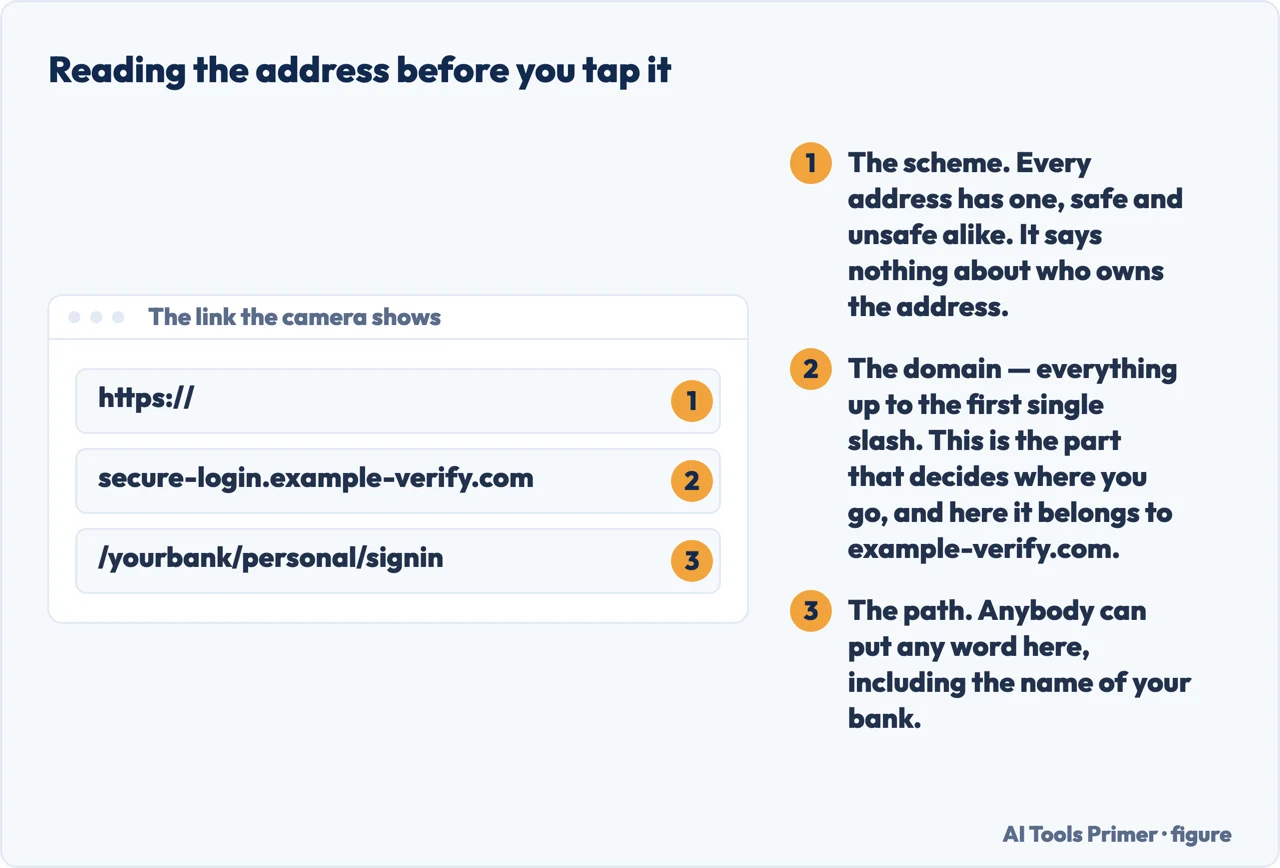
Then the FTC’s spelling check: “look for misspellings or a switched letter”. A single transposed character is the standard trick, and it is invisible unless you are looking for it.
And the situational rule, which is the strongest of the three: “Don’t scan a QR code in an email or text message you weren’t expecting — especially if it urges you to act immediately.” The urgency is not incidental to these messages; it is the mechanism. If it were not urgent you would have time to check, and checking is what they cannot survive.
Where the codes are riskiest, and it is not online. The parking meter example matters because it inverts the usual advice. People are cautious about links in emails and trusting of objects in the street — but a sticker on a meter, a table card in a café, a poster at a bus stop or a flyer on a windscreen can be replaced by anybody with a printer. A printed code carries no signature and no sender. It is the least verifiable link you will ever be offered, and it looks the most official.
The practical version, if you want one line. Treat a QR code as a link from a stranger, because that is what it is until you have read the address. That costs you half a second and it is the entire defence.
If the code will not scan. Apple gives two alternatives worth knowing. The Control Center has a Scan Code control you can add — “If you don’t see the Scan Code control, add it to Control Center” — and there is a small tip on the same page that solves most failures: “Tap the flashlight to add more light.” Poor light and a shallow angle account for nearly every code that will not read.
What the FTC says to do beyond the moment itself: “Update your phone’s OS to protect against hackers and protect your online accounts with strong passwords and multi-factor authentication.” What it does not say to do is buy monitoring, and the reason is in the published numbers on whether identity theft protection is worth it. That is the part that limits the damage when somebody does eventually tap the wrong thing — and everybody eventually does.
The steps here are quoted from the iPhone User Guide and the warnings from a Federal Trade Commission consumer alert of December 2023, each read on 21 August 2026. The point about reading the domain rather than the rest of the address is ours.
Where to start
Four ways in.
- “I just need the steps.”
- They are above — then read the second box, and see if something went wrong
- “I got a code by text.”
- The FTC is explicit — messages you did not expect
- “The code arrived and I never asked for one.”
- That is a different question: Link verification code
- “The code will not scan.”
- Two fixes above, then the camera
- “I already tapped it.”
- Go to if something went wrong
Messages you did not expect
A code in a message is a link in a costume. The pretexts are few and well documented, and they all run on urgency.
If something went wrong
Everybody eventually taps the wrong thing. What limits the damage is arranged beforehand rather than afterwards.
The camera
Most codes that will not scan are a lighting or angle problem rather than a broken code. The camera has more in it than people use.
On a computer
Codes are meant for phones, but they turn up on screens too — and the answer there is different.
Not covered here. It will not recommend a QR scanner app. Apple builds it into the Camera, and two widely read guides on this are published by companies selling one.
It will not tell you QR codes are dangerous. They are links, with the same risks and the same defence — reading the address before you follow it.
And it will not paraphrase the federal warning. It is quoted above with its date, because that is a subject where the exact wording matters. What holds instead is simple: the steps come from the iPhone User Guide and the warnings from a Federal Trade Commission consumer alert, quoted with the date each was read.
Sources
- Apple — Scan a QR code with your iPhone camera, iPhone User Guide, including the Control Centre alternative and the flashlight tip — support.apple.com, read 21 August 2026.
- Federal Trade Commission — Scammers hide harmful links in QR codes to steal your information, consumer alert published December 2023, including the parking meter example and what to check before opening a link — consumer.ftc.gov, read 21 August 2026.
Written by Alberto Gulotta
Founder and editor of AI Tools Primer, writing from Palermo, Italy. Thirty-five years of taking computers apart, starting with a Commodore 64 — the long version is on the about page.
Something wrong on this page? Write to aitoolsprimer@gmail.com and it gets fixed.
Written on 21 August 2026 · last checked 23 September 2026.
Independence and limits
No affiliate links and no paid placements anywhere on this site. Nobody pays to appear here, and no company has seen this page before you did.
This is general information, not professional advice. Where a page touches money, health, safety or the law, it names its source and the date it was read — and your situation may still differ. See the privacy page and the cookie policy.