
Software · guide
Call failed iPhone: what Apple and the carriers say to check
By Alberto Gulotta · Updated · 16 min read
Call failed iPhone errors are sorted by two questions: does it happen with every number or only one, and does the status bar show “No Service” or “SOS”. Apple says settings, old software or the network can stop calls. For one number, check blocks and forwarding; for every number, check signal, restart, updates and the carrier.
| Question | Answer | Where it comes from |
|---|---|---|
| What does the message mean? | BankMyCell says the call was not connected in the first place | BankMyCell |
| What do the status bar words mean? | SOS means no link to your carrier but emergency calls work; No Service or Searching means no cellular network | Apple Support |
| How long do I leave Airplane Mode on? | Apple gives five seconds on one page and at least 15 on another | Apple Support |
| Does it mean I am blocked? | Navi says not necessarily; BankMyCell lists a block among the possible reasons | Navi, BankMyCell |
| When do I call the carrier? | Apple lists the account, outages, billing blocks and carrier-side call errors to ask about | Apple Support |
Two questions before any setting
Apple’s page, published on 15 July 2026, gives the broad cause first: a call can fail, or not arrive, if certain settings are on, if the software is not up to date or if there is a problem with the network. It does not say what the words Call Failed mean on the screen. BankMyCell does. It says the error means the call was unsuccessful, and lists as possible reasons that the person called blocked or ignored the call, switched off the other phone or put it in Do Not Disturb, plus a SIM card problem or a software bug. Navi says the message is likely to appear only when the call fails immediately after dialling, and OSXDaily says it can show on outgoing and incoming calls and in the middle of a call.
The pages we read do sort their causes in the same two ways: Apple has a separate page for the status bar words, and T-Mobile has a separate list for a single number.
The status bar words matter because Apple gives them different meanings. On its page published on 23 June 2026, Apple says that “SOS” or “SOS only” means the iPhone is not connected to your carrier’s network but can still make emergency calls through other carriers’ networks, a feature it says is available in Australia, Canada and the United States. “No Service” or “Searching” means the device is not connected to a cellular network. Our page on what SOS means on iPhone covers the SOS indicator on its own. The pages we read do not say which step fixes the most failed calls, and they do not explain what the message means in technical terms, so this page follows the two questions and not a ranking. Apple tells you to test after each step.
When it fails for every number
Start with the signal. T-Mobile’s “read me first” list, before any step, asks for at least two signal bars and says fewer means the signal is too low for reliable calls. It also asks that the line be active, with a balance on a prepaid line. OSXDaily asks for at least a moderately strong signal. Verizon lists other causes: distance from cell sites, obstructions and terrain, a network stretched by heavy use in an area, as at a sporting event or concert, and a plan change made online, which it says restarting the phone usually solves. The Apple pages we read do not give a number of bars.
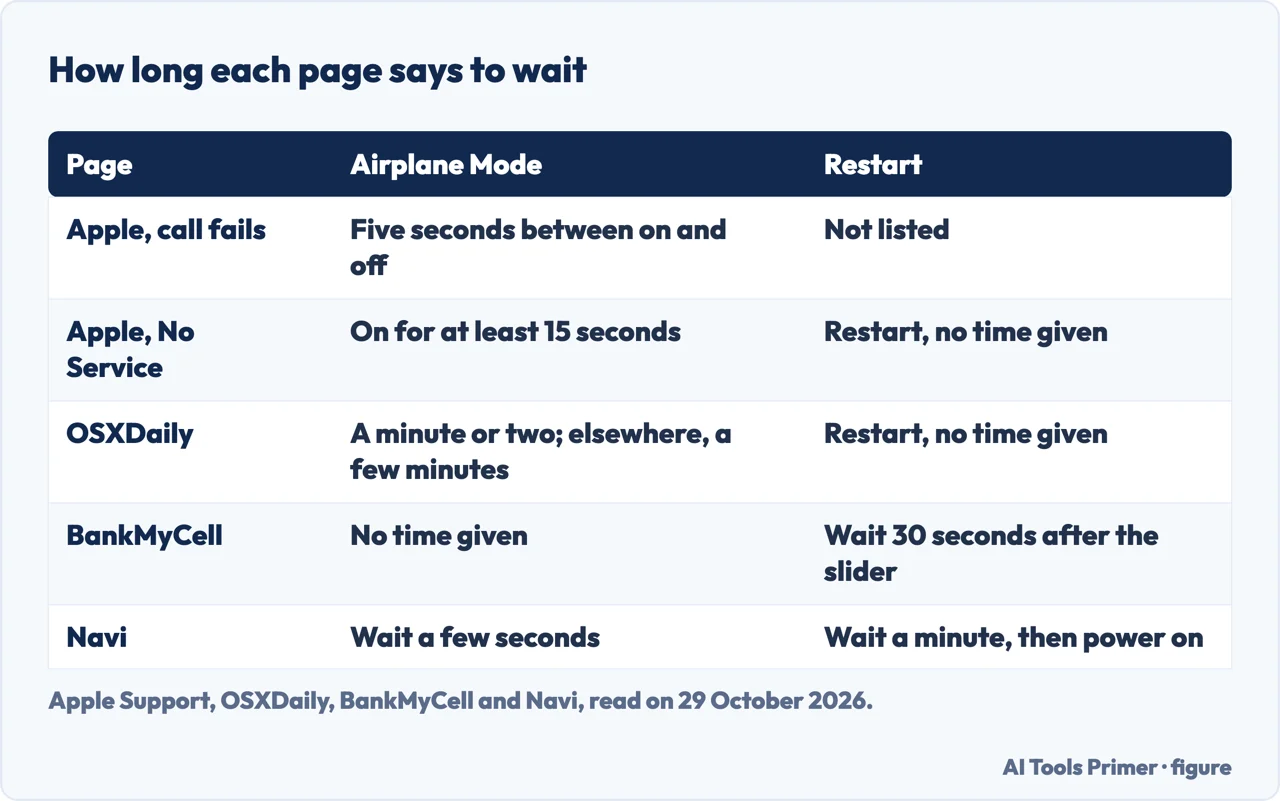
Airplane Mode and the restart are where the pages disagree about time, as the first figure shows. Apple’s page on failed calls, read on 29 October 2026, says to turn Airplane Mode on and off with five seconds between; its page on “SOS” and “No Service” says to keep it on for at least 15 seconds. OSXDaily says to wait a minute or two and, in another place, a few minutes. Navi says a few seconds, and BankMyCell gives no time. For the restart, Apple’s page on failed calls does not list one, while the “No Service” page does, with no time given. BankMyCell says to wait 30 seconds after the slider, and Navi says to wait a minute before switching back on. OSXDaily gives the sequence for a modern iPhone: Volume Up, Volume Down, then hold the side button until the Apple logo appears. Our page on force restarting an iPhone covers the sequences by model.
Updates, Wi-Fi Calling, the SIM and travel
Apple asks for two checks: a carrier settings update and an iOS update, and it says some updates might need a Wi-Fi connection. Its page on carrier settings, published on 17 March 2026, says these updates improve the connection and performance and can add support for 5G or Wi-Fi Calling. Installing takes less than a minute, and if you dismissed the prompt you can look in Settings, General, About. The version number appears next to Carrier, and to verify that you have the latest one Apple says to contact the carrier. On the SOS page, Apple adds that a new SIM card means downloading the settings for the new carrier. Navi gives the path for automatic updates: Settings, General, Software Update, Automatic Updates.
Wi-Fi Calling points two ways. OSXDaily lists it as a cause when the Wi-Fi network is having problems. T-Mobile asks for the Wi-Fi Calling preference to be Cellular Preferred or Cellular Only, and, among its basic steps, to turn Wi-Fi off to be sure the phone uses its network. Verizon names the opposite case: if you cannot make calls over Wi-Fi, check whether Wi-Fi Calling is turned off. The pages we read do not say whether to leave it on in general. Our page on Wi-Fi Calling on iPhone has Apple’s steps.
The SIM comes up in the guides and in Apple’s page on No Service. OSXDaily says a SIM that is not seated properly in the tray, or is damaged, can cause the message. BankMyCell says to remove the SIM with the ejection tool and put it back, and to ask the provider for a new one if nothing improves. Navi adds a minute’s wait and cleaning the tray. Apple’s page on failed calls does not mention the SIM; the No Service page does, for a phone with Dual SIM: Settings, Cellular, choose the line and check it is on, and if it is a physical SIM, take it out and put it back. Abroad, Apple says to turn on Data Roaming, and for No Service on an iPhone 6 or later to check that LTE is on in the Cellular Data Options. Our page on a SIM card that is not working covers the SIM in more detail.
When it fails for one number
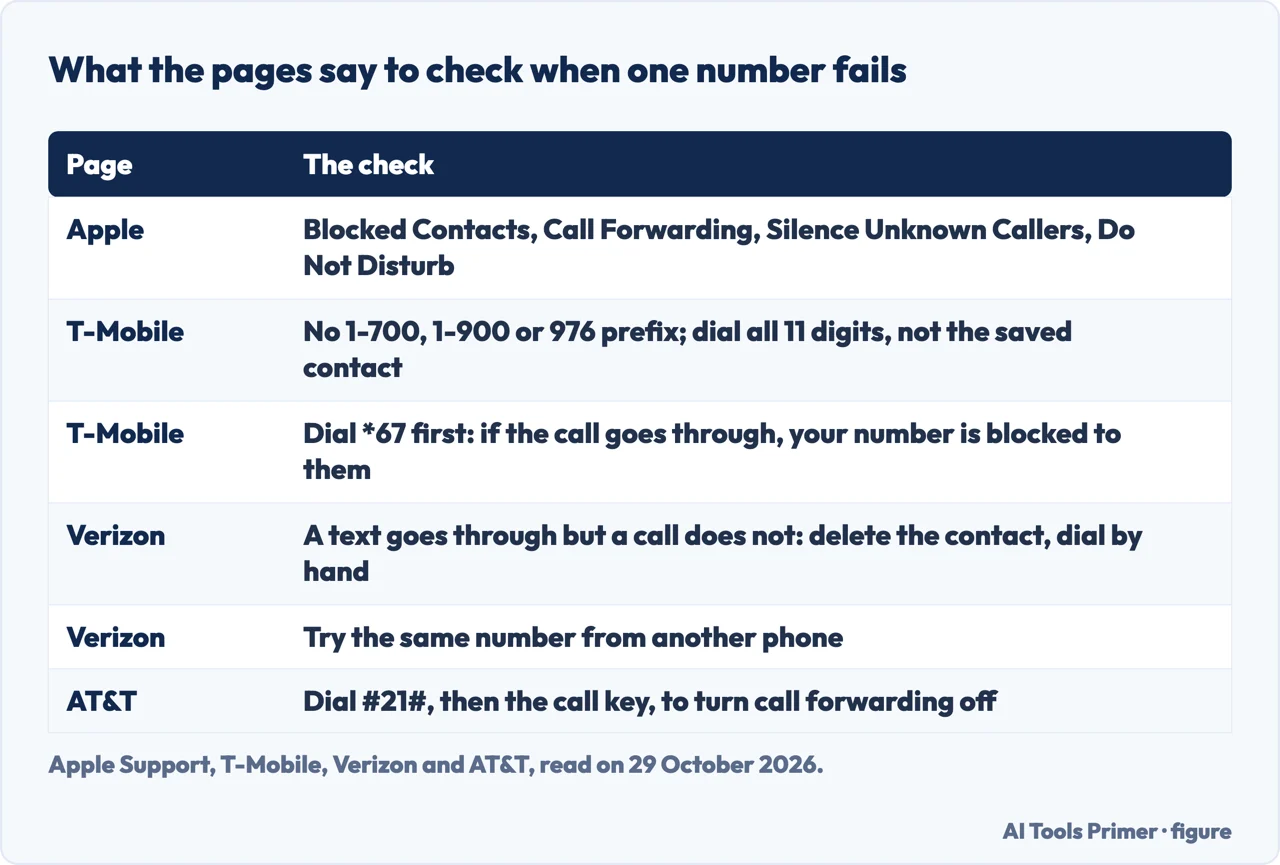
After Airplane Mode, Apple’s page lists four more settings to check, and says to test after each step. In Settings, tap Focus and then Do Not Disturb, and make sure it is off. Under Apps, Phone, look at Blocked Contacts; Apple adds that adding the number to Contacts makes sure the phone rings. Under Phone, Call Forwarding should be off. And Silence Unknown Callers, if on, lets a call through only if the caller is in Contacts or Recents, or shared the number in Mail, or sent a message from it; Apple says calls from some third-party apps might not go through. BankMyCell repeats the same checks with the path Phone, without the Apps step. The pages we read do not say which iOS version uses which path. We have separate pages on Do Not Disturb, unknown callers and blocked numbers.
T-Mobile gives a list for a single number, and Verizon and AT&T add their own, which the second figure sets side by side. T-Mobile says the number should not start with 1-700, 1-900 or 976, which it says T-Mobile blocks, and should not be on the phone’s block or spam list. It says to enter the full 11 digits in the dialler and not use the saved contact, to include country and area codes, and to dial *67 before the number, which T-Mobile describes as disabling caller ID: if the call goes through, it says, “your number is blocked to them.” Verizon has a test for the saved contact: if you cannot call a number but can text it, delete the contact entry and dial by hand, and if the call goes through the problem was how the contact was saved. It also says to try the same number from another phone, and if that fails the problem may be with the number or the device being called.
The codes differ by page. AT&T says to turn off call forwarding by dialling #21# and then the call key. T-Mobile, for the case where all incoming calls go to voicemail, gives ##004# to reset the busy, unreachable and no-reply settings and ##21# to reset unconditional forwarding. BankMyCell tells readers to dial *#31#, without saying what it does in terms we could check, and the Apple and carrier pages we read do not mention it, so we have not used it. Each of the other codes comes from one carrier’s page, and the pages we read do not say whether it works on another carrier.
Whether the message means you are blocked is the one question two guides answer differently. Navi says not necessarily: if a number has blocked you, the call typically goes to voicemail or rings once and disconnects, and it would not show as Call Failed. BankMyCell lists the other person blocking or ignoring the call among the possible reasons for the message, and says Call Failed does not mean they hung up, but that the call never connected. The Apple and carrier pages we read do not address the question.
What to ask the carrier
Apple’s page on failed calls gives four things to make sure of when you contact the carrier: the account is set up to use the iPhone, there are no local service outages, there is no billing-related block, and the calls have no errors on the carrier’s system. BankMyCell lists the same four. Apple’s page on “No Service”, read on 29 October 2026, adds to the list: the account is active and in good standing, the device is not blocked or barred and is set up with the right data plan, and, for an iPhone bought outside your country or region, whether the local government requires IMEI registration. Apple also says only the carrier can access and manage details about the account.
The carrier pages fill in what those items can look like. Verizon says a switch from another carrier can take up to 72 hours before the number is active, and a transfer from a landline up to 10 business days, with a temporary number meanwhile. It adds that an account suspension may send outgoing calls to a Verizon representative. T-Mobile asks for a balance on a prepaid line and for Family Allowances not to be blocking calls, and Verizon names its Family restrictions. AT&T points to a suspended service and to the SIM if the phone shows Insert SIM or Emergency Call Only. OSXDaily gives an unpaid past-due bill as an example of a billing problem and says plans with limits, particularly pay-as-you-go ones, may restrict the length or number of calls. T-Mobile asks you to have any error messages or recordings ready when you contact it.
AT&T’s page, updated on 3 October 2026, carries a notice about the iPhone 18 Pro Max only: it says to update to iOS 27.0.1 and the carrier settings, where Carrier should read AT&T 72.1, and that an affected phone already without service cannot be reactivated and needs a hardware replacement. That is one model and one carrier, and the Apple pages we read do not mention it. If a hardware fault is suspected, OSXDaily names a drop or water contact and points to Apple Support or an Apple Store, and Apple says that if the carrier finds no problem you might need service. On an iPhone running iOS 18 or later, both of Apple’s pages say the Apple Support app can run extra diagnostics.
The reset that costs something
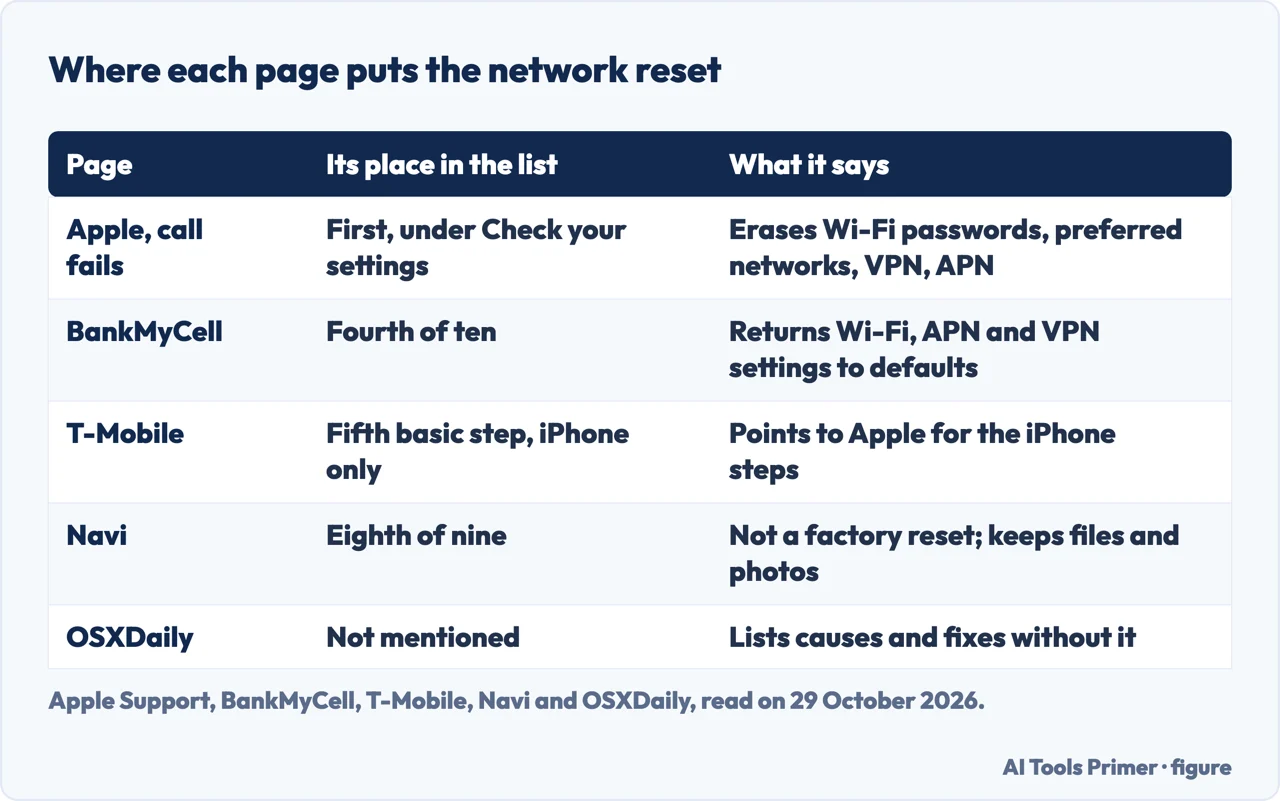
The pages put the network reset in very different places, as the third figure shows. Apple’s page on failed calls makes it the first step under checking your settings: Settings, General, Transfer or Reset iPhone, Reset, Reset Network Settings. Apple says this erases the saved Wi-Fi passwords, preferred networks, and the VPN and APN settings used before, and then to try to make or receive calls in another location. BankMyCell puts it fourth of ten. Navi puts it eighth of nine, says to save it as a hail Mary method, and says it is not a factory reset and does not delete files or photos. T-Mobile lists it as one of its basic steps for an iPhone and sends readers to Apple for the specifics. OSXDaily does not mention it.
The pages we read agree that Wi-Fi passwords and VPN settings go, and they do not say how often the reset helps. Our page on resetting network settings on an iPhone covers what else goes. T-Mobile’s basic list also includes steps that erase nothing: turning on VoLTE and VoNR, and removing downloaded calling, blocking, launcher and home screen apps added around the time the problem began, since it says it cannot support calls on other services such as Google Voice.
What we did not use
We tested nothing on an iPhone. We did not read forum threads or videos, so what people report in them is not here. The BankMyCell page was last updated in March 2024, and the Navi page sits among phone deals, so we used both only for their lists of causes and fixes. T-Mobile’s page was behind a block for a simple download, and we read a copy loaded through a browser. We left out the lines that advertise phones, plans and trade-ins on the guides, and the T-Mobile pages for Wi-Fi Calling problems and signal issues that its page links to.
Where to start
Four ways in.
- “Is it every number?”
- When it fails for every number — every
- “Is it one number?”
- When it fails for one number — one
- “What do I ask the carrier?”
- What to ask the carrier — carrier
- “Should I reset the network?”
- The reset that costs something — reset
Restarts and resets
The steps the pages put before and after the carrier.
Calls that never ring
Silencing, blocking and Wi-Fi Calling.
Questions people also ask
How to resolve call failed issue?
Apple says to contact the carrier about the account, outages, billing blocks and call errors, update the carrier settings and iOS, then work through the settings, testing after each step. T-Mobile lists a restart, turning Wi-Fi off, VoLTE and VoNR, removing downloaded calling apps, a network reset on an iPhone and an update.
Does call failed mean blocked on iPhone?
The guides disagree. Navi says not necessarily and describes a blocked call as one that goes to voicemail or rings once. BankMyCell lists a block among the possible reasons. The Apple and carrier pages we read do not address it.
Why does my call to someone keep failing?
For one number, T-Mobile says to check the prefix, the block and spam lists and to dial all 11 digits. Verizon says to delete the contact and dial by hand if a text goes through, and to try the number from another phone.
How to force call failed iPhone?
The pages we read do not describe how to bring the message on. They cover only its causes and the steps that follow it.
Not covered here. We tested nothing on an iPhone. The statements come from three Apple Support pages, OSXDaily, BankMyCell, Navi, T-Mobile, Verizon and AT&T, all read on 29 October 2026.
The search volume and difficulty behind this page come from a Semrush reading of 29 August 2026, older than the 60 days the site normally allows.
Sources
- Apple Support — If your call fails or you can’t receive calls on your iPhone — support.apple.com, read 29 October 2026.
- Apple Support — If you see SOS, No Service, or Searching on your iPhone or iPad — support.apple.com, read 29 October 2026.
- Apple Support — Manually update carrier settings on your iPhone or iPad — support.apple.com, read 29 October 2026.
- OSXDaily — Why iPhone Says “Call Failed” & How to Fix It — osxdaily.com, read 29 October 2026.
- BankMyCell — 10 Ways To Fix the Call Failed Message on iPhone — www.bankmycell.com, read 29 October 2026.
- Navi — Here’s The Best Way To Fix a Failed iPhone Call — www.yournavi.com, read 29 October 2026.
- T-Mobile Support — Can’t call, dropped calls, & other calling issues — www.t-mobile.com, read 29 October 2026.
- Verizon — Phone can’t make calls, calls drop, calling not working — www.verizon.com, read 29 October 2026.
- AT&T — Troubleshoot AT&T Wireless Call Issues — www.att.com, read 29 October 2026.
Written by Alberto Gulotta
Founder and editor of AI Tools Primer, writing from Palermo, Italy. Thirty-five years of taking computers apart, starting with a Commodore 64 — the long version is on the about page.
Something wrong on this page? Write to aitoolsprimer@gmail.com and it gets fixed.
Written on 29 October 2026.
Independence and limits
No affiliate links and no paid placements anywhere on this site. Nobody pays to appear here, and no company has seen this page before you did.
This is general information, not professional advice. Where a page touches money, health, safety or the law, it names its source and the date it was read — and your situation may still differ. See the privacy page and the cookie policy.