
iPhone · guide
iPhone not receiving texts, sorted by what is missing
By Alberto Gulotta · Updated · 18 min read
An iPhone not receiving texts may be missing everything, one person, a group, one device or only verification codes, and the pages we read check different settings for each. This page sorts the steps from Apple Support, Asurion and Lifewire by what is missing, and shows where those pages differ on filters, storage and the network reset.
| Question | Answer | Where it comes from |
|---|---|---|
| Where do I start? | With what is missing: everything, one person, a group, one device or only codes | Asurion, Apple Support |
| How much free space? | Asurion says at least 1 GB; Apple gives no figure, only enough space | Asurion, Apple Support |
| Where does the network reset sit? | Apple says only if other solutions fail; Lifewire lists it among eight fixes | Apple Support, Lifewire |
| Does replying make a sender known? | Apple says a reply does not mark the sender as known automatically | Apple Support |
| How long after turning iMessage off? | Texts should arrive right away; some Apple devices may take a few hours to notice | Apple Support |
Start with what is missing
Asurion’s page gives seven checks in a fixed order: the network connection, the messaging settings, blocked numbers and spam filters, free storage, software updates, the SIM card and verification codes. A short box at the top of the page tells you to restart first and asks three questions: are only the texts from iPhone users missing, are verification codes not showing up, and was the phone recently switched. Apple’s page on sending and receiving is arranged the other way round, by situation: a new device, a red exclamation point, messages on one device but not another, a group message, photos and videos, and a list of other steps. That Apple page does not name the Unknown Senders filter or Hide Alerts; Apple’s notifications page and its unknown-senders page do.
Sorted by what is missing, the sources point to four starting places. If nothing arrives, begin with the network and the phone. If texts arrive but you do not see or hear them, go to the filters and alerts. If it is one person, a group or a verification code, go to who is sending. If you changed phone, use a second device or moved your number, go to the switch.
One step appears on all three sources’ lists: the restart. Asurion says to restart first, Apple lists it among its other steps and Lifewire lists it among its fixes. Our page on force restarting an iPhone covers the sequences by generation.
If the texts never reach the phone
Apple says that iMessage, RCS and MMS need a cellular data or Wi-Fi connection, that an SMS needs the cellular network, and that with Wi-Fi Calling turned on SMS messages can go over Wi-Fi. Asurion’s FAQ, for a phone that gets no texts on Wi-Fi, says it may need Wi-Fi Calling turned on or a messaging app that supports messages over Wi-Fi. Our page on Wi-Fi Calling on iPhone has Apple’s steps. For the check itself, Asurion tells you to look at the signal bars, turn Airplane Mode on and then off, and send a text to yourself to see whether messages go through. Lifewire, whose page is written about texts from Android phones, tells you to disconnect from Wi-Fi and check that you can still make calls, to turn Airplane Mode off and wait a few minutes, and, after a full shutdown and restart, to verify the cellular connection and wait a few minutes again.
Free space is where the sources differ. Asurion says to open Settings, General and iPhone Storage and check for at least 1 GB of free space, and in its FAQ says that when the phone’s storage is full, new texts will not come through until old ones are deleted. Apple’s page says only to make sure the device has enough space to receive images and videos, with no figure. Our page on freeing up space on an iPhone covers the options. Asurion also puts a software update on its list, with a restart afterwards, and Apple’s steps for a new device begin by updating to the latest iOS.
Asurion’s sixth check is the SIM card. It says a loose or slightly dirty physical SIM can drop its registration without showing a No SIM message, and gives the steps: power the phone off, open the tray with a removal tool or a paperclip, clear dust, seat the gold contacts flush and slide the tray back in. If the phone uses an eSIM, it says to skip that step and look for a carrier profile update. Our pages on a SIM card that is not working and on setting up an eSIM go further.
The carrier side has two entries. Apple’s page on carrier settings says an update prompt takes less than a minute to install; if you dismissed it, open Settings, General and About, and the version appears next to Carrier. It adds that a new eSIM or a new SIM card might need the carrier settings downloaded, and that to know whether you have the latest you should contact your carrier. Apple’s messaging page also says to ask the carrier whether RCS, MMS or SMS is supported, and Lifewire ends its list the same way: if the texts still do not arrive, contact the carrier.
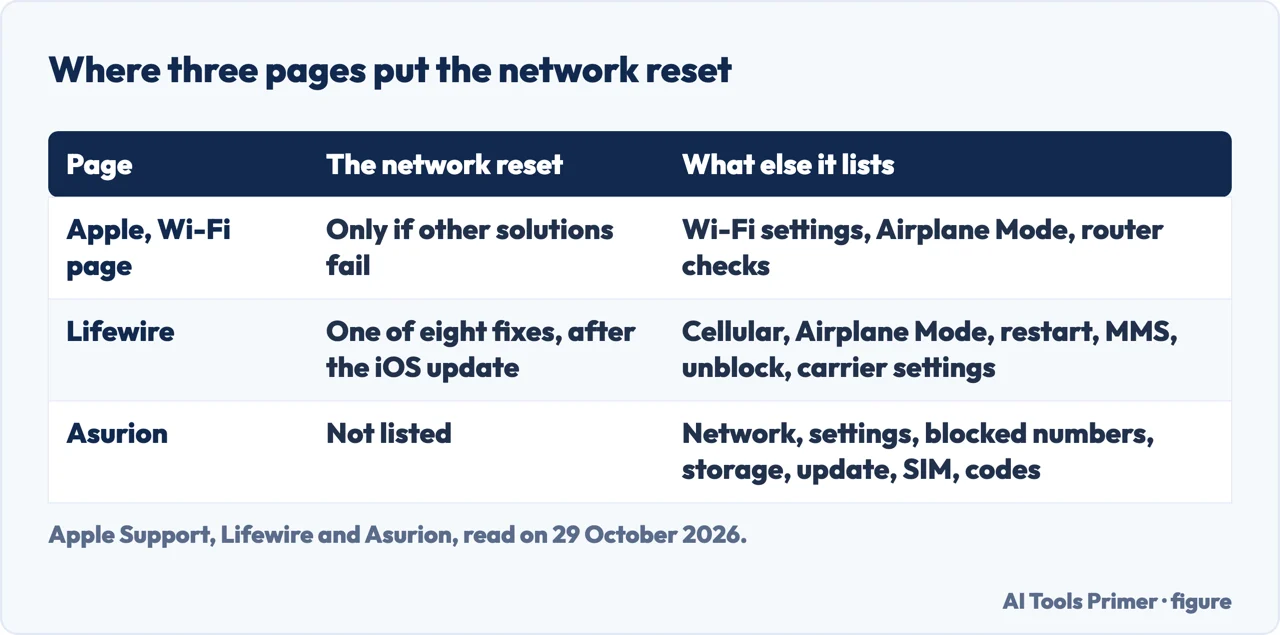
The network reset is placed differently on each page. Apple’s page on Wi-Fi, which is about connecting to Wi-Fi rather than texts, puts Reset Network Settings after its Wi-Fi, VPN and router checks, under General and Transfer or Reset, and says to use it only if other solutions fail; it lists what goes, including Wi-Fi networks and passwords, cellular settings, and VPN and APN settings. Lifewire lists it as one of eight fixes, ahead of the carrier settings, and warns that it erases Wi-Fi connections. Asurion’s seven checks do not include it. Our page on resetting network settings goes through what it removes.
If the texts arrive and you do not see or hear them
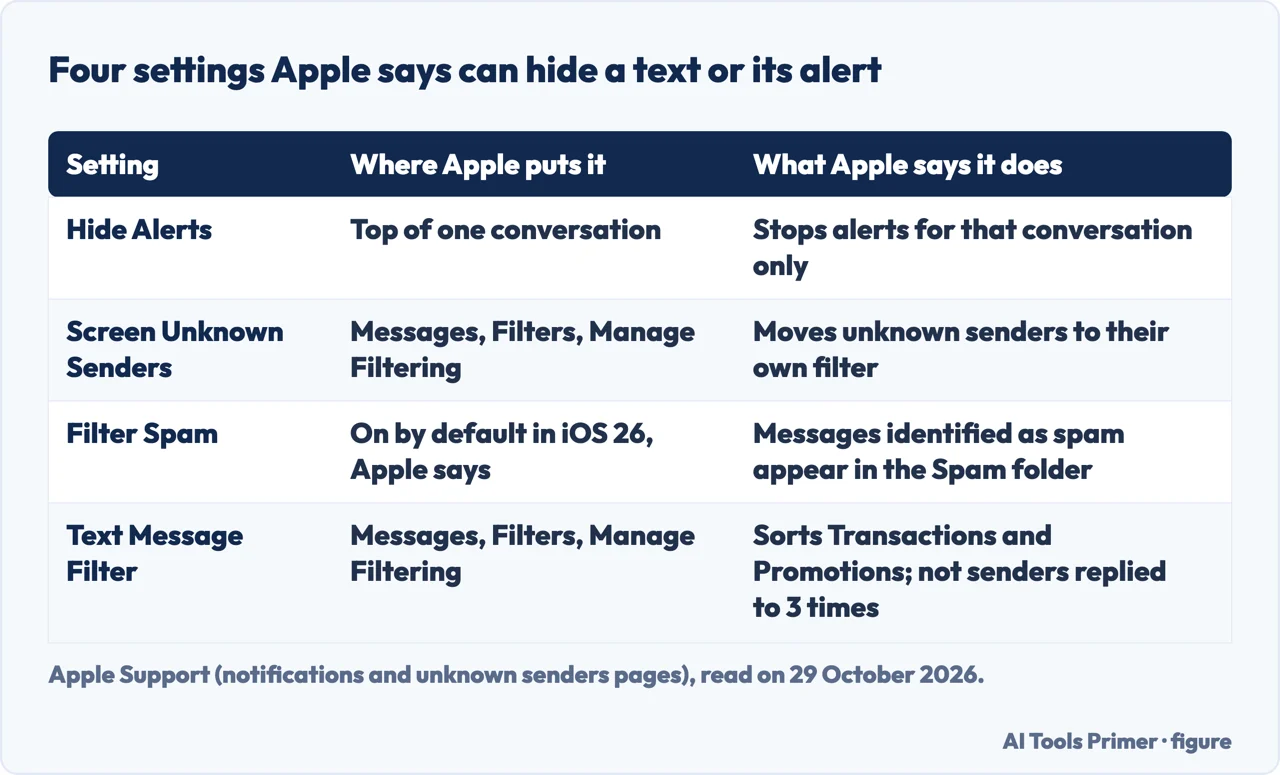
Apple’s notifications page begins with three things that are not faults. If the device is silenced, a notification does not alert you with a sound. If the Messages app is open and active, you do not get a notification for each new message. And with an Apple Watch, notifications go to either the watch or the iPhone, not both. Then it gives the first setting to check: open the conversation, tap the image or icon at the top and turn off Hide Alerts. Apple says Hide Alerts stops notifications only for that conversation, not for everything on the iPhone, and that you still receive all other messages. If notifications are off for the whole app, the route is Settings, Apps, Messages, Notifications and Allow Notifications. For one contact whose messages should always sound, Apple describes Emergency Bypass: in Contacts, choose the contact, tap Edit, tap Ringtone or Text Tone and turn on Emergency Bypass, so that sounds and vibrations come through even when everything else is silenced. Our pages on notifications and on Do Not Disturb that comes back cover the settings around it.
The second place is a filter. Apple’s notifications page, published on 14 September 2026, says that in iOS 26 Filter Spam for Messages is on by default, and that when you also turn on Screen Unknown Senders you do not receive a notification for messages from unknown senders or for messages identified as spam. They appear in the Unknown Senders filter or the Spam folder in the Messages app. Apple’s page on unknown senders, published on 8 April 2026, describes the other setting: Screen Unknown Senders is off by default in iOS 26, and it is on after the upgrade if Filter Unknown Senders was on in iOS 18. These are two settings, and the pages describe them separately. To change the second one, open Messages, tap the Filters button, tap Manage Filtering and scroll to Unknown Senders; the same switch is in Settings, Apps, Messages, under Unknown Senders.
Apple defines an unknown sender as anyone you have not previously interacted with in Messages, or someone who is not in your contacts. When one writes, a badge notes that you have new messages in the Unknown Senders filter. To bring one into the main list, open that filter, tap the conversation and tap Mark as Known. Apple’s page says that responding to a message from an unknown sender does not automatically mark the sender as known or move the message to your conversation list. The iPhone User Guide, which now lists iPhone models compatible with iOS 27, adds that until you mark a sender as known or add them as a contact, future messages are filtered to Unknown Senders, and that marking a sender lets you open links and view blurred images they sent. Messages in the Spam folder can be moved back to the conversation list, which Apple says restores the notifications.
A third filter is separate from the first two. Under Manage Filtering, Text Message Filter sorts SMS, MMS and RCS messages from unknown senders into Transactions and Promotions. Apple’s unknown-senders page and the iPhone User Guide both say it does not apply to a sender you have replied to three times or more. The user guide also says business alerts can be switched off in Settings, Apps, Messages: RCS Business Messages under RCS Messaging, and Business Updates under Messages for Business. Our page on spam texts covers these filters from the other direction, as a way to stop unwanted messages.
Notifications from unknown senders can be allowed by category. Apple says they are on by default for Time Sensitive messages, such as verification codes, and that under Settings, Apps, Messages, Unknown Senders and Allow Notifications you can turn Time Sensitive, Personal, Transactions or Promotions on or off. Messages you allow this way show notifications and stay in the conversation list for eight hours, then move to Unknown Senders. In most countries and regions, Apple says, unknown senders send notifications by default, while in the United States, Brazil and India you choose which ones.
If it is one person, a group or a code
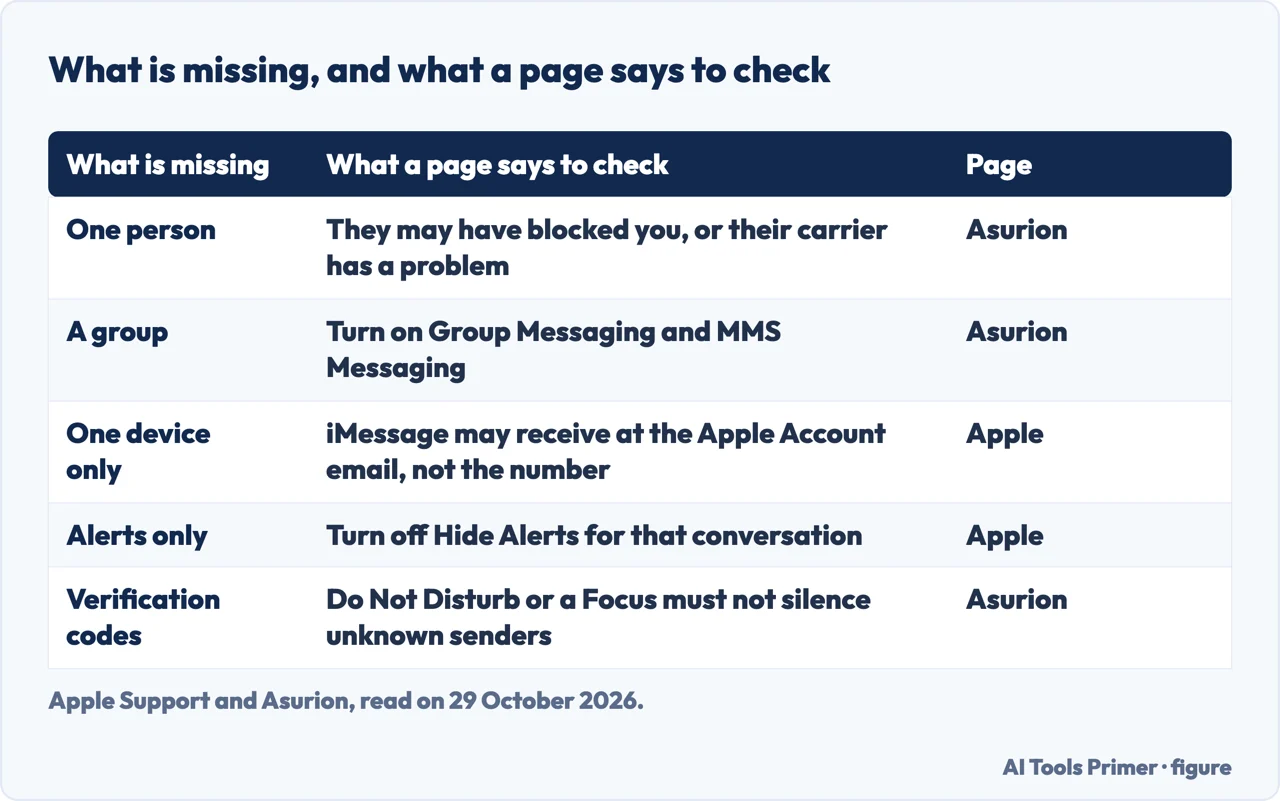
For texts missing from one person, Asurion’s FAQ gives two possibilities: the sender may have blocked your number, or there could be an issue with their carrier, and it suggests asking them to check their settings and try again. The other direction is your own list. Asurion points to Settings, Apps, Messages and Blocked Contacts, and Lifewire says that if you blocked a number by accident you will not receive its texts, so unblock it and ask the sender to resend. Our pages on seeing blocked numbers and on blocking a number have the steps.
Lifewire adds a case for a single friend who previously had an iPhone and now uses an Android phone: ask the friend to make sure the number is removed from iMessage. It also says that if an Android user sends an image and MMS is turned off, you will not receive it, so turn MMS on. Asurion lists iMessage, MMS Messaging and Group Messaging among the switches to confirm under Settings, Apps, Messages. For group messages, Asurion names Group Messaging and MMS Messaging, while Apple, for group MMS, names Send as Text Message and says that if Send as Text Message or Group Messaging is not offered, the carrier might not support the feature.
For a group that has gone quiet, Apple has a different first check: open the group conversation and see whether a message says you left the conversation. That message means you left or were removed. Apple says you can rejoin only if someone in the group adds you, and otherwise you can start a new group message with your contacts. If other problems remain, the page says you might need to delete the conversation and start a new one, and that in iOS 16, iPadOS 16.1 and later you can recover a deleted message within 30 to 40 days (our page on recovering deleted texts on iPhone has the steps).
For photos and videos, Apple says to make sure the device has enough space and notes that with SMS or MMS the carrier may set size limits for attachments. For sending full-size images it names Send Photo Previews and Low Quality Image Mode in Settings, Apps, Messages.
Verification codes are the case where the sources lean on different settings. Asurion says codes for two-factor authentication arrive through alternative carrier routes, so Do Not Disturb or a Focus must not be silencing unknown senders, and if the problem persists it says to ask the cellular provider whether Premium SMS Messaging or short-code delivery is blocked on the account. Apple’s unknown-senders page says Time Sensitive messages, such as verification codes, send notifications by default, and that the Transactions category can be allowed or not. Asurion does not say where Premium SMS Messaging is set in a plan.
If you changed phone, or the number moved
Apple lists a short sequence for problems after setting up a new device, such as conversations appearing as separate threads or sent messages turning green: update to the latest iOS, open Settings and tap Cellular to make sure the phone line is on, and with several SIMs make sure the number you want is selected and on. Then go to Settings, Apps, Messages, turn iMessage off and back on, tap Send & Receive and tap the phone number you want to use. Asurion has a similar check for texts that go out from an email address instead of the mobile number: tap Send & Receive and make sure the phone number is selected under Start New Conversations From.
When messages arrive on one device but not on another, Apple says an iPhone and a second device such as an iPad may be set to receive and start messages from the Apple Account email address instead of the phone number. The check is in Settings, Apps, Messages, Send & Receive. If the number is not listed, Apple says you can link it to your Apple Account, and that Text Message Forwarding lets you send and receive text messages on all of your Apple devices. Our page on enabling iMessage covers the activation, and the one on iMessage covers why it fails to send or activate.
If you moved to a phone that is not an Apple phone and RCS, SMS or MMS messages are not arriving, Apple’s page on deregistering iMessage says you might need to deregister it. With the iPhone, put the SIM back in it, make sure you are on cellular data, then in Settings, Apps, Messages turn iMessage off, and in Settings, Apps, FaceTime turn FaceTime off. Without the iPhone, you can deregister online. Apple says the number is then removed from iMessage services and you should be able to receive text messages right away, but it might take a few hours for some Apple devices to recognize that you are not using iMessage when they send you a message.
Apple adds how the two kinds of message travel afterwards. If someone sends an iMessage to your Apple Account, you receive it on your other Apple devices; if someone texts your phone number, you receive it as an RCS, SMS or MMS message only on your phone. The pages we read do not say what happens to messages sent while the number was still registered beyond the hours Apple mentions.
What we did not use
We tested nothing on an iPhone. We read no forum threads, only the pages listed under Sources. We read one page from a software vendor that lists causes and took no statements from it. The filter steps come from Apple pages that name iOS 26, and the iPhone User Guide now lists iPhone models compatible with iOS 27, so we have not checked whether the menus differ there. The pages we read do not say how long to wait after a restart before judging the result, apart from Lifewire’s few minutes, and they do not give how often each cause occurs. Menu labels are quoted from the English pages for the United States and may differ in other languages and regions.
Where to start
Four ways in.
- “Nothing arrives at all.”
- If the texts never reach the phone — network
- “They arrive but I do not see them.”
- If the texts arrive and you do not see or hear them — filter
- “It is one person, a group or a code.”
- If it is one person, a group or a code — who
- “I changed phone.”
- If you changed phone, or the number moved — moved
Calls, texts and who gets through
Blocked lists, spam filters and notifications.
Signal, SIM and settings
What sits underneath the messages.
Questions people also ask
Why is my phone suddenly not receiving texts?
Asurion lists the network connection, the messaging settings, blocked numbers and filters, free storage, a software update and the SIM card. Apple adds settings after a new device, and iMessage set to receive at the Apple Account email instead of the number.
Why is my iPhone blocking SMS?
Apple describes filters that move texts out of the main list: Screen Unknown Senders, Filter Spam and Text Message Filter. Asurion and Lifewire also point to the list of blocked contacts, and Asurion adds that for verification codes the carrier may be blocking Premium SMS Messaging or short-code delivery on the account.
Why have my text messages stopped working?
Apple covers a red exclamation point with Not Delivered: check the network, tap Try Again, then Send as Text Message, where messaging rates may apply. It also lists a restart, the carrier’s support for the message type and the contact’s number.
Why is iMessage suddenly not working?
Apple says to update iOS, check that the phone line is on, turn iMessage off and back on, and choose the number under Send & Receive. If you moved to a phone that is not an Apple phone, it says to deregister iMessage.
Not covered here. We tested nothing on an iPhone. The statements come from six Apple Support pages, the Apple iPhone User Guide, Asurion and Lifewire, all read on 29 October 2026.
The search volume and difficulty behind this page come from a Semrush reading of 29 August 2026, older than the 60 days the site normally allows.
Sources
- Apple Support — If you can’t send or receive messages on your iPhone or iPad — support.apple.com, read 29 October 2026.
- Apple Support — If you don’t receive Messages notifications on your iPhone or iPad — support.apple.com, read 29 October 2026.
- Apple Support — View conversations from unknown senders in Messages on your iPhone — support.apple.com, read 29 October 2026.
- Apple iPhone User Guide — Screen and filter text messages on iPhone — support.apple.com, read 29 October 2026.
- Apple Support — Deregister iMessage on your iPhone or online — support.apple.com, read 29 October 2026.
- Apple Support — Manually update carrier settings on your iPhone or iPad — support.apple.com, read 29 October 2026.
- Apple Support — If you can’t connect to Wi-Fi on your iPhone or iPad — support.apple.com, read 29 October 2026.
- Asurion — How to fix not receiving text messages on phone — www.asurion.com, read 29 October 2026.
- Lifewire — Fix Android Texts Not Appearing on iPhone — www.lifewire.com, read 29 October 2026.
Written by Alberto Gulotta
Founder and editor of AI Tools Primer, writing from Palermo, Italy. Thirty-five years of taking computers apart, starting with a Commodore 64 — the long version is on the about page.
Something wrong on this page? Write to aitoolsprimer@gmail.com and it gets fixed.
Written on 29 October 2026.
Independence and limits
No affiliate links and no paid placements anywhere on this site. Nobody pays to appear here, and no company has seen this page before you did.
This is general information, not professional advice. Where a page touches money, health, safety or the law, it names its source and the date it was read — and your situation may still differ. See the privacy page and the cookie policy.